Page tree


Electronic signature is the possibility to sign electronically documents, without the need of printing, signing and scanning them. 

  • It allows to execute a contractual agreement between Solvay and employee or third party companies

  • In countries which accept electronically signed and executed documents as official instruments


Solvay can sign and create documents to be signed via Advanced Signature using DocuSign Cloud Service, in compliance with regulations in  Europe (eIDAS) and US (UETA and ESIGN) and Brazil regulations.


NEW INFO  November 2021

  • New country: DocuSign can be used now from Brazil.
  • New signature type: Qualified Signature (QeS) can be used to sign PDFs in Europe.
  • New signature type: ICP Brazil has been included in DocuSign to sign using USB Token provided by Brazilian goverment.

Ask for more info if needed

Get started


Are you responsible of a process that can benefit from using eSignature? Follow these indications to know more about DocuSign and to request the activation of eSignature for your case:

  1. Follow this form that will guide you to understand if you need electronic signature or not.
  2. Watch this video and presentation to understand how electronic signature is used inside Solvay.
  3. Contact your legal counsel or local lawyer to check if electronic signature can be used in your circumstances.
  4. Fill this form together with the needed information.

In case you need support on the process or have other questions please send an email to Document Management Info mailbox.

You can watch these videos to see some demos of DocuSign:

FAQ


DocuSign keeps a copy of our documents signed, only if we keep an agreement with them. 

Imagine what could happen if Solvay decides to change to another eSignature provider in the future... We may loose access to important documents that we need to keep for years, the same way that we have to keep the originals in case we sign agreements in paper. Therefore, it's important that you keep a copy of the signed documents in the document management system used in your department

You are responsible that Solvay keeps the signed PDF in a secured storage system owned by Solvay group.

Before using any DocuSign extension or add-on, you need to follow the process indicated in "Get started" here on the left.

Once you have your account created, you could install the Google Chrome Extension. However we don't recommend it, because adds no extra functionality (it works like a shortcut to the DocuSign application with a reduced interface).

The DocuSign Add-On for Google Workspace is not allowed in Solvay environment, since it adds no extra functionality. Moreover, it would be displayed to every user regardless if they are authorized to use DocuSign or not, what would provoque some confusion in its usage.

From the DocuSign interface you can upload documents from Google Drive, as if you upload them from your local computer.

However, you can't select directly files that are stored in Google Shared Drive. If you need it, you should download a PDF version of it and then upload it to DocuSign.

Technically both types of signature are identical. The difference comes from the trust on the signature:

Advanced signature relies on Solvay to check the identity of document signatories, what it makes it valid for commercial agreements or agreements among Solvay companies or Solvay and employees. An email and secret code is enough for signatory identification.

Qualified Signature relies on external independent provider to check the identity of the signatories, what it makes it better for documents issued to governments. It requires to identify the signatories via face to face web conferencing, showing ID card or passport to the camera, where an operator in a call center validates the information.

In Solvay we try to use Advanced Signature as much as possible. Qualified Signature requires extra complexity, also related to GDPR. We are reviewing the contract to include that in the near future, but it's not available yet and I can't be sure of when it would be.

Finally, the usage of advance or qualified depends on who is requesting you to sign the document. It's normal that goverments only accept Qualified Signature. However a company can request you Advanced or even Simple (just using username and password). It relies in the local legislation.

When we want to sign a document electronically, we have to upload it to DocuSign. There we say who has to sign it (name and email address) and then DocuSign manages the document, send notifications and guides users in the process. Once everybody has signed, DocuSign sends a mail with info for downloading a signed copy. Each person can later store the document on their own repository.

Solvay has approved the usage of electronic signature via DocuSign in these countries: European Union countries, USA, Canada and Brazil

Yes. The list can be extended as we launch new use cases in different countries. In case of doubt you can contact your legal counsel or local lawyer

If you want to have more information about the legal context of electronic signature in your country you can check the eSignature Legality Guide per country (provided by DocuSign).

Every process that wants to use electronic signature in Solvay has to comply with some obligations to keep legality of signatures. One is apply an authentication process to every signer. You are getting more information about this topic once you submit your use case using the request form.

In general Solvay has accepted the usage of electronic signature for contractual agreements between Solvay and other companies.

More specifically, the nature of the document has to be reviewed and validated use case per use case from different points of view (local legality and eSignature regulation compliant). Currently it only includes some purchasing contracts, but it can be extended as new use cases arrive.

Every GBU, Function and country has a legal expert assigned. This person belongs to Legal department and is an expert in the laws that affect their perimeter. If you don't know whom to contact, check with your hierarchy to identify him/her.

Adobe Acrobat is a tool:

Adobe Acrobat implements the technical mechanism to sign any document by any user. However, the electronic certificate used in the process is self generated by the computer. In other words, you can trust that signed document as long as you trust the person and the computer who has given it to you. This is normally ok for internal documents with low risk implied.

Anyone in Solvay can use this tool under his/her own responsibility about the content and the usage of the tool.

DocuSign is a Trust Service Provider under EU legislation:

DocuSign (as many other similar services in Internet) implements the same mechanism as Adobe Acrobat, but it also generates and maintain the electronic certificates used during the signature. By using these publicly trusted electronic certificates, contracts signed via DocuSign are automatically accepted as a valid proof in case of trial or disputes.

In fact, when you use Adobe Acrobat for viewing a PDF signed by DocuSign, it automatically checks in the background with DocuSign if all the signatures and certificates are valid and trustworthy.

You can only use DocuSign to sign documents if your signature represents Solvay company.

In a nutshell:

Both tools allows you to sign a PDF, however the only one that can be automatically accepted as contractual for agreements between Solvay and other companies is via DocuSign

Legal Department has written and approved some guidelines that helps you and your legal counsel or local lawyer to decide how to apply electronic signature to your case. You can read it here: Solvay eSignature Legal policy

More information and tutorials

How-to


If you have received a mail from DocuSign requesting you to sign a document, follow the instructions in the mail. The process guides you though the different steps. Action buttons are normally colored in yellow. At the end of the process is possible that you are asked for an authentication code. You normally have received that code from the contract creator via a different email, a phone call or an SMS. You have videos and tutorials in this page.

If what you want is to create a document and sign it, you first need to understand which are the different possibility you have and request to use DocuSign (check previous section Get started)

If you need help using the tool you should contact your DocuSign key user for your process or use case (check with your hierarchy if needed). Take into account that the process behind each document is different depending on the use case or process in which you are working on.

If you have problems using the application you can also check videos and tutorials in this page or request help via the section Troubleshooting

There is criteria that has to be followed in order to start using electronic signature in your department. You have the most updated information in the eSignature Service presentation

More information and tutorials: DocuSign - Extra resources

Troubleshooting and Requests     


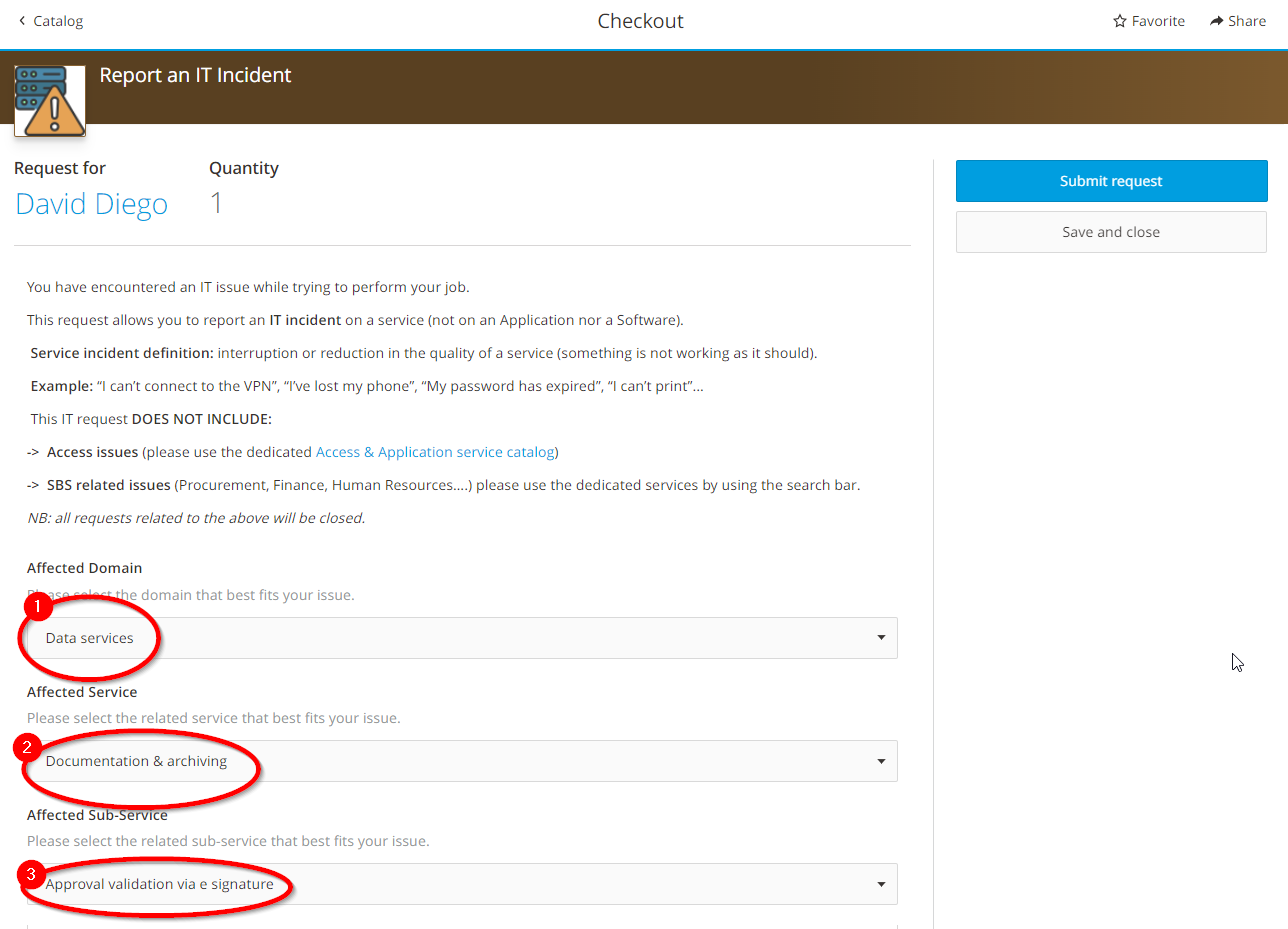
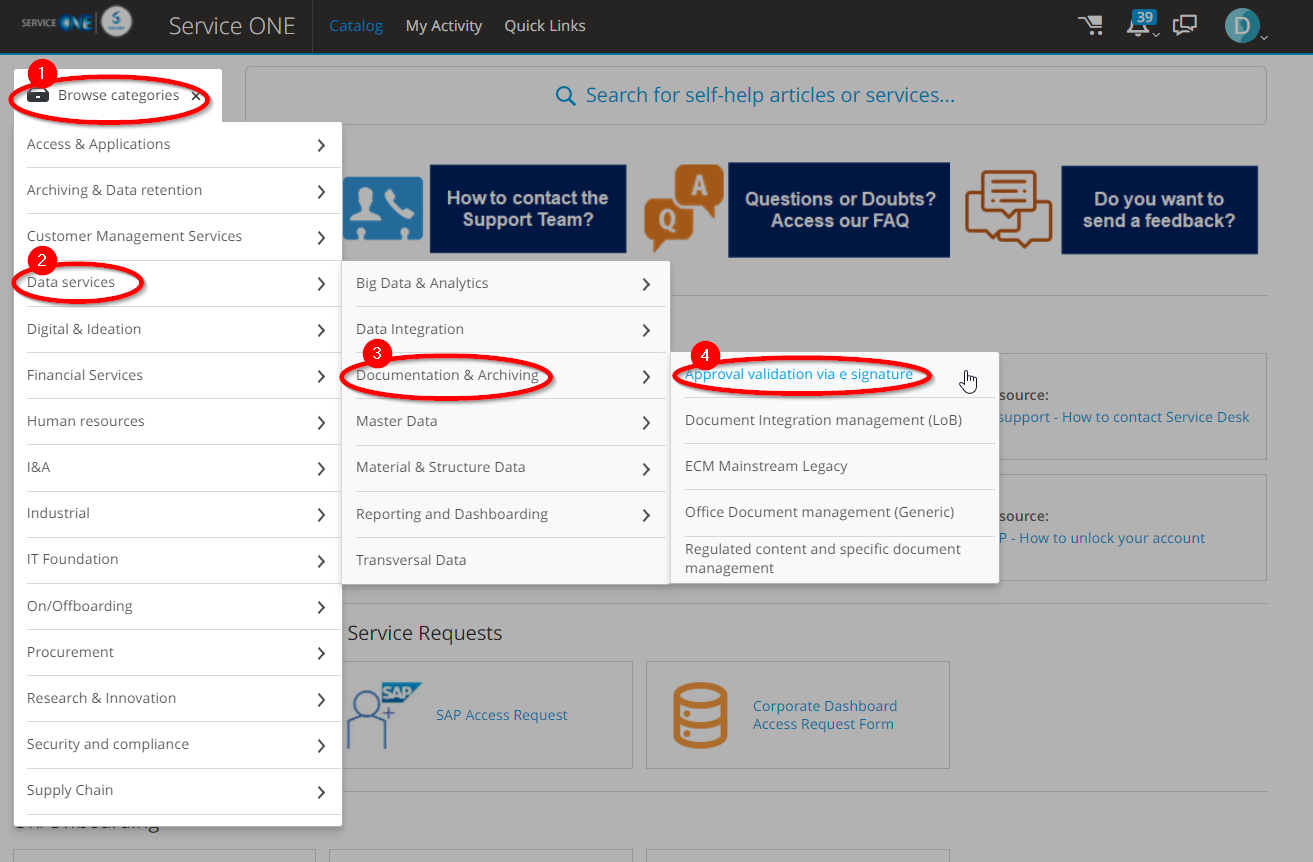
If you need to request a change in your DocuSign configuration or have a problem, please create a ticket in Service ONE:

Requesting changes via Service Catalog:
Error reporting via "Report an IT Incident":


The best way to get IT support is to use the new Service One Platform.