


| Status | Revision under Review |
|---|---|
| Owner | |
| Stakeholders |
Purpose
The purpose of this document is to define the conversion approach to create Portfolio Item in S/4 HANA.
PPM Item: A PPM Item is a proxy of project in PPM which is used to plan, evaluate, and monitor Spend (Capex and Opex) within Syensqo’s portfolio. In SyWay, PPM Items are created under the lowest level bucket.
Conversion Scope
The scope of this document covers the approach for converting applicable active Projects to Portfolio Items from Legacy Source Systems into S/4HANA following the Portfolio Item Master Data Design Standard.
This is a completely new object for Syensqo, with the data being sourced using a DCT (Data Collection Template).
The templates will be prepopulated with relevant information from Capital and Budget Managed Operating PS Project Definitions in scope for migration but while these systems serve as sources, extensive enrichment will be necessary to produce properly formatted data load sheets for S/4 HANA.
The data from legacy system includes:
- Capital projects (e.g. Industrial, Facility, IT and R&I) open as at migration date with postings in the last 3 years or has AUC balance.
- Budgeted Operating projects (e.g. Budgeted Maintenance, Marketing, Demolition projects) open as at migration date with postings in the last 3 years.
- Closed Capital Projects with postings within the agreed timeframe. (currently migration relevant is 2028)
- Closed Budgeted Operating projects with postings within the agreed timeframe. (currently migration relevant is 2028)
- Specifically also included are IT and R&I Projects (open as at migration date and (closed projects with postings the agreed timeframe) with postings in the last 3 years
The data from legacy system excludes
- Project Definition in out of scope Company Codes
- Project Definitions in out of scope Plants.
- Project which has deletion indicator set
- Project marked as closed and not included in C, D and E above.
Also exclude, Operating Expense projects without budget, including the following proposed project profile in S/4:
a. Open Project for Statistical Expenses - replaced by project definitions with profile ZPS0003 - Statistical Expense.
b. Open Recharge Projects - replaced by project definitions with profile ZPS0004 - Intercompany Recharges.
c. Open Project definitions with profile ZPS0005 - Provisional Projects.
The migration for these excluded Operating Expense project without budget is dealt with in CNV-1024 Project Definition
Additionally, there may be Items included in the DCT which does not have any existing Project Systems objects. as well as
Direct Asset purchases for which an Item is created for GBU/Company Code/Plant combination
Capital Spare for which an item is created for GBU/Company Code/Plant combination
List of source systems and approximate number of records
| Source | Scope | Source Approx No. of Records | Target System | Target Approx No. of Records |
|---|---|---|---|---|
| PF2 | Relevant Open PS Projects | S/4 Hana | TBD | |
| WP2 | Relevant Open PS Projects | S/4 Hana | TBD | |
| DCT | S/4 Hana | TBD |
Item is to be migrated into a single instance of S/4 Hana only with the determination of which instance dependent on the company code maintained in the area field of the item. Area will be maintained based upon the converted Company Code of the legacy Project Definition.
The PS Project definition with WBS element hierarchy (Level 1 & 2) is automatically created from the approved PPM item once stage-gate 1 is approved., the PS project structure is based on the configuration of PPM item type to a PS template project (created as per CVN-1019 Template Projects) with the Decision Flow Management settings in the SAP system. As per CNV-1019 Template Project - SyWay Project - Syensqo - Wiki knowledge base. Program will be required to perform mass status change.
Relevancy Logic:
Table PROJ
Field "Company Code" in scope.
Field project profile not excluded.
Result: Object numbers of Project that are in company codes in scope.
Table JEST:
Field "Object number" = Key in the object numbers of Project
Field "Status Inactive" = blank, Then filter object number that has status I0046 (Closed). (for postings in the agreed timeframe)
Result closed projects.
Table PRPS
Field PSPHI For closed projects numbers, Result WBS numbers for
Table RPSCO / COSP:
Field "Object number" = Key in the object numbers of WBS
Field "Fiscal Year" = the agreed timeframe, (currently migration relevant is 2028)
Result = Object numbers that have cost in current year.
These WBS needs to be migrated.
Table BPGE
Using object number from PRPS (both open and closed)
If any WBS object has a record then project is seen to have a budget and is included
Additional Information
Multi-language Requirement
All item names and texts will be maintained in a single language as entered, with no requirement for translation.
Document Management
Not applicable
Legal Requirement
Not applicable
Special Requirements
Not applicable
Target Design
The technical design of the target for this conversion approach.
| Table | Field | Data Element | Field Description | Data Type | Length | Requirement |
|---|---|---|---|---|---|---|
| /RPM/ITEM_D | EXTERNAL_ID | /RPM/TV_EXTID | ID | CHAR | 24 | System Generated |
| /RPM/ITEM_D | PARENT_ID | /RPM/TV_EXTID | Parent Bucket ID | CHAR | 24 | Mandatory |
| /RPM/ITEM_D | PARENT_GUID | Bucket GUID | System Generated | |||
| /RPM/ITEM_D | PORTFOLIO_GUID | System Generated | ||||
| /RPM/ITEM_D | PORTFOLIO_ID | /RPM/TV_EXTID | Portfolio ID | CHAR | 24 | Mandatory |
| /RPM/ITEM_D | ITEM_TYPE | /RPM/TV_ITEM_ID | Type | CHAR | 15 | Mandatory |
| CGPL_TEXT | TEXT1 | CGPL_TEXT1 | Name | CHAR | 40 | Mandatory |
| STXL | LTEXT | CLUSTD | Item Description | CLUSTD | Conditional | |
| /RPM/ITEM_D | STATUS | /RPM/TV_STATUS_COMMON | Item Status | CHAR | 5 | Mandatory |
| /RPM/ITEM_D | PLANNED_START | RPM_TV_PLAN_START | Planned Start | DATS | 8 | Mandatory |
| /RPM/ITEM_D | PLANNED_FINISH | RPM_TV_PLAN_FINISH | Planned Finish | DATS | 8 | Mandatory |
| /RPM/ITEM_D | FORECAST_START | RPM_TV_FORECAST_START | Forecasted Start | DATS | 8 | Conditional |
| /RPM/ITEM_D | FORECAST_FINISH | RPM_TV_FORECAST_FINISH | Forecasted Finish | DATS | 8 | Conditional |
| /RPM/ITEM_D | CATEGORY | RPM_PROJECT_CATEGORY | Category | NUMC | 4 | Mandatory |
| /RPM/ITEM_D | SUBCATEGORY | RPM_PROJ_SUBCATEGORY | Subcategory | NUMC | 4 | Mandatory |
| /RPM/ITEM_D | GEOGRAPHY | RPM_TV_PROJECT_GEOGRAPHY | Area | CHAR | 4 | Mandatory |
| /RPM/ITEM_D | ESCALATION | RPM_TV_ESCALATION | Escalation | CHAR | 1 | Conditional |
| /RPM/ITEM_D | CURRENCY | RPM_TV_CURRENCY | CURRENCY | CUKY | 5 | Mandatory |
| /RPM/ITEM_D | UNIT | RPM_TV_UNIT | Unit | UNIT | 3 | System Generated |
| /RPM/ITEM_D | CAP_PERIODTYPE | /RPM/TV_CAP_PERIOD_TYPE | Capacity Period Breakdown | NUMC | 2 | System Generated |
| /RPM/ITEM_D | PERIODTYPE | /RPM/TV_PERIOD_TYPE | Fin Period Breakdown | NUMC | 2 | System Generated |
| /RPM/ITEM_D | INITIATIVE_ID | INM_TV_EXTID | INITIATIVE ID | CHAR | 24 | Conditional |
| /RPM/ITEM_D | ZXX1 | Investment Category | NUMC | 2 | Mandatory | |
| /RPM/ITEM_D | ZXX2 | Spending Range | NUMC | 2 | Mandatory | |
| /RPM/ITEM_D | ZXX3 | Business Unit/ Domain | NUMC | 2 | Mandatory | |
| /RPM/ITEM_D | ZXX4 | End User Market | NUMC | 2 | Conditional | |
| /RPM/ITEM_D | ZXX5 | Market Driver | NUMC | 2 | Conditional | |
| /RPM/ITEM_D | ZXX6 | Cluster | NUMC | 2 | Conditional | |
| /RPM/ITEM_D | ZXX7 | GBU Product Family | CHAR | 40 | Conditional | |
| /RPM/ITEM_D | ZXX8 | GBU Product Category | CHAR | 40 | Conditional | |
| /RPM/ITEM_D | ZXX9 | Product (s) | CHAR | 40 | Mandatory | |
| /RPM/ITEM_D | ZXX10 | Export Control | NUMC | 2 | Mandatory | |
| /RPM/ITEM_D | ZXX11 | Need-to-know | CHAR | 1 | Mandatory | |
| /RPM/ITEM_D | ZXX12 | Sustainability Score | NUMC | 3 | Mandatory | |
| /RPM/ITEM_D | ZXX13 | EU Taxonomy | NUMC | 2 | Conditional | |
| /RPM/ITEM_D | ZXX14 | HROBJID | Person Responsible | NUMC | 8 | Mandatory |
| /RPM/ITEM_D | ZXX15 | STEXT | Person Responsible | STEXT | 40 | System Generated |
| /RPM/ITEM_D | ZXX16 | HROBJID | Project Financial Controller | NUMC | 8 | Mandatory |
| /RPM/ITEM_D | ZXX17 | STEXT | Project Financial Controller | STEXT | 40 | System Generated |
| /RPM/ITEM_D | ZXX18 | Starting Risk Magnitude | NUMC | 2 | Conditional | |
| /RPM/ITEM_D | ZXX19 | Starting Risk Likelihood | NUMC | 2 | Conditional | |
| /RPM/ITEM_D | ZXX20 | Residual Risk Magnitude | NUMC | 2 | Conditional | |
| /RPM/ITEM_D | ZXX21 | Residual Risk Likelihood | NUMC | 2 | Conditional | |
| /RPM/ITEM_D | ZXX22 | Regulatory Mandated Magnitude | NUMC | 2 | Conditional | |
| /RPM/ITEM_D | ZXX23 | Regulatory Mandated Likelihood | NUMC | 2 | Conditional | |
| /RPM/ITEM_D | ZXX24 | Regulatory Mandated Time Horizon (to start project) | NUMC | 2 | Conditional | |
| /RPM/ITEM_D | ZXX25 | Capitalization Date | DATS | 8 | Conditional | |
| /RPM/ITEM_D | ZXX26 | PRCTR | Profit Centre | CHAR | 10 | Mandatory |
| /RPM/ITEM_D | ZXX27 | WeGo ID | CHAR | 10 | Conditional | |
| /RPM/ITEM_D | ZXX28 | Investment Reason | NUMC | 2 | Mandatory | |
| /RPM/ITEM_D | ZXX29 | Budget Provision | CHAR | 10 | Conditional | |
| /RPM/ITEM_D | ZXX30 | Opportunity ID | CHAR | 40 | Conditional | |
| /RPM/ITEM_D | ZXX31 | Archetype | NUMC | 2 | Conditional | |
| /RPM/ITEM_D | ZXX32 | Must Do Justification | NUMC | 2 | Conditional | |
| /RPM/ITEM_D | ZXX33 | PS_PSPID | Legacy Project ID | CHAR | 24 | Conditional |
| /RPM/ITEM_D | ZXX34 | WERKS_D | Plant | CHAR | 4 | Conditional |
| /RPM/ITEM_D | ZXX35 | Idea ID | CHAR | 40 | Conditional | |
| /RPM/ITEM_D | ZXECJ | Justification (Export Control) | CHAR | 60 | Conditional | |
| /RPM/ITEM_D | ZXX36 | Subsidy Relevant | CHAR | 1 | Conditional |
Relationship between /RPM/ITEM_D and CGPL_TEXT is the field /RPM/ITEM_D-GUID
Data Cleansing
.
| ID | Criticality | Error Message/Report Description | Rule | Output | Source System |
|---|---|---|---|---|---|
| 1 | Medium | Completed PS projects to be closed | SAP ECC |
Conversion Process
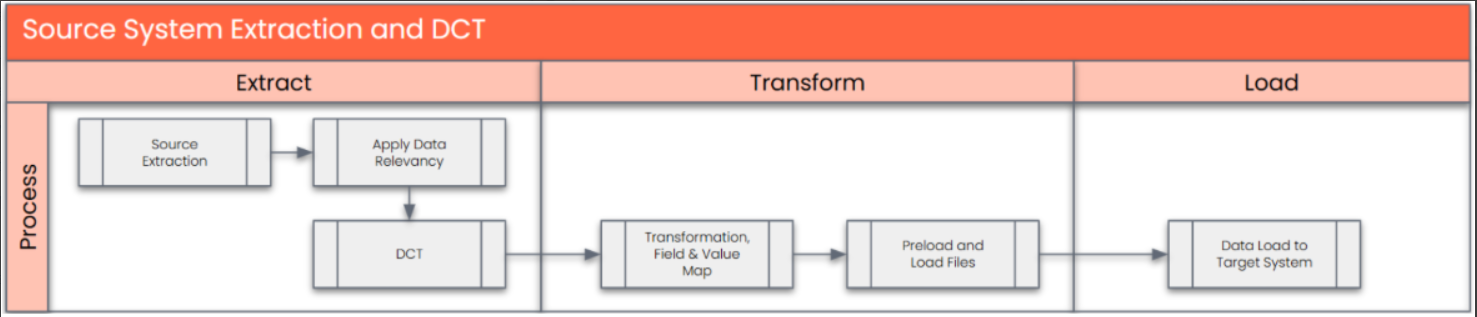
The high-level process is represented by the diagram below:
Data Privacy and Sensitivity
Some projects are considered Need to Know and data is to be restricted.Extraction
Extract data from a source into Syniti Migrate. There are 2 possibilities:
- The data exists. Syniti Migrate connects to the source and loads the data into Syniti Migrate. There are 3 methods:
- Perform full data extraction from relevant tables in the source system(s).
- Perform extraction through the application layer.
- Only if Syniti Migrate; cannot connect to the source, data is loaded to the repository from the provided source system extract/report.
- The data does not exist (or cannot be converted from its current state). The data is manually collected by the business directly in Syniti Migrate. This is to be conducted using DCT (Data Collection Template) in Syniti Migrate
The agreed Relevancy criteria is applied to the extracted records as reference point to identify the records that are applicable for the data construction in the DCT.
- The data exists. Syniti Migrate connects to the source and loads the data into Syniti Migrate. There are 3 methods:
Extraction Run Sheet
| Req # | Requirement Description | Team Responsible |
|---|---|---|
| 1 | Extract data from source system based on relevancy rule | SyWay Data Team |
| 2 | Google Sheet report pre-populated with PF2 and WP2 information to be generated based on relevancy criteria. | SyWay Data Team |
Selection Screen
| Selection Ref Screen | Parameter Name | Selection Type | Requirement | Value to be entered/set |
|---|---|---|---|---|
| Not Applicable |
Data Collection Template (DCT)
Target Ready Data Collection Template will be created for Portfolio Item data with exception of some fields which require transformation as mentioned in the transformation rule.
Note: All rules specified below should be documented as a tooltip in the DC Page.
Portfolio Item DCT Rules
| Field Name | Field Description | Rule |
|---|---|---|
| PARENT_ID | Parent Bucket ID | Unique Identifier for the Item's parent Bucket. In SyWay it is the ID of the L3 bucket where item is assigned It is a Required Field: Preload Check to be done to confirm that this field is filled the Data Collection Template |
| ITEM_TYPE | Type | Item types define the structure and behavior of the portfolio item. In Syway item types will be based on the function and number of phases of the project. Refer configuration table field /RPM/ITEM_TYPE- ITEM_TYPE for allowed values. It is a Required Field: Preload Check to be done to confirm that this field is filled the Data Collection Template |
| TEXT1 | Name | 40 character description of the PPM Item It is a Required Field: Preload Check to be done to confirm that this field is filled the Data Collection Template |
| LTEXT | Item Description | Long-text Description, this field is used to provide a concise description of the PPM Item. Conditional for projects where additional project scope information is required |
| STATUS | Item Status | Represents status of an item (from Customizing). Refer configuration table field /RPM/ITEM_STATUS- STATUS against ITEM_TYPE for the allowed values of the selected Item Type. It is a Required Field: Preload Check to be done to confirm that this field is filled the Data Collection Template |
| PLANNED_START | Planned Start | Baseline start date of the item/ project used for planning within the portfolio/ bucket. It is a Required Field: Preload Check to be done to confirm that this field is filled the Data Collection Template |
| PLANNED_FINISH | Planned Finish | Expected Delivery Date. Baseline finish date of the item/ project used for planning within the portfolio/ bucket. It is a Required Field: Preload Check to be done to confirm that this field is filled the Data Collection Template |
| FORECAST_START | Forecasted Start | A forecast start date is predictive date when an item/project is likely to begin. In the Syway design, if this field is available in Operational Project Management tool (outside SAP) then required to be maintained. |
| FORECAST_FINISH | Forecasted Finish | A forecast finish date is predictive date when an item/project is likely to complete. In the Syway design, if this field is available in Operational Project Management tool (outside SAP) then required to be maintained. |
| CATEGORY | Category | In Syway, "Category" represents the business driver. It is a dropdown field with customizable values. This is a dropdown field RPM_PROJ_CAT-CATEGORY. It is a Required Field: Preload Check to be done to confirm that this field is filled the Data Collection Template |
| SUBCATEGORY | Subcategory | In Syway, "Sub Category" represents the rationale behind the investment/expense for the item/project. This is a dropdown field whose values are configurable and depend on the selected "Category". Refer configuration table field RPM_PROJ_SUBCAT- SUBCATEGORY against the selected field RPM_PROJ_SUBCAT- CATEGORY. It is a Required Field: Preload Check to be done to confirm that this field is filled the Data Collection Template |
| GEOGRAPHY | Area | Represents Company code; the legal entity in which the Syway Project will be executed. Dropdown values from V_DPR_AREA- AREA. It is a Required Field: Preload Check to be done to confirm that this field is filled the Data Collection Template |
| ESCALATION | Escalation | Checkbox; Selection indicates if PPM item is qualified for the Prioritization process. For R&I it will be managed at cluster level PPM Item |
| INITIATIVE_ID | INITIATIVE ID | Internal ID of Initiative where Item must be linked to Initiative |
| ZXX1 | Investment category | In SyWay, investment category is a mandatory field to define the drivers for the project Growth/ Sustenance. Dropdown values from /SYQ/T_INV_CAT It is a Required Field: Preload Check to be done to confirm that this field is filled the Data Collection Template |
| ZXX2 | Spending Range | The Capex spending range used for reporting the project size i.e. XS, S, M, L & XL. Dropdown values from /SYQ/T_SPND_RNGE It is a Required Field: Preload Check to be done to confirm that this field is filled the Data Collection Template |
| ZXX3 | Business Unit/ Domain | Business Unit/ Domain field is an organizational unit within GBU/ Function which owns the project. Dropdown values from /SYQ/T_BU_DMN |
| ZXX4 | End User Market | Classification of the industrial end users based upon type of industry e.g. aerospace, automative etc. Dropdown values from /SYQ/T_END_USR_MKT |
| ZXX5 | Market Driver | Market driver in SyWay is factor that influence demand/ growth/ success of the project. Dropdown values from /SYQ/T_MKT_DRVR |
| ZXX6 | Cluster | In SyWay, Used to group items together for reporting where a budget allocation is made at an aggregated level, and actuals are collected against individual related items. Field content from /SYQ/T_CLSTR |
| ZXX7 | GBU Product Family | GBU Product Family relevant for the project. When Item Type is related to either IS or R&I project then either of GBU product family, GBU product category or Product is required. |
| ZXX8 | GBU Product Category | GBU Product Category relevant for the project. When Item Type is related to either IS or R&I project then either of GBU product family, GBU product category or Product is required. |
| ZXX9 | Product (s) | Product relevant for the project. When Item Type is related to either IS or R&I project then either of GBU product family, GBU product category or Product is required. |
| ZXX10 | Export Control | To identify if the project is applicable for regulatory governence, a dropdown list will appear with values Yes, No & Non-Determined. This is a dropdown field from /SYQ/T_EXPORT_CNTL |
| ZXECJ | Justification (Export Control) | This field indicates confidentional projects. Access will be restricted if selection is "Yes" |
| ZXX11 | Need-to-know | This field indicates confidential projects. Access will be restricted if selection is "Yes" It is a Required Field: Preload Check to be done to confirm that this field is filled the Data Collection Template |
| ZXX12 | Sustainability Score | This field is used to determine whether the project is subject to environmental compliance requirements. Questionnaire will be assigned to this field. |
| ZXX13 | EU Taxonomy | EU Taxonomy is mandatory field for IS projects. This is a dropdown field from /SYQ/T_EU_TXNMY |
| ZXX14 | Person Responsible | This field represent Position of the Person Responsible for WBS elements (Project Manager) and is mandatory for all SyWay business functions. Manually selected from the drop-down list. Refer configuration table field TCJ04-PS_VERNR for field validation. It is a Required Field: Preload Check to be done to confirm that this field is filled the Data Collection Template |
| ZXX16 | Project Financial Controller | This field represent Position of the Project Financial Controller for a project and is mandatory for all SyWay business functions. Manually selected from the drop-down list. Refer configuration table field TCJ05-ASTNR for field validation. It is a Required Field: Preload Check to be done to confirm that this field is filled the Data Collection Template |
| ZXX18 | Starting Risk Magnitude | This field is mandatory if dropdown value of the "Category" field = HSE Risk reduction or Business risk reduction This is a dropdown field /SYQ/T_RISK_MAGNITUDE |
| ZXX19 | Starting Risk Likelihood | This field is mandatory if dropdown value of the "Category" field = HSE Risk reduction or Business risk reduction This is a dropdown field /SYQ/T_RISK_LKLHD |
| ZXX20 | Residual Risk Magnitude | This field is mandatory if dropdown value of the "Category" field = HSE Risk reduction or Business risk reduction This is a dropdown field from /SYQ/T_RISK_MAGNITUDE |
| ZXX21 | Residual Risk Likelihood | This field is mandatory if dropdown value of the "Category" field = HSE Risk reduction or Business risk reduction This is a dropdown field from /SYQ/T_RISK_LKLHD |
| ZXX22 | Regulatory Mandated Magnitude | This field is mandatory if dropdown value of the "Category" field = Regulatory compliance This is a dropdown field from /SYQ/T_REG_MAGNITUDE |
| ZXX23 | Regulatory Mandated Likelihood | This field is mandatory if dropdown value of the "Category" field = Regulatory compliance This is a dropdown field from /SYQ/T_REG_LKLHD |
| ZXX24 | Regulatory Mandated Time Horizon (to start project) | This field is mandatory if dropdown value of the "Category" field = Regulatory compliance This is a dropdown field from /SYQ/T_REG_TIME_HORIZON |
| ZXX25 | Capitalization Date | For ongoing Capex projects SyWay carries out "Depreciation forecast", this date is mandatory for the "Capital Projects" Item types. Item Types are Z001,Z002, Z003, Z008, Z009, Z011 |
| ZXX26 | Profit Centre | Profit centre is required on PPM Item to create Project in SAP PS automatically. Refer master table field CEPC-PRCTR for Profit center list. It is a Required Field: Preload Check to be done to confirm that this field is filled the Data Collection Template |
| ZXX27 | WeGo ID | System calculated score for prioritization and ranking |
| ZXX28 | Investment Reason | In Syway, "Investment Reason" represent the detailed investment/ expense reason. This is a dropdown field and depend on the selected "Sub Category" This is a dropdown field from /SYQ/T_INV_REASON It is a Required Field: Preload Check to be done to confirm that this field is filled the Data Collection Template |
| ZXX29 | Budget Provision | "Budget Provision" Item Type exists as a distinct category. Additionally, a custom field named "Budget Provision" will be available in other CAPEX item types. This field will feature a dropdown containing Budget Provision PPM items for selection. |
| ZXX30 | Opportunity ID | If IS or R&I PPM item is created with reference to a CRM Opportunity, the corresponding Opportunity ID will be entered. This is an optional field. |
| ZXX31 | Archetype | This field represent Archetype of the R&I PPM item. N/A for IS & IT PPM Items. Refer configuration table field RPM_PROJ_TYPE- PTYPE against the selected field RPM_PROJ_TYPE- CATEGORY. This is a dropdown field from /SYQ/T_ARCHETYPE Conditional based on Category |
| ZXX32 | Must Do Justification | If financial analysis required, then this field is mandatory. Required if Category is- |
| ZXX33 | Legacy Project ID | Legacy Project ID refers to the project identifier used in the previous SAP system before migration to the current S/4 HANA platform. It will be mandatory for the cutover projects only. |
| ZXX34 | Plant | Plant represent a site of the PPM Item. Mandatory for all PPM Items. It is a Required Field: Preload Check to be done to confirm that this field is filled the Data Collection Template |
| ZXX35 | Idea ID | Field to store the Idea number where known. This is an optional field. |
| ZXX36 | Subsidy Relevant | Use this checkbox if the project is eligible for government or institutional subsidies. |
| Instance | Instance | Instance where the project definition is to be loaded. (Field required in DCT) |
In conjunction with DCT business user will be provided with Person Responsible / Applicant list for reference.
Extraction Dependencies
| Item # | Step Description | Team Responsible |
|---|---|---|
1 | Ensure DCT is collected for Item | Data Team |
2 | Perform preliminary completeness check | Data Team |
3 | Raise issues as defects if Req # 1 to 2 are not met | Data Team |
4 | Repeat Req # 1 to 3 if required | Data Team |
Transformation
The Target fields are mapped to the applicable Legacy field that will be its source, this is a 3-way activity involving the Business, Functional team and Data team. This identifies the transformation activity required to allow Syniti Migrate
to make the data Target ready:
- Perform value mapping and data transformation rules.
- Legacy values are mapped to the to-be values (this could include a default value)
- Values are transformed according to the rules defined in Syniti Migrate
- Prepare target-ready data in the structure and format that is required for loading via prescribed Load Tool. This step also produces the load data ready for business to perform Pre-load Data Validation
Transformation Run Sheet
| Item # | Step Description | Team Responsible |
|---|---|---|
1 | Obtain DCT Sign-off from Business | Data Team |
2 | Execute and Load and perform Transformation | Data Team |
3 | Monitor the transformation progress and ensure performance and completion is within allowed timeframe | Data team |
4 | Review and Validate Error and Preload Reports | Data Team |
5 | Generate data load count. | Data team |
6 | Generate Load Files | Data Team |
7 | Log errors as defects, if any and address resolutions. Close defects. | Data team |
8 | Re-transform and re-validate the Pre-load reports if necessary. | Data team |
9 | Validate the transformed file as part of pre-load validation, raise data defects or provide the pre-load sign-off. | Business |
10 | Analyze and resolve any pre-load defects logged by business. | Data team |
11 | Repeat steps 7 to 10 if necessary | Data team |
12 | Proceed to pre-load validations | Data team |
Transformation Rules
| Rule # | Source system | Source Table | Source Field | Source Description | Target System | Target Table | Target Field | Target Description | Transformation Logic |
|---|---|---|---|---|---|---|---|---|---|
| 1 | WP2 | PROJ | PSPID | ID | S/4 Hana | /RPM/ITEM_D | Legacy Project ID | Legacy Project ID (For existing records this is the key for related DCT values) For additional Items not from source this will be empty. | Copy From Source |
| 2 | WP2 | S/4 Hana | /RPM/ITEM_D | ITEM_TYPE | Type | Apply first successful rule If PROJ-PSPID start with RR* then use data from DCT. If any WBS elements PRPS-USER0 starts with IT then Z009 IF PROJ-ZINV = B4 Then Z011 IF PROJ-ZINV = B1, H1, or H2 Then Z013 IF PROJ-PSPID 4&5 Character of Project ID is /J: Then Z001 If PROJ-PSPID 4&5 Character of Project ID is /M: then Z002 f PROJ-PSPID 4&5 Character of Project ID is /C: then Z003 If no WBS elements is Capital, PRPS-IMPRF="" then Item type PRPS-Z010 | |||
| 3 | WP2 | PROJ | TEXT1 | Project Description | S/4 Hana | CGPL_TEXT | TEXT1 | Name | Copy source to target |
| 4 | WP2 | STXL | LTEXT | CLUSTD | S/4 Hana | STXL | LTEXT | CLUSTD | Copy source to target |
| 7 | WP2 | PROJ | SPROG | Forecast start date of project definition | S/4 Hana | /RPM/ITEM_D | FORECAST_START | Forecasted Start | Copy from source, format YYYYMMDD |
| 8 | WP2 | PROJ | EPROG | Forecast finish date for project definition | S/4 Hana | /RPM/ITEM_D | FORECAST_FINISH | Forecasted Finish | Copy from source, format YYYYMMDD |
| 9 | WP2 | PROJ | PLFAZ | Project planned start date | S/4 Hana | /RPM/ITEM_D | PLANNED_START | Planned Start | Copy from source, format YYYYMMDD |
| 10 | WP2 | PROJ | PLSEZ | Project planned finish date | S/4 Hana | /RPM/ITEM_D | PLANNED_FINISH | Planned Finish | Copy from source, format YYYYMMDD |
| 11 | WP2 | PROJ | VBUKR | Company code for the project | S/4 Hana | /RPM/ITEM_D | GEOGRAPHY | Area | Copy from Source |
| 12 | WP2 | PROJ | PWHIE | WBS currency (project definition) | S/4 Hana | /RPM/ITEM_D | CURRENCY | CURRENCY | Copy from Source |
| 13 | WP2 | PROJ | PRCTR | Profit Center | S/4 Hana | /RPM/ITEM_D | ZXX26 | Profit Centre | Value Mapping: Profit Center Old to New |
| 14 | WP2 | PROJ | ZZ_IZWEK | Investment reason | S/4 Hana | /RPM/ITEM_D | ZXX29 | Investment Reason | Value Mapping: Investment Reason Old to new |
| 15 | WP2 | PROJ | WERKS | Plant | S/4 Hana | /RPM/ITEM_D | ZXX34 | Plant | Value Mapping: Old Plant to New |
| 16 | WP2 | PROJ | ZZ_POSIT | Position of the person responsible | S/4 Hana | /RPM/ITEM_D | ZXX14 | Person responsible Position ID | Copy from Source |
| 17 | WP2 | PRPS | ZZ_WEGO_ID | WEGO ID | S/4 Hana | /RPM/ITEM_D | ZXX27 | Wego ID | If all WBS Elements for the PSPID record has the same WEGO Number only. |
| 1 | PF2 | PROJ | PSPID | ID | S/4 Hana | /RPM/ITEM_D | Legacy Project ID | Legacy Project ID (For existing records this is the key for related DCT values) For additional Items not from source this will be empty. | Copy From Source |
| 2 | PF2 | PROJ | S/4 Hana | /RPM/ITEM_D | ITEM_TYPE | Type | Apply first successful rule only If PROJ-PSPID start with R-* then use data from DCT. Investment Reason = H0 then Z009 IF PROJ-ZINV = B4 Then Z011 IF PROJ-ZINV = B1, B5, H1, or H2 Then Z013 IF PROJ-PSPID 4&5 Character of Project ID is /J: Then Z001 If PROJ-PSPID 4&5 Character of Project ID is /M: then Z002 f PROJ-PSPID 4&5 Character of Project ID is /C: then Z003 If no WBS elements is Capital, PRPS-IMPRF="" then Item type PRPS-Z010 | ||
| 3 | PF2 | PROJ | TEXT1 | Project Description | S/4 Hana | CGPL_TEXT | TEXT1 | Name | Copy source to target |
| 4 | PF2 | STXL | LTEXT | CLUSTD | S/4 Hana | STXL | LTEXT | CLUSTD | Copy source to target |
| 7 | PF2 | PROJ | SPROG | Forecast start date of project definition | S/4 Hana | /RPM/ITEM_D | FORECAST_START | Forecasted Start | Copy from source, format YYYYMMDD |
| 8 | PF2 | PROJ | EPROG | Forecast finish date for project definition | S/4 Hana | /RPM/ITEM_D | FORECAST_FINISH | Forecasted Finish | Copy from source, format YYYYMMDD |
| 9 | PF2 | PROJ | PLFAZ | Project planned start date | S/4 Hana | /RPM/ITEM_D | PLANNED_START | Planned Start | Copy from source, format YYYYMMDD |
| 10 | PF2 | PROJ | PLSEZ | Project planned finish date | S/4 Hana | /RPM/ITEM_D | PLANNED_FINISH | Planned Finish | Copy from source, format YYYYMMDD |
| 11 | PF2 | PROJ | VBUKR | Company code for the project | S/4 Hana | /RPM/ITEM_D | GEOGRAPHY | Area | Value Mapping: Old to New Company Code |
| 12 | PF2 | PROJ | PWHIE | WBS currency (project definition) | S/4 Hana | /RPM/ITEM_D | CURRENCY | Currency | Copy from Source |
| 13 | PF2 | PROJ | PRCTR | Profit Center | S/4 Hana | /RPM/ITEM_D | ZXX26 | Profit Centre | Value Mapping: Profit Center Old to New |
| 14 | PF2 | PROJ | ZZ_IZWEK | Investment reason | S/4 Hana | /RPM/ITEM_D | ZXX29 | Investment Reason | Value Mapping: Investment Reason Old to new |
| 15 | PF2 | PROJ | WERKS | Plant | S/4 Hana | /RPM/ITEM_D | ZXX34 | Plant | Value Mapping: Old Plant to New |
| 16 | PF2 | PROJ | ZZ_POSIT | Position of the person responsible | S/4 Hana | /RPM/ITEM_D | ZXX14 | Person responsible Position ID | Copy from Source |
| 17 | PF2 | PRPS | ZZ_WEGO_ID | WEGO ID | S/4 Hana | /RPM/ITEM_D | ZXX27 | Wego ID | If all WBS Elements for the PSPID record has the same WEGO Number only |
| 1 | S/4 Hana | /RPM/ITEM_D | EXTERNAL_ID | ID | System Generated | ||||
| 2 | DCT | PARENT_ID | Parent Bucket ID | S/4 Hana | /RPM/ITEM_D | PARENT_ID | Parent Bucket ID | Copy from source to target system | |
| 3 | DCT | S/4 Hana | /RPM/ITEM_D | PORTFOLIO_ID | Portfolio ID | Default to Syensqo | |||
| 4 | DCT | ITEM_TYPE | Type | S/4 Hana | /RPM/ITEM_D | ITEM_TYPE | Type | Copy from source to target system | |
| 5 | DCT | TEXT1 | Name | S/4 Hana | CGPL_TEXT | TEXT1 | Name | Copy from source to target system | |
| 6 | DCT | LTEXT | Item Description | S/4 Hana | STXL | LTEXT | CLUSTD | Copy from source to target system | |
| 7 | DCT | STATUS | Item Status | S/4 Hana | /RPM/ITEM_D | STATUS | Item Status | Copy from source to target system | |
| 8 | DCT | PLANNED_START | Planned Start | S/4 Hana | /RPM/ITEM_D | PLANNED_START | Planned Start | Copy from source to target system | |
| 9 | DCT | PLANNED_FINISH | Planned Finish | S/4 Hana | /RPM/ITEM_D | PLANNED_FINISH | Planned Finish | Copy from source to target system | |
| 10 | DCT | FORECAST_START | Forecasted Start | S/4 Hana | /RPM/ITEM_D | FORECAST_START | Forecasted Start | Copy from source to target system | |
| 11 | DCT | FORECAST_FINISH | Forecasted Finish | S/4 Hana | /RPM/ITEM_D | FORECAST_FINISH | Forecasted Finish | Copy from source to target system | |
| 12 | DCT | CATEGORY | Category | S/4 Hana | /RPM/ITEM_D | CATEGORY | Category | Copy from source to target system | |
| 13 | DCT | SUBCATEGORY | Subcategory | S/4 Hana | /RPM/ITEM_D | SUBCATEGORY | Subcategory | Copy from source to target system | |
| 14 | DCT | GEOGRAPHY | Area | S/4 Hana | /RPM/ITEM_D | GEOGRAPHY | Area | Copy from source to target system | |
| 18 | DCT | ESCALATION | Escalation | S/4 Hana | /RPM/ITEM_D | ESCALATION | Escalation | Copy from source to target system | |
| 19 | DCT | Currency | Currency | S/4 Hana | /RPM/ITEM_D | CURRENCY | CURRENCY | If Legacy Project ID field is empty then Value Mapping: Currency From Company Code | |
| 20 | S/4 Hana | /RPM/ITEM_D | UNIT | Unit | Default to "TAG"(Day) | ||||
| 21 | S/4 Hana | /RPM/ITEM_D | CAP_PERIODTYPE | Capacity Period Breakdown | Default to "12"(Annually) | ||||
| 22 | S/4 Hana | /RPM/ITEM_D | PERIODTYPE | Fin Period Breakdown | Default to "12"(Annually) | ||||
| 23 | DCT | INITIATIVE_ID | INITIATIVE ID | S/4 Hana | /RPM/ITEM_D | INITIATIVE_ID | INITIATIVE ID | Copy from source to target system | |
| 24 | DCT | ZXX1 | Investment category | S/4 Hana | /RPM/ITEM_D | ZXX1 | Investment category | Copy from source to target system | |
| 25 | DCT | ZXX2 | Spending Range | S/4 Hana | /RPM/ITEM_D | ZXX2 | Spending Range | Copy from source to target system | |
| 26 | DCT | ZXX3 | Business Unit/ Domain | S/4 Hana | /RPM/ITEM_D | ZXX3 | Business Unit/ Domain | Copy from source to target system | |
| 27 | DCT | ZXX4 | End User market | S/4 Hana | /RPM/ITEM_D | ZXX4 | End User market | Copy from source to target system | |
| 28 | DCT | ZXX5 | Market driver | S/4 Hana | /RPM/ITEM_D | ZXX5 | Market driver | Copy from source to target system | |
| 29 | DCT | ZXX6 | Cluster | S/4 Hana | /RPM/ITEM_D | ZXX6 | Cluster | Copy from source to target system | |
| 30 | DCT | ZXX7 | GBU product family | S/4 Hana | /RPM/ITEM_D | ZXX7 | GBU product family | Copy from source to target system | |
| 31 | DCT | ZXX8 | GBU product category | S/4 Hana | /RPM/ITEM_D | ZXX8 | GBU product category | Copy from source to target system | |
| 32 | DCT | ZXX9 | Product (s) | S/4 Hana | /RPM/ITEM_D | ZXX9 | Product (s) | Copy from source to target system | |
| 33 | DCT | ZXX10 | Export control relevant | S/4 Hana | /RPM/ITEM_D | ZXX10 | Export control relevant | Copy from source to target system | |
| 34 | DCT | ZXX11 | Need-to-know | S/4 Hana | /RPM/ITEM_D | ZXX11 | Need-to-know | Copy from source to target system | |
| 35 | DCT | ZXX12 | Overall Sustainability Score | S/4 Hana | /RPM/ITEM_D | ZXX12 | Overall Sustainability Score | Copy from source to target system | |
| 36 | DCT | ZXX13 | EU taxonomy | S/4 Hana | /RPM/ITEM_D | ZXX13 | EU taxonomy | Copy from source to target system | |
| 37 | DCT | ZXX14 | Person responsible Position ID | S/4 Hana | /RPM/ITEM_D | ZXX14 | Person responsible Position ID | Copy from source to target system | |
| 38 | S/4 Hana | /RPM/ITEM_D | ZXX15 | Person Responsible Position Name | Value Mapping: Position Name from Position Mapped from table field HRP1000-STEXT where HRP1000-OBJID= ZX001 | ||||
| 41 | DCT | ZXX16 | Project Financial Controller Position ID | S/4 Hana | /RPM/ITEM_D | ZXX16 | Project Financial Controller Position ID | Copy from source to target system | |
| 42 | S/4 Hana | /RPM/ITEM_D | ZXX17 | Project Financial Controller Position Name | Value Mapping: Position Name from Position Mapped from table field HRP1000-STEXT where HRP1000-OBJID= ZX001 | ||||
| 48 | DCT | ZXX18 | Starting risk Magnitude | S/4 Hana | /RPM/ITEM_D | ZXX18 | Starting risk Magnitude | Copy from source to target system | |
| 49 | DCT | ZXX19 | Starting risk Likelihood | S/4 Hana | /RPM/ITEM_D | ZXX19 | Starting risk Likelihood | Copy from source to target system | |
| 50 | DCT | ZXX20 | Residual risk Magnitude | S/4 Hana | /RPM/ITEM_D | ZXX20 | Residual risk Magnitude | Copy from source to target system | |
| 51 | DCT | ZXX21 | Residual risk Likelihood | S/4 Hana | /RPM/ITEM_D | ZXX21 | Residual risk Likelihood | Copy from source to target system | |
| 53 | DCT | ZXX22 | Regulatory Mandated Magnitude | S/4 Hana | /RPM/ITEM_D | ZXX22 | Regulatory Mandated Magnitude | Copy from source to target system | |
| 54 | DCT | ZXX23 | Regulatory Mandated Likelihood | S/4 Hana | /RPM/ITEM_D | ZXX23 | Regulatory Mandated Likelihood | Copy from source to target system | |
| 55 | DCT | ZXX24 | Regulatory Mandated Time Horizon (to start project) | S/4 Hana | /RPM/ITEM_D | ZXX24 | Regulatory Mandated Time Horizon (to start project) | Copy from source to target system | |
| 56 | DCT | ZXX25 | Capitalization Date | S/4 Hana | /RPM/ITEM_D | ZXX25 | Capitalization Date | Copy from source to target system | |
| 57 | DCT | ZXX26 | Profit Centre | S/4 Hana | /RPM/ITEM_D | ZXX26 | Profit Centre | Copy from source to target system | |
| 58 | DCT | ZXX27 | Project Equivalent Score | S/4 Hana | /RPM/ITEM_D | ZXX27 | Project Equivalent Score | Copy from source to target system | |
| 62 | DCT | ZXX28 | WeGo ID | S/4 Hana | /RPM/ITEM_D | ZXX28 | WeGo ID | Copy from source to target system | |
| 64 | DCT | ZXX29 | Investment Reason | S/4 Hana | /RPM/ITEM_D | ZXX29 | Investment Reason | Copy from source to target system | |
| 65 | DCT | ZXX30 | Budget Provision | S/4 Hana | /RPM/ITEM_D | ZXX30 | Budget Provision | Copy from source to target system | |
| 66 | DCT | ZXX31 | Opportunity ID | S/4 Hana | /RPM/ITEM_D | ZXX31 | Opportunity ID | Copy from source to target system | |
| 67 | DCT | ZXX32 | Archetype | S/4 Hana | /RPM/ITEM_D | ZXX32 | Archetype | Copy from source to target system | |
| 68 | DCT | ZXX33 | Must Do Justification | S/4 Hana | /RPM/ITEM_D | ZXX33 | Must Do Justification | Copy from source to target system | |
| 69 | DCT | ZXX34 | Legacy Project ID | S/4 Hana | /RPM/ITEM_D | ZXX34 | Legacy Project ID (For existing records this is the key for related DCT values) For additional Items not from source this will be empty. | Copy from source to target system | |
| 70 | DCT | ZXX35 | Plant | S/4 Hana | /RPM/ITEM_D | ZXX35 | Plant | Copy from source to target system | |
| 71 | DCT | ZXECJ | Justification (Export Control) | S/4 Hana | /RPM/ITEM_D | ZXECJ | Justification (Export Control) | Copy from source to target system | |
| 72 | DCT | ZXX36 | Subsidy Relevant | S/4 Hana | /RPM/ITEM_D | ZXX35 | Subsidy Relevant | Copy from source to target system |
List of Custom Target Reports for this object is maintained here: Conversion Specification - Custom Reports Register.
The Standard template for the upload of Item to be used for the upload of Items, this includes ability to upload of custom fields, into S/4 Hana: Item Load File.xlsx - Google Sheets
Transformation Mapping
| Mapping Table Name | Mapping Table Description |
|---|---|
| Company Code | Value Mapping: Old to New Company Code |
| T001 | Value Mapping: Currency From Company Code |
| HRP1000 | Value Mapping: Position Name from Position |
| Plant | Value Mapping: Old Plant to New |
| Profit Center | Value Mapping: Profit Center Old to New |
| Investment Reason | Value Mapping: Investment Reason Old to new |
Transformation Dependencies
List the steps that need to occur before transformation can commence| Item # | Step Description | Team Responsible |
|---|---|---|
1 | Ensure all the fields that require value mapping, as stipulated. Mapping tables, have the correct values mapped and imported into tool. | Data Team |
Pre-Load Validation
Project Team
Completeness
| Task | Action |
|---|---|
| Verify Record Count | SyWay I2M Data Team to verify that the total number of relevant records from the DCT is equal to the total number of records in the Preload and Load Sheets. |
Accuracy
| Task | Action |
|---|---|
Conversion Accuracy | SyWay I2M Data Team to verify that all fields below meet pass the checks:
|
Review Error Reports | Review and correct the errors. Achieve a zero-error record count as much as possible. Raise defects for data remediated and requiring a correction in the source (DCT) data. |
Business
Completeness
| Task | Action |
|---|---|
Verify Record Count | Business Data Owner/s to verify that the total number of relevant records from the DCT is equal to the total number of records in the Preload and Load Sheets. |
Accuracy
| Task | Action |
|---|---|
Conversion Accuracy | Business Data Owner/s to verify that all the data in the load table/file is accurate as per endorsed transformation/mapping rules (and signed-off DCT data). |
Load
The load process includes:
- Execute the automated data load into target system using load tool or product the load file if the load must be done manually
- Once the data is loaded to the target system, it will be extracted and prepared for Post Load Data Validation
Load Run Sheet
| Item # | Step Description | Team Responsible |
|---|---|---|
| 1 | Load using transaction RPM_DX_ITEM | SyWay Data Team |
| 2 | Load 3 records for < > to validate if data is loaded successfully without errors | SyWay Data Team |
| 3 | Load 3 records for < > to validate if data is loaded successfully without errors | SyWay Data Team |
| 4 | Proceed with full load if steps 2 and 3 are validated | SyWay Data Team |
| 5 | Validate few records loaded by accessing Portfolio Item App | SyWay Data Team |
| 6 | Post Process - for all Items where Legacy Project ID not blank - Create PS Project definition with WBS element hierarchy (Level 1 & 2) from the approved PPM item by setting stage gate 1 to Approved. Program required to perform mass status change. | SyWay Data Team |
| 7 | Validate few records loaded by accessing PS Project App | SyWay Data Team |
| 8 | Generate post load report if step 5 is validated | SyWay Data Team |
| 9 | Business to validate the post load files as part of post-load validation, raise data defects or provide the post-load sign-off. | Business |
Load Phase and Dependencies
Configuration
| Item # | Configuration Item |
|---|---|
| 1 | Override Default Global Settings (Master Switches 0002 Switched off - Item will have manual ID) |
| 2 | Define Currency Units |
| 3 | Define Period Types |
| 4 | Define Capacity Units |
| 5 | Configure Fields for Mass Import |
| 6 | Item Types - /RPM/ITEM_TYPE- ITEM_TYPE |
| 7 | Item Type Status - /RPM/ITEM_STATUS- STATUS |
| 8 | Category - RPM_PROJ_CAT- CATEGORY |
| 9 | Sub-Category RPM_PROJ_SUBCAT- SUBCATEGORY |
| 10 | Area - DPR_AREA |
| 11 | Project Type - RPM_PROJ_TYPE |
| 12 | Plant - T001W |
| 13 | Responsible Person - TCJ04 |
| 14 | Applicant - TCJ05 |
| 15 | Priority Group |
| 16 | Investment category |
| 17 | Spending Range |
| 18 | Business Unit/ Domain |
| 19 | End User market |
| 20 | GBU product family |
| 21 | GBU product category |
| 22 | Product (s) |
| 23 | Investment Reason |
| 24 | Archetype |
| 25 | Cluster |
Conversion Objects
| Object # | Preceding Object Conversion Approach |
|---|---|
| 1113 | Portfolio Bucket Hierarchy |
| 1023 | Portfolio Initiative |
1073 | Profit Centre |
1019 | Template Projects |
Error Handling
| Error Type | Error Description | Action Taken |
|---|---|---|
Invalid Data | Invalid Portfolio | Validate Transformation Rules |
Invalid Data | Invalid Bucket ID (Parent ID does not exist) | Validate DCT content |
| Invalid Data | Invalid Item Type | Validate Transformation rules and DCT values |
| Invalid Data | Invalid entry in field "Field Name" | Validate the DCT content for the named field |
| Invalid Data | Invalid dates | Validate format of the date fields. |
Post-Load Validation
Project Team
Completeness
| Task | Action |
|---|---|
Verify Count | SyWay I2M Data Team to verify the record count created in target S/4 HANA by accessing post load reports or standard reports from S/4 HANA. |
Verify Logs | Check if there is data that failed to load and perform the necessary actions (e.g. register as post load issue or attempt to load the record again, etc.). |
Accuracy
| Task | Action |
|---|---|
Conversion Accuracy | Verify that the Portfolio Item in target S/4 HANA were loaded correctly via Standard Portfolio Item display and table /RPM/ITEM_D |
Conversion Accuracy | Verify that the Project Definition in target were created correctly as per project template |
Conversion Accuracy | Verify that the WBS Structure in target were created correctly as per project template |
Business
Completeness
| Task | Action |
|---|---|
| Verify Count | Extract Item details from Item App in S/4 Hana |
| Verify Count | Extract Project Definitions from Project Definitions App in S/4 Hana, to be same as Item count |
Accuracy
| Task | Action |
|---|---|
| Verify Accuracy | Extract Item details from Item App in S/4 Hana and compare |
| Extract Project details from Project in S/4 Hana and compare to expected. |
Key Assumptions
- Master Data Standard is up to date as on the date of documenting this conversion approach and data load.
- Portfolio Item is in scope based on data design and any exception requested by business.