

There are 3 different ways to save information to Accolade:
- The data relative to your project : Save as a DELIVERABLE STREAM
- The tool you want to attach to you project : Save as a RELATED DOCUMENT
- The documents relative to the phase changes : Save as a GATE DOCUMENT
Using Excel

1. Save as a DELIVERABLE STREAM:
Another window opens :
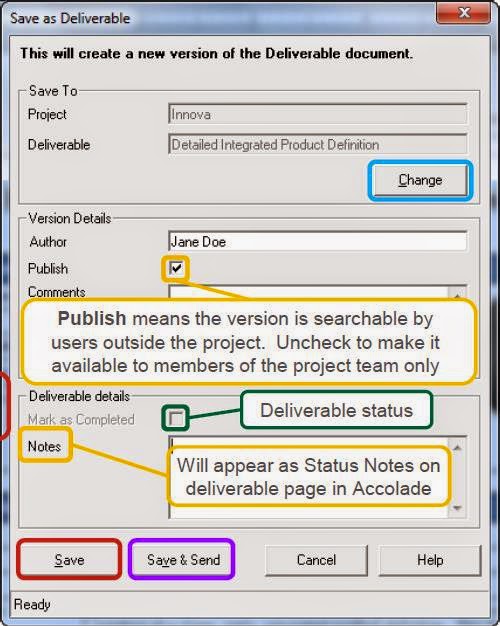
- Change : to be used if the document must be saved under another project
- Publish : it should be ticked to make the data available for dashboards and reports
- Mark as completed to let the project leader knows that this deliverable is done
- Note here relevant information regarding this deliverable
- Save
- Save and send by email, not available yet with Gmail
2. Save as a RELATED DOCUMENT:
Accolade offers the possibility to attach documents relative to the project: SPM analysis, Risk Analysis, etc… Open your document directly from your computer, then click File > Save to Accolade > Save as a related document.
This related document has to be attached to your project in the Production server : check the URL ishttp://wego.solvay.com.80/ and select your project.

Your file will be attached to the tab Reports in your project homepage.

3. Save as a GATE DOCUMENT : The 3rd way to attach a document is at gate level, and for each gate of the process. The number is limited to 3 documents per gate. For instance : the presentation Powerpoint made during the steering committee + minutes of the meeting + another file

 The best way to get IT support is to use the new
Service One Platform.
The best way to get IT support is to use the new
Service One Platform.