You are viewing an old version of this page. View the current version.
Compare with Current
View Page History
« Previous
Version 10
Next »
Purpose
The purpose of this document is to define the conversion approach to create Static Ariba catalogs uploaded in Ariba and available in Guided buying and S/4 HANA is our To be Process.
Presently(As Is) the catalogs are at Ariba and available for SRM & Ebuy Applications
Conversion Scope
The scope of this document covers the approach for converting active Ariba Catalogs
from Legacy Source Systems ECC /SRM/Ebuy/Ariba into S/4HANA/Ariba Guided Buying/Ariba following the DD-FUN- 050 Master Data Standard_1197-Ariba Catalogs.
The data from legacy system includes:
- Sap Ariba
The data from legacy system excludes:
- Sap SRM
- SAP ECC
- Ebuy Portal
List of source systems and approximate number of records
| Source | Scope | Source Approx No. of Records | Target System | Target Approx No. of Records |
|---|
| Sap Ariba Catalog Manager | There are more than 325 active catalogs in the current (As-Is) system, which need to be migrated to the future (To-Be) system. | Record volume is dependent on contract line items, with approximately 1 to 10,000 records per catalog. | Sap Ariba Catalog Manager | The number of records will remain similar to the legacy source, varying based on contract line items, with approximately 1 to 10,000 records per catalog. |
|
|
|
|
|
|
|
|
|
|
|
|
|
|
|
Additional Information
Multi-language Requirement
The Catalog item Language field will decides
Document Management
Documents related to catalogs are managed by Versions
Legal Requirement
As on Contract / Agreements with Supplier
Special Requirements
Nil
Target Design
The technical design of the target for this conversion approach.
| Table | Field | Data Element | Field Description | Data Type | Length | Requirement |
|---|
| Supplier ID | Supplier ID | Indicates the ERP Vendor ID or Ariba Network ID of the supplier | Upfront Automated | String | 255 |
| Manufacturer Part ID | Manufacturer Part ID |
| Upfront Automated | String | 255 |
| Manufacturer Part ID | Manufacturer Part ID | The Manufacturer Part ID must be provided by the Supplier based on Manufacturer's specification. To be provided if already available in legacy system | Upfront Automated | String | 255 |
| Item Description | Item Description | Support up to 2000 bytes (upto 1000 characters). Case Sensitive. | Upfront Automated | String | 1000 |
| SPSC Code | SPSC Code | THE SPSC code must be provided by the supplier. Also, a mapping between the SPSC code and Synesqo material group must be maintained. This field is mandatory if the same information is not provided in the Classification code column. The classification code (material group) must be loaded and active in Ariba | Upfront Automated | String | 40 |
| Unit Price | Unit Price | This field is mandatory if the Pricing Configuration field is not available. No value required for Punchout or Partial catalogs | Upfront manual/Default on the form | Decimal |
|
| Unit of Measure | Unit of Measure | ISO Unit of measure | Upfront Automated | String | 32 |
| Lead Time | Lead Time | The lead time is used to display a warning to the end user if the need by date specified by the end user is less than the current date plus the lead time. To be provided if already available in legacy system | Upfront Automated | Integer |
|
| Manufacturer Name | Manufacturer Name | To be provided if already available in legacy system | Upfront manual/Default on the form | String | 255 |
| Supplier URL | Supplier URL | This field is mandatory for Punchout Catalogs. The Punchout Set Up Request URL must be set as Supplier URL for punchout catalogs | Upfront manual/Default on the form | String | 255 |
| Manufacturer URL | Manufacturer URL | Provides additional information to the user by linking manufacturer's website on the catalog details page. To be provided if already available in legacy system | Upfront manual/Default on the form | String | 255 |
| Market Price | Market Price | Used to calculate discount. To be provided if already available in legacy system | Upfront manual/Default on the form | Decimal |
|
| Short Name | Short Name | Provides short description of the item. If left blank, it copied first part of the Item description. To be provided if already available in legacy system | Upfront Automated | String | 80 |
| Classification Codes | Classification Codes | THE UNSPSC code must be provided by the supplier. Also, a mapping between the SPSC code and Synesqo material group must be maintained. This field is mandatory if the same information is not provided in the SPSC Code column. The classification code (material group) must be loaded and active in Ariba | Upfront Automated | String | 64 |
| Language | Language | Java locale code for the language used in the Item Description. For the list of Java locale codes, see: http://java.sun.com/j2se/1.4.2/docs/guide/intl/locale.doc.html | Upfront Automated | String | 255 |
| Currency | Currency | ISO 4217 currency code must be set. It overrides the currcncy at the header field. | Upfront Automated | String | 32 |
| Expiration Date | Expiration Date | This date must be in the future and in YYYY-MM-DD format. | Upfront Automated | Date | 0 |
| Effective Date | Effective Date | This date must be prior to the expiration date and in YYYY-MM-DD format. | Upfront Automated | Date | 0 |
| Parametric Data | Parametric Data | This field needs to be set only if Parameteric values are enabled. To be provided if already available in legacy system | Upfront manual/Default on the form | String | 255 |
| Parametric Name | Parametric Name | This field needs to be set only if Parameteric values are enabled. To be provided if already available in legacy system | Upfront manual/Default on the form | String | 255 |
| PunchOut Enabled | PunchOut Enabled | Can True or False | Upfront Automated | Boolean | 0 |
| PunchoutLevel | PunchoutLevel | Can be store, aisle, shelf, or product. | Upfront Automated | String |
|
| Territory Available | Territory Available | List of one or more ISO country or region codes. Recommended to use ISO 3166-1 and 3166-2 codes for this field. | Upfront Automated | String | 255 |
| Supplier Part Auxiliary ID | Supplier Part Auxiliary ID | The combination of Supplier ID, Supplier Part ID and Supplier Part Auxiliary ID must be unique. Must be upto up to 255 characters (case-insensitive) | Upfront Automated | String | 255 |
| Image | Image | Provides image of the item at the search and item details page. To be provided if already available in legacy system | Upfront manual/Default on the form | String | 255 |
| Thumbnail | Thumbnail | Provides image of the item at the search page. If left blank, the thumbnail is replaced with the image. To be provided if already available in legacy system | Upfront manual/Default on the form | String | 255 |
| Delete | Delete | Can True or False | Upfront Automated | Boolean |
|
| IsPartial | IsPartial | Can be Yes or No | Upfront Automated | Flag |
|
| isInternalPartID | isInternalPartID | Can be Yes or No | Upfront Automated | Flag |
|
| IsCollection | IsCollection | Can be Yes or No | Upfront Automated | Flag |
|
| DefaultRelevance | DefaultRelevance | Can be a value from 0-1000. 1000 is most relevant, and 0 is least relevant. | Upfront Automated | Integer |
|
| InKitOnly | InKitOnly | Can True or False | Upfront Automated | Boolean |
|
| green | green | Can be Yes or No | Upfront Automated | Flag |
|
| hazardousmaterials | hazardousmaterials | Can be Yes or No | Upfront Automated | Flag |
|
| Keywords | Keywords | To be provided if already available in Legacy system | Upfront Automated | String | 255 |
| Price configuration | Price configuration | This field should be used only when advance pricing is applicable. | Upfront Automated | String | 255 |
| MinimumQuantity | MinimumQuantity | This restricts the user from ordering below the minimum order quantity. It must be left blank if the MOQ is not applicable. To be provided if already available in Legacy system. | Upfront Automated | Integer |
|
| QuantityInterval | QuantityInterval | It is needed only for items which are sold in multiples of a set. It is needed only when mandated by the supplier. To be provided if already available in Legacy system | Upfront Automated | Integer |
|
| Content Unit | Content Unit | It describes the number of items avaialble in one unit of the item which is purchased. It is needed only when provided by the supplier. To be provided if already available in legacy system | Upfront Automated | String | 32 |
| Packing Quantity | Packing Quantity | It describes the number of items avaialble in one packaging unit of the item which is purchased. It is needed only when provided by the supplier. To be provided if already available in legacy system | Upfront Automated | Integer |
|
| Item Spec | Item Spec | This provides additional information about Item specifications. It must be left blank if not applicable. If needed, it must be provided in form of a hash table of [“key-value”] pairs. The syntax is "{key1=value1;key2=value2;key3=value3;keyn=valuen}" | Upfront Automated | String | 6000 |
| RelatedItems | RelatedItems | This links additional related items to a catalog item. It must be left blank if not applicable. If needed, it must be provided in form of a hash table of [“key-value”] pairs. The syntax is "{key1=value1;key2=value2;key3=value3;keyn=valuen}" | Upfront Automated | String | 255 |
| Attachments | Attachments | It adds the specified attachment on the item details page. To be provided if already available in legacy system. Typically, it can be item specification sheet etc. | Upfront Automated | String | 255 |
| AuxilaryImages | AuxilaryImages | Additional images, can be added to the item details using this field. To be provided if already available in legacy system | Upfront Automated | String | 255 |
| AuxiliaryThumbnails | AuxiliaryThumbnails | Additional tumbnails can be added to the item details using this field. To be provided if already available in legacy system | Upfront Automated | String | 255 |
Data Cleansing
| ID | Criticality | Error Message/Report Description | Rule | Output | Source System |
|---|
|
|
|
|
|
|
|
|
|
|
|
|
|
|
|
|
|
|
|
|
|
|
|
|
Conversion Process
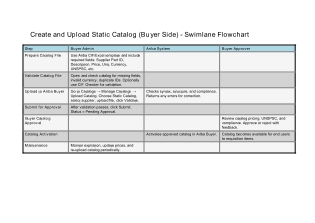
The high-level process is represented by the diagram below:
Data Privacy and Sensitivity
Confidential due to Price agreements in contracts
Extract data from a source into CIF file
. There are 2 possibilities:
- All Catalogs are exported using Ariba catalog Manager(Lagacy) and Import the catalogs using Ariba catalog Manager(New)
The agreed Relevancy criteria is applied to the extracted records to identify the records that are applicable for the Target loads
| Req # | Requirement Description | Team Responsible |
|---|
| 1 | Make sure All activated catalogs are up to date with Suppliers and there is no changes after catalogs exported date to live | Business |
| 2. | Once the date set for Catalog exported then catalogs will be exported as CIF file. | Data Team. |
| 3 | Exported CIF file will be imported in New Ariba system using catalog manager | Data Team |
Selection Screen
| Selection Ref Screen | Parameter Name | Selection Type | Requirement | Value to be entered/set |
|---|
|
|
|
|
|
|
|
|
|
|
|
|
|
|
|
|
|
|
|
|
Data Collection Template (DCT)
Target Ready Data Collection Template will be created for data with exception of some fields which require transformation as mentioned in the transformation rule. DCT Rules
| Field Name | Field Description | Rule |
|---|
|
|
|
|
|
|
|
|
|
|
|
|
| Item # | Step Description | Team Responsible |
|---|
|
|
|
|
|
|
|
|
|
|
|
|
The Target fields are mapped to the applicable Legacy field that will be its source, this is a 3-way activity involving the Business, Functional team and Data team. This identifies the transformation activity required to allow to make the data Target ready:
- Perform value mapping and data transformation rules.
- Legacy values are mapped to the to-be values (this could include a default value)
- Values are transformed according to the rules defined in
- Prepare target-ready data in the structure and format that is required for loading via prescribed Load Tool. This step also produces the load data ready for business to perform Pre-load Data Validation
| Item # | Step Description | Team Responsible |
|---|
|
|
|
|
|
|
|
|
|
|
|
|
Transformation Rules
| Rule # | Source system | Source Table | Source Field | Source Description | Target System | Target Table | Target Field | Target Description | Transformation Logic |
|---|
|
|
|
|
|
|
|
|
|
|
|
|
|
|
|
|
|
|
|
|
|
|
|
|
|
|
|
|
|
|
|
|
|
|
|
|
|
|
|
|
| Mapping Table Name | Mapping Table Description |
|---|
|
|
|
|
|
|
|
|
| Item # | Step Description | Team Responsible |
|---|
|
|
|
|
|
|
|
|
|
|
|
|
Pre-Load Validation
Project Team
Completeness
Accuracy
Business
Completeness
Accuracy
Load
The load process includes:
- Execute the automated data load into target system using load tool or product the load file if the load must be done manually
- Once the data is loaded to the target system, it will be extracted and prepared for Post Load Data Validation
Load Run Sheet
| Item # | Step Description | Team Responsible |
|---|
|
|
|
|
|
|
|
|
|
|
|
|
Load Phase and Dependencies
Configuration
Conversion Objects
| Object # | Preceding Object Conversion Approach |
|---|
| list the exact title of the conversion object of only the immediate predecessor – this will then confirm the DDD (Data Dependency Diagram) |
|
|
|
|
Error Handling
| Error Type | Error Description | Action Taken |
|---|
|
|
|
|
|
|
|
|
|
Post-Load Validation
Project Team
Completeness
Accuracy
Business
Completeness
Accuracy
Key Assumptions
- Master Data Standard is up to date as on the date of documenting this conversion approach and data load.
- is in scope based on data design and any exception requested by business.


