


| Status | Peer Review |
|---|---|
| Owner | |
| Stakeholders |
Purpose
The purpose of this document is to define the conversion approach to create Portfolio Initiatives in S/4 HANA.
Portfolio Initiatives represents a Program of work in EPPM. A Portfolio Initiative is group of related projects (Portfolio Items) potentially belonging to different Portfolio Buckets for reporting purposes.
Conversion Scope
The scope of this document covers the approach for uploading the Portfolio Initiatives into S/4HANA following the Portfolio Initiatives Master Data Design Standard
This is a completely new object for Syensqo with the data being sourced using DCT (Data Collection Template).
No action is required for the Initiative decision points from a data migration perspective.
List of source systems and approximate number of records
| Source | Scope | Source Approx No. of Records | Target System | Target Approx No. of Records |
|---|---|---|---|---|
DCT | All Records | S/4HANA |
Migration load to be done to ROW instance with replication of Global Initiatives to other S/4 Hana instances done by batch job as per business process. Local initiatives will not be replicated in other instances.
To be included in cut-over strategy document.
The Initiative reporting is performed in the SAC reporting tool.
Additional Information
Multi-language Requirement
Global Initiative names and texts will be maintained in English Language only.
A Local initiative in China, will be maintained in the Chinese language.
Document Management
Not Applicable
Legal Requirement
Not Applicable
Special Requirements
Not Applicable
Target Design
The technical design of the target for this conversion approach.
| Table | Field | Data Element | Field Description | Data Type | Length | Requirement |
|---|---|---|---|---|---|---|
| INM_INITIATIVE | GUID | INM_TV_GUID | Unique Identifier | RAW | 16 | System generated |
| INM_INITIATIVE | ITEM_GUID | RPM_TV_GUID | Guid for application objects | RAW | 16 | System generated |
| INM_INITIATIVE | DPR_GUID | DPR_TV_GUID | Application Object GUID | RAW | 16 | System generated |
| INM_INITIATIVE | EXTERNAL_ID | INM_TV_EXTID | Initiative ID | CHAR | 24 | Mandatory, System generated |
| CRM_JEST | STAT | CRM_J_STATUS | System status | CHAR | 5 | Mandatory |
| /RPM/ITEM_D | PORTFOLIO_GUID | /RPM/TV_GUID | Guid for application objects | RAW | 16 | System generated |
| /RPM/ITEM_D | PARENT_GUID | /RPM/TV_GUID | Parent Bucket ID | RAW | 16 | Mandatory |
| /RPM/ITEM_D | ITEM_TYPE | /RPM/TV_ITEM_ID | Initiative Type | CHAR | 15 | Mandatory |
| CGPL_TEXT | NAME | CGPL_TEXT1 | Initiative Name | CHAR | 40 | Mandatory |
| STXL | CLUSTD | STXLDUMMY2 | Initiative Description | LRAW | 7902 | Conditional |
| RPM_OBJ_LINK | OBJECT_KEY | RPM_TV_OBL_OBJECT_KEY | Key of the linked object | STRING | 0 | System generated |
| /RPM/ITEM_D | Currency key | RPM_TV_CURRENCY | Currency key | CUKY | 5 | Mandatory |
| /RPM/ITEM_D | PLANNED_START | RPM_TV_PLAN_START | Planned Start | DATS | 8 | Optional |
| /RPM/ITEM_D | PLANNED_FINISH | RPM_TV_PLAN_FINISH | Planned Finish | DATS | 8 | Optional |
| /RPM/ITEM_D | ZX001 | HROBJID | Program Manager | NUMC | 8 | Mandatory |
| /RPM/ITEM_D | ZX002 | STEXT | Program Manager Position Name | STEXT | 40 | System generated |
Relationship between INM_INITIATIVE and CGPL_TEXT is the field INM_INITIATIVE-GUID.
STXL long text table, to read data from CLUSTD use FM READ_TEXT with object = CGPL_TEXT
Relationship between INM_INITIATIVE and CRM_JEST is the field INM_INITIATIVE-GUID. Status number from CRM_JEST table to TJ02 table provides description for the status
Data Cleansing
Not applicable, as data object Portfolio initiatives does not exist in legacy system and will be collected specifically for data migration.
| ID | Criticality | Error Message/Report Description | Rule | Output | Source System |
|---|---|---|---|---|---|
Conversion Process
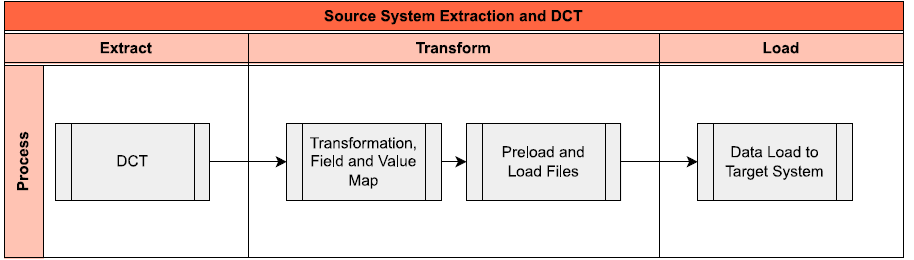
The high-level process is represented by the diagram below:
Data Privacy and Sensitivity
Not Applicable.
Extraction
Extract data from a source into Syniti Migrate.
The data does not exist (or cannot be converted from its current state). The data is manually collected by the business directly in Syniti Migrate. This is to be conducted using DCT (Data Collection Template) in Syniti Migrate
The agreed Relevancy criteria is applied to the extracted records to identify the records that are applicable for the Target loads
Extraction Run Sheet
| Req # | Requirement Description | Team Responsible |
|---|---|---|
| 1 | Ensure DCT is collected for Initiatives | Data Team |
| 2 | Perform preliminary completeness check | Data Team |
| 3 | Raise issues as defects if Req # 1 to 2 are not met | Data Team |
| 4 | Repeat Req # 1 to 3 if required | Data Team |
Selection Screen
Not Applicable| Selection Ref Screen | Parameter Name | Selection Type | Requirement | Value to be entered/set |
|---|---|---|---|---|
| None |
Data Collection Template (DCT)
Target Ready Data Collection Template will be created for Portfolio initiative data with exception of some fields which require transformation as mentioned in the transformation rule.DCT Rules
| Field Name | Field Description | Rule |
|---|---|---|
| EXTERNAL_ID | Initiative ID | Unique Identifier for the Initiative, system generated number. (IN-999999) |
| STAT | System status | Represent the system status of an initiative. Default Status is set upon creation of PPM Initiative. It can be modified by the Program Manager at any point during the Initiative's lifecycle. It is a Required Field |
| PORTFOLIO_ID | Portfolio ID | Unique Identifier for the Portfolio, Defaulted to "Syensqo" |
| BUCKET_ID | Parent Bucket ID | Unique Identifier for the initiative's parent Bucket. In SyWay it is the ID of the L3 bucket where item is assigned. It is a Required Field: Preload Check to be done to confirm that this is field in the Data Collection Template |
| ITEM_TYPE | Initiative Type | Initiative types define the structure and behavior of the portfolio initiative. In Syway there will be only 2 Initiative types. It is a Required Field: Preload Check to be done to confirm that this is field in the Data Collection Template |
| TEXT1 | Initiative Name | Name of the Initiative. It is a Required Field: Preload Check to be done to confirm that this is field in the Data Collection Template |
| CLUSTD | Initiative Description | Conditional for initiatives long text where additional program information is required. |
| PLANNED_START | Planned Start | Planned start of Initiative Conditional in format (YYYYMMDD) |
| PLANNED_FINISH | Planned Finish | Planned Finish of Initiative Conditional in format (YYYYMMDD) |
| ZX001 | Program Manager | This field represent Position of the Program Manager and is mandatory for all Initiatives to determine the responsibility It is a Required Field: Preload Check to be done to confirm that this is field in the Data Collection Template |
| RPM_OBJ_LINK | Key of the linked object | Relationship of Portfolio Items to a given Portfolio Initiative/program. Preload Check to be done to confirm that this is field in the Data Collection Template |
Object Link - Item to Initiative
Use FM /RPM/CREATE_OBJ_LINK or /RPM/OBJECT_LINK_MODIFY to create the object link between the initiative and the item(s).
Step:
a. Upload item as per CNV-1022
b. Upload Initiative
c. Object link, item to initiative
Extraction Dependencies
No Dependencies for Extract
| Item # | Step Description | Team Responsible |
|---|---|---|
| None |
Transformation
The Target fields are mapped to the applicable Legacy field that will be its source, this is a 3-way activity involving the Business, Functional team and Data team. This identifies the transformation activity required to allow to make the data Target ready:
- Perform value mapping and data transformation rules.
- Legacy values are mapped to the to-be values (this could include a default value)
- Values are transformed according to the rules defined in
- Prepare target-ready data in the structure and format that is required for loading via prescribed Load Tool. This step also produces the load data ready for business to perform Pre-load Data Validation
Transformation Run Sheet
| Item # | Step Description | Team Responsible |
|---|---|---|
1 | Obtain DCT Sign-off from Business | Data Team |
2 | Execute and Load and perform Transformation | Data Team |
3 | Monitor the transformation progress and ensure performance and completion is within allowed timeframe | Data team |
4 | Review and Validate Error and Preload Reports | Data Team |
5 | Generate data load count. | Data team |
6 | Generate Load Files | Data Team |
7 | Log errors as defects, if any and address resolutions. Close defects. | Data team |
| 8 | Re-transform and re-validate the Pre-load reports if necessary. | Data team |
| 9 | Validate the transformed file as part of pre-load validation, raise data defects or provide the pre-load sign-off. | Business |
| 10 | Analyse and resolve any pre-load defects logged by business. | Data team |
| 11 | Repeat steps 7 to 10 if necessary | Data team |
| 12 | Proceed to pre-load validations | Data team |
Transformation Rules
| Rule # | Source system | Source Table | Source Field | Source Description | Target System | Target Table | Target Field | Target Description | Transformation Logic |
|---|---|---|---|---|---|---|---|---|---|
| 1 | DCT | EXTERNAL_ID | Initiative ID | S/4 Hana | INM_INITIATIVE | EXTERNAL_ID | Initiative ID | Copy from source to target system | |
| 2 | DCT | STAT | System status | S/4 Hana | INM_INITIATIVE | STAT | System status | Copy from source to target system | |
| 3 | DCT | PORTFOLIO_ID | Portfolio ID | S/4 Hana | /RPM/ITEM_D | PORTFOLIO_ID | Portfolio ID | Copy from source to target system | |
| 4 | DCT | BUCKET ID | Parent Bucket ID | S/4 Hana | /RPM/ITEM_D | BUCKET_ID | Parent Bucket ID | Copy from source to target system | |
| 5 | DCT | S/4 Hana | INM_INITIATIVE | ITEM_TYPE | Initiative Type | Copy from source to target system | |||
| 6 | DCT | NAME | Initiative Name | S/4 Hana | CGPL_TEXT | NAME | Initiative Name | Copy from source to target system | |
| 7 | DCT | S/4 Hana | /RPM/ITEM_D | CURRENCY | Currency key | Default "EUR" | |||
| 8 | DCT | PLANNED_START | Planned Start | S/4 Hana | /RPM/ITEM_D | PLANNED_START | Planned Start | Copy from source to target system | |
| 9 | DCT | PLANNED_FINISH | Planned Finish | S/4 Hana | /RPM/ITEM_D | PLANNED_FINISH | Planned Finish | Copy from source to target system | |
| 10 | S/4 Hana | /RPM/ITEM_D | CAP_PERIODTYPE | Capacity Period Breakdown | Default to "12"(Annually) | ||||
| 11 | S/4 Hana | /RPM/ITEM_D | UNIT | Unit | Default to "TAG"(Day) | ||||
| 12 | S/4 Hana | /RPM/ITEM_D | PERIODTYPE | Financial Period Breakdown | Default to "12"(Annually) | ||||
| 13 | DCT | ZX001 | Program Manager | S/4 Hana | /RPM/ITEM_D | ZX001 | Program Manager | Copy from source to target system | |
| 14 | S/4 Hana | /RPM/ITEM_D | ZX002 | Program Manager Position Name | Value Mapping: Position Name from Position Mapped from table field HRP1000-STEXT where HRP1000-OBJID= ZX001 | ||||
| 17 | DCT | LTEXT | Initiative Description | S/4 Hana | /RPM/ITEM_D | LTEXT | Initiative Description | Copy from source to target system |
List of Custom Target Reports for this object is maintained here: Conversion Specification - Custom Reports Register.
Standard Initiative upload template
Transformation Mapping
| Mapping Table Name | Mapping Table Description |
|---|---|
HRP1000 | Infotype 1000 DB Table |
Transformation Dependencies
List the steps that need to occur before transformation can commence| Item # | Step Description | Team Responsible |
|---|---|---|
| 1 | Position table HRP1000 has been maintained (HRP1000) | |
| 2 | Ensure all the fields that require value mapping, as stipulated. Mapping tables, have the correct values mapped and imported into tool | Data Team |
Pre-Load Validation
Project Team
Completeness
| Task | Action |
|---|---|
Verify Record Count | SyWay I2M Data Team to verify that the total number of relevant records from the DCT is equal to the total number of records in the Preload and Load Sheets. |
Accuracy
| Task | Action |
|---|---|
Conversion Accuracy | SyWay I2M Data Team to verify that all fields below meet pass the checks:
|
Review Error Reports | Review and correct the errors. Achieve a zero-error record count as much as possible. Raise defects for data remediated and requiring a correction in the source (DCT) data. |
Business
Completeness
| Task | Action |
|---|---|
Verify Record Count | Business Data Owner/s to verify that the total number of relevant records from the DCT is equal to the total number of records in the Preload and Load Sheets. |
Accuracy
| Task | Action |
|---|---|
Conversion Accuracy | Business Data Owner/s to verify that all the data in the load table/file is accurate as per endorsed transformation/mapping rules (and signed-off DCT data). |
Load
The load process includes:
- Execute the automated data load into target system using load tool or product the load file if the load must be done manually
- Once the data is loaded to the target system, it will be extracted and prepared for Post Load Data Validation
- Migration load to be done to ROW instance with replication of Global Initiatives to other S/4 Hana instances done by batch job as per business process. To be included in cut-over strategy document.
- Object link initiative to item.
Load Run Sheet
| Item # | Step Description | Team Responsible |
|---|---|---|
1 | Go to RPM_DX_INITIATIVE | SyWay I2M Data Team |
2 | Load 3 records for < > to validate if data is loaded successfully without errors | SyWay I2M Data Team |
3 | Load 3 records for < > to validate if data is loaded successfully without errors | SyWay I2M Data Team |
4 | Proceed with full load if steps 2 and 3 are validated | SyWay I2M Data Team |
5 | Validate few records loaded by accessing Portfolio Initiative App | SyWay I2M Data Team |
6 | Generate post load report if step 5 is validated | SyWay I2M Data Team |
Load Phase and Dependencies
Configuration
| Item # | Configuration Item |
|---|---|
| 1 | Initiative Type |
| 2 | Override Default Global Settings (Master Switches 0002 Switched off - Portfolio & Bucket will have manual ID) |
| 3 | Define Currency Units |
| 4 | Define Period Types |
| 5 | Define Capacity Units |
| 6 | Configure Fields for Mass Import |
Conversion Objects
| Object # | Preceding Object Conversion Approach |
|---|---|
| 1113 | Portfolio Bucket Hierarchy |
| 1022 | Portfolio Item |
Error Handling
Invalid Data | Invalid Portfolio | Validate DCT default content |
Invalid Data | Invalid Bucket ID | Validate DCT default content |
| Invalid date format | Invalid dates | Validate DCT default content |
| Invalid Data | Invalid Initiative type | Validate DCT default content |
Post-Load Validation
Project Team
Completeness
| Task | Action |
|---|---|
Verify Count | SyWay I2M Data Team to verify the record count created in target S/4 HANA by accessing post load reports or standard reports from S/4 HANA. |
Verify Logs | Check if there is data that failed to load and perform the necessary actions (e.g. register as post load issue or attempt to load the record again, etc.). |
Accuracy
| Task | Action |
|---|---|
| Conversion Accuracy | Verify that the Portfolio Initiatives in target S/4 HANA were loaded correctly via Initiative Dashboard App display and table V_INM_INIT_DB in S/4 HANA |
Business
Completeness
| Task | Action |
|---|---|
Verify Count | Extract Initiative details from Initiative dashboard App in S/4 HANA |
Accuracy
| Task | Action |
|---|---|
| Verify Accuracy | Extract Initiative details from Initiative dashboard App in S/4 HANA |
Key Assumptions
- Master Data Standard is up to date as on the date of documenting this conversion approach and data load.
- Portfolio Initiatives is in scope based on data design and any exception requested by business.
Jira Task: