

Introduction
Purpose of this Document
The purpose of this document is to provide a set of guidelines and best practices that the development team (Admins and Developers) must follow, when working on Syensqo’s Salesforce applications.
Audience
Reading is mandatory for anyone that potentially will be configuring/customizing/building components in Salesforce, namely:
- Administrators
- Developers
- Tech Leads
- Technical Architects
- Deployment Team
Reading is advisable for:
- Management team
- Functional Analysts
- Functional Lead
Reading is optional for:
- Support Team
Generic Guidelines
In this section, we will briefly introduce some topics that each Admin or developer should know in order to provide support for Release identification, and to ensure the proper communication channel is used. The Generic best practices should always be considered. If, for some reason, it is not possible, please discuss with your technical lead.
- Each Configuration/development will have an Accountable Process that will determine the naming conventions to be used (each section below will detail).
- Configuration solutions should be privileged over Customizations, if Customization is necessary, a justification why configuration is not used must be provided.
- NO hard-coding!
- Custom settings: useful for configurations that differ from sandbox to sandbox/ Org. E.g. URLs for external apps.
- Custom metadata: useful for configurations that don’t change between sandboxes and PROD.
- Labels: it’s not a best practice to use labels for complex configurations,
- You can also use a label to store the list of GBUs that use the functionality, for example).
- It is recommended to use custom settings and metadata that store attributes related to GBUs.
- For CRM, never use hard-coded references to GBUs. Even if you are requested to implement a requirement for only 1 GBU, please implement in a way that is simple to extend to other GBUs in the future:
- Custom permission: useful for configurations that depend on a certain profile or permission set.
- Use custom settings, custom metadata, labels or custom permissions (associated to profiles or permission sets), in order to ease maintenance of the functionalities:
- Every component should be built in a way to make maintenance simple, and in case maintenance is needed, an Operational Procedure must be created.
- Please take some time to have a clear understanding of Salesforce Order of Execution Diagram as shown in the diagram
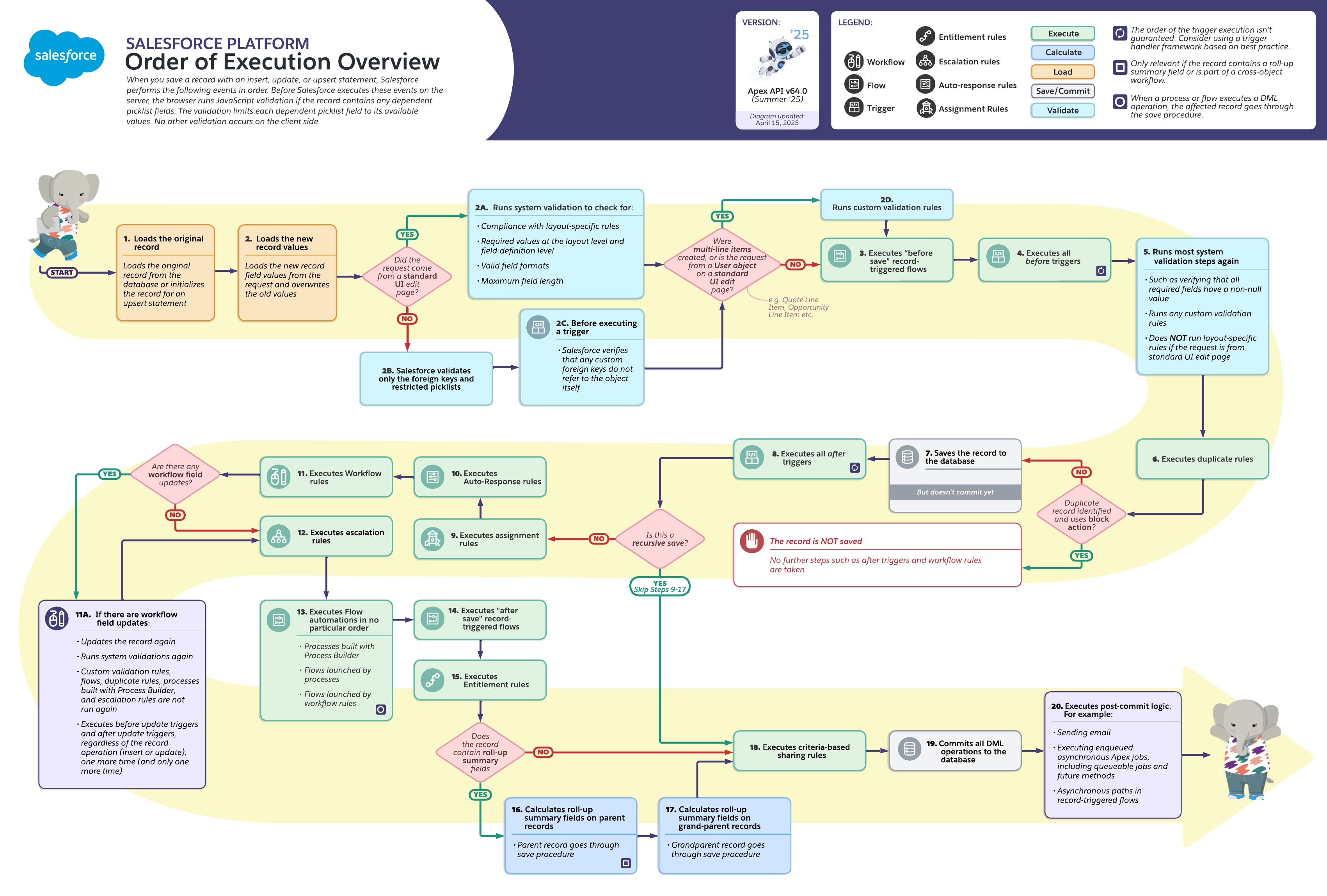
- Here the link to some Useful Salesforce Cheat Sheet
Configurations Guidelines (point & Click)
Our primary goal is to maximize the use of Salesforce standard functionality to ensure long-term maintainability and seamless platform updates. Before exploring low-code or custom solutions, standard configuration must be the default choice. Use these guidelines to:
Leverage Native Features: Utilize built-in objects, fields, and validation rules to solve business requirements.
Ensure Scalability: Build solutions that do not require complex maintenance or specialized technical knowledge.
Minimize Complexity: Keep the org "clean" by avoiding unnecessary customizations when a standard toggle or setting exists.
Please refer to this link for Configurations Guidelines (point & Click)
Flows Guidelines (Low Code)
When standard configuration is insufficient to meet complex logic requirements, Flow Builder is our preferred automation tool. Low-code solutions bridge the gap between simple setup and heavy customization. Please follow these standards to ensure:
Efficiency and Performance: Design flows that are optimized for bulk processing and respect governor limits.
Consistency: Follow naming conventions and architectural patterns (e.g., One Flow per Object) to avoid automation conflicts.
Error Handling: Implement robust fault paths and notification systems to manage exceptions gracefully.
Please refer to this link for Flows Guidelines (Low Code)
Coding Guidelines (code)
Our Main guideline is NO CODE: Before moving into a Custom Solution, you will need to justify why, so please always consider Standard point and Click, low code solutions and appexchange solution first, this is also valid if you are requested to update existing code, here you have several options to justify the need to use code:
- Impossible with Standard: share the limitations of the platform, highlight risks of reaching governor limits, highlight the risks on performance and scalability.
- Partially Implemented with code: your solution will be a mix between point and click and code, you will need to justify why code is needed.
- Use of managed package: the usage of managed package will be accepted, if the package supplier provides support, if it is free (if not free Syensqo will need to initiate a purchasing process), please note that unmanaged packages where we will need to perform maintenance are considered as code, so therefore not accepted as alternative for code.
- Create Technical Debt: while updating existing code, due to workload reasons, you can propose a temporary implementation with code, and creation of technical debt for migration to standard.
Please refer to this link for Development Guidelines related to Customization.
Security, Sharing, Access Management Guidelines
Definition and scope
Security solutions and Access Management processes must be designed and implemented according to the IS Security Policies and compliance guidelines.
Security refers to system permissions, objects and fields access, data access and user management guidelines.
Security is divided into 3 aspects:
- Security Model: access to Objects and Fields + System and User permissions (profile, permission sets and permission set groups management)
- Visibility/Sharing Model: access to Data/Records related to business visibility guidelines. It includes queue, public groups, team sharing management, sharing rules
- Access management (User Management Lifecycle): guidelines and procedures.
Safeguards
- System Administrator profile must not be assigned in Production, except if it has been approved by Syensqo Lead.
- System Administrator or System Admin (lite) cannot be assigned to non IT users even if they request it.
- Integration profiles should have access to nothing, profiles to Use ‘No Access’ or ‘API Only System Integrations’ (no object, no system permission…) , to provide access to objects and fields for a certain Integration, a specific permission set must be created.
General Guidelines for Profile/Permission Set Groups/Permission Sets
Detailed security principles and guidelines can be found part of the Salesforce Application Architecture (Application Security section)
Custom Permissions
Custom Permission | Permission Set Name | Used for? |
Bypass_Validation_Rules | ||
Bypass_Automation |
Delegated Administration
- Delegated Administration can be used to provide ‘Super User’ Access to some our GBU users
- Delegated Admin groups should be created by GBU and another one for IT.
Queue and Public group management
- Since Queues management is not possible to delegate, the guidelines is to create a public group each time a queue is created
- Each time a new public group is created, it needs to be added to the Delegated Administration group of the GBU, and IT. Without doing this step, GBU Data steward or IT will not have the rights to update the group members.
Queue Naming convention: The first thing to do when creating a queue is to determine which will be the queue’s name.
A queue name must follow this nomenclature:
<gbu code>-<process>-<queue name>
- The <gbu code> refers to the Annex III
- The <process> refers mainly to where this queue will be used (Sample, Customer Request, Leads…), Annex I
- Do note that a queue label and API Name cannot have more than 36 characters as the last 4 characters are required for a public group creation as will be explained further in the document.
Public group creation: Once a label has been determined for the new queue the next step is to create a Public Group. This will be where the users required to access the queue will be added and managed.
When creating the group the label will be:
QUE-<corresponding queue name>
The 4 characters used to label the public group are why the queue name cannot have more than 36 characters.
Additional Steps: Once the queue is created the following action must be taken to ensure the correct working of the queue and the security around it:
- Adding the users to the public group you created in Step 2.
- A case list view is automatically generated when you create a queue. To avoid security issues, edit the list view sharing by removing “All Internal Users” (added by default), adding the public group you created and make sure the Visibility is set to “Visible to certain groups of users”.
- Adding the public groups to the corresponding Delegated Administration groups (CGI + the related GBU)
Mass Data Management Guidelines
Mass Data Management might be required in several situations, like data migrations, data transformation, data updates, data creation due to several reasons, projects needs, roll-out needs, carve-out needs or simply as validation rules creation/updates, new fields creation, fields type changes, etc.
We have currently 3 ways to change data:
- Using apex Script
- Using apex batch
- Using Loading files
- External tools, like Talend
Below you find the guidelines for when is recommend to use each approach:
Apex Script | The amount of record to change/transform is less than 2.000 per object. |
|---|---|
Apex Batch | The amount of record to change/transform is more than 2.000 per object. The number of records to update/transform will change between UAT starts and PROD Go live (meaning, new records created in PROD between UAT starts and Go live, should also be considered). |
Loading files (.csv) (using Dataloader or inspector) | The workload to update/transform the data is reduced (less than 1 working day). The data to load/transform will not change between UAT and PROD (meaning, new records created in PROD between UAT starts and Go live, should not be considered or if It is acceptable to perform a second update after go live, for the records created between file preparation for PROD and go live) |
External Tools | The amount of data to update/transform requires a big workload > 1 working day, external tools, like Talend, should be considered to automate and optimize data loading activities in UAT and PROD |
For UAT and PROD environments, all data updates must be executed under a specific User: <user to be created>
Environments and Data Loading Users to use:
Org Type | System | Who executes | User to Execute | Max. Level of access | User Password |
|---|---|---|---|---|---|
Dev | CRM | Admin or Developer | User’s Own User | System Administrator with Bypass | Managed By user |
DevPro | CRM | Admin or Developer Release Manager | |||
Full | CRM | Release Manager | <User to be created> | Data Loading with bypass | Managed by Security Lead, password is automatically reset every 1 month |
PROD | CRM | <User to be created> |
IT Technical Users
- Data Loading User- <to include the user name> - to be used for data loading Activities
- System - <to include the user name> - to be used for Apex batch schedule, system defaults, system monitoring notifications.
Reports and Dashboards Guidelines
<we will need to define if the reports and dashboards will be included into Git repository>
Integrations
Technical Architects will need to be informed about all integration needs. The following topics will be defined by Technical architect, nevertheless below you can find generic guidelines:
- All Integrations must be listed into file CRM Integrations List, maintained by Technical Architect or Tech Analyst.
- For new Integration the authentication method should be OAuth 2.0 JWT token flow, if not supported, an exception must be created (contact Technical Architect or Tech Analyst).
- Integration User should be defined by System/Middleware that we are directly integrating with (1 user for webmethods, 1 user for SAP, 1 user for Gensuite, etc), instead of one user per data flow.
- Integration User should have ‘API Only System Integrations’, profile with Permission set Licence: ‘Salesforce API Integration’ , if no licence available or not supported, profile ‘No Access’ should be granted instead.
- Data Flow Diagrams should be created in Stored in this folder:
- Each specific dataflow access (needed system permissions, Objects, FLS, apex classes, etc) should be granted via specific permission set, NOT via profile.
- Monitoring: Detailed design of each integration should cover the monitoring approach
Technical Documentation
While leveraging naming convention within a project in a consistent manner is a must have, the below is a proposition of convention but should not be considered as the only option. Each project team can decide on their own conventions considering the context.
Annex I - Naming Convention Prefix
Stream | Process | Prefix to Use |
Sales | Accounts | ACC_ |
Sales | Contacts | CON_ |
Sales | Visit Report | VRP_ |
Sales | Account Development Plan | ADP_ |
Sales | Sales Leads | LED_ |
Sales | AI Leads | LED_ |
Sales | Opportunities/DevPool | OPP_ |
Sales | Products | PRO_ |
Sales | Market Segmentation | MSG_ |
Pricing | Product Pricing | PPR_ |
Pricing | Quotes | QUO_ |
Pricing | Contracts | CNT_ |
Pricing | Sales Agreement | AGR_ |
Service | Complaints | CPL_ |
Service | Samples | SAM_ |
Service | Customer Specific Requirements | SCR_ |
Service | Customer Requests | CR_ |
Service | Technical Request System | TRS_ |
Service | Net Promoter Score | NPS_ |
Marketing | Marketing Growth Program | MGP_ |
Marketing | Marketing Campaigns | CAM_ |
Marketing | Marketing Leads | LED_ |
Sales | Sales Orders | ORD_ |
Commerce & Portal | Commerce & Portal | MSP_ |
Technical | Generic / Cross Process / technical objects shared between modules not Owned by Functional Team. | GEN_ |
Annex II - GBU Codes
Company | GBU | Code |
Syensqo | Performance & Care | ?? |
Syensqo | Specialty Polymers | SP |
Syensqo | Composite Materials | CM |