

In BW not updated in real-time. The data is copied from the different sources periodically.
For the WBP server :
Most data (excluding below exceptions) is loaded once a day. The data updating starts at 12pm Paris Time and finishes around 6pm Paris Time.
Due to closing reporting, some applications are loaded several times a day (up to 6) following the D4 loading schedule .
Example :
If you modify a document in the ERP (WP1 or PF1), you will usually need to wait until the next day to see the impact in BW reports (with exception of the D4 loading scheduled applications)
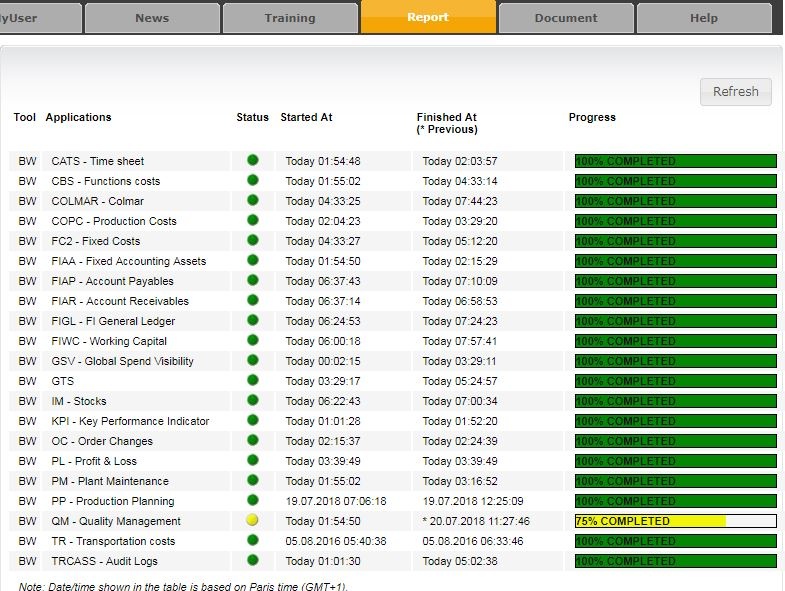
You can now check the loading status of each BW application (WBP only) in live via the Loading Status page in the ISSP.
The page shows a table which is continuously updated with the progress and times of each loading.
Example :
D4 Loading Schedule
All times in this page are Paris time (UTC+1).
The 'D' Days are open working days.
Applications under D4 loading
The following applications are under the D4 loading schedule :
Code | Application |
|---|---|
FIWC | Working Capital |
IM | Stock |
FIAP | Account Payables |
FIGL | General Ledger |
FIAR | Account Receivables |
Schedule for non-closing (D5 to D-2)
Sequence | Start | End |
|---|---|---|
1 | 6.00 am | 8.00 am |
2 | 12.00 noon | 1.00 pm |
3 | 6.00 pm | 7.00 pm |
Schedule for closing (D-1 to D4)
End time are indicative only. Late loadings are usually posted in the IS Support Portal
Sequence | Start | End |
|---|---|---|
1 | 6.00 am | 8.00 am |
2 | 10.00 am | 11.00 am |
3 | 12.00 noon | 1.00 pm |
| 4 | 2.00pm | 3.00pm |
5 | 4.00 pm | 5.00 pm |
6 | 6.00 pm | 7.00 pm |
7 | 10.00 pm | 11.00 pm |
Impact on performances
During the loadings the BW reports may be slower due to the workload on the server. Below are the expected times of poor performances :

Status of the data
A query is available to check the status of the data for all the Cubes (databases) used by the Working Capital reports.
A BW user account is requiered.
You can access it via this link : WC Data Status Query

You can also run the query - DALDST01_0001- BW - Application loading status - history.
 The best way to get IT support is to use the new
Service One Platform.
The best way to get IT support is to use the new
Service One Platform.