...
| title | Task to be filled when creating a new Operating Procedure |
|---|
- Name the Operating procedure: OP.xxx - description of the operating procedure
- verify the appropriate Scope(s):
 Image Removed, Image Removed, Image Removed (remove the icon(s) not appropriated)
 - verify the appropriate Frequency: Image Removed , Image Removed , Image Removed , Image Removed , Image Removed (remove the icon(s) not appropriated)
- fill the associated Process Name from the Costing - Process Space: copy the url of the costing process page from the list of Process Workflow and Operations
- fill the Responsibility Area from the Costing - Process Space: copy the url of the costing responsibility page from
...
- add the OP number (op_xxx),
- Scope (wp1, pf1, ww),
- Frequency ( yearly, quarterly, monthly, weekly, on-demand , ...),
- Responsibility Area (maintain_assessment_cycles, maintain_costing_master_data, manage_activity_type_price, monitor_consitency_monthly_cost_calculation, perform_costing_monthly_closing, supervise_product_costing, requester, ...),
- costing process (assessment_cycle_maintenance, product_costing, monthly_closing, master_data_management ...)
...
...
Image Removed Image Removed ...
Area: Responsability Area
...
...
Additional information
...
...
...
...
The R&D projects aiming to track costs of R&D projects. In order to facilitate the capitalization of qualifying R&D projects, a time and cost-tracking system has been created using WBS (Work Breakdown Structure) in the accounting ERP system (SAP).
...
| Panel |
|---|
| bgColor | #f2f2f2 |
|---|
| titleColor | #ffffff |
|---|
| borderWidth | 1 |
|---|
|
Guideline |
| Expand |
|---|
| title | I receive the request to create a R&D WBS |
|---|
|
...
|
The codification of the R&D project must follow the standard rule detailed below: | Include Page |
|---|
| CostFAQ:PF2 - R&D project |
|---|
| CostFAQ:PF2 - R&D project |
|---|
|
|
...
|
| Expand |
|---|
| title | Manual creation of WBS |
|---|
| | Include Page |
|---|
| CJ01 - Create Project |
|---|
| CJ01 - Create Project |
|---|
|
|
| Expand |
|---|
| title | Creation by Mass Upload |
|---|
| | Include Page |
|---|
| ZZJ02 - R&D - Create Projects from XLS template |
|---|
| ZZJ02 - R&D - Create Projects from XLS template |
|---|
|
|
|
| Expand |
|---|
| title | I ask validation of the controller for the release of the R&D WBS |
|---|
|
...
I send an e-mail to the Controller in order to obtain the confirmation or validation that everything is OK in project creation process, in order to perform the release. |
| Expand |
|---|
| title | I release the project after the validation is received |
|---|
|
- Click on ''Back'' (F3)
 Image Added Image Added
- When the warning message appears, click on ''Yes''.
- Tick the''Release project'' field.
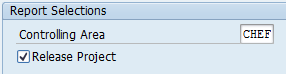 Image Added Image Added
|
...
Next Operation(s): 
...
| Expand |
|---|
| title | I inform the controller that the R&D WBS was created and released |
|---|
|
...
...
| Expand |
|---|
| title | I update the R&D Project |
|---|
|
|
Send an e-mail to the Controller confirming that the R&D WBS was created and release. |
