
Overview
| Excerpt |
|---|
RFIs are web forms : you and your suppliers will fill in them directly in Convergence. No need to "send" something. |
Table of content
| Table of Contents | ||||
|---|---|---|---|---|
|
Step-By-Step
Status colour Blue title Step 1
To Create a ”New RFI”
1- In Tabs => Click on “Accounts”
2- In View Menus => Select “My Accounts”
3- In ListViews => Click on “Account Name” eg.A R WILFLEY AND SONSSAP SE


Status colour Blue title Step 2
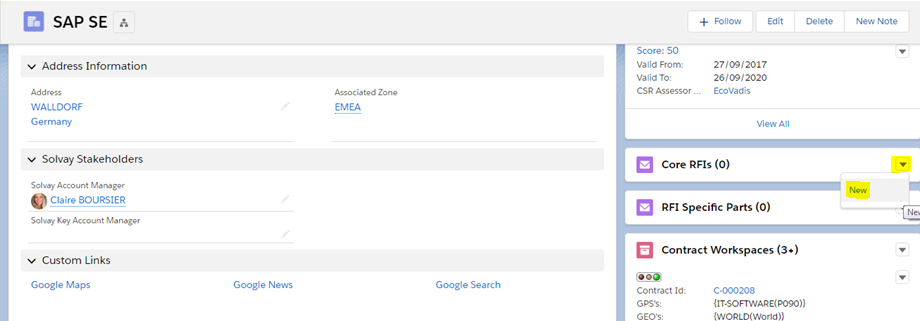
Scroll down Go to find the "Core RFIs" related list on the right of your screen and click on the button "New RFI“

Status colour Blue title Step 3
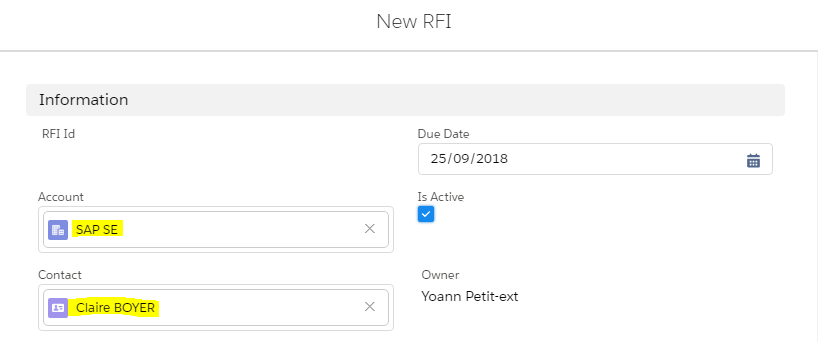
❑ Information
Account is automatically filled in this square eg. A R WILFLEY AND SONSSAP SE
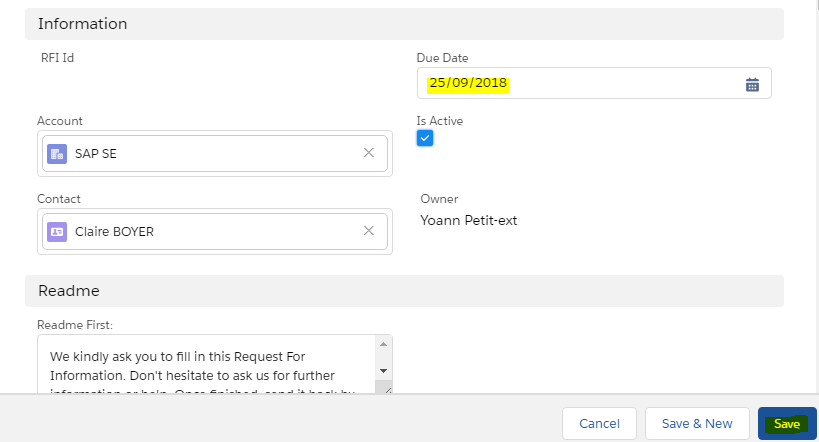
1- Fill the Due Date
2- Click on Save

1- Fill Contact (you can use the magnifier)Contact
| Note |
|---|
You must have a contact related to your account to send a RFI (A1311 - Account Contacts and related contacts) |

Status colour Blue title Step 64
❑ Go To Next Step
1- In status, select Sent in View menus”menus

| Status | ||||||
|---|---|---|---|---|---|---|
|
1- Fill the Due Date
2- Click on Save
| Tip |
|---|
You can attached an Excel file in the Core RFI to receive answer from suppliers on specific RFI. |

Need help?
| Include Page | ||||
|---|---|---|---|---|
|
| Viewtracker | ||
|---|---|---|
|