

| Status |
| |
|---|---|---|
| Owner | ||
| Stakeholders |
Purpose
The purpose of this document is to define the conversion approach to upload Materials - PO Text View into S/4 HANA as part of the Material Data Migration.
Link to MDS:
DD-FUN-050 Master Data Standard_2022-Material master-PO Text
Conversion Scope
The scope of this document covers the approach for converting active PO Text data on Materials and Services from Legacy Source Systems into S/4HANA following the Master Data Design Standard.
This object is migrated after Material Basic Data, therefore only materials in scope for object "2019 - Materials Basic Data View" are in scope for this object. Click here to go to the Conversion Spec for 2019 to see the full set of relevancy rules.
Exclusion DCT
We need an Exclusion DCT (it contains records that must excluded from the ECC extract because it is in the DCT) whose keys are: TDOBJECT ('MATERIAL' or 'ASMD'), TDNAME (MARA-MATRN or ASMD-ASNUM), TDID ('BEST' or 'LTXT'), TDSPRAS.
List of source systems and approximate number of records
| Source | Scope | Source Approx No. of Records | Target System | Target Approx No. of Records |
|---|---|---|---|---|
| PF2,WP2 | Scope is Material and Service Master records that have been identified as part of Basic Data. | 332,000 | S4H | 332,000 |
Profiling
| WP2 - ALL Records | WP2 - Relevant Records | PF2 - ALL Records | PF2 - Relevant Records | Total Relevant Records | |
| Material Master | 771,298 | 116,055 | 880,498 | 210,486 | 326,541 |
| Service Master | 7,719 | 134 | 64,894 | 5,114 | 5,248 |
| Total | 779,017 | 116,189 | 945,392 | 215,600 | 331,789 |
| Core, Additional or Supplier Language | Language | Count of Records where Material is Marked as Relevant |
| Y | EN - English | 102,716 |
| Y | FR - French | 58,555 |
| Y | IT - Italian | 38,462 |
| Y | ZH - Mandarin | 21,994 |
| Y | DE - German | 21,061 |
| Y | ES - Spanish | 17,159 |
| Y | PT - Portuguese | 16,748 |
| Y | NL - Dutch | 13,528 |
| Y | JA - Japanese | 13,223 |
| Y | KO - Korean | 10,365 |
| Y | PL - Polish | 9,490 |
| Y | BG - Bulgarian | 3,441 |
| Y | RU - Russian | 2,748 |
| Y | FI - Finnish | 2,100 |
| Y | ZF - Chinese traditional | 146 |
| Y | TH - Thai | 53 |
| Y | SK - Slovak | 5,779 |
| Y | Z9 - Brazil Portuguese | 4,832 |
| N | EL - Greek | 222 |
| N | CS - Czech | 192 |
| N | TR - Turkish | 37 |
| N | 3F - French_CA | 25 |
| N | AF - Afrikaans | 18 |
| N | AR - Arabic | 14 |
| N | ID - Indonesian | 9 |
| N | MS - Malay | 5 |
| N | DA - Danish | 4 |
| N | ET - Estonian | 3 |
| N | HU - Hungarian | 3 |
| N | SL - Slovenian | 3 |
| N | KK - Kazakh | 2 |
| N | CA - Catalan | 1 |
| N | HE - Hebrew | 1 |
| N | RO - Romanian | 1 |
| N | SR - Serbian | 1 |
| N | SV - Swedish | 1 |
| N | VI - Vietnamese | 1 |
| N | Z8 - EN (US) EHS ONLY | 1 |
| N | HI - Hindi | 0 |
| N | HY - Armenian | 0 |
| N | IS - Icelandic | 0 |
| N | LV - Latvian | 0 |
| N | UK - Ukrainian | 0 |
| N | Z1 - Customer reserve | 0 |
Predecessor Objects
Material Master - Basic View (2019) → Materials Purchasing View (2020) → Materials – PO Text View.
Additional Information
Multi-language Requirement
Multi language is supported for Materials - PO Text. Login via a different language will show the description displayed in the logon language if the language key is maintained.
The following languages are allowed:
- Core languages: EN - English, FR - French, IT - Italian and ZH - Mandarin.
- Additional languages: PT - Portuguese, DE - German, ES - Spanish,
TH - Thai(descoped by CR0086, users can no use TH as their login language). - Supplier languages that are possible: FR - French, EN - English, ES - Spanish, DE - German, IT - Italian, NL - Dutch, PT - Portuguese, ZH - Mandarin, PL - Polish, JA - Japanese, KO - Korean, FI - Finnish, BG - Bulgarian, RU - Russian, TH- Thai, ZF - Chinese traditional, SK - Slovak, Z9 - Brazil Portuguese. (TH has not been descoped from such requirements where we need to send a document to a supplier in there own language, therefore it is still valid on the Materials PO Text View.)
Jira Task to check if TH records are still in scope: Jira server Syensqo's Jira serverId d8efc1ef-48bd-3b4e-8714-ad827f4f059b key PDM-773
Document Management
Not Applicable
Legal Requirement
Not Applicable
Special Requirements
Not Applicable
Target Design
The technical design of the target for this conversion approach.
| Table | Field | Data Element | Field Description | Data Type | Length | Requirement |
|---|---|---|---|---|---|---|
STXL | TDOBJECT | Texts: application object | CHAR | 10 | Required | |
STXL | TDNAME | Name | CHAR | 70 | Required | |
STXL | TDID | Text ID | CHAR | 4 | Required | |
STXL | TDSPRAS | SPRAS | Language Key | LANG | 1 | Required |
STXL | CLUSTD | SAPscript: LONG RAW field for table STXL | LRAW | 7902 | Required |
Data Cleansing
| ID | Criticality | Error Message/Report Description | Rule | Output | Source System | Syniti Report Required |
|---|---|---|---|---|---|---|
1 | High | TDSPARS Not In Allowed List | The following language are allowed as being either core, or additional or the language of the supplier: BG, DE, EN, ES, FI, FR, IT, JA, KO, NL, PL, PT, RU, TH, ZF, ZH, SK, Z9. | MATNR and Text messages that are not in the allowed list | PF2 & WP2 | YES |
2 | Medium | Text Message Rules | No special characters. | MATNR and Text messages that don’t follow this | PF2 & WP2 | NOYES |
3 | Medium | No Long Text for the Material | List of Materials that do not have Long Text | MATNR and MAKT-MAKTX (Material Short Description) for MAKT-SPRAS either EN, FR, IT or CH | PF2 & WP2 | YES |
Conversion Process
The high-level process for PO Text that will be migrated is represented by the diagram below:
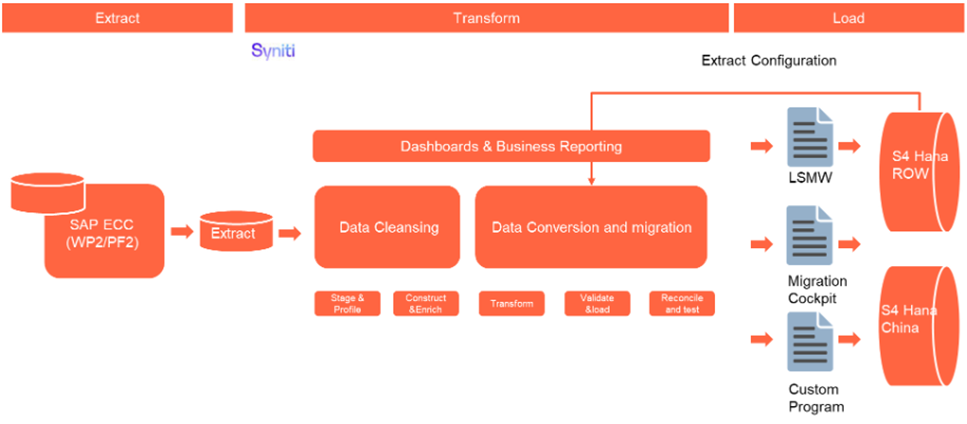
The high-level process for PO Text that will be captured in a DCT are represented by the diagram below:
Field Governance Rules | |||||
These governance rules apply to the individual fields within the data record. | |||||
Rule # | Field Label | Rule Description | Validation Method | Conditional Logic | Cleansing Rule (Also see Data Cleansing section above) |
1 | MARA-MATNR | Material number governance rules will be defined in Basic data as these are copied over from Basic data to PO text view automatically & are not specific to this view. | Upfront Automated | ||
2 | Language | The following language are acceptable as being either core, or additional or the language of the supplier: BG, DE, EN, ES, FI, FR, IT, JA, KO, NL, PL, PT, RU, TH, ZF, ZH, SK, Z9. | Upfront Automated | TDSPARS Not In Allowed List | |
3 | Long Text | ||||
No special characters. |
2. Use line breaks.
3. Capitalise first letter of sentence & major words capitalised.
|
|
Data Privacy and Sensitivity
Not ApplicableExtraction
Target Materials will come from both the Material Master and Service Master. In addition to the ECC data, PO Text data may also come from the DCT.
Text data in the table STXL is not readable and the Function Module “READ_TEXT” is used for this, using the following STXL fields: TDOBJECT, TDNAME, TDID and TDSPRAS.
TDOBJECT & TDID are used in the following combinations to get the data:
- Material Master: 'MATERIAL' and 'BEST'
- Service Master: 'ASMD' and 'LTXT'
TDNAME: this will contain MARA-MATNR or ASMD-ASNUM.
Updates to Extracted Data
The Business needs access to the data extracted from PF2 & WP2. They should be able to update TDSPARS and LongText.
Extraction Run Sheet
| Req # | Requirement Description | Team Responsible |
|---|---|---|
1 | Extract data from PF2 and WP2 using Function Module “READ_TEXT” | Syniti Team |
Selection Screen
| Selection Ref Screen | Parameter Name | Selection Type | Requirement | Value to be entered/set |
|---|---|---|---|---|
| Not Applicable |
Data Collection Template (DCT)
| Field Name | Field Description | Rule | Tool Tip | zComment | zDelete |
|---|---|---|---|---|---|
| Material or Service | Mandatory. Radio button or something similar A dropdown to indicate if the value in TDNAME is a Material Number or a Service Number. The default value for the dropdown is for a Material. Used in Transformation Rule 2 so the correct mapping (Old MARA-MATNR or Old ASMD-ASNUM to New MARA-MATRN) is applied. | Is this data for a Material Number or a Service Number? | |||
| TDNAME | Material /Service Number | Mandatory | The Legacy Material/Service Number will be used to identify the corresponding Target Material Number. | ||
| TDSPRAS | Language | Mandatory. A dropdown with the following values: BG - Bulgarian, DE - German, EN - English, ES - Spanish, FI - Finnish, FR - French, IT - Italian, JA - Japanese, KO - Korean, NL - Dutch, PL - Polish, PT - Portuguese, RU - Russian, TH- Thai, ZF - Chinese traditional, ZH - Mandarin, SK - Slovak, Z9 - Brazil PortugueseZH - Mandarin, SK - Slovak, Z9 - Brazil Portuguese. | |||
| Counter | Counter | Mandatory. User enters the value starting at 1 and incrementing by 1 for each line of text. This forms part of the key with TDNAME and TDSPRAS. | Start at 1 and increment by 1 for each line added, so that each line of the PO Text has a unique number, in the order the lines are to be displayed in. | ||
| Long Text | Long Text | Mandatory. No special characters: ; Semi-colon : Colon :: Double Colon ? Question Mark / Forward Slash @ At sign & Ampersand = Equal Sign + Plus Sign $ Dollar Sign % Percent | Vertical Bar [] Left or Right Square Bracket " Double Quotes | This text should provide additional details of the material ordered with consistent descriptions, specifications & instructions to the supplier for packaging & labelling requirements, Shipping relevant instructions, delivery/handling notes, Special vendor instructions(if any) & any compliance or regulatory requirements with regards to purchase etc. 2. Use line breaks. 3. Capitalise first letter of sentence & major words capitalised. |
Extraction Dependencies
| Item # | Step Description | Team Responsible |
|---|---|---|
| 1 | Materials and Services in scope to be loaded as Material Master Basic Data must be identified before the extraction of Text data, so that we can limit the extraction to this sub-set of data. | CutoverS2P Data Team & S2P Data Owners |
Transformation
The Target fields are mapped to the applicable Legacy field that will be its source, this is a 3-way activity involving the Business, Functional team and Data team. This identifies the transformation activity required to allow to make the data Target ready:
- Perform value mapping and data transformation rules.
- Legacy values are mapped to the to-be values (this could include a default value)
- Values are transformed according to the rules defined in
- Prepare target-ready data in the structure and format that is required for loading via prescribed Load Tool. This step also produces the load data ready for business to perform Pre-load Data Validation
Transformation Run Sheet
| Item # | Step Description | Team Responsible |
|---|---|---|
1 | Verify that data is extracted from both source systems and includes both Materials and Services Long Text. | Syniti/Data Team(S2P) |
2 | Transformation jobs are ready for execution. | Syniti |
Transformation Rules
| Rule # | Source system | Source Table | Source Field | Source Description | Target System | Target Table | Target Field | Target Description | Transformation Logic |
|---|---|---|---|---|---|---|---|---|---|
1 | PF2, WP2 & DCT | STXL | TDOBJECT | S4H | STXL | TDOBJECT | Default to MATERIAL | ||
| 2 | PF2, WP2 & DCT | STXL | TDNAME | S4H | STXL | TDNAME | Map from Old MARA-MATNR or Old ASMD-ASNUM to New MARA-MATRN | ||
| 3 | PF2, WP2 & DCT | STXL | TDID | S4H | STXL | TDID | Default to BEST | ||
| 4 | PF2, WP2 & DCT | STXL | TDSPRAS | S4H | STXL | TDSPRAS | Copy As-Is | ||
| 5 | PF2, WP2 & DCT | Long Text | S4H | Long Text | Copy As-Is |
Transformation Mapping
| Mapping Table Name | Mapping Table Description | Link |
|---|---|---|
| Material | XREF |
Transformation Dependencies
List the steps that need to occur before transformation can commence| Item # | Step Description | Team Responsible |
|---|---|---|
| 1 | Data has been extracted from sources systems | Syniti |
| 2 | Deduplication is completed | Syniti & Data Team (S2P) |
| 3 | Configuration should be completed - (Config documents should be complete) | Syniti & Data Team (S2P) |
| 4 | Value mapping and XREF tables are ready | Syniti & Data Team (S2P) |
| 5 | Language Translations are Completed | Integration Team & Data Team (S2P) |
Pre-Load Validation
Project Team
Completeness
| Task | Action |
|---|---|
Verify Record Count | The number of records presented after relevancy checks and validation needs to be correct compared to the staged data in Migrate. |
Completeness check | All fields required as per mapping template rules must be completed. Validity reports checking each field in Syniti must be built. |
Accuracy
| Task | Action |
|---|---|
Conversion Accuracy |
|
Business
Completeness
| Task | Action |
|---|---|
Count and Completeness check | All fields required as per mapping template rules must be completed. Validity reports checking each field in ADMM must be built to help check. |
Accuracy
| Task | Action |
|---|---|
Conversion Accuracy | Business team to verify that the data staged in the preload tables are correct in terms of the mapping rules. This will be done via Syniti ADMM reports/SAP reports |
Load
The load process includes:
- The Long Text data field in STXL is not a normal field, therefore Syniti needs to determine if Migration Cockpit is the best option, or if another standard load method is available, otherwise a custom method must be developed.
- Once the data is loaded to the target system, it will be extracted and prepared for Post Load Data Validation.
Load Run Sheet
| Item # | Step Description | Team Responsible |
|---|---|---|
1 | Verify data extracted | Data Specialist/Functional - S2P |
2 | Verify data combined from both source systems and from Materials and Services | Data Specialist/Functional - S2P |
3 | Verify Material XREF is ready | Data Specialist/Functional - S2P |
4 | Stage data for transformations | Syniti |
5 | Run transforms | Syniti |
8 | Execute pre-load report | Syniti |
9 | Validate preload report - release | Data Specialist/Functional - S2P |
10 | Prepare and simulate | Syniti |
11 | Pre-load verification and approval to load | Functional/Data Owner - S2P |
12 | Load to S4 | Syniti |
13 | Complete Jira steps, Volumes and Timings | All - where applicable |
14 | Execute post-load report | Syniti |
15 | Post-load report verification/validation | Data Specialist/Functional/Data Owner - S2P |
16 | Object load completion approval | Data Owner - S2P |
Load Phase and Dependencies
Configuration
| Item # | Configuration Item |
|---|---|
| 1 | Not Applicable. This object is only dependent on Languages found in the table T002 and these are all SAP standard so nothing is required. |
Conversion Objects
| Object # | Preceding Object Conversion Approach | ||
|---|---|---|---|
1 | Material Master - Basic View (2019) | ||
2 | Materials - Additional data (2021) | 3 | Materials Purchasing View (2020) |
Error Handling
| Error Type | Error Description | Action Taken |
|---|---|---|
Data | Incorrect Language | Fix incorrect data |
Data | Duplicate | Fix incorrect data |
Load | Authorization errors | Apply for the applicable authorization permission and retry |
Load | Technical load failures - If using MC - Simulation errors, etc | Investigate error and rectify. Retry simulation and/or load |
Post-Load Validation
Project Team
Post-Load Step
Step Description | Team Responsible |
Execute post-load report | Syniti |
Post-load report verification/validation | Data Specialist/Functional/Data Owner - S2P |
Object load completion approval | Data Owner - S2P |
Completeness
| Task | Action |
|---|---|
Verify count | The number of records presented in the preload needs to be compared to the post-load. – Syniti report |
Field by field check | Compare source data to target data. |
Accuracy
| Task | Action |
|---|---|
Verify Logs | Check if there is data that failed to load and perform the necessary actions (e.g. register as post load issue or attempt to load the record again, etc.). |
Business
Completeness
| Task | Action |
|---|---|
Verify Count | The number of records presented in the preload needs to be compared to the post-load Syniti report. |
Missing data | Check missing data which was supposed to be loaded. |
Reconciliation | Participate in Post-load walkthroughs. |
Accuracy
| Task | Action |
|---|---|
Conversion Accuracy | Business team to verify that the data staged in the preload tables are correct in terms of the mapping rules. This will be done via Syniti/SAP reports. |
Key Assumptions
- Master Data Standard is up to date as on the date of documenting this conversion approach and data load.
- Materials - PO Text is in scope based on data design and any exception requested by business.
See also
Change log
| Change History | ||
|---|---|---|
|
Workflow history
| Workflow Report | ||||||
|---|---|---|---|---|---|---|
|