

The new wiki link for this data flow is here:
BW OTC - Supply Chain- DPS (WBP)
Please update the new doc there and no longer here.
| Table of Contents |
|---|
General presentation
Objective of the application
BW Demand Planning Scheduling (DPS)

Tool Leader: Antoine Roy Alexandre Eliane
IT leader of the application: Guillaume Thevenet Laura Labbadi (DynaSys DP), Alexandre Eliane (DiP-PP), Mario Simonelli (BW), Craig Wanamaker (BW backup)
Name of project: Dynasys DynaSys
PMO Project: 6046 S&OP with Dynasys - Core model and pilot
UR: UR335513 DYNASYS Sales Forecast / UR333365 DYNASYS Demand Planning
Reporting Coordinator: GONZALEZ-ROUX, Célia <celia.gonzalez-roux@Reporting Coordinator: PAIVA Diogo <diogo.paiva@solvay.com>
Usage information
Number of users: tbd
Critical period: none
Geographical perimeter: worldwide
InfoArea:
- Demand Planning Scheduling
IA_DPS
Process chain Display Component:
- 127 - PROJECT - DPS - Demand Planning Scheduling
COMP_DPS_PC
Roles & Access
Roles and access
| Role Id | Role Title | Explanation |
|---|---|---|
| ZR_RCS_CA_M52 | DP - Demand Planning | Role Menu Dynasys Currently (Nov 2016), only 2 queries published in this role
|
| ZBI_RCS_DP_A02 | Demand Planning - Dynasys | Role utilisateur Dynasys Authorization object ZBI_DPS
|
| ZBI_RCS_DP_A03 | Demand Planning - Dynasys Keyuser | Authorization object ZBI_DPS_K
|

See also file maintained by Authorization team : BW Catalog of Roles / link: https://drive.google.com/open?id=10GEfKYqrT1eeTO_uHYAheL1GX7L5y_pvH0KQU64qh5I
Authorization objects
List of autorisation objects mandatory for the application.
| Authorization object | Explanation |
|---|---|
GBU (CPFCTR1_2) | ZR_*_CA_P05 |
Dataflow presentation
Overview
| Embedded Google Drive File | ||
|---|---|---|
|
Reporting Part DataFlow
| Embedded Google Drive File | ||
|---|---|---|
|
Functional and Technical rules on Workbench
General presentation
Most DSO / Cubes are used to extract data to the Dynasys tool.
Data are extracted from a source outside BW dynasys (it could be another BW application, ECC table, query etc), loaded into DSO and/or Cubes. Then data are transformed through an APD and loaded into flat files which are loaded into the Dynasys tool.
Useful file to understand dataflow from APD to source, and check filters applied all along the dataflow:

| View file | ||||
|---|---|---|---|---|
|
Conversion in KG unit

Only conversion in two steps are managed in Dynasys (UOM then T006; conversion in Three or more steps are not managed in Dynasys and should be updated by the business)
The different step of the routine are the following:
Creation of internal table
Creation of internal table between T006and T006D (T006D provide the fields MSSIE, base unit of a dimension DIMID)
Creation of internal table for DSO UOMCMAT2, filled with both conversion from UOM to UNIT and UNIT to UOM and joined with T006 to get Dimension DIMID
Conversion in KG (if possible)
Quantity needs to be converted to KG.
The routine check:
- if Quantity is already in KG, nothing is done
- if Quantity is equal to 0, Unit is set to KG
- if Unit is in dimension MASS (the same dimension as the one for KG), then conversion is done in KG using T006
- if Unit is not in MASS, we check in UOMCMAT2 if we have a direct conversion from UNIT to KG
- if no direct conversion exists, we check if there is a conversion from Unit to any MASS unit and after conversion we apply another conversion from MASS to KG using T006
If no conversion exists, Unit remains empty and will be manage as an error (see below)
Catch missing conversion
The flow uses Error DTP. When Unit can't be converted, the routine raise an exception "cx_rsrout_skip_val". The error is loaded in the error queue with text from the message class ZDYN_CONV_ERROR
Not all error will be fixed. Most of these error are linked with BU outside of Dynasys perimeter.
Transformation from ZWPPTDYS ECC table
Documentation
Functional specification are available in the following spreadsheet:
| Embedded Google Drive File | ||
|---|---|---|
|
In the following tabs:

ECC process
The ZWPPTDYS is loaded on ECC side through the transaction ZWPPTMRPOUT (which load the ZWPPMRPOUT program)
This transaction use the program RMDMRPEXTRACT01 which create a list of material to extract.
Then, for each material, the program RMDMRPEXTRACT01 run through the exit ZCL_PP_IM_MD_SR_LIST_EXTRACT.
This exit reads the database for each material and loads in memory several table among which is table IT_MDPSX.
Then, through specific code, the table ZWPPTDYS is loaded from IT_MDPSX using method IF_EX_MD_SR_LIST_EXTRACT~EXTRACT_SR_LIST_INFOS
BW Process
This table is loaded from PF1/WP1 into WBP in the DPDYN02 DSO (Propagation) and then in the DBDYN14 (Propagation).
All rules are available in the following transformation
ODSO DPDYN02 -> ODSO DBDYN14
See short description of this rules below
Begin of global
- Declaration of types
- Declaration of table & variable
Begin of routine
- Declaration of field-symbols
- Refresh internal table
- Clear variable
- Get Source system using class oref_dynasys_utils, method get_source_systems
- Get Systems extensions using class oref_dynasys_utils, method get_system_extension
Phase 0: Table preparation
Load each required table into hashed table.
Phase 1: DSO Enrichment
Depending on value of field c_delkz:
- Step 1: Ship/Rec Shipto ID (PARTNER_CUST_ID)
- Step 2: Ship/Rec plant ID (PARTNER_PLANT_ID)
- Step 3: Complement ID (COMPL_ID)
- Step 4a: BU Source
- Step 4b: BU Destination
- DOC_TYPE
- ITEM_CATEG
Remarks:
- Step 1 to 4 depends on result of previous step. No simplication is done in the code.
- If in Step 1, PARTNER_CUST_ID equals source_field-X, in step we will use PARTNER_CUST_ID and not source_field-X
- This means any error in the code will raise error in further rules. This is a choice in all the routine and this logic must be kept.
- For Step 1,2,3, value are loaded without modification in variable ended by*_origin (and later in the script, these value are saved in dedicated infooject to ease debugging)
- Even useless rules are loaded to keep homogeneity in the code, example: loading a field at null even if this field is already null.
Between phase 1 and 2:
Fields are assigned for expert routine (source to result)
System extension is added to field (Material, Plant, Partner plant ID etc) and remove unneeded 0 using function conversion_exit_alpha_output. These new value are stored in dedicated infooject to e used later in Phase 2 of script
A check is done to find any correspondance with content of specific tale zmatplant and zmatvendor
...
Once Phase 1 is finished, depending on DELKZ value, several fields are loaded:
- File flag fields: these flag will be used in APD to dettermine which data needs to be loaded in flat file
- Flowid identify which rule has been applied regarding the specification
- SKU R in FS (C_FLGSRF), filled from PARTNER_CUST_ID / PARTNER_PLANT_ID / COMPL_ID depending on flow id value.
All rules are checked one after the other. Once one check is validated, the check stop
Remarks: c_pfctr2 = BU SOURCE and c_recptbu = BU DESTINATION
Global Filter C_GLBFILT

Stream: DPS

Main filter : C_PFCTR2 (BU) and PLANT
These 2 filter may be extended regularly due to the extension of Dynasys perimeter (RCS in january 2016, Soda in june 2016)
Other filters: C_MGN_ACC, DEL_TYPE, ITEM_CATEG, MATL_TYPE, REASON_REJ, REC_TYPE
Usage of error stack
Error stack are used in relation with Unit and Currency conversion.
Most if not all error are linked with BU outside current perimeter of project and won't be fixed.
Each DTP has the following settings:
DTP

Error DTP


Package Size is lower than Maximum Number of Errors per Pack as the number of error won't decrease (example in may 2016: 2567 records from DP_PUSL2 to DPDYN22, 17618 records from DPSD001 to DPDYN21 and 530 from DSO_DLV1 to DPDYN21)
Specific table
Two specific table have been created in SM30 to manage following rules


The 2 tables are:
- ZMATPLANT
- ZMATVENDOR
Two customised transaction have been created in SE93:
- ZMAINT_MATPLANT
- ZMAINT_MATVENDOR
"UD connect" connection
Dynasys is a MSSQL tool, BW WBP is on an AIX server. No ODBC driver exists between BW and MSSQL server in Linux / AIX.
This problem was solved setting an UD connect connection
User ID for Dynasys connection is Dynasys_Interface / Password : 791hB6zi8Rk1DBSV3uNG
Main server:
- Dynasys Production server: WDCCLSLBV01\SLV1_DBPRD
- Dynasys Development server: WDCCLSLBV01\SLV1_DBDEV
Remark: contact for management of UD Connect connection is Adaggio team.
Management of file through APD
Files are created in the following folder in AL11
/exploit/depart/Dynasys
To avoid problem with quotes, routines have been added in APD to encapsulate existing quotes in description fields

Data loadings
Loading frequency
Daily: launched by the LO_DAILY_MASTER_DATA process chain around 6:00 AM each day.
- PC_DPS_DYNASYS_01
DPS Dynasys: META - D - Daily Meta-Chain
Weekly: launched on saturday, 9:00 AM
- PC_DPS_DYNASYS_03
DPS Dynasys: META - W - Weekly Meta-Chain
- Remark: Dynasays tool is awaiting data between 6:00 AM and 8:00 AM
Yearly: launched the 15th of January at 9:00 AM
- DPS Dynasys: META - Y - Cleaning Historical Data
PC_DPS_DYNASYS_04
Flag end of process chain: For both daily and weekly process chain, at the end of APD execution, a command is sent to the Dynasys tool. This command must be executed in productive environnement only and is not effective in other environnement (it will raise an error). The Decision process prevent execution of the command in non productive environnement.


...
- Monthly, the 6th of the month at 3am
- Whole chain last around 10 minutes (07/10/2016)
...
Based on Table EXP_FORE (daily update, by 1.45am)
The SnapShot month (End of Month View/C_FCSTMTH) is automatically set to previous month.
Global filter variable (C_GLBFILT) DPS/PHOTO_MTH can be used to fix another SnapShot month.
Caution : do not launch this chain several times a month without cleaning previous loadings
...
- Daily for the moment at 3.15 am (Target = Every 2 hours from 8am to 6pm)
- Whole chain last arount 15 minutes (17/11/2016)
Based on Table EXP_FORE_DR (daily update, by 1.45am, even if BW loading is monthly))
05/01/2017: On dynasys side, the treatment which prepares table EXP_FORE_DR takes more time, and now finishes around 2.45 (previously 1.45) => BW chain starter changed 2.30 am => 3.15 am
List of GBU deployed in DynaSys, and live modules => b. GBU & BU codes, Product Group et Customer Group
| Role Id | Role Title | Explanation | |
|---|---|---|---|
| SILICA (SI) | 2016 ((DIP-PP + DP) | ERP BU : ENTRP00002 2 DC : 21 for "Tires" + 82 for "Silica Cross Company". In DynaSys workspace filtered on DC 21 "Tires" | WP1 |
| PEROX | beg 2017 (DP) June 2017 (DIP-PP) | ERP BU : PEROX | |
| SODA | June 2017 (DIP-PP) | ERP BU : SDSOA / SDERI 5 April 2022 => migration DP1 to DSCP1 Export DR live the 5th of April 2022 at 6pm / Export FA live 6th of May 2022 | PF1 |
| EP | dec 2017 (DP) | ERP BU : ENTRP00030
EP APAC golive is confirmed to be rescheduled on Apr 6th 2018 EP North Amerciay in June 7th 2018 | WP1 + PF1 (only mexique business) |
| Aroma Performance (PA) | dec 2017 (DP) planned 2018 (DIP-PP) | ERP BU : ENTRP00108 / ENTRP00194 (WP1) + PMEPL / PADIP / PACYT (PF1) | WP1 + PF1 (only mexique business) |
| Fibras | planned dec 2018 (DP) | ||
| Coatis | planned dec 2018 (DP) | ||
| Cytec (TS) | DynaSys DP Go-live June 2018 (DP) | ERP BUs: ENTRP00190 + ENTRP00197 + ENTRP00198 + ENTRP00192 | WP1 |
| Novecare (CS) | DynaSys DP3 Go-live April/May 2019 (DP) by Ship-to Zone Europe : April 22-26
| BW reporting - Forecast Accuracy - Snapshot is done every 6th of the month April 6th 2019 -> Snapshot WW done from APO May 6th 2019 -> Snapshot from APO for NA / LA / AP + Snapshot from Dyn for EU June 6th 2019 -> Snapshot WW from DynaSys BW reporting - Demand Review Switch to DynaSys for all zones from 12th of April 2019 | WP1 + PF1 |
| Composite Material (CM) | DynaSys DP2 Go-live January 2020 (DP) | Janv 2020 - Run 1 Nov 2020 - Run 2 July 2021 - Run 3 | WP1 |
| Special Chem (CH) | DynaSys DP3 Go-live July 2020 (DP) | BW reporting - Forecast Accuracy July 6th 2020 -> Snapshot done from APO August 6th 2019 -> Snapshot done from DynaSys
BW reporting - Demand Review Switch to DynaSys from 7th of July 2020
| WP1 + PF1 |
| Specialty Polymers- SPP (SP) | Dedicated DSCP Go-Live April 2022 for DP part | PF1 only |
Important links
| WIKI DynaSys for endusers | DynaSys | Useful link to get general information about DynaSys. tool Lexicon part list the notion managed within Interfaces and Reporting. |
Usage information
Nu mber of users: tbd
Critical period: none
Geographical perimeter: worldwide
InfoArea:
- Demand Planning Scheduling
IA_DPS
Process chain Display Component:
- 127 - PROJECT - DPS - Demand Planning Scheduling
COMP_DPS_PC
Roles & Access
Roles and access
| Role Id | Role Title | Explanation |
|---|---|---|
| ZBI_RCS_DP_A03 | Demand Planning - Dynasys Keyuser | Authorization object ZBI_DPS_K
|
See also file maintained by Authorization team : BW Catalog of Roles / link: https://drive.google.com/open?id=10GEfKYqrT1eeTO_uHYAheL1GX7L5y_pvH0KQU64qh5I
Authorization objects
Dataflow presentation
Overview
Embedded Google Drive File docid 1oCkX3n8PArnIKeJQ7dOq_izTPbYv3bKhLBVA5DJ-vrc
Functional and Technical rules on Workbench
General presentation
Sales, Deliveries, Stocks, BoM, Recipe...are extracted from several BW application or from SAP directly and stored in DynaSys dedicated DSO, ADSO.
Data are filtered, reworked, and used to generae flat .csv files through APD or ABAP or Hana Application Process (soon).
Files are moved to DynaSys datahub, and loaded in DynaSys modules (DP or DiP).
Useful file to understand dataflow from APD to source, and check filters applied all along the dataflow: (not up to date)
View file name DYN - Dataflow.xlsx height 150
Interface file specifications
All interfaces flat files are documented in specification googlesheet
MasterData => Master Data Process specification
DP (used for DP module) => DP Process specification
DIP-PP (used for DiP-PP module) => DI-PP Process specification
Currency Conversions
All amounts transfered to DynaSys are in Euro (EUR).
Many discussions have been led concerning the exchange rate to use. Finally the exchange rate has been set to CAR4 (active since 2018/07/26)
CAR4 exists only on BW side, It handle begin of month rates.
it is created from exchange rate CAR2 via program ZBW_LOAD_EXCHANGE_RATES_CAR4 (old Z_CREATE_EXCHANGE_RATES_CAR4). The creating is handle via a scheduled process chain Z_TAUX_CARAT.

TIP : To check exchange rate on SAP side, use transaction ZRATE (available on WP1 & PF1)
Interface part
File | Where is the conversion done? | Conversion routine | Exchange rate | Time reference | Comments |
DYS_BW_PNL.csv | Query BW_QRY_MVCOPA01_0017 | CTK_DYN07 | CAR4 | 0CALMONTH (start of month) | CAR4 used since 20180726 (before C) |
DYS_BW_IH.csv | Query BW_QRY_MVSDSO44_0005 | CTK_DYN06 | CAR4 | 0BILL_DATE (to exact day) | CAR4 used since 20180726 (before C) |
DYS_BW_DH_DELDAT.csv DYS_BW_DH_GI.csv DYS_BW_FD_DELDAT.csv DYS_BW_FD_GI.csv | Transformation Transformation DPSDSO05 => IB_DYN_02 | CTK_DYN01 | CAR4 | 0DSDEL_DATE (to exact day) | CAR4 used since 20180726 (before ZRH2) (DSO_SD02 Replaced by DPSDSO45 - 15.11.2021) |
| DSO DBDYN08 (seems not used in any file based on the DSO) | Transformation C_MATPNT2 => IP_DYN_06 | CTK_DYN01 | CAR4 | 0DSDEL_DATE (to exact day) | CAR4 used since 20180726 (before ZRH2) |
DYS_BW_OOB_GI.csv DYS_BW_OOB_DELDAT.csv | Query BW_QRY_MVSDSO41_0005 | CTK_DYN05 | CAR4 | C_TBI5 (start of month) | |
| DYS_BW_RECEIPT_HIST | Transformation DPMMIC03 => DBDYN06 Transformation CUB_IC002 => DBDYN06 | CTK_DYN01 | CAR4 | 0CALDAY (Mouvement day) | |
| DYS_BW_INVOICDAT.csv | Query BW_QRY_MVSDSO41_0011 | CTK_DYN02 | CAR4 | C_TBIDATE (To be invoiced date) | |
| DYS_BW_INVOICDAT.csv | Query BW_QRY_CPSDSO54_0010 | CTK_DYN04 | CAR4 | 0CALDAY |
Reporting part
Report | Where is the conversion done? | Conversion routine | Exchange rate | Time reference | Comments |
Demand Review (core query) | BW_QRY_MVDYN11_0006 | CTK_CAR4_M | CAR4 | 0CALMONTH (start of month) | CAR4 used since 20180726 (before ZRH3) |
Budget Review (core query) | BW_QRY_MVDYN11_0001 | CTK_CAR4_M | CAR4 | 0CALMONTH (start of month) | |
| Demand Review for SBS Dashboard (QV) | QVSBS_BW_QRY_MVDYN11_0001 | CTK_CAR4_M | CAR4 | 0CALMONTH (start of month) | CAR4 used since 20180726 (before ZRHO end of month) |
Conversion in KG unit
Only conversion in two steps are managed in Dynasys (UOM then T006; conversion in Three or more steps are not managed in Dynasys and should be updated by the business)
The different step of the routine are the following:
Creation of internal table
Creation of internal table between T006and T006D (T006D provide the fields MSSIE, base unit of a dimension DIMID)
Creation of internal table for DSO UOMCMAT2, filled with both conversion from UOM to UNIT and UNIT to UOM and joined with T006 to get Dimension DIMID
Conversion in KG (if possible)
Quantity needs to be converted to KG.
The routine check:
- if Quantity is already in KG, nothing is done
- if Quantity is equal to 0, Unit is set to KG
- if Unit is in dimension MASS (the same dimension as the one for KG), then conversion is done in KG using T006
- if Unit is not in MASS, we check in UOMCMAT2 if we have a direct conversion from UNIT to KG
- if no direct conversion exists, we check if there is a conversion from Unit to any MASS unit and after conversion we apply another conversion from MASS to KG using T006
If no conversion exists, Unit remains empty and will be manage as an error (see below)
Catch missing conversion
The flow uses Error DTP. When Unit can't be converted, the routine raise an exception "cx_rsrout_skip_val". The error is loaded in the error queue with text from the message class ZDYN_CONV_ERROR
Not all error will be fixed. Most of these error are linked with BU outside of Dynasys perimeter.
Transformation from ZWPPTDYS ECC table
Documentation
Functional specification are available in the following spreadsheet:
Embedded Google Drive File docid 1G15zd7Tte_iP8NyTQFYcSaXHB02JOkIS9F_4OQvIwec
In the following tabs:
ECC process
The ZWPPTDYS is loaded on ECC side through the transaction ZWPPTMRPOUT (which load the ZWPPMRPOUT program)
This transaction use the program RMDMRPEXTRACT01 which create a list of material to extract.
Then, for each material, the program RMDMRPEXTRACT01 run through the exit ZCL_PP_IM_MD_SR_LIST_EXTRACT.
This exit reads the database for each material and loads in memory several table among which is table IT_MDPSX.
Then, through specific code, the table ZWPPTDYS is loaded from IT_MDPSX using method IF_EX_MD_SR_LIST_EXTRACT~EXTRACT_SR_LIST_INFOS
BW Process
This table is loaded from WP1 into WBP in the DPDYN02 DSO (Propagation) and then in the DBDYN14 (Propagation).
This table is loaded from PF1 into WBP in the DPDYN05 DSO (Propagation) and then in the DBDYN14 (Propagation).
All rules are available in following transformations :
ODSO DPDYN02 -> ODSO DBDYN14
ODSO DPDYN05 -> ODSO DBDYN14
See short description of this rules below
Begin of global
- Declaration of types
- Declaration of table & variable
Begin of routine
- Declaration of field-symbols
- Refresh internal table
- Clear variable
- Get Source system using class oref_dynasys_utils, method get_source_systems
- Get Systems extensions using class oref_dynasys_utils, method get_system_extension
Phase 0: Table preparation
Load each required table into hashed table.
Phase 1: DSO Enrichment
Depending on value of field c_delkz:
- Step 1: Ship/Rec Shipto ID (PARTNER_CUST_ID)
- Step 2: Ship/Rec plant ID (PARTNER_PLANT_ID)
- Step 3: Complement ID (COMPL_ID)
- Step 4a: BU Source
- Step 4b: BU Destination
- DOC_TYPE
- ITEM_CATEG
Remarks:
- Step 1 to 4 depends on result of previous step. No simplication is done in the code.
- If in Step 1, PARTNER_CUST_ID equals source_field-X, in step we will use PARTNER_CUST_ID and not source_field-X
- This means any error in the code will raise error in further rules. This is a choice in all the routine and this logic must be kept.
- For Step 1,2,3, value are loaded without modification in variable ended by*_origin (and later in the script, these value are saved in dedicated infooject to ease debugging)
- Even useless rules are loaded to keep homogeneity in the code, example: loading a field at null even if this field is already null.
- For step 3, a master have been created C_PLNTCON (previously MD C_CUSTASS) to apply a specific Complement ID. This case happen only on flow "Plan consignment" :

Example :
If the PARNET_PLANT_ID is 8254, normally COMPL_ID linked to this plant is 61281 (by reading master data C_PLANT).

But for this flow, we previously read master data C_CUSTASS to see if this plant is a specific case :
Current values in C_CUSTASS (Update 09/03/2018 manually)

Previous values to 09/03/2018

And if it's the case, we apply the transcodification => in the example, NDC-66852 replace NDC-61281.
For the moment this master data C_CUSTASS is maintained manually.
Between phase 1 and 2:
Fields are assigned for expert routine (source to result)
System extension is added to field (Material, Plant, Partner plant ID etc) and remove unneeded 0 using function conversion_exit_alpha_output. These new value are stored in dedicated infooject to e used later in Phase 2 of script
A check is done to find any correspondance with content of specific table ZMATPLANT and ZMATVENDOR (see below) :
Two specific table have been created in SM30 to manage following rules
Two customised transaction have been created in SE93:
- ZMAINT_MATPLANT (maintain table ZMATPLANT)
- ZMAINT_MATVENDOR (maintain table ZMATVENDOR)
Phase 2: Flag determination
Once Phase 1 is finished, depending on DELKZ value, several fields are loaded:
- File flag fields: these flag will be used in APD to dettermine which data needs to be loaded in flat file
- Flowid identify which rule has been applied regarding the specification
- SKU R in FS (C_FLGSRF), filled from PARTNER_CUST_ID / PARTNER_PLANT_ID / COMPL_ID depending on flow id value.
All rules are checked one after the other. Once one check is validated, the check stop
Remarks: c_pfctr2 = BU SOURCE and c_recptbu = BU DESTINATION
Phase 3: DBDYN14 data loading with process chain
DSO DBDYN14 is loaded by 4 DSO "Source" :
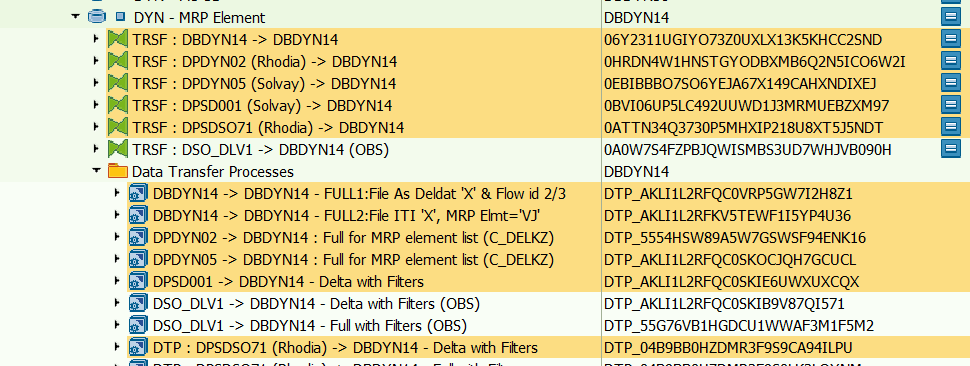
DSO DPDYN02 & DPDYN05 are loaded in full mode due to modification done on table ZWPPTDYS in ECC systems (adding and deletion lines everyday).
DSO DSO_DLV1 DPSDSO71 & DPSD001 are loaded in delta mode. (DSO_DLV1 Replaced by DPSDSO71 - 15.11.2021)
To not to have to delete data everyday DSO DBDYN14 and reload it from the four sources, we'll use a flag on object C_FLGZWDY (Flag ZWPPTDYS data) wich is equal to 'X' for all data coming from DSO DPDYN02 & DPDYN05.
Program ZBW_DYN001 with variant ZBW_DBDYN14 will be launched everyday (in process chain) before DBDYN14 loading in order to delete data with flag ZWPPTDYS data = 'X'.
After that DTP full will run for DPDYN02 & DPDYN05 and DTP delta for DPSD001 & DSO_DLV1 DPSDSO71. (DSO_DLV1 Replaced by DPSDSO71 - 15.11.2021)
Specific rules on Dynasys dataflow
Nota fiscal
Plant 7525 is not recognized on Dynasys side, deletion or modification are done on BW side following rules like below :
| File | Action done |
| DYS_BW_AS_DELDAT.csv | Delete the transferts of the source site 7525 for all SILICA material (C_MATPNT2-C_PFCTR2 = ENTRP00002) |
| DYS_BW_AS_GI.csv | Delete the transferts of the source site 7525 for all SILICA material (C_MATPNT2-C_PFCTR2 = ENTRP00002) |
| DYS_BW_EPO.csv | Replace plant 7525 by 7528 for all SILICA material (C_MATPNT2-C_PFCTR2 = ENTRP00002) |
| DYS_BW_FPO.csv | Replace plant 7525 by 7528 for all SILICA material (C_MATPNT2-C_PFCTR2 = ENTRP00002) |
| DYS_BW_FS_RECEIPT.csv | Delete the transferts of the source site 7525 for all SILICA material (C_MATPNT2-C_PFCTR2 = ENTRP00002) |
| DYS_BW_FS_SHIPPING.csv | Delete the transferts of the source site 7525 for all SILICA material (C_MATPNT2-C_PFCTR2 = ENTRP00002) |
| DYS_BW_ITI_RECEIPT.csv | Delete the transferts of the source site 7525 for all SILICA material (C_MATPNT2-C_PFCTR2 = ENTRP00002) |
| DYS_BW_PO.csv | Replace plant 7525 by 7528 for all SILICA material (C_MATPNT2-C_PFCTR2 = ENTRP00002) |
| DYS_BW_PROD_HIST.csv | Replace plant 7525 by 7528 for all SILICA material (C_MATPNT2-C_PFCTR2 = ENTRP00002) |
| DYS_BW_QM.csv | Replace plant 7525 by 7528 for all SILICA material (C_MATPNT2-C_PFCTR2 = ENTRP00002) |
| DYS_BW_SKU_PW.csv | Replace plant 7525 by 7528 for all SILICA material (C_MATPNT2-C_PFCTR2 = ENTRP00002) |
These rules are generally applied in transformation (by routine) before DSO source of each file.
Interco rule
For DIP files below, delete line where "Receiving site" = "source site" :
File | APD | Source |
DYS_BW_AS_DELDAT.csv | APD 43 | DBDYN14 |
DYS_BW_AS_GI.csv | APD 45 | DBDYN14 |
DYS_BW_FS_RECEIPT.csv | APD 33 | DBDYN14 |
DYS_BW_FS_SHIPPING.csv | APD 34 | DBDYN14 |
DYS_BW_ITI_RECEIPT.csv | APD 36 | DBDYN14 |
This rule is applied in transformations before DSO DBDYN14 and each APD :
- Creation of a flag C_FLGSITE in transformation, where C_FLGSITE = 'X' if Receiving Site (C_FLGSRF) = Source Site (C_DYN_001)
- Apply filter on APD C_FLGSITE = BLANK to delete lines (like below for APD_36)

Field with extension C_DYN_***
In Dynasys file exported, fields are generaly with an extension S or R corresponding of source system :
- *R => Rhodia (WP1)
- *S=> Solvay (PF1)
These fields are calculated and created in transformation before to be added in their DSO target.
It's also possible in specific dataflow these fields are directly calculated in APD.
Main fields with extension :
- C_DYN_001 : Plant with System Extension
- C_DYN_003 : Customer with System Extension
- C_DYN_006 : Distribution Channel with System Extension
- C_DYN_005 : Material with System Extension
- C_DYN_008 : Division with System Extension
- C_DYN_025 : Ship-to (including Prospects) with extension
Global variables stored in Global Filter (C_GLBFILT) - DynaSys scope
Stream: DPS
Refresh workbook to get current WBP variables => DynaSys Global Filters.xlsx
| Rule | Description | Examples |
| CPFCTR2_2 | BFC BU | SDERI, SDSOA, PEROX, PADIP… |
| C_PFCTR2 | BU | ENTRP00002, PEROX, SDSOA… |
| DEL_TYPE | Delivery Types exclusion | NLC, NLN, ZNL… |
| ITEM_CATE2 | Sales Document Categories exclusion | ZPLG, UNL |
| ITEM_CATEG | Sales Document Categories | ZZXD, ZVSI, ZTRA… |
| C_MAT_GRP | Material Group exclusion | ZM3110, ZM3260, ZM3610, ZM3620… |
| MATL_TYPE | Material Type | Z700, ZMAT, Z714, Z707… |
| PLANT | Plant | 0087, 0257, 0278, 0294… |
| PLANT2 | Plant (following) | |
| REASON_REJ | Rejection for Rejection exclusion | 96, 98, 9A… |
| C_MGN_ACC | BFC Account | N8110, R10000, R15400 |
| REC_TYPE | BFC Account Type | F |
| PNL_BU_TS | BFC BU for TS | TSDPH, TSADT, TSMIN… |
| PNL_DC_TS | Default DC for TS (BFC Activity 1 => DC) | TSME=>9U TSMP=>9S TSAL=>9R |
| PNL_MAT_TS | Default Material for TS (Dummy) | 77269 |
| PNL_SHP_TS | Default Ship-to for TS (Dummy) | 999930 |
Be careful, it's forbidden to have the same filter value twice for a global filter field (Active = Y only one time).
Reload data :
- If a new line is added in Global filter, all delta data flow have to be reinitialized
See below all DSO wich are to be reload :
- DBDYN06
- DPDYN21
- DPDYN22
- DBDYN14
Refer to Paragraph Recurring Procedures for detailed process
- Concerning BU, in APD there are BU (Field C_PFCTR2) filters values "hardcoded".Some modifications have to be done to update these filters if necessary.
=> See Dynasys dataflow document (BW Layer = APD / field =*C_PFCTR2) :
https://drive.google.com/file/d/1hsxeQAMi3quJ-rs6aa0tl5neod7oz85lzBr_o8kAQmQ/view

Usage of error stack
Error stack are used in relation with Unit and Currency conversion.
Most if not all error are linked with BU outside current perimeter of project and won't be fixed.
Each DTP has the following settings:
DTP
Error DTP
Package Size is lower than Maximum Number of Errors per Pack as the number of error won't decrease (example in may 2016: 2567 records from DP_PUSL2 to DPDYN22, 17618 records from DPSD001 to DPDYN21 and 530 from DSO_DLV1 DPSDSO71 to DPDYN21. (DSO_DLV1 Replaced by DPSDSO71 - 15.11.2021)
Connection with UD CONNECT
Dynasys is a MSSQL tool, BW WBP is on an AIX server. No ODBC driver exists between BW and MSSQL server in Linux / AIX.
This problem was solved setting an UD connect connection
Main servers:
- Dynasys Production server: WDCCLSLBV01\SLV1_DBPRD => connected to WBP
- Dynasys Development server: WDCCLSLBV01\SLV1_DBDEV => connected to WBD
- Dynasys Testing server: WDCCLSLVBV01\SLV1_DBTST => connected to WBQ
- Dynasys Testing server: WDCCLSLVBV01\SLV1_DBTST => connected to WBV
Important:
- Adagio Team is in charge of UD Connect connexions. Admin Change to be created by Guillaume T for any change or issue.
- Wintel Operations is in charge of DynaSys servers (Contact Abdelmôti KHABABA)
Management of file through APD (or ABAP)
Files storage (physical/logical)
All files are created in the folder /exploit/depart/Dynasys/MASTER or PART1 or PART2 (can be shown via transaction AL11)
Logical path is used (transaction FILE) : one by directory used
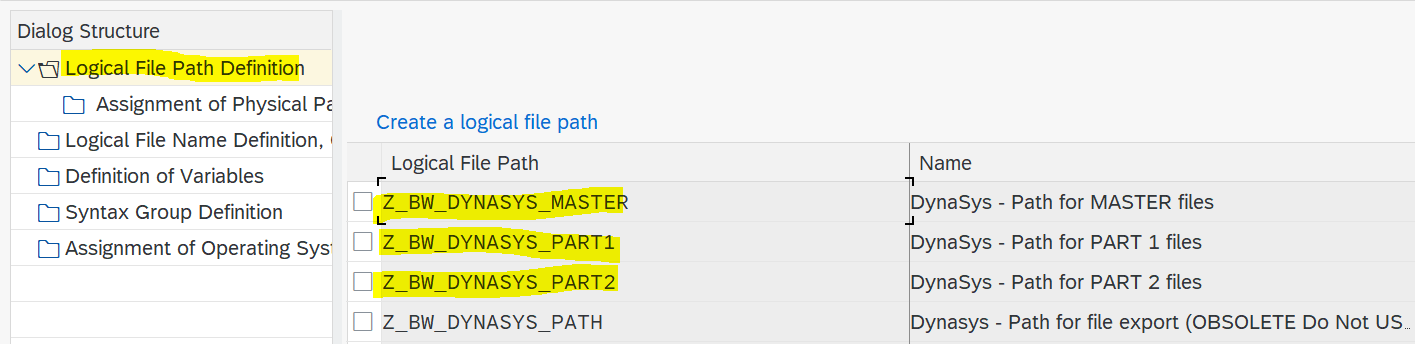
Detail for Logical path MASTER (similar for others)
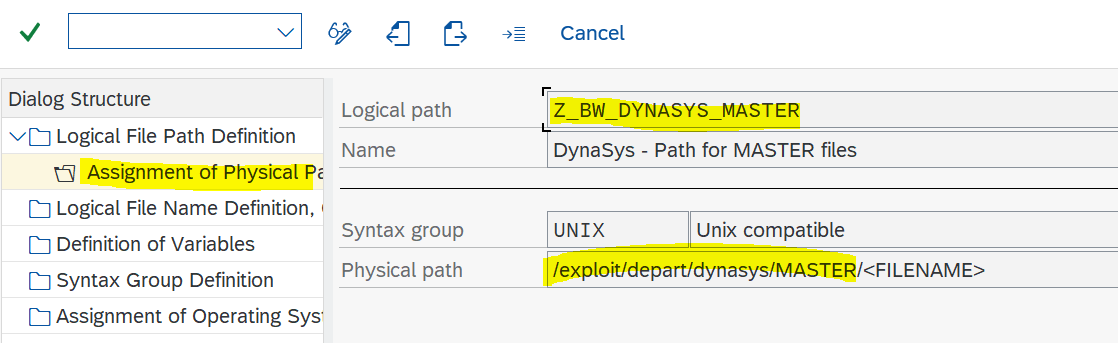
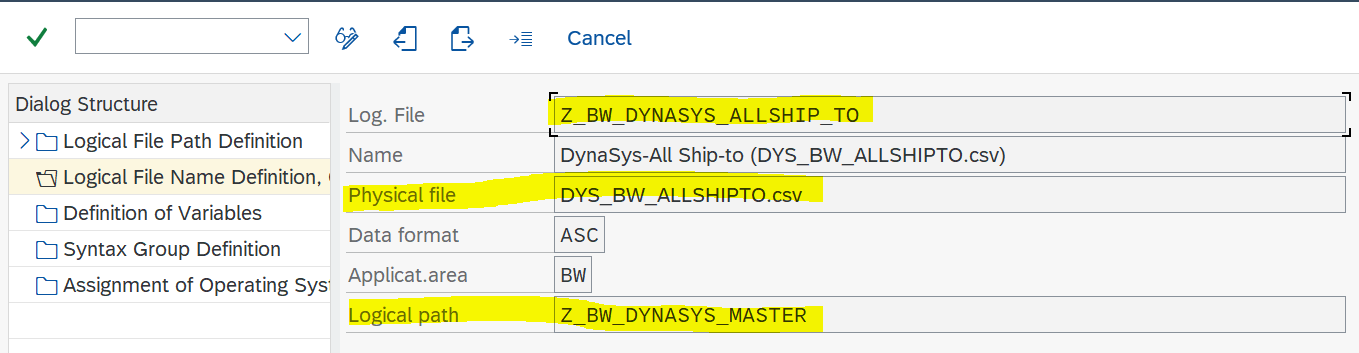
Logical file is used (transaction FILE) : one by .csv file
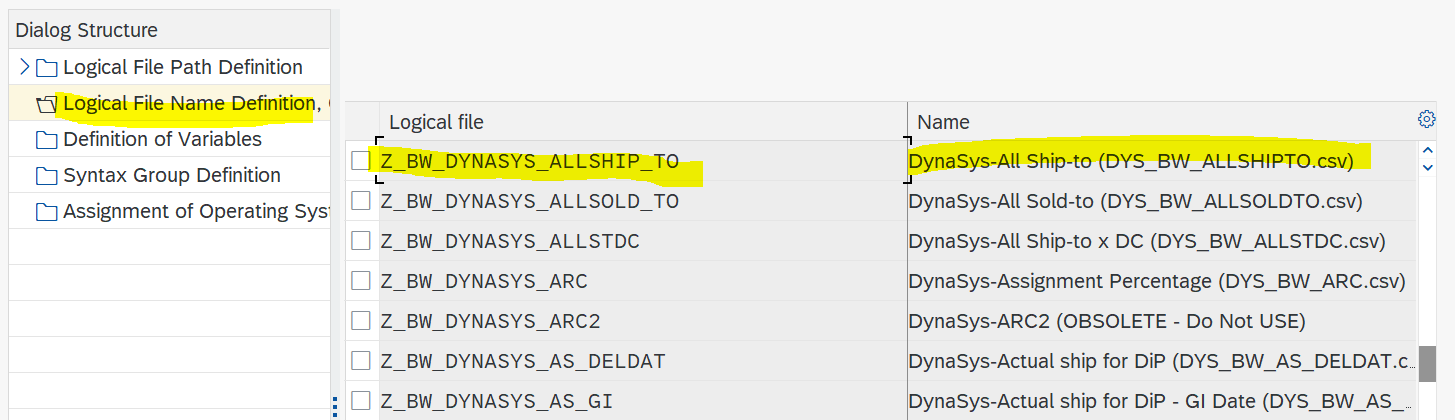
Detail for Logical file Z_BW_DYNASYS_ALLSHIP_TO (similar for other .csv files)
=> put the .csv file name wanted
=> put the Logical path in which the .csv file has to be generated
Special Format in files (negative sign, number of decimal...)
| Type | Technical Solution |
|---|---|
| Descriptions | To avoid problem with quotes, routines have been added in APD to encapsulate existing quotes in description fields Sample : APD_DPS_DYNASYS_0002 => file DYS_BW_MATERIAL.csv |
| Negative figures | Negative sign have to be in front of numbers in file, this is treated directly by routine in APD : Sample : APD_DPS_DYNASYS_0063 => file DYS_BW_PNL.csv |
| Decimal point / thousand separator | Sample : APD_DPS_DYNASYS_0063 => file DYS_BW_PNL.csv |
| Decimal place | For amount (EUR), keep 2 decimal places For quantity (KG), keep 0 decimal places Sample : APD_DPS_DYNASYS_0063 => file DYS_BW_PNL.csv |
| non significant zero | Sample : APD_DPS_DYNASYS_0030 => file DYS_BW_SPECIFICATIONS.csv |
| Header line | Via APD, even if no available data, flat file contain header line Via ABAP, code has to be handle to get at least the header line in the flat file. If file is empty, it will not be moved to DynaSys via MFT (Webmethod) exemple ZBW_DYN015 for DYS_BW_SKU_DAILY_DEMAND.csv flat file generation |


Interface between BW and DynaSys
Documentation about Dynasys process and Interface here.
Specificities for Composite Material - AERO
GBU CM has been deploied on WP1 and WBP in january 2020 (golive). The project is called Solstice.
Few major enhancements has been done for AERO :
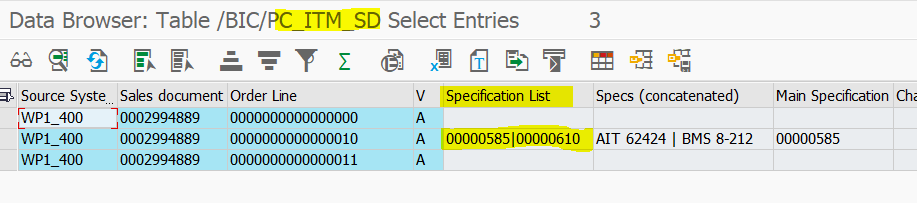
new key axis Specification List
C_SPECLIS / Specification List (Max 15) / CHAR 130
On WP1 side, none, one or several specifications are managed on Sales order item, tab 'Additional data B'
Embedded Google Drive File docid 19LoXwfIfVJcoUN-lGQnLz_xMl3ZTVWrCTOW0I_bEONk
Example WP1 Sales Order 0002994889

Stored in a specific table ZWOCT435 on WP1

Store in C_ITM_SD on WBP side (part of Global Sales steam), concatenated separated by a '|'
This axis has been added as key in several interface files. General file documentation is updated.
new material classification Z_CM_MAT for AERO
Example Material WP1 166422

Stored on C_MATCLS on BW side
lots of different material units (L, M2, GAL...)
Lots of different Material Base UOMs, and Sales Units, most of them not mass ones

ADSO ABDPDY52 is containing conversion factors to KG.
Most of the efforts to get conversion factor is done here

In other files, containing quantities in KG if rule in place does not get a KG conversion, the KG conversion is read in ADSO ABDPDY52
=> Class : ZBW_DPS_DYNASYS_UTILS + Method : GET_MATERIAL_CONVERSION_FACTOR / Get material conversion from DBDYN02
Data loadings
Loading frequency
Daily: launched by the RSP_DAILY process chain around 6am every day from Monday to Friday
- PC_DPS_DYNASYS_01 / DPS DynaSys META Part1 - D - Daily Meta-Chain Part 1

- PC_DPS_DYNASYS_25 / DPS DynaSys META Part2 - D - Daily Meta-Chain Part 2

Weekly: launched on saturdays at fixed hour 9am
- PC_DPS_DYNASYS_03 / DPS Dynasys: META - W - Weekly Meta-Chain
Remark: DynaSys tool is waiting for files between 6am and 5pm
Flag end of file generation
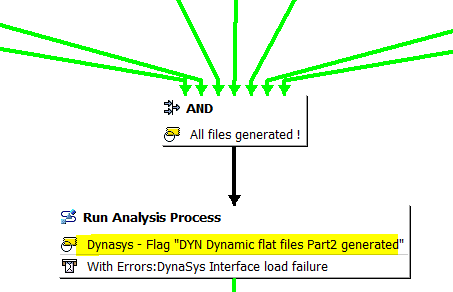
Files are splitted into 3 groups : MASTER DATA, PART1, PART2, at the end of each group file generation a flag file is generated (used to start automatique import on DynaSys side)
BW_MASTER_COMPLETE
BW_DYN_PART1_COMPLET
BW_DYN_PART2_COMPLETE
Files transfert
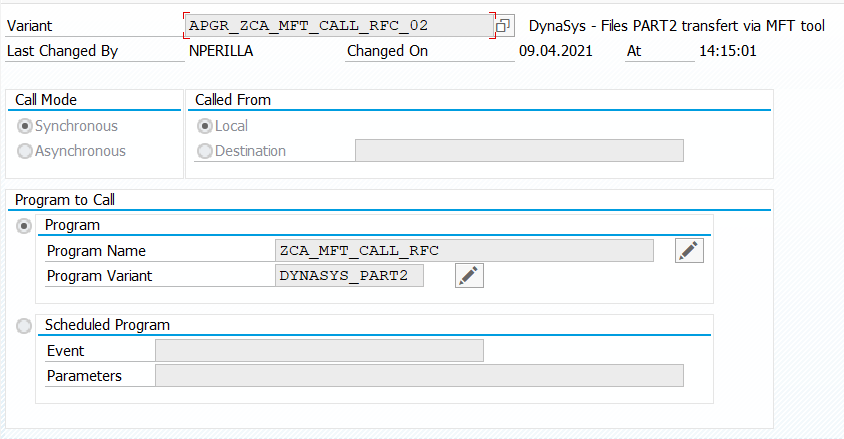
After flag file generation, an ABAP step has been added to transfert files from BW to DynaSys via webmethod
ABAP = ZCA_MFT_CALL_RFC
with 3 variants : DYNASYS_MASTER / DYNASYS_PART1 / DYNASYS_PART2

Archive files cleaning
Flat files are archived at each run in repository /Exploit/BW/archive/DYNASYS during abap ZCA_MFT_CALL_RFC execution
A filesystem cleanup procedure is managed by Adaio based on the File_Retention_Rules file (File maintained by Adagio team)
Rule in place : clean DynaSys files older than 1 month in all BW systems (WBD, WBQ, WBP).
For any change, email Adagio team
Average performance
Most DSO & Cubes are loaded in full mode due to the low amount of data and/or calculation rules.
Exception:
- DPDYN21: 6,4 M lines loaded in delta mode (init)
- DPDYN22: 2,2 M lines loaded in delta mode (init)
- DBDYN06 : 150 000 lines loaded in delta mode (init)
- DBDYN14 (only from DPSD001 /
DSO_DLV1DPSDSO71) : 5 M lines loaded in delta mode (init) - (DSO_DLV1 Replaced by DPSDSO71 - 15.11.2021)
NB : Statistics dating March, 2017.
Average duration (March 2017):
- Daily chain usually run for approximately 1,5 hour
- Weekly chain usually run for 40 minutes to 1,5 hour (= Daily Run + Material data flow loading and Material.csv file generation)
Remark : On going evolution will change Daily run to take into account the various dependences of DSO source wich are out of Dynasys perimeter (Deliveries, Sales order, Stock...).
Process will be cut in various process : DI-PP / DP / Master data & Reporting. (See part Planned evolution)
Historization
No data below 3 year before beginning of current year are kept. Ex: in Aprl 2016, only data greater than or equal to 01.01.2013 are loaded in Dynasys.
It involves that the volume of data loaded increase during the year, until arrived at its maximum at the end of december.
Reporting
Queries Documentation or user guide
No dedicated documentation on queries
Reporting Specification here.
Main queries
Main functionnalities
n/a
Broadcast
n/a
Maintenance
Known bugs
ShipTo missing in file ShipTo.csv
In end routine DPDYN22 => DBDYN31 & DBDYN18 => DBDYN31, only ShipTo with a filled country is loaded in target.

To fix the issue, follow the steps bellow :
- Check if country is correctly filled in C_CUSTOMR master data for missing ShipTo.
- If not filled, reload this ShipTo from ECC source system.
- Check if country is filled
- Delete data in DSO DBDYN31 and reload it from DPDYN22 and DBDYN18.
- Generate file ShipTo.csv, the ShipTo would be appear.
Customer Sales empty or inexact (C_CUSTSAL or 0CUST_SALES)
Due to loading routine in the propagation level of DPSDSO05 / DSO_SD02 DPSDSO45 which are loaded in delta mode, this field is not correctly updated. (DSO_SD02 Replaced by DPSDSO45 - 15.11.2021)

Customer Sales attributes empty or inexact (0CUST_SALES & C_CUSTSAL)
Correction done for 0CUST_SALES (see below), the same dataflow must be done for C_CUSTSAL Master data.
Modification on ZZ fields are not taken by the delta. Only full loading can fix this problem.

A specific extractor has been created based on KNVP table from WP1_400 in order to feed ZZ fields correctly.

This data loading is done everyday with the process chain ZPC_MD_ATTR_RCS.
After that we have to retreat data stored in DSO DPDYN22 to update ZI PArtner only if we have a modification. To do that a new transformation has been created :

A new DTP has been created too, launching it ZI partner is reading into master data 0CUST_SALES and updated in DPDYN22.
This DTP is in daily and weekly Dynasys process chain :
- PC_DPS_DYNASYS_08
- PC_DPS_DYNASYS_12
Repository /EXPLOIT in AL11 is full (Dump => Error when calculating position for open file)
If you have the following DUMP when you execute an APD :

It means the repository where the file generated will be stored is full (/EXPLOIT).
In September 2016, ADAGIO Team added 50GB on WBP server : wbpsapr3.ibm.be.solvay.com
If the issue appears again please contact ADAGIO Team.
File DYS_BW_PROD_HIST.csv - Ressource not filled for RCS Material/Plant
The field is linked to the process order and comes from WP1 table AUFK field ZZMDV01 (Production line)
Check the Production Version via transaction C223 is filled.
If not filled, ask 'Agent d'Ordonnancement' to update.
The value stored in table MKAL is then copied at process order level (table AUFK).
To be check if update will impact existing process orders and associated material movement or will be taken into account only for new flow

Issue encouraged 2019/03/26 for Material 76010 / Plant 7525 => value Production Line 'AENSACAG' was missing
Maintenance
Recurring procedure
Asking an update on lists of flat files to be transfered to DynaSys server (Obsolete since 21st of June 2021)
Lists are not used anymore, a cleaning has been asked to Adagio
The lists are stored in AL11 directory /exploit/TA/programs/env
- BW_DYN_PART1_COMPLETE.filelist
- BW_DYN_PART2_COMPLETE.filelist
- BW_MASTER_COMPLETE.filelist
For info BW_DYN_COMPLETE.filelist is obsole and you have been removed from all systems.
If a flat file name need to added or removed, send a email to IS-Adagio-SAP-Operations@solvay.com
NB : Adagio does the modification on a separated server which is replicated every hours. You have to wait to see modification.
Example of message :

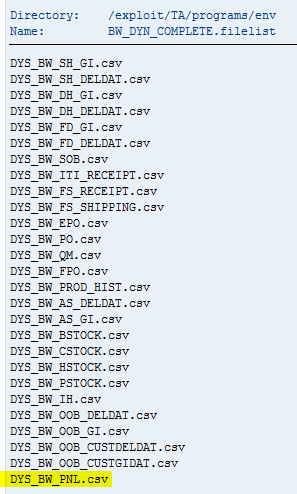
Adding a plant to DynaSys scope
CAUTION : all delta loading are impacted
Step1 ) Check the daily DynaSys chain (PC_DPS_DYNASYS_01) is finished via ST13

Step2) Add a new line in Global Filter (C_GLBFILT) for Stream DPS / Rule PLANT
/!\ check requested Plants are not already in DynaSys scope, dupplicates records would make daily chain fails
Please indicates in the description the date and user code to track changes

/! \ Each Rule has 999 lines (Counter), if all the counter are taken for the Rule "PLANT", it will be necessary to increment the rule "PLANT" and create a new one => Example: PLANT2 or PLANT3 etc.
Make sure there are no more counter available before creating a new Rule.
Rule PLANT is full, use PLANT2
Step3) Delete whole contain of following DSOs:
Reason : part of the loading is via DELTA mode
- DPDYN21 / DYN - Sales Deliveries
- DPDYN22 / DYN - Sales Orders
- DBDYN14 / DYN - MRP Element
Step4) Launch the Process Chain PC_DPS_DYNASYS_12 (around 30 minutes).
For info, list of Plant (update of 20190412)
View file name 2020_02_21_PLANT_LIST.xlsx height 250
Adding an ERP BU to DynaSys scope
Same procedure than 'Adding a plant to DynaSys scope' but with Rule C_PFCTR2
Please indicates in the description the date and user code to track changes

Adding a BFC BU to DynaSys scope
Step1) Check the daily DynaSys chain (PC_DPS_DYNASYS_01) is finished via ST13
Step2) Add a new line in Global Filter (C_GLBFILT) for Stream DPS / Rule CPFCTR2_2
Please indicates in the description the date and user code to track changes

Step3) No more action requiered as BFC BU filter is only used for DSOs loaded via FULL process
Mass update of Global Filter (Plant / BFC BU / ERP BU ... ) via Flat file
Step1) Check the daily DynaSys chain (PC_DPS_DYNASYS_01) is finished via ST13
Step 2)
Reload the IP of the global Filter with a csv file (Cf Flat file model below) + Run the DTP of the Global filter
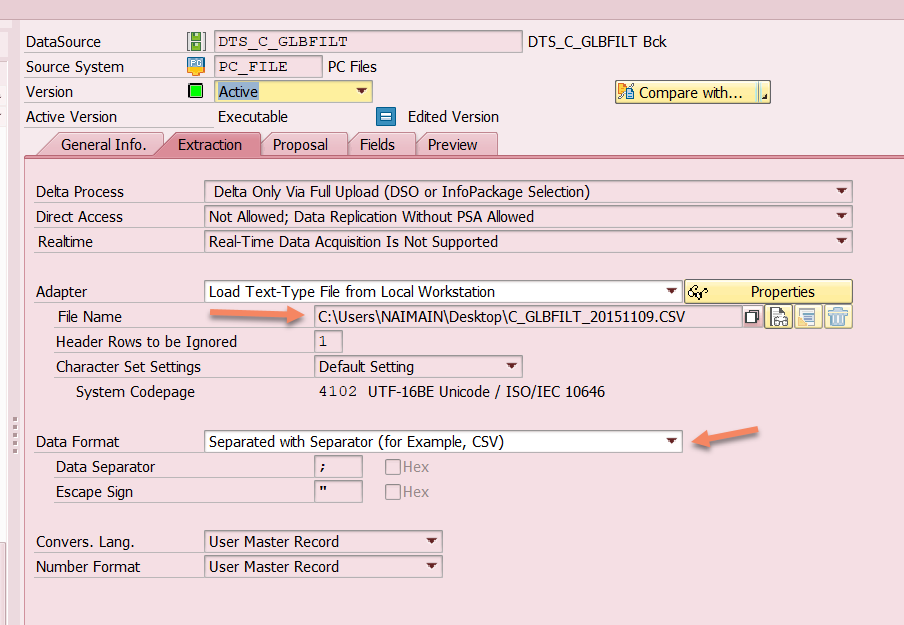
Global Filter flat file template:
Below is an example of the contents of the flat file:

NB : The above procedure is to be carried out first in a development / quality environment and if the tests are OK, apply this in production.
If you use an existing key: "STREAM / RULE / C_GLBFILT (Counter)", then the record will be updated with the new information.
/! \ Each Rule has 999 lines (Counter), if all the counter are taken for the Rule "PLANT", it will be necessary to increment the rule "PLANT" and create a new one => Example: PLANT2 or PLANT3 etc.
Make sure there are no more counter available before creating a new Rule.
For BFC BU no more action is required.
For Plant or ERP BU , apply step 3 and 4 below.
Step3) Delete whole contain of following DSOs:
Reason : part of the loading is via DELTA mode
- DPDYN21 / DYN - Sales Deliveries
- DPDYN22 / DYN - Sales Orders
- DBDYN14 / DYN - MRP Element
Step4) Launch the Process Chain PC_DPS_DYNASYS_12 (around 3-4h).
Adding an extra currency to Exchange Rates flat file (DYS_BW_CURR)
Exchange rates are send daily to DynaSys via flat file DYS_BW_CURR.csv.
There are limited to Exchange Rate types CAR4, and several currencies (ZAR, VEF, USD, TWD...). For all, conversion to EUR only.
It is possible to add currency to the current list (From currency / FCURR).
Step1) in WBD : modify 'DTP DAFICE01 -> DBDYN10 - Full limited' / DTP_AKLI1L2RFKV5X4Z6KR11T14Y4
Step2) transport till WBP.
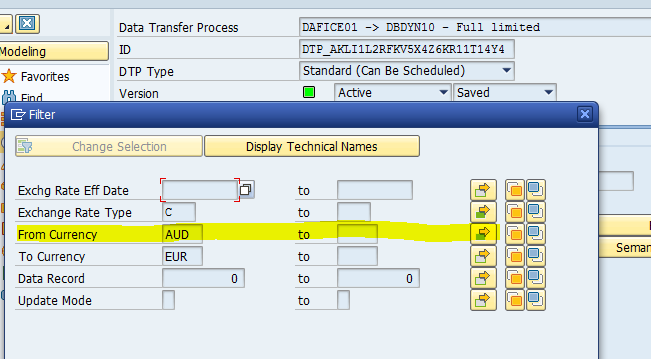
CAUTION : It is not possible to change Exchange Rate Type (KURST) or To-currency (TCURR) without impact on the loading flow, and file generation.
Adding/Changing a customer for Consignation Plant (C_PLNTCON)
Step1) Check the daily DynaSys chain (PC_DPS_DYNASYS_01) is finished via ST13
Step2) Update C_PLNTCON / Plant for Consignation (Receiving Plant from Delivery)
a) if few values have to be modified, use transaction RSD1, add or modify lines for C_PLNTCON / Plant for Consignation (Receiving Plant from Delivery)
In case of modification, do not forget to launch Change Log.
b) if several values, you can use update by flat file. Format is :
0LOGSYS; C_PLNTCON;C_PARTCUS;C_SHIPTOF
WP1_400;8063;2016260;57295
WP1_400;8039;2013950;57300
WP1_400;8171;2031655;57641
Step3) Delete whole contain of following DSOs
Reason : part of the loading is via DELTA mode
- DBDYN14 / DYN - MRP Element
Step4) Launch the Process Chain PC_DPS_DYNASYS_12 (around 3-4h).
Adding/Changing a material group exclusion for actuals files (C_GBLFILT).
On Solvay flow to DBDYN06 / DYN - Actual Prod we were facing many unit conversion issues even if material were Z700 type.
These materials were not relevant for DynaSys process, so we now exclude several Material Group.
The exclusion list can be enhanced or modified changing G_GLBFILT DPS/C_MAT_GRP
caution : it is mandatory to put 'SOLVAY' in high field. Value is checked in transformation

Steps after System landscape modification
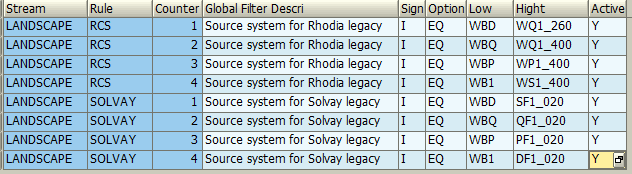
When a system change name or mandant, when a new system is created, check variables in Global Filter (C_GLBFILT)
Variables managed for DPS :
Variables DPS/WBD... where put in place before LANDSCAPE/SOLVAY, so there are still used in DynaSys (It would be good to change it to make maintenance easier)
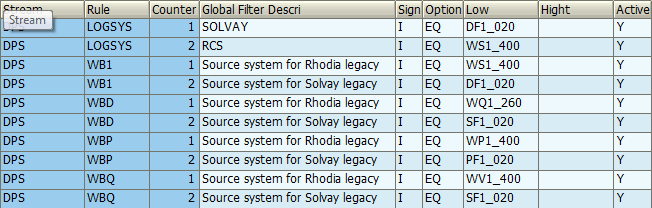
Common variables (used by DPS also) :
Adding a Material Type to DynaSys scope
CAUTION : all delta loading are impacted
Step1
- Get the list of Material from MARA table with the new Material Type to added
- Filter with this material list the VBAP table to get the associated Item Category

Step2) Check the daily DynaSys chain (PC_DPS_DYNASYS_01) is finished via ST13
Step3) Add a new line in Global Filter (C_GLBFILT) for Stream DPS / Rule MATL_TYPE
Please indicates in the description the date and user code to track changes

Step4) Delete whole contain of following DSOs:
Reason : part of the loading is via DELTA mode
- DPDYN21 / DYN - Sales Deliveries
- DPDYN22 / DYN - Sales Orders
- DBDYN14 / DYN - MRP Element
Step5) Launch the Process Chain PC_DPS_DYNASYS_12 (around 1h).
Adding an item category (Sales Documents) to DynaSys scope
CAUTION : all delta loading are impacted
Step1) Check the daily DynaSys chain (PC_DPS_DYNASYS_01) is finished via ST13
Step2) Add a new line in Global Filter (C_GLBFILT) for Stream DPS / Rule ITEM_CATEG
Please indicates in the description the date and user code to track changes

Step3) Delete whole contain of following DSOs:
Reason : part of the loading is via DELTA mode
- DPDYN21 / DYN - Sales Deliveries
- DPDYN22 / DYN - Sales Orders
- DBDYN14 / DYN - MRP Element
Step4) Launch the Process Chain PC_DPS_DYNASYS_12 (around 3-4h).
Ask to connect file transfert from WBQ to DynaSys Test
WBQ is NOT connected to DynaSys Test for file transfer as there is only one Webmethod Test for QUAL and PRE-PROD
If you temporarly need to change contact <support.xml@solvay.com>
Don't forget to ask them to put it back when you have finished with WBQ
Architecture DEV, QUAL, PRE-PROD, PROD |
WBD-> Webmethod Dev-> DynaSys Dev |
WBQ-> Webmethod Test -> DynaSys Test => not by default |
WBV-> Webmethod Test-> DynaSys Test |
WBP-> Webmethod Prod-> DynaSys Prod + Test (in_prod) |
Planned Evolution
Several minor evolution managed by the Dynasis project team.
Process chain planning : Take into account various dependences of DSO Source wich are out of DYnasys perimeter (Deliveries, sales order, Stock...)
See the New Dynasys dataflow to implement here.
Field C_PFCTR2 in master data C_MATPNT2
Originaly, there was a filter on field C_PFCTR2 in DTP linked to transformation between master data C_MATPNT2 and DSO DBDYN08 :

Filter value applied was OLAP variable V_0G_CWWE03_0001.
But the issue is that field C_PFCTR2 is not filled for source system PF1.
When we applied the filter, only data from source system WP1 was loaded in DSO DBDYN08.
To fix the issue, filter value was deleted and a start routine was added in transformation.
In this one, we read the master data C_MATPNT3 to keep C_PFCTR2 value with key Plant & Material.
If an evolution is done to fill C_PFCTR2 value for PF1 System in C_MATPNT2 master data, start routine could be deleted and filter value in DTP will be applied again.
Table of Contents
General presentation
Objective of the application
BW Demand Planning Scheduling (DPS)
Tool Leader: Olivier Descamps
IT leader of the application: Laure Pichot-Plasse (DynaSys), Craig Wanamaker (BW)
Name of project: Dynasys
PMO Project: 6046 S&OP with Dynasys - Core model and pilot
UR: UR335513 DYNASYS Sales Forecast / UR333365 DYNASYS Demand Planning
Reporting Coordinator: PAIVA Diogoa <diogo.paiva@solvay.com>
| Role Id | Role Title | Explanation | |
|---|---|---|---|
| SILICA (SI) | 2016 ((DIP-PP + DP) | ERP BU : ENTRP00002 2 DC : 21 for "Tires" + 82 for "Silica Cross Company". In DynaSys workspace filtered on DC 21 "Tires" | WP1 |
| PEROX | beg 2017 (DP) June 2017 (DIP-PP) | ERP BU : PEROX | |
| SODA | June 2017 (DIP-PP) | ERP BU : SDSOA / SDERI | PF1 |
| EP | dec 2017 (DP) | ERP BU : ENTRP00030
EP APAC golive is confirmed to be rescheduled on Apr 6th 2018 EP North Amerciay in June 7th 2018 | WP1 + PF1 (only mexique business) |
| Aroma Performance (PA) | dec 2017 (DP) planned 2018 (DIP-PP) | ERP BU : ENTRP00108 / ENTRP00194 (WP1) + PMEPL / PADIP / PACYT (PF1) | WP1 + PF1 (only mexique business) |
| Fibras | planned dec 2018 (DP) | ||
| Coatis | planned dec 2018 (DP) | ||
| Cytec (TS) | DynaSys DP Go-live June 2018 (DP) | ERP BUs: ENTRP00190 + ENTRP00197 + ENTRP00198 + ENTRP00192 | WP1 |
| Novecare (CS) | DynaSys DP3 Go-live April/May 2019 (DP) by Ship-to Zone Europe : April 22-26
| BW reporting - Forecast Accuracy - Snapshot is done every 6th of the month April 6th 2019 -> Snapshot WW done from APO May 6th 2019 -> Snapshot from APO for NA / LA / AP + Snapshot from Dyn for EU June 6th 2019 -> Snapshot WW from DynaSys BW reporting - Demand Review Switch to DynaSys for all zones from 12th of April 2019 | WP1 + PF1 |
| Composite Material (CM) | DynaSys DP2 Go-live January 2020 (DP) | Janv 2020 - Run 1 Nov 2020 - Run 2 July 2021 - Run 3 | WP1 |
| Special Chem (CH) | DynaSys DP3 Go-live July 2020 (DP) | BW reporting - Forecast Accuracy July 6th 2020 -> Snapshot done from APO August 6th 2019 -> Snapshot done from DynaSys
BW reporting - Demand Review Switch to DynaSys from 7th of July 2020
| WP1 + PF1 |
Important links
| WIKI DynaSys for endusers | DynaSys | Useful link to get general information about DynaSys. tool Lexicon part list the notion managed within Interfaces and Reporting. |
Usage information
Nu mber of users: tbd
Critical period: none
Geographical perimeter: worldwide
InfoArea:
- Demand Planning Scheduling
IA_DPS
Process chain Display Component:
- 127 - PROJECT - DPS - Demand Planning Scheduling
COMP_DPS_PC
Roles & Access
Roles and access
| Role Id | Role Title | Explanation |
|---|---|---|
| ZBI_RCS_DP_A03 | Demand Planning - Dynasys Keyuser | Authorization object ZBI_DPS_K
|
See also file maintained by Authorization team : BW Catalog of Roles / link: https://drive.google.com/open?id=10GEfKYqrT1eeTO_uHYAheL1GX7L5y_pvH0KQU64qh5I
Authorization objects
Dataflow presentation
Overview
Embedded Google Drive File docid 1oCkX3n8PArnIKeJQ7dOq_izTPbYv3bKhLBVA5DJ-vrc
Functional and Technical rules on Workbench
General presentation
Most DSO / Cubes are used to extract data to the Dynasys tool.
Data are extracted from a source outside BW dynasys (it could be another BW application, ECC table, query etc), loaded into DSO and/or Cubes. Then data are transformed through an APD and loaded into flat files which are loaded into the Dynasys tool.
All interfaces flat files are documented in specification googlesheet
MasterData => Master Data Process specification
DP (used for DP module) => DP Process specification
DIP-PP (used for DiP-PP module) => DI-PP Process specification
Useful file to understand dataflow from APD to source, and check filters applied all along the dataflow: (not up to date)
View file name DYN - Dataflow.xlsx height 150
Currency Conversions
All amounts transfered to DynaSys are in Euro (EUR).
Many discussions have been led concerning the exchange rate to use. Finally the exchange rate has been set to CAR4 (active since 2018/07/26)
CAR4 exists only on BW side, It handle begin of month rates.
it is created from exchange rate CAR2 via program ZBW_LOAD_EXCHANGE_RATES_CAR4 (old Z_CREATE_EXCHANGE_RATES_CAR4). The creating is handle via a scheduled process chain Z_TAUX_CARAT.
TIP : To check exchange rate on SAP side, use transaction ZRATE (available on WP1 & PF1)
Interface part
File | Where is the conversion done? | Conversion routine | Exchange rate | Time reference | Comments |
DYS_BW_PNL.csv | Query BW_QRY_MVCOPA01_0017 | CTK_DYN07 | CAR4 | 0CALMONTH (start of month) | CAR4 used since 20180726 (before C) |
DYS_BW_IH.csv | Query BW_QRY_MVSDSO44_0005 | CTK_DYN06 | CAR4 | 0BILL_DATE (to exact day) | CAR4 used since 20180726 (before C) |
DYS_BW_DH_DELDAT.csv DYS_BW_DH_GI.csv DYS_BW_FD_DELDAT.csv DYS_BW_FD_GI.csv | Transformation Transformation DPSDSO05 => IB_DYN_02 | CTK_DYN01 | CAR4 | 0DSDEL_DATE (to exact day) | CAR4 used since 20180726 (before ZRH2) (DSO_SD02 Replaced by DPSDSO45 - 15.11.2021) |
| DSO DBDYN08 (seems not used in any file based on the DSO) | Transformation C_MATPNT2 => IP_DYN_06 | CTK_DYN01 | CAR4 | 0DSDEL_DATE (to exact day) | CAR4 used since 20180726 (before ZRH2) |
DYS_BW_OOB_GI.csv DYS_BW_OOB_DELDAT.csv | Query BW_QRY_MVSDSO41_0005 | CTK_DYN05 | CAR4 | C_TBI5 (start of month) | |
| DYS_BW_RECEIPT_HIST | Transformation DPMMIC03 => DBDYN06 Transformation CUB_IC002 => DBDYN06 | CTK_DYN01 | CAR4 | 0CALDAY (Mouvement day) | |
| DYS_BW_INVOICDAT.csv | Query BW_QRY_MVSDSO41_0011 | CTK_DYN02 | CAR4 | C_TBIDATE (To be invoiced date) | |
| DYS_BW_INVOICDAT.csv | Query BW_QRY_CPSDSO54_0010 | CTK_DYN04 | CAR4 | 0CALDAY | |
| DYS_BW_CM_SKU.csv | Query BW_QRY_MVCOPA01_0029 | CTK_DYN07 | CAR4 | 0CALMONTH (start of month) |
Reporting part
Report | Where is the conversion done? | Conversion routine | Exchange rate | Time reference | Comments |
Demand Review (core query) | BW_QRY_MVDYN11_0006 | CTK_CAR4_M | CAR4 | 0CALMONTH (start of month) | CAR4 used since 20180726 (before ZRH3) |
Budget Review (core query) | BW_QRY_MVDYN11_0001 | CTK_CAR4_M | CAR4 | 0CALMONTH (start of month) | |
| Demand Review for SBS Dashboard (QV) | QVSBS_BW_QRY_MVDYN11_0001 | CTK_CAR4_M | CAR4 | 0CALMONTH (start of month) | CAR4 used since 20180726 (before ZRHO end of month) |
Conversion in KG unit
Only conversion in two steps are managed in Dynasys (UOM then T006; conversion in Three or more steps are not managed in Dynasys and should be updated by the business)
The different step of the routine are the following:
Creation of internal table
Creation of internal table between T006and T006D (T006D provide the fields MSSIE, base unit of a dimension DIMID)
Creation of internal table for DSO UOMCMAT2, filled with both conversion from UOM to UNIT and UNIT to UOM and joined with T006 to get Dimension DIMID
Conversion in KG (if possible)
Quantity needs to be converted to KG.
The routine check:
- if Quantity is already in KG, nothing is done
- if Quantity is equal to 0, Unit is set to KG
- if Unit is in dimension MASS (the same dimension as the one for KG), then conversion is done in KG using T006
- if Unit is not in MASS, we check in UOMCMAT2 if we have a direct conversion from UNIT to KG
- if no direct conversion exists, we check if there is a conversion from Unit to any MASS unit and after conversion we apply another conversion from MASS to KG using T006
If no conversion exists, Unit remains empty and will be manage as an error (see below)
Catch missing conversion
The flow uses Error DTP. When Unit can't be converted, the routine raise an exception "cx_rsrout_skip_val". The error is loaded in the error queue with text from the message class ZDYN_CONV_ERROR
Not all error will be fixed. Most of these error are linked with BU outside of Dynasys perimeter.
Transformation from ZWPPTDYS ECC table
Documentation
Functional specification are available in the following spreadsheet:
Embedded Google Drive File docid 1G15zd7Tte_iP8NyTQFYcSaXHB02JOkIS9F_4OQvIwec
In the following tabs:
ECC process
The ZWPPTDYS is loaded on ECC side through the transaction ZWPPTMRPOUT (which load the ZWPPMRPOUT program)
This transaction use the program RMDMRPEXTRACT01 which create a list of material to extract.
Then, for each material, the program RMDMRPEXTRACT01 run through the exit ZCL_PP_IM_MD_SR_LIST_EXTRACT.
This exit reads the database for each material and loads in memory several table among which is table IT_MDPSX.
Then, through specific code, the table ZWPPTDYS is loaded from IT_MDPSX using method IF_EX_MD_SR_LIST_EXTRACT~EXTRACT_SR_LIST_INFOS
BW Process
This table is loaded from WP1 into WBP in the DPDYN02 DSO (Propagation) and then in the DBDYN14 (Propagation).
This table is loaded from PF1 into WBP in the DPDYN05 DSO (Propagation) and then in the DBDYN14 (Propagation).
All rules are available in following transformations :
ODSO DPDYN02 -> ODSO DBDYN14
ODSO DPDYN05 -> ODSO DBDYN14
See short description of this rules below
Begin of global
- Declaration of types
- Declaration of table & variable
Begin of routine
- Declaration of field-symbols
- Refresh internal table
- Clear variable
- Get Source system using class oref_dynasys_utils, method get_source_systems
- Get Systems extensions using class oref_dynasys_utils, method get_system_extension
Phase 0: Table preparation
Load each required table into hashed table.
Phase 1: DSO Enrichment
Depending on value of field c_delkz:
- Step 1: Ship/Rec Shipto ID (PARTNER_CUST_ID)
- Step 2: Ship/Rec plant ID (PARTNER_PLANT_ID)
- Step 3: Complement ID (COMPL_ID)
- Step 4a: BU Source
- Step 4b: BU Destination
- DOC_TYPE
- ITEM_CATEG
Remarks:
- Step 1 to 4 depends on result of previous step. No simplication is done in the code.
- If in Step 1, PARTNER_CUST_ID equals source_field-X, in step we will use PARTNER_CUST_ID and not source_field-X
- This means any error in the code will raise error in further rules. This is a choice in all the routine and this logic must be kept.
- For Step 1,2,3, value are loaded without modification in variable ended by*_origin (and later in the script, these value are saved in dedicated infooject to ease debugging)
- Even useless rules are loaded to keep homogeneity in the code, example: loading a field at null even if this field is already null.
- For step 3, a master have been created C_PLNTCON (previously MD C_CUSTASS) to apply a specific Complement ID. This case happen only on flow "Plan consignment" :
Example :
If the PARNET_PLANT_ID is 8254, normally COMPL_ID linked to this plant is 61281 (by reading master data C_PLANT).
But for this flow, we previously read master data C_CUSTASS to see if this plant is a specific case :
Current values in C_CUSTASS (Update 09/03/2018 manually)
Previous values to 09/03/2018
And if it's the case, we apply the transcodification => in the example, NDC-66852 replace NDC-61281.
For the moment this master data C_CUSTASS is maintained manually.
Between phase 1 and 2:
Fields are assigned for expert routine (source to result)
System extension is added to field (Material, Plant, Partner plant ID etc) and remove unneeded 0 using function conversion_exit_alpha_output. These new value are stored in dedicated infooject to e used later in Phase 2 of script
A check is done to find any correspondance with content of specific table ZMATPLANT and ZMATVENDOR (see below) :
Two specific table have been created in SM30 to manage following rules
Two customised transaction have been created in SE93:
- ZMAINT_MATPLANT (maintain table ZMATPLANT)
- ZMAINT_MATVENDOR (maintain table ZMATVENDOR)
Phase 2: Flag determination
Once Phase 1 is finished, depending on DELKZ value, several fields are loaded:
- File flag fields: these flag will be used in APD to dettermine which data needs to be loaded in flat file
- Flowid identify which rule has been applied regarding the specification
- SKU R in FS (C_FLGSRF), filled from PARTNER_CUST_ID / PARTNER_PLANT_ID / COMPL_ID depending on flow id value.
All rules are checked one after the other. Once one check is validated, the check stop
Remarks: c_pfctr2 = BU SOURCE and c_recptbu = BU DESTINATION
Phase 3: DBDYN14 data loading with process chain
DSO DBDYN14 is loaded by 4 DSO "Source" :

DSO DPDYN02 & DPDYN05 are loaded in full mode due to modification done on table ZWPPTDYS in ECC systems (adding and deletion lines everyday).
DSO DSO_DLV1 DPSDSO71 & DPSD001 are loaded in delta mode. (DSO_DLV1 Replaced by DPSDSO71 - 15.11.2021)
To not to have to delete data everyday DSO DBDYN14 and reload it from the four sources, we'll use a flag on object C_FLGZWDY (Flag ZWPPTDYS data) wich is equal to 'X' for all data coming from DSO DPDYN02 & DPDYN05.
Program ZBW_DYN001 with variant ZBW_DBDYN14 will be launched everyday (in process chain) before DBDYN14 loading in order to delete data with flag ZWPPTDYS data = 'X'.
After that DTP full will run for DPDYN02 & DPDYN05 and DTP delta for DPSD001 & DSO_DLV1 DPSDSO71. (DSO_DLV1 Replaced by DPSDSO71 - 15.11.2021)
Specific rules on Dynasys dataflow
Nota fiscal
Plant 7525 is not recognized on Dynasys side, deletion or modification are done on BW side following rules like below :
| File | Action done |
| DYS_BW_AS_DELDAT.csv | Delete the transferts of the source site 7525 for all SILICA material (C_MATPNT2-C_PFCTR2 = ENTRP00002) |
| DYS_BW_AS_GI.csv | Delete the transferts of the source site 7525 for all SILICA material (C_MATPNT2-C_PFCTR2 = ENTRP00002) |
| DYS_BW_EPO.csv | Replace plant 7525 by 7528 for all SILICA material (C_MATPNT2-C_PFCTR2 = ENTRP00002) |
| DYS_BW_FPO.csv | Replace plant 7525 by 7528 for all SILICA material (C_MATPNT2-C_PFCTR2 = ENTRP00002) |
| DYS_BW_FS_RECEIPT.csv | Delete the transferts of the source site 7525 for all SILICA material (C_MATPNT2-C_PFCTR2 = ENTRP00002) |
| DYS_BW_FS_SHIPPING.csv | Delete the transferts of the source site 7525 for all SILICA material (C_MATPNT2-C_PFCTR2 = ENTRP00002) |
| DYS_BW_ITI_RECEIPT.csv | Delete the transferts of the source site 7525 for all SILICA material (C_MATPNT2-C_PFCTR2 = ENTRP00002) |
| DYS_BW_PO.csv | Replace plant 7525 by 7528 for all SILICA material (C_MATPNT2-C_PFCTR2 = ENTRP00002) |
| DYS_BW_PROD_HIST.csv | Replace plant 7525 by 7528 for all SILICA material (C_MATPNT2-C_PFCTR2 = ENTRP00002) |
| DYS_BW_QM.csv | Replace plant 7525 by 7528 for all SILICA material (C_MATPNT2-C_PFCTR2 = ENTRP00002) |
| DYS_BW_SKU_PW.csv | Replace plant 7525 by 7528 for all SILICA material (C_MATPNT2-C_PFCTR2 = ENTRP00002) |
These rules are generally applied in transformation (by routine) before DSO source of each file.
Interco rule
For DIP files below, delete line where "Receiving site" = "source site" :
File | APD | Source |
DYS_BW_AS_DELDAT.csv | APD 43 | DBDYN14 |
DYS_BW_AS_GI.csv | APD 45 | DBDYN14 |
DYS_BW_FS_RECEIPT.csv | APD 33 | DBDYN14 |
DYS_BW_FS_SHIPPING.csv | APD 34 | DBDYN14 |
DYS_BW_ITI_RECEIPT.csv | APD 36 | DBDYN14 |
This rule is applied in transformations before DSO DBDYN14 and each APD :
- Creation of a flag C_FLGSITE in transformation, where C_FLGSITE = 'X' if Receiving Site (C_FLGSRF) = Source Site (C_DYN_001)
- Apply filter on APD C_FLGSITE = BLANK to delete lines (like below for APD_36)
Field with extension C_DYN_***
In Dynasys file exported, fields are generaly with an extension S or R corresponding of source system :
- *R => Rhodia (WP1)
- *S=> Solvay (PF1)
These fields are calculated and created in transformation before to be added in their DSO target.
It's also possible in specific dataflow these fields are directly calculated in APD.
Main fields with extension :
- C_DYN_001 : Plant with System Extension
- C_DYN_003 : Customer with System Extension
- C_DYN_006 : Distribution Channel with System Extension
- C_DYN_005 : Material with System Extension
- C_DYN_008 : Division with System Extension
- C_DYN_025 : Ship-to (including Prospects) with extension
Use of the Global Filter (C_GLBFILT)
Stream: DPS
Main filter : C_PFCTR2 (BU) and PLANT
These 2 filter may be extended regularly due to the extension of Dynasys perimeter (RCS in january 2016, Soda in june 2016)
Other filters: C_MGN_ACC, DEL_TYPE, ITEM_CATEG, MATL_TYPE, REASON_REJ, REC_TYPE
Be careful, it's forbidden to have the same filter value twice for a global filter field (Active = Y only one time).
Reload data :
- If a new line is added in Global filter, all delta data flow have to be reinitialized
See below all DSO wich are to be reload :
- DBDYN06
- DPDYN21
- DPDYN22
- DBDYN14
Refer to Paragraph Recurring Procedures for detailed process
- Concerning BU, in APD there are BU (Field C_PFCTR2) filters values "hardcoded".Some modifications have to be done to update these filters if necessary.
=> See Dynasys dataflow document (BW Layer = APD / field =*C_PFCTR2) :
https://drive.google.com/file/d/1hsxeQAMi3quJ-rs6aa0tl5neod7oz85lzBr_o8kAQmQ/view
Usage of error stack
Error stack are used in relation with Unit and Currency conversion.
Most if not all error are linked with BU outside current perimeter of project and won't be fixed.
Each DTP has the following settings:
DTP
Error DTP
Package Size is lower than Maximum Number of Errors per Pack as the number of error won't decrease (example in may 2016: 2567 records from DP_PUSL2 to DPDYN22, 17618 records from DPSD001 to DPDYN21 and 530 from DSO_DLV1 DPSDSO71 to DPDYN21)
(DSO_DLV1 Replaced by DPSDSO71 - 15.11.2021)
Connection with UD CONNECT
Dynasys is a MSSQL tool, BW WBP is on an AIX server. No ODBC driver exists between BW and MSSQL server in Linux / AIX.
This problem was solved setting an UD connect connection
Main servers:
- Dynasys Production server: WDCCLSLBV01\SLV1_DBPRD => connected to WBP
- Dynasys Development server: WDCCLSLBV01\SLV1_DBDEV => connected to WBD
- Dynasys Testing server: WDCCLSLVBV01\SLV1_DBTST => connected to WBQ
Important:
- Adagio Team is in charge of UD Connect connexions. Admin Change to be created by Guillaume T for any change or issue.
- Wintel Operations is in charge of DynaSys servers (Contact Abdelmôti KHABABA)
Management of file through APD
Files are created in the following folder in AL11 :
- /exploit/depart/Dynasys
An archive is created everyday with generated file in following folder :
- /exploit/BW/archive/DYNASYS
Special Format
| Type | Technical Solution |
|---|---|
| Descriptions | To avoid problem with quotes, routines have been added in APD to encapsulate existing quotes in description fields Sample : APD_DPS_DYNASYS_0002 => file DYS_BW_MATERIAL.csv |
| Negative figures | Negativ sign have to be at the end of number in file, this is treated directly by routine in APD : Sample : APD_DPS_DYNASYS_0063 => file DYS_BW_PNL.csv |
| Decimal point / thousand separator | Sample : APD_DPS_DYNASYS_0063 => file DYS_BW_PNL.csv |
| Decimal place | For amount (EUR), keep 2 decimal places For quantity (KG), keep 0 decimal places Sample : APD_DPS_DYNASYS_0063 => file DYS_BW_PNL.csv |
| non significant zero | Sample : APD_DPS_DYNASYS_0030 => file DYS_BW_SPECIFICATIONS.csv |
Interface between BW and DynaSys
Documentation about Dynasys process and Interface here.
Specificities for Composite Material - AERO
GBU CM has been deploied on WP1 and WBP in january 2020 (golive). The project is called Solstice.
Few major enhancements has been done for AERO :
new key axis Specification List
C_SPECLIS / Specification List (Max 15) / CHAR 130
On WP1 side, none, one or several specifications are managed on Sales order item, tab 'Additional data B'
Embedded Google Drive File docid 19LoXwfIfVJcoUN-lGQnLz_xMl3ZTVWrCTOW0I_bEONk
Example WP1 Sales Order 0002994889
Stored in a specific table ZWOCT435 on WP1
Store in C_ITM_SD on WBP side (part of Global Sales steam), concatenated separated by a '|'
This axis has been added as key in several interface files. General file documentation is updated.
new material classification Z_CM_MAT for AERO
Example Material WP1 166422
Stored on C_MATCLS on BW side
lots of different material units (L, M2, GAL...)
Lots of different Material Base UOMs, and Sales Units, most of them not mass ones
ADSO ABDPDY52 is containing conversion factors to KG.
Most of the efforts to get conversion factor is done here
In other files, containing quantities in KG if rule in place does not get a KG conversion, the KG conversion is read in ADSO ABDPDY52
=> Class : ZBW_DPS_DYNASYS_UTILS + Method : GET_MATERIAL_CONVERSION_FACTOR / Get material conversion from DBDYN02
Data loadings
Loading frequency
Daily: launched by the RSP_DAILY process chain around 6am every day from Monday to Friday
- PC_DPS_DYNASYS_01 / DPS DynaSys META Part1 - D - Daily Meta-Chain Part 1
- PC_DPS_DYNASYS_25 / DPS DynaSys META Part2 - D - Daily Meta-Chain Part 2
Weekly: launched on saturdays at fixed hour 9am
- PC_DPS_DYNASYS_03 / DPS Dynasys: META - W - Weekly Meta-Chain
Remark: DynaSys tool is waiting for files between 6am and 5pm
Flag end of file generation
Files are splitted into 3 groups : MASTER DATA, PART1, PART2, at the end of each group file generation a flag file is generated (used to start automatique import on DynaSys side)
BW_MASTER_COMPLETE
BW_DYN_PART1_COMPLET
BW_DYN_PART2_COMPLETE
Files transfert
After flag file generation, an ABAP step has been added to transfert files from BW to DynaSys via webmethod
ABAP = ZCA_MFT_CALL_RFC
with 3 variants : DYNASYS_MASTER / DYNASYS_PART1 / DYNASYS_PART2
Archive files cleaning
Flat files are archived at each run in repository /Exploit/BW/archive/DYNASYS during abap ZCA_MFT_CALL_RFC execution
A filesystem cleanup procedure is managed by Adaio based on the File_Retention_Rules file (File maintained by Adagio team)
Rule in place : clean DynaSys files older than 1 month in all BW systems (WBD, WBQ, WBP).
For any change, email Adagio team
Average performance
Most DSO & Cubes are loaded in full mode due to the low amount of data and/or calculation rules.
Exception:
- DPDYN21: 6,4 M lines loaded in delta mode (init)
- DPDYN22: 2,2 M lines loaded in delta mode (init)
- DBDYN06 : 150 000 lines loaded in delta mode (init)
- DBDYN14 (only from DPSD001 /
DSO_DLV1DPSDSO71) : 5 M lines loaded in delta mode (init) - (DSO_DLV1 Replaced by DPSDSO71 - 15.11.2021)
NB : Statistics dating March, 2017.
Average duration (March 2017):
- Daily chain usually run for approximately 1,5 hour
- Weekly chain usually run for 40 minutes to 1,5 hour (= Daily Run + Material data flow loading and Material.csv file generation)
Remark : On going evolution will change Daily run to take into account the various dependences of DSO source wich are out of Dynasys perimeter (Deliveries, Sales order, Stock...).
Process will be cut in various process : DI-PP / DP / Master data & Reporting. (See part Planned evolution)
Historization
No data below 3 year before beginning of current year are kept. Ex: in Aprl 2016, only data greater than or equal to 01.01.2013 are loaded in Dynasys.
It involves that the volume of data loaded increase during the year, until arrived at its maximum at the end of december.
Reporting
Queries Documentation or user guide
No dedicated documentation on queries
Reporting Specification here.
Main queries
Main functionnalities
n/a
Broadcast
n/a
Maintenance
Known bugs
ShipTo missing in file ShipTo.csv
In end routine DPDYN22 => DBDYN31 & DBDYN18 => DBDYN31, only ShipTo with a filled country is loaded in target.
To fix the issue, follow the steps bellow :
- Check if country is correctly filled in C_CUSTOMR master data for missing ShipTo.
- If not filled, reload this ShipTo from ECC source system.
- Check if country is filled
- Delete data in DSO DBDYN31 and reload it from DPDYN22 and DBDYN18.
- Generate file ShipTo.csv, the ShipTo would be appear.
Customer Sales empty or inexact (C_CUSTSAL or 0CUST_SALES)
Due to loading routine in the propagation level of DPSDSO05 / DSO_SD02 DPSDSO45 which are loaded in delta mode, this field is not correctly updated. (DSO_SD02 Replaced by DPSDSO45 - 15.11.2021)
Customer Sales attributes empty or inexact (0CUST_SALES & C_CUSTSAL)
Correction done for 0CUST_SALES (see below), the same dataflow must be done for C_CUSTSAL Master data.
Modification on ZZ fields are not taken by the delta. Only full loading can fix this problem.
A specific extractor has been created based on KNVP table from WP1_400 in order to feed ZZ fields correctly.
This data loading is done everyday with the process chain ZPC_MD_ATTR_RCS.
After that we have to retreat data stored in DSO DPDYN22 to update ZI PArtner only if we have a modification. To do that a new transformation has been created :
A new DTP has been created too, launching it ZI partner is reading into master data 0CUST_SALES and updated in DPDYN22.
This DTP is in daily and weekly Dynasys process chain :
- PC_DPS_DYNASYS_08
- PC_DPS_DYNASYS_12
Repository /EXPLOIT in AL11 is full (Dump => Error when calculating position for open file)
If you have the following DUMP when you execute an APD :
It means the repository where the file generated will be stored is full (/EXPLOIT).
In September 2016, ADAGIO Team added 50GB on WBP server : wbpsapr3.ibm.be.solvay.com
If the issue appears again please contact ADAGIO Team.
File DYS_BW_PROD_HIST.csv - Ressource not filled for RCS Material/Plant
The field is linked to the process order and comes from WP1 table AUFK field ZZMDV01 (Production line)
Check the Production Version via transaction C223 is filled.
If not filled, ask 'Agent d'Ordonnancement' to update.
The value stored in table MKAL is then copied at process order level (table AUFK).
To be check if update will impact existing process orders and associated material movement or will be taken into account only for new flow
Issue encouraged 2019/03/26 for Material 76010 / Plant 7525 => value Production Line 'AENSACAG' was missing
Interface Flat files are generated but not archived or not received by DynaSys
https://wiki.solvay.com/x/HICOEw => known issues
BOM missing on DYS_BW_BOM.csv
The list of BOM loaded into Dynasys used filters and especially attributes from C_MATPNT3. It's possible that the BOM was loaded from the transactional flow and the master data C_MATPNT3 was not yet updated especially during the end frozen period. In this case the data in both ADSO APPPBO01 & APPPBO02 have to deleted and reloaded from Acquisition Layer ADSOs.
Maintenance
Recurring procedure
Asking an update on lists of flat files to be transfered to DynaSys server (Obsolete since 21st of June 2021)
Lists are not used anymore, a cleaning has been asked to Adagio
The lists are stored in AL11 directory /exploit/TA/programs/env
- BW_DYN_PART1_COMPLETE.filelist
- BW_DYN_PART2_COMPLETE.filelist
- BW_MASTER_COMPLETE.filelist
For info BW_DYN_COMPLETE.filelist is obsole and you have been removed from all systems.
If a flat file name need to added or removed, send a email to IS-Adagio-SAP-Operations@solvay.com
NB : Adagio does the modification on a separated server which is replicated every hours. You have to wait to see modification.
Example of message :
Adding a plant to DynaSys scope
CAUTION : all delta loading are impacted
Step1 ) Check the daily DynaSys chain (PC_DPS_DYNASYS_01) is finished via ST13
Step2) Add a new line in Global Filter (C_GLBFILT) for Stream DPS / Rule PLANT
/!\ check requested Plants are not already in DynaSys scope, dupplicates records would make daily chain fails
Please indicates in the description the date and user code to track changes
/! \ Each Rule has 999 lines (Counter), if all the counter are taken for the Rule "PLANT", it will be necessary to increment the rule "PLANT" and create a new one => Example: PLANT2 or PLANT3 etc.
Make sure there are no more counter available before creating a new Rule.
Rule PLANT is full, use PLANT2
Step3) Delete whole contain of following DSOs:
Reason : part of the loading is via DELTA mode
- DPDYN21 / DYN - Sales Deliveries
- DPDYN22 / DYN - Sales Orders
- DBDYN14 / DYN - MRP Element
Step4) Launch the Process Chain PC_DPS_DYNASYS_12 (around 45 minutes) via SE37 / RSPC_API_CHAIN_START
For info, list of Plant (update of 20190412)
View file name 2020_02_21_PLANT_LIST.xlsx height 250
Adding an ERP BU to DynaSys scope
Same procedure than 'Adding a plant to DynaSys scope' but with Rule C_PFCTR2
Please indicates in the description the date and user code to track changes
Adding a BFC BU to DynaSys scope
Step1) Check the daily DynaSys chain (PC_DPS_DYNASYS_01) is finished via ST13
Step2) Add a new line in Global Filter (C_GLBFILT) for Stream DPS / Rule CPFCTR2_2
Please indicates in the description the date and user code to track changes
Step3) No more action requiered as BFC BU filter is only used for DSOs loaded via FULL process
Mass update of Global Filter (Plant / BFC BU / ERP BU ... ) via Flat file
Step1) Check the daily DynaSys chain (PC_DPS_DYNASYS_01) is finished via ST13
Step 2)
Reload the IP of the global Filter with a csv file (Cf Flat file model below) + Run the DTP of the Global filter
Global Filter flat file template:
Below is an example of the contents of the flat file:
NB : The above procedure is to be carried out first in a development / quality environment and if the tests are OK, apply this in production.
If you use an existing key: "STREAM / RULE / C_GLBFILT (Counter)", then the record will be updated with the new information.
/! \ Each Rule has 999 lines (Counter), if all the counter are taken for the Rule "PLANT", it will be necessary to increment the rule "PLANT" and create a new one => Example: PLANT2 or PLANT3 etc.
Make sure there are no more counter available before creating a new Rule.
For BFC BU no more action is required.
For Plant or ERP BU , apply step 3 and 4 below.
Step3) Delete whole contain of following DSOs:
Reason : part of the loading is via DELTA mode
- DPDYN21 / DYN - Sales Deliveries
- DPDYN22 / DYN - Sales Orders
- DBDYN14 / DYN - MRP Element
Step4) Launch the Process Chain PC_DPS_DYNASYS_12 (around 45 minutes) via SE37 / RSPC_API_CHAIN_START
Adding an extra currency to Exchange Rates flat file (DYS_BW_CURR)
Exchange rates are send daily to DynaSys via flat file DYS_BW_CURR.csv.
There are limited to Exchange Rate types CAR4, and several currencies (ZAR, VEF, USD, TWD...). For all, conversion to EUR only.
It is possible to add currency to the current list (From currency / FCURR).
Step1) in WBD : modify 'DTP DAFICE01 -> DBDYN10 - Full limited' / DTP_AKLI1L2RFKV5X4Z6KR11T14Y4
Step2) transport till WBP.
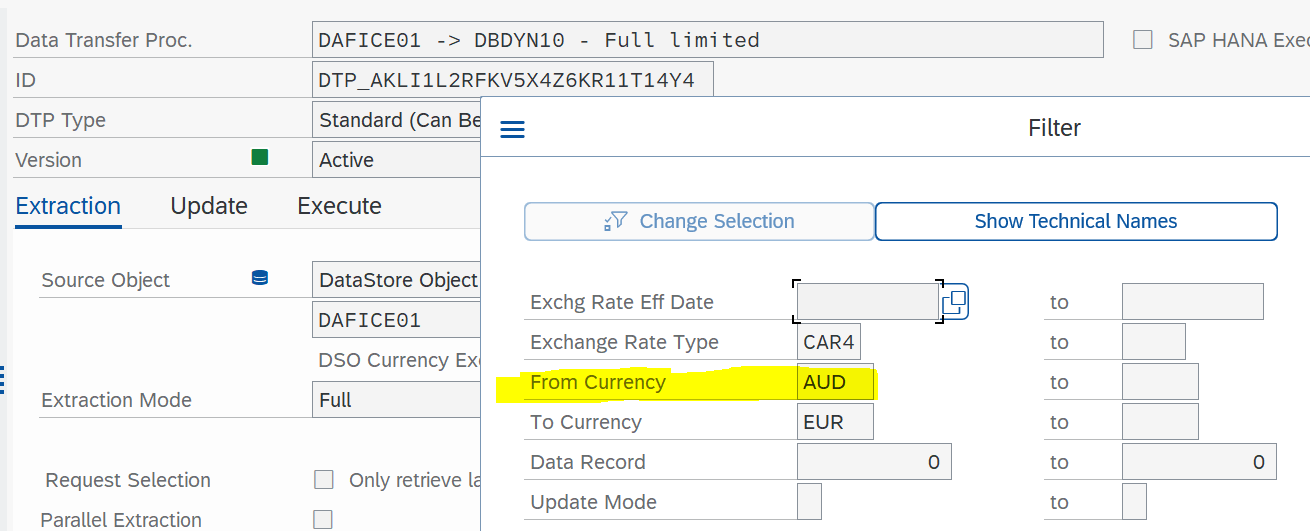
Step3) update interface flow
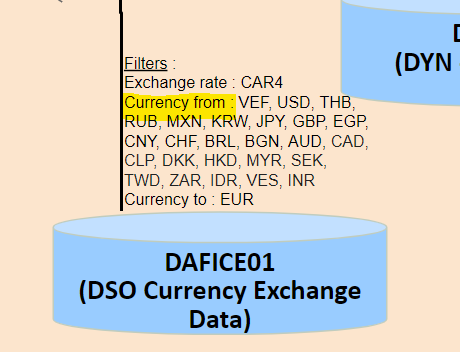
CAUTION : It is not possible to change Exchange Rate Type (KURST) or To-currency (TCURR) without impact on the loading flow, and file generation.
Adding/Changing a customer for Consignation Plant (C_PLNTCON) - ( will be Obsolete with EV00013 - mid-nov 2021)
Step1) Check the daily DynaSys chain (PC_DPS_DYNASYS_01) is finished via ST13
Step2) Update C_PLNTCON / Plant for Consignation (Receiving Plant from Delivery)
a) if few values have to be modified, use transaction RSD1, add or modify lines for C_PLNTCON / Plant for Consignation (Receiving Plant from Delivery)
In case of modification, do not forget to launch Change Log.
b) if several values, you can use update by flat file. Format is :
0LOGSYS; C_PLNTCON;C_PARTCUS;C_SHIPTOF
WP1_400;8063;2016260;57295
WP1_400;8039;2013950;57300
WP1_400;8171;2031655;57641
Step3) Delete whole contain of following DSOs
Reason : part of the loading is via DELTA mode
- DBDYN14 / DYN - MRP Element
Step4) Launch the Process Chain PC_DPS_DYNASYS_12 (around 3-4h).
Adding/Changing a material group exclusion for actuals files (C_GBLFILT).
On Solvay flow to DBDYN06 / DYN - Actual Prod we were facing many unit conversion issues even if material were Z700 type.
These materials were not relevant for DynaSys process, so we now exclude several Material Group.
The exclusion list can be enhanced or modified changing G_GLBFILT DPS/C_MAT_GRP
caution : it is mandatory to put 'SOLVAY' in high field. Value is checked in transformation
Steps after System landscape modification or refresh
When a system change name or mandant, when a new system is created, when a system is refreshed check variables in Global Filter (C_GLBFILT)
Variables managed for DPS :
CAUTION, these variables are still used in CM Aero reporting, Hana view CV_DY_LOGSYS, to risky to be changed
and APD_DPS_DYNASYS_0063 / Dynasys - P&L => to be changed in a futur evolution
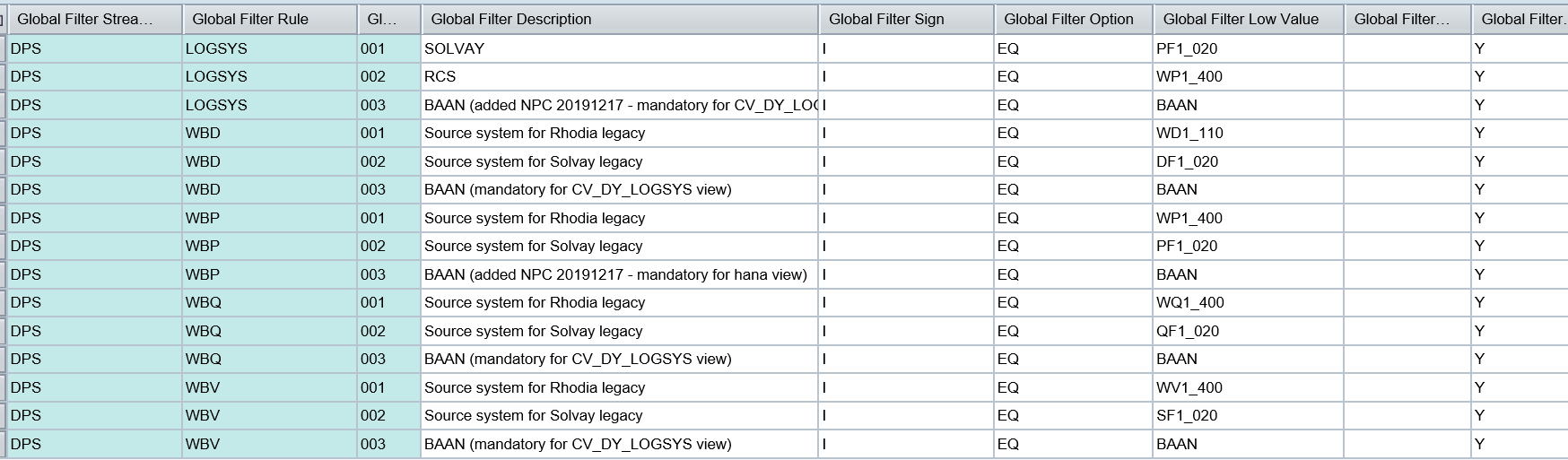
Common variables (used by DPS also) :

Adding a Material Type to DynaSys scope
CAUTION : all delta loading are impacted
Step1
- Get the list of Material from MARA table with the new Material Type to added
- Filter with this material list the VBAP table to get the associated Item Category
Step2) Check the daily DynaSys chain (PC_DPS_DYNASYS_01) is finished via ST13
Step3) Add a new line in Global Filter (C_GLBFILT) for Stream DPS / Rule MATL_TYPE
Please indicates in the description the date and user code to track changes
Step4) Delete whole contain of following DSOs:
Reason : part of the loading is via DELTA mode
- DPDYN21 / DYN - Sales Deliveries
- DPDYN22 / DYN - Sales Orders
- DBDYN14 / DYN - MRP Element
Step5) Launch the Process Chain PC_DPS_DYNASYS_12 (around 1h).
Adding an item category (Sales Documents) to DynaSys scope
CAUTION : all delta loading are impacted
Step1) Check the daily DynaSys chain (PC_DPS_DYNASYS_01) is finished via ST13
Step2) Add a new line in Global Filter (C_GLBFILT) for Stream DPS / Rule ITEM_CATEG
Please indicates in the description the date and user code to track changes
Step3) Delete whole contain of following DSOs:
Reason : part of the loading is via DELTA mode
- DPDYN21 / DYN - Sales Deliveries
- DPDYN22 / DYN - Sales Orders
- DBDYN14 / DYN - MRP Element
Step4) Launch the Process Chain PC_DPS_DYNASYS_12 (around 3-4h).
Ask to connect file transfert from WBQ to DynaSys Test
WBQ is NOT connected to DynaSys Test for file transfer as there is only one Webmethod Test for QUAL and PRE-PROD
If you temporarly need to change contact <support.xml@solvay.com>
Don't forget to ask them to put it back when you have finished with WBQ
Architecture DEV, QUAL, PRE-PROD, PROD |
WBD-> Webmethod Dev-> DynaSys Dev |
WBQ-> Webmethod Test -> DynaSys Test => not by default |
WBV-> Webmethod Test-> DynaSys Test |
WBP-> Webmethod Prod-> DynaSys Prod + Test (in_prod) |
For futur DynaSys deploiment: generation of files with enlarge scope
1) prepare a flat file to fill Global Filter masterdata
=> put date in description to easily identify new entries
View file name Global Filter for SPP.csv height 250
2) upload C_GLBFILT using flat file
3) hold transfert BW>DynaSys step in following chains
PC_DPS_DYNASYS_14 (PART1)

PC_DPS_DYNASYS_24 (Master Data)

PC_DPS_DYNASYS_25 (PART2)

4) Empty delta DSOs
- DPDYN21 / DYN - Sales Deliveries
- DPDYN22 / DYN - Sales Orders
- DBDYN14 / DYN - MRP Element
5) Run chains via SE37 using Function Module RSPC_CHAIN_START
PC_DPS_DYNASYS_01 (PART1+MASTERDATA)
PC_DPS_DYNASYS_25 (PART2)
6) Extract all files from /exploit/depart/dynasys/MASTER + PART1 + PART2
7) Remove or unactivate enlarge scope in global filter
8) Empty delta DSOs
- DPDYN21 / DYN - Sales Deliveries
- DPDYN22 / DYN - Sales Orders
- DBDYN14 / DYN - MRP Element
9) Run chain via SE37 using Function Module RSPC_CHAIN_START
PC_DPS_DYNASYS_12 to refill emptied DSOs
10) put back skipped processed on chains
PC_DPS_DYNASYS_14
PC_DPS_DYNASYS_24
PC_DPS_DYNASYS_25
GOOD JOB !!
Action after End of Year Structure Freeze
for more info about Structure Freeze => BW Master data Frozen period
1) make sure C_CDSA and 0G_CWWE01 and C_SUBACT2 have been fully loaded
2) make sure C_MATPNT2 and C_MATPNT3 have been fully reloaded, but after 1)
3) empty DSOs loaded in delta mode
- DPDYN21 / DYN - Sales Deliveries
- DPDYN22 / DYN - Sales Orders
- DBDYN14 / DYN - MRP Element
4) run Process Chain PC_DPS_DYNASYS_12
5) empty DSOs for BOM
- APPPBO01 / BOM Level Data (SLV)
- APPPBO02 / BOM Level Data (RCS)
- ABDPDY50 / DYN - BOM Level and Item Data
6) reload ABPPBO01 / BOM Level Data - Dynasys from Acquisition Layer ADSOs
7) reload ABDPDY50 / DYN - BOM Level and Item Data, and run program ZBW_DYN011 (DYN - DYS_BW_BOM.csv File) to generate DYS_BW_BOM.csv file
Consider NEW structure is fully available :
In BW => end of freeze + 2 days
In DynaSys => end of freeze + 4 days
When 1st of the month is a Saturday or a Sunday, action to perform for STOCKS
Context :
Stocks are not updated in BW during weekends and DynaSys chain PC_DPS_DYNASYS_01 is running generally before first stock upload (6.30 am).
So when 1st of the month is a Saturday or a Sunday, Stock files miss new month’s stock
Example
1st of May 2022 is a Sunday. Monday files will miss May’s stocks
(same behavior expected next Oct 2023 + July 2023 + Oct 2023)
Temporarily solution :
CASE1 : first of month is a SUNDAY : DiP Team has to inform GBU to wait Tuesday for EOM Stock update
=> weekly chain will be fine
=> daily chain has to be changed for Monday running : PART1 files generation PC_DPS_DYNASYS_14
| SKIP | File generation hold for |
|---|---|
| APD_DPS_DYNASYS_0056 | CSTOCK |
| APD_DPS_DYNASYS_0067 | VSTOCK |
| Prog ZBW_DYN012 | EOMCSTOCK |
| PC_DPS_DYNASYS_35 | BSTOCK, HSTOCK, RSTOCK, EOMSTOCK |
=> on Monday, remove SKIP
=> on Tuesday, DiP team has to manually load EOMSTOCK for Silica (which is updated only weekly on Sundays)
CASE2 : first of month is a SATURDAY : DiP Team has to inform GBU to wait Tuesday for stock update
=> Both weekly and daily chains have to be changed
weekly chain : PC_DPS_DYNASYS_18
daily chain will run on Monday : PC_DPS_DYNASYS_14 (included in PCH 01)
| SKIP | in PCH | File generation hold for |
|---|---|---|
| APD_DPS_DYNASYS_0056 | PCH 18 + 14 | CSTOCK |
| APD_DPS_DYNASYS_0067 | PCH 18 + 14 | VSTOCK |
| Prog ZBW_DYN012 | PCH 18 + 14 | EOMCSTOCK |
| PC_DPS_DYNASYS_35 | PCH 18 + 14 | BSTOCK, HSTOCK, RSTOCK, EOMSTOCK |
=> on Monday, remove SKIP
=> on Tuesday, DiP team has to manually load all STOCK for Silica (which is updated only weekly on Sundays)
Planned Evolution
Several minor evolution managed by the Dynasis project team.
Process chain planning : Take into account various dependences of DSO Source wich are out of DYnasys perimeter (Deliveries, sales order, Stock...)
See the New Dynasys dataflow to implement here.
Field C_PFCTR2 in master data C_MATPNT2
Originaly, there was a filter on field C_PFCTR2 in DTP linked to transformation between master data C_MATPNT2 and DSO DBDYN08 :
Filter value applied was OLAP variable V_0G_CWWE03_0001.
But the issue is that field C_PFCTR2 is not filled for source system PF1.
When we applied the filter, only data from source system WP1 was loaded in DSO DBDYN08.
To fix the issue, filter value was deleted and a start routine was added in transformation.
In this one, we read the master data C_MATPNT3 to keep C_PFCTR2 value with key Plant & Material.
If an evolution is done to fill C_PFCTR2 value for PF1 System in C_MATPNT2 master data, start routine could be deleted and filter value in DTP will be applied again.
Bundle of interface evolutions 06.2022 EV00044 :
EVOL_A: ZIP creation for interface transfer
A. Create a new ABAP Program in SE38 name: ZBW_ZIP_FILE
In order to reduce the volume of data transferred (zip = 20% of current volum), to reduce transferring duration, to secure reception of whole files inside PART1, PART2 or MASTER we want to work with zip files, 1 by directory PART1, PART2, MASTER.
To create a Zip File :
Go to transaction SE38 then program ZBW_ZIP_FILE
- Choose input: Source UNIX directory -> List of file a specific variable directory
- Choose output: Target UNIX directory + file -> One zip file upload in specific variable directory
- Execute: ZIP files from/to AL11


Go to transaction AL11 -> ZIP file is created

Result:

Same for: PART1 and PART2
B. Create variant
The variable names are :
ZIP_PART1_USR / ZIP_DYN_PART1
ZIP_PART2_USR / ZIP_DYN_PART2
ZIP_MASTER_USR / ZIP_DYN_MASTER
For display variant à go to transaction se38 and then program ZBW_ZIP_FILE

Choose variant : example ZIP_MASTER_USR

C. Data loading
5 PCs have been modified by adding a new step with the ABAP program ZBW_ZIP_FILE
PC_DPS_DYNASYS_24
PC_DPS_DYNASYS_05
PC_DPS_DYNASYS_14
PC_DPS_DYNASYS_18
PC_DPS_DYNASYS_25
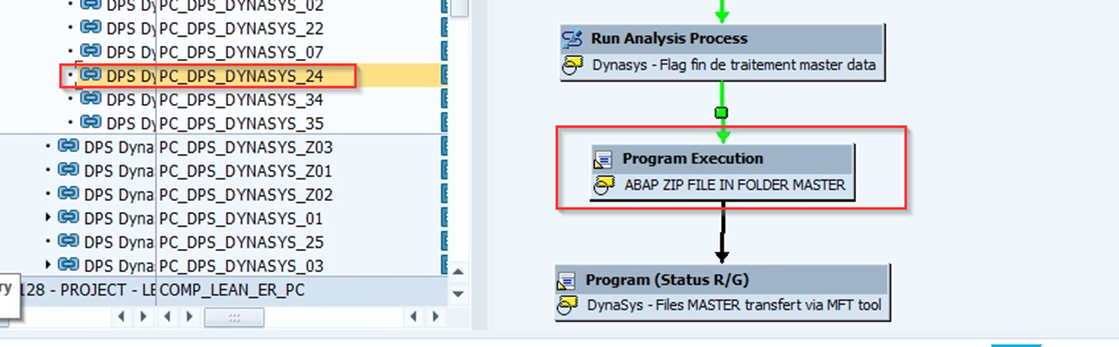
EVOL_B: FILE DYNS_BWSOLDOTO_DC.csv
A. Create a new flow
Creation of a new flow from ECC of the TVAST table to feed C_AUFSD
- Create view ZBW_TVAST and Datasource DTS_ ZBW_TVAST:
Go to transaction RSO2:

Display data: go to transaction RSA3 :

- Replicate in BW
- Create a new objet and flow to feed C_AUFSD


3. Add C_AUFSD to master data C_CUSTAL
B. Data loading
PC_DPS_DYNASYS_23 is modified and add 2 DTPs

C. Modify program ZBW_DYN026
Add a new colomn in DYS_BW_SOLDTO_DC.csv

...
- Daily (to be planned after Dynasys loading ex DBDYN33, DBDYN12, DBDYN02)
...
Not YET PLANNED
2 known issues :
- DTP DBDYN33 -> C_DYN_017 - Full => dupplicates on Ship-to 703581S / SDSOA
cause : the DC is not filled for all loadings (subject in progress Julien/Emmanuel)
solution : the DTP has to handle dupplicates (done only in WBP as solution is temporarly - DTP DBDYN12 -> C_DYN_018 - Full => dupplicated on Ship-to 66946R
cause: specific rule for plant 8000 is not applied for Ship-to with extension (subject in progress Julien/JC)
solution: in DSO DBDYN12 delete line with Ship-to 66946R / Plant 8000
...
- Daily at 5 am
...
Average performance
Most DSO & Cubes are loaded in full mode due to the low amount of data and/or calculation rules.
Exception:
- DPDYN21: 2,1 M lines loaded in delta mode
- DPDYN22: 2,2 M lines loaded in delta mode
Average duration (may 2016):
- Daily chain usually run for 25 to 45 minutes.
- Weekly chain usually run for 40 minutes to 1,5 hour
Remark: on going evolution will transfer most process in the weekly chain to the daily one (increasing duration of daily chain and decreasing weekly chain).
Historization
No data below 3 year before beginning of current year are kept. Ex: in Aprl 2016, only data greater than or equal to 01.01.2013 are loaded in Dynasys.
Reporting
Queries Documentation or user guide
No dedicated documentation on queries
Main queries
| Query | Description | Type | Role Menu | Comments |
|---|---|---|---|---|
| BW_QRY_MVDYN11_0005 | BW - DP - Forecast Accuracy (Core query) | QRY | DP - Demand Planning | Version 1. Version 2 is planned mid December 2016. |
| BW_QRY_MVDYN11_0002 | BW - DP - Forecast Accuracy (Core query) | QRY | Previous FA. query to be deleted | |
| BW_QRY_MVDYN11_0001 | QRY | Previous Demand Review => query to be deleted | ||
BW_QRY_MVDYN11_0006 | BW - DP - Demand Review (Core query) | QRY | DP - Demand Planning | Version 1 (some GBU affectation missing. DBDYN02 issue) Version 2 is planned end November 2016. |
Main functionnalities
n/a
Broadcast
n/a
Maintenance
Known bugs
Data loading in DSO DBDYN33
DSO DBDYN33 is loaded by 2 DTP in this order :
- DPDYN22 => DBDYN33 - Full with filter
- DBDYN18 => DBDYN33 - Full with filter

Sometimes an error appears with a dump when DTP DBDYN18 => DBDYN33 is launched.
In this case, to fix the issue, follow the steps bellow :
- Delete data in DSO DBDYN33
- Launch manually DTP "DPDYN22 => DBDYN33".
- Repeat the process chain step in error DTP " DBDYN18 => DBDYN33".
Customer Sales empty or inexact (C_CUSTSAL or 0CUST_SALES)
Due to loading routine in the propagation level of DPSDSO05 / DSO_SD02 which are loaded in delta mode, this field is not correctly updated
Customer Sales attributes empty or inexact (0CUST_SALES)
Modification on ZZ fields are not taken by the delta. Only full loading can fix this problem.
A specific extractor has been created based on KNVP table from WP1_400 in order to feed ZZ fields correctly.
This data loading is done everyday with the process chain ZPC_MD_ATTR_RCS.
After that we have to retreat data stored in DSO DPDYN22 to update ZI PArtner only if we have a modification. TO do that a new transformation have been created :
A new DTP have been created too, launching it ZI partner is reading into master data 0CUST_SALES and updated in DPDYN22.
This DTP is in daily and weekly Dynasys process chain :
- PC_DPS_DYNASYS_08
- PC_DPS_DYNASYS_12
Update of UD Connect datasource
Data loaded from Dynasys tool are using "UD connect" connection type (Java).
Datasource updated in Udconnect can encounter problem in WBQ / WBP due to Metadata cache (whereas everything is ok in WBD)
S:RSSDK:300 Field GHFF_QUANTITY is not a member of /BIC/CADTS_ EXP000010000001

Message no. RSSDK300
Ask Addagio team for a « cache clearance for quality / production system (BW) on this JCO connection”

This issue can also appear in WBD on an existing datasource, when a new field is added in the Dynasys table.
Ask adagio to clear the cache in all systems, otherwise you will get the issus when moving the datasource in WBQ/WBP
Recurring procedure
n/a
Planned Evolution
Several minor evolution managed by the Dynasis project team