

Assessment cycles
An assessment cycle is used in SAP to assign all primary cost elements and secondary cost elements from a sending cost center to the receiver cost center.When you want to transfer costs from one cost center to another costs from one cost center to another through an assessment cycle, sap use a secondary cost element and accumulates all the primary cost and secondary cost and send it to the receiving cost center.
In WP1 , assessment cycles are used to a llocate common production cost centers ( PPPP-2xxx ) to Workshops cost centers ( PPPP-1xxx )

COPA Assessment cycle
COPA Assessment cycle assesses costs from a Cost Center to COPA Value Fields.
Distribution cycle
A distribution cycle is used in SAP to transfer primary costs from a sender cost center to receiving controlling objects. The original cost element remains the same.
In PF1, distribution cycles are used for IAS 19

When you create a cycle to distribute corporate IAS19 costs in PF1, you must follow the following steps:
STEP 1
Create a distribution cycle with KSV1 - Create Actual Distribution Cycle
1. Cycle = CCCCDV
2. Start Date = 01.01.20YY to 31.12.20YY
3. Text = Distribution (IAS19)

STEP 2
Only one segment needs to be created
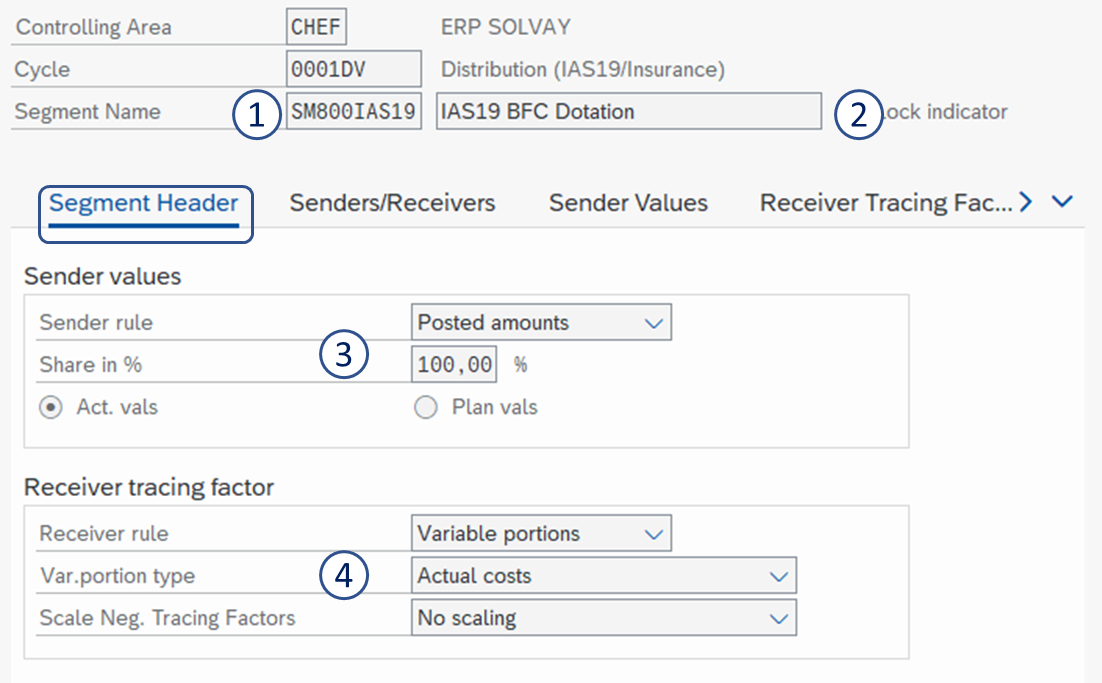
1. Segment name = EE800IAS19
2. Segment description = IAS 19 BFC Dotation
3. Sender values =
- Sender rule: Posted amounts
- Share in %: 100
- Act. vals
4. Receiver tracing factor
- Receiver rule: Variable portions
- Var.portion type: Actual costs
- Scale Neg. Tracing Factors: No scaling
5. Sender cost center = EE 800IAS19
6. Sender cost elements group = ZSO-P20010
7. Receiver cost centers group = E_CCCC (= all cost centers of the company)
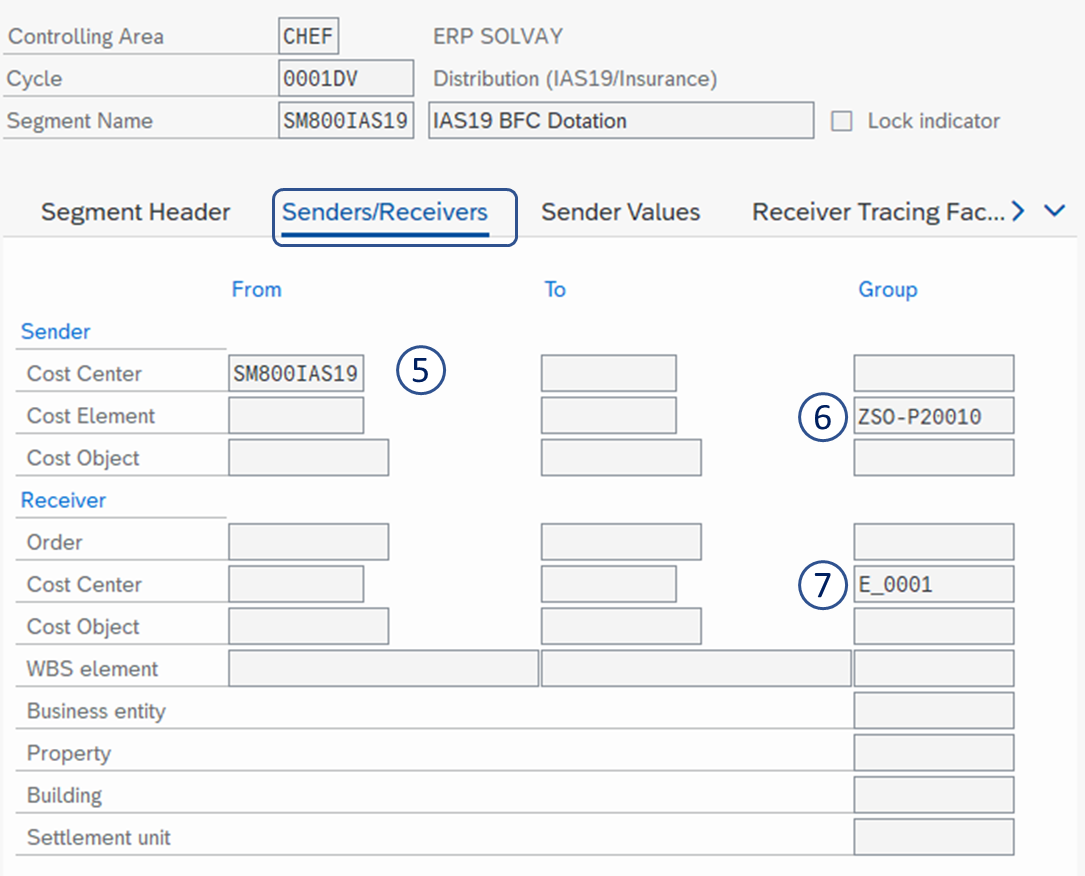
8. Cost Element Group = IASSERV
SAVE 

In PF1, distribution cycles are used for IAS 19
When you create a cycle to distribute corporate IAS19 costs in PF1, you must follow the following steps:
STEP 1
Create a distribution cycle with KSV1 - Create Actual Distribution Cycle
1. Cycle = CCCCDV
2. Start Date = 01.01.20YY to 31.12.20YY
3. Text = Distribution (IAS19)
STEP 2
Only one segment needs to be created
1. Segment name = EE800IAS19
2. Segment description = IAS 19 BFC Dotation
3. Sender values =
- Sender rule: Posted amounts
- Share in %: 100
- Act. vals
4. Receiver tracing factor
- Receiver rule: Variable portions
- Var.portion type: Actual costs
- Scale Neg. Tracing Factors: No scaling
5. Sender cost center = EE 800IAS19
6. Sender cost elements group = ZSO-P20010
7. Receiver cost centers group = E_CCCC (= all cost centers of the company)
8. Cost Element Group = IASSERV
SAVE