Attention!
Dear PSL contributor, you will not be able to create pages in the space for the foreseeable future due to the global documentation project, This action is being reserved to process experts, administrators and IS to ensure consistency and avoid duplication while the documents are under review.


In convergence, there are 2 available single sign-on implemented: OPEN-AM and SOLVAYGOOGLE
OPEN-AM is the official Solvay SSO. It s the SSO used in production.
SOLVAYGOOGLE is the convergence SSO used for Sandbox and UAT, this SSO is also used as backup SSO for production connection.
To switch between available SSO
Navigate to Setup > My Domain

Then you have to change the Authentication methods > Edit
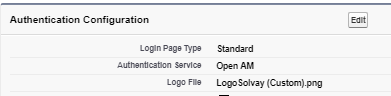

If you only select one of them, it's gonna be used by default when the user goes to URL: https://solvaysrm.lightning.force.com/
Else the options selected will be available and the user will have to select one before going into Convergence.
If you select: Login Form, user will have to enter Username and Password
The OPEN-AM sso managed by Revevol team.
To view the configuration of this SSO, navigate to Setup>Single Sign On

If there is a new certificate given by revevol, you'll have to upload it here.
The SOLVAYGOOGLE sso managed by the project team.
For this configuration, we use the authenticated provider from Salesforce. Google being one of them. The class used for the configuration of this provider is CVG_SSO

Overview
Content Tools
Tasks