Jira The Basics
Projects
A Jira Project represents a Syensqo IT initiative (for example: Pricing, customer Portal, Lab Booster, ERP Rebuild, etc.)
Projects is the module you will use the most.
Click on Projects > Click View all projects > Search and find the name of the IT initiative(s) you working on.
Note: Use the favorite Jira feature (Star icon) to mark your Jira Project(s) as your favorite so that it shows up as the first option(s) in the Projects menu.
If you are admin of your Jira project, you can modify the configuration of you project by clicking on  at the bottom of the left panel.
Before creating a Jira project, please MAKE SURE:
- It is associated to an IT initiative (a budget) validated by the Portfolio Team
- A Jira project represents a perimeter (program) of Project/Product/Initiative Lead with one or multiple initiative(s)
While creating a project, please MAKE SURE:
- Choose between two types of project templates:
- For Waterfall, Kanban project: pick a KANBAN template
- For Agile Scrum: pick the SCRUM template
- ALWAYS Select a company-managed project
- Start with an existing configuration by clicking

- If you chose KANBAN template: pick "IT E2E SC (IES)"
- If you chose SCRUM template: pick "Lab Booster"
Once create, make sure to go to the project settings to add the people in your team that needs to have access to the project.
Then you can create boards (section below).
Issue
Definition
In Jira, an issue is a generic term for any task, bug, story, epic, or work item that needs to be tracked and managed within a project. It represents a unit of work that a team needs to complete.
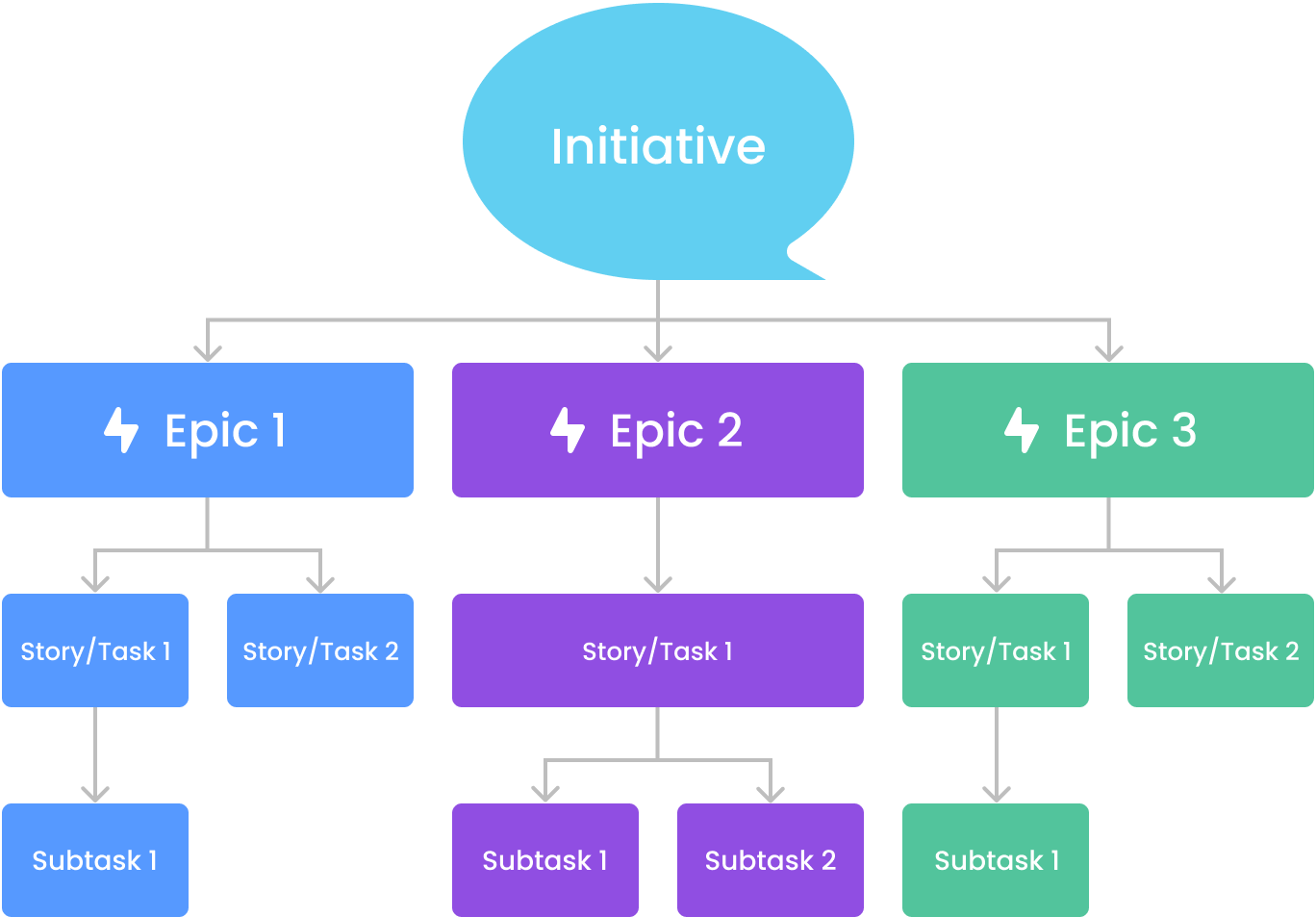
Below represents the hierarchy between the different type of issues.
| Hierarchy | Issue Type | Definition |
|---|---|---|
| #1 |
| IT Initiative (like the One-Pager) |
| #2 |
| In Jira, an Epic is a large body of work that is broken down into smaller, manageable issues such as stories, tasks, or bugs. |
| #3 |
| A bug is an issue that represents a defect, error, or unexpected behavior in the system. A spike is a research or exploration task used to gain knowledge or reduce uncertainty before implementing a feature. Spikes help teams make informed decisions about architecture, tools, or technical solutions. A Story in Jira represents a small, independent unit of work that delivers value to the user. It is written from the user's perspective and describes a feature, functionality, or improvement needed for the product. A task is a standard work item representing a piece of work that needs to be done but does not fall under a Bug or Story. Tasks are often used for technical work, operational activities, or general to-do items. |
| #4 |
| A Subtask is a smaller unit of work that breaks down a Story, Task, Bug, or Spike into more manageable pieces. It is used when a larger work item needs to be divided among multiple team members. |



You create Jira issues to track your team work within your project.
You can create these issues from:
- Within a column of your board or backlog (if you have the option) by clicking

- With this option you do not need to fill out the all the fields within the issue, only the title called the summary in Jira
- The top main menu by clicking the
 button
- Fill out the necessary fields to create the issue (Be careful fields marked with a red Asterix are mandatory)
- To create a subtask: within a story/task/bug, click the
 button and click
When you need more information about what to select or type in a Jira field, HOVER on the title of the field, the tooltip icon "i" will show up, HOVER on the "i" and you will see a description if any.
If there is no description please, contact Jira admins to ask or add/update description.
| Fields | Description |
|---|---|
| Summary | This is the title a Jira issue |
| Issue Types | 
|
| Parent | To link parent issue. The issue on top of the issue being created or edited. Example:
|
| Team | The team that will work on the issue |
| Start date | The start date of the issue |
| Due date | The due date of the issue |
Boards
A Jira Project can have one or multiple board(s).
An IT initiative can have multiple scopes/teams, then multiple boards.
A board encompasses a group of issues being worked on by one team.
The board(s) in a Jira project can be found at the top of the left panel.
Issues travel though multiple statuses from the first to the last column of the board.
If you are admin of your Jira project, you can configure your board by clicking the  at the top right corner of your screen.
Within your project:
- Click the selection field on the top of the left panel under "Planning" and click create a board
- Choose between a Scrum or a Kanban board
- Select "Board from an existing project" and choose the current project you are in
- Give it a name and save.
Once create go to the at the top right corner of your screen and click "Configure Board".
Go to columns to edit the columns of your board.
Plan (Timeline)
A Plan shows you the whole hierarchy of your issues in a Timeline format (Gantt Chart).
To access a Plan, click the  button in the top menu and pick an existing Plan.
Note: Use the favorite Jira feature (Star icon) to mark your Timeline(s) as your favorite so that it shows up as the first option(s) in the Plan menu.
Once you are in the selected Plan: you can either choose the Timeline (Gantt Chart) or the List view (selected fields): 
Search
In top right corner you can conduct a search though Jira to find specific issue(s) you are looking for,
Team
In the top menu you can create a team and add your team members.
You can select the team(s) in you initiative.