


| Status | Revision in Progress |
|---|---|
| Owner | Maytingsari Tjahjo |
| Stakeholders |
Purpose
The purpose of this document is to define the conversion approach to migrate asset master (main and sub asset) and group asset from legacy systems to the S/4HANA.
Group asset in SAP is utilized to meet certain tax requirements of some countries (e.g. India), which require depreciation calculation on a higher asset level than the individual asset level. The depreciation rate is applied to the group asset value rather than individual asset value. Group asset is almost like a normal asset with Group Asset indicator and only tax depreciation area assigned.
This document consists of links to other documents that support conversion process such as Master Data Standard for Asset master.
050 - Master Data Standard - ERP Rebuild Implementation - Google Drive
Asset master consists of information of Fixed Assets Register including:
- General information such as asset description name, asset class, account determination, capitalization date, etc.
- Time Dependent data – Assignment of related data by validity period (such as cost center, plant, location, etc)
- Depreciation terms data - Depreciation keys, useful life and depreciation areas
Conversion Scope
The scope of this document covers the approach for converting active main and sub asset and group assets from Legacy Source Systems (PF2 and WP2) into S/4HANA following the Fixed Asset MDS (Master Data Standard).
In Company code 5955 (India), there are 11 Group assets (These will be in scope for migration? TBC)
The data from legacy system includes:
- Main and sub asset with:
- Company codes and plants in scope
- Active asset (field "Deactivation date" is blank) or asset that are deactivated in current year (field "Deactivation date" is current year)
- Non-Asset under Construction.
- Group assets with:
- Company codes in scope
- Active asset (field "Deactivation date" is blank) or asset that are deactivated in current year (field "Deactivation date" is current year)
Fully depreciated asset will be in scope for migration as the asset register may be retained for insurance purposes or tax depreciation purposes.
Time dependent data in main and sub assets and group assets have specific validity period. Only the current validity period of the time dependent data will be migrated
All fixed asset master, inclusive of low value assets will be extracted, and relevancy rule applied as part of migration.
Relevancy rule:
- Main and sub assets with all rules to be met:
- Company code is in scope (Enterprise Structure Catalog - Google Sheets, worksheet "10. Company Code") AND
- Plant is in scope if not Blank AND
- Deactivation date is blank or current year AND
- Indicator Asset is a group asset (ANLA-XANLGR) is NOT “X” AND
- One of the 2 following criteria must be met:
- Posted with values in one of the depreciation areas OR
- Unposted in all depreciation areas and
- Appeared in the settlement rules of CAPEX Projects or
- Appeared in the account assignment category “A” in Open Purchase orders which are deemed relevant for migration
Group assets with all rules to be met:
- Company code is in scope (Enterprise Structure Catalog - Google Sheets, worksheet "10. Company Code") AND
- Deactivation date is blank or current year AND
- Indicator Asset is a group asset (ANLA-XANLGR) is set to “X”
The data from legacy system excludes:
- Assets under construction (AUC)
| Source | Scope | Source Approx No. of Records | Target System | Target Approx No. of Records |
|---|---|---|---|---|
PF2 & WP2 | Relevant fixed asset master records extracted from the source system and transformed according to the target data into a pre-load reports. | 261790 | S/4 HANA | 261790 |
There will be 3 SAP boxes:
a. CUI box (US, GB, DE)
b. China box
c. ROW (Rest of the World) box
Please refer to file "Enterprise Structure Catalog" to see which company codes belongs to which SAP boxes.
In terms of data migration, below is the guideline:
- Non CUI objects : Migration to US system by Syniti
- CUI objects : Manual cleansing/separate migration cockpit (Syniti is not certified)
Additional Information
Multi-language Requirement
It was decided to apply approach below:
- Field “Description Line1” (ANLA-TXT50) = Migrate as it is from legacy system to S/4HANA (The description could be any languages (not only the 4 core languages but also any other non-core languages)).
- Field “Description Line2” (ANLA-TXA50) = Migrate as it is from legacy system to S/4HANA (To be confirmed)
- Field "Asset main no.text" (ANLH-ANLHTXT) must be in English (To be confirmed)
In PF2 and WP2, the field "Description Line 2" is used to add information on the description of the asset when the Line 1 is not enough.
PF2:
Total active assets 140.092
- Desc Line 2 which is empty = 95.618
- Desc Line 2 which is not empty = 44.474
WP2:
Total active assets 142.669
- Desc Line 2 which is empty = 63.524
- Desc Line 2 which is not empty = 79.145
Therefore, to store the translation in English, instead of using Field "Description Line 2" (ANLA-TXA50), it's better to use field "Asset main no.text" (ANLH-ANLHTXT). To be confirmed by Functional Team.
Note: Currently the value of field "Description Line 1" and field "Asset main no. text" are majority the same but for some assets, they are different.
Document Management
N/A
Legal Requirement
N/A
Special Requirements
Target Design
The technical design of the target for this conversion approach.
| Table | Field | Data Element | Field Description | Data Type | Length | Requirement |
|---|---|---|---|---|---|---|
Data Cleansing
| ID | Criticality | Error Message/Report Description | Rule | Output | Source System |
|---|---|---|---|---|---|
Conversion Process
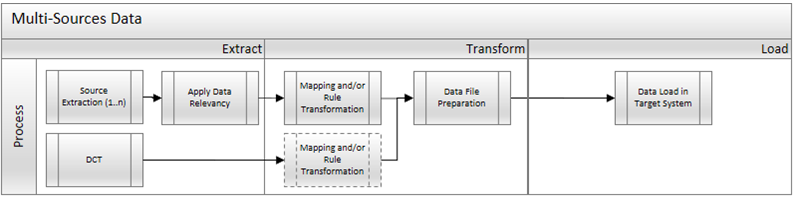
The high-level process is represented by the diagram below:
Process | Activity |
Extract | Extract involves collecting data from the source. If the source is a system, Extract means to pull the required data from source systems into repository using ADMM. There are 2 steps for this method: a. Perform full data extraction from relevant asset tables in the source system(s). b. Apply Relevancy criteria for filtering the data that will be applicable according to Target Design. |
Transform | There are 2 steps of Transform activities that can happen in ADMM: 1. Perform mapping and data transformation rules. Some data will need to be mapped to the to-be values and/or updated according to the rules as per design requirement in target system. 2. Prepare load-ready data in the structure and format that is required for loading via standard Load Tool. This step also produces the load data ready for business to perform Pre-load Data Validation. |
Load | This process includes: 1. Execute the automated data load into target system using load tool. Note: There may be some cases where the load is done manually as part of business activities. If there is any, the load steps will be specified in section "Load Run Sheet" 2. Once the data is loaded to target system, it will be extracted out and prepared for Post Load Data Validation. |
Delta Data Management
Any main assets created in the legacy systems (PF2 and WP2) after the full extraction for Mock conversion will be re-extracted again from legacy systems (PF2 and WP2) for each mock or cutover rehearsals.
As data cleansing is performed in PF2 and WP2 to meet SYWAY design standard, each extraction will re-transform extracted data with on-going new unmapped legacy values discovered and mapped.
The transformed fixed assets will be combined with any other assets maintained in the Fixed Asset DCT (Data Collection Template) into the pre-load file for validation.
Data Privacy and Sensitivity
Extraction
Extract data from a source into . There are 2 possibilities:
- The data exists. connects to the source and loads the data into . There are 3 methods:
- Perform full data extraction from relevant tables in the source system(s).
- Perform extraction through the application layer.
- Only if ; cannot connect to the source, data is loaded to the repository from the provided source system extract/report.
- The data does not exist (or cannot be converted from its current state). The data is manually collected by the business directly in . This is to be conducted using DCT (Data Collection Template) in
The agreed Relevancy criteria is applied to the extracted records to identify the records that are applicable for the Target loads
Extraction Run Sheet
| Req # | Requirement Description | Team Responsible |
|---|---|---|
1. | Extract all main assets from ANLA table in PF2 and WP2, | Data team |
2. | Apply Asset Relevancy criteria on the extracted records. | Data team |
3. | Extract Asset long text from STXH and STXL tables of asset master records in Req#2 in PF2 and WP2. | Data team |
4. | Extract time dependent data of asset master records in Req#2 above from ANLZ table in PF2 and WP2. | Data team |
5. | Extract depreciation terms data of the asset master in Req#2 from ANLB table in PF2 and WP2. | Data team |
Selection Screen
| Selection Ref Screen | Parameter Name | Selection Type | Requirement | Value to be entered/set |
|---|---|---|---|---|
| N/A | ||||
Data Collection Template (DCT)
Target Ready Data Collection Template will be created for data with exception of some fields which require transformation as mentioned in the transformation rule.
Data collection template will be made available for creation of lease plan assets (TBC).
DCT Rules
Fixed Asset Master – General Data/Time Dependent Data
| Field Name | Field Description | Rule |
|---|---|---|
ANLA-ANLKL | Asset Class | Must be valid in asset class configuration (table ANKA). Retrieve the asset class description in English from table ANKT. Please refer to file below for To-Be Asset Classes: SyWay_asset_classes&fields - Google Sheets |
ANLA-BUKRS | Company Code | Must be valid company code in company code configuration (table T001) |
ANLA-ANLN1 | Asset number | Generated by system |
ANLA-ANLN2 | Asset sub-number | |
ANLA-TXT50 | Description Line1 | Mandatory. Migrate as it is from legacy system to S/4HANA (The description could be not only the 4 core languages but also any other non-core languages) |
ANLA-TXA50 | Description Line2 | Mandatory. It must be in English |
ANLA-XLTXID | General long text | Must be X if long text content is populated (TBC) |
STXL-CLUSTD | Raw Data Long text | Field to populate long text content |
ANLA-SERNR | Serial number | it's used in SyWay |
ANLA-INVNR | Inventory Number | it's used in SyWay |
ANLA-MENGE | Quantity | Must be a number and equal or more than 1 |
ANLA-MEINGS | Base Unit of Measure | Must be populated if Quantity is populated |
ANLA-IVDAT | Last Inventory On | Must be in date format (Anil-For each mock, can this be defaulted to mock date?) |
ANLA-INKEN | Include asset in inventory list | Checkbox (Defaulted to “X”) |
ANLA-INVZU | Inventory Note | |
ANLA-AKTIV | Capitalization date | Must be in date format |
ANLZ-KOSTL | Cost Centre | Must be valid in cost center DCT |
ANLZ-WERKS | Plant | Must be valid in plant assigned to the company code configuration (Table T001K) |
ANLZ-STORT | Asset location | Must be valid Location (T499S-STAND) assigned to plant above in configuration (Table T499S) |
ANLZ-RAUMN | Room | |
ANLZ-KFZKZ | Licence Plate No. of Vehicle | TBC |
ANLZ-XSTIL | Shutdown indicator | Checkbox |
ANLA-ORD41 | Evaluation group 1 | Must be valid in Evaluation group 1 in configuration (Tables T087) and Text (Table T087T) |
ANLA-ANLUE | Asset Super Number | |
ANLA-AIBN1 | Original asset | If not blank, must be a valid combination of legacy company code and Asset no. in legacy system. |
ANLA-AIBN2 | Original sub asset | Original Asset and Original Sub-asset must be unique within the DCT |
ANLA-AIBDT | Original Acquisition Date of AuC/ Transferred Asset | Valid date format |
ANLA-URJHR | Fiscal Year of Original Acquisition | Numeric value |
ANLA-URWRT | Original Acquisition Value | Numeric value |
ANLA-POSNR | WBS Element Investment Project | Must be valid in WBS element DCT |
ANLA-? | Equipment | There won't be any synchronization switched on between Fixed Assets and Equipments or the other way around. There would be a soft link between equipments and Fixed Assets where the equipment should store the asset ID for plant assets. There won't be a link from Fixed Assets to the equipment hence this has been descoped. |
Fixed Asset Master – Depreciation Terms
| Field Name | Field Description | Rule |
|---|---|---|
ANLB-AFABE | Depreciation area | Pre-populate from Asset class configuration |
ANLB-AFASL | Depreciation keys | Pre-populate from Asset class configuration Must be valid Depreciation key in configuration table by chart of depreciation. |
ANLB-NDJAR | Useful life | Numeric value less than 999 |
ANLB-NDPER | Useful life in Period | Numeric value (1-12) |
ANLB-AFABG | Ord.dep.start date | Valid date format |
ANLB-SCHRW_PROZ | Scrap Value % | Numeric value less than 100 |
ANLB-ANLGR | Group asset | If populated, must be valid Group Asset. |
Extraction Dependencies
| Item # | Step Description | Team Responsible |
|---|---|---|
| 1. | Data cleansing of legacy main assets in the source system to adhere to target design is completed. | Business |
| 2. | Data cleansing of legacy assets where assets that are no longer physically exist will be assessed for retirement is accomplished | Business |
Transformation
The Target fields are mapped to the applicable Legacy field that will be its source, this is a 3-way activity involving the Business, Functional team and Data team. This identifies the transformation activity required to allow to make the data Target ready:
- Perform value mapping and data transformation rules.
- Legacy values are mapped to the to-be values (this could include a default value)
- Values are transformed according to the rules defined in
- Prepare target-ready data in the structure and format that is required for loading via prescribed Load Tool. This step also produces the load data ready for business to perform Pre-load Data Validation
Transformation Run Sheet
| Item # | Step Description | Team Responsible |
|---|---|---|
1. | Ensure all the fields that require value mapping, as stipulated in Section "Mapping tables", have the latest signed-off mapping files imported into Syniti Migrate. | Data team |
2. | Go to Process Area Launch and Process the Object – Fixed Asset | Data team |
3. | Launch the Objects to execute transformation. | Data team |
4. | Perform transformation for Group Assets and Main Assets extracted from PF2 and WP2 where target values will be derived from mapping tables. | Data team |
5. | Combine the transformed data of extracted main-asset (section "Extraction run sheet") and lease plan main assets populated in DCT (section "Data Collection Template") | Data team |
6. | Generate Pre-Load reports in Syniti Migrate. | Data team |
7. | Generate data load count in Syniti Migrate. | Data team |
8. | Log errors as defects, if any and address resolutions. Close defects. | Data team |
9. | Re-transform and re-validate the Pre-load reports if necessary. | Data team |
10. | Validate the transformed file as part of pre-load validation, raise data defects or provide the pre-load sign-off. | Business |
11. | Analyse and resolve any pre-load defects logged by business. | Data team |
12. | Repeat steps 5 to 10 if necessary | Data team |
Transformation Rules
List of all fields in the Target table field to be populated with values according to the Fixed Asset Master Data Standard to facilitate loading into target system.
| Rule # | Source system | Source Table | Source Field | Source Description | Target System | Target Table | Target Field | Target Description | Transformation Logic |
|---|---|---|---|---|---|---|---|---|---|
1. | PF2 and WP2 | ANLA-BUKRS | Company Code | S/4HANA | ANLA-BUKRS | Company Code | Map from source to target by using company code mapping table | ||
2. | PF2 and WP2 | ANLA-ANLKL | Asset Class | S/4HANA | ANLA-ANLKL | Asset Class | Map from source to target via Asset Class mapping table | ||
3. | PF2 and WP2 | ANLA-ANLN1 | Asset number | S/4HANA | ANLA-ANLN1 | Asset number | System generated number | ||
4. | PF2 and WP2 | ANLA-ANLN2 | Asset sub-number | S/4HANA | ANLA-ANLN2 | Asset sub-number | |||
5. | PF2 and WP2 | ANLA-TXT50 | Description 1 | S/4HANA | ANLA-TXT50 | Description 1 | Copy value from source to target system | ||
6. | PF2 and WP2 | ANLA-TXA50 | Description 2 | S/4HANA | ANLA-TXA50 | Description 2 | Copy value from source to target system. | ||
7. | PF2 and WP2 | STXH-SPRAS | Language Key for Asset Long text | S/4HANA | STXH-SPRAS | Language Key for Asset Long text | Target Language Key as per Logon language. | ||
8. | PF2 and WP2 | ANLA-XLTXID | General long text | S/4HANA | ANLA-XLTXID | General long text | Copy value from source to target system. | ||
9. | PF2 and WP2 | ANLA-SERNR | Serial number | S/4HANA | ANLA-SERNR | Serial number | Copy value from source to target system. | ||
10. | PF2 and WP2 | ANLA-MENGE | Quantity | S/4HANA | ANLA-MENGE | Quantity | Copy value from source to target system. | ||
11. | PF2 and WP2 | ANLA-MEINS | Base unit of measure | S/4HANA | ANLA-MEINS | Base unit of measure | Copy value from source to target system. | ||
12. | DCT or PF2 and WP2? | ANLA-INVNR | Inventory Number | S/4HANA | ANLA-INVNR | Inventory Number | |||
13. | PF2 and WP2 | ANLA-XHIST | Manage historically | S/4HANA | ANLA-XHIST | Manage historically | Default “X” for all assets. | ||
14. | PF2 and WP2 | ANLA-IVDAT | Last Inventory On | S/4HANA | ANLA-IVDAT | Last Inventory On | |||
15. | PF2 and WP2 | ANLA-INKEN | Include asset in inventory list | S/4HANA | ANLA-INKEN | Include asset in inventory list | Extract indicator (INKEN) from table ANKA in target system based on target asset class (ANLKL). | ||
16. | DCT or PF2 and WP2? | ANLA-INVZU | Inventory Note | S/4HANA | ANLA-INVZU | Inventory Note | Copy values from source to target system if maintained in DCT. | ||
17. | PF2 and WP2 | ANLA-AKTIV | Capitalization date | S/4HANA | ANLA-AKTIV | Capitalization date | Copy values from source to target system. | ||
18. | PF2 and WP2 | ANLA-ZUPER | First Acquisition Date | S/4HANA | ANLA-ZUPER | First Acquisition Date | First Acquisition Date – This will be defaulted with Capitalization date. | ||
19. | PF2 and WP2 | ANLA-DEAKT | Deactivation Date | S/4HANA | ANLA-DEAKT | Deactivation Date | Leave as Blank. | ||
20. | PF2 and WP2 | ANLZ-KOSTL | Cost Centre | S/4HANA | ANLZ-KOSTL | Cost Centre | Map from source (latest validity date) to target via Cost Centre mapping table. | ||
21. | PF2 and WP2 | ANLZ-WERKS | Plant | S/4HANA | ANLZ-WERKS | Plant | Map from source (latest validity date) to target via Plant mapping table. | ||
22. | PF2 and WP2 | ANLZ-STORT | Asset location | S/4HANA | ANLZ-STORT | Asset location | Map from source (latest validity date) to target via Location mapping table. | ||
23. | PF2 and WP2 | ANLZ-RAUMN | Room | S/4HANA | ANLZ-RAUMN | Room | Copy value from source (latest validity date) to target system. | ||
24. | PF2 and WP2 | ANLZ-KFZKZ | License Plate No. of Vehicle | S/4HANA | ANLZ-KFZKZ | License Plate No. of Vehicle | Copy value from source to target system. | ||
25. | PF2 and WP2 | ANLZ-XSTIL | Shutdown indicator | S/4HANA | ANLZ-XSTIL | Shutdown indicator | Copy value from source (latest validity date) to target system. | ||
26. | PF2 and WP2 | ANLA-ORD41 | Evaluation group 1 | S/4HANA | ANLA-ORD41 | Evaluation group 1 | Map from source (asset class) to target system via Evaluation Group 1 mapping table | ||
| PF2 and WP2 | ANLA-ORD42 | Evaluation group 2 | S/4HANA | ANLA-ORD42 | Evaluation group 2 | Map from source (asset class) to target system via Evaluation Group 2 mapping table | |||
| PF2 and WP2 | ANLA-ORD42 | Evaluation group 3 | S/4HANA | ANLA-ORD43 | Evaluation group 3 | Map from source (asset class) to target system via Evaluation Group 3 mapping table | ||
| PF2 and WP2 | ANLA-ORD44 | Evaluation group 4 | S/4HANA | ANLA-ORD44 | Evaluation group 4 | Map from source (asset class) to target system via Evaluation Group 4 mapping table | ||
27. | PF2 and WP2 | ANLA-ANLUE | Asset Super Number | S/4HANA | ANLA-ANLUE | Asset Super Number | |||
28. | PF2 and WP2 | ANLA-ANLN1 | Asset Number | S/4HANA | ANLA-AIBN1
| Original asset number or Original Group Asset number | |||
29. | PF2 and WP2 | ANLA-ANLN2 | Asset Sub-Number | S/4HANA | ANLA-AIBN2 | Original Sub-Asset | Original Asset sub-number – Populate this field with the legacy PF2 and WP2 Asset sub-number.
| ||
30. | PF2 and WP2 | ANLA-AIBDT | Original Acquisition Date of AuC/ Transferred Asset | S/4HANA | ANLA-AIBDT | Original Acquisition Date of AuC/ Transferred Asset | Copy value from source to target system. | ||
31. | PF2 and WP2 | ANLA-URJHR | Fiscal Year of Original Acquisition | S/4HANA | ANLA-URJHR | Fiscal Year of Original Acquisition | Copy value from source to target system. | ||
32. | PF2 and WP2 | ANLA-URWRT | Original Acquisition Value | S/4HANA | ANLA-URWRT | Original Acquisition Value | Copy value from source to target system. | ||
33. | DCT | ANLA-POSNR | WBS element | S/4HANA | ANLA-POSNR | WBS element | Copy values from source to target system (Lease asset class). | ||
34. | PF2 and WP2 | ANLB-AFABE | Depreciation area | S/4HANA | ANLB-AFABE | Depreciation area | Map from source to target via Depreciation area mapping table. | ||
35. | PF2 and WP2 | ANLB-AFASL | Depreciation Key | S/4HANA | ANLB-AFASL | Depreciation Key | Map from source to target via Depreciation Key mapping table. | ||
36. | PF2 and WP2 | ANLB- NDJAR | Useful Life | S/4HANA | ANLB- NDJAR | Useful Life | Useful life (Years) defaulted from the new asset class will be overwritten with the useful life from legacy system. | ||
37. | PF2 and WP2 | ANLB- NDPER | Useful Life (Period) | S/4HANA | ANLB- NDPER | Useful Life (Period) | Useful life (Period) defaulted from the new asset class will be overwritten with the useful life from legacy system. | ||
38. | PF2 and WP2 | ANLB- AFABG | Depreciation Start date | S/4HANA | ANLB- AFABG | Depreciation Start date | Depreciation start date defaulted from the Capitalization start date will be overwritten with depreciation start date from legacy system. | ||
39. | PF2 and WP2 | ANLB-SCHRW_PROZ | Scrap value % | S/4HANA | ANLB-SCHRW_PROZ | Scrap value % | Copy value from source to target system. | ||
40. | PF2 and WP2 | ANLB-ANLGR | Group asset | S/4HANA | ANLB- ANLGR | Group asset | Map from source to target via Group asset mapping table. | ||
41. | PF2 and WP2 | ANLB-INBDA | Operating Readiness | S/4HANA | ANLB- INBDA | Operating Readiness | Copy value from source to target system. |
Transformation Mapping
List of mapping tables where the legacy values will have to SyWay values.
| Mapping Table Name | Mapping Table Description |
|---|---|
Company code | Mapping of legacy company code to SyWay company code |
Asset Class | Mapping of legacy asset Class to SyWay asset class List of SyWay Asset Classes to be is stored in link below: |
Cost center | Mapping of legacy cost centre to SyWay cost centre |
Internal Order | N/A. PF2 and WP2 do not use field Internal Order (ANLX-CAUFN) |
Plant | Mapping of legacy plant code to SyWay plant code |
Location | Mapping of legacy location to SyWay location |
Room | Mapping of legacy room to SyWay room |
Evaluation group 1 (EG1) | Mapping of legacy EG1 to SyWay EG1 |
Evaluation group 2 (EG2) | Mapping of legacy EG2 to SyWay EG2 |
Evaluation group 3 (EG3) | Mapping of legacy EG3 to SyWay EG3 |
Evaluation group 4 (EG4) | Mapping of legacy EG4 to SyWay EG4 |
Evaluation group 5 (EG5) | Mapping of legacy EG5 to SyWay EG5 |
Investment Reason | Mapping of legacy investment reason codes to SyWay investment reason codes |
Asset Super Number | Mapping of legacy asset super number to SyWay asset super number |
| Classification Key | Mapping of legacy classification key to SyWay classification key |
Insurance Type | Mapping of legacy insurance type to SyWay insurance type |
Depreciation area | Mapping of legacy depreciation areas to SyWay depreciation areas |
Depreciation key | Mapping of legacy depreciation key to SyWay depreciation key |
Group Assets | Mapping of legacy group asset to SyWay group asset (for India company code only) |
Transformation Dependencies
List the steps that need to occur before transformation can commence| Item # | Step Description | Team Responsible |
|---|---|---|
1. | Ensure all the fields that require value mapping, as stipulated in Section "Mapping tables", have the correct values mapped and imported into ADMM. | Data team |
Pre-Load Validation
Project Team
Completeness
| Task | Action |
|---|---|
Generation of Pre-load reports | Pre-load reports will have same structure as of load file with additional columns/attributes if required by business to facilitate validations. Main Assets: There will be 3 Pre-load reports generated: 1. Asset Master Main data (General, Time-dependent, Allocations) 2. Asset Depreciation terms data (Depreciation areas, Useful life by Depreciation area and Depreciation Keys) 3. Asset Long Text (if any asset has relevant long text to be migrated) in logon languages |
Reconciliation of record count | Main Assets Total number of main Assets in the extract is compared against total number of main assets in the legacy system. Less: 1. All main assets under companies and plant or cost centre NOT in Scope. 2. Total number of AUCs in the legacy system. 3. Non-Relevant records (Deactivated Main Assets, Main assets dropped via Relevancy criteria -refer section 2 Conversion Scope). 4. Other constraints/errors. Add: New main assets populated in DCT Total Number of Records to load: 1. Asset Master Main data : 2. Asset Depreciation terms data: Total number of records for Main assets multiply by the number of depreciation areas defined in the Chart of Depreciation. |
Compliance check | ??? |
Accuracy
| Task | Action |
|---|---|
Mandatory field mapping and transformation
| Obtain a list of the fields to be populated with values from mapping files (Refer to section "Mapping tables") and ensure all these fields contain S/4HANA values. Review the data report to ensure mapping value is not missing in ADMM. Capture errors in the Data Error report. |
Business
Completeness
| Task | Action |
|---|---|
Verify record count in Pre-load reports by region
| In legacy system, execute Asset Balances report (S_ALR_87011963 – Asset Balances - by Asset Number) and ensure “Current book value” is selected to obtain a list of active posted assets to be migrated for the companies in scope for each region. Compare the count in this report and assets populated in DCT against the count of main assets to be loaded in Pre-load. |
Verify Relevancy rules applied
| In Legacy system, execute Unposted Asset report (S_ALR_87012056 - Directory of Unposted Assets) to retrieve the list of unposted assets with deactivation date = Blank. These assets should not appear in the Pre-load report. Leverage the List of Unposted Assets relevant for migration in ADMM for any unposted asset flagged as relevant for migration as the asset fulfils the Relevancy criteria. (Section "Conversion Scope"). |
Accuracy
| Task | Action |
|---|---|
Conversion accuracy | Verify all main assets are transformed accurately as per endorsed transformation/mapping rules. Review List of Error reports in ADMM for any mismatch or missing transformed values. |
Load
The load process includes:
- Execute the automated data load into target system using load tool or product the load file if the load must be done manually
- Once the data is loaded to the target system, it will be extracted and prepared for Post Load Data Validation
Load Run Sheet
| Item # | Step Description | Team Responsible |
|---|---|---|
1. | Ensure the load tools are transported into the correct ADMM instance. | Data team |
2. | Ensure Pre-load sign-offs are obtained. | Data team |
3. | Load main assets with capitalization date. | |
4. | Load main assets without any capitalization date as it requires a separate load tool. | |
5. | Import the main asset numbers created in S/4HANA and use the original asset number and sub-number =’0’ to link the general long text in the load files to the correct asset number in S/4 HANA. | Data team |
6. | Load asset Long text using main asset number in S/4HANA. | Data team |
7. | Load asset Super number using main asset number in S/4HANA | Data team |
8. | Generate the post load reports in ADMM. | Data team |
9. | Log errors as defects, if any and address resolutions. Close defects. | Data team |
10. | Resolve defects via data update or upload and re-generate post load reports if necessary. | Data team |
11. | Business to validate the post load files as part of post-load validation, raise data defects or provide the post-load sign-off. | Data team |
12. | Repeat steps 8 to 10 if necessary. | Data team |
Load Phase and Dependencies
Pre Cutover is the phase as to when the load for this object will occur.
Configuration
| Item # | Configuration Item |
|---|---|
1. | Company code-related configuration (Chart of Depreciation per country, Plant, Location, Asset Class, Depreciation areas, Depreciation keys, Asset Number Range Interval). |
2.
| Asset Data Transfer Configuration · Transfer date – Last day of the month prior to go-live · Legacy Data Transfer Status = In Preparation · Document type – “UE” |
Conversion Objects
| Object # | Preceding Object Conversion Approach |
|---|---|
| list the exact title of the conversion object of only the immediate predecessor – this will then confirm the DDD (Data Dependency Diagram) | |
| 1074 | Cost Centre Master |
Error Handling
| Error Type | Error Description | Action Taken |
|---|---|---|
Configuration | Revaluation values in Depreciation area XX is not allowed. | Engage functional team to expedite and fix the error in the system by allowing Revaluations (Acquisition/Ord.Depreciation) to be posted to the impacted depreciation area/chart of depreciation in transaction code OADB |
Invalid Data | Relevant cost centre is not valid in the validity of time dependent data in the Asset master to be loaded. | Check whether the validity of time dependent data in cost centre needs to be changed. |
Post-Load Validation
Project Team
Completeness
| Task | Action |
|---|---|
Reconciliation of Total Record Count | Total number of records loaded for (Main Assets, Depreciation terms) will be generated in the Post-load reports in ADMM. Main Assets Total no. of Main assets in the Post Load report is compared against total number of main assets in the pre-load reports by region. Less: Any errors during load. |
Mandatory fields check | Review the post load file and note the records that failed the mandatory fields check. Below are the mandatory fields: · Asset Class · Company Code · Description · Serial Number (for assets of certain classes) TBC · Cost Centre · Plant Depreciation terms · Depreciation Key · Useful Life Year (except for keys *000) and Period (except for keys *0000) · Ordinary Depreciation Start Date |
Accuracy
| Task | Action |
|---|---|
Check values in key fields for accuracy | Post-load reports will have the same structure as the load file and some additional columns as required to facilitate the post load validation. Leverage on ADMM to create a Post load report that reports S/4 HANA loaded records along with the legacy values side-by-side to allow for 100% check of all these fields in the shortest possible time. Main Assets: There will be 3 post load reports generated in ADMM for key fields comparison: 1. Asset Master data (General, Time-dependent, Allocations) 2. Asset Depreciation terms data (Depreciation areas, Useful life and Depreciation Keys by Depreciation area) 3. Asset Long Text (if any asset has relevant long text to be migrated) in logon languages Any mismatch will be reported under the Post Load – Error report. |
Business
Completeness
| Task | Action |
|---|---|
Record Count Check | Review the record count report from the Data Team and ensure it is correct by cross-checking with the record count confirmed during Pre-load Business Validations. |
Accuracy
| Task | Action |
|---|---|
Check accuracy of field values | Based on the field checks report from the Data Team, conduct a sample check to prove accuracy of the values in S/4 HANA against the source (Pre-load report or PF2 and WP2 system). Suggested sample size is 1 per company code, per asset class. |
Key Assumptions
- Master Data Standard is up to date as on the date of documenting this conversion approach and data load.
- Fixed Asset is in scope based on data design and any exception requested by business.
- Asset Master cleansing task is completed.
- All assets flagged for deletion must be deactivated (i.e. populate the deactivation date field).
See also
Change log
Workflow history
| Title | Last Updated By | Updated | Status | |
|---|---|---|---|---|
| There are no pages at the moment. | ||||