


| Status | Revision in Progress |
|---|---|
| Owner | |
| Stakeholders |
Purpose
The purpose of this document is to define the conversion approach to create Maintenance Strategy in S/4 HANA.
Legacy Plant Maintenance Maintenance Strategy is using a diverse range of formats across the different systems. There are instances where the same Maintenance Strategy is duplicated within and across sources, with informal words. This results in data inconsistency. As per SyWay design, Maintenance Strategy will be standardized.
The complete information of the key fields that hold the Task List information follows DD-FUN-050 Master Data Standard_1017-Maintenance Strategy.xlsx
Conversion Scope
The scope of this document covers the approach for converting active Maintenance Strategy from Legacy Source Systems into S/4HANA following the Maintenance Strategy Master Data Design Standard.
A Maintenance Strategy in SAP defines how and when maintenance tasks should be performed. It’s a core concept in SAP Plant Maintenance (PM) that helps organizations plan preventive maintenance activities efficiently.
No data from legacy system will be migrated and all new strategies will be constructed using DCT.
Types of strategy (defined by the first 2 characters of the strategy):
01 - Time-Based Strategy
-Description:
Used for assets that require preventive maintenance at fixed time intervals.
-Application:
Maintenance cycles defined in days, weeks, months, or years.
-Example:
Lubrication every 3 months, inspection every 12 months.
02 - Performance-Based Strategy
-Description:
Used for assets that require preventive maintenance based on operational usage or performance.
-Application:
Maintenance cycles defined in measured units such as operating hours, kilometres, or production counts.
-Example:
Preventive maintenance every 2,000 operating hours.
03 - Corrective Strategy
-Description:
Used to manage corrective or run-to-failure maintenance and to differentiate task lists created for repeated corrective activities.
-Application:
This strategy contains a dummy package (not assigned in task lists) and acts as a placeholder to enable reuse of corrective task lists.
-Example:
Standard repair procedures applied upon failure.
04 - Turnaround/Shutdown Strategy
-Description:
Used for assets undergoing maintenance during planned turnarounds or shutdowns.
-Application:
Defines repetitive and pre-planned maintenance work that occurs during turnaround/shutdown periods.
-Example:
Boiler overhaul during annual plant shutdown.
List of source systems and approximate number of records
| Source | Scope | Source Approx No. of Records | Target System | Target Approx No. of Records |
|---|---|---|---|---|
DCT | All Maintenance Strategy will be constructed using DCT | 400 | S/4HANA | 400 |
Additional Information
Multi-language Requirement
Maintenance Strategy description will be made available in English.
Multi language is supported for Maintenance Strategy. Login via a different language will have its description displayed in the logon language if the language key is maintained in the Maintenance Strategy.
Document Management
Not Applicable
Legal Requirement
Not Applicable
Special Requirements
Not Applicable
Target Design
The technical design of the target for this conversion approach.
| Table | Field | Data Element | Field Description | Data Type | Length | Requirement |
|---|---|---|---|---|---|---|
| T351 | STRAT | STRAT | Maintenance Strategy | CHAR | 6 | Mandatory |
| T351T | KTEXT | TXWSTRA | Description of maintenance strategy | CHAR | 30 | Mandatory |
| T351 | ZEIEH | DZEIEH | Unit for the performance of maintenance tasks | UNIT | 3 | Mandatory |
| T351 | TOLE1 | TOLERPLUS | Tolerance for Late Completion (%) | NUMC | 3 | Conditional |
| T351 | TOLE2 | TOLERNEG | Tolerance for Early Completion (%) | NUMC | 3 | Conditional |
| T351 | VERS1 | VERSCHPLUS | Shift Factor for Late Completion | NUMC | 3 | Conditional |
| T351 | VERS2 | VERSCHNEG | Shift Factor for Early Completion | NUMC | 3 | Conditional |
| T351 | TERMK | TERMKNZ | Scheduling indicator | CHAR | 1 | Mandatory |
| T351 | HORIZ | HORIZONT | Call horizon for maintenance plan calls | NUMC | 3 | Conditional |
| T351 | HORIZ_QUALIFIER | EAM_CC_CALLHORIZON_QUALIFIER | Calculation Type of Call Horizon | CHAR | 1 | Conditional |
| T351 | FABKL | FABKL | Factory calendar key | CHAR | 2 | NU |
| T351 | AUTHGR | EAM_AUTH_GROUP | Authorization Group | CHAR | 4 | NU |
| T351P | ZAEHL | PAKETZAEHL | Maintenance Package Number | NUMC | 2 | Mandatory |
| T351P | ZEIEH | DZEIEH | Unit for the performance of maintenance tasks | UNIT | 3 | Mandatory |
| T351P | OFFZT | DZYK_OFFZT | Start offset of a time-based maintenance package | FLTP | 16(16) | Conditional |
| T351P | OFFLS | DZYK_OFFLS | Start offset of a performance-based maintenance package | FLTP | 16(16) | NU |
| T351X | PUFFP | PUFF_VORL | Lead Float in Days | NUMC | 3 | NU |
| T351X | PUFFN | PUFF_NACHL | Follow-up float in days | NUMC | 3 | NU |
| T351X | KTEX1 | TXZYKLUS | Text for maintenance package/cycle (time/performance) | CHAR | 30 | Mandatory |
| T351X | KZYK1 | KTEXTZYK | Short text for the maintenance cycle (time/performance) | CHAR | 2 | Mandatory |
| T351X | KTXHI | KTEXTHIER | Short text of the maintenance package hierarchy | CHAR | 2 | Mandatory |
ata Cleansing
All data will be constructed using DCT. No cleansing activity is necessary.
| ID | Criticality | Error Message/Report Description | Rule | Output | Source System |
|---|---|---|---|---|---|
Informal Words ** (to be removed?? Waiting for functional to confirm - MDS review point sent)
Group 1 | Group 2 | Group 3 | Group 4 | Group 5 |
|---|---|---|---|---|
*DNU | Delete | donot | Formerly | Old # |
.. | Deletion | DONT USE | From | Old[ ] |
/ | DELISTED | DON'T USE | Incorrect | PLEASE USE |
? | Discontinued | Dup Use | Invalid | Pls Use |
@ | Disposable | DUPLICATE | New | Previously |
^ | DNU | -DUPLICATE | NOT ACTIVE | Replace |
+ | Do Not | DUPLICATION | not in use | Replaced |
++ | Do Not Re | Duplicidad | Not Used | RESERVED |
£ | Do Not Sell | Duplikat | NOT VALID | Retired |
Defective | Do Not Use | Former | Obsolete | ZZDEL |
Conversion Process
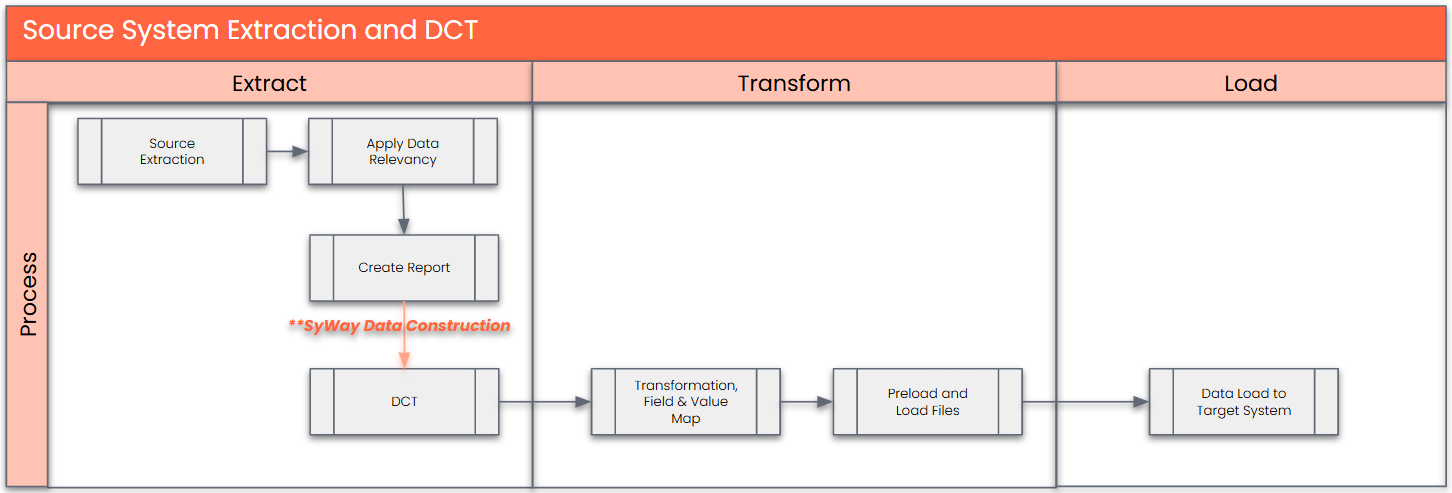
All data will be constructed for Maintenance Strategy using DCT.
The high-level process for DCT is represented by the diagram below:
Data Privacy and Sensitivity
Extraction
No extraction of legacy data will be done as all data will be constructed.
Extraction Run Sheet
| Req # | Requirement Description | Team Responsible |
|---|---|---|
Not Applicable |
Selection Screen
| Selection Ref Screen | Parameter Name | Selection Type | Requirement | Value to be entered/set |
|---|---|---|---|---|
Not Applicable |
Data Collection Template (DCT)
Target Ready Data Collection Template will be created for Maintenance Strategy data with exception of some fields which require transformation as mentioned in the transformation rule.Maintenance Strategy DCT Rules
- Maintenance Strategy
Field Name Field Description Rule STRAT Strategy Maintenance Strategies shall follow the below Mask
XX_XXX where:
XX = As per the Maintenance strategy defined below:- 01 - Time-Based Strategy
- 02 - Performance-Based Strategy
- 03 - Corrective Strategy
- 04 - Turnaround/Shutdown Strategy
XXX = Sequential Number starting 001
KTEXT Description Must not be blank ZEIEH Unit for the performance of maintenance tasks Must not be blank
Must reference active Units of Measurement in config (T006)
TOLE1 Tolerance for Late Completion (%) Default to 0 unless provided by business TOLE2 Tolerance for Early Completion (%) Default to 0 unless provided by business VERS1 Shift Factor for Late Completion Default to 0 unless provided by business VERS2 Shift Factor for Early Completion Default to 0 unless provided by business TERMK Scheduling indicator Must not be blank (MDS review point sent) HORIZ Call horizon for maintenance plan calls Default to 100 unless provided by business HORIZ_QUALIFIER Calculation Type of Call Horizon Default to "%" - Maintenance Package
Field Name Field Description Rule ZAEHL Maintenance Package Number Must not be blank.
Numeric values only.
Sequential ascending values only.
ZEIEH Unit for the performance of maintenance tasks Must not be blank.
Must reference active Units of Measurement in config (T006)
OFFZT Start offset of a time-based maintenance package KTEX1 Text for maintenance package/cycle (time/performance) Must not be blank (MDS review point sent) KZYK1 Short text for the maintenance cycle (time/performance) Must not be blank (MDS review point sent) KTXHI Short text of the maintenance package hierarchy Must not be blank (MDS review point sent)
Extraction Dependencies
| Item # | Step Description | Team Responsible |
|---|---|---|
Not Applicable |
Transformation
The legacy data is maintained in Syniti Data Construction page. All mapping is performed in Syniti Data Construction page.
Prepare target-ready data in the structure and format that is required for loading via prescribed Load Tool. This step also produces the load data ready for business to perform Pre-load Data Validation
Transformation Run Sheet
| Item # | Step Description | Team Responsible |
|---|---|---|
1 | Obtain DCT Sign-off from Business | SyWay A2D Data Team |
2 | <Add steps from Syniti Migrate here> | SyWay A2D Data Team |
3 | Review and Validate Error and Preload Reports | SyWay A2D Data Team |
4 | Generate Load Files | SyWay A2D Data Team |
Transformation Rules
All transformation and mapping is performed in Syniti Data Construction page.
| Rule # | Source system | Source Table | Source Field | Source Description | Target System | Target Table | Target Field | Target Description | Transformation Logic |
|---|---|---|---|---|---|---|---|---|---|
List of Custom Target Reports for this object is maintained here: Conversion Specification - Custom Reports Register.
Transformation Mapping
All transformation and mapping is performed in Syniti Data Construction page.| Mapping Table Name | Mapping Table Description |
|---|---|
Transformation Dependencies
List the steps that need to occur before transformation can commence| Item # | Step Description | Team Responsible |
|---|---|---|
1 | Ensure DCT completeness | Business & SyWay A2D Data Team |
2 | Unit of Measure configuration must be completed | Business & SyWay A2D Data Team |
Pre-Load Validation
Project Team
Completeness
| Task | Action |
|---|---|
Verify Record Count | SyWay A2D Data Team to verify that the total number of relevant records from the DCT is equal to the total number of records in the Preload and Load Sheets. |
Accuracy
| Task | Action |
|---|---|
Conversion Accuracy | SyWay A2D Data Team to verify that all fields below meet pass the checks:
|
Review Error Reports | Review and correct the errors. Achieve a zero-error record count as much as possible. Raise defects for data remediated and requiring a correction in the source data. |
Business
Completeness
| Task | Action |
|---|---|
Verify Record Count | Business Data Owner/s to verify that the total number of relevant records from the the DCT is equal to the total number of records in the Preload and Load Sheets. |
Accuracy
| Task | Action |
|---|---|
Conversion Accuracy | Business Data Owner/s to verify that all the data in the load table/file is accurate as per endorsed transformation/mapping rules (and signed-off DCT data). |
Load
The load process includes:
- Execute the automated data load into target system using load tool or produce the load file if the load must be done manually
- Once the data is loaded to the target system, it will be extracted and prepared for Post Load Data Validation
Load Run Sheet
| Item # | Step Description | Team Responsible |
|---|---|---|
| 1 | Obtain DCT Sign-off from Business | SyWay A2D Data Team |
| 2 | Syniti will provide load file | Syniti |
| 3 | Go to <Load Tool> | SyWay A2D Data Team/Syniti |
| 4 | Load 3 records for Maintenance Strategy for function (IP11) to validate if data is loaded successfully without errors | SyWay A2D Data Team/Syniti |
| 5 | Proceed with full load if step 4 is validated | SyWay A2D Data Team/Syniti |
| 6 | Validate few records loaded by accessing standard transactions from S/4HNA E.g. IP12 | SyWay A2D Data Team/Syniti |
| 7 | Generate post load report if step 6 is validated | SyWay A2D Data Team/Syniti |
Load Phase and Dependencies
Configuration
| Item # | Configuration Item |
|---|---|
| 1 | Unit of Measure |
Conversion Objects
| Object # | Preceding Object Conversion Approach |
|---|---|
| Not Applicable |
Error Handling
| Error Type | Error Description | Action Taken |
|---|---|---|
Configuration | Invalid Unit of Measure | Engage Functional team to expedite and fix the error in the system |
Invalid Data | Maintenance Package: Invalid Maintenance Strategy | Check whether the Maintenance Strategy exist in Maintenance Strategy table |
Post-Load Validation
Project Team
Completeness
| Task | Action |
|---|---|
Verify Count | SyWay A2D Data Team to verify the record count created in target S/4 HANA by accessing post load reports in dspMigrate or standard reports from S/4 HANA. |
Verify Logs | Check if there is data that failed to load and perform the necessary actions (e.g. register as post load issue or attempt to load the record again, etc.). |
Accuracy
| Task | Action |
|---|---|
Conversion Accuracy | SyWay A2D Data Team to verify that the Maintenance Strategy data in target S/4 HANA were loaded correctly via dspMigrate post load reports or standard reports from S/4 HANA. |
Business
Completeness
| Task | Action |
|---|---|
Verify Count | Download Post Load Reports from dspMigrate and verify that the record count loaded in the target S/4 HANA is the same count as of the endorsed load file. |
Accuracy
| Task | Action |
|---|---|
Conversion Accuracy | Verify that the Maintenance Strategy data in target S/4 HANA were loaded correctly via dspMigrate post load reports or standard reports from S/4 HANA. |
Key Assumptions
- Master Data Standard is up to date as on the date of documenting this conversion approach and data load.
- Maintenance Strategy is in scope based on data design and any exception requested by business.
- Valid legacy data objects dependent on S4/HANA strategies have relevant S4/HANA strategy/packages mapped
See also
Change log
Workflow history
| Title | Last Updated By | Updated | Status | |
|---|---|---|---|---|
| There are no pages at the moment. | ||||