


| Status | Update in progress |
|---|---|
| Owner | CASTRO MONCAYO-ext, Jose Luis |
| Stakeholders |
Purpose
The purpose of this document is to define the conversion approach to create1039 - Master Recipe in S/4 HANA.
Master recipes are assigned to a plant and are part of a plant-independent recipe group.
In the recipe header, master recipes used for production are linked to the materials to be produced. The production versions of the materials also link them to the alternative BOM required for production.
Master recipes are used as the basis for process orders. The business object master recipe is the description of an enterprise-specific process in process industries, that does not relate to a specific order. The master recipe is used for the manufacture of products. In all Manufacturing plants that are using SAP PP-PI ( Production Planning for process Industries), This is the most important Master Data, This Master Data includes BOM, Resources, Formulas, Costing Data and others, relevant for creating Process Orders.
Conversion Scope
The scope of this document covers the approach for converting active1039- Master Recipe from Legacy Source Systems into S/4HANA following the1039 Master Data Design Standard.
The data from legacy system includes:
- Active Master Recipes, used in Process Orders for the last 3 years
- Active Master Recipes valid for active materials
- Active Master Recipes valid for Material / Plant Combination (according with the latest Plant Mapping)
The data from legacy system excludes:
- Active Master Recipes NOT used for the last three years
- Master recipes with deletion flag
- Master Recipes for materials flagged for deletion
- Master Recipes for materials without active status
- Master recipes for Material / Plant combination that are Out of Scope
| Source | Scope | Source Approx No. of Records | Target System | Target Approx No. of Records |
|---|---|---|---|---|
| PF2 | Master Recipes will be extracted from PF2 | 15,000 | S/4 HANA | 10,000 |
| WP2 | Master Recipes will be extracted from WP2 | 15,000 | S/4 HANA | 12,000 |
| DCT | We will use a DCT for data conversion from Specific Routing to Master Recipe, for plants are still using Discrete Manufacturing | 3000 | S/4 HANA | 1500 |
Additional Information
Multi-language Requirement
Document Management
N/A
Legal Requirement
N/A
Special Requirements
N/A
N/A
Target Design
The technical design of the target for this conversion approach.
| Table | Field | Data Element | Field Description | Data Type | Length | Requirement |
|---|---|---|---|---|---|---|
| PLKO | PLNTY | PLNTY | Key which classifies task lists according to their functionality. In Syensqo production context this value is defaulted to "2" | CHAR | 1 | R : For PP PI the master recipe is a task list with type "2" In case of Rate routing value from As Is = "R" will be mapped to value "2" |
| PLKO | PLNNR | PLNNR | Key that uniquely identifies a recipe group. | CHAR | 8 | R : If not provided by the user the system propose and incremental number |
| PLKO | PLNAL | PLNAL | Key that identifies a master recipe within a recipe group. | CHAR | 2 | R : The system increment the group counter |
| PLKO | DATUV | DATUV | Date from which the recipe object is valid. | DATS | 8 | R : By default the system date but the user can enter a valid from date |
| PLKO | DATUV | DATUV | End of the validity period of the recipe object. | DATS | 8 | R |
| PLKO | AENNR | AENNR | Key for the change master record or engineering change order that the chosen change status of the recipe object was created with. | CHAR | 12 | NU |
| PLKO | VERWE | PLN_VERWE | Key indicating what the recipe is used for, such as production or plant maintenance. for Syensqo production scope the value used will be "1" | CHAR | 3 | R : Syensqo production scope the value used will be "1" |
| PLKO | WERKS | WERKS_D | Plant of the material to be produced. | CHAR | 4 | R |
| PLKO | STATU | PLNST | Status key to indicate the processing status of a recipe. For example, indicate whether the recipe is still in the creation phase or has already been released. | CHAR | 3 | R |
| PLKO | PLNME | PLNME | Unit of measure of the charge quantity | UNIT | 3 | R |
| PLKO | LOSVN | LOSGRVON | Lower limit of the charge quantity range for which the recipe is valid. | QUAN | 13 | C : If a value is entered, then the recipe can be used only for process orders with quantity superior to the minimum lot size |
| PLKO | LOSBS | LOSGRBIS | Upper limit of the charge quantity range for which the recipe is valid. | QUAN | 13 | C : If a value is entered, then the recipe can be used only for process orders with quantity inferior to the maximum lot size |
| PLKO | VAGRP | VAGRP | Key of the planner group responsible for maintaining the recipe. | CHAR | 3 | C |
| PLKO | KTEXT | PLANTEXT | Describes the recipe | CHAR | 40 | R |
| PLKO | TXTSP | SPRAS | Language key | LANG | 1 | S |
| PLKO | LOEKZ | LKENZ | Indicator set if the recipe to be completely deleted at the next reorganization run, with all its change states. | CHAR | 1 | C |
| PLKO | PROFIDNETZ | PROFID_STD | A profile is a collection of default values and settings for maintenance of routings or master recipes or standard networks. | CHAR | 7 | R |
| PLKO | BMSCH | BMSCH | Quantity of the material to be produced to which the standard values of the operation refer. | QUAN | 13 | R |
| PLKO | QKZRASTER | QKZRASTER | Identifier for Inspection Point Field Combination Inspection points are used as reference objects for recording inspection results below operation level. If a value is entered for the inspection point, this value is copied to the inspection lots. | CHAR | 1 | C |
| PLKO | PPKZTLZU | QPPKZTLZU | Partial Lot Assignment in an Inspection During Production he entry in this list field to set the detail levels for the assignment of manufactured quantities. In the first and most detailed level ("Partial lots not defined"), the manufactured partial quantities are assigned to inspection points for which inspection results are also recorded. In the second detail level ("Partial lot for each inspection point"), the partial quantities, to which the inspection points are assigned, are combined into partial lots. In the third detail level ("Partial lot and batch for each inspection point"), partial lots are combined into batches. | CHAR | 1 | C |
| PLKO | QPRZIEHVER | QPRZIEHVER | A master data object in QM sample management that contains instructions for a sample drawing. | CHAR | 8 | C |
| PLKO | QDYNHEAD | QDYNHEAD | Identifies the level at which the decision for inspection stages is made and the quality level maintained. | CHAR | 1 | C |
| PLKO | QDYNREGEL | QDYNREGEL | Contains the definition of inspection stages and the conditions that lead to changes in inspection stages. | CHAR | 3 | C |
| PLKO | CHRULE | R_CHRULE | Key that specifies which change procedure must be used for recipe or inspection plan editing. | CHAR | 1 | C |
| MAPL | MATNR | MATNR | Material Number for witch the receipe is created | CHAR | 18 | R |
| MAPL | WERKS | WERKS_D | Plant | CHAR | 4 | R |
| PLPO | DATUV | DATUV | Valid from date | DATS | 8 | R |
| PLPO | DATUV | DATUV | Valid to date | DATS | 8 | R |
| PLPO | VORNR | VORNR | Determines in which order the operations of a sequence are carried out. | CHAR | 4 | R |
| PLPO | PHFLG | PHFLG | ndicator for phases as opposed to operations. | CHAR | 1 | S |
| PLPO | PVZNR | PVZNR | Key of the operation to which the phase is subordinated. This field is used for phases but not for operations. | CHAR | 1 | S |
| PLPO | ARBID | OBJEKTID | Ressource used to perform the activity | NUMC | 8 | R : PLPO-ARBID = CRHD-OBJID that represent the ressource CRHD-ARBPL |
| PLPO | STEUS | STEUS | Determines which business transactions should be executed for the object that belongs to the task list or order (for example scheduling or costing). | CHAR | 4 | R : Value mapping to be completed during remaining detailed design phase |
| PLPO | LTXA1 | LTXA1 | Operation Short Text | CHAR | 40 | C |
| PLPO | SPRAS | SPRAS | Language Key | CHAR | 2 | S |
| PLPO | BMSCH | BMSCH | Quantity of the material to be produced to which the standard values of the operation refer. | QUAN | 13 | R |
| PLPO | MEINH | VORME | Unit of measure used in the operation for the material to be produced. | UNIT | 3 | R |
| PLPO | WERKS | WERKS_D | Plant | CHAR | 4 | R |
| PLPO | UMREN | CP_UMREN | Denominator for Converting Routing and Operation UoM | DEC | 5 | C |
| PLPO | UMREZ | CP_UMREZ | Numerator for Converting Routing and Operation UoM | DEC | 5 | C |
| PLPO | ZMERH | DZMERH | Break Time | QUAN | 9 | C |
| PLPO | ZEIER | DZEIER | Unit for a Break Time | UNIT | 3 | C |
| PLPO | LAR01 | LSTAR | Activity Type | CHAR | 6 | C |
| PLPO | VGE01 | VGWRTEH | Unit of Measurement of Standard Value | UNIT | 3 | C |
| PLPO | VGW01 | VGWRT | Standard Value | QUAN | 9 | C |
| PLPO | LAR02 | LSTAR | Activity Type | CHAR | 6 | C |
| PLPO | VGE02 | VGWRTEH | Unit of Measurement of Standard Value | UNIT | 3 | C |
| PLPO | VGW02 | VGWRT | Standard Value | QUAN | 9 | C |
| PLPO | LAR03 | LSTAR | Activity Type | CHAR | 6 | C |
| PLPO | VGE03 | VGWRTEH | Unit of Measurement of Standard Value | UNIT | 3 | C |
| PLPO | VGW03 | VGWRT | Standard Value | QUAN | 9 | C |
| PLPO | LAR04 | LSTAR | Activity Type | CHAR | 6 | C |
| PLPO | VGE04 | VGWRTEH | Unit of Measurement of Standard Value | UNIT | 3 | C |
| PLPO | VGW04 | VGWRT | Standard Value | QUAN | 9 | C |
| PLPO | LAR05 | LSTAR | Activity Type | CHAR | 6 | C |
| PLPO | VGE05 | VGWRTEH | Unit of Measurement of Standard Value | UNIT | 3 | C |
| PLPO | VGW05 | VGWRT | Standard Value | QUAN | 9 | C |
| PLPO | LAR06 | LSTAR | Activity Type | CHAR | 6 | C |
| PLPO | VGE06 | VGWRTEH | Unit of Measurement of Standard Value | UNIT | 3 | C |
| PLPO | VGW06 | VGWRT | Standard Value | QUAN | 9 | C |
| PLPO | ZERMA | DZERMA | Key which controls how the standard values are calculated (for example, using CAPP or comparison). | CHAR | 5 | C |
| PLPO | LOANZ | LOHNANZ | Number of confirmation slips to be printed for an operation or an activity | DEC | 3 | C |
| PLPO | RFGRP | RUEFAGRP | Classification which combines setup group keys in groups. | CHAR | 10 | NU |
| PLPO | RFSCH | RUEFASCHLU | Key that specifies who sets up a recipe (for example, machine servicer, setup person or a setup crew). The value from the ressource is the default in the recipe. | CHAR | 10 | NU |
| PLPO | AUFAK | AUSCHUFAK | Scrap factor | DEC | 5 | C |
| PLPO | UEMUS | UEMUSKZ | Indicator which specifies that overlapping is required. During scheduling the system determines from the minimum send-ahead quantity and the minimum overlap time. Whether the operations can overlap An overlap is only permissible, if the time the operations overlap is larger than the minimum overlap time. When is the start date of the following operation If operations overlap, the next operation can start when the minimum send-ahead quantity has been produced. If a move is necessary, this is taken into account with the minimum move time. The following operation is scheduled so that no interruptions occur. | CHAR | 1 | C |
| PLPO | UEKAN | UEKANKZ | Indicator which specifies that the operation can be overlapped with the next one if the execution time is to be reduced. | CHAR | 1 | C |
| PLPO | ZEIMU | DZEIMU | Unit for the Minimum Overlap Time | UNIT | 3 | C |
| PLPO | ZMINU | DZMINU | Shortest time the operation must overlap with the next operation if overlapping is to be economical. The minimum overlap time is taken into account during lead time scheduling. | QUAN | 9 | C |
| PLPO | SPMUS | SPLITTUNG | Splitting Required | CHAR | 1 | C |
| PLPO | SPLIM | SPLITTANZ | Maximum Number of Splits | DEC | 3 | C |
| PLPO | ZMINB | DZMINB | Minimum Processing Time | QUAN | 9 | NU |
| PLPO | ZLMAX | DZLMAX | Maximum wait time | QUAN | 9 | NU |
| PLPO | ZLPRO | DZLPRO | Minimum Wait Time | QUAN | 9 | NU |
| PLPO | ZWNOR | DZWNOR | Standard Queue Time | QUAN | 9 | NU |
| PLPO | ZWMIN | DZWMIN | Minimum Queue Time | QUAN | 9 | NU |
| PLPO | ZTNOR | DZTNOR | Standard Move Time | QUAN | 9 | NU |
| PLPO | ZTMIN | DZTMIN | Minimum Move Time | QUAN | 9 | NU |
| PLPO | ABLIPKZ | ABLIPKZ | Teardown and Wait Occur in Parallel | CHAR | 1 | NU |
| PLPO | RSTRA | RSTRA | Reduction Strategy per Operation | CHAR | 2 | NU |
| PLPO | LIFNR | LIFNR | Supplier number | CHAR | 10 | C |
| PLPO | PLIFZ | PLIFZ | Planned Delivery Time in Days | DEC | 3 | C |
| PLPO | PREIS | IPREI | Net Price in Purchasing Info Record | CURR | 11 | C |
| PLPO | PEINH | EPEIN | Price unit | DEC | 5 | C |
| PLPO | SAKTO | KSTAR | Cost Element | CHAR | 10 | C |
| PLPO | WAERS | WAERS | Currency Key | CUKY | 5 | C |
| PLPO | INFNR | INFNR | Number of purchasing info record | CHAR | 10 | C |
| PLPO | ESOKZ | ESOKZ | Purchasing info record category | CHAR | 1 | C : In case of subcontracting (PLPO-FRDLB) is not empty, value is "3" Otherwise "Empty" |
| PLPO | EKORG | EKORG | Purchasing Organization | CHAR | 4 | C : Mapping to be provided to link As Is values with To be purch org |
| PLPO | EKGRP | VG_EKGRP | Purchasing Group for External Processing Activity | CHAR | 3 | C : Mapping to be provided to link As Is values with To be purch group |
| PLPO | KZLGF | KZLGF | Indicator: Lot-Size-Independent External Processing | CHAR | 1 | C |
| PLPO | DAUMI | DAUMIN | Minimum activity duration | QUAN | 5 | NU |
| PLPO | DAUME | DAUMINE | Unit for the minimum duration | UNIT | 3 | NU |
| PLPO | DDEHN | DAUDEHN | Indicator: flexible duration | CHAR | 1 | C |
| PLPO | ANFKO | ANFKO | Requesting Cost Center | CHAR | 10 | NU |
| PLPO | CKSELKZ | CK_SELKZ | Indicator for Relevancy to Costing | CHAR | 1 | C |
| PLPO | PHFLG | PHFLG | Indicator: Phase | CHAR | 1 | C |
| PLPO | FRDLB | CO_FRDLB | Indicator: External Processing Operation with Subcontracting | CHAR | 1 | C |
| PLPO | BMVRG | BMVRG | Order Quantity | QUAN | 13 | C |
| PLPO | ANZMA | ANZMS | Nb Of employees | DEC | 5 | C |
| PLPO | DAUNO | DAUNOR | Normal duration | QUAN | 5 | C |
| PLPO | DAUNE | DAUNORE | Normal duration unit | UNIT | 3 | C |
| PLPO | ARBEIT | ARBEIT | Work involved in the activity | CHAR | 1 | C |
| PLPO | ARBEITE | ARBEITE | Unit for work | CHAR | 3 | C |
| PLPO | ANZKAP | ANZKAP | Number of capacities required | CHAR | 2 | C |
| PLPO | BURKS | BURKS | Company code | CHAR | 4 | R |
| PLPO | KALID | WFCID | Factory calendar | CHAR | 2 | R |
| PLPO | AUFKT | AFAKT | Execution factor | DEC | 3 | C |
| PLPO | ANZZL | ANZKAP | Number of individual capacities | INT1 | 3 | C |
| PLMZ | PLNTY | PLNTY | Task List Type | CHAR | 1 | R |
| PLMZ | PLNNR | PLNNR | Group | CHAR | 8 | R |
| PLMZ | ZAEHL | CIM_COUNT | Counter | NUMC | 8 | R |
| PLMZ | ZUONR | ZUONR | Allocation number | CHAR | 3 | R |
| PLMZ | DATUV | DATUV | Valid from | DATS | 8 | R |
| PLMZ | AENNR | AENNR | Change Number | CHAR | 12 | C |
| PLMZ | LOEKZ | LKENZ | Deletion Indicator | CHAR | 1 | C |
| PLMZ | PLNAL | PLNAL | Group Counter | CHAR | 2 | R |
| PLMZ | PLNFL | PLNFL | Sequence | CHAR | 3 | C |
| PLMZ | PLNKN | PLNKN | Task list node | NUMC | 8 | R |
| PLMZ | STLTY | STLTY | BOM category | CHAR | 1 | R |
| PLMZ | STLNR | STNUM | Bill of Material | CHAR | 8 | R |
| PLMZ | STLAL | STLAL | Alternative BOM | CHAR | 2 | R |
| PLMZ | STLKN | STLKN | Nodes of the BOM item assigned | CHAR | 4 | R |
| PLMZ | WERKS_STL | WERKS_STL | Plant | CHAR | 4 | R |
| PLMZ | IMENG | IMENG | Component Quantity | NUMC | 10 | R |
| PLMZ | IMEIN | IMEIN | Component UoM | CHAR | 3 | S |
| PLMZ | ANDAT | ANDAT | Created On | DATS | 8 | S |
| PLMZ | ANNAM | ANNAM | Created by | CHAR | 12 | S |
| PLMZ | AEDAT | AEDAT | Changed on | DATS | 8 | S |
| PLMZ | AENAM | AENAM | Changed By | CHAR | 12 | S |
| PLMZ | RGEKZ | RGEKZ | Backflush | CHAR | 1 | C |
Data Cleansing
| ID | Criticality | Error Message/Report Description | Rule | Output | Source System |
|---|---|---|---|---|---|
| 1039-1 | C1 | Master Recipe has a flag for deletion | NO Master recipes with flag for deletion won't be migrated | Deletion Flag for master recipe | PF2/WP2 |
| 1039-2 | C1 | Inactive status (source system might have various statuses to identify) | Inactive Master recipes won't be migrated | Mark all inactive Master recipe | PF2/WP2 |
| 1039-3 | C1 | Not a part of any active FG BOM . Here data cleansing would be necessary or this could be a case of outsourced/subcontracting SFG BOM. | SFG Active Master Recipe, only for active FG | SFG active and part of the FG PDS must be considered to migrate | PF2/WP2 |
| 1039-4 | C1 | If all the parent part/s are inactive, then this SFG is not relevant for migration. | SFG part of inactive FG not considered for migration | SFG is part of a Inactive FG | PF2/WP2 |
| 1039-5 | C1 | No usage in the past 3 years. | Master recipes not used for the last 3 years are not considered to migrate | Remove all Master Recipes with no usage for the last three years | PF2 / WP2 |
| 1039-6 | C1 | BOM status is inactive | Master Recipe to include a inactive BOM not to be considered | BOM is inactive | PF2/WP2 |
Conversion Process
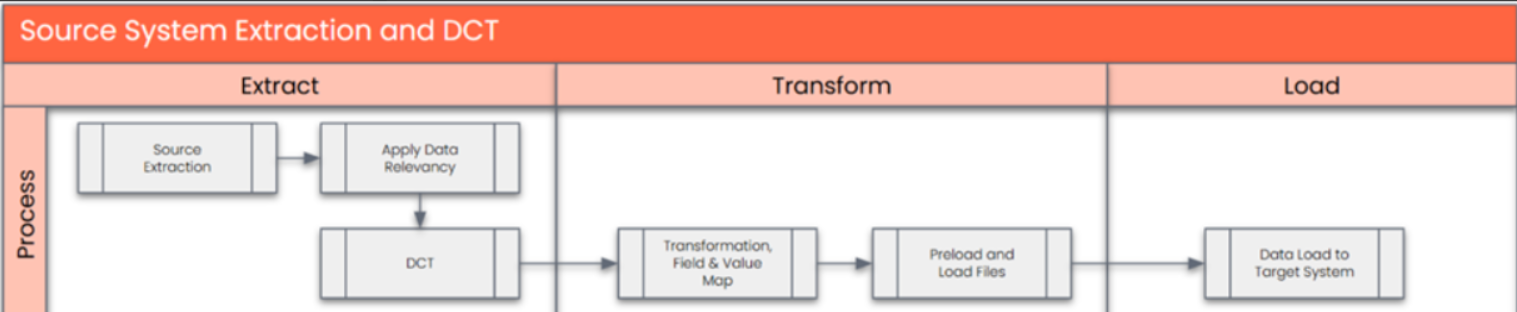
The high-level process is represented by the diagram below:
Data Privacy and Sensitivity
Extraction
Extract data from a source into . There are 2 possibilities:
- The data exists. connects to the source and loads the data into . There are 3 methods:
- Perform full data extraction from relevant tables in the source system(s).
- Perform extraction through the application layer.
- Only if ; cannot connect to the source, data is loaded to the repository from the provided source system extract/report.
- The data does not exist (or cannot be converted from its current state). The data is manually collected by the business directly in . This is to be conducted using DCT (Data Collection Template) in
The agreed Relevancy criteria is applied to the extracted records to identify the records that are applicable for the Target loads
Extraction Run Sheet
| Req # | Requirement Description | Team Responsible |
|---|---|---|
Selection Screen
| Selection Ref Screen | Parameter Name | Selection Type | Requirement | Value to be entered/set |
|---|---|---|---|---|
Data Collection Template (DCT)
Target Ready Data Collection Template will be created for data with exception of some fields which require transformation as mentioned in the transformation rule.DCT Rules
| Field Name | Field Description | Rule |
|---|---|---|
Extraction Dependencies
| Item # | Step Description | Team Responsible |
|---|---|---|
Transformation
The Target fields are mapped to the applicable Legacy field that will be its source, this is a 3-way activity involving the Business, Functional team and Data team. This identifies the transformation activity required to allow to make the data Target ready:
- Perform value mapping and data transformation rules.
- Legacy values are mapped to the to-be values (this could include a default value)
- Values are transformed according to the rules defined in
- Prepare target-ready data in the structure and format that is required for loading via prescribed Load Tool. This step also produces the load data ready for business to perform Pre-load Data Validation
Transformation Run Sheet
| Item # | Step Description | Team Responsible |
|---|---|---|
Transformation Rules
| Rule # | Source system | Source Table | Source Field | Source Description | Target System | Target Table | Target Field | Target Description | Transformation Logic |
|---|---|---|---|---|---|---|---|---|---|
Transformation Mapping
| Mapping Table Name | Mapping Table Description |
|---|---|
Transformation Dependencies
List the steps that need to occur before transformation can commence| Item # | Step Description | Team Responsible |
|---|---|---|
Pre-Load Validation
Project Team
Completeness
| Task | Action |
|---|---|
Verify Record Count | Data team to verify that the total number of relevant records from the source systems is equal to the total number of records in the Preload and Load Sheets. |
Accuracy
| Task | Action |
|---|---|
Conversion Accuracy | Data team to verify that all fields below meet pass the checks: 1. Mandatory Fields 2. Field and Value Mapping Correctness 3. Null Checks 4. Text Length Checks |
Review error reports | Review and correct the errors. Achieve a zero-error record count as much as possible. Raise defects for data remediated and requiring a correction in the source data. |
Business
Completeness
| Task | Action |
|---|---|
Verify Record Count | Business team to verify that the total number of relevant records from the source systems is equal to the total number of records in the Preload and Load Sheets. |
Accuracy
| Task | Action |
|---|---|
Conversion Accuracy | Business to verify that all the data in the load table/file is accurate as per endorsed transformation/mapping rules (and signed-off data) |
Load
The load process includes:
- Execute the automated data load into target system using load tool or product the load file if the load must be done manually
- Once the data is loaded to the target system, it will be extracted and prepared for Post Load Data Validation
Load Run Sheet
| Item # | Step Description | Team Responsible |
|---|---|---|
| 1 | Go to <Load Tool> | SyWay Data Team |
| 2 | Load 3 records for < > to validate if data is loaded successfully without errors | SyWay Data Team |
| 3 | Proceed with full load if steps 2 and 3 are validated | SyWay Data Team |
| 4 | Validate few records loaded by accessing standard transactions from S/4HNA eg. MDO4 | SyWay Data Team |
| 5 | Generate post load report if step 5 is validated | SyWay Data Team |
Load Phase and Dependencies
Configuration
| Item # | Configuration Item |
|---|---|
Conversion Objects
| Object # | Preceding Object Conversion Approach |
|---|---|
| list the exact title of the conversion object of only the immediate predecessor – this will then confirm the DDD (Data Dependency Diagram) | |
Error Handling
| Error Type | Error Description | Action Taken |
|---|---|---|
Post-Load Validation
Project Team
Completeness
| Task | Action |
|---|---|
Verify Count | Data team to verify the record count created in target S/4 HANA by accessing post load reports in Sinity Migrate or standard reports from S/4 HANA. |
Verify Logs | Check if there is data that failed to load and perform the necessary actions (e.g. register as post load issue, or attempt to load the record again, etc.). |
Accuracy
| Task | Action |
|---|---|
Conversion Accuracy | Data team to verify that the Measuring Point data in target S/4 HANA were loaded correctly via Sinity Migrate post load reports or standard reports from S/4 HANA. |
Business
Completeness
| Task | Action |
|---|---|
Verify Count | Download Post Load Reports from Sinity Migrate and verify that the record count loaded in the target S/4 HANA is the same count as of the endorsed load file. |
Accuracy
| Task | Action |
|---|---|
Conversion Accuracy | Verify that the Measuring Point data in target S/4 HANA were loaded correctly via dspMigrate post load reports or standard reports from S/4 HANA. |
Key Assumptions
- Master Data Standard is up to date as on the date of documenting this conversion approach and data load.
- is in scope based on data design and any exception requested by business.
See also
Change log
Workflow history
| Title | Last Updated By | Updated | Status | |
|---|---|---|---|---|
| There are no pages at the moment. | ||||