


| Status | Approved |
|---|---|
| Owner | RUAN-ext, Eric |
| Stakeholders |
Purpose
The purpose of this document is to define the conversion approach to create Customer Hierarchy in S/4 HANA.
There will be different scenarios for the customer hierarchy information in various legacy systems.
First scenario is in SAP ECC, customer hierarchy is used to save the information. The customer hierarchy is a tree-like hierarchy where each node is a customer (including parent and child customers). The primarily purpose is used for pricing, rebates, and reporting across related customers. It is maintained via transaction code VDH1N.
Second scenario is in Customer General data, the field Group Key is used to assign the Parent company to each customer. The Group key is defined in PRS system, and synced to SAP ECC (WP2/PF2) in a custom table (ZZRGROUP in PF2. ZWPUT068 in WP2).
Third scenario is in Salesforce, Corporate group is defined as a type of Account in Salesforce, then it is used to link related accounts (such as Prospect) accordingly. The Corporate Group definition is the same as Group Key mentioned in the second scenario.
In SAP S/4HANA, customers or prospect are managed as Business Partners (BP), enabling a more flexible and integrated data model. In the meantime, Global Hierarchies are used in the the new S4 Hana design. Global hierarchies are any characteristic hierarchies that are maintained centrally in the Fiori app Manage Global Hierarchies. This conversion spec will capture on the migration approach on how to convert the ECC customer hierarchy and Salesforce Corporate group to S4 Hana Global Hierarchies. In the S4 Hana global hierarchy design, the sales area assignment between Business Partners are not required.
The table below summarizes the three scenarios and the S4 solution to be used to manage the customer hierarchy information.
| Scenario | Legacy System | Legacy System Data Source | Partner Type | Sales Area Related | S4 |
|---|---|---|---|---|---|
| 1 | ECC (WP2 only) | The customer hierarchy is used, maintained via t-code VDH1N | Customer | Relevant | Global Hierarchies will be used and maintained via Fiori App Manage Global Hierarchies. Sales Area data will not be applicable for the data maintenance. |
| 2 | ECC (WP2/PF2) | Group Key (KNA1-KONZS) field is used in customer general data | Customer | Not Relevant | |
| 3 | Salesforce (iCare and Core CRM) | Related Accounts is used to link the Corporate group (Parent Company) with the Accounts (Prospect) | Prospect | Not Relevant |
Conversion Scope
The scope of this document covers the approach for converting active Customer Hierarchy from Legacy Source Systems into S/4HANA following the document "DD-FUN-050 Master Data Standard_3005-Customer Hierarchy".
The Customer hierarchy data from legacy systems includes:
| Scenario | Legacy System | Legacy System Data Source | Relevancy Rule |
|---|---|---|---|
| 1 | ECC (WP2 only) | The customer hierarchy is used, maintained via t-code VDH1N |
|
| 2 | ECC (WP2/PF2) | Group Key (KNA1-KONZS) field is used in customer general data |
|
| 3 | Salesforce (iCare and Core CRM) | Related Accounts is used to link the Corporate group (Parent Company) with the Accounts (Prospect) |
|
The customer hierarchy data from legacy system excludes:
- The Corporate Group / Group key is not in migration scope of S4 Hana system
- The Business Partner General data is not in migration scope for the Customer or Prospect
| Scenario | Source | Scope | Source Approx No. of Records | Target System | Target Approx No. of Records |
|---|---|---|---|---|---|
| 1 | WP2 | Customer Hierarchy | 1856 | S4 Hana ROW/China/CUI | 1856 |
| 2 | WP2 | Group Key in customer general data | 31835 | S4 Hana ROW/China/CUI | 31835 |
| 2 | PF2 | Group Key in customer general data | 26150 | S4 Hana ROW/China/CUI | 26150 |
| 3 | iCare | Corporate Group and related accounts | S4 Hana ROW/China/CUI | ||
| 3 | Core CRM | Corporate Group and related accounts | S4 Hana ROW/China/CUI |
Additional Information
Multi-language Requirement
N/A
Document Management
N/A
Legal Requirement
N/A
Special Requirements
There will be 3 SAP instances, ROW (Rest of the World), China, CUI. This data object will be replicated to all 3 SAP instances.
Target Design
The technical design of the target for this conversion approach.
| Table | Field | Data Element | Field Description | Data Type | Length | Requirement |
|---|---|---|---|---|---|---|
| HRRP_DIR_N | HRYTYP | Hierarchy Type | CHAR | 4 | Mandatory | |
| HRRP_DIR_N | HRYVALTO | Valid To | DATS | 8 | Mandatory | |
| HRRP_DIR_N | HRYVALFROM | Valid From | DATS | 8 | Mandatory | |
| HRRP_DIR_N | HRYSID | Hierarchy ID | CHAR | 20 | Mandatory | |
| HRRP_DIRT_N | HRYTXT | Hierarchy Description | CHAR | 50 | Mandatory | |
| HRRP_ATTR_NODE_N | HRYNODE | Hierarchy Node | CHAR | 50 | Mandatory | |
| HRRP_ATTR_NODE_N | PARNODE | Hierarchy Parent Node | CHAR | 50 | Mandatory | |
| Type | Type for Upload template only | Mandatory | ||||
Data Cleansing
| ID | Criticality | Error Message/Report Description | Rule | Output | Source System |
|---|---|---|---|---|---|
| 3005-1 | C1 | Remove obsolete child customer | Child Customer has general data marked as for deletion | Higher Customer Number/Name/Child Customer/Name/Sales Organization/Distribution Channel/Division/Deletion Indicator | WP2 |
| 3005-2 | C1 | Remove child customer with obsolete sales data | Child Customer has the sales area data marked for deletion | Higher Customer Number/Name/Child Customer/Name/Sales Organization/Distribution Channel/Division /Deletion Indicator | WP2 |
| 3005-3 | C1 | Parent Customer with central deletion indicator | Higher Customer has general data marked as for deletion | Higher Customer Number/Name/Child Customer/Name/Sales Organization/Distribution Channel/Division /Deletion Indicator | WP2 |
| 3005-4 | C1 | Parent Customer with sales area deletion indicator | Higher Customer has sales area data marked as for deletion | Higher Customer Number/Name/Child Customer/Name/Sales Organization/Distribution Channel/Division /Deletion Indicator | WP2 |
Conversion Process
The high-level process is represented by the diagram below:
The ETL (Extract, Transform, Load) process is a structured approach to data migration and management, ensuring high-quality data is seamlessly transferred across systems. Here’s a breakdown of its key components:
1. Extraction
For SAP ECC, the process begins with extracting raw data (KNVH) from source systems, such as Syensqo ECC system (i.e., WP2/PF2) . The extracted data is then staged for transformation. For Salesforce, a flat file will be shared, then staged for transformation.
2. Transformation
Once extracted, the data undergoes cleansing, consolidation, and governance. This step ensures data integrity, consistency, and compliance with business rules. The transformation process includes:
- Data validation to remove inconsistencies.
- Standardization to align formats across datasets.
- Business rule application to refine data for operational use.
3. Loading
The transformed data is then loaded into the target S4 Hana system.

Data Privacy and Sensitivity
N/AExtraction
Extract data from a source into Syniti Migrate for SAP S4 Hana Syniti Migrate connects to the source and loads the data into Syniti Migrate. There are 2 methods:
a. Perform full data extraction from relevant tables (KNVH) in the SAP ECC (WP2/PF2).
b. Data is loaded to the repository from the Salesforce system extract/report.
The agreed Relevancy criteria is applied to the extracted records to identify the records that are applicable for the Target loads.
Extraction Run Sheet
| Req # | Requirement Description | Team Responsible |
|---|---|---|
| 3005-001 | - Identify the source systems and databases involved. - Define the data objects (tables, fields, records) to be extracted. - Establish business rules for data selection. | Syniti Syniti / LTC Data team |
| 3005-002 | - Specify the extraction approach (full, incremental, or delta extraction). - Determine the tools and technologies used. - Define data filtering criteria to exclude irrelevant records. | Syniti |
| 3005-003 | - Establish execution timelines and batch processing schedules. - Assign responsibilities for extraction monitoring. - Document dependencies on other migration tasks. | Syniti |
| 3005-004 | - Define error handling mechanisms for extraction failures. | Syniti |
Selection Screen
| Selection Ref Screen | Parameter Name | Selection Type | Requirement | Value to be entered/set |
|---|---|---|---|---|
| N/A | ||||
Data Collection Template (DCT)
Target Ready Data Collection Template will be created for data with exception of some fields which require transformation as mentioned in the transformation rule.DCT Rules
| Field Name | Field Description | Rule |
|---|---|---|
| N/A | ||
Extraction Dependencies
| Item # | Step Description | Team Responsible |
|---|---|---|
| 1 | Source System Availability
| Syensqo IT |
| 2 | Data Structure
| Syniti |
| 3 | Referential Integrity
| Syniti |
| 4 | Extraction Methodology
| Syniti |
| 5 | Performance and Scalability Considerations
| Syniti |
| 6 | Security and Compliance
| Syniti |
Transformation
The Target fields are mapped to the applicable Legacy field that will be its source, this is a 3-way activity involving the Business, Functional team and Data team. This identifies the transformation activity required to allow Syniti Migrate to make the data Target ready:
- Perform value mapping and data transformation rules.
- Legacy values are mapped to the to-be values (this could include a default value)
- Values are transformed according to the rules defined in Syniti Migrate
- Prepare target-ready data in the structure and format that is required for loading via prescribed Load Tool. This step also produces the load data ready for business to perform Pre-load Data Validation
Transformation Run Sheet
| Item # | Step Description | Team Responsible |
|---|---|---|
| 1 | Identify target S/4HANA fields and determine applicable legacy source fields from ECC system WP2 + Salesforce system (iCare and Core CRM) | Functional Team (L2C)+ Data Team (L2C) |
| 2 | Map legacy field values to S/4HANA target values (including field-level mapping and technical names) | Data Team (L2C), Data Team (Syniti) |
| 3 | Define value mapping rules for fields requiring standardization or harmonization across the source systems, ECC system WP2 + Salesforce system (iCare and Core CRM) | Functional Team (L2C)+ Data Team (L2C) |
| 4 | Identify and agree on default values where legacy data is incomplete or inconsistent | Business Team + Functional Team (L2C) |
| 5 | Configure transformation rules in Syniti Migrate | Data Team (Syniti), Data Team (L2C) |
| 6 | Review transformation logic and mappings with Business for confirmation | Business Team + Functional Team (L2C) |
| 7 | Perform initial transformation run and generate draft target-ready dataset | Data Team (Syniti), |
| 8 | Review draft target-ready data for structure and completeness | Data Team (L2C), Functional Team (L2C) |
| 9 | Share transformed data with Business for Pre-load Validation | Business Team |
| 10 | Incorporate feedback from Business and refine mappings or transformation logic as needed | Data Team (L2C) |
| 11 | Finalize and approve transformed data as Target Ready Load File | Business + Functional (L2C) + Data Team (L2C) |
| 12 | Handover final file to Load Team or trigger the load via Syniti Load Workbench | Data Team (Syniti), Data Load Team |
Transformation Rules
| Rule # | Source system | Source Table | Source Field | Source Description | Target System | Target Table | Target Field | Target Description | Transformation Logic |
|---|---|---|---|---|---|---|---|---|---|
| 1 | S4 | HRRP_DIR_N | HRYTYP | Hierarchy Type | Default - CH02 (this refers to Customer Hierarchy Analytics) | ||||
| 2 | S4 | HRRP_DIR_N | HRYVALTO | Valid To | Default - 31/12/9999 | ||||
| 3 | S4 | HRRP_DIR_N | HRYVALFROM | Valid From | Default - 1/1/2027 | ||||
| 4 | S4 | HRRP_DIR_N | HRYSID | Hierarchy ID | Default - CUST_HIER | ||||
| 5 | S4 | HRRP_DIRT_N | HRYTXT | Hierarchy Description | Default - Customer Hierarchy | ||||
| 6 | Scenario 1: SAP ECC: WP2 Scenario 2: SAP ECC: Group Key Scenario 3: Salesforce field: | KNVH KNA1 | KUNNR KUNNR SLV_Related_Account__c | Customer Customer Related Account | S4 | HRRP_ATTR_NODE_N | HRYNODE | Hierarchy Node | Rule - There are 3 scenario based on the "Type" in the upload template.
After getting all the BP number, remove the duplicate Child BP based on parent BP. Mapping table is MAP_KUNNR |
| 7 | Scenario 1: SAP ECC: WP2 Scenario 2: SAP ECC: Group Key Scenario 3: Salesforce field: | KNVH KNA1 | HKUNNR KONZS SLV_Account__c | Customer Group Key Account | S4 | HRRP_ATTR_NODE_N | PARNODE | Hierarchy Parent Node | Rule - There are 3 scenario based on the Type in the upload template.
Map KNA1-KONZS or Corporate group based on MAP_KONZS |
| 8 | S4 | Type | Type from Upload template | - There are 3 drop-downs based on the Type in the upload template. | |||||
Transformation Mapping
| Mapping Table Name | Mapping Table Description |
|---|---|
| MAP_KUNNR | ECC vs BP number mapping |
Transformation Dependencies
List the steps that need to occur before transformation can commence| Item # | Step Description | Team Responsible |
|---|---|---|
| 1 | Source Data Integrity - Ensure extracted data is complete, accurate, and consistent. - Validate that data types and formats align with transformation requirements. | Syniti |
| 2 | Referential Integrity - Ensure dependent records are transformed together or in advance | Syniti |
| 3 | Transformation Logic and Mapping - Define data mapping rules between source and target schemas. | Data Team |
| 4 | Performance and Scalability Considerations - Optimize transformation processes for large datasets. - Ensure system resources can handle transformation workloads | Syniti |
| 5 | Logging and Error Handling - Maintain detailed logs of transformation activities. - Define error-handling procedures for failed transformations | Syniti |
Pre-Load Validation
Project Team
Completeness
| Task | Action |
|---|---|
| Compare Data Counts |
|
| Validate the mandatory fields | Validate there is value for all the mandatory fields |
| Validate Primary Keys and Unique Constraints |
|
| Test Referential Integrity | Confirm dependent records exist in related tables |
Accuracy
| Task | Action |
|---|---|
| Validate the transformation | Validate the fields which require transformation have the value after transformation instead of the original field value |
| Check Data Consistency |
|
Business
The following pre-load validations will be performed by the business.Completeness
| Task | Action |
|---|---|
| Compare Data Counts |
|
| Review populated templates for missing or incorrect values | Use checklists to verify completeness and correctness before submission |
Accuracy
| Task | Action |
|---|---|
Load
The load process includes:
- Execute the automated data load into target system using load tool or product the load file if the load must be done manually
- Once the data is loaded to the target system, it will be extracted and prepared for Post Load Data Validation
Load Run Sheet
| Item # | Step Description | Team Responsible |
|---|---|---|
| 1 | Load Scope Definition - Identify the target system and database structure. - Define data objects (tables, fields, records) to be loaded. - Establish business rules for data validation. | Data team |
| 2 | Load Methodology - Specify the loading tools and technologies (LSMW). | Syniti |
| 3 | Data Quality and Validation - Ensure data integrity checks (null values, duplicates, format validation). - Perform pre-load validations to verify completeness. - Define error handling mechanisms for load failures | Syniti |
| 4 | Load Execution Plan - Establish execution timelines and batch processing schedules. - Assign responsibilities for monitoring execution. - Document dependencies on other migration tasks | Syniti |
| 5 | Logging and Reporting - Maintain detailed logs of loading activities. - Generate summary reports on loaded data volume and quality. - Define escalation procedures for errors | Syniti |
The Import template from Fiori app 'Manage Global Hierarchies' will be used.
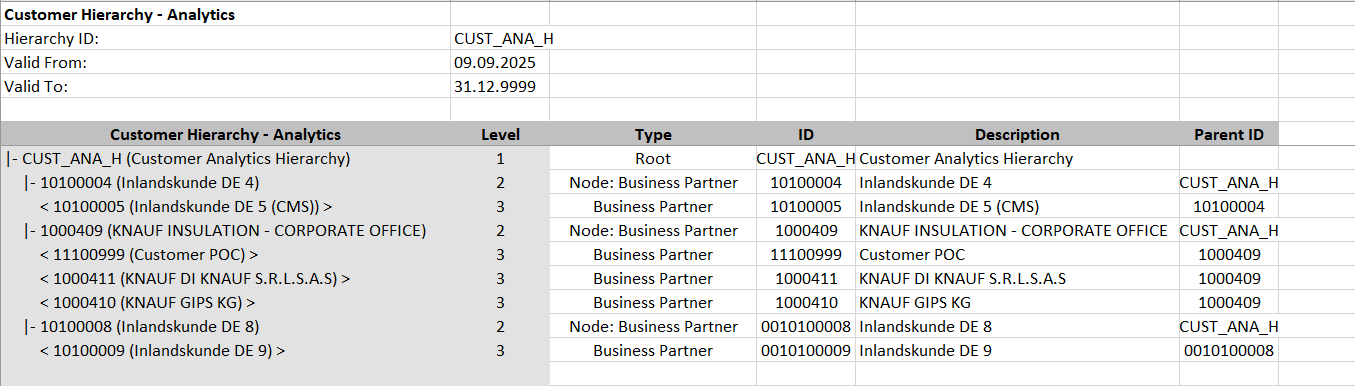
Load Phase and Dependencies
The Customer Hierarchy will be loaded in the pre-cutover period.
Before loading, it will have dependency on the configuration. The configuration needs to be transported into the respective system first.
Configuration
| Item # | Configuration Item |
|---|---|
| 1 | Define the Hierarchy ID in Fiori App 'Manage Global Hierarchies' |
Conversion Objects
| Object # | Preceding Object Conversion Approach |
|---|---|
| 3007 | Business Partners - General (Role 000000) |
| 3009 | Business Partners - Prospect (BUP002) |
Error Handling
| Error Type | Error Description | Action Taken |
|---|---|---|
| Data Error | The Business partner is not defined | Validate the BP relevancy rule and maintain the BP if it is in migration scope |
Post-Load Validation
Project Team
The following post-load validations will be performed by the Project Team.Completeness
| Task | Action |
|---|---|
| Perform Source-to-Target Comparisons |
|
Accuracy
| Task | Action |
|---|---|
| Execute Sample Queries and Reports |
|
| Conduct Post-Migration Reconciliation | Generate reports comparing pre- and post-migration data. |
Business
Post-load validation is a critical step in data migration, ensuring that transferred data is accurate, complete, and functional within the target system.
1. Ensuring Data Integrity
After migration, data must be consistent with its original structure. Post-load validation checks for missing records, incorrect mappings, and formatting errors to prevent discrepancies.
2. Business Continuity
Faulty data can disrupt operations, leading to financial losses and inefficiencies. Validating post-load data ensures that applications function as expected, preventing downtime.
3. Error Detection and Resolution
By validating data post-migration, businesses can detect anomalies early, reducing the cost and effort required for corrections
Completeness
| Task | Action |
|---|---|
| Perform Source-to-Target Comparisons |
|
| Conduct Post-Migration Reconciliation | Go through reports comparing pre- and post-migration data. |
Accuracy
| Task | Action |
|---|---|
| Perform Manual Testing | Conduct manual spot-checks for additional assurance. |
Key Assumptions
- Master Data Standard is up to date as on the date of documenting this conversion approach and data load.
- Customer hierarchy is in scope based on data design and any exception requested by business.
- There will be 3 SAP instances, one for ROW, one for China and one for CUI only.
- For SAP CUI instance, the migration activity will be handled by US based data consultant.
See also
Change log
Workflow history
| Title | Last Updated By | Updated | Status | |
|---|---|---|---|---|
| There are no pages at the moment. | ||||