


| Status | Peer Review |
|---|---|
| Owner | |
| Stakeholders |
The purpose of this document is to define the conversion approach to create Template Project in S/4 HANA. .
As per SyWay design, Template projects are standardized reusable Project structures used for creating operational Project and/or WBS quickly and consistently in S/4 Hana.
Templates Projects consists of both a Project definition and/or WBS element hierarchy structure. These templates are created as Operative Project templates starting with letter T, these are not the STANDARD Projects and Standard WBS elements. Once created, the template project status is locked.
Conversion Scope
The scope of this document covers the approach for uploading Template Project into S/4HANA following the Template Project Master Data Design Standard.
Scope include:
There will be 2 types of Template Project Definitions
- Template Project definition assigned to PPM Item types - Used to create Project structure automatically from PPM item.
- Template Project Definition which are not assigned to PPM item types - Used to create sub-hierarchy of WBS on an existing project rather than creating WBS element individually.
Project Templates will be created for all of the below mentioned project profiles.
ZPS0001 | Capital/ Operational Expense |
ZPS0002 | Operational Expense |
Applicable Project code as per design for project template:
Project ID | Coding Mask | Description |
T | -000000-00-00-XX-XX-XX | Coding Mask for Project Templates |
Once the template project upload is done in S/4 HANA, template project should be locked.
Template Project Definition status as locked.
- Table PROJ - Object number of template Project definition
- Table JEST - Field "Object number" = Key in the object numbers of template Project definition from PROJ.
- Table JEST - Filter object number that do have status = I0065-Master data locked
- Table TJ02 - Status number from JEST table to TJ02 table provides description for system statuses.
Template WBS element status as locked
- Table PRPS - Object numbers of template WBS
- Table JEST - Field "Object number" = Key in the object numbers of WBS from PRPS.
- Table JEST - Filter object number that do have status = I0043-Locked.
- Table JEST - Once the template WBS status is set to Locked, below statuses get updated as well.
- Table TJ02 - Status number from JEST table to TJ02 table provides description for system statuses.
| System Status | Status | Short Text |
| I0061 | PLLK | Planning locked |
| I0062 | DDLK | Date definition locked |
| I0063 | BMLK | Budget management locked |
| I0064 | AALK | Account assignment locked |
| I0065 | MDLK | Master data locked |
The data from legacy system includes:
Not applicable, Source of data is DCT.
List of source systems and approximate number of records
| Source | Scope | Source Approx No. of Records | Target System | Target Approx No. of Records |
|---|---|---|---|---|
DCT | Project Definition | S/4HANA | 15 | |
DCT | WBS element | S/4HANA |
Migration load to be done to ROW instance with replication to other S/4 Hana instances via interface (API) to the China and CUI instance To be included in cut-over strategy document.
Additional Information
Multi-language Requirement
Project Definition / WBS description will be made available in English.
Document Management
Not Applicable
Legal Requirement
Not Applicable
Special Requirements
Not Applicable
Target Design
The technical design of the target for this conversion approach.
| Table | Field | Data Element | Field Description | Data Type | Length | Requirement |
|---|---|---|---|---|---|---|
| PROJ | PSPID | PS_PSPID | Project definition | CHAR | 24 | Mandatory |
| PROJ | POST1 | PS_POST1 | PS: Short description | CHAR | 40 | Mandatory |
| PROJ | STSPR | PS_STSPR | WBS status profile | CHAR | 8 | Mandatory |
| PROJ | VBUKR | PS_VBUKR | Company code | CHAR | 4 | Mandatory |
| PROJ | VKOKR | PS_VKOKR | Controlling area for the project | CHAR | 4 | Mandatory |
| PROJ | PWHIE | PS_PWHIE | WBS currency (project definition) | CHAR | 5 | Mandatory |
| PROJ | PLFAZ | PS_PLFAZ_CHG | Project planned start date | DATS | 8 | Mandatory |
| PROJ | VGPLF | PS_VGPLF | Planning method for project basic dates | NUMC | 1 | Mandatory |
| PROJ | EWPLF | PS_EWPLF | Planning method for project forecast dates | NUMC | 1 | Mandatory |
| PROJ | PROFL | PROFIDPROJ | Project Profile | CHAR | 7 | Mandatory |
| PROJ | BPROF | BP_BPROFIL | Budget Profile | CHAR | 6 | Mandatory |
| PROJ | BESTA | PS_BESTAND | Project Stock | CHAR | 1 | Mandatory |
| PROJ | SCOPE | SCOPE_CV | Object Class | CHAR | 2 | Mandatory |
| PROJ | SCPRF | PS_SCHDPRF | Profile for WBS scheduling | CHAR | 12 | Mandatory |
| PROJ | PLINT | PLINT | Indicator for Integrated Planning | CHAR | 1 | Mandatory |
| PROJ | SCHTYP | PS_SCHED_TYPE | Scheduling scenario | CHAR | 1 | Mandatory |
| PROJ | FUNC_AREA | FKBER | Functional Area | CHAR | 16 | Mandatory |
| PRPS | POSID | PS_POSID | WBS element ID | CHAR | 24 | Mandatory |
| PRPS | POST1 | PS_POST1 | PS: Short description | CHAR | 40 | Mandatory |
| PRPS | PBUKR | PS_PBUKR | Company code for WBS element | CHAR | 4 | Mandatory |
| PRPS | PKOKR | PS_PKOKR | Controlling area | CHAR | 4 | Mandatory |
| PRPS | PRART | PS_PRART | Project Type | CHAR | 2 | Mandatory |
| PRPS | PLAKZ | PS_PLAKZ | Planning element | CHAR | 1 | Conditional |
| PRPS | BELKZ | PS_BELKZ | Account assignment element | CHAR | 1 | Conditional |
| PRPS | PWPOS | PS_PWPOS | Currency | CHAR | 5 | Mandatory |
| PRPS | SCOPE | SCOPE_CV | Object Class | CHAR | 2 | Mandatory |
| PRPS | IMPRF | PS_ZSCHM | Investment Profile | CHAR | 7 | Conditional |
| PRPS | EEINH | PS_EEINH | Unit of measure | CHAR | 3 | Mandatory |
| PRPS | FUNC_AREA | FKBER | Functional Area | CHAR | 16 | Mandatory |
| PRPS | PSPHI | PSPID | Current number for project | CHAR | 24 | Mandatory |
| PRPS | STUFE | PS_STUFE | Level in Project Hierarchy | IN1 | 3 | Mandatory |
| PRHI | LEFT | PS_PHILE | WBS_LEFT | CHAR | 24 | Mandatory |
| PRHI | UP | PS_PHIUP | WBS_UP | CHAR | 24 | Mandatory |
| PRPS | ZX01 | CAPEX/ OPEX | CHAR | 10 | Mandatory |
Data Cleansing
Data cleansing not applicable, as data object Project Template data (Project Definition and WBS) will be collected specifically for data migration.
Collection will be done manually in the Data Collection Template.
| ID | Criticality | Error Message/Report Description | Rule | Output | Source System |
|---|---|---|---|---|---|
| Not Applicable |
Conversion Process
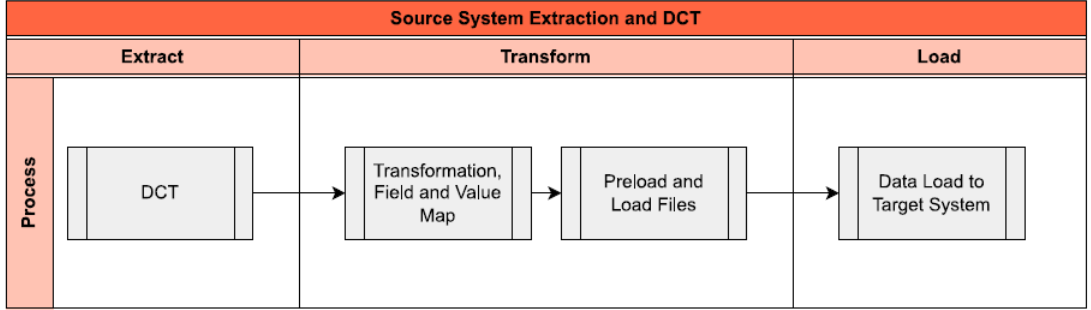
The high-level process is represented by the diagram below:
Data Privacy and Sensitivity
Not Applicable.Extraction
Extract data from a source into Syniti Migrate.
The data does not exist (or cannot be converted from its current state). The data is manually collected by the business directly in Syniti Migrate. This is to be conducted using DCT (Data Collection Template) in Syniti Migrate
Extraction Run Sheet
| Req # | Requirement Description | Team Responsible |
|---|---|---|
| 1 | Ensure DCT is collected for Project Template (Project Definition / WBS elements) | Data Team |
| 2 | Perform preliminary completeness check, data quality check. | Data Team |
| 3 | Raise issues as defects if Req # 1 to 2 are not met | Data Team |
| 4 | Repeat Req # 1 to 3 if required | Data Team |
Selection Screen
Not Applicable| Selection Ref Screen | Parameter Name | Selection Type | Requirement | Value to be entered/set |
|---|---|---|---|---|
| Not Applicable |
Data Collection Template (DCT)
Target Ready Data Collection Template will be created for Template Project data with exception of some fields which require transformation as mentioned in the transformation rule.Template Project DCT Rules
| Field Name | Field Description | Rule | ||||||||||||
|---|---|---|---|---|---|---|---|---|---|---|---|---|---|---|
| Project Level | ||||||||||||||
| PROJ_PSPID | Project definition | Unique Identifier manually generated via coding mask starting with "T-000000". T = Single digit project coding key followed by separator '-' and six digit numeric character 000000. | ||||||||||||
| PROJ_POST1 | PS: Short description | Template description entered manually. | ||||||||||||
| PROJ_VBUKR | Company code | Represents legal entity. Refer configuration table field T001-BURKS for data validation. The project template will have the default company code 1000. PROJ-VBUKR = 1000 | ||||||||||||
| PROJ_PROFL | Project Profile | The profiles contain default values and control parameters for processing objects and functions in the Project System. Project profile is maintained on the template project. Rule applicable as below: Rule 1: The Template Project mapped to PPM item type are assigned to project profile ZPS0001 and ZPS0002. Template projects are mapped to item types through customizing settings for SAP Portfolio and Project Management (PPM). Refer config table /RPM/V_PSITPT. Refer Appendix below for applicable PPM item type mapped with template projects and its respective allowed project profile and project type. Refer Appendix below Rule 2: Project template "Detailed Engineering and construction" is not mapped to a PPM item but is assigned to project profile ZPS0001. Such project template is not mapped in config table config table /RPM/V_PSITPT. Refer Appendix below | ||||||||||||
| PROJ_FUNC_AREA | Functional Area | The Functional Area allows classification of project-related costs by function.
| ||||||||||||
| WBS Level | ||||||||||||||
| POSID | WBS element ID | Unique Identifier for the WBS Element template as per project coding mask starts with "T". Project definition key = Project WBS key, T = Single digit key | ||||||||||||
| POST1 | PS: Short description (1st text line) | 40 character description of the template WBS element. | ||||||||||||
| PBUKR | Company code for WBS element | Represents legal entity and inherited from the Project Definition. Refer configuration table field T001-BURKS for data validation. | ||||||||||||
| PRART | Project Type | It is an attribute that serve as classification field that help to define the nature, purpose, and governance of a WBS element. Project Type will be maintained as per rules defined in Appendix below: | ||||||||||||
| BELKZ | Account assignment element | This indicator enables financial posting on the WBS element. It will be checked in below conditions: Item Type DP are mapped to PS WBS Element through customizing settings for SAP Portfolio and Project Management (PPM). Refer config table /RPM/V_WBSDP_MAP - Item Type DP to PS WBS Rule 1: Item type = Z001to Z009 in /RPM/V_WBSDP_MAP, for decision point id, field DECISION_ID mapped to WBS, AA assignment element PRPS-BELKZ = blank, if PRPS-STUFE = 1 or 2 Rule 2: Item type = Z010, Z012, Z013, Z014 in /RPM/V_WBSDP_MAP, for decision point id field DECISION_ID mapped to WBS, AA assignment element PRPS-BELKZ = active, if PRPS-STUFE = 2 Rule 3: Template project with project profile PROJ-PROFL = ZPS0001, mapping does not exist in /RPM/V_PSITPT, and WBS PRPS-STUFE = 3 and beyond, AA assignment element PRPS-BELKZ = active | ||||||||||||
| IMPRF | Investment Profile | Investment Profile on WBS element is used to enable auto generation of AUC w.r.t. predefined asset class. Template project with project profile PROJ-PROFL = ZPS0001 and mapping does not exist in config table /RPM/V_PSITPT, investment profile is mandatory on template WBS for level PRSP-STUFE = 3 and Capex/Opex = Capex, PRPS-IMPRF = mandatory | ||||||||||||
| FUNC_AREA | Functional Area | The value of this field will be inherited from the project definition template. It should not be changed at the WBS element level i.e PROJ-FUNC_AREA = PRPS-FUNC_AREA
| ||||||||||||
| PSPHI | Current number for project | Project ID assigned to the WBS elements in the project template | ||||||||||||
| STUFE | Level in Project Hierarchy | Level of the WBS element within the template. Level 1 WBS element represent project i.e T-000000 same as project definition number Level 5 (Optional) -000000-00-00-XX-XX-XX | ||||||||||||
| LEFT | WBS_LEFT | This field represents the left-adjacent WBS element in the same hierarchy level required for navigating sibling relationships within a WBS hierarchy. PRHI-LEFT | ||||||||||||
| UP | WBS_UP | This field represents the immediate superior WBS element (parent node) required for establishing parent-child relationships in the WBS hierarchy. PRHI-RIGHT | ||||||||||||
| ZX01 | CAPEX/ OPEX | This field identifies expense is CAPEX or OPEX. Table: PRPS, check PRPS-PSPHI. For PRPS-PSPHI in table PROJ-PROFL = ZPS0001, PRPS- ZX01 = blank -For project profiles ZPS0002 this field will be set to OPEX on the project template WBS. For PRPS-PSPHI in table PROJ, PROJ-PROFL = ZPS0001, PRPS-ZX01 = not blank | ||||||||||||
Appendix: Post template upload, Template project mapping to be done as per the config rationale.
| Template name | PPM Item Type | PS Project Profile | PS Project Type |
| Industrial Project with Qualification | Z001 Industrial Project with Qualification | ZPS0001 - CAPITAL/ Operational Expense | 17 Industrial Projects |
| Industrial Project | Z002 Industrial Project | ZPS0001 - CAPITAL/ Operational Expense | 17 Industrial Projects |
| Industrial Project - Simple | Z003 Industrial Project - Simple ? | ZPS0001 - CAPITAL/ Operational Expense | 17 Industrial Projects |
| New Product Introduction | Z004 New Product Introduction | ZPS0001 - CAPITAL/ Operational Expense | New Product Introduction |
| New Product Introduction | Z005 Product & Process Improvement | ZPS0001 - CAPITAL/ Operational Expense | Product & Process Improvement |
| Customer and business support | Z006 Customer and business support | ZPS0001 - CAPITAL/ Operational Expense | Customer and business support |
| OPD Opportunity Development | Z007 OPD Opportunity Development | ZPS0002 - Operational Expense | OPD Opportunity Development |
| IT Full Lifecycle Project | Z008 IT Full Lifecycle Project | ZPS0001 - CAPITAL/ Operational Expense | 18 IT Project |
| IT Small Project | Z009 IT Small Project | ZPS0001 - CAPITAL/ Operational Expense | 18 IT Project |
| Opex project | Z010 Opex Project | ZPS0002 - Operational Expense | 34 Operational Expense |
| Turnaround Projects | Z011 Turnaround Projects | ZPS0001 - CAPITAL/ Operational Expense | 19 Turnaround Projects |
| Direct Asset Purchase | Z012 Direct Asset Purchase | ZPS0001 - CAPITAL/ Operational Expense | 11 Direct Asset Purchase |
| Capitalised Maintenance | Z013 Capitalised Maintenance | ZPS0001 - CAPITAL/ Operational Expense | 29 Budgeted Maintenance |
| Capitalised Lease | Z014 Capital Lease | ZPS0001 - CAPITAL/ Operational Expense | 16 Capital Lease |
| Detailed Engineering and construction Templates | N/A | ZPS0001 - CAPITAL/ Operational Expense | 17 Industrial Projects |
Note: Upfront Automated Fields are not included in DCT as SAP validates these fields upon entry.
Extraction Dependencies
No Dependencies for Extract
| Item # | Step Description | Team Responsible |
|---|---|---|
| NA |
Transformation
The Target fields are mapped to the applicable Legacy field that will be its source, this is a 3-way activity involving the Business, Functional team and Data team. This identifies the transformation activity required to allow Syniti Migrate to make the data Target ready:
- Perform value mapping and data transformation rules.
- Legacy values are mapped to the to-be values (this could include a default value)
- Values are transformed according to the rules defined in Syniti Migrate
- Prepare target-ready data in the structure and format that is required for loading via prescribed Load Tool. This step also produces the load data ready for business to perform Pre-load Data Validation
Transformation Run Sheet
| Item # | Step Description | Team Responsible |
|---|---|---|
1 | Obtain DCT Sign-off from Business | Data Team |
2 | Execute and Load and perform Transformation | Data Team |
3 | Monitor the transformation progress and ensure performance and completion is within allowed timeframe | Data team |
4 | Review and Validate Error and Preload Reports | Data Team |
5 | Generate data load count. | Data team |
6 | Generate Load Files | Data Team |
7 | Log errors as defects, if any and address resolutions. Close defects. | Data team |
| 8 | Re-transform and re-validate the Pre-load reports if necessary. | Data team |
| 9 | Validate the transformed file as part of pre-load validation, raise data defects or provide the pre-load sign-off. | Business |
| 10 | Analyze and resolve any pre-load defects logged by business. | Data team |
| 11 | Repeat steps 7 to 10 if necessary | Data team |
| 12 | Proceed to pre-load validations | Data team |
Transformation Rules
| Rule # | Source system | Source Table | Source Field | Source Description | Target System | Target Table | Target Field | Target Description | Transformation Logic |
|---|---|---|---|---|---|---|---|---|---|
| Template Project definition | |||||||||
| 1 | DCT | PROJ_PSPID | Project definition | S/4 Hana | PROJ | PSPID | Project definition | Copy from source to target system | |
| 2 | DCT | PROJ_POST1 | PS: Short description | S/4 Hana | PROJ | POST1 | PS: Short description | Copy from source to target system | |
| 3 | DCT | PROJ_VBUKR | Company Code | S/4 Hana | PROJ | VBUKR | Company code | Copy from source to target | |
| 4 | S/4 Hana | PROJ | VKOKR | Controlling Area | Derived from Project profile | ||||
| 5 | S/4 Hana | PROJ | PWHIE | Project Currency | Value Mapping: Currency From Company Code Company Code Currency from T001-WAERS where BUKRS = PBUKR | ||||
| 6 | DCT | PROJ_PROFL | Project Profile | S/4 Hana | PROJ | PROFL | Project Profile | Copy from Source | |
| 7 | DCT | PLFAZ | Project planned start date | S/4 Hana | PROJ | PLFAZ | Project planned start date | Copy from source to target system | |
| 8 | S/4 Hana | PROJ | BPROF | Budget Profile | Derived from Project profile | ||||
| 9 | S/4 Hana | PROJ | BESTA | Project Stock | Default to No | ||||
| 10 | S/4 Hana | PROJ | SCOPE | Object Class | Derived from Project profile | ||||
| 11 | S/4 Hana | PROJ | SCPRF | Profile for WBS scheduling | Derived from Project profile | ||||
| 12 | S/4 Hana | PROJ | PPROF | Planning Profile | Derived from Project profile | ||||
| 13 | S/4 Hana | PROJ | PLINT | Indicator for Integrated Planning | Derived from Project profile | ||||
| 14 | S/4 Hana | PROJ | SCHTYP | Scheduling scenario | Derived from Project profile | ||||
| 15 | DCT | PROJ_FUNC_AREA | Functional Area | S/4 Hana | PROJ | FUNC_AREA | Functional Area | Copy from source to target system | |
| Template WBS | |||||||||
| 16 | DCT | POSID | WBS element ID | S/4 Hana | PRPS | POSID | WBS element ID | Copy from source to target system | |
| 17 | DCT | POST1 | PS: Short description (1st text line) | S/4 Hana | PRPS | POST1 | PS: Short description (1st text line) | Copy from source to target system | |
| 18 | DCT | PBUKR | Company code for WBS element | S/4 Hana | PRPS | PBUKR | Company code for WBS element | Copy from source to target system | |
| 19 | DCT | PRART | Project Type | S/4 Hana | PRPS | PRART | Project Type | Copy from source to target system | |
| 20 | DCT | BELKZ | Account assignment element | S/4 Hana | PRPS | BELKZ | Account assignment element | Copy from source to target system | |
| 21 | S/4 Hana | PRPS | PWPOS | Currency | Value Mapping: Currency From Company Code Company Code Currency from T001-WAERS where BUKRS = PBUKR | ||||
| 22 | S/4 Hana | PRPS | SCOPE | Object class | Default from Project Profile | ||||
| 23 | DCT | IMPRF | Investment Profile | S/4 Hana | PRPS | IMPRF | Investment Profile | Copy from source to target system | |
| 24 | DCT | FUNC_AREA | Functional Area | S/4 Hana | PRPS | FUNC_AREA | Functional Area | Copy from source to target system | |
| 25 | DCT | PSPHI | Project Definition | S/4 Hana | PRPS | PSPHI | Project Definition | Copy from source to target system | |
| 26 | DCT | STUFE | Level | S/4 Hana | PRPS | STUFE | Level | Copy from source to target system | |
| 27 | DCT | LEFT | WBS_LEFT | S/4 Hana | PRPS | PRHI-LEFT | WBS_LEFT | Copy from source to target system | |
| 28 | DCT | UP | WBS_UP | S/4 Hana | PRPS | PRHI-UP | WBS_UP | Copy from source to target system | |
| 29 | DCT | ZX01 | CAPEX/ OPEX | S/4 Hana | PRPS | ZX01 | CAPEX/ OPEX | Copy from source to target system | |
List of Custom Target Reports for this object is maintained here: Conversion Specification - Custom Reports Register.
The standard upload template to be used for Project template upload in S/4 Hana.
Transformation Mapping
| Mapping Table Name | Mapping Table Description |
|---|---|
| T001 | Value Mapping: Currency From Company Code |
Transformation Dependencies
List the steps that need to occur before transformation can commence| Item # | Step Description | Team Responsible |
|---|---|---|
Ensure all the fields that require value mapping, as stipulated. Mapping tables, have the correct values mapped and imported into tool. | Data Team |
Pre-Load Validation
Project Team
Completeness
| Task | Action |
|---|---|
Verify Record Count | SyWay I2M Data Team to verify that the total number of relevant records from the DCT is equal to the total number of records in the Preload and Load Sheets. |
Accuracy
| Task | Action |
|---|---|
Conversion Accuracy | SyWay I2M Data Team to verify that all fields below meet pass the checks:
|
Review Error Reports | Review and correct the errors. Achieve a zero-error record count as much as possible. Raise defects for data remediated and requiring a correction in the source (DCT) data. |
Business
Completeness
| Task | Action |
|---|---|
Verify Record Count | Business Data Owner/s to verify that the total number of relevant records from the DCT is equal to the total number of records in the Preload and Load Sheets. |
Accuracy
| Task | Action |
|---|---|
Conversion Accuracy | Business Data Owner/s to verify that all the data in the load table/file is accurate as per endorsed transformation/mapping rules (and signed-off DCT data). |
Load
The load process includes:
- Execute the automated data load into target system using load tool or product the load file if the load must be done manually
- Once the data is loaded to the target system, it will be extracted and prepared for Post Load Data Validation
- Migration load to be done to ROW instance with replication to other S/4 Hana instances via interface (API) to the China and CUI instance To be included in cut-over strategy document.
Load Run Sheet
| Item # | Step Description | Team Responsible |
|---|---|---|
1 | Load using transaction CNMASSCREATE or Migration cockpit. | SyWay I2M Data Team |
2 | Load 3 records for < > to validate if data is loaded successfully without errors | SyWay I2M Data Team |
3 | Load 3 records for < > to validate if data is loaded successfully without errors | SyWay I2M Data Team |
4 | Proceed with full load if steps 2 and 3 are validated | SyWay I2M Data Team |
5 | Validate few records loaded by accessing Portfolio Bucket Structure App | SyWay I2M Data Team |
6 | Generate post load report if step 5 is validated | SyWay I2M Data Team |
7 | Post Template upload, run CNMASSSTATUS to update the template status to Lock | SyWay I2M Data Team |
Load Phase and Dependencies
Configuration
| Item # | Configuration Item |
|---|---|
| 1 | Controlling Area |
| 2 | Company Code |
| 3 | Project Type |
| 4 | Factory Calendar |
| 5 | Currency Code |
| 6 | Project Profile |
| 7 | Project Type |
| 8 | Investment Profile |
| 9 | Budget Profile |
| 10 | Planning Profile |
| 11 | Functional Area |
| 12 | Profile for WBS scheduling |
| 13 | Map Item Type to Project or PS or Commercial Project (Post template upload required config) |
Conversion Objects
| Object # | Preceding Object Conversion Approach |
|---|---|
| list the exact title of the conversion object of only the immediate predecessor – this will then confirm the DDD (Data Dependency Diagram) |
Error Handling
| Error Type | Error Description | Action Taken |
|---|---|---|
| Project Definition already exist | Correct upload data | |
| WBS element already exist | Correct upload data |
Post-Load Validation
Project Team
Completeness
| Task | Action |
|---|---|
Verify Count | SyWay I2M Data Team to verify the record count created in target S/4 HANA by accessing post load reports or standard reports from S/4 HANA. |
Verify Logs | Check if there is data that failed to load and perform the necessary actions (e.g. register as post load issue or attempt to load the record again, etc.). |
Accuracy
| Task | Action |
|---|---|
Conversion Accuracy | Verify that the Project Definition / WBS in target S/4 HANA were loaded correctly via Project Builder display and table PROJ / PRPS |
Business
Completeness
| Task | Action |
|---|---|
| Verify template Project data - Project Definition / WBS | Extract data from PS report CN41N in S/4 Hana |
Accuracy
| Task | Action |
|---|---|
| Verify template Project data - Project Definition / WBS | Extract data from PS report CN41N in S/4 Hana |
Key Assumptions
- Master Data Standard is up to date as on the date of documenting this conversion approach and data load.
- Template Project is in scope based on data design and any exception requested by business.
Note: Jira Task: