You are viewing an old version of this page. View the current version.
Compare with Current
View Page History
« Previous
Version 13
Next »
| Status | Supplier Master Mapping | Maps Supplier information from the legacy system (S/4HANA or legacy catalog) to Ariba Buyer. Includes Supplier ID, Supplier Partitioning, Supplier-Purchasing Org mapping, and Supplier Location. Ensures suppliers are visible and accessible in Ariba Buyer catalogs. |
|---|
| Owner | Catalog Item Mapping | Maps all catalog item fields from legacy catalogs to Ariba Buyer. Includes Supplier Part ID, Supplier Part Auxiliary ID, Manufacturer Part ID, Item Description, Unit Price, Unit of Measure, Lead Time, Manufacturer Name, Supplier URL, Manufacturer URL, Market Price, Short Name, Language, Currency, Expiration/Effective Dates, Parametric Data/Name, PunchOut fields, Territory Available, Images/Thumbnails/Auxiliary Images, Delete/Flags, Keywords, Price Configuration, Minimum Quantity, Quantity Interval, Content Unit, Packing Quantity, Item Spec, Related Items, Attachments. Ensures data is target-ready for Syniti Migrate and CIF 3.0/Excel upload. |
|---|
| Stakeholders | Commodity Code / UNSPSC Mapping | Maps legacy commodity codes to Ariba UNSPSC codes. Validates mapping to prevent catalog load errors. Supports value transformation and ensures correct classification for catalog items. |
|---|
| Unit of Measure Mapping | Maps legacy unit of measure codes to Ariba standard ISO UOM. Validates values to avoid catalog validation errors during upload. |
Purpose
The purpose of this document is to define the conversion approach to create Static Ariba catalogs uploaded in Ariba and available in Guided buying and S/4 HANA is our To be Process.
Presently(As Is) the catalogs are at Ariba and available for SRM & Ebuy Applications
Conversion Scope
The scope of this document covers the approach for converting active Ariba Catalogs
from Legacy Source Systems ECC /SRM/Ebuy/Ariba into S/4HANA/Ariba Guided Buying/Ariba following the DD-FUN- 050 Master Data Standard_1197-Ariba Catalogs.
The data from legacy system includes:
- Sap Ariba
The data from legacy system excludes:
- Sap SRM
- SAP ECC
- Ebuy Portal
List of source systems and approximate number of records
| Source | Scope | Source Approx No. of Records | Target System | Target Approx No. of Records |
|---|
| Sap Ariba Catalog Manager | There are more than 325 active catalogs in the current (As-Is) system, which need to be migrated to the future (To-Be) system. | Record volume is dependent on contract line items, with approximately 1 to 10,000 records per catalog. | Sap Ariba Catalog Manager | The number of records will remain similar to the legacy source, varying based on contract line items, with approximately 1 to 10,000 records per catalog. |
|
|
|
|
|
|
|
|
|
|
|
|
|
|
|
Additional Information
Multi-language Requirement
The Catalog item Language field will decides
Document Management
Documents related to catalogs are managed by Versions
Legal Requirement
As on Contract / Agreements with Supplier
Special Requirements
Nil
Target Design
The technical design of the target for this conversion approach.
| Table | Field | Data Element | Field Description | Data Type | Length | Requirement |
|---|
| Supplier ID | Supplier ID | Indicates the ERP Vendor ID or Ariba Network ID of the supplier | Upfront Automated | String | 255 |
| Manufacturer Part ID | Manufacturer Part ID |
| Upfront Automated | String | 255 |
| Manufacturer Part ID | Manufacturer Part ID | The Manufacturer Part ID must be provided by the Supplier based on Manufacturer's specification. To be provided if already available in legacy system | Upfront Automated | String | 255 |
| Item Description | Item Description | Support up to 2000 bytes (upto 1000 characters). Case Sensitive. | Upfront Automated | String | 1000 |
| SPSC Code | SPSC Code | THE SPSC code must be provided by the supplier. Also, a mapping between the SPSC code and Synesqo material group must be maintained. This field is mandatory if the same information is not provided in the Classification code column. The classification code (material group) must be loaded and active in Ariba | Upfront Automated | String | 40 |
| Unit Price | Unit Price | This field is mandatory if the Pricing Configuration field is not available. No value required for Punchout or Partial catalogs | Upfront manual/Default on the form | Decimal |
|
| Unit of Measure | Unit of Measure | ISO Unit of measure | Upfront Automated | String | 32 |
| Lead Time | Lead Time | The lead time is used to display a warning to the end user if the need by date specified by the end user is less than the current date plus the lead time. To be provided if already available in legacy system | Upfront Automated | Integer |
|
| Manufacturer Name | Manufacturer Name | To be provided if already available in legacy system | Upfront manual/Default on the form | String | 255 |
| Supplier URL | Supplier URL | This field is mandatory for Punchout Catalogs. The Punchout Set Up Request URL must be set as Supplier URL for punchout catalogs | Upfront manual/Default on the form | String | 255 |
| Manufacturer URL | Manufacturer URL | Provides additional information to the user by linking manufacturer's website on the catalog details page. To be provided if already available in legacy system | Upfront manual/Default on the form | String | 255 |
| Market Price | Market Price | Used to calculate discount. To be provided if already available in legacy system | Upfront manual/Default on the form | Decimal |
|
| Short Name | Short Name | Provides short description of the item. If left blank, it copied first part of the Item description. To be provided if already available in legacy system | Upfront Automated | String | 80 |
| Classification Codes | Classification Codes | THE UNSPSC code must be provided by the supplier. Also, a mapping between the SPSC code and Synesqo material group must be maintained. This field is mandatory if the same information is not provided in the SPSC Code column. The classification code (material group) must be loaded and active in Ariba | Upfront Automated | String | 64 |
| Language | Language | Java locale code for the language used in the Item Description. For the list of Java locale codes, see: http://java.sun.com/j2se/1.4.2/docs/guide/intl/locale.doc.html | Upfront Automated | String | 255 |
| Currency | Currency | ISO 4217 currency code must be set. It overrides the currcncy at the header field. | Upfront Automated | String | 32 |
| Expiration Date | Expiration Date | This date must be in the future and in YYYY-MM-DD format. | Upfront Automated | Date | 0 |
| Effective Date | Effective Date | This date must be prior to the expiration date and in YYYY-MM-DD format. | Upfront Automated | Date | 0 |
| Parametric Data | Parametric Data | This field needs to be set only if Parameteric values are enabled. To be provided if already available in legacy system | Upfront manual/Default on the form | String | 255 |
| Parametric Name | Parametric Name | This field needs to be set only if Parameteric values are enabled. To be provided if already available in legacy system | Upfront manual/Default on the form | String | 255 |
| PunchOut Enabled | PunchOut Enabled | Can True or False | Upfront Automated | Boolean | 0 |
| PunchoutLevel | PunchoutLevel | Can be store, aisle, shelf, or product. | Upfront Automated | String |
|
| Territory Available | Territory Available | List of one or more ISO country or region codes. Recommended to use ISO 3166-1 and 3166-2 codes for this field. | Upfront Automated | String | 255 |
| Supplier Part Auxiliary ID | Supplier Part Auxiliary ID | The combination of Supplier ID, Supplier Part ID and Supplier Part Auxiliary ID must be unique. Must be upto up to 255 characters (case-insensitive) | Upfront Automated | String | 255 |
| Image | Image | Provides image of the item at the search and item details page. To be provided if already available in legacy system | Upfront manual/Default on the form | String | 255 |
| Thumbnail | Thumbnail | Provides image of the item at the search page. If left blank, the thumbnail is replaced with the image. To be provided if already available in legacy system | Upfront manual/Default on the form | String | 255 |
| Delete | Delete | Can True or False | Upfront Automated | Boolean |
|
| IsPartial | IsPartial | Can be Yes or No | Upfront Automated | Flag |
|
| isInternalPartID | isInternalPartID | Can be Yes or No | Upfront Automated | Flag |
|
| IsCollection | IsCollection | Can be Yes or No | Upfront Automated | Flag |
|
| DefaultRelevance | DefaultRelevance | Can be a value from 0-1000. 1000 is most relevant, and 0 is least relevant. | Upfront Automated | Integer |
|
| InKitOnly | InKitOnly | Can True or False | Upfront Automated | Boolean |
|
| green | green | Can be Yes or No | Upfront Automated | Flag |
|
| hazardousmaterials | hazardousmaterials | Can be Yes or No | Upfront Automated | Flag |
|
| Keywords | Keywords | To be provided if already available in Legacy system | Upfront Automated | String | 255 |
| Price configuration | Price configuration | This field should be used only when advance pricing is applicable. | Upfront Automated | String | 255 |
| MinimumQuantity | MinimumQuantity | This restricts the user from ordering below the minimum order quantity. It must be left blank if the MOQ is not applicable. To be provided if already available in Legacy system. | Upfront Automated | Integer |
|
| QuantityInterval | QuantityInterval | It is needed only for items which are sold in multiples of a set. It is needed only when mandated by the supplier. To be provided if already available in Legacy system | Upfront Automated | Integer |
|
| Content Unit | Content Unit | It describes the number of items avaialble in one unit of the item which is purchased. It is needed only when provided by the supplier. To be provided if already available in legacy system | Upfront Automated | String | 32 |
| Packing Quantity | Packing Quantity | It describes the number of items avaialble in one packaging unit of the item which is purchased. It is needed only when provided by the supplier. To be provided if already available in legacy system | Upfront Automated | Integer |
|
| Item Spec | Item Spec | This provides additional information about Item specifications. It must be left blank if not applicable. If needed, it must be provided in form of a hash table of [“key-value”] pairs. The syntax is "{key1=value1;key2=value2;key3=value3;keyn=valuen}" | Upfront Automated | String | 6000 |
| RelatedItems | RelatedItems | This links additional related items to a catalog item. It must be left blank if not applicable. If needed, it must be provided in form of a hash table of [“key-value”] pairs. The syntax is "{key1=value1;key2=value2;key3=value3;keyn=valuen}" | Upfront Automated | String | 255 |
| Attachments | Attachments | It adds the specified attachment on the item details page. To be provided if already available in legacy system. Typically, it can be item specification sheet etc. | Upfront Automated | String | 255 |
| AuxilaryImages | AuxilaryImages | Additional images, can be added to the item details using this field. To be provided if already available in legacy system | Upfront Automated | String | 255 |
| AuxiliaryThumbnails | AuxiliaryThumbnails | Additional tumbnails can be added to the item details using this field. To be provided if already available in legacy system | Upfront Automated | String | 255 |
Data Cleansing
| ID | Criticality | Error Message/Report Description | Rule | Output | Source System |
|---|
|
|
|
|
|
|
|
|
|
|
|
|
|
|
|
|
|
|
|
|
|
|
|
|
Conversion Process
The high-level process is represented by the diagram below:
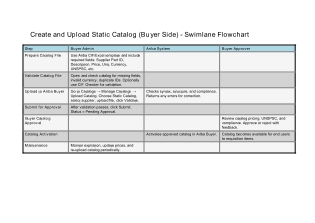
Data Privacy and Sensitivity
Confidential due to Price agreements in contracts
Extract data from a source into CIF file
. There are 2 possibilities:
- All Catalogs are exported using Ariba catalog Manager(Lagacy) and Import the catalogs using Ariba catalog Manager(New)
The agreed Relevancy criteria is applied to the extracted records to identify the records that are applicable for the Target loads
| Req # | Requirement Description | Team Responsible |
|---|
| EXTR-001 | Extract the active catalog data from Ariba Buyer using the Catalog Manager module. Navigate to Core Administration → Catalog Manager → Catalogs → Select Supplier → Click on Active Version → Step 1 → Export → Format: CIF 3.0 → All Items → Good Items → Export and Save CIF file. | Data Team |
|
|
|
|
|
|
Selection Screen
| Selection Ref Screen | Parameter Name | Selection Type | Requirement | Value to be entered/set |
|---|
| Core Administration → Catalog Manager → Catalogs → Select Supplier → Click on Active Version | Export Options | Action / Navigation | Export catalog data for the selected supplier catalog in CIF format. | 1. In Step 1, click the Export button.
2. Select Export Format = CIF 3.0.
3. Under All Items, click Good Items.
4. Click Export again.
5. Save the generated CIF file for this catalog. |
|
|
|
|
|
|
|
|
|
|
|
|
|
|
|
Data Collection Template (DCT)
Target Ready Data Collection Template will be created for data with exception of some fields which require transformation as mentioned in the transformation rule. DCT Rules
| Field Name | Field Description | Rule |
|---|
| Supplier ID | Supplier identifier maintained in Ariba. | Mandatory; must exist in Ariba. |
| Supplier Part ID | Unique part identifier provided by the Supplier. | The combination of Supplier ID, Supplier Part ID, and Supplier Part Auxiliary ID must be unique. |
| Manufacturer Part ID | Manufacturer’s reference number for the item. | Optional; provided if available in legacy system. |
| Item Description | Detailed description of the catalog item. | Supports up to 2000 bytes (~1000 characters); case sensitive. |
| SPSC Code | Commodity classification code. | Mandatory if Classification Code is not provided; must be mapped to Synesqo material group and active in Ariba. |
| Unit Price | Unit price of the item. | Mandatory if Pricing Configuration is not provided; not required for PunchOut or Partial catalogs. |
| Unit of Measure | Standard unit in which the item is purchased. | Must follow ISO UOM codes. |
| Lead Time | Delivery lead time in days. | Used to warn end users if need-by date < current date + lead time; optional if available in legacy system. |
| Manufacturer Name | Name of the item manufacturer. | Optional; provide if available in legacy system. |
| Supplier URL | Supplier website or PunchOut setup URL. | Mandatory for PunchOut catalogs; must be valid HTTPS URL. |
| Manufacturer URL | Manufacturer’s website link for item details. | Optional; provide if available in legacy system. |
| Market Price | Reference market price for the item. | Optional; used for discount calculations. |
| Short Name | Short description of the item. | If blank, first part of Item Description is copied; optional. |
| Classification Codes | Classification code / material group. | Mandatory if SPSC Code is blank; must be active in Ariba. |
| Language | Language code of item description. | Java locale code (e.g., “en”, “fr”). |
| Currency | Currency for item pricing. | ISO 4217 code; overrides header currency if provided. |
| Expiration Date | End date for item validity. | Must be in future and in YYYY-MM-DD format. |
| Effective Date | Start date for item validity. | Must be prior to Expiration Date and in YYYY-MM-DD format. |
| Parametric Data | Parametric attribute values. | Provide only if Parametric Values are enabled; optional. |
| Parametric Name | Name of parametric attribute. | Provide only if Parametric Values are enabled; optional. |
| PunchOut Enabled | Indicates if item is PunchOut-enabled. | True or False. |
| PunchOut Level | PunchOut integration level. | Values: store, aisle, shelf, product. |
| Territory Available | Countries or regions where item is available. | Use ISO 3166-1 or 3166-2 codes; optional. |
| Supplier Part Auxiliary ID | Additional identifier for the item. | Must be up to 255 characters; ensures uniqueness with Supplier ID and Supplier Part ID. |
| Image | Item image displayed in catalog. | Optional; provide if available in legacy system. |
| Thumbnail | Item thumbnail image for search results. | Optional; if blank, main Image is used. |
| Delete | Marks item for deletion. | True or False. |
| IsPartial | Indicates partial catalog item. | Yes or No. |
| IsInternalPartID | Internal part ID indicator. | Yes or No. |
| IsCollection | Indicates if item belongs to a collection. | Yes or No. |
| Default Relevance | Search relevance of item. | Numeric 0–1000; 1000 = most relevant, 0 = least relevant. |
| InKitOnly | Indicates if item is part of a kit. | True or False. |
| Green | Indicates eco-friendly item. | Yes or No. |
| Hazardous Materials | Indicates if item is hazardous. | Yes or No. |
| Keywords | Search keywords for the item. | Optional; provide if available in legacy system. |
| Price Configuration | Advanced pricing configuration. | Use only if advanced pricing is applicable. |
| Minimum Quantity | Minimum order quantity. | Leave blank if not applicable; provide if available. |
| Quantity Interval | Incremental quantity for ordering. | Required if sold in multiples; optional. |
| Content Unit | Number of items per purchasable unit. | Optional; provide if available. |
| Packing Quantity | Number of items per packaging unit. | Optional; provide if available. |
| Item Spec | Additional item specifications. | Hash table format: {key1=value1;key2=value2;...}; leave blank if not applicable. |
| Related Items | Links additional items. | Hash table format: {key1=value1;key2=value2;...}; leave blank if not applicable. |
| Attachments | Attachments for item details (e.g., spec sheets). | Optional; provide if available. |
| Auxiliary Images | Additional images for item details. | Optional; provide if available. |
| Auxiliary Thumbnails | Additional thumbnails for item details. | Optional; provide if available. |
|
|
|
|
|
|
|
|
|
|
|
|
| Item # | Step Description | Team Responsible |
|---|
| Supplier | Ensure that Supplier data is created and available in S/4HANA before catalog upload. Supplier must also be partitioned to appear in Ariba Buyer. | Data Team / Interface Team |
| Supplier – Purchasing Org Mapping | Verify that Supplier is mapped to the relevant Purchasing Organizations. This mapping must exist before catalog upload. | Data Team / Interface Team |
| Supplier Location / Partitioned Supplier | Ensure Supplier locations and partitioning are configured correctly, otherwise end users cannot access the catalog. | Data Team / Interface Team |
| Commodity Code (UNSPSC mapping) | Commodity Codes must be loaded in Ariba and mapped to UNSPSC codes. Missing mapping will result in validation errors during catalog upload. | Functional Team / Data Team |
| Unit of Measure (UOM) | UOM values must exist in Ariba; otherwise catalog items with missing UOM will fail validation. | Interface Team / S4HANA Integration Team |
| Material Codes / Material Groups | No dependency on Material codes or Material Groups in Ariba. | N/A |
| End-User Access | Ensure all above objects (Supplier, Supplier Partition, Supplier-P org mapping, Commodity code) are loaded; otherwise end users cannot search or use catalogs in Ariba Buyer. | Data Team / Functional Team |
The Target fields are mapped to the applicable Legacy field that will be its source, this is a 3-way activity involving the Business, Functional team and Data team. This identifies the transformation activity required to allow to make the data Target ready:
The target fields are mapped to the applicable legacy fields that will be their source. This is a 3-way activity involving the Business Team, Functional Team/Interface Team, and Data Team. This activity identifies the transformation rules required to make the data target-ready for loading into Ariba Buyer via Syniti Migrate.
| Item # | Step Description | Team Responsible |
|---|
| Supplier | Validate that all Supplier records are loaded in S/4HANA and correctly interfaced to Ariba. Ensure each Supplier is partitioned so it is visible in Ariba Buyer. | Data Team / Interface Team |
| Supplier – Purchasing Org Mapping | Confirm that each Supplier is mapped to the relevant Purchasing Organizations in S/4HANA and that this mapping is interfaced to Ariba. | Data Team / Interface Team |
| Supplier Location / Partitioned Supplier | Verify that Supplier locations are configured and partitioned. Missing partitioning will prevent end users from accessing catalogs. | Data Team / Interface Team |
| Commodity Code (UNSPSC mapping) | Ensure Commodity Codes exist in Ariba and are mapped to UNSPSC codes. Validate mapping to prevent catalog upload errors. | Functional Team / Data Team |
| Unit of Measure (UOM) | Check that all UOM values exist in Ariba. Missing UOM will cause validation failures during catalog transformation. | Interface Team / S/4HANA Integration Team |
| Material Codes / Material Groups | No transformation required as these are not dependencies for Ariba catalog load. | N/A |
| End-User Access Validation | After all above objects are available, validate that end users can access and search catalogs in Ariba Buyer. | Functional Team / Data Team |
Transformation Rules
| Rule # | Source system | Source Table | Source Field | Source Description | Target System | Target Table | Target Field | Target Description | Transformation Logic |
|---|
| TR-001 | Legacy System / S4HANA | Supplier Master | Supplier ID | Unique supplier identifier | Ariba Buyer | Supplier Catalog | Supplier ID | Supplier master in Ariba | Map directly; ensure exists and is partitioned for visibility in Ariba Buyer |
| TR-002 | Legacy Catalog | Catalog Item | Supplier Part ID | Supplier-assigned unique item ID | Ariba Buyer | Catalog | Supplier Part ID | Unique catalog item in Ariba | Map directly; ensure uniqueness in combination with Supplier ID and Supplier Part Auxiliary ID |
| TR-003 | Legacy Catalog | Catalog Item | Supplier Part Auxiliary ID | Optional auxiliary item ID | Ariba Buyer | Catalog | Supplier Part Auxiliary ID | Auxiliary identifier in Ariba | Map directly; max 255 characters; ensure uniqueness |
| TR-004 | Legacy Catalog | Catalog Item | Item Description | Detailed product description | Ariba Buyer | Catalog | Item Description | Description field in Ariba | Preserve case; trim spaces; limit to 2000 bytes (~1000 characters) |
| TR-005 | Legacy Catalog | Catalog Item | SPSC Code | Commodity classification | Ariba Buyer | Catalog | UNSPSC / Classification Code | Commodity mapping in Ariba | Map to Ariba UNSPSC; mandatory if Classification Code not provided; validate mapping |
| TR-006 | Legacy Catalog | Catalog Item | Unit Price | Price per unit | Ariba Buyer | Catalog | Unit Price | Item unit price in Ariba | Map directly; default if Pricing Configuration missing; skip for PunchOut/Partial catalogs |
| TR-007 | Legacy Catalog | Catalog Item | Unit of Measure | Purchase unit | Ariba Buyer | Catalog | Unit of Measure | UOM in Ariba | Map to ISO UOM; validate existence in Ariba |
| TR-008 | Legacy Catalog | Catalog Item | Lead Time | Delivery lead time | Ariba Buyer | Catalog | Lead Time | Lead time in days in Ariba | Map directly; blank if not provided |
| TR-009 | Legacy Catalog | Catalog Item | Manufacturer Name | Item manufacturer | Ariba Buyer | Catalog | Manufacturer Name | Manufacturer name in Ariba | Map directly; optional |
| TR-010 | Legacy Catalog | Catalog Item | Supplier URL | Supplier or PunchOut URL | Ariba Buyer | Catalog | Supplier URL | Supplier URL in Ariba | Map directly; validate HTTPS; mandatory for PunchOut |
| TR-011 | Legacy Catalog | Catalog Item | Expiration Date | Catalog item expiration | Ariba Buyer | Catalog | Expiration Date | Expiration date in Ariba | Transform to YYYY-MM-DD; must be in future |
| TR-012 | Legacy Catalog | Catalog Item | Effective Date | Catalog item start date | Ariba Buyer | Catalog | Effective Date | Effective date in Ariba | Transform to YYYY-MM-DD; must be before Expiration Date |
| TR-013 | Legacy Catalog | Catalog Item | Parametric Data / Parametric Name | Parametric attributes | Ariba Buyer | Catalog | Parametric Data / Parametric Name | Parametric attributes in Ariba | Map only if parametric enabled; blank otherwise |
| TR-014 | Legacy Catalog | Catalog Item | PunchOut Enabled / PunchOut Level | PunchOut integration | Ariba Buyer | Catalog | PunchOut Enabled / PunchOut Level | PunchOut fields in Ariba | Map True/False; map level as store/aisle/shelf/product |
| TR-015 | Legacy Catalog | Catalog Item | Commodity Code | Commodity mapping | Ariba Buyer | Catalog | UNSPSC Mapping | Commodity mapping in Ariba | Map to existing commodity code; validation mandatory |
| TR-016 | Legacy Catalog | Catalog Item | Image / Thumbnail / Auxiliary Images / Auxiliary Thumbnails | Item images | Ariba Buyer | Catalog | Image / Thumbnail / Auxiliary Images / Auxiliary Thumbnails | Images in Ariba | Map URLs; validate accessibility; default Thumbnail = Image if blank |
| TR-017 | Legacy Catalog | Catalog Item | Delete | Delete flag | Ariba Buyer | Catalog | Delete | Marked for deletion | Map True/False |
| TR-018 | Legacy Catalog | Catalog Item | IsPartial / IsInternalPartID / IsCollection / InKitOnly / Green / Hazardous Materials | Catalog flags | Ariba Buyer | Catalog | Same fields in Ariba | Map flags directly | Map Yes/No or True/False as-is |
| TR-019 | Legacy Catalog | Catalog Item | Keywords | Search keywords | Ariba Buyer | Catalog | Keywords | Keywords in Ariba | Map as-is; optional |
| TR-020 | Legacy Catalog | Catalog Item | Minimum Quantity | Minimum order quantity | Ariba Buyer | Catalog | Minimum Quantity | Minimum quantity in Ariba | Map directly; leave blank if not applicable |
| TR-021 | Legacy Catalog | Catalog Item | Quantity Interval | Incremental order quantity | Ariba Buyer | Catalog | Quantity Interval | Interval in Ariba | Map directly; only for multiples |
| TR-022 | Legacy Catalog | Catalog Item | Content Unit / Packing Quantity | Unit and packaging info | Ariba Buyer | Catalog | Content Unit / Packing Quantity | Content/packaging info in Ariba | Map directly; optional |
| TR-023 | Legacy Catalog | Catalog Item | Item Spec / Related Items / Attachments | Additional specs, links, attachments | Ariba Buyer | Catalog | Same fields in Ariba | Store additional info in Ariba | Transform into hash table {key1=value1;key2=value2;...}; leave blank if not applicable |
|
|
|
|
|
|
|
|
|
|
| Mapping Table Name | Mapping Table Description |
|---|
| Supplier Master Mapping | Maps Supplier information from the legacy system (S/4HANA or legacy catalog) to Ariba Buyer. Includes Supplier ID, Supplier Partitioning, Supplier-Purchasing Org mapping, and Supplier Location. Ensures suppliers are visible and accessible in Ariba Buyer catalogs. |
| Catalog Item Mapping | Maps all catalog item fields from legacy catalogs to Ariba Buyer. Includes Supplier Part ID, Supplier Part Auxiliary ID, Manufacturer Part ID, Item Description, Unit Price, Unit of Measure, Lead Time, Manufacturer Name, Supplier URL, Manufacturer URL, Market Price, Short Name, Language, Currency, Expiration/Effective Dates, Parametric Data/Name, PunchOut fields, Territory Available, Images/Thumbnails/Auxiliary Images, Delete/Flags, Keywords, Price Configuration, Minimum Quantity, Quantity Interval, Content Unit, Packing Quantity, Item Spec, Related Items, Attachments. Ensures data is target-ready for Syniti Migrate and CIF 3.0/Excel upload. |
| Commodity Code / UNSPSC Mapping | Maps legacy commodity codes to Ariba UNSPSC codes. Validates mapping to prevent catalog load errors. Supports value transformation and ensures correct classification for catalog items. |
| Unit of Measure Mapping | Maps legacy unit of measure codes to Ariba standard ISO UOM. Validates values to avoid catalog validation errors during upload. |
| PunchOut & Integration Mapping | Maps legacy PunchOut flags False |
| Auxiliary Data Mapping | Maps additional catalog data such as images, thumbnails, auxiliary images, auxiliary thumbnails, attachments, and related items. Applies formatting rules (e.g., hash tables for Item Spec / Related Items) and ensures proper structure for Ariba. |
| Transformation Validation & Defaults | Provides rules for applying default values, data formatting (e.g., dates in YYYY-MM-DD, case sensitivity), and business rules such as minimum quantities, intervals, relevance scores, and optional field handling. Ensures all target data is ready for pre-load validation by the business team. |
| Item # | Step Description | Team Responsible |
|---|
| Supplier | Ensure Supplier records exist in S/4HANA and are migrated/interfaced to Ariba Buyer. Validate that Supplier is partitioned to allow catalog visibility. | Data Team / Interface Team |
| Supplier – Purchasing Org Mapping | Verify that each Supplier is mapped to the relevant Purchasing Organizations and interfaced to Ariba. | Data Team / Interface Team |
| Supplier Location / Partitioned Supplier | Confirm Supplier locations and partitions are configured correctly; missing partitioning prevents catalog access. | Data Team / Interface Team |
| Commodity Code / UNSPSC Mapping | Ensure Commodity Codes exist in Ariba and are correctly mapped to UNSPSC codes. Validate that all required mappings are present to prevent validation errors. | Functional Team / Data Team |
| Unit of Measure (UOM) | Validate that all UOM values exist in Ariba. Transform legacy UOM values if needed to ISO standard. | Interface Team / Data Team |
| Material Codes / Material Groups | No dependency on Material codes or Material Groups in Ariba. No transformation required. | N/A |
| Catalog Item Fields (General) | Extract legacy catalog item data (Supplier Part ID, Item Description, Manufacturer Part ID, Short Name, Market Price, Currency, Language, etc.) and transform to target-ready Ariba format. | Data Team |
| Catalog Item Fields (Advanced) | Apply parametric attributes, PunchOut flags, PunchOut levels, territory availability, item specs, related items, attachments, images, thumbnails, auxiliary images/thumbnails. | Data Team / Functional Team |
| Flags & Indicators | Map fields like Delete, IsPartial, IsInternalPartID, IsCollection, InKitOnly, Green, Hazardous Materials, Default Relevance, Price Configuration, Minimum Quantity, Quantity Interval, Content Unit, Packing Quantity. Apply validation and defaults where required. | Data Team |
| Target-Ready Data Validation | Validate all transformed catalog data (format, value mapping, defaults) to ensure it is ready for Syniti Migrate load. Generate pre-load dataset for business review. | Business Team / Functional Team / Data Team |
| End-User Access Validation | Confirm that after all dependencies are met (Supplier, Supplier partition, Supplier-P org mapping, Commodity code, UOM), end users can search and access catalog items in Ariba Buyer. | Functional Team / Business Team |
|
|
|
|
|
|
Pre-Load Validation
Project Team
Completeness
| Task | Action |
|---|
| Validate Supplier Records | Ensure all Suppliers exist in S/4HANA and are migrated/interfaced to Ariba. Verify that Supplier is partitioned for catalog visibility. |
| Validate Supplier – Purchasing Org Mapping | Confirm each Supplier is mapped to the correct Purchasing Organizations. Ensure mappings are loaded in Ariba before catalog upload. |
| Validate Supplier Locations | Verify all Supplier locations exist and are partitioned correctly. Missing locations or partitions prevent end-user access. |
| Validate Commodity Codes / UNSPSC Mapping | Ensure all Commodity Codes are loaded in Ariba and mapped correctly to UNSPSC codes. Identify any missing mappings to avoid catalog load validation errors. |
| Validate Unit of Measure (UOM) | Check that all required UOM values exist in Ariba. Map legacy UOMs to ISO standards if required. |
| Validate Catalog Item Fields | Verify completeness of mandatory catalog fields: Supplier Part ID, Item Description, Manufacturer Part ID, Short Name, Market Price, Currency, Language, Effective Date, Expiration Date. |
| Validate Parametric / Advanced Fields | Ensure Parametric Data/Name, PunchOut flags, PunchOut Level, Territory Available, and advanced item fields are provided as required. |
| Validate Images and Attachments | Confirm that all images, thumbnails, auxiliary images, auxiliary thumbnails, and attachments are available and correctly linked. |
| Validate Flags & Indicators | Check completeness for Delete, IsPartial, IsInternalPartID, IsCollection, InKitOnly, Green, Hazardous Materials, Default Relevance, Price Configuration, Minimum Quantity, Quantity Interval, Content Unit, Packing Quantity. Apply default values where necessary. |
| Validate Related Items / Item Specs | Ensure Item Specs and Related Items are populated where applicable using the correct hash table format {key1=value1;key2=value2;...}. |
| Target-Ready Data Validation | Verify that all extracted and transformed data meets Ariba load requirements (CIF 3.0/Excel template) and is ready for Syniti Migrate load. |
| End-User Access Validation | Confirm that after all dependencies are loaded, end users can search and access all catalog items in Ariba Buyer. |
Accuracy
| Task | Action |
|---|
| Validate Supplier Data Accuracy | Ensure Supplier IDs, Supplier Partitioning, and Supplier-Purchasing Org mappings match the source system and are correctly loaded in Ariba. |
| Validate Catalog Item Identifiers | Verify that Supplier Part IDs, Supplier Part Auxiliary IDs, and Manufacturer Part IDs are unique and correctly mapped. |
| Validate Item Descriptions | Confirm that Item Descriptions are complete, accurate, and match legacy system values. Ensure case sensitivity and character limits are maintained. |
| Validate Commodity Code / UNSPSC Mapping | Check that Commodity Codes are correctly mapped to UNSPSC codes in Ariba. Ensure no mismatches that could cause catalog validation errors. |
| Validate Unit of Measure (UOM) | Confirm that UOM values match legacy system standards and ISO codes in Ariba. |
| Validate Prices and Currency | Ensure Unit Prices and Market Prices are accurate. Confirm currency codes match legacy values and are correctly applied. |
| Validate Dates | Verify that Effective Date is prior to Expiration Date and both are in correct YYYY-MM-DD format. Ensure future Expiration Dates. |
| Validate Flags & Indicators | Check that fields like Delete, IsPartial, IsInternalPartID, IsCollection, InKitOnly, Green, Hazardous Materials, Default Relevance, and Price Configuration are accurate and consistent with source data. |
| Validate Parametric and PunchOut Fields | Ensure Parametric Data/Name, PunchOut Enabled, PunchOut Level, and Territory Available are accurately populated according to business rules. |
| Validate Images, Thumbnails, Attachments | Confirm all images, auxiliary images/thumbnails, and attachments are correctly linked, complete, and accessible. |
| Validate Related Items / Item Specs | Check that Related Items and Item Specs are accurate, formatted properly (hash table {key1=value1;...}), and consistent with source data. |
| Validate Overall Data Consistency | Ensure all catalog fields are internally consistent, values are correct, and dependencies (Suppliers, UOM, Commodity Codes) are satisfied. |
|
|
|
|
|
|
Business
Completeness
Accuracy
Load
The load process includes:
- Execute the automated data load into target system using load tool or product the load file if the load must be done manually
- Once the data is loaded to the target system, it will be extracted and prepared for Post Load Data Validation
Load Run Sheet
| Item # | Step Description | Team Responsible |
|---|
|
|
|
|
|
|
|
|
|
|
|
|
Load Phase and Dependencies
Configuration
Conversion Objects
| Object # | Preceding Object Conversion Approach |
|---|
| list the exact title of the conversion object of only the immediate predecessor – this will then confirm the DDD (Data Dependency Diagram) |
|
|
|
|
Error Handling
| Error Type | Error Description | Action Taken |
|---|
|
|
|
|
|
|
|
|
|
Post-Load Validation
Project Team
Completeness
Accuracy
Business
Completeness
Accuracy
Key Assumptions
- Master Data Standard is up to date as on the date of documenting this conversion approach and data load.
- is in scope based on data design and any exception requested by business.


