


| Status | Revision under Review |
|---|---|
| Owner | THANGARAJAN-ext, Ganesan |
| Stakeholders |
Purpose
The purpose of this document is to define the data conversion approach for creating Pricing Condition Records in the SAP S/4HANA target system, as part of a Greenfield implementation.
In SAP ECC, sales pricing condition records exist as part of the pricing procedure configuration and are stored in condition tables such as KONV, A*, and related master and transactional tables. These records are used to define pricing elements such as base price, discounts, freight, and surcharges across sales documents.
In SAP S/4HANA, the structure and usage of pricing condition records remain largely consistent; however, data models may be simplified, and dependencies on business partners (replacing customer/vendor master records) become critical in ensuring consistency across sales and purchasing functions.
This conversion aims to migrate active and relevant sales pricing condition records from existing ECC systems into S/4HANA by applying required transformation logic using Syniti as the data migration and transformation platform. The converted records will be loaded into the target S/4HANA system using standard SAP mechanisms such as IDOCs, BAPIs, or direct table loads where applicable.
Conversion Scope
The scope of this document includes the end-to-end approach for:
- Extracting existing Pricing Condition Records from SAP ECC systems WP2 and PF2.
- Applying transformation and cleansing logic via Syniti to conform with the S/4HANA data model and business partner framework.
- Loading the transformed condition records into SAP S/4HANA while ensuring data integrity, correct assignment to condition types, condition tables, access sequences, and pricing procedures.
This process will support the migration of condition records such as:
- Base Price (e.g., PR00)
- Discounts (e.g., K007, K004)
- Freight and surcharges
- Transfer Prices
The conversion will ensure all condition records are aligned to the new Pricing Key combinations defined for example, based on Business Partner, Material Masters and relevant Organizational Units (Sales Org, Distribution Channel, Division) as designed for the target S/4HANA landscape.
The data from legacy system includes:
- List price at various key combinations including scale-based pricing as applicable
- Discounts and surcharges at various key combinations
- Freight condition records at various key combinations
The data from legacy system excludes:
- Rebate condition records will be managed via Condition contracts set up
- Commissions condition records will be managed via Condition contracts set up ( Condition types : CV, CV1, CV2, Z95A, ZCOA, ZCOM )
- Tax condition records that will be covered in CONV-1035 Tax condition records spec.
| Source | Scope | Source Approx No. of Records | Target System | Target Approx No. of Records |
|---|---|---|---|---|
WP2 | Pricing Condition Records |
| S/4HANA System |
|
PF2 | Pricing Condition Records |
| S/4HANA System |
|
Additional Information
Multi-language Requirement
Not Applicable
Document Management
None identified. The conversion scope is limited to the migration of pricing condition data records. No document attachments, images, or supporting files are included.
Legal Requirement
N/A
Special Requirements
N/A
Target Design
The technical design of the target for this conversion approach.
Pricing Condition Data Structure for Migration
The illustration below depicts the typical structure of pricing condition records as used in S/4HANA. Each record is defined at the level of an access sequence (key combination) and a validity period for a given condition type.
In the SAP S/4HANA database, the condition data is physically stored across several transparent tables — primarily KONH (Condition Header), KONP (Condition Items) + Axxx Condition tables, KONW (Scales), and KONM (Scale Base). However, for migration purposes, the data must be organized into a structured file format that aligns with the Migration Cockpit upload template.
This structure consists of a parent node representing the Pricing Condition Record, with two sub-nodes:
Key Fields for Condition – capturing the access key (e.g., customer, material, sales org, distribution channel) that determines the condition table.
Scales – holding scale values, quantities, or amounts that define graduated pricing within the condition record.
This logical representation ensures that condition records can be uploaded consistently into S/4HANA using the Migration Cockpit app, while still preserving the technical mapping to the underlying condition tables in the system.
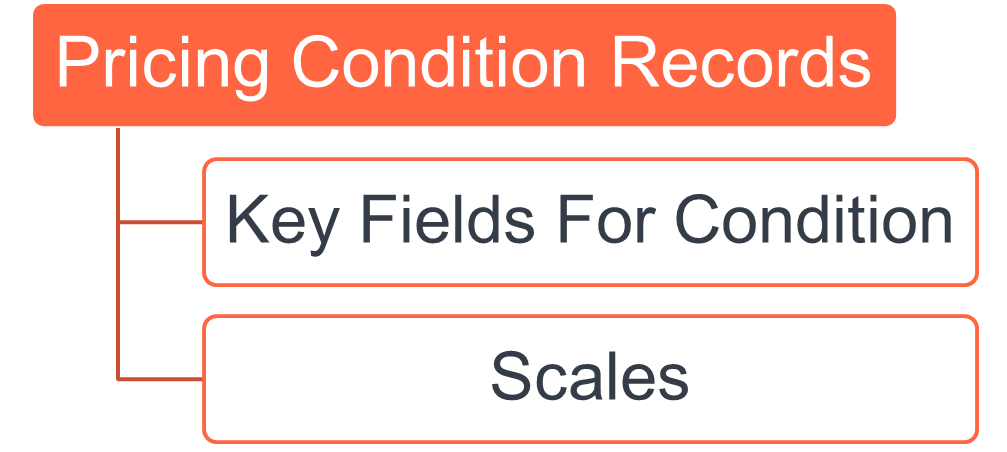
Overview of target S/4HANA transparent tables
| Node / Structure | Technical Table(s) | Purpose / Description |
| Pricing Condition Record | KONH | Condition header (validity period, release status, condition type, access sequence). |
| Key Fields for Condition | KONP + condition tables (Axxx) | Defines the key combination that determines which condition table is used (e.g., Customer/Material, Sales Org/Distribution Channel). Contains condition rate, currency, unit of measure, etc. |
| Scales | KONW / KONM | Holds scale values (quantity, amount, or percentage) that drive graduated or tiered pricing. |
A separate migration template must be generated for data extraction from each source system. This ensures that system-specific values can be captured and transformed consistently.
In addition, there may be cases where ad-hoc data collection templates are required for specific target condition types that do not have corresponding or sufficient data available in the current ECC systems. These ad-hoc templates will be used to gather the missing data directly from business stakeholders or relevant functional teams.
Target Structure
| Table | Field | Data Element | Field Description | Data Type | Length | Requirement | Remarks |
|---|---|---|---|---|---|---|---|
Pricing Condition Records | |||||||
/1LT/DSM23001318 | KNUMH | KNUMH | Condition Record No.* | CHAR | 10 | Required | Temporary number of your condition record. The record will be renumbered in the target system. You can, for example enter the legacy key of your condition record. |
/1LT/DSM23001318 | KAPPL | KAPPL | Application* | CHAR | 2 | Required | Subdivides the usage of a condition (for example, pricing) for use in different application areas (for example, sales & distribution or purchasing). |
/1LT/DSM23001318 | KSCHL | KSCHA | Condition Type* | CHAR | 4 | Required | The condition type indicates, for example, whether, during pricing, the system applies a price, a discount, a surcharge, or other pricing elements, such as freight costs and sales taxes. For each of these pricing elements, there is a condition type defined in the system. |
/1LT/DSM23001318 | DATAB | DATAB | Valid From* | DATS | 8 | Required | When you create an object, the beginning date to which object is valid is defined here. |
/1LT/DSM23001318 | DATBI | DATBI | Valid To* | DATS | 8 | Required | When you create an object, you use the ending date to define as of when the object is valid. |
/1LT/DSM23001318 | KRECH | KRECH | Calculation Type | CHAR | 80 | Required | Determines how the system calculates prices, discounts, or surcharges in a condition. For example, the system can calculate a price as a fixed amount or as a percentage based on quantity, volume, or weight. |
/1LT/DSM23001318 | KBETR | KBETR | Amount | Number | 11,2 | Required | The rate that determines how the system calculates pricing using this condition. Depending on the condition type, the rate can be a fixed amount or a percentage. Leave this field empty if scales exist for this condition. |
/1LT/DSM23001318 | KONWA | KONWA | Condition Unit (Currency or Percentage) | CUKY | 5 | Required | The unit that determines whether the condition for a product is based on a percentage or on an amount in a particular currency. The use of the condition unit depends on the condition type. Examples: If you create a condition that includes prices, you enter the currency that applies to the condition (for example, "USD" for US dollars). If you are creating a condition based on percentage discounts or surcharges, you leave the field empty or fill %. The system automatically enters a percent sign as the condition unit. |
/1LT/DSM23001318 | KPEIN | KPEIN | Condition Pricing Unit | DEC | 5 | Optional | The quantity on which the amount or percentage is based. For example, the condition can refer to 1 piece or 10 pieces. |
/1LT/DSM23001318 | KMEIN | KMEIN | Condition Unit of Measure | UNIT | 3 | Optional | Enter the unit of measure to which the condition amount refers (for example: bottles, pieces, kilograms, or hours). |
| Key Fields For Condition | |||||||
| Table | Field | Data Element | Field Description | Data Type | Length | Requirement | Remarks |
/1LT/DSM23001319 | KNUMH | KNUMH | Condition Record No.* | CHAR | 10 | Required | Temporary number of your condition record. The record will be renumbered in the target system. You can, for example enter the legacy key of your condition record. |
/1LT/DSM23001319 | FIELDNAME | FIELDNAME | Field Name* | CHAR | 30 | Required | Enter the field name for the condition according to SAP note 2332748. |
/1LT/DSM23001319 | FIELDVALUE | N/A | Field Value | CHAR | 80 | Required | Enter the field value that corresponds to the field name. |
| Scales | |||||||
/1LT/DSM23001321 | KNUMH | KNUMH | Condition Record No.* | CHAR | 10 | Required | Temporary number of your condition record. The record will be renumbered in the target system. You can, for example enter the legacy key of your condition record. |
| /1LT/DSM23001321 | KLFN1 | KLFN1 | Scales Item Counter* | NUM | 4 | Required | This alphanumeric field is used as a sequence number. It enables multiple key entries to be entered. |
| /1LT/DSM23001321 | KSTBM | KSTBM | Scale Quantity | QUAN | 15 | Optional | Scale quantity (for example, number of pieces) to which a scale refers. |
| /1LT/DSM23001321 | KONMS | KONMS | Scale Unit of Measure | UNIT | 3 | Optional | Enter the unit of measure for this scale rate. |
| /1LT/DSM23001321 | SCALE_VAL | KSTBW | Scale Value | CURR | 15 | Optional | Enter the scale value for value-based scales. |
| /1LT/DSM23001321 | KONWA2 | KONWA | Scale Currency | CUKY | 5 | Optional | Enter the currency for this scale rate. |
| /1LT/DSM23001321 | KBETR | KBETR | Scale Amount* | CURR | 15 | Required | Enter the amount of the scale rate for this scale entry. |
| /1LT/DSM23001321 | KONWA | KONWA | Scale Currency* | CUKY | 5 | Required | Enter the currency for this scale rate. |
| /1LT/DSM23001321 | KBETR_PERC | KBETR | Scale Percentage | CURR | 11 | Optional | Enter the percentage value for this value-based scale. |
Data Cleansing
| ID | Criticality | Error Message/Report Description | Rule | Output | Source System |
|---|---|---|---|---|---|
1034-001 | C1 | Remove obsolete condition records | Eliminate pricing condition records where the material, customer, or condition type is blocked or discontinued. | List of obsolete records | WP2/PF2 |
1034-002 | C1 | Validate Customer-Material master data | Ensure pricing condition records refer to valid and active Customer and Material master records. | List of invalid Customer Material combinations | WP2/PF2 |
1034-003 | C1 | Remove expired condition records | Delete condition records where validity end date has already passed. Exception the condition records required for open sales orders under migration scope | List of expired records | WP2/PF2 |
1034-004 | C1 | Validate mandatory fields | Check for missing mandatory fields (e.g. Condition Value, Currency, UoM, Scale data, Validity dates). | List of incomplete records | WP2/PF2 |
1034-005 | C2 | Detect duplicate condition records | Identify and flag duplicate pricing condition records for the same condition type, key combination, and validity period. This is possible as the source is from multiple systems WP2 and PF2 | List of duplicate records | WP2/PF2 |
1034-006 | C1 | Validate currency consistency | Validate that the currency used in pricing conditions matches the currency allowed for the corresponding sales organization or customer master data. | List of inconsistent currency | WP2/PF2 |
1034-007 | C2 | Validate scale data | Identify and correct scale records with inconsistent or overlapping ranges (quantity/value). | List of scale issues | WP2/PF2 |
1034-008 | C1 | Validate unit of measure consistency | Validate unit of measure used in pricing conditions aligns with material master base UoM and allowed UoMs. | List of inconsistent UoM records | WP2/PF2 |
Conversion Process
The high-level process is represented by the diagram below:
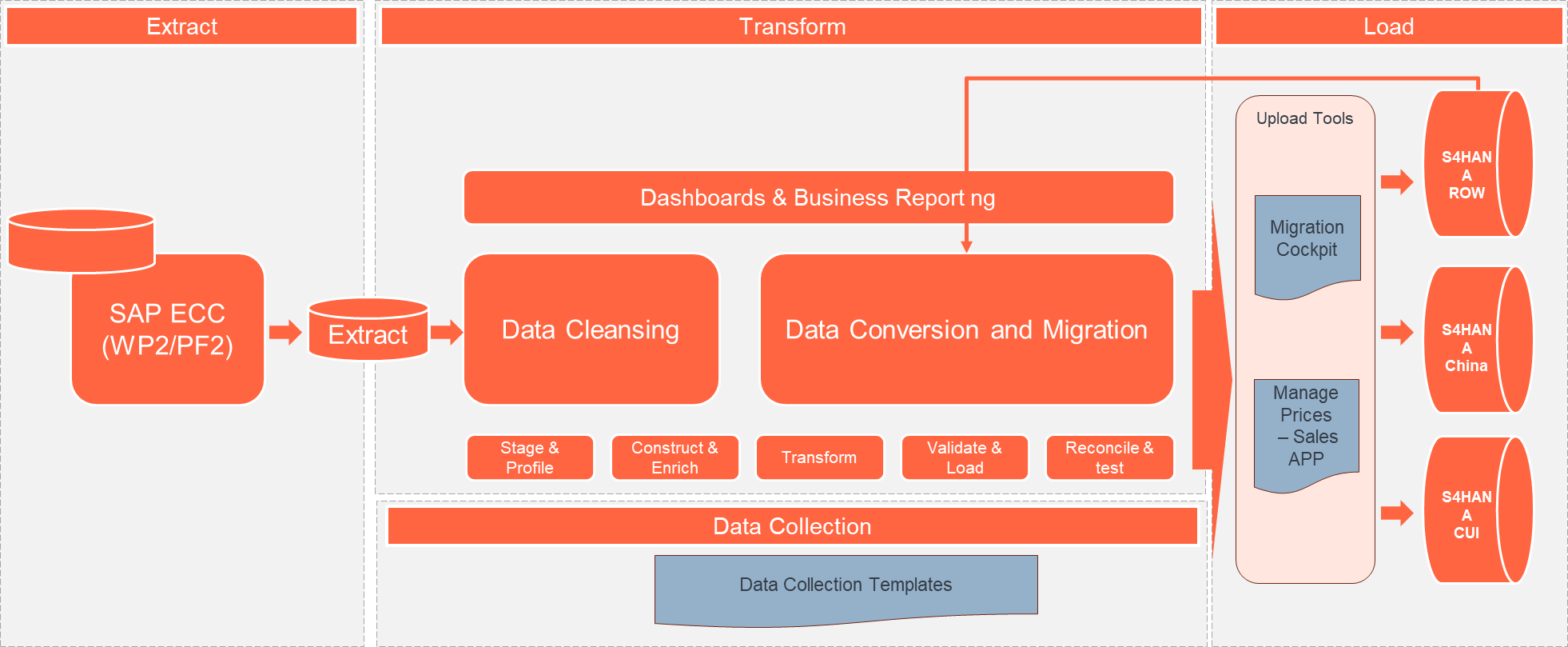
Overview of Pricing Conversion objects
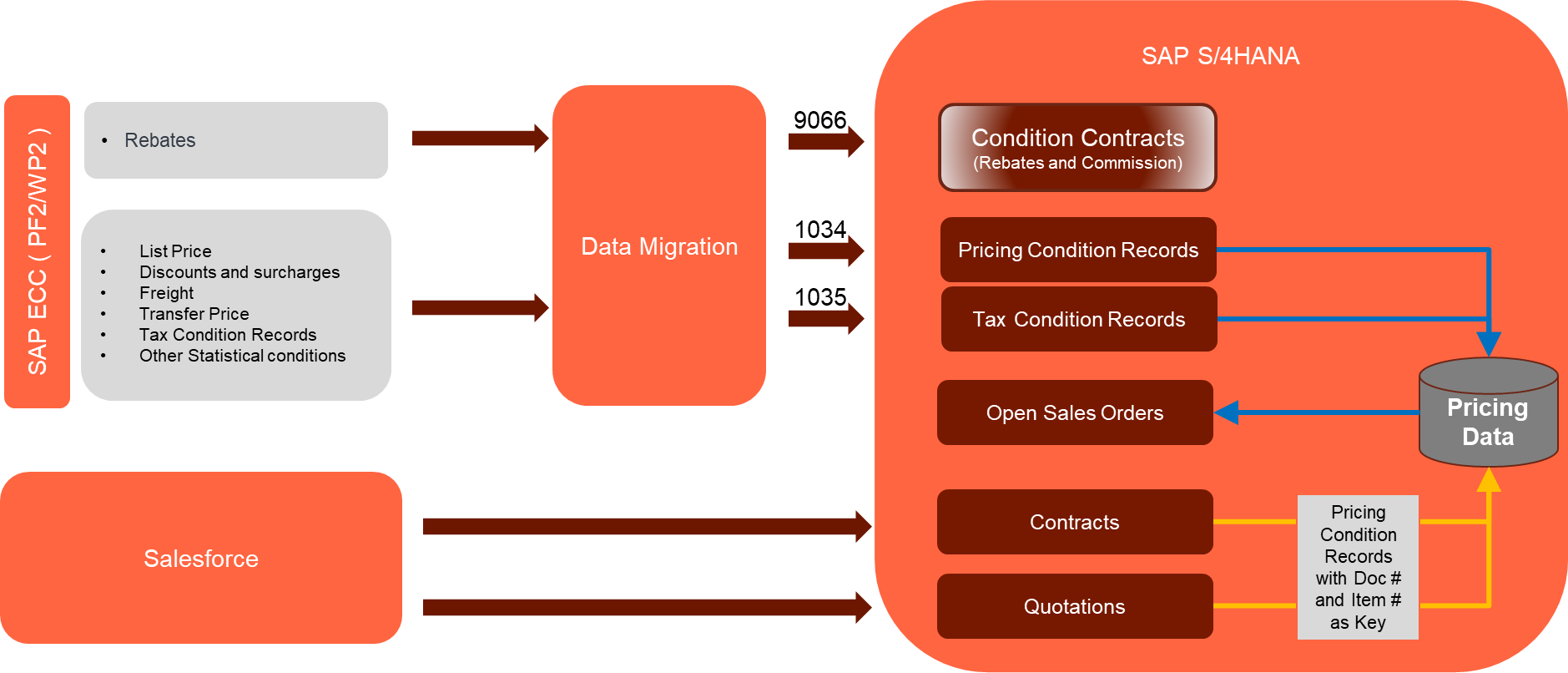
Data Privacy and Sensitivity
Extraction
Extract data from a source into . There are 2 possibilities:
- The data exists. connects to the source and loads the data into . There are 3 methods:
- Perform full data extraction from relevant tables in the source system(s).
- Perform extraction through the application layer.
- Only if ; cannot connect to the source, data is loaded to the repository from the provided source system extract/report.
- The data does not exist (or cannot be converted from its current state). The data is manually collected by the business directly in . This is to be conducted using DCT (Data Collection Template) in
The agreed Relevancy criteria is applied to the extracted records to identify the records that are applicable for the Target loads
Extraction Run Sheet
| Req # | Requirement Description | Team Responsible |
|---|---|---|
| 1034-001 | Confirm scope and extraction approach for each ECC source systems WP2, PF2 (direct DB or manual extract) | Data Team (L2C), Data Team (Syniti) |
| 1034-002 | Establish and validate Syniti connectivity to both ECC source systems | Technical / Basis Team, Data Team (Syniti) |
| 1034-003 | Perform full data extraction from relevant SAP pricing tables (e.g., A*, KONH, KONP, etc.) from both source systems WP2, PF2 | Data Team (Syniti) |
| 1034-004 | Extract pricing condition records via the application layer for additional validations for Manual Data Collection using DCTs | Functional / Data Team (L2C) |
| 1034-005 | Apply agreed Relevancy Criteria to filter only applicable condition records for S/4HANA (e.g., active conditions, valid dates, active customers/materials) | Data Team (L2C), Data Team (Syniti) |
| 1034-006 | In case of restricted access or connectivity issues, receive pre-extracted pricing reports/files from source system team and upload to Syniti Migrate manually | Data Team (L2C), Data Team (Syniti) |
| 1034-007 | Identify pricing data not present in SAP (e.g., special rates, legacy exceptions) and collect manually via DCT (Data Collection Template) | Business Users / Data Team (L2C), Data Team (Syniti) |
| 1034-008 | Perform data quality checks on extracted records (e.g., missing key fields, invalid dates, incorrect formats) | Data Team (L2C), Data Team (Syniti) |
| 1034-009 | Review and approve extracted data sample sets from each source system before transformation begins | Business / Functional Team |
| 1034-010 | Archive raw extracts and maintain extraction audit logs for traceability | Data Team (L2C), Data Team (Syniti) / PMO Team |
Selection Screen
| Selection Ref Screen | Parameter Name | Selection Type | Requirement | Value to be entered/set |
|---|---|---|---|---|
| Validity To Date | Single | Select Data that are valid from this (Valid to) date | Date | |
| Sales Organization | Multiple | Valid Sales organization for extraction | In-Scope Sales Organizations | |
Data Collection Template (DCT)
A Target Ready Data Collection Template will be created for the required data, except for fields that need transformation as per the defined transformation rules. These templates will follow the format required by the target S/4HANA pricing configuration.
Each template corresponds to a specific condition table structure, designed to handle data based on the key combinations used for one or more condition types. You can identify the correct template based on the condition type and the relevant sales organizations or entities.
Please find the complete list of Data Collection Templates in the link attached below.
DCT-CNV-1034-Pricing Condition Records V1.0
Please note, creation of Data collection template must be aligned with pricing configurations for Condition types, Access sequence and Associated Condition Tables. For now, the following Template is prepared based on Pricing Configurations from S/4HANA Sandbox environment. This will be replaced once the pricing configuration is ready.
DCT Rules
| Field Name | Field Description | Rule |
|---|---|---|
| KSCHL | Condition Type | Mandatory. Must be a valid condition type configured in S/4HANA. Use lookup list provided. |
| Field List Based on Chosen Access Table / Key Combination (Refer to Full Template List Above) | ||
| VKORG | Sales Organization | Mandatory. Must match valid Sales Org values in target system. Only authorized values per scope should be used. |
| VTWEG | Distribution Channel | Optional based on condition table. Must be valid if provided. |
| SPART | Division | Optional. Use only if applicable. Validate against S/4HANA master data. |
| KUNNR | Customer Number | Must be a valid customer number in the S/4HANA master data. |
| LIFNR | Vendor Number | Use only when condition type applies to vendor. Must match master data. |
| MATNR | Material Number | Used only for material-based pricing. Should be padded to 18 characters. |
| WERKS | Plant | Optional. Use only if relevant for the pricing condition. |
| Mandatory Fields in All DCTs | ||
| KBETR | Condition Rate | Mandatory. Should be numeric. Decimal separator should be "." (e.g., 25.50). |
| KONWA | Currency | Mandatory. Must be a valid ISO currency code (e.g., USD, EUR). |
| KPEIN | Pricing Unit | Mandatory. Must be numeric and represent number of units (e.g., 1, 1000). |
| KMEIN | Unit of Measure | Mandatory. Must match valid UOM from SAP (e.g., EA, KG, L). |
| DATAB | Valid From Date | Mandatory. Format: YYYYMMDD. Cannot be in the past or beyond system date range. |
| DATBI | Valid To Date | Mandatory. Format: YYYYMMDD. Must be later than Valid From date. |
Extraction Dependencies
| Item # | Step Description | Team Responsible |
|---|---|---|
| Not Applicable | ||
Transformation
The Target fields are mapped to the applicable Legacy field that will be its source, this is a 3-way activity involving the Business, Functional team and Data team. This identifies the transformation activity required to allow to make the data Target ready:
- Perform value mapping and data transformation rules.
- Legacy values are mapped to the to-be values (this could include a default value)
- Values are transformed according to the rules defined in
- Prepare target-ready data in the structure and format that is required for loading via prescribed Load Tool. This step also produces the load data ready for business to perform Pre-load Data Validation
Transformation Run Sheet
| Item # | Step Description | Team Responsible |
|---|---|---|
| 1 | Identify target S/4HANA fields and determine applicable legacy source fields from both ECC systems WP2, PF2 | Functional Team (L2C)+ Data Team (L2C) |
| 2 | Review condition types and access tables used in each ECC source systems WP2, PF2 | Business Team + Functional Team (L2C) |
| 3 | Map legacy field values to S/4HANA target values (including field-level mapping and technical names) | Data Team (L2C), Data Team (Syniti) |
| 4 | Define value mapping rules for fields requiring standardization or harmonization across the two source systems WP2, PF2 (i.e., USD, US$ mapped to USD, and ZD01 and ZDISC from ECC system mapped to ZD01 etc., | Functional Team (L2C)+ Data Team (L2C) |
| 5 | Identify and agree on default values where legacy data is incomplete or inconsistent | Business Team + Functional Team (L2C) |
| 6 | Configure transformation rules in Syniti Migrate (including calculated fields, formatting rules, etc.) | Data Team (Syniti), Data Team (L2C) |
| 7 | Review transformation logic and mappings with Business for confirmation | Business Team + Functional Team (L2C) |
| 8 | Perform initial transformation run and generate draft target-ready dataset | Data Team (Syniti), |
| 9 | Review draft target-ready data for structure and completeness | Data Team (L2C), Functional Team (L2C) |
| 10 | Share transformed data with Business for Pre-load Validation | Business Team |
| 11 | Incorporate feedback from Business and refine mappings or transformation logic as needed | Data Team (L2C) |
| 12 | Finalize and approve transformed data as Target Ready Load File | Business + Functional (L2C) + Data Team (L2C) |
| 13 | Handover final file to Load Team or trigger the load via Syniti Load Workbench | Data Team (Syniti), Data Load Team |
Transformation Rules
The source and target tables have the same fields as listed in the key combination.
| Rule # | Source system | Source Table | Source Field | Source Description | Target System | Target Table | Target Field | Target Description | Mapping Table | Transformation Logic |
|---|---|---|---|---|---|---|---|---|---|---|
| Pricing Condition Records | ||||||||||
Data Extraction Logic for Pricing Conditions
| ||||||||||
| 1034-001 | PF2, WP2 | KONH | KNUMH | Condition Record No.* | S/4HANA | /1LT/DSM23001318 | KNUMH | Condition Record No.* | RULE | Temporary number of target condition record. The record will be renumbered in the S/4HANA system. |
| 1034-002 | PF2, WP2 | KONP | KAPPL | Application* | S/4HANA | /1LT/DSM23001318 | KAPPL | Application* | Expected Value "V" - Sales and Distribution | |
| 1034-003 | PF2, WP2 | KONP | KSCHL | Condition Type* | S/4HANA | /1LT/DSM23001318 | KSCHL | Condition Type* | MAP_KSCHL_PRICING | Map Condition type from Source to Target using Mapping table defined here. Multiple records may be available for the selection but all will lead to same target condition for an input condition type |
| 1034-004 | PF2, WP2 | KONH | DATAB | Valid From* | S/4HANA | /1LT/DSM23001318 | DATAB | Valid From* | Copy Valid from Date | |
| 1034-005 | PF2, WP2 | KONH | DATBI | Valid To* | S/4HANA | /1LT/DSM23001318 | DATBI | Valid To* | Copy Valid To Date | |
| 1034-006 | PF2, WP2 | KONP | KRECH | Calculation Type | S/4HANA | /1LT/DSM23001318 | KRECH | Calculation Type | Determines how the system calculates prices, discounts, or surcharges in a condition. For example, the system can calculate a price as a fixed amount or as a percentage based on quantity, volume, or weight. | |
| 1034-007 | PF2, WP2 | KONP | KBETR | Amount | S/4HANA | /1LT/DSM23001318 | KBETR_EXT | Amount | RULE | The rate that determines how the system calculates pricing using this condition. Depending on the condition type, the rate can be a fixed amount or a percentage. Please refer to the below Conversion logic for Condition values section to transform the value |
| 1034-008 | PF2, WP2 | KONP | KONWA | Condition Unit (Currency or Percentage) | S/4HANA | /1LT/DSM23001318 | KONWA | Condition Unit (Currency or Percentage) | The unit that determines whether the condition for a product is based on a percentage or on an amount in a particular currency. The use of the condition unit depends on the condition type. Examples: If you create a condition that includes prices, you enter the currency that applies to the condition (for example, "USD" for US dollars). If you are creating a condition based on percentage discounts or surcharges, you leave the field empty or fill %. The system automatically enters a percent sign as the condition unit. | |
| 1034-009 | PF2, WP2 | KONP | KPEIN | Condition Pricing Unit | S/4HANA | /1LT/DSM23001318 | KPEIN | Condition Pricing Unit | The quantity on which the amount or percentage is based. For example, the condition can refer to 1 piece or 10 pieces. | |
| 1034-010 | PF2, WP2 | KONP | KMEIN | Condition Unit of Measure | S/4HANA | /1LT/DSM23001318 | KMEIN | Condition Unit of Measure | RULE | Enter the unit of measure (ISO Codes used in S/4HANA). Refer to the rule provided below |
| Key Fields for Condition | ||||||||||
For each condition record identified in the extraction step, one or more entries must be generated in the Key Fields for Condition structure of the migration data template:
| ||||||||||
| 1034-011 | PF2, WP2 | KONH | KNUMH | Condition Record No.* | S/4HANA | /1LT/DSM23001319 | KNUMH | Condition Record No.* | RULE | Temporary number of condition record copied from the previous section |
| 1034-012 | PF2, WP2 | DD03L | FIELDNAME | Field Name* | S/4HANA | /1LT/DSM23001319 | FIELDNAME | Field Name* | Enter the field name for the condition | |
| 1034-013 | PF2, WP2 | N/A | FIELDVALUE | Field Value | S/4HANA | /1LT/DSM23001319 | FIELDVALUE | Field Value | Enter the field value that corresponds to the field name. | |
| Scales | ||||||||||
For each condition record identified in the extraction step, ZERO or more entries must be generated in the Scales structure of the migration data template: if the KONP-KZBZG Scale basis Indicator is B read data from KONW table otherwise read data from KONM table. | ||||||||||
| 1034-014 | PF2, WP2 | KONH | KNUMH | Condition Record No.* | S/4HANA | /1LT/DSM23001321 | KNUMH | Condition Record No.* | RULE | Temporary number of condition record copied from the previous section |
| 1034-015 | PF2, WP2 | KONM | KLFN1 | Scales Item Counter* | S/4HANA | /1LT/DSM23001321 | KLFN1 | Scales Item Counter* | This alphanumeric field is used as a sequence number. It enables multiple key entries to be entered.. | |
| Quantity-based Scales - Fill in the following section from KONM table if the KONP-KZBZG Scale basis indicator is not blank and not "B" | ||||||||||
| 1034-016 | PF2, WP2 | KONM | KSTBM | Scale Quantity | S/4HANA | /1LT/DSM23001321 | KSTBM | Scale Quantity | Scale quantity (for example, number of pieces) to which a scale refers. | |
| 1034-017 | PF2, WP2 | KONP | KONMS | Scale Unit of Measure | S/4HANA | /1LT/DSM23001321 | KONMS | Scale Unit of Measure | RULE | Enter the unit of measure (ISO Codes used in S/4HANA). Refer to the rule provided below |
Value-Based Scales - Fill in the following section from KONW table if the KONP-KZBZG Scale basis indicator is "B" | ||||||||||
| 1034-018 | PF2, WP2 | KONW | SCALE_VAL | Scale Value | S/4HANA | /1LT/DSM23001321 | SCALE_VAL | Scale Value | RULE | Please refer to the below Conversion logic for Condition values section to transform the value |
| 1034-019 | PF2, WP2 | KONP | KONWA2 | Scale Currency | S/4HANA | /1LT/DSM23001321 | KONWA2 | Scale Currency | Enter the currency for this scale rate if the KONP-KZBZG Scale basis indicator is "B" | |
| Scale Amount or Ratio - Fill in the following section if KONP-KZBZG is not blank | ||||||||||
| 1034-020 | PF2, WP2 | KONM/KONW | KBETR | Scale Amount | S/4HANA | /1LT/DSM23001321 | KBETR | Scale Amount | RULE | Enter the amount of the scale rate for this scale entry. Get KBETR from table KONW if KONP-KZBZG = "B" , get from table KONM if the KONP-KZBZG is non blank and not "B" Please refer to the below Conversion logic for Condition values section to transform the value |
| 1034-021 | PF2, WP2 | KONP | KONWA | Scale Currency | S/4HANA | /1LT/DSM23001321 | KONWA | Scale Currency | Enter the currency for this scale rate. | |
| 1034-022 | PF2, WP2 | KONM | KBETR_PERC | Scale Percentage | S/4HANA | /1LT/DSM23001321 | KBETR_PERC | Scale Percentage | RULE | Enter the percentage value for this value-based scale. Please refer to the below Conversion logic for Condition values section to transform the value |
Transformation Mapping
Transformation mapping must be applied using the respective MAP_* tables for the fields listed below. The transformed values will be used in the Key Fields for Condition section of the migration template.
For each field included in the target key combination, the source value must be validated and, if required, transformed using the corresponding mapping table before being assigned to the target field. This ensures consistency between source and target systems and prevents invalid or unmapped values from being migrated.
| Field Name | Mapping Table Name | Mapping Table Description |
|---|---|---|
| AUART_SD | MAP_AUART | Sales Document Types |
| BUKRS | MAP_BUKRS | Company Code |
| KUNAG | MAP_KUNNR | Business Partner - Customer |
| KUNNR | MAP_KUNNR | Business Partner - Customer |
| KUNRG | MAP_KUNNR | Business Partner - Customer |
| KUNWE | MAP_KUNNR | Business Partner - Customer |
| LGORT | MAP_LGORT | Storage Location |
| MATKL | MAP_MATKL | Material Group |
| MATNR | MAP_MATNR | Material Master |
| PRODH | MAP_PRODH | Product Hierarchy |
| SPART | MAP_SPART | Division |
| VKBUR | MAP_VKBUR | Sales Office |
| VKORG | MAP_VKORG | Sales Organization |
| VKORGAU | MAP_VKORG | Sales Organization |
| VTWEG | MAP_VTWEG | Distribution Channel |
| WERKS | MAP_WERKS | Plant |
| INCO1 | MAP_INCO1 | Inco Term 1 Mapping |
| VBELN | MAP_VBELN | Map VBELN |
| MAP_KSCHL_PRICING | Mapping for Pricing Condition Types (Data Construction Page) |
Proposed Mapping for Pricing Condition Types (Data Construction Page)
The following mapping table has been designed to define the relationship between source Pricing Condition Types and their corresponding target condition types and transparent tables in S/4HANA. In addition to serving as the basis for determining the appropriate target objects, this mapping acts as a control mechanism to ensure that only valid records with corresponding configuration available in the target system are migrated.
Any records that lack a valid target condition type or condition table assignment will be excluded from the data extraction process. Sample entries have been included based on the current ECC data. The final target values will be manually maintained once the pricing configuration is completed and the condition tables are available.
Key Combination Field Transformation
The Key Combination field defines the set of fields that uniquely identify a condition record. For each source condition record, the values of these fields must be mapped (where applicable) using the relevant mapping tables and then transferred to the equivalent fields defined in the target Key Combination.
The list of fields used in a given key combination can also be derived from the DD03L table in the respective source and target systems.
Example:
Source Key Combination: VKBUR / VKORG / VTWEG / SPART / KUNNR / MATNR
Target Key Combination: VKBUR / VKORG / VTWEG / SPART / KUNNR / MATNR
In this case, the value found in the source field VKBUR must be transformed using the MAP_VKBUR mapping table. The transformed value is then assigned to the VKBUR field in the target key combination, creating a new key-value pair in the target Key Fields for Condition structure.
When Release Status is enabled, a new Key value pair for field "KFRST" with Blank value needs to be added in the target Key Fields for Condition structure.
| Source | Target | |||||||||
| Category | System ID | Condition Type | TableName | Key Combination | T_SystemID | T_ConditionType | T_TableName | ReleaseStatusEnabled | ReleaseStatusEnabled | Active |
| Pricing | PF2 | GRWR | A755 | ALAND / INCO1 / LLAND | S/4HANA | GRWR | /1LT/DSM23001319 | ALAND / INCO1 / LLAND | ||
| Pricing | PF2 | GRWR | A751 | INCO1 | S/4HANA | GRWR | /1LT/DSM23001319 | INCO1 | ||
| Pricing | PF2 | IP | A604 | AUART_SD | S/4HANA | IP | /1LT/DSM23001319 | AUART_SD | ||
| Pricing | PF2 | IP | A617 | VKORGAU / VTWEG / SPART / WERKS / MATNR | S/4HANA | IP | /1LT/DSM23001319 | VKORGAU / VTWEG / SPART / WERKS / MATNR | ||
| Pricing | PF2 | IP | A605 | VKBUR / VKORGAU / VTWEG / SPART / WERKS / PRODH | S/4HANA | IP | /1LT/DSM23001319 | VKBUR / VKORGAU / VTWEG / SPART / WERKS / PRODH | ||
| Pricing | PF2 | IP | A608 | VKBUR / VKORGAU / VTWEG / SPART / WERKS / ZZPRODH_P3 | S/4HANA | IP | /1LT/DSM23001319 | VKBUR / VKORGAU / VTWEG / SPART / WERKS / ZZPRODH_P3 | ||
| Pricing | PF2 | IP | A601 | VKORGAU / VTWEG / SPART / WERKS | S/4HANA | IP | /1LT/DSM23001319 | VKORGAU / VTWEG / SPART / WERKS | ||
| Pricing | PF2 | IP | A616 | VKBUR / VKORGAU / VTWEG / SPART | S/4HANA | IP | /1LT/DSM23001319 | VKBUR / VKORGAU / VTWEG / SPART | ||
| Pricing | PF2 | PC | A513 | VKBUR / VKORG / VTWEG / SPART / KUNNR / INCO1 / MATNR | S/4HANA | PC | /1LT/DSM23001319 | VKBUR / VKORG / VTWEG / SPART / KUNNR / INCO1 / MATNR | ||
| Pricing | PF2 | PC | A514 | VKBUR / VKORG / VTWEG / SPART / INCO1 / MATNR | S/4HANA | PC | /1LT/DSM23001319 | VKBUR / VKORG / VTWEG / SPART / INCO1 / MATNR | ||
| Pricing | PF2 | PCCU | A099 | VBELN / POSNR | S/4HANA | ZPR1 | /1LT/DSM23001319 | VBELN / POSNR | ||
| Pricing | PF2 | PCCU | A563 | SPART / PLTYP / VKORG / PRODH / MATKL / INCO1 / KUNAG / ZZKUNZF | S/4HANA | ZPR1 | /1LT/DSM23001319 | SPART / PLTYP / VKORG / PRODH / MATKL / INCO1 / KUNAG / ZZKUNZF | ||
| Pricing | PF2 | PCCU | A567 | SPART / PLTYP / VKORG / PRODH / MATKL / INCO1 / KUNAG | S/4HANA | ZPR1 | /1LT/DSM23001319 | SPART / PLTYP / VKORG / PRODH / MATKL / INCO1 / KUNAG | ||
| Pricing | PF2 | PCCU | A549 | SPART / PLTYP / VKORG / PRODH / MATKL / KUNAG / ZZKUNZF / MATNR | S/4HANA | ZPR1 | /1LT/DSM23001319 | SPART / PLTYP / VKORG / PRODH / MATKL / KUNAG / ZZKUNZF / MATNR | ||
| Pricing | PF2 | PCCU | A552 | SPART / PLTYP / VKORG / PRODH / MATKL / KUNAG / ZZKUNZF | S/4HANA | ZPR1 | /1LT/DSM23001319 | SPART / PLTYP / VKORG / PRODH / MATKL / KUNAG / ZZKUNZF | ||
| Pricing | PF2 | PCCU | A554 | SPART / PLTYP / VKORG / PRODH / MATKL / KUNAG / KUNWE | S/4HANA | ZPR1 | /1LT/DSM23001319 | SPART / PLTYP / VKORG / PRODH / MATKL / KUNAG / KUNWE | ||
| Pricing | PF2 | PCCU | A569 | SPART / PLTYP / VKORG / PRODH / MATKL / KUNAG / MATNR | S/4HANA | ZPR1 | /1LT/DSM23001319 | SPART / PLTYP / VKORG / PRODH / MATKL / KUNAG / MATNR | ||
| Pricing | PF2 | PCCU | A635 | SPART / PLTYP / VKORG / PRODH / MATKL / KUNAG / WAERK | S/4HANA | ZPR1 | /1LT/DSM23001319 | SPART / PLTYP / VKORG / PRODH / MATKL / KUNAG / WAERK | ||
| Pricing | PF2 | PCCU | A568 | SPART / PLTYP / VKORG / PRODH / MATKL / KUNAG | S/4HANA | ZPR1 | /1LT/DSM23001319 | SPART / PLTYP / VKORG / PRODH / MATKL / KUNAG | ||
| Pricing | PF2 | PCLX | A568 | SPART / PLTYP / VKORG / PRODH / MATKL / KUNAG | S/4HANA | ZPR1 | /1LT/DSM23001319 | SPART / PLTYP / VKORG / PRODH / MATKL / KUNAG | ||
| Pricing | PF2 | PL | A576 | SPART / PLTYP / VKORG / PRODH / MATKL / MATNR | S/4HANA | ZPR1 | /1LT/DSM23001319 | SPART / PLTYP / VKORG / PRODH / MATKL / MATNR | ||
| Pricing | PF2 | PL | A577 | SPART / PLTYP / VKORG / PRODH / MATKL | S/4HANA | ZPR1 | /1LT/DSM23001319 | SPART / PLTYP / VKORG / PRODH / MATKL | ||
| Pricing | PF2 | PMS | A659 | SPART / PLTYP / VKORG / PRODH / MATKL / ZZTEAMC | S/4HANA | ZPR0 | /1LT/DSM23001319 | SPART / PLTYP / VKORG / PRODH / MATKL / ZZTEAMC | ||
| Pricing | PF2 | PMS | A573 | SPART / PLTYP / VKORG / PRODH / MATKL / ZZMVGR4 / ZZMVGR5 | S/4HANA | ZPR0 | /1LT/DSM23001319 | SPART / PLTYP / VKORG / PRODH / MATKL / ZZMVGR4 / ZZMVGR5 | ||
| Pricing | PF2 | PMS | A575 | SPART / PLTYP / VKORG / PRODH / MATKL / ZZMVGR4 | S/4HANA | ZPR0 | /1LT/DSM23001319 | SPART / PLTYP / VKORG / PRODH / MATKL / ZZMVGR4 | ||
| Pricing | PF2 | R1 | A099 | VBELN / POSNR | S/4HANA | R1 | /1LT/DSM23001319 | VBELN / POSNR | ||
| Pricing | PF2 | R1 | A512 | VKBUR / VKORG / VTWEG / SPART / KUNNR / INCO1 / MATNR / WERKS | S/4HANA | R1 | /1LT/DSM23001319 | VKBUR / VKORG / VTWEG / SPART / KUNNR / INCO1 / MATNR / WERKS | ||
| Pricing | PF2 | R1 | A516 | VKBUR / VKORG / VTWEG / SPART / KUNNR / MATNR | S/4HANA | R1 | /1LT/DSM23001319 | VKBUR / VKORG / VTWEG / SPART / KUNNR / MATNR | ||
| Pricing | PF2 | R1 | A517 | VKBUR / VKORG / VTWEG / SPART / KUNNR | S/4HANA | R1 | /1LT/DSM23001319 | VKBUR / VKORG / VTWEG / SPART / KUNNR | ||
| Pricing | PF2 | RDLV | A751 | INCO1 | S/4HANA | RDLV | /1LT/DSM23001319 | INCO1 | ||
| Pricing | PF2 | RN | A516 | VKBUR / VKORG / VTWEG / SPART / KUNNR / MATNR | S/4HANA | RN | /1LT/DSM23001319 | VKBUR / VKORG / VTWEG / SPART / KUNNR / MATNR | ||
| Pricing | PF2 | RN | A517 | VKBUR / VKORG / VTWEG / SPART / KUNNR | S/4HANA | RN | /1LT/DSM23001319 | VKBUR / VKORG / VTWEG / SPART / KUNNR | ||
| Pricing | PF2 | RN | A9AD | VKORG / VTWEG / SPART / AUART_SD | S/4HANA | RN | /1LT/DSM23001319 | VKORG / VTWEG / SPART / AUART_SD | ||
| Pricing | PF2 | TU | A099 | VBELN / POSNR | S/4HANA | TU | /1LT/DSM23001319 | VBELN / POSNR | ||
| Pricing | PF2 | TU | A515 | VKBUR / VKORG / VTWEG / SPART / KUNNR / KUNWE / MATNR | S/4HANA | TU | /1LT/DSM23001319 | VKBUR / VKORG / VTWEG / SPART / KUNNR / KUNWE / MATNR | ||
| Pricing | PF2 | TU | A516 | VKBUR / VKORG / VTWEG / SPART / KUNNR / MATNR | S/4HANA | TU | /1LT/DSM23001319 | VKBUR / VKORG / VTWEG / SPART / KUNNR / MATNR | ||
| Pricing | PF2 | ZIP | A604 | AUART_SD | S/4HANA | ZIP | /1LT/DSM23001319 | AUART_SD | ||
| Pricing | PF2 | ZSKT | A599 | ZTERM | S/4HANA | ZSKT | /1LT/DSM23001319 | ZTERM | ||
| Pricing | PF2 | ZTPB | A584 | SPART / VKORG / KUNAG / MATNR | S/4HANA | ZTPB | /1LT/DSM23001319 | SPART / VKORG / KUNAG / MATNR | ||
| Pricing | PF2 | ZTPD | A581 | SPART / VKORG / KUNAG / KUNWE / MATNR | S/4HANA | ZTPD | /1LT/DSM23001319 | SPART / VKORG / KUNAG / KUNWE / MATNR | ||
| Pricing | PF2 | ZV80 | A895 | ALAND / J_1AFITP / KUNNR | S/4HANA | ZV80 | /1LT/DSM23001319 | ALAND / J_1AFITP / KUNNR | ||
| Pricing | PF2 | ZV80 | A395 | ALAND / J_1AFITP | S/4HANA | ZV80 | /1LT/DSM23001319 | ALAND / J_1AFITP | ||
| Pricing | PF2 | ZV82 | A350 | VKORG | S/4HANA | ZV82 | /1LT/DSM23001319 | VKORG | ||
| Pricing | PF2 | ZV83 | A350 | VKORG | S/4HANA | ZV83 | /1LT/DSM23001319 | VKORG | ||
| Pricing | WP2 | GRWR | A528 | VKORG / WERKS / LAND1 / INCO1 | S/4HANA | GRWR | /1LT/DSM23001319 | VKORG / WERKS / LAND1 / INCO1 | ||
| Pricing | WP2 | GRWR | A508 | VKORG / INCO1 | S/4HANA | GRWR | /1LT/DSM23001319 | VKORG / INCO1 | ||
| Pricing | WP2 | PPAR | A090 | VBELN / POSNR / MATNR | S/4HANA | PPAR | /1LT/DSM23001319 | VBELN / POSNR / MATNR | ||
| Pricing | WP2 | PR00 | A847 | VKORG / VTWEG / KUNNR / MATNR / INCO1 / WERKS | S/4HANA | ZPR0 | /1LT/DSM23001319 | VKORG / VTWEG / KUNNR / MATNR / INCO1 / WERKS | ||
| Pricing | WP2 | PR00 | A9AG | VKORG / VTWEG / KUNNR / MATNR / INCO1 / VRKME | S/4HANA | ZPR0 | /1LT/DSM23001319 | VKORG / VTWEG / KUNNR / MATNR / INCO1 / VRKME | ||
| Pricing | WP2 | PR00 | A999 | VKORG / VTWEG / KUNNR / MATNR / INCO1 | S/4HANA | ZPR0 | /1LT/DSM23001319 | VKORG / VTWEG / KUNNR / MATNR / INCO1 | ||
| Pricing | WP2 | PR00 | A005 | VKORG / VTWEG / KUNNR / MATNR | S/4HANA | ZPR0 | /1LT/DSM23001319 | VKORG / VTWEG / KUNNR / MATNR | ||
| Pricing | WP2 | PR00 | A970 | VKORG / VTWEG / KUNNR / KUNWE / MATNR / INCO1 | S/4HANA | ZPR0 | /1LT/DSM23001319 | VKORG / VTWEG / KUNNR / KUNWE / MATNR / INCO1 | ||
| Pricing | WP2 | PR00 | A616 | VKORG / VTWEG / KUNNR / MATNR / PLTYP | S/4HANA | ZPR0 | /1LT/DSM23001319 | VKORG / VTWEG / KUNNR / MATNR / PLTYP | ||
| Pricing | WP2 | PR00 | A944 | VKORG / VTWEG / KUNNR / KUNWE / MATNR | S/4HANA | ZPR0 | /1LT/DSM23001319 | VKORG / VTWEG / KUNNR / KUNWE / MATNR | ||
| Pricing | WP2 | PR00 | A004 | VKORG / VTWEG / MATNR | S/4HANA | ZPR0 | /1LT/DSM23001319 | VKORG / VTWEG / MATNR | ||
| Pricing | WP2 | PRIN | A847 | VKORG / VTWEG / KUNNR / MATNR / INCO1 / WERKS | S/4HANA | ZPR0 | /1LT/DSM23001319 | VKORG / VTWEG / KUNNR / MATNR / INCO1 / WERKS | ||
| Pricing | WP2 | PRIN | A999 | VKORG / VTWEG / KUNNR / MATNR / INCO1 | S/4HANA | ZPR0 | /1LT/DSM23001319 | VKORG / VTWEG / KUNNR / MATNR / INCO1 | ||
| Pricing | WP2 | PRIN | A005 | VKORG / VTWEG / KUNNR / MATNR | S/4HANA | ZPR0 | /1LT/DSM23001319 | VKORG / VTWEG / KUNNR / MATNR | ||
| Pricing | WP2 | PRIN | A004 | VKORG / VTWEG / MATNR | S/4HANA | ZPR0 | /1LT/DSM23001319 | VKORG / VTWEG / MATNR | ||
| Pricing | WP2 | Z036 | A911 | VKORG / VTWEG / SPART / KUNNR / MATNR / INCO1 / WERKS | S/4HANA | Z036 | /1LT/DSM23001319 | VKORG / VTWEG / SPART / KUNNR / MATNR / INCO1 / WERKS | ||
| Pricing | WP2 | Z049 | A674 | VKORG / PLTYP / MATNR | S/4HANA | Z049 | /1LT/DSM23001319 | VKORG / PLTYP / MATNR | ||
| Pricing | WP2 | Z049 | A675 | VKORG / PLTYP / SPART | S/4HANA | Z049 | /1LT/DSM23001319 | VKORG / PLTYP / SPART | ||
| Pricing | WP2 | ZA02 | A090 | VBELN / POSNR / MATNR | S/4HANA | ZA02 | /1LT/DSM23001319 | VBELN / POSNR / MATNR | ||
| Pricing | WP2 | ZAED | A004 | VKORG / VTWEG / MATNR | S/4HANA | ZAED | /1LT/DSM23001319 | VKORG / VTWEG / MATNR | ||
| Pricing | WP2 | ZAED | A005 | VKORG / VTWEG / KUNNR / MATNR | S/4HANA | ZAED | /1LT/DSM23001319 | VKORG / VTWEG / KUNNR / MATNR | ||
| Pricing | WP2 | ZAED | A873 | VKORG / ALAND / LAND1 | S/4HANA | ZAED | /1LT/DSM23001319 | VKORG / ALAND / LAND1 | ||
| Pricing | WP2 | ZAED | A854 | ALAND / WERKS / STEUC / ZZKVGR1 | S/4HANA | ZAED | /1LT/DSM23001319 | ALAND / WERKS / STEUC / ZZKVGR1 | ||
| Pricing | WP2 | ZALW | A746 | VKORG / WKREG / REGIO / VSBED / TRAGR | S/4HANA | ZALW | /1LT/DSM23001319 | VKORG / WKREG / REGIO / VSBED / TRAGR | ||
| Pricing | WP2 | ZDPR | A627 | AUART_SD | S/4HANA | ZDPR | /1LT/DSM23001319 | AUART_SD | ||
| Pricing | WP2 | ZECS | A873 | VKORG / ALAND / LAND1 | S/4HANA | ZECS | /1LT/DSM23001319 | VKORG / ALAND / LAND1 | ||
| Pricing | WP2 | ZECS | A854 | ALAND / WERKS / STEUC / ZZKVGR1 | S/4HANA | ZECS | /1LT/DSM23001319 | ALAND / WERKS / STEUC / ZZKVGR1 | ||
| Pricing | WP2 | ZENC | A614 | LAND1 | S/4HANA | ZENC | /1LT/DSM23001319 | LAND1 | ||
| Pricing | WP2 | ZEXD | A005 | VKORG / VTWEG / KUNNR / MATNR | S/4HANA | ZEXD | /1LT/DSM23001319 | VKORG / VTWEG / KUNNR / MATNR | ||
| Pricing | WP2 | ZEXD | A873 | VKORG / ALAND / LAND1 | S/4HANA | ZEXD | /1LT/DSM23001319 | VKORG / ALAND / LAND1 | ||
| Pricing | WP2 | ZEXE | A854 | ALAND / WERKS / STEUC / ZZKVGR1 | S/4HANA | ZEXE | /1LT/DSM23001319 | ALAND / WERKS / STEUC / ZZKVGR1 | ||
| Pricing | WP2 | ZFE1 | A885 | RESWK / MATNR | S/4HANA | ZFE1 | /1LT/DSM23001319 | RESWK / MATNR | ||
| Pricing | WP2 | ZFE1 | A745 | WERKS / SPART / LAND1 | S/4HANA | ZFE1 | /1LT/DSM23001319 | WERKS / SPART / LAND1 | ||
| Pricing | WP2 | ZFE1 | A510 | RESWK / LAND1 | S/4HANA | ZFE1 | /1LT/DSM23001319 | RESWK / LAND1 | ||
| Pricing | WP2 | ZFE1 | A511 | RESWK | S/4HANA | ZFE1 | /1LT/DSM23001319 | RESWK | ||
| Pricing | WP2 | ZFR1 | A517 | WERKS / LAND1 | S/4HANA | ZFR1 | /1LT/DSM23001319 | WERKS / LAND1 | ||
| Pricing | WP2 | ZFRI | A627 | AUART_SD | S/4HANA | ZFRI | /1LT/DSM23001319 | AUART_SD | ||
| Pricing | WP2 | ZHEC | A873 | VKORG / ALAND / LAND1 | S/4HANA | ZHEC | /1LT/DSM23001319 | VKORG / ALAND / LAND1 | ||
| Pricing | WP2 | ZHEC | A854 | ALAND / WERKS / STEUC / ZZKVGR1 | S/4HANA | ZHEC | /1LT/DSM23001319 | ALAND / WERKS / STEUC / ZZKVGR1 | ||
| Pricing | WP2 | ZHEE | A854 | ALAND / WERKS / STEUC / ZZKVGR1 | S/4HANA | ZHEE | /1LT/DSM23001319 | ALAND / WERKS / STEUC / ZZKVGR1 | ||
| Pricing | WP2 | ZI01 | A855 | VKORG / WERKS / MATNR | S/4HANA | ZI01 | /1LT/DSM23001319 | VKORG / WERKS / MATNR | ||
| Pricing | WP2 | ZKP0 | A868 | VKORG / VTWEG / KUNWE | S/4HANA | ZKP0 | /1LT/DSM23001319 | VKORG / VTWEG / KUNWE | ||
| Pricing | WP2 | ZKP0 | A849 | VKORG / VTWEG / KUNAG | S/4HANA | ZKP0 | /1LT/DSM23001319 | VKORG / VTWEG / KUNAG | ||
| Pricing | WP2 | ZKP0 | A004 | VKORG / VTWEG / MATNR | S/4HANA | ZKP0 | /1LT/DSM23001319 | VKORG / VTWEG / MATNR | ||
| Pricing | WP2 | ZLO1 | A509 | VKORG / LAND1 / INCO1 | S/4HANA | ZLO1 | /1LT/DSM23001319 | VKORG / LAND1 / INCO1 | ||
| Pricing | WP2 | ZLO1 | A508 | VKORG / INCO1 | S/4HANA | ZLO1 | /1LT/DSM23001319 | VKORG / INCO1 | ||
| Pricing | WP2 | ZLO2 | A508 | VKORG / INCO1 | S/4HANA | ZLO2 | /1LT/DSM23001319 | VKORG / INCO1 | ||
| Pricing | WP2 | ZPB0 | A999 | VKORG / VTWEG / KUNNR / MATNR / INCO1 | S/4HANA | ZPR0 | /1LT/DSM23001319 | VKORG / VTWEG / KUNNR / MATNR / INCO1 | ||
| Pricing | WP2 | ZPB0 | A616 | VKORG / VTWEG / KUNNR / MATNR / PLTYP | S/4HANA | ZPR0 | /1LT/DSM23001319 | VKORG / VTWEG / KUNNR / MATNR / PLTYP | ||
| Pricing | WP2 | ZPB0 | A599 | VKORG / KUNNR / MATNR / PLTYP | S/4HANA | ZPR0 | /1LT/DSM23001319 | VKORG / KUNNR / MATNR / PLTYP | ||
| Pricing | WP2 | ZPCA | A005 | VKORG / VTWEG / KUNNR / MATNR | S/4HANA | ZPCA | /1LT/DSM23001319 | VKORG / VTWEG / KUNNR / MATNR | ||
| Pricing | WP2 | ZPLI | A889 | WERKS / VKORGAU / SPART | S/4HANA | ZPLI | /1LT/DSM23001319 | WERKS / VKORGAU / SPART | ||
| Pricing | WP2 | ZPLI | A681 | VKORGAU / WERKS | S/4HANA | ZPLI | /1LT/DSM23001319 | VKORGAU / WERKS | ||
| Pricing | WP2 | ZPRE | A847 | VKORG / VTWEG / KUNNR / MATNR / INCO1 / WERKS | S/4HANA | ZPR0 | /1LT/DSM23001319 | VKORG / VTWEG / KUNNR / MATNR / INCO1 / WERKS | ||
| Pricing | WP2 | ZPRE | A9AG | VKORG / VTWEG / KUNNR / MATNR / INCO1 / VRKME | S/4HANA | ZPR0 | /1LT/DSM23001319 | VKORG / VTWEG / KUNNR / MATNR / INCO1 / VRKME | ||
| Pricing | WP2 | ZPRE | A999 | VKORG / VTWEG / KUNNR / MATNR / INCO1 | S/4HANA | ZPR0 | /1LT/DSM23001319 | VKORG / VTWEG / KUNNR / MATNR / INCO1 | ||
| Pricing | WP2 | ZPRE | A005 | VKORG / VTWEG / KUNNR / MATNR | S/4HANA | ZPR0 | /1LT/DSM23001319 | VKORG / VTWEG / KUNNR / MATNR | ||
| Pricing | WP2 | ZPRE | A970 | VKORG / VTWEG / KUNNR / KUNWE / MATNR / INCO1 | S/4HANA | ZPR0 | /1LT/DSM23001319 | VKORG / VTWEG / KUNNR / KUNWE / MATNR / INCO1 | ||
| Pricing | WP2 | ZPRE | A972 | VKORG / VTWEG / KUNNR / KUNWE / MATNR | S/4HANA | ZPR0 | /1LT/DSM23001319 | VKORG / VTWEG / KUNNR / KUNWE / MATNR | ||
| Pricing | WP2 | ZPRE | A644 | VKORG / VTWEG / KUNNR / MATNR | S/4HANA | ZPR0 | /1LT/DSM23001319 | VKORG / VTWEG / KUNNR / MATNR | ||
| Pricing | WP2 | ZPRE | A645 | VKORG / VTWEG / MATNR | S/4HANA | ZPR0 | /1LT/DSM23001319 | VKORG / VTWEG / MATNR | ||
| Pricing | WP2 | ZPRE | A004 | VKORG / VTWEG / MATNR | S/4HANA | ZPR0 | /1LT/DSM23001319 | VKORG / VTWEG / MATNR | ||
| Pricing | WP2 | ZPRI | A999 | VKORG / VTWEG / KUNNR / MATNR / INCO1 | S/4HANA | ZPR1 | /1LT/DSM23001319 | VKORG / VTWEG / KUNNR / MATNR / INCO1 | ||
| Pricing | WP2 | ZPRI | A644 | VKORG / VTWEG / KUNNR / MATNR | S/4HANA | ZPR1 | /1LT/DSM23001319 | VKORG / VTWEG / KUNNR / MATNR | ||
| Pricing | WP2 | ZPRI | A645 | VKORG / VTWEG / MATNR | S/4HANA | ZPR1 | /1LT/DSM23001319 | VKORG / VTWEG / MATNR | ||
| Pricing | WP2 | ZPRI | A646 | VKORG / MATNR | S/4HANA | ZPR1 | /1LT/DSM23001319 | VKORG / MATNR | ||
| Pricing | WP2 | ZREI | A681 | VKORGAU / WERKS | S/4HANA | ZREI | /1LT/DSM23001319 | VKORGAU / WERKS | ||
| Pricing | WP2 | ZREI | A854 | ALAND / WERKS / STEUC / ZZKVGR1 | S/4HANA | ZREI | /1LT/DSM23001319 | ALAND / WERKS / STEUC / ZZKVGR1 | ||
| Pricing | WP2 | ZRTR | A778 | ALAND / LAND1 / WERKS / STEUC | S/4HANA | ZRTR | /1LT/DSM23001319 | ALAND / LAND1 / WERKS / STEUC | ||
| Pricing | WP2 | ZSEG | A627 | AUART_SD | S/4HANA | ZSEG | /1LT/DSM23001319 | AUART_SD | ||
| Pricing | WP2 | ZTEI | A681 | VKORGAU / WERKS | S/4HANA | ZTEI | /1LT/DSM23001319 | VKORGAU / WERKS | ||
| Pricing | WP2 | ZTPD | A099 | VBELN / POSNR | S/4HANA | ZTPD | /1LT/DSM23001319 | VBELN / POSNR | ||
| Pricing | WP2 | ZTPD | A862 | VKORG / WERKS / KUNNR / MATNR | S/4HANA | ZTPD | /1LT/DSM23001319 | VKORG / WERKS / KUNNR / MATNR | ||
Transformation Dependencies
List the steps that need to occur before transformation can commence| Item # | Step Description | Team Responsible |
|---|---|---|
| 1 | Value Mapping Tables are complete | Functional Team (L2C) + Data Team (L2C) |
| 2 | Pricing configuration is complete | Functional Team (L2C) + Data Team (L2C) |
| 3 | Org structure configuration is complete | Functional Team (L2C) + Data Team (L2C) |
| 4 | Dependent Master Data records for Customer and Material are loaded | Functional Team (L2C) + Data Team (L2C) |
Conversion logic for Condition values
When copying data between SAP tables condition values from field KBETR can be copied directly without transformation. But for ETL involving extracted load file, condition values may require transformation depending on the condition type and currency.
The following rules apply:
- Condition Type (%)
- If the condition type is percentage (T685A-KRECH = A), divide the value by 10.
- Currency Conversion (TCURX Table Reference)
- Check the number of decimal places maintained for the currency in TCURX.
- Conversion rule:
Scale Factor=10(2−Decimal_Places)
- If the result is positive, multiply the value.
- If the result is negative, divide the value.
- If the result is zero, keep the value unchanged.
- Other Cases
- Copy the value as-is.
Example :
| Condition Type | Currency | Original Value | TCURX Decimal Places | Calculation | Converted Value |
| % (T685A-KRECH = A) | % | 150 | - | 150 ÷ 10 | 15 |
| Value | JPY | 6.54 | 0 | 2 – 0 = 2 → Multiply by 100 | 654 |
| Value | USD4 | 10.4 | 4 | 2 – 4 = -2 → Divide by 100 | 0.104 |
| Value | EUR | 200 | 2 | 2 – 2 = 0 → No change | 200 |
Unit of Measure ISO Code determination
- S/4HANA uses ISO codes for Units of Measure.
- "ST" might exist in legacy ECC system as a UoM for pieces, but in S/4, the system expects PC (or another ISO-compliant code).
- The Migration Cockpit validates the mapping against table T006 (Units of Measure) and ISO code mapping.
- Input PC Preferably internal code ST in T006 and get the ISO Code as input to the load file

Key Adjustment for Legacy KNUMH
During data migration, the legacy key KNUMH must be adjusted to ensure uniqueness across multiple source systems.
Replace the first character of the 10-digit legacy KNUMH with a system-specific prefix:
PF2: Replace the first character with 1
WP2: Replace the first character with 2
Example:
Legacy KNUMH
0016781971→ Migrated as1016781971(for PF2)Legacy KNUMH
0016781971→ Migrated as2016781971(for WP2)
This ensures that condition records originating from different source systems remain uniquely identifiable in the target migration data.
Pre-Load Validation
Project Team
Completeness
| Task | Action |
|---|---|
| Configuration | Ensure necessary configurations are in place in target system and field mapping is aligned with access sequence, pricing condition types |
| Review Mapping Table | Ensure all the source organization units are mapped with target values |
| Check Values | Validate the pre-load data confirming the values are aligned with target system format and |
| Validate template structure and required field population | Ensure mandatory fields like VKORG, VTWEG, MATNR, KUNNR, KSCHL, valid dates are filled |
Accuracy
| Task | Action |
|---|---|
| Review Mapping Table | Ensure all the source organization units are mapped with target values |
| Check mapping rules against configuration (access sequences, condition tables) | Cross-check mapping sheet with customizing entries in V/03, V/04, V/05, V/08 |
| Set up validation rules based on condition tables and field catalog | Use rule-based validation and lookups against master data (e.g., MARA, KNA1) |
| Perform format validation (date, currency, decimal separators) | Standardize format to match SAP accepted input (e.g., YYYYMMDD for dates) |
| Implement logic to detect duplicate condition records | Example: Run duplicate checks using key combinations (e.g., VKORG + MATNR + KUNNR) |
| Conduct dry runs using LTMC or BAPIs and review logs | Analyze load results and correct format or conversion errors |
Business
Completeness
| Task | Action |
|---|---|
| Review populated templates for missing or incorrect values | Use checklists to verify completeness and correctness before submission |
| Ensure all required pricing scenarios are covered | Confirm that customer/material-specific special conditions are not missed |
Accuracy
| Task | Action |
|---|---|
| Review condition records for duplicate or conflicting entries | Review for duplicates within key combinations (e.g., customer-material-date) |
| Validity Period Check | Review validity period of the condition records to ensure pricing coverage |
| Spot-check high-impact pricing conditions for accuracy | Validate pricing accuracy for key customers and materials |
Load
The load process includes:
- Execute the automated data load into target system using load tool or product the load file if the load must be done manually
- Once the data is loaded to the target system, it will be extracted and prepared for Post Load Data Validation
Load Run Sheet
| Item # | Step Description | Team Responsible |
|---|---|---|
| 1 | Confirm readiness of final approved data sets for each ECC source system WP2 and PF2 | Business / Functional Team |
| 2 | Validate transformation rules and mappings in Syniti tool | Data Team (L2C-Data) |
| 3 | Generate target-ready load files based on S/4HANA condition table format | Data Team (Syniti) |
| 4 | Review and approve load files before execution | Business / Functional Team |
| 5 | Execute automated data load using Syniti into the S/4HANA system (or generate manual load files if required) | Data Team (Syniti) |
| 6 | Monitor load progress and capture load statistics (records loaded, errors, duplicates, etc.) | Data Team (Syniti) / Technical Team |
| 7 | Extract loaded data from S/4HANA for post-load validation | Data Team (Syniti) |
| 8 | Perform post-load data validation (compare target data with source/approved files) for all loaded pricing condition types | Data Team (L2C-Data) |
| 9 | Log and resolve any data load errors or mismatches identified during validation | Data Team (L2C-Data) + Functional Team |
| 10 | Obtain business sign-off on successful load and validation | Business Team |
| 11 | Archive load logs, error reports, and validation results for audit/compliance | Data Team (L2C-Data) / Data Team (Syniti) / PMO |
Load Phase and Dependencies
Configuration
| Item # | Configuration Item |
|---|---|
| Condition types | Ensure the condition types are assigned with access sequence and condition tables are active for all the key combinations planned for each condition type |
| Organization Data | Ensure configurations for all the organization units involved in pricing condition records are imported into the target system |
Conversion Objects
| Object # | Preceding Object Conversion Approach |
|---|---|
| Business Partner | Business Partner |
| Material Master | Material Master - Basic View, Product Hierarchy, Material Group, Material Group 1 to 5 |
Error Handling
As part of the sales pricing condition data load from multiple SAP ECC systems to a single S/4HANA instance using the Syniti data migration tool, various data quality, configuration, and technical challenges may arise. These errors typically occur during the transformation, load, and post-load validation phases and can impact the accuracy, completeness, or acceptance of condition records in the target system.
The following table outlines the most commonly observed error types during data load, and the corrective actions typically taken to resolve them. This helps ensure consistency in issue handling, improves traceability during cutover, and supports smooth end-to-end execution of the pricing condition load.
| Error Type | Error Description | Action Taken |
|---|---|---|
| Invalid Condition Type | Condition type not found or not configured in target S/4HANA system | Validated against configuration; corrected or replaced with valid KSCHL |
| Missing Key Fields | One or more key fields (e.g., VKORG, MATNR, KUNNR) are blank or incorrectly formatted when required as per the selected Key Combination | Populated missing values; ensured format (e.g., leading zeros for KUNNR/MATNR) |
| Invalid Date Range | Valid From (DATAB) is after Valid To (DATBI) | Corrected the date range to ensure DATAB < DATBI and in required date format |
| Duplicate Records | Identical key combinations found more than once in the load file | Duplicates removed or merged as per business rule. Aligned with Business and documented for future loads |
| Unmapped Values | Values for fields like UoM (KMEIN), Currency (KONWA), etc. not mapped in Syniti | Updated mapping tables; ensured value conversion aligned with S/4HANA settings |
| Invalid Currency Format | Incorrect currency formatting or unsupported currency code | Standardized to valid ISO currency codes (e.g., USD, EUR, JPY) |
| Invalid Number Format | KBETR or KPEIN contains special characters or comma separators | Cleaned formatting; ensured decimal values used with '.' as separator |
| Authorization Errors | Lack of access to execute load in target client/system | Raised access request; obtained necessary authorizations |
| Condition Table Mismatch | Field structure in load file doesn’t match condition table in target system | Corrected the file structure to align with condition table (A001, A002, etc.) |
| Transformation Miss | Required transformation logic not applied before load | Re-applied transformation rules and revalidated source-target mapping |
| Obsolete Master Data | Customer or material master data no longer exists in target system | Replaced or removed based on business input |
| Technical Load Failure | File not processed due to syntax/format error or system issue | Reviewed logs; regenerated file; re-executed load after resolving issue |
| Missing Condition Record Dependencies | Dependent records (e.g., access sequences, pricing procedures) not available | Reviewed config dependencies; coordinated with config team for correction |
Post-Load Validation
Project Team
Completeness
| Task | Action |
|---|---|
| Execute condition record report (e.g., V/LD, PRC_COND_MONITOR) | Run transaction reports to confirm condition records exist as expected |
Compare uploaded data against source file values | Use Custom reconciliation tools or Excel based comparison tools to validate the following ensure number of records loaded meets the load file record volume |
Check for load errors or partial loads in AIF or LTMC | Review IDocs, BDC, or Legacy Transfer Migration Cockpit LTMC logs for any failures |
Perform technical reconciliation with database tables (e.g., KONH, KONP) | Query SAP tables and match field-level values using SE16N or custom report |
Accuracy
| Task | Action |
|---|---|
| Compare uploaded data against source file values | Use Custom reconciliation tools to validate the following
|
| Verify Key Field Values | Ensure values like Condition Type, Material, Customer, Sales Org, Validity Dates, and Rates are correctly populated |
Business
The business team plays a vital role in validating the completeness and accuracy of sales pricing condition data loaded into S/4HANA. Their review ensures that key pricing elements such as condition types, customer-material combinations, and validity dates are correctly migrated and aligned with business requirements. This validation helps identify any missing or incorrect records early, supports a smooth cutover, and ensures that pricing processes function correctly from day one in the new system.Completeness
| Task | Action |
|---|---|
| Participate in Post-Load Walkthroughs | Join scheduled validation sessions with the migration and functional teams |
| Review Loaded Condition Records | Access the S/4HANA system (via transactions like VK13 or custom reports) to view loaded pricing data |
| Check for Missing Records | Identify any missing condition records or key combinations that were expected but not loaded |
Accuracy
| Task | Action |
|---|---|
| Compare Against Approved Load File | Cross-check data in S/4HANA against the final business-approved load file used for migration |
| Validate Accuracy of Converted/Transformed Data | Review any transformed fields (e.g., currency conversion, unit mappings) for correctness |
| Log and Report Discrepancies | Use provided discrepancy log format or defect management tool to report any findings |
Key Assumptions
- Master Data Standard is up to date as on the date of documenting this conversion approach and data load.
- is in scope based on data design and any exception requested by business.
See also
Change log
Workflow history
| Title | Last Updated By | Updated | Status | |
|---|---|---|---|---|
| There are no pages at the moment. | ||||