


| Status | Revision in Progress |
|---|---|
| Owner | |
| Stakeholders |
Purpose
The purpose of this document is to define the conversion approach to create 1057 - QM Master Inspection Characteristics in S/4 HANA.
Master Inspection Characteristics are a fundamental element of SAP Quality Management (QM) used to define the parameters, specifications, and methods for quality inspections. MICs provide a standardized definition of what is to be inspected and how it should be measured, ensuring uniformity and consistency across inspection plans and quality processes. MICs can be maintained as Quantitative (numeric specifications such as measurement ranges and tolerances) or Qualitative (descriptive specifications such as defect classes or codes).
In SAP S/4HANA, the structure and usage of MICs remain consistent with SAP ECC, typically defined by key combinations such as plant, characteristic name, and characteristic type. MICs may include additional settings such as selected sets for qualitative characteristics, catalog assignments, default inspection methods, target values, upper and lower specification limits, and sampling procedures.
In SAP ECC, aside from the standard MIC structures, there may be additional configurations, such as plant-independent characteristics, characteristics linked to custom catalogs, or MICs with special control indicators and custom fields. Certain legacy systems may also include MICs with obsolete catalog references, inactive units of measure, or unused selected sets (pending MDS review), which must be validated before conversion.
This conversion aims to migrate active and relevant MIC records, along with their associated control indicators, selected sets, catalog assignments, default inspection methods, and specification limits, from existing ECC systems into S/4HANA. The migration will apply the required transformation logic using Syniti as the data migration and transformation platform. The converted records will be loaded into the target S/4HANA system using standard SAP mechanisms such as BAPIs (e.g., BAPI_INSPOPER_RECORDRESULTS for linking to inspection operations, or QS21 transaction for creation), IDOCs, or direct table loads where applicable, ensuring data integrity, compliance, and reusability across inspection plans.
Conversion Scope
The scope of this document covers the approach for converting active Conversion Specification CNV-1057 Master Inspection Characteristic (MIC) from Legacy Source Systems into S/4HANA following the Master Inspection Characteristic Master Data Design Standard MDS-1057.
The data from legacy system includes:
Active MICs used within the last three (3) years in inspection plans or inspection lots.
MICs without deletion flag.
Plant-specific and global MICs that will be migrated to the To-Be Plant Mapping (taking into consideration the To-Be definition of Plants).
MICs referenced in active inspection plans, sampling procedures, or inspection methods.
- MICs with valid configuration, including:
- Inspection Plan
- Sampling Procedure
- Inspection Method
- MICs with complete multilingual descriptions (short texts and, if available, long texts) in required business languages.
The data from legacy system excludes:
Inactive MICs not used in inspection plan for more than three (3) years.
MICs marked for deletion in ECC.
MICs belonging to deleted plants (per To-Be Plant mapping).
Obsolete or duplicate MICs that are no longer relevant, such as:
MIC replaced by harmonized corporate standards
- Local variations with identical configuration
- Test or training MICs not intended for productive use
- MICs with invalid references, such as:
- Links to deleted Sampling Procedures
- Links to inactive or obsolete Inspection Methods
- MICs with incomplete setup, including:
Missing UoM or decimal places for quantitative MICs
Missing catalog/code group for qualitative MICs
Missing description in mandatory languages
Relevancy rule
Material/Plant with history and active production usage – Materials must be defined at global (MARA) and plant level (MARC) with valid status and assignment to active plants in scope.
BOMs linked to active materials – Only BOMs associated with materials that have valid production usage (Usage = 1 “Production”) and are actively used in production within the last three (3) years will be considered.
Production Versions referencing BOMs – Production Versions must exist and be valid, linking BOMs with corresponding Routings/Master Recipes at the plant level to ensure continuity of manufacturing execution.
Component materials – All components within the BOM must be valid, active materials in the Material Master and not marked for deletion.
Plant-specific validation – BOMs will be checked against active plant mappings (per To-Be Plant definition) to ensure only relevant BOMs are migrated.
Material/Plant Active with three years production usage history ➡ defines Active BOMs (Usage = 1 “Production”) by Plant ➡ validates Production Versions ➡ ensures accurate mapping of dependent Routings/Master Recipes.
Plant Merging
Plants will be harmonized based on the To-Be Plant Mapping. As some legacy plants will be merged into one target plant, BOMs will be reassigned accordingly. Plant transformation will be managed through a mapping table maintained in Syniti to ensure consistent alignment with the To-Be Plant structure.
| Source | Scope | Source Approx No. of Records | Target System | Target Approx No. of Records |
|---|---|---|---|---|
| PF2 & WP2 | Master Inspection Characteristic will be extracted from PF2 and WP2 | PF2 =10145 records WP2 = 41526 records | S/4 HANA | 11722 records |
Additional Information
Multi-language Requirement
Master Inspection Characteristic description will be maintained in English by default.
Since multi-language support is available for Master Inspection Characteristic, users logging in with a different language will see the description displayed in their logon language, provided that the corresponding language key has been maintained in the on Characteristic.
Document Management
Not applicable
Legal Requirement
Not applicable
Special Requirements
Not applicable
Target Design
The technical design of the target for this conversion approach.
| Table | Field | Data Element | Field Description | Data Type | Length | Requirement |
|---|---|---|---|---|---|---|
| QPMK | VERWMERKM | VERWMERKM | Master Inspection Characteristic (MIC) | CHAR | 18 | R |
| QPMK | VERSION | VERSION | MIC Version | NUMC | 2 | R |
| QPMK | WERKS | WERKS_D | Plant (plant-specific MIC) | CHAR | 4 | R |
| QPMK | SPRAS | SPRAS | Language Key | LANG | 1 | R |
| QPMK | KURZTEXT | KURZTEXT | Short Text (MIC name/description) | CHAR | 40 | R |
| QPMK | QUALI | QUALI | Qual/Quant Indicator (blank = qualitative, ‘1’ = quantitative) | CHAR | 1 | R |
| QPMK | PRUEFME | MSEHI | Unit of Measure (for quantitative MIC) | UNIT | 3 | R for Quantitative MIC |
| QPMK | ANZSTELL | ANZSTELL | Decimal Places | NUMC | 2 | R for Quantitative MIC |
| QPMK | MWERTS | MWERTS | Target Value (Default) | DEC | 15 | C |
| QPMK | MWERTU | MWERTU | Lower Spec Limit (Default) | DEC | 15 | C |
| QPMK | MWERTO | MWERTO | Upper Spec Limit (Default) | DEC | 15 | C |
| QPMK | TOLKZ | TOLKZ | Tolerance Indicator | CHAR | 1 | C |
| QPMK | KATALOGART | KATALOGART | Catalog Type (for qualitative MIC) | CHAR | 3 | R for Qualitative MIC |
| QPMK | CODEGRP | CODEGRP | Code Group (qualitative default) | CHAR | 8 | C |
| QPMK | AUSWMENGE | AUSWMENGE | Selected Set (qualitative default) | CHAR | 8 | C |
| QPMK | STICHPRVER | STICHPRVER | Sampling Procedure (default) | CHAR | 8 | C |
| QPMK | PRFGEB | PRFGEB | Inspection Method (default) | CHAR | 12 | C |
| QPMK | PRFGVER | PRFGVER | Inspection Method Version | NUMC | 2 | C |
| QPMK | STEUERKZ | STEUERKZ | Control Indicators (packed flags) | CHAR | 30 | C |
| QPMK | ERSTELLER | ERNAM | Created By | CHAR | 12 | C |
| QPMK | DATUMERST | ERDAT | Created On | DATS | 8 | C |
| QPMK | AENDERER | AENAM | Last Changed By | CHAR | 12 | C |
| QPMK | DATUMAEND | AEDAT | Last Changed On | DATS | 8 | C |
| QPMK | LOEKZ | LOEKZ | Deletion Flag (MIC) | CHAR | 1 | C (leave blank for active) |
| QPMT | VERWMERKM | VERWMERKM | MIC (text object link) | CHAR | 18 | R |
| QPMT | VERSION | VERSION | MIC Version | NUMC | 2 | R |
| QPMT | SPRAS | SPRAS | Language | LANG | 1 | R |
| QPMT | KURZTEXT | KURZTEXT | Short Text (language-dependent) | CHAR | 40 | C |
Data Cleansing
All data cleansing activities must be performed in the source systems (e.g., PF2, WP2) wherever possible, following the rules and criteria defined in this document. The objective is to ensure that only valid, active, and relevant master data is migrated to S/4HANA, while obsolete, redundant, or inconsistent records are excluded.
If certain data cleansing activities cannot be executed directly in the source systems due to system limitations, they may be managed externally (e.g., using Syniti Migrate, 3rd Party Vendor tools, or DCT processes). In such cases, proper documentation of the cleansing activity must be maintained and appended to this deliverable to support review, validation, and sign-off by stakeholders.
| ID | Criticality | Error Message/Report Description | Rule | Output | Source System |
|---|---|---|---|---|---|
| 1057-001 | C1 | MIC not used in last 3 years | All MICs not referenced in any inspection plan (PLMK) or inspection lot in the last 3 years won’t be migrated. | Active MICs used within last 3 years | PF2/WP2 |
| 1057-002 | C1 | MIC flagged for deletion | All MICs with deletion indicator (QPMK-LOEKZ = X) won’t be migrated. | Active MICs without deletion flag | PF2/WP2 |
| 1057-003 | C1 | MICs in Plants that are Out of Scope | MICs created in plants not part of the To-Be Plant Mapping won’t be migrated. | MICs valid in active plants (To-Be mapping) | PF2/WP2 |
| 1057-004 | C1 | Inconsistent Qualitative/Quantitative setup | MICs with QUALI indicator inconsistent with catalog assignments (qualitative) or missing UoM/specification limits (quantitative) won’t be migrated. | MICs with valid setup (qualitative/quantitative) | PF2/WP2 |
| 1057-005 | C1 | Missing or invalid Sampling Procedure reference | MICs linked to sampling procedures (QDSV) that don’t exist or are obsolete won’t be migrated. | MICs with valid sampling procedure references | PF2/WP2 |
| 1057-006 | C1 | Missing or invalid Inspection Method reference | MICs linked to inspection methods (QMTB) that don’t exist or are obsolete won’t be migrated. | MICs with valid inspection method references | PF2/WP2 |
| 1057-007 | C2 | MIC without description in required languages | MICs missing short text (QPMK-KURZTEXT) in business languages won’t be migrated. | MICs with complete multi-language descriptions | PF2/WP2 |
| 1057-008 | C2 | Duplicate MICs | MICs with duplicate name/version across same plant will be consolidated or excluded. | Unique MICs per plant/version | PF2/WP2 |
| 1057-009 | C3 | Obsolete or unused selected sets/catalog codes | MICs referencing obsolete catalogs or code groups won’t be migrated. | MICs with valid catalog/code group | PF2/WP2 |
Conversion Process
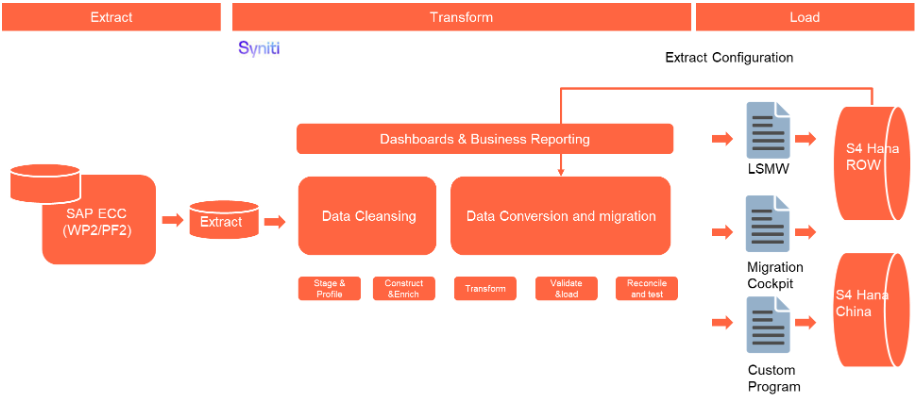
The high-level process is represented by the diagram below:
The ETL (Extract, Transform, Load) process is a structured approach to data migration and management, ensuring high-quality data is seamlessly transferred across systems. Here’s a breakdown of its key components:
1. Extraction
The process begins with extracting metadata and raw data from source systems, such as Syensqo ECC system (i.e. WP2/PF2) periodically. The extracted data is then staged for transformation.
2. Transformation
Once extracted, the data undergoes cleansing, consolidation, and governance. This step ensures data integrity, consistency, and compliance with business rules. The transformation process includes:
- Data validation to remove inconsistencies.
- Standardization to align formats across datasets.
- Business rule application to refine data for operational use.
3. Loading
The transformed data is then loaded into the target S/4HANA system.
Data Privacy and Sensitivity
Not applicableExtraction
Extract data from a source into Syniti Migrate. There are 2 possibilities:
- The data exists. Syniti Migrate connects to the source and loads the data into Syniti Migrate. There are 3 methods:
- Perform full data extraction from relevant tables in the source system(s).
- Perform extraction through the application layer.
- Only if Syniti Migrate; cannot connect to the source, data is loaded to the repository from the provided source system extract/report.
- The data does not exist (or cannot be converted from its current state). The data is manually collected by the business directly in Syniti Migrate. This is to be conducted using DCT (Data Collection Template) in Syniti Migrate.
The agreed relevancy criteria is applied to the extracted records to identify the records that are applicable for the Target Loads
Extraction Run Sheet
| Req # | Requirement Description | Team Responsible |
|---|---|---|
| Extraction Scope Definition | - Identify the source systems and databases involved. - Define the data objects (tables, fields, records) to be extracted. - Establish business rules for data selection. | Syniti / LTC Data team |
| Extraction Methodology | - Specify the extraction approach (full, incremental, or delta extraction). - Determine the tools and technologies used. - Define data filtering criteria to exclude irrelevant records. | Syniti |
| Extraction Execution Plan | - Establish execution timelines and batch processing schedules. - Assign responsibilities for extraction monitoring. - Document dependencies on other migration tasks. | Syniti |
| Data Quality and Validation | - Define error handling mechanisms for extraction failures. | Syniti |
Selection Screen
| Selection Ref Screen | Parameter Name | Selection Type | Requirement | Value to be entered/set |
|---|---|---|---|---|
| Not applicable |
Data Collection Template (DCT)
The Data Collection Template (DCT) will not be applicable in this case. If there is a need to create a new Master Data (MD) for Material BOM object, the business must perform this activity in the source system. The newly created object will then be captured and migrated as part of the standard migration process.
Extraction Dependencies
| Item # | Step Description | Team Responsible |
|---|---|---|
| 1 | Source System Availability
| Syensqo IT |
| 2 | Data Structure
| Syniti |
| 3 | Referential Integrity
| Syniti |
| 4 | Extraction Methodology
| Syniti |
| 5 | Performance and Scalability Considerations
| Syniti |
| 6 | Security and Compliance
| Syniti |
Transformation
The Target fields are mapped to the applicable Legacy field that will be its source, this is a 3-way activity involving the Business, Functional team and Data team. This identifies the transformation activity required to allow to make the data Target ready:
- Perform value mapping and data transformation rules.
- Legacy values are mapped to the to-be values (this could include a default value)
- Values are transformed according to the rules defined in
- Prepare target-ready data in the structure and format that is required for loading via prescribed Load Tool. This step also produces the load data ready for business to perform Pre-load Data Validation
Transformation Run Sheet
| Item # | Step Description | Team Responsible |
|---|---|---|
| 1 | Obtain DCT Sign-off from Business | SyWay Data Team |
| 2 | <Add steps from Syniti Migrate here> | SyWay Data Team |
| 3 | Review and Validate Error and Preload Reports | SyWay Data Team |
| 4 | Generate Load Files | SyWay Data Team |
Transformation Rules
| Rule # | Source system | Source Table | Source Field | Source Description | Target System | Target Table | Target Field | Target Description | Transformation Logic |
|---|---|---|---|---|---|---|---|---|---|
| 1 | PF2, WP2 | QPMK | VERWMERKM | MIC Name | S4 HANA | QPMK | VERWMERKM | MIC Name | Direct transfer; harmonize naming per corporate standard |
| 2 | PF2, WP2 | QPMK | VERSION | MIC Version | S4 HANA | QPMK | VERSION | MIC Version | Direct transfer; default “00” if missing |
| 3 | PF2, WP2 | QPMK | WERKS | Plant | S4 HANA | QPMK | WERKS | Plant | Map from Old Plant to New Plant (To-Be Plant Mapping) |
| 4 | PF2, WP2 | QPMK | KURZTEXT | Short Text | S4 HANA | QPMK | KURZTEXT | Short Text | Direct transfer; cleanse special characters; ensure language-dependent text available |
| 5 | PF2, WP2 | QPMT | SPRAS | Language Key | S4 HANA | QPMT | SPRAS | Language Key | Map to target system language codes (EN, ZH, ID etc.) |
| 6 | PF2, WP2 | QPMT | KURZTEXT | Text (per language) | S4 HANA | QPMT | KURZTEXT | Text (per language) | Direct transfer; validate for completeness in key business languages |
| 7 | PF2, WP2 | QPMK | QUALI | Quantitative / Qualitative Indicator | S4 HANA | QPMK | QUALI | Quantitative / Qualitative Indicator | Direct transfer; ensure consistency with catalog assignments (qualitative) or limits (quantitative) |
| 8 | PF2, WP2 | QPMK | PRUEFME | Unit of Measure | S4 HANA | QPMK | PRUEFME | Unit of Measure | Map UoM via standard T006 conversion |
| 9 | PF2, WP2 | QPMK | ANZSTELL | Decimal Places | S4 HANA | QPMK | ANZSTELL | Decimal Places | Direct transfer for quantitative MICs; default = 0 if qualitative |
| 10 | PF2, WP2 | QPMK | MWERTS | Target Value | S4 HANA | QPMK | MWERTS | Target Value | Direct transfer if quantitative; blank for qualitative |
| 11 | PF2, WP2 | QPMK | MWERTU | Lower Spec Limit | S4 HANA | QPMK | MWERTU | Lower Spec Limit | Direct transfer if quantitative; blank for qualitative |
| 12 | PF2, WP2 | QPMK | MWERTO | Upper Spec Limit | S4 HANA | QPMK | MWERTO | Upper Spec Limit | Direct transfer if quantitative; blank for qualitative |
| 13 | PF2, WP2 | QPMK | KATALOGART | Catalog Type | S4 HANA | QPMK | KATALOGART | Catalog Type | Direct transfer if qualitative MIC |
| 14 | PF2, WP2 | QPMK | CODEGRP | Code Group | S4 HANA | QPMK | CODEGRP | Code Group | Direct transfer if qualitative MIC; validate existence in target |
| 15 | PF2, WP2 | QPMK | AUSWMENGE | Selected Set | S4 HANA | QPMK | AUSWMENGE | Selected Set | Direct transfer if qualitative MIC |
| 16 | PF2, WP2 | QPMK | PRFGEB | Inspection Method Ref. | S4 HANA | QPMK | PRFGEB | Inspection Method Ref. | Map to new Inspection Method IDs in S/4 (if harmonized) |
| 17 | PF2, WP2 | QPMK | STICHPRVER | Sampling Procedure Ref. | S4 HANA | QPMK | STICHPRVER | Sampling Procedure Ref. | Map to active Sampling Procedures in S/4 (validated against QDSV) |
| 18 | PF2, WP2 | QPMK | STEUERKZ | Control Indicators | S4 HANA | QPMK | STEUERKZ | Control Indicators | Direct transfer; align with S/4 customizing for MIC flags |
| 19 | PF2, WP2 | QPMK | LOEKZ | Deletion Flag | S4 HANA | QPMK | LOEKZ | Deletion Flag | Exclude flagged records (set during cleansing, not migrated) |
| 20 | PF2, WP2 | QPMK | ERNAM / ERDAT | Created By / On | S4 HANA | QPMK | ERNAM / ERDAT | Created By / On | System-generated field during load |
| 21 | PF2, WP2 | QPMK | AENAM / AEDAT | Changed By / On | S4 HANA | QPMK | AENAM / AEDAT | Changed By / On | System-generated field during load |
Transformation Mapping
| Mapping Table Name | Mapping Table Description |
|---|---|
| Plant | Mapping of legacy Plants to new S/4HANA Plant codes according to To-Be Plant Mapping definition. Ensures characteristics are assigned to valid and active plants only. |
| Characteristic Name (MIC) | Mapping of legacy Master Inspection Characteristic (QS21) names to new harmonized naming convention in S/4HANA, following corporate quality standards. |
| Characteristic Type | Mapping of legacy Characteristic Type values (Quantitative / Qualitative) to target system domain values (QMTB-KZQUI). |
| Catalog Type | Mapping of legacy Catalog Type to valid Catalog Type entries in configuration table TQ15 in S/4HANA. |
| Selected Set / Code Group | Mapping of legacy Selected Set and Code Group to harmonized sets in target system (reference configuration table TQ15T). Ensures consistency of catalog-based inspection characteristics. |
| Unit of Measure (UoM) | Mapping of legacy Units of Measure to ISO-compliant Units of Measure in S/4HANA (as defined in table T006). |
| Decimal Places | Mapping of legacy Decimal Place format to target format as per S/4HANA numeric precision standard (QPMK-ANZST / QPMK-STELL). |
| Target Value / Upper & Lower Limit | Conversion of legacy target, lower, and upper specification limits into harmonized decimal format consistent with target measurement system. |
| Characteristic Group | Mapping of legacy characteristic groups (QPMK-MERKNR grouping) to harmonized groups in target system for standardized reporting and search. |
| Plant Authorization Group | Mapping of legacy Authorization Groups (QPMK-BEGRU) to target Authorization Groups in S/4HANA (per configuration table TBRG). |
| Class / Class Type (Optional) | Mapping of legacy class assignments (if MICs were linked to classes) to target class and class type configuration in S/4HANA. |
| Reference Indicator | Mapping of legacy Reference Indicator values to target domain values ensuring correct reference linkage between global and plant-specific MICs. |
Transformation Dependencies
List the steps that need to occur before transformation can commence| Item # | Step Description | Team Responsible |
|---|---|---|
| 1 | Ensure tables completeness | Syniti |
| 2 | Ensure all Transformation mappings are up to date. | Syniti |
Pre-Load Validation
Project Team
Completeness
| Task | Action |
|---|---|
| Verify Record Count | SyWay P2F-MFG Data Team to verify that the total number of relevant records from the system is equal to the total number of records in the Preload and Load Sheets. |
Accuracy
| Task | Action |
|---|---|
| Conversion Accuracy | SyWay P2F-MFG Data Team to verify that all fields below meet pass the checks:
|
| Review Error Reports | Review and correct the errors. Achieve a zero-error record count as much as possible. Raise defects for data remediated and requiring a correction in the source data. |
Business
Completeness
| Task | Action |
|---|---|
| Verify Record Count | Business Data Owner/s to verify that the total number of relevant records from the the system is equal to the total number of records in the Preload and Load Sheets. |
Accuracy
| Task | Action |
|---|---|
| Conversion Accuracy | Business Data Owner/s to verify that all the data in the load table/file is accurate as per endorsed transformation/mapping rules. |
Load
The load process includes:
- Execute the automated data load into target system using load tool or product the load file if the load must be done manually
- Once the data is loaded to the target system, it will be extracted and prepared for Post Load Data Validation
Load Run Sheet
| Item # | Step Description | Team Responsible |
|---|---|---|
1 | Ensure Pre-load sign-offs are obtained. | SyWay Data team |
2 | Go to the load tool and select the correct load Program. | SyWay Data team |
3 | Proceed with Data load. | SyWay Data team |
4 | Validate few records loaded by accessing standard transactions. | SyWay Data team |
5 | Generate the post load reports in the tool. | SyWay Data team |
6 | Log errors as defects, if any and address resolutions. Close defects. | SyWay Data team |
7 | Resolve defects by re-upload and re-generate post load reports if necessary. | SyWay Data team |
8 | Business to validate the post load files as part of post-load validation, raise data defects or provide the post-load sign-off. | Business |
9 | Repeat steps 5 to 7 if necessary. | SyWay Data team |
Load Phase and Dependencies
Pre-Cutover
Configuration
| Item # | Configuration Item |
|---|---|
| 1 | T001W – Plants/Branches: Definition of plants where Master Inspection Characteristics are created and maintained. |
| 2 | T006 – Units of Measurement: ISO-compliant UoM definitions to ensure consistency of quantitative inspection characteristics. |
| 3 | TQ07A – Inspection Types: Configuration of valid inspection types used for assigning MICs in inspection plans or material QM view. |
| 4 | TQ08 – Control Keys (QM): Definition of control keys for inspection processing, including in-process and final inspection controls. |
| 5 | TQ09 – Usage Keys: Definition of usage keys to determine where inspection characteristics can be used (e.g., in inspection plans, material QM view). |
| 6 | TQ15 – Catalog Types: Definition of catalog types for qualitative inspection characteristics (e.g., defect codes, result recording codes). |
| 7 | TQ15T – Selected Sets & Code Groups: Configuration of selected sets and code groups used to classify qualitative MIC values. |
| 8 | TBRG – Authorization Groups: Assignment of authorization groups controlling access and maintenance rights for MICs. |
| 9 | TQ30 – Reference Indicators: Configuration of reference indicator usage for linking global and plant-specific MICs. |
| 10 | TQ75 – Decimal Places & Format: Configuration of decimal places, number format, and rounding rules for quantitative MIC values. |
| 11 | TCLA – Class Type (optional): Configuration of class type if MICs are linked to classification system (e.g., class type 023). |
| 12 | TQ33 – Catalog Profile Assignment: Control of which catalog profiles are assigned to MICs for standardizing defect recording. |
| 13 | TQ85 – Inspection Lot Origin: Configuration of inspection lot origin values that determine MIC usage in inspection processes. |
Conversion Objects
| Object # | Preceding Object Conversion Approach |
|---|---|
| 1064 | Sampling Procedure |
| 1043 | Inspection Methods |
Error Handling
| Error Type | Error Description | Action Taken |
|---|---|---|
| 1 | Plant does not exist or not mapped in target system | Verify that the plant exists in the target system and mapping is correctly maintained. Reprocess once mapping is updated. |
| 2 | UoM (Unit of Measure) not valid or not harmonized | Ensure that UoM is mapped correctly in T006 and harmonized with the target system. Correct invalid values in the collection template and reload. |
| 3 | Catalog or Selected Set not found in target system | Check if the required catalog and selected set are already migrated or configured in the target system. Migrate or create them before reprocessing. |
| 4 | Characteristic code or description missing | Validate source data completeness. Update missing mandatory fields (e.g., short text, characteristic ID) in the collection template. |
| 5 | Duplicate inspection characteristic records for the same plant | Perform deduplication and retain only the valid active characteristic in the collection file before loading. |
| 6 | Invalid characteristic type or control indicators | Review and correct control indicators (e.g., quantitative/qualitative flags, sampling procedures) to align with target system configuration. |
| 7 | Authorization group or class type not maintained in target system | Ensure the required authorization group or class type is configured in the target system before reprocessing. |
| 8 | Obsolete or marked-for-deletion characteristics | Exclude these records from migration as per data cleansing rules. |
Post-Load Validation
Project Team
Completeness
| Task | Action |
|---|---|
| Verify Count | SyWay P2F-MFG Data Team to verify the record count created in target S/4 HANA by accessing post load reports in dspMigrate or standard reports from S/4 HANA. |
Accuracy
| Task | Action |
|---|---|
| Verify Logs | Check if there is data that failed to load and perform the necessary actions (e.g. register as post load issue or attempt to load the record again, etc.). |
Business
Completeness
| Task | Action |
|---|---|
| Verify Count | Download Post Load Reports from dspMigrate and verify that the record count loaded in the target S/4 HANA is the same count as of the endorsed load file. |
Accuracy
| Task | Action |
|---|---|
| Conversion Accuracy | Verify that the Material BOM data in target S/4 HANA were loaded correctly via DSP Migrate post load reports or standard reports from S/4 HANA. |
Key Assumptions
Master Data Standard (MDS) is up to date as of the date of documenting this conversion approach and Master Inspection Characteristic data load.
Data cleansing activities have been completed to ensure only active, valid, and relevant Master Inspection Characteristics are migrated. Characteristics marked for deletion or obsolete records are excluded.
Required configuration elements such as Catalogs, Selected Sets, Code Groups, Control Indicators, and Authorization Groups are already in place in the target S/4HANA system prior to migration.
All Units of Measure (UoM) used in quantitative characteristics are harmonized between source and target systems to ensure data consistency during migration.
Plant master data and organizational mapping are completed prior to Master Inspection Characteristic load to ensure proper assignment.
Number ranges for characteristic identifiers are preconfigured in S/4HANA and internal numbering will be applied during migration unless otherwise specified.
Only fields required for QM inspection processing, quality planning, and execution are in scope for migration. Legacy-specific or unused fields will not be migrated.
Enrichment activities (such as missing control indicators, invalid UoM, or obsolete characteristics) are handled outside of the automated migration process and may require business sign-off.
Dependencies such as catalog entries, selected sets, and reference data are assumed to be loaded and validated prior to characteristic migration.
Any exceptions to these assumptions (e.g., manual updates to control indicators or special characteristic types) will be managed through a formal exception process.
Change log
Workflow history
| Title | Last Updated By | Updated | Status | |
|---|---|---|---|---|
| There are no pages at the moment. | ||||