


High- Level Specification
| Parameter | Value |
|---|---|
| Application System | Icertis |
| Business Process Reference | 03.03.04.01. Create Agreement/Amendment |
Functional Overview
The system enforces a mandatory approval workflow for Bid Waiver forms prior to initiating the Delegation of Authority (DOA) approval process for any Master Agreement, Sub-Agreement, or standalone agreement. This requirement ensures that Contracting Specialists cannot proceed with agreement approvals unless the Bid Waiver has been formally approved. By embedding this control, the process aligns with the Bid Waiver Policy, mitigates operational risk, and upholds audit integrity by preventing unauthorized agreements from advancing in the approval chain.
Scope and Objectives
This custom development focuses on enforcing Bid Waiver compliance within the agreement approval workflow. Specifically, it introduces page-level and logic-based enhancements to ensure that when the Competitive Sourcing metadata is marked as Yes, an approved Bid Waiver form is required before an agreement can be sent for Delegation of Authority (DOA) approval.
The scope includes:
Page-Level Customization:
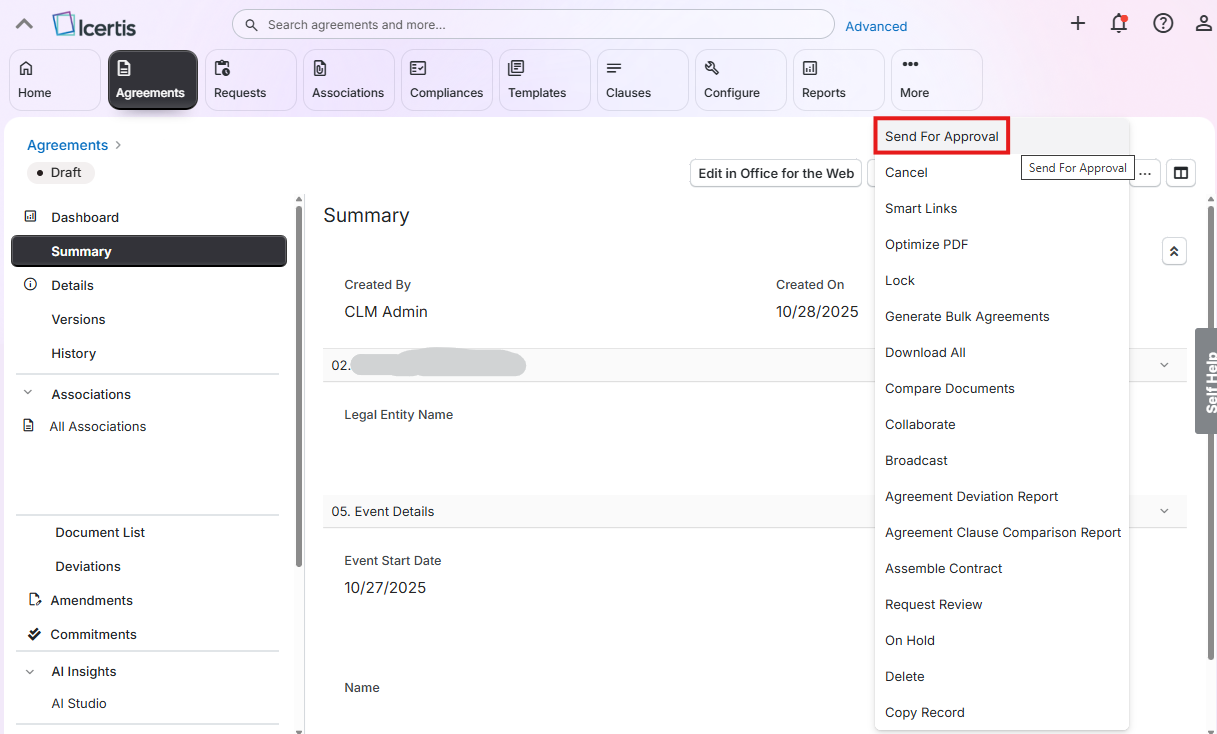
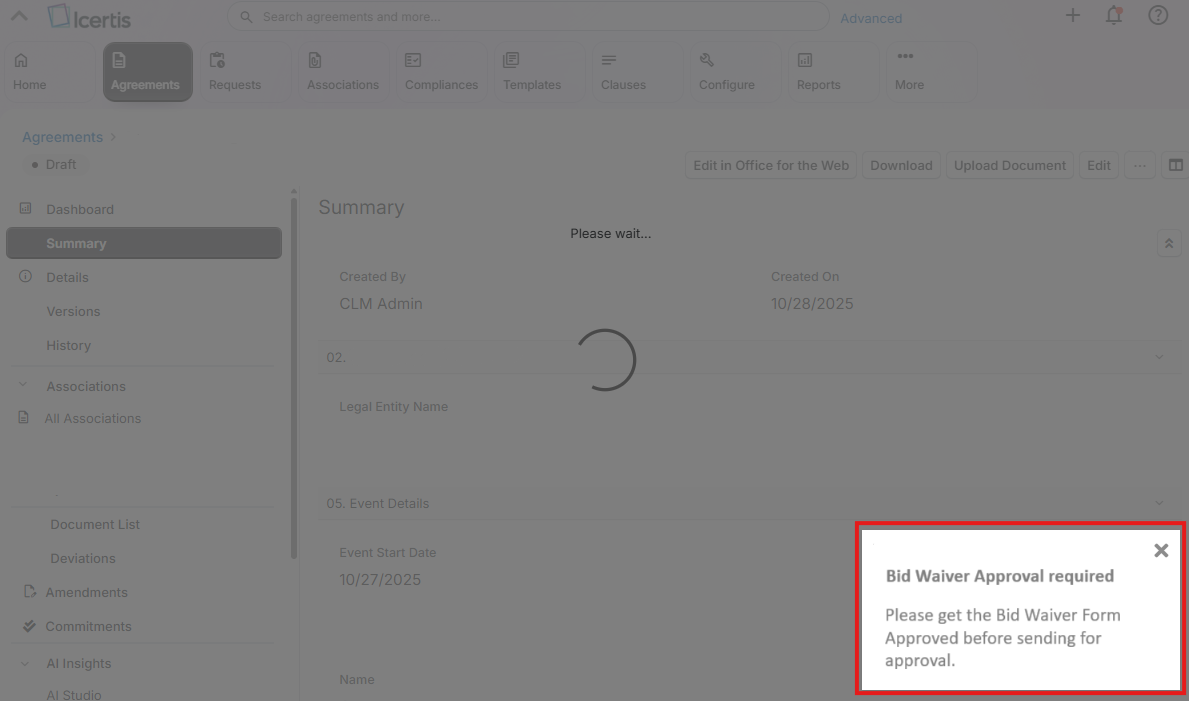
Implementing an alert on the agreement page when the user clicks “Send for Approval,” guiding them to obtain Bid Waiver approval first.
Enforcement Logic:
Validating the status of the associated Bid Waiver form. The system will block the approval process unless the form is marked as Approved.
Conditional Enforcement:
The Bid Waiver requirement is enforced only when Competitive Sourcing = Yes. If Competitive Sourcing = No, no restrictions or alerts are applied.
Objectives
- Ensure compliance with Bid Waiver policy by preventing agreements from being sent for approval without prior authorization.
- Provide clear and actionable guidance to Contracting Specialists through user-friendly alerts.
- Reduce operational risk and maintain audit integrity by embedding approval checks directly into the workflow.
- Improve user experience by automating enforcement based on metadata conditions, minimizing manual oversight.
Process Flow Diagram
Step | Description | Comment |
|---|---|---|
| 1 | The user drafts the agreement according to the requirements and selects in the metadata whether the agreement involves Competitive Sourcing. | |
| 2 | The user creates a record for the Bid Waiver form and fills in all required metadata (as defined in the configuration workbook). | |
| 3 | The user or process follows the Bid Waiver form approval workflow as outlined in the configuration workbook. | |
| 4 | Once the agreement is ready for approval, the user clicks on "Send for Approval". | |
| 5 | Upon clicking "Send for Approval", the system checks whether the agreement involves Competitive Sourcing. | |
| 6 | If the agreement involves Competitive Sourcing, the system verifies whether a Bid Waiver form has been created and approved. | |
| 7 | If the agreement involves Competitive Sourcing and the Bid Waiver form is either not created or not approved, the system displays a message: “Please get the Bid Waiver Form Approved before sending for approval.” | |
| 8 | If the agreement does not involve Competitive Sourcing, or if the Bid Waiver form is created and approved, the system proceeds with the approval workflow and subsequent steps. |
Assumptions
- The Bid Waiver form functionality utilizes out-of-the-box configurations, as defined in the configuration workbook. No customizations are applied to the form itself beyond standard metadata and workflow settings.
- Users involved in drafting agreements and managing Bid Waiver forms have the appropriate access rights and roles assigned, in accordance with the configuration workbook. This includes permissions to create, edit, and submit Bid Waiver forms, as well as to initiate the agreement approval process.
- The metadata field Competitive Sourcing is correctly configured and available on the agreement record, and its values ("Yes" or "No") are reliably used to trigger enforcement logic.
Dependencies
Not Applicable
Security, Integrity and Controls
Configuration Requirements
- Competitive Sourcing: Must be configured as a metadata attribute on the agreement, per the configuration workbook.
- Bid Waiver Association: Agreements must support linking to a Bid Waiver form, as defined in the configuration workbook.
- Bid Waiver Approval Flow: The approval workflow for Bid Waiver forms must follow the stages and roles outlined in the configuration workbook.
- Access and Permissions: Users must have the correct roles and permissions to manage Bid Waiver forms and initiate agreement approvals, as specified in the configuration workbook.
Language Requirements
Not Applicable
Special Requirements
Not Applicable
Design Rationale
Not Applicable
Functional Requirements
- When the Competitive Sourcing metadata is set to Yes, the system must enforce that a Bid Waiver form is both associated and approved before allowing the agreement to be sent for approval.
- The system must also provide a clear alert to guide Contracting Specialists when this condition is not met.
Recommended UI Technology
Standard Icertis
Application Screen
Wireframe or Mock-Up
Screen Behavior
Not Applicable - Standard behavior applied.
Screen Navigation
Standard behavior applies. Action buttons such as "Send for Approval" are available based on role-action mappings defined in the configuration workbook. The trigger for Bid Waiver validation is initiated when the user clicks "Send for Approval", as shown in the mockup below.
Data Integration
Not Applicable
| Field | Table-Field Name | Comments / Calculation / Field Manipulation / Input / Output / Validation rule / Value help |
|---|---|---|
Custom Tables
Not Applicable
Master data
Not Applicable
| Field | Description | Data Type/Length | Validation rule / Value help |
|---|---|---|---|
Configuration table
Not Applicable
| Field | Description | Data Type/Length | Validation rule / Value help |
|---|---|---|---|
Tooltips
Not Applicable
Front-End
Standard Icertis
Mobile Services
Not Applicable
Authentication & Authorization
Not Applicable - Standard Authentication of Icertis
Accessibility
Not Applicable - Standard configuration as per configuration workbook
Volumetrics
All agreement created have to follow the requirement.
Performance Consideration
Not Applicable
Error Handling
Not Applicable
Testing
How to Test
Positive Flow – Bid Waiver created and approved:
- Draft Agreement with Competitive Sourcing = Yes
- Action: User drafts the agreement and sets Competitive Sourcing to "Yes".
- Outcome: Agreement record created; output document generated.
- Create Bid Waiver Form
- Action: User creates and associates a Bid Waiver form.
- Outcome: Bid Waiver form created and submitted for approval.
- Approve Bid Waiver Form
- Action: Approver reviews and approves the Bid Waiver form.
- Outcome: Bid Waiver status = Approved.
- Send Agreement for Approval
- Action: User clicks "Send for Approval".
- Outcome: Agreement proceeds to approval workflow.
Validation – No Bid Waiver Form Created:
- Draft Agreement with Competitive Sourcing = Yes
- Action: User drafts the agreement and sets Competitive Sourcing to "Yes".
- Outcome: Agreement record created; output document generated.
- Skip Bid Waiver Form Creation
- Action: User clicks "Send for Approval" without creating a Bid Waiver form.
- Outcome: System displays alert:
“Please get the Bid Waiver Form Approved before sending for approval.”
Validation: Agreement cannot proceed.
Validation – Bid Waiver Form Not Approved:
- Draft Agreement with Competitive Sourcing = Yes
- Action: User drafts the agreement and sets Competitive Sourcing to "Yes".
- Outcome: Agreement record created; output document generated.
- Create Bid Waiver Form
- Action: User creates and associates a Bid Waiver form.
- Outcome: Bid Waiver form created and submitted for approval.
- Approver ignored Bid Waiver form approval
- Action: Approver ignored approval and remains in "Pending for Approval" status.
- Outcome: Bid Waiver not approved.
- Send Agreement for Approval
- Action: User clicks "Send for Approval" without creating a Bid Waiver form.
- Outcome: System displays alert:
“Please get the Bid Waiver Form Approved before sending for approval.”
Validation: Agreement cannot proceed.
Validation – Bid Waiver Form Rejected:
- Draft Agreement with Competitive Sourcing = Yes
- Action: User drafts the agreement and sets Competitive Sourcing to "Yes".
- Outcome: Agreement record created; output document generated.
- Create Bid Waiver Form
- Action: User creates and associates a Bid Waiver form.
- Outcome: Bid Waiver form created and submitted for approval.
- Approver Rejects Bid Waiver Form
- Action: Approver rejects the form.
- Outcome: Bid Waiver status = Draft.
- Send Agreement for Approval
- Action: User clicks "Send for Approval" without creating a Bid Waiver form.
- Outcome: System displays alert:
“Please get the Bid Waiver Form Approved before sending for approval.”
Validation: Agreement cannot proceed.
Test Conditions and Expected Results
| ID | Condition | Expected Result |
|---|---|---|
Test Considerations/Dependencies
Other Information
Development Details
Package
| Package Name | Parent Package |
|---|---|
UI Implementation
UI Type | UI Name | Fiori Catalogue | Design Rationale Reference |
|---|---|---|---|
API Implementation
| API Type | API Name | Purpose / High Level Logic | API Product | Design Rationale Reference |
|---|---|---|---|---|
Other Development Objects
| Object Type | Object Name | Purpose/High Level Logic | Design Rationale Reference |
|---|---|---|---|