


High- Level Specification
| Parameter | Value |
|---|---|
| Application System | SAP S4/HANA SyWay |
| Business Process Reference | 04.06 Manage Production Execution 06.10 Manage Inventory and Logistics 06.11 Manage Warehouse and Logistics 06.12 Manage Transportation |
Functional Overview
This Neptune mobile app will display the relevant users settings and allow the user to change settings and to see the postings made from all mobile apps in the Logistics Mobility Solution.
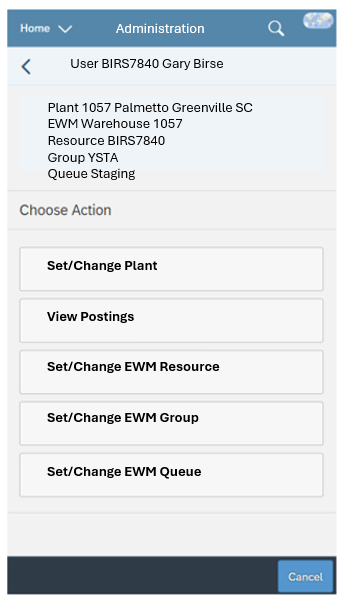
The tile will show the plant of the user and, when the plant has EWM, the EWM Warehouse number, resource, resource group and queue of the user.
Within the app, the following options will be available:
- Option to Set/Change user plant parameter (WRK)
- Set/Change EWM resource
- Change EWM resource group
- Set/Change EWM queue
- List today's Posting messages from mobile apps for user
Scope and Objectives
This Admin app lets the user see the currently selected user settings for the Logistics Mobility Solution and allows these settings to be changed. The app will also allow the user to see all the postings that have been made from the Logistics Mobility Apps.
The Logistics Mobility Solution is mandatory for all SyWay plants that manage stock.
Process Flow Diagram
Not applicable. The Central Functions Mobile Admin app will be used by all users of the Logistics Mobility Solution.
Assumptions
None
Dependencies
None
Security, Integrity and Controls
To start this app, the user must have read access for the selected plant. Check object M_MSEG_WMB for Activity 03 and the selected plant. If no access, show the message "No authorization for plant <9999>".
Configuration Requirements
None
Language Requirements
This app will be available in all SyWay languages.
Special Requirements
None.
Design Rationale
Functional Requirements
Recommended UI Technology
This app will be developed using Neptune DXP Open Edition.
Application Screen
Wireframe or Mock-Up
App tile for plant without EWM

App start screen for plant without EWM

App tile for plant with EWM

App start screen for plant with EWM
Screen Behavior
None
Screen Navigation
Within the app, there will be different buttons for each of the options available.
Data Integration
| Field | Table-Field Name | Comments / Calculation / Field Manipulation / Input / Output / Validation rule / Value help |
|---|---|---|
| Plant | ||
| EWM Warehouse | ||
| EWM Resource | ||
| EWM Resource Group | ||
| EWM Queue |
Custom Tables
A custom table will be used to store the details of all postings made from the Logistics Mobility Solution mobile apps.
Postings from Logistics Mobility Solution Apps
LMS Postings
This table will store the details of all the postings made from Logistics Mobility Solution Apps, including the app name, document processed, username, date, time and message back from SAP.
The user has the option to see all their own postings for the day in this mobility admin app. The desktop admin app will allow all postings to be shown.
| Field | Description | Data Type/Length | Validation rule / Value help |
|---|---|---|---|
| App Name | CHAR 30 | ||
| Plant | CHAR 4 | ||
| Document | CHAR 10 | ||
| Username | CHAR 10 | ||
| Date | DATE | ||
| Time | TIME | ||
| SAP Message | CHAR 100 | Last message received back from posting | |
Tooltips
Front-End
Mobile Services
Authentication & Authorization
Accessibility
Volumetrics
Performance Consideration
Error Handling
Testing
How to Test
Test Conditions and Expected Results
| ID | Condition | Expected Result |
|---|---|---|
Test Considerations/Dependencies
Other Information
Development Details
Package
| Package Name | Parent Package |
|---|---|
UI Implementation
UI Type | UI Name | Fiori Catalogue | Design Rationale Reference |
|---|---|---|---|
API Implementation
| API Type | API Name | Purpose / High Level Logic | API Product | Design Rationale Reference |
|---|---|---|---|---|
Other Development Objects
| Object Type | Object Name | Purpose/High Level Logic | Design Rationale Reference |
|---|---|---|---|