


After making the decision to depart the company, you need to inform your Manager or your Site HR, and if you have an employment contract or union agreement that states how much notice you should give, abide by it.
Can the restrictive covenants for sensitive roles impede me from taking a job outside of Syensqo?
Here is the procedure to follow if you are in a sensitive role and want to resign.
When you have given notice that you’re leaving your job and turned in your official resignation, there are still some things you should do to ensure a smooth transition:
- Read the Offboarding article in the HR Wiki.
- Take the time to inform the colleagues who've supported you, and who you would like to keep in touch with, that you are resigning, retiring, or starting a new chapter of your lif
If you are new to Syensqo's Wiki space, you may need to link your Google Drive in order to see embedded documents.
Follow the instructions here.
Before your last day of work, please ensure to:
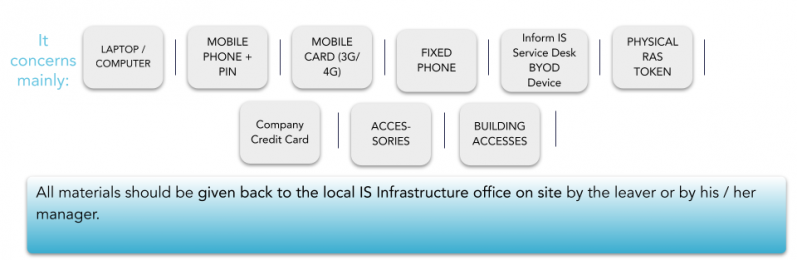
- Remind your manager to book a meeting with your local infrastructure team to return your equipment (PC, Phone, Sim Cards, etc...);
Store all Syensqo documents in Google Drive;
Transfer Google drive ownership to the relevant person (access the detailed procedure);
Transfer ownership of meetings in Google calendar (if applicable);
Submit any outstanding expense reports and settle any outstanding balance on Corporate Card (if applicable);
Open a Service One ticket requesting cancellation of your Fed Ex Account (if applicable);
Delete any personal information from your computer, your emails or your Google Drive including any photos after transferring what is important;
Deliver the Company’s card to the Travel Expenses team, Line Manager or Site HR (if applicable). If you can't deliver the card to the responsible team, please destroy it;
- Please open a ticket to the T&E team requesting to cancel you card;
Deliver the access card (badge) to the site contact (facilities/HR etc.).
Ensure you agree to an “Out of office notification” message with your Line Manager / Syensqo assignment supervisor. Please be aware this cannot be set once your account is deactivated. It must be set before you log out for the last time;
Deliver the assets to the local Service Desk on their last day of work (if applicable).
Important Notice
If not permanently on site, you should leave all your equipment at the front desk of the site you are attached to after having received approval from your Line Manager / Syensqo assignment supervisor, and in compliance with the country's legal requirements.
The Local IS Infrastructure on site must be informed in advance to ensure they are able to check the equipment with you.
You are about to leave Syensqo and you are wondering ...
... for how long will Syensqo retain various data concerning you?
... if you have some control over your personal data?
Find the answers in your local Employee Privacy notice!
Point of attention: Syensqo as an employer undertakes to keep personal data only for the retention period indicated in the Employee Privacy notices. You are invited to store information (e.g. pay slips) by your own means if you need to keep them beyond this period, e.g. when you will retire.
Below is the current employee privacy notice, please select your country:
- Belgium - DE - FR - NL
- Croatia
- Czech Repulic
- France
- Germany
- Great Britain
- Italy
- Luxembourg DE - FR
- Netherlands
- Poland
- Portugal
- Romania
- Spain
- Specific Regulations (APAC, Brazil, China)
For the generic Employee Notice in English, please click here
