


| Status | Update in progress |
| Owner | |
| Stakeholders |
Purpose
The purpose of this document is to define the conversion approach to create Business Partners - General in S/4 HANA.
In SAP ECC, customer and vendor master data are maintained separately as distinct entities. Customers are managed through Customer Master Data, while vendors are handled via Vendor Master Data. These records store essential details such as company name, address, payment terms, and tax information.
In SAP S/4HANA, the Business Partner (BP) concept replaces the traditional customer and vendor master data approach. The BP model integrates both customer and vendor roles into a single entity, simplifying data management and ensuring consistency across different business functions
Conversion Scope
The scope of this document covers the approach for converting active Customer Master Data General and Vendor Master General from Legacy Source Systems into S/4HANA Business Partner (BP) General (Role 000000) Master Data Design Standard.
Customer Master Data - General Information
The data from legacy system includes:
1. Customer with AR Balance under the company codes within S4 Hana implementation scope (BSID-KUNNR).
2. or There is usage for the customer in the sales document within 4 years, and the sales organization for the sales documents is within scope. * modified on 31/Oct/2025
3. or There is usage for the customer in the finance document within 4 years, and the company code for the finance documents is within scope.. * modified on 31/Oct/2025
4. or Customer is part of Customer Hierarchy Higher Node, and the sales area data is part of the sales areas within migration scope
5. or there is customer consignment stock and the plant for the consignment stock is within S4 Hana implementation scope.
6. or Customer is set as the credit account for other customers, and either the customer or credit account customer is not deleted. (if both customer or credit account is deleted, then not in migration scope)
7. Intercompany customer will be defined based on the Enterprise structure. (To identify Intercompany customer, trading partner will be used. In the meantime, Group field(KNA1-KONZS) from customer general data will be used. For WP2/PF2, Group value = 0000810135 (Syensqo) )
8. or the customer in the partner function is active, then the parent customer will also be migrated. * added on 16/Oct/2025
9. or the customer is active in Salesforce and there are activities within 48 months.* added on 16/Oct/2025
10. or there is an existing forecast for the customer in Kinaxis. * added on 16/Oct/2025
11. or there is active master data for the customer, such as active Pricing Condition records. * added on 16/Oct/2025
| Criteria | Relevancy Rule | Technical Details |
|---|---|---|
| 1 | Customer with AR Balance under the company codes within S4 Hana implementation scope | Select KUNNR from BSID where BSID-BUKRS in (Company code in scope) |
| 2 | or There is usage for the customer in the sales document within 4 years, and the sales organization for the sales documents is within scope | Select KUNNR from KNA1
|
| 3 | or There is usage for the customer in the finance document within 4 years, and the company code for the finance documents is within scope. | Select KUNNR from KNA1
|
| 4 | ||
| 5 | or there is customer consignment stock and the plant for the consignment stock is within S4 Hana implementation scope. | Select KUNNR from MSKU where MSKU-WERKS in (Plant in scope) |
| 6 | or Customer is used for Credit Limit Reference in Credit Management, only when the credit account is different from the customer, and at least credit account or customer is still active. | Select KNKLI from KNKK where KNKK-KKBER = T001CM-KKBER and T001CM-BUKRS in (Company Code in scope based on the sales organization) where KNKK-KUNNR<>KNKK-KNKLI AND (KNA1-LOEVM is initial where KNA1-KUNNR = KNKK-KUNNR or KNA1-LOEVM is initial where KNA1-KUNNR = KNKK-KNKLI) |
| 7 | Intercompany Customer is in migration scope, but it will be use Data Collection Template to collect the information | KNA1-VBUND <>"" or KNA1-KONZS = 0000810135 or 0000800001 |
| 8 | or the customer in the partner function is active and in migration scope (based on rule 2), then the parent customer will also be migrated. * added on 16/Oct/2025 | Select KNVP-KUNNR INNER JOIN KNA1 as a WHERE KNVP-KUNNR = a.kunnr and a.loevm = X and KNVP-VKORG in 'Sales Org in scope' inner join kna1 as b where knvp-kunn2 = b.kunnr and b.loevm = '' and kunn2 in rule 2 |
| 9 | or the customer is active in Salesforce and there are activities within 48 months. | Two reports will be provided. iCare - If (there is value in field 'PRS Code (Account)' or 'RCS code (Account)') and 'Last Activity' is within 48 months and Type <> "Inactive Customer". then the account is in scope. 'PRS Code (Account)' is mapped to PF2 customer number, 'RCS code (Account)' is mapped to WP2 customer number. Core CRM - If (there is value in field 'PRS ID / RCS ID') and 'Last Activity' is within 48 months and 'Account Organization' = 'SCO' and 'Status'<>"Rejected", then the account is in scope. 'PRS ID / RCS ID' need to split using "/" to get the PRS/RCS code and 'GBU' in (Novecare, Technology Solutions). |
| 10 | or there is an existing forecast for the customer in Kinaxis. |
|
| 11 | or there is relevant Pricing Condition records maintained for the customer 4 years ago. a. The relevant condition table will be provided, which includes the customer field b. The price valid-from date is >= current date - 4 years c. Based on the selection criteria mentioned in a&b to select the condition header index table (KONH), then use it to match the customer number. If there is match, then the customer is taken into consideration. | Select KNA1-KUNNR from KONH where KONH-KOTABNR IN (List to be provided) and KONH-DATAB >= current date - 4 years and KONH-VAKEY CS KNA1-KUNNR |
The data from legacy system excludes:
- One time customer (Account group is Z004 or ZCPD)
| Criteria | Relevancy Rule | Technical Details |
|---|---|---|
| 1 | One time customer (Account group is Z004) | KNA1-KTOKD = Z004 or ZCPD |
| Source | Scope | Source Approx No. of Records | Target System | Target Approx No. of Records |
|---|---|---|---|---|
| WP2 | Customer Master Data General Information | 55371 | S4 Hana ROW / China / CUI | 55371 |
| PF2 | Customer Master Data General Information | 36983 | S4 Hana ROW / China / CUI | 36983 |
Vendor Master Data - General Information
The data from legacy system includes:
- Vendors’ relevant general data with potential duplicate records (refer Relevancy Criteria for Vendor inclusion)
- Vendors’ relevant general data with potential missing information such as bank, tax, etc related fields
The data from legacy system excludes:
- Vendors marked for deletion (refer Relevancy Criteria for Vendor exclusion)
- Inactive vendors with no transactions for the past 2 years
List of source systems and approximate number of records
| Source | Scope | Source Approx No. of Records | Target System | Target Approx No. of Records |
|---|---|---|---|---|
| WP2. PF2 | Vendor Master Data General Information Extract from LFA1, LFB1, LFM1, EKPA, EKKO according to relevancy criteria for vendor and deduplication nominations | 70,000 | S4 Hana | < 70,000 |
| DCT | All active BP's in Intercompany DCT, includes
The number range for Inter-Company is external (as per in MDS) with the following prefixed
Data collection will be prepared and there's a mapping between Syensqo entities as Vendor in WP2/PF2 and those created in BP Intercompany entities. Please refer to data object 3027 - Business Partners - Plants/Intercompany Suppliers for more details | S4 Hana | ||
Relevancy Criteria for Vendor : | Rules | |
Relevancy rules - All must be true for the Vendor to be considered for relevancy | ||
1 | Deletion Flag as no longer used anywhere in system (unless Vendor has open transactions: Open PO/AP/Contract) | where Vendor does not belong to the conditions below
|
2 | Has at least one valid extension (unless Vendor has open transactions: Open PO/AP/Contract) | having entry in LFB1/LFM1 where LOEVM <> 'X' with Company Code/Purchasing Organization in scope |
3 | Exclude Inter-company suppliers (identified with class G - group) | where ZZR_SEGT_ATTR <> 'G' |
4 | Exclude employees as well where Account groups: (ZZPE / Z012) | if zSource = 'PF2' and KTOKK <> 'ZZPE' if zSource = 'WP2' and KTOKK <> 'Z012' |
Additional rules - Only one needs to be true for the Vendor to be ‘relevant’ [only Vendor that have passed ‘Relevancy rules’ above are included] | ||
1 | Has Purchase Order and Contract created last 4 yrs | where Vendor has PO created (EKKO-AEDAT in past 4 yrs) and EKKO-BSTYP in (F,K) and EKKO-LOEKZ<>X and (EKORG/BUKRS/WERKS in-scope) |
2 | Has Cleared Items created last 4 yrs | where LIFNR has AP clearing date (BSAK-AUGDT in past 4 yrs) and (EKORG/BUKRS/WERKS in-scope) |
3 | Has a valid Contract | where Vendor has Contract created (EKKO-KDATE>=Current-Date and EKKO-BSTYP=K and EKKO-LOEKZ<>X and (EKORG/BUKRS/WERKS in-scope) |
4 | Has and open purchase order | where Vendor has PO (EKKO-BSTYP=F and and EKKO-LOEKZ<>X and EKPO.EREKZ='' and EKPO-LOEKZ<>X and (EKORG/BUKRS/WERKS in-scope) |
5 | Is a valid Partner in PO/SO created last 4 yrs | here Vendor having entry in EKPA-LIFN2 (PO created in last 4 yrs) or |
6 | Vendor created in the last 6 months | where Current-Date < LFA1-ERDAT > Current-Date – 6 months |
7 | Is linked to a valid Customer | where Vendor is linked to a relevant Customer (KNA1-LIFNR ) |
8 | Has Open Items Not Cleared | where Vendor has an entry in BSIK-LIFNR (within legal company code in scope) |
9 | Is One-Time Vendor | where Vendor Segment Class LFA1-ZZR_SEGT_ATTR is 'D' (for info only / no activity checks required) |
10 | Last purchase order transaction date | Vendor's max(EKKO-AEDAT) where and EKKO-BSTYP=F and EKKO-LOEKZ<>X (for info only / no activity checks required) |
11 | Has Purchase Order and Contract created last 5 yrs (only for ZIND/ZABF material types) | where Vendor has PO created (EKKO-AEDAT in past 5yrs) and EKKO-BSTYP in (F,K) and EKKO-LOEKZ<>X and EKPO-LOEKZ<>X and EKPO-MATNR in (MARA-MATNR where MARA-MTART in S4(ZIND/ZABF)) and (EKORG/BUKRS/WERKS in-scope) |
12 | Has Cleared Items created last 5 yrs (only for ZIND/ZABF material types) | where LIFNR has AP clearing date (BSAK-AUGDT in past 5 yrs) and BSAK-EBELN in (EKPO-EBELN and and EKPO-LOEKZ<>X and EKPO-MATNR in (MARA-MATNR where MARA-MTART in S4(ZIND/ZABF)) and (EKORG/BUKRS/WERKS in-scope) |
13 | Has Purchase Requisitions in the last 4 yrs | where Vendor has PR created (EBAN-AEDAT in past 4 yrs) and EBAN-BSTYP=F and EBAN-LOEKZ<>X and (EKORG/BUKRS/WERKS in-scope) |
14 | Has Process Orders with external procurement in the last 4 yrs | where (PLAF-PSTTR in past 4 years) and (PLAF-SOBES=0) and (PLAF-FLIEF is not Intercompany & Employee) and (EKORG/WERKS in-scope) |
15 | Has Valid SourceList | where LFA1-LIFNR = EORD-LIFNR and EORD-BDATU >= Current-Date and (EKORG/BUKRS/WERKS in-scope) |
16 | Has valid PIR (Purchase Info Records) | where EINA / EINE (LOEKZ<>X) and (EKORG/BUKRS/WERKS in-scope) |
17 | Is a valid Partner in PO/SO created last 5 yrs (only for ZIND/ZABF material types) | where Vendor having entry in EKPA-LIFN2 (PO created in last 5 yrs) or in VBPA-LIFNR (SO created in last 5 yrs) where MARA-MTART in S4(ZIND/ZABF) |
18 | Has Purchase Requisitions in the last 5 yrs (only for ZIND/ZABF material types) | where Vendor has PR created (EBAN-AEDAT in past 5 yrs) and EBAN-BSTYP=F and EBAN-LOEKZ<>X and MARA-MTART in S4(ZIND/ZABF and (EKORG/BUKRS/WERKS in-scope) |
Exception Rules (disregard all above rules) | ||
1 | Has VAT changed last 4 yrs | where Vendor EKPA-LIFN2 used in Partner Function EKPA-PARVW 'IP' (Invoice Presented By) and 'VN' (Vendor) is different in open PO. |
2 | Inclusion/Exclusion List | Force any vendors to be included or excluded. |
Exclude given list of Vendors from Activity based checks:
1 | We should exclude activity checks for Vendors which are extended to Company Code view only (Finance Vendors)- Invoicing Partner/Banks | LFA1-LIFNR not in LFM1 and Vendor does not belong to the conditions below
|
2 | We need to check Vendor ‘Partner Function’ role also (OA, PI) even if they are not extended to any company code or purchasing org. If active Vendors are used as only invoicing Party or as Ordering Address then those vendors will not have any POs. | WYT3-PARVW = 'OA' or 'PI' and Vendor does not belong to the conditions below
|
| 3 | Catalog suppliers (even if they are not extended to any company code or purchasing org)- identified in the attribute 6 field | ZZR_ZLATR6 = 'CEA' or 'CIA' or 'CIM' or 'COA', or 'CSA' and Vendor does not belong to the conditions below
|
| 4 | Commission Agents (39*****) where account group is 'ZXAG' even if they are not extended to any company code or purchasing org. | where KTOKK = 'ZXAG' and Vendor does not belong to the conditions below
|
| 5 | Not used/Duplicate/VATchange | LFA1-ZZR_ZLATR8 = ZVN ( (for info only) and Vendor does not belong to the conditions below
|
Additional Information
Multi-language Requirement
The customer and vendor general data may contain international address. Therefore, the conversion will also need to support the multi-language address. Below languages (International versions) are supported.
| International Version | Description |
|---|---|
| C | Simplified Chinese |
| M | Traditional Chinese |
| R | Cyrillic |
| K | Kanji (Japanese) |
| A | Arabic |
| 3 | Korean |
| T | Thai |
| H | Hangul |
Document Management
It is possible the customer has attachment in the legacy system. The migration of attachment will be captured in conversion spec CNV-3004 - Attachment for customer master data.
Legal Requirement
CMMC 2.0 is a mandatory DoD cybersecurity certification for contractors handling Controlled Unclassified Information (CUI) and Federal Contract Information (FCI). CUI includes sensitive technical data (e.g., design specs, system info) related to U.S. military and space applications. The Composites Business handles CUI and is therefore within CMMC scope. Without certification, the business risks disqualification from existing and future DoD programs.
It is mandatory to implement CMMC-compliant systems and processes to for all the organizations that are dealing with CUI. Therefore, there will be one SAP instance specifically for CUI related entities.
Special Requirements
If the data conversion involves third-party systems or external data sources, such as Icertis, describe any additional requirements related to data mapping, transformation logic, validation rules or security measures that must be followed.
Customer Master Data - General Information
A. Different SAP Instance Migration Approach
Due to compliance requirement, there will be one SAP instance for Rest of the World (ROW), one for China and one for CUI. For BP general data, the same data will be created in all 3 SAP instances as it is Tier 1 object with central data governance and maintenance rule.
For entities in China, the data will be loaded into SAP China instance while the entire migration process will remain the same as rest of the world.
Please refer to the link for the entity mapping for each instance. SAP instance mapping based on company code
- To identify the record is for which SAP instance, it will follow below logic. If the same customer is mapped to multiple instances, the customer general data will be migrated in the respective SAP instance.
For customer with company code view in scope, map the company code to the SAP instance based on the mapping file.For customer with sales view in scope, map the sales org to company code first, then map the company code to the SAP instance based on the mapping file.Reconcile the result from step 1/step 2, and remove duplicate based on Customer/SAP Instance combination.
B. WP2/PF2 Customer General Data Reconciliation
In the meantime, for WP2/PF2 customer master general data, it is possible they are both coming from the same MDM PRS system, therefore, a de-duplication or reconciliation needs to be performed based on below logic.
- In PF2, it will have the relationship that KNA1-ZZR_KUNNR_RCS (RCS Customer code) = WP2, KNA1-KUNNR, then it refers to the same customer.
- In WP2, it will have the relationship that KNA1-ZZR_KUNNR_PRS (PRS Customer code)= PF2, KNA1-KUNNR, then it refers to the same customer.
C. Intercompany BP General Data
For Intercompany BP, it is in the migration scope. However, as the definition of the to-be Intercompany BP is different from the existing ECC Intercompany BP definition, instead of migrating the ECC Intercompany BP directly, a DCT will be utilized to collect the intercompany information, then map to the ECC customer/vendor number if applicable.
| Grouping | BP Grouping | From Number | Comments |
|---|---|---|---|
| BPAB | Intercompany Customer - Trade | ICTXXXX | where XXXX is company code |
| BPAB | Intercompany Customer - Non Trade | ICNXXXX | where XXXX is company code |
| BPAB | Plant | PLYYYY | where YYYY is plant code |
D. BP Number Range
In the BAU (business as usual) scenario, the BP number range for external parties will be Internal number range, meaning SAP will generate the running number based on the sequence of creation. For the migration purpose, it will adopt the external number range, which means each partner will have a pre-defined number when migrating to S4 Hana system. The consideration for this set up is to prepare the R3 customer migration in salesforce to keep the number in sync in both Salesforce and S4 Hana. Although the migration is using external number range, the pattern will be the same as internal number range.
| Grouping | BP Grouping | From Number | To Number |
|---|---|---|---|
| BP02 | Internal Numbering for standard use | 1000000 | 99999999 |
E. One-time Customer
One time customer will not be migrated directly. However, if there is one time customer used in the open sales documents, or AR, a corresponding customer will be created as a normal customer.
Vendor Master Data - General Information
A. Different SAP Instance Migration Approach
There're three target SAP S4 Hana instances which will follow the following approach -
- Rest Of The World (All remaining entities from rest of the world will be loaded into S4 Hana Rest Of The World instance)
- China (Entities in China will be loaded into S4 Hana China instance)
- CUI US (Entities in CUI will be handled by US based data consultant)
The following logic is being used to identify record for SAP ROW Instance.
- Vendor has purchasing organization or company code attributes data in below entities.
- If vendor being used in both ROW entities and others, then General attributes data needs to be created in both SAP ROW and others instances.
| SAP ROW Instance Specific Company Codes | SAP ROW Instance Specific Purchasing Organization |
|---|---|
The following logic is being used to identify record for SAP China Instance.
- Vendor has purchasing organization or company code attributes data in below entities.
- If vendor being used in both China entities and others, then General attributes data needs to be created in both SAP China and other instances.
| SAP China Instance Specific Company Codes | SAP China Instance Specific Purchasing Organization |
|---|---|
The following logic is being used to identify record for SAP CUI Instance.
- Vendor has purchasing organization or company code attributes data in below entities.
- If vendor being used in both CUI entities and others, then General attributes data needs to be created in both SAP CUI and other instances.
| SAP CUI Instance Specific Company Codes | SAP CUI Instance Specific Purchasing Organization |
|---|---|
Target Design
The technical design of the target for this conversion approach.
| Table | Field | Data Element | Field Description | Data Type | Length | Requirement |
|---|---|---|---|---|---|---|
| BUT000 | PARTNER | PARTNER | Business Partner | CHAR | 10 | Mandatory |
| BUT000 | BPKIND | BPKIND | BP Type | CHAR | 4 | Conditional |
| BUT000 | BU_GROUP | BU_GROUP | Grouping | CHAR | 4 | Mandatory |
| BUT000 | BPEXT | BPEXT | External BP Number | CHAR | 20 | Conditional |
| BUT000 | BU_SORT1 | BU_SORT1 | Search Term 1 | CHAR | 20 | Mandatory |
| BUT000 | NAME_ORG1 | NAME_ORG1 | Name 1 | CHAR | 40 | Mandatory |
| BUT000 | NAME_ORG2 | NAME_ORG2 | Name 2 | CHAR | 40 | Conditional |
| BUT000 | NATPERS | NATPERS | Natural Person | CHAR | 1 | Conditional |
| BUT000 | MILVE | MILVE | Military use | CHAR | 1 | Conditional |
| BUT000 | NUC_SEC | NUC_SEC | Nuclear Sector | CHAR | 1 | Conditional |
| ADRC | NATION | NATION | Address Version | CHAR | 1 | Conditional |
| ADRC | NAME1 | NAME1 | Name | CHAR | 40 | Mandatory |
| ADRC | NAME2 | NAME2 | Name 2 | CHAR | 40 | Conditional |
| ADRC | NAME_CO | NAME_CO | c/o | CHAR | 40 | Conditional |
| ADRC | CITY1 | CITY1 | City | CHAR | 40 | Mandatory |
| ADRC | CITY2 | CITY2 | District | CHAR | 40 | Conditional |
| ADRC | POST_CODE1 | POST_CODE1 | Postal Code | CHAR | 10 | Mandatory |
| ADRC | POST_CODE2 | POST_CODE2 | PO Box Postal Code | CHAR | 10 | Conditional |
| ADRC | POST_CODE3 | POST_CODE3 | Company Postal Code | CHAR | 10 | Conditional |
| ADRC | PO_BOX | PO_BOX | PO Box | CHAR | 10 | Conditional |
| ADRC | PO_BOX_NUM | PO_BOX_NUM | PO Box w/o No. | CHAR | 1 | Conditional |
| ADRC | PO_BOX_LOC | PO_BOX_LOC | PO Box City | CHAR | 40 | Conditional |
| ADRC | PO_BOX_REG | PO_BOX_REG | PO Box Region | CHAR | 3 | Conditional |
| ADRC | PO_BOX_CTY | PO_BOX_CTY | PO Box Ctry/Region | CHAR | 3 | Conditional |
| ADRC | TRANSPZONE | TRANSPZONE | Transportation Zone | CHAR | 10 | Conditional |
| ADRC | STREET | STREET | Street | CHAR | 60 | Mandatory |
| ADRC | HOUSE_NUM1 | HOUSE_NUM1 | House Number | CHAR | 10 | Conditional |
| ADRC | HOUSE_NUM2 | HOUSE_NUM2 | Supplement | CHAR | 10 | Conditional |
| ADRC | STR_SUPPL1 | STR_SUPPL1 | Street 2 | CHAR | 40 | Conditional |
| ADRC | STR_SUPPL2 | STR_SUPPL2 | Street 3 | CHAR | 40 | Conditional |
| ADRC | BUILDING | BUILDING | Building Code | CHAR | 20 | Conditional |
| ADRC | COUNTRY | COUNTRY | Country/Region Key | CHAR | 3 | Mandatory |
| ADRC | LANGU | LANGU | Language Key | LANG | 1 | Mandatory |
| ADRC | REGION | REGION | Region | CHAR | 3 | Mandatory |
| ADRC | SORT1 | SORT1 | Search Term 1 | CHAR | 20 | Mandatory |
| ADRC | TEL_NUMBER | TEL_NUMBER | Telephone | CHAR | 30 | Conditional |
| ADRC | TEL_EXTENS | TEL_EXTENS | Extension | CHAR | 10 | Conditional |
| ADRC | FAX_NUMBER | FAX_NUMBER | Fax | CHAR | 30 | Conditional |
| ADRC | FAX_EXTENS | FAX_EXTENS | Extension | CHAR | 10 | Conditional |
| ADRC | FLAGCOMM2 | FLAGCOMM2 | Telephone... | CHAR | 1 | Conditional |
| ADRC | FLAGCOMM3 | FLAGCOMM3 | Fax... | CHAR | 1 | Conditional |
| ADRC | FLAGCOMM4 | FLAGCOMM4 | Teletex | CHAR | 1 | Conditional |
| ADRC | FLAGCOMM6 | FLAGCOMM6 | E-Mail Defined | CHAR | 1 | Conditional |
| ADRC | MC_CITY1 | MC_CITY1 | City | CHAR | 25 | Conditional |
| ADRC | EXTENSION1 | EXTENSION1 | Data line | CHAR | 40 | Conditional |
| ADRC | EXTENSION2 | EXTENSION2 | Telebox | CHAR | 40 | Conditional |
| ADRC | TAXJURCODE | TAXJURCODE | Tax Jurisdiction | CHAR | 15 | Conditional |
| ADRC | PO_BOX_LOBBY | PO_BOX_LOBBY | PO Box Lobby | CHAR | 40 | Conditional |
| STXH | TDOBJECT | TDOBJECT | Text object | CHAR | 10 | Conditional |
| STXH | TDNAME | TDNAME | Text Name | CHAR | 70 | Conditional |
| STXH | TDID | TDID | Text ID | CHAR | 4 | Conditional |
| STXH | TDSPRAS | TDSPRAS | Language Key | LANG | 1 | Conditional |
| STXL | TDNAME | TDNAME | Text Name | CHAR | 70 | Conditional |
| STXL | TDID | TDID | Text ID | CHAR | 4 | Conditional |
| STXL | TDSPRAS | TDSPRAS | Language Key | LANG | 1 | Conditional |
| STXL | CLUSTD | CLUSTD | Data | LRAW | 7902 | Conditional |
| BUT0ID | PARTNER | PARTNER | Business Partner | CHAR | 10 | Internal |
| BUT0ID | TYPE | TYPE | Identification Type | CHAR | 6 | Conditional |
| BUT0ID | IDNUMBER | IDNUMBER | ID Number | CHAR | 60 | Conditional |
| DFKKBPTAXNUM | PARTNER | PARTNER | Business Partner | CHAR | 10 | Conditional |
| DFKKBPTAXNUM | TAXTYPE | TAXTYPE | Tax Number Category | CHAR | 4 | Conditional |
| DFKKBPTAXNUM | TAXNUM | TAXNUM | Tax number | CHAR | 20 | Conditional |
| ADR2 | CONSNUMBER | CONSNUMBER | Sequence Number | NUMC | 3 | Conditional |
| ADR2 | COUNTRY | COUNTRY | Country/Region | CHAR | 3 | Conditional |
| ADR2 | FLGDEFAULT | FLGDEFAULT | Standard No. | CHAR | 1 | Conditional |
| ADR2 | FLG_NOUSE | FLG_NOUSE | Do Not Use Communication Number | CHAR | 1 | Conditional |
| ADR2 | HOME_FLAG | HOME_FLAG | Home Address | CHAR | 1 | Conditional |
| ADR2 | TEL_NUMBER | TEL_NUMBER | Telephone | CHAR | 30 | Conditional |
| ADR2 | TEL_EXTENS | TEL_EXTENS | Extension | CHAR | 10 | Conditional |
| ADR2 | TELNR_LONG | TELNR_LONG | Telephone number | CHAR | 30 | Conditional |
| ADR2 | TELNR_CALL | TELNR_CALL | Caller number | CHAR | 30 | Conditional |
| ADR2 | DFT_RECEIV | DFT_RECEIV | SMS-Enab. | CHAR | 1 | Conditional |
| ADR2 | R3_USER | R3_USER | Mobile phone | CHAR | 1 | Conditional |
| ADR3 | COUNTRY | COUNTRY | Country/Region | CHAR | 3 | Conditional |
| ADR3 | FLGDEFAULT | FLGDEFAULT | Standard No. | CHAR | 1 | Conditional |
| ADR3 | FLG_NOUSE | FLG_NOUSE | Do Not Use Communication Number | CHAR | 1 | Conditional |
| ADR3 | HOME_FLAG | HOME_FLAG | Home Address | CHAR | 1 | Conditional |
| ADR3 | FAX_NUMBER | FAX_NUMBER | Fax | CHAR | 30 | Conditional |
| ADR3 | FAX_EXTENS | FAX_EXTENS | Extension | CHAR | 10 | Conditional |
| ADR3 | FAXNR_LONG | FAXNR_LONG | Fax Number | CHAR | 30 | Conditional |
| ADR3 | FAXNR_CALL | FAXNR_CALL | Sender number | CHAR | 30 | Conditional |
| ADR4 | FLGDEFAULT | FLGDEFAULT | Standard No. | CHAR | 1 | Conditional |
| ADR4 | FLG_NOUSE | FLG_NOUSE | Do Not Use Communication Number | CHAR | 1 | Conditional |
| ADR4 | HOME_FLAG | HOME_FLAG | Home Address | CHAR | 1 | Conditional |
| ADR4 | TTX_NUMBER | TTX_NUMBER | Teletex number | CHAR | 30 | Conditional |
| ADR5 | FLGDEFAULT | FLGDEFAULT | Standard No. | CHAR | 1 | Conditional |
| ADR5 | FLG_NOUSE | FLG_NOUSE | Do Not Use Communication Number | CHAR | 1 | Conditional |
| ADR5 | HOME_FLAG | HOME_FLAG | Home Address | CHAR | 1 | Conditional |
| ADR5 | TLX_NUMBER | TLX_NUMBER | Telex number | CHAR | 30 | Conditional |
| ADR6 | FLGDEFAULT | FLGDEFAULT | Standard addr. | CHAR | 1 | Conditional |
| ADR6 | FLG_NOUSE | FLG_NOUSE | Do Not Use Communication Number | CHAR | 1 | Conditional |
| ADR6 | HOME_FLAG | HOME_FLAG | Home Address | CHAR | 1 | Conditional |
| ADR6 | SMTP_ADDR | SMTP_ADDR | E-Mail Address | CHAR | 241 | Conditional |
| ADR6 | SMTP_SRCH | SMTP_SRCH | E-Mail Address | CHAR | 20 | Conditional |
| BUT0BK | PARTNER | PARTNER | Business Partner | CHAR | 10 | Conditional |
| BUT0BK | BANKS | BANKS | Bank Country/Region | CHAR | 3 | Conditional |
| BUT0BK | BANKL | BANKL | Bank Key | CHAR | 15 | Conditional |
| BUT0BK | BANKN | BANKN | Bank acct | CHAR | 18 | Conditional |
| BUT0BK | BKONT | BKONT | Bank Control Key | CHAR | 2 | Conditional |
| BUT0BK | BKREF | BKREF | Reference Details | CHAR | 20 | Conditional |
| BUT0BK | KOINH | KOINH | Account Holder | CHAR | 60 | Conditional |
| KNA1 | AUFSD | AUFSD | Central order block | CHAR | 2 | Conditional |
| KNA1 | DATLT | DATLT | Data line | CHAR | 14 | Conditional |
| KNA1 | EXABL | EXABL | Unloading points | CHAR | 1 | |
| KNA1 | FAKSD | FAKSD | Central billing block | CHAR | 2 | Conditional |
| KNA1 | KTOKD | KTOKD | Account group | CHAR | 4 | Mandatory |
| KNA1 | LIFNR | LIFNR | Vendor | CHAR | 10 | Conditional |
| KNA1 | LIFSD | LIFSD | Central delivery block | CHAR | 2 | Conditional |
| KNA1 | LOEVM | LOEVM | Central deletion flag | CHAR | 1 | Conditional |
| KNA1 | SPERR | SPERR | Central posting block | CHAR | 1 | Conditional |
| KNA1 | STKZU | STKZU | Liable for VAT | CHAR | 1 | Conditional |
| KNA1 | TELBX | TELBX | Telebox number | CHAR | 15 | |
| KNA1 | VBUND | VBUND | Trading partner | CHAR | 6 | Conditional |
| KNA1 | STKZN | STKZN | Natural Person | CHAR | 1 | |
| KNA1 | WERKS | WERKS | Plant | CHAR | 4 | Conditional |
| KNA1 | XICMS | XICMS | ICMS-exempt | CHAR | 1 | Conditional |
| KNA1 | XXIPI | XXIPI | IPI-exempt | CHAR | 1 | Conditional |
| KNA1 | XSUBT | XSUBT | SubTrib group | CHAR | 3 | Conditional |
| KNA1 | CFOPC | CFOPC | Cust CFOP category | CHAR | 2 | Conditional |
| KNA1 | TXLW1 | TXLW1 | ICMS text | CHAR | 3 | Conditional |
| KNA1 | TXLW2 | TXLW2 | IPI text | CHAR | 3 | TBD |
| KNA1 | CASSD | CASSD | Central sales block | CHAR | 2 | Conditional |
| KNA1 | J_1KFREPRE | J_1KFREPRE | Name of Representative | CHAR | 10 | Not used |
| KNA1 | J_1KFTBUS | J_1KFTBUS | Type of Business | CHAR | 30 | Not used |
| KNA1 | J_1KFTIND | J_1KFTIND | Type of Industry | CHAR | 30 | Not used |
| KNA1 | NODEL | NODEL | Central delblock | CHAR | 1 | Conditional |
| KNA1 | SUFRAMA | SUFRAMA | Suframa Code | CHAR | 9 | Conditional |
| KNA1 | ICMSTAXPAY | ICMSTAXPAY | ICMS Taxpayer | CHAR | 2 | Conditional |
| KNA1 | DEAR2 | DEAR2 | Indicator: Sales partner | CHAR | 1 | Conditional |
| KNA1 | KUKLA | KUKLA | CUSTOMER CLASSIFIC. | CHAR | 2 | Not used |
| KNA1 | DELIVERY_DATE_RULE | DELIVERY_DATE_RULE | Delivery Date Rule | Conditional | ||
| KNA1 | RG | RG | RG Number | Conditional | ||
| KNA1 | EXP | EXP | Issued by | Conditional | ||
| KNA1 | UF | UF | State | Conditional | ||
| KNA1 | RGDATE | RGDATE | RG Issuing Date | Conditional | ||
| KNA1 | RNE | RNE | Foreign National Registration | Conditional | ||
| KNA1 | RNEDATE | RNEDATE | RNE Issuing Date | Conditional | ||
| KNA1 | CRTN | CRTN | CRT Number | Conditional | ||
| KNA1 | INDTYP | INDTYP | Industry Main Type | Conditional | ||
| KNA1 | TDT | TDT | Tax Declaration Type | Conditional | ||
| KNA1 | COMSIZE | COMSIZE | Company Size | Conditional | ||
| KNA1 | DECREGPC | DECREGPC | Declaration Regimen for PIS/COFINS | Conditional | ||
| KNA1 | J_1IPANNO | J_1IPANNO | Permanent Account Number | Conditional | ||
| KNA1 | GST_TDS | GST_TDS | GST TDS Registration | Conditional | ||
| KNA1 | DATLT | DATLT | Data line | Conditional | ||
| KNVA | ABLAD | ABLAD | Unloading Point | C | 25 | Conditional |
| KNVA | KNFAK | KNFAK | Cust.fact.calendar | C | 2 | Conditional |
| KNVA | WANID | WANID | Goods receiving hrs | C | 3 | Conditional |
| KNVA | TPQUA | TPQUA | Means of Transp. Qualification | C | 1 | Conditional |
| KNVA | TPGRP | TPGRP | Means of Transport Group | C | 2 | Conditional |
| KNVA | STZKL | STZKL | Wait Time Class (Factor, Var. Portion) | P | 2 | Conditional |
| KNVA | STZZU | STZZU | Wait Time Surcharge (Fixed Portion) | P | 2 | Conditional |
| KNVA | MOAB1 | MOAB1 | Monday | T | 6 | Conditional |
| KNVA | MOBI1 | MOBI1 | Monday | T | 6 | Conditional |
| KNVA | MOAB2 | MOAB2 | Monday | T | 6 | Conditional |
| KNVA | MOBI2 | MOBI2 | Monday | T | 6 | Conditional |
| KNVA | DIAB1 | DIAB1 | Tuesday | T | 6 | Conditional |
| KNVA | DIBI1 | DIBI1 | Tuesday | T | 6 | Conditional |
| KNVA | DIAB2 | DIAB2 | Tuesday | T | 6 | Conditional |
| KNVA | DIBI2 | DIBI2 | Tuesday | T | 6 | Conditional |
| KNVA | MIAB1 | MIAB1 | Wednesday | T | 6 | Conditional |
| KNVA | MIBI1 | MIBI1 | Wednesday | T | 6 | Conditional |
| KNVA | MIAB2 | MIAB2 | Wednesday | T | 6 | Conditional |
| KNVA | MIBI2 | MIBI2 | Wednesday | T | 6 | Conditional |
| KNVA | DOAB1 | DOAB1 | Thursday | T | 6 | Conditional |
| KNVA | DOBI1 | DOBI1 | Thursday | T | 6 | Conditional |
| KNVA | DOAB2 | DOAB2 | Thursday | T | 6 | Conditional |
| KNVA | DOBI2 | DOBI2 | Thursday | T | 6 | Conditional |
| KNVA | FRAB1 | FRAB1 | Friday | T | 6 | Conditional |
| KNVA | FRBI1 | FRBI1 | Friday | T | 6 | Conditional |
| KNVA | FRAB2 | FRAB2 | Friday | T | 6 | Conditional |
| KNVA | FRBI2 | FRBI2 | Friday | T | 6 | Conditional |
| KNVA | SAAB1 | SAAB1 | Saturday | T | 6 | Conditional |
| KNVA | SABI1 | SABI1 | Saturday | T | 6 | Conditional |
| KNVA | SAAB2 | SAAB2 | Saturday | T | 6 | Conditional |
| KNVA | SABI2 | SABI2 | Saturday | T | 6 | Conditional |
| KNVA | SOAB1 | SOAB1 | Sunday | T | 6 | Conditional |
| KNVA | SOBI1 | SOBI1 | Sunday | T | 6 | Conditional |
| KNVA | SOAB2 | SOAB2 | Sunday | T | 6 | Conditional |
| KNVA | SOBI2 | SOBI2 | Sunday | T | 6 | Conditional |
| KNVA | DEFAB | DEFAB | Default unloading pt | C | 1 | Conditional |
| BUT100 | RLTYP | RLTYP | BP Role | CHAR | 6 | Mandatory |
| ADRCT | REMARK | REMARK | Notes | CHAR | 50 | Conditional |
Data Cleansing
All data cleansing should take place in the data source system as defined in this document, unless system limitations prevent it.
Customer Master Data - General Information
| ID | Criticality | Error Message/Report Description | Rule | Output | Source System |
|---|---|---|---|---|---|
|
| ||||
| 3007-C02 | C-2 | Missing Postal code in the general data | Active customer in scope and there is no postal code maintained except for HK | Customer/Name/Country/Postal Code / Sales Org / Distribution Channel / Division / Sales Office / Sales Group / CSR Name / Account Manager Name / Geo Region / Leading GBU For the Leading Sales Or / Leading GBU information, it will follow below logic.
| PF2/WP2 |
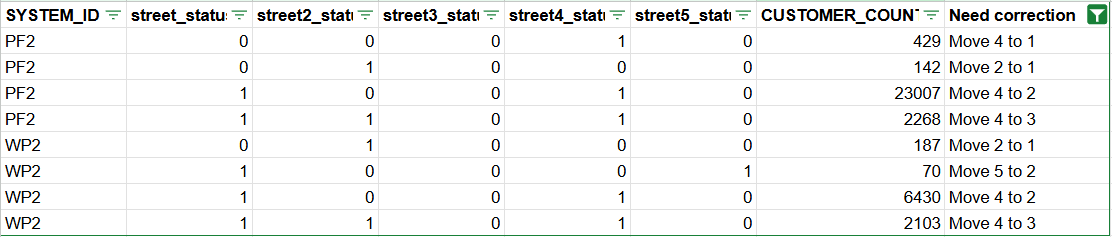
| 3007-C03 | C-2 | Missing Street in the general data | Active customer in scope and there is no street information in either Street/2/3/4/5 | Customer/Name/Country/Street/Street2/Street3/Street4/Street5 / Sales Org / Distribution Channel / Division / Sales Office / Sales Group / CSR Name / Account Manager Name / Geo Region / Leading GBU | PF2/WP2 |
| 3007-C04 | C-2 | Missing Region in the general data | Active customer in scope and there is no region code maintained | Customer/Name/Country/City/Region code / Sales Org / Distribution Channel / Division / Sales Office / Sales Group / CSR Name / Account Manager Name / Geo Region / Leading GBU | PF2/WP2 |
| 3007-C05 | C-2 | Review the international version address maintained for the customer | Active customer in scope and there is international address maintained. In the meantime, the international version content doesn't match the international version | Customer/Name/International version/International version Name 1/International version Name 2/International version Street/International version Street2 / Sales Org / Distribution Channel / Division / Sales Office / Sales Group / CSR Name / Account Manager Name / Geo Region / Leading GBU | PF2/WP2 |
| 3007-C06 | Review the customer with obsolete region code | Active customer in scope and the region code is no longer valid, i.e., the region code includes description such as D* / Obs / OBLAST | Customer/Name/Country/City/Region code/ECC description / Sales Org / Distribution Channel / Division / Sales Office / Sales Group / CSR Name / Account Manager Name / Geo Region / Leading GBU | PF2/WP2 | |
| |||||
| |||||
| 3007-C09 | C2 | Missing customer without transportation zone | Active customer in scope and there is no transportation zone | Customer/Name/Street/Country/Region/Transportation Zone / Sales Org / Distribution Channel / Division / Sales Office / Sales Group / CSR Name / Account Manager Name / Geo Region / Leading GBU | PF2/WP2 |
| 3007-C10 | C3 | Review customer using name 3 and name 4 and re-organize the name if possible? | Active customer in scope, and there is information maintained in name 3 or name 4 | Customer/Name/Name2/Name3/Name4/Country / Sales Org / Distribution Channel / Division / Sales Office / Sales Group / CSR Name / Account Manager Name / Geo Region / Leading GBU | PF2/WP2 |
| 3007-C11 | C3 | Customer name not in the correct format | Active customer in scope and customer name 1/2/3/4 has following pattern
| Customer/Name/Name2/Name3/Name4 /Country /Sales Org / Distribution Channel / Division / Sales Office / Sales Group / CSR Name / Account Manager Name / Geo Region / Leading GBU | PF2/WP2 |
| 3007-C12 | C3 | Remove room number as the field is no longer in use | Active customer in scope and there is room number | Customer/Name/Country/Street/Street2/Street3/Street4/room number /Country /Sales Org / Distribution Channel / Division / Sales Office / Sales Group / CSR Name / Account Manager Name/ Geo Region / Leading GBU | PF2/WP2 |
| 3007-C13 | C2 | Identify one customer has multiple VAT ID in different registration country | If the customer has multiple VAT ID, identify if this is for different country and if there is different VAT registration address, if yes, then need to split the customer into multiple ship-to in S4 | Customer/Name/Street/Country/Region/VAT ID(STCEG)/Tax Number 1(STCD1)/Tax Number 2(STCD2)/Tax Number 3(STCD3)/Tax Number 4(STCD4)/Tax Number 5(STCD5)/Tax Number 6(STCD6) /Sales Org / Distribution Channel / Division / Sales Office / Sales Group / CSR Name / Account Manager Name / Geo Region / Leading GBU | PF2/WP2 |
| 3007-C14 | C2 | Customers with identical VAT ID | After de-duplication, there are several customers share the identical VAT ID | Customer/Name/Street/Country/Region/VAT ID(STCEG)/Tax Number 1(STCD1)/Tax Number 2(STCD2)/Tax Number 3(STCD3)/Tax Number 4(STCD4)/Tax Number 5(STCD5)/Tax Number 6(STCD6) /Sales Org / Distribution Channel / Division / Sales Office / Sales Group / CSR Name / Account Manager Name / Geo Region / Leading GBU | PF2/WP2 |
| 3007-C15 | C3 | Salesforce customer not in SAP | iCare/Core CRM customer in migration scope, but there is no data in WP2/PF2 | Account ID / Name / Account Manager / PRS/RCS ID / Geo Region / Leading GBU | iCare/Core |
| 3007-C16 | C3 | Tax jurisdiction code is missing | For CA/US/BR, tax jurisdiction code is mandatory. Active customer in scope for the 3 countries, but there is no tax jurisdiction code | Customer/Name/Country/Street/Region /Sales Org / Distribution Channel / Division / Sales Office / Sales Group / CSR Name / Account Manager Name / Geo Region / Leading GBU | PF2/WP2 |
| 3007-C17 | C3 | Customer with PO Box only | Customer is defined as sold-to/ship-to, but there is no street/2/3/4/5 information, just the PO Box | Customer/Name/Country/Street/Street2/Street3/Street4//5/PO Box /Sales Org / Distribution Channel / Division / Sales Office / Sales Group / CSR Name / Account Manager Name / Geo Region / Leading GBU | PF2/WP2 |
| 3007-C18 | C3 | VAT Number Position | Customer has tax number in STCEG/STCD1/2/3/4/5/6, but not in the correct field | Customer/Name/Country/Street/STCEG/STCD1/2/3/4/5/6/Sales Org / Distribution Channel / Division / Sales Office / Sales Group / CSR Name / Account Manager Name / Geo Region/Proposed Tax Field / Leading GBU | PF2/WP2 |
| 3007-C19 | C3 | Brazil Nota Fiscal Related fields | Brazil customer missing value for mandatory fields for Nota Fiscal, such as ICMS TAXPAYER( KNA1-ICMSTAXPAY) | Customer/Name/Country/Street/Sales Org / Distribution Channel / Division / Sales Office / Sales Group / CSR Name / Account Manager Name / Geo Region/ Leading GBU | PF2/WP2 |
Vendor Master Data - General Information
Conversion Process
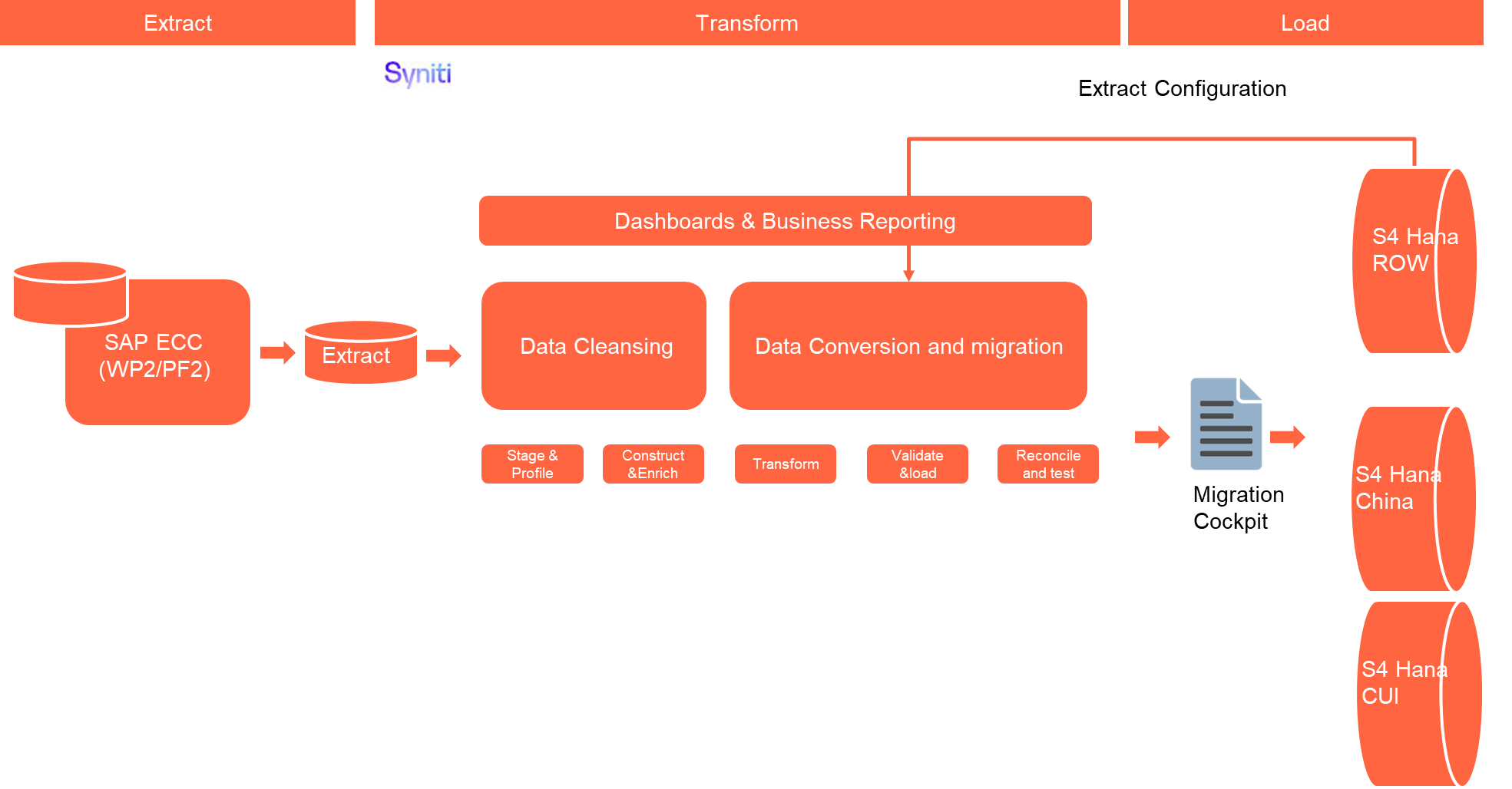
The high-level process is represented by the diagram below:
The ETL (Extract, Transform, Load) process is a structured approach to data migration and management, ensuring high-quality data is seamlessly transferred across systems. Here’s a breakdown of its key components:
1. Extraction
The process begins with extracting metadata and raw data from source systems, such as Syensqo ECC system (i.e., WP2/PF2) periodically. The extracted data is then staged for transformation.
It will extract the customer and vendor master data related table, such as KNA1/LFA1/KNVV/KNB1/LFB1/LFM1/ADRC/ADR2/ADR3/ADR4/ADR5/ADR6 etc.
2. Transformation
Once extracted, the data undergoes cleansing, consolidation, and governance. This step ensures data integrity, consistency, and compliance with business rules. The transformation process includes:
- Data validation to remove inconsistencies.
- Standardization to align formats across datasets.
- Business rule application to refine data for operational use.
3. Loading
The transformed data is then loaded into the target S4 Hana system. SAP Migration cockpit will be used to migrate the Customer/Supplier separately. If the Business partner is customer and vendor in the same time, the BP general information will be in the Customer loading file.
Data Privacy and Sensitivity
N/AExtraction
Extract data from a source into Syniti Migrate for SAP ROW and SAP China relevant entities. There are 2 possibilities:
- The data exists. Syniti Migrate connects to the source and loads the data into Syniti Migrate. There are 3 methods:
- Perform full data extraction from relevant tables in the source system(s).
- Perform extraction through the application layer.
- Only if Syniti Migrate cannot connect to the source, data is loaded to the repository from the provided source system extract/report.
- The data does not exist (or cannot be converted from its current state). The data is manually collected by the business directly in Syniti Migrate. This is to be conducted using DCT (Data Collection Template) in Syniti Migrate
The agreed Relevancy criteria is applied to the extracted records to identify the records that are applicable for the Target loads.
Extraction Run Sheet
| Req # | Requirement Description | Team Responsible |
|---|---|---|
| Extraction Scope Definition | - Identify the source systems and databases involved. Major tables to be extracted are KNA1/LFA1/KNVV/KNB1/LFB1/LFM1/ADRC/ADR2/ADR3/ADR4/ADR5/ADR6. | Data team |
| Extraction Methodology | - Specify the extraction approach (full, incremental, or delta extraction). For this object, it will be full extraction. | Syniti |
| Extraction Execution Plan | - Establish execution timelines and batch processing schedules. - Assign responsibilities for extraction monitoring. - Document dependencies on other migration tasks. | Syniti |
| Data Quality and Validation | - Define error handling mechanisms for extraction failures. | Syniti |
Selection Screen
| Selection Ref Screen | Parameter Name | Selection Type | Requirement | Value to be entered/set |
|---|---|---|---|---|
| N/A | ||||
Data Collection Template (DCT)
Target Ready Data Collection Template will be created for BP General data with exception of some fields which require transformation as mentioned in the transformation rule.BP General DCT Rules
Customer Master Data - General Information
A. Collect BP Type information
| Field Name | Field Description | Rule |
|---|---|---|
| KUNNR | Customer Number | Mandatory Key link to Customer master table KNA1. 9003 for Sales Agent. Currently there is a request to use this field to identify Sales Agents/Commission Agents for Royalty management. |
| NAME1 | Customer Name | Display only link to Customer master table KNA1 |
| STRAS | STREET | Display only link to Customer master table KNA1 |
| LAND1 | COUNTRY | Display only link to Customer master table KNA1 |
| BPKIND | BP Type | Mandatory Key link to table TB004, limit to value 9003 (Sales Agent) |
| TEXT40 | BP Type Description | Display only link to table TB004 |
C. Collect Customer Loading Points
| Field Name | Field Description | Rule |
|---|---|---|
| CLIENT | System ID | Mandatory System ID with drop-down PF2 or WP2 |
| KUNNR | Customer | Mandatory Unloading points will be required for specific Ship-To parties that have defined receiving days or limited goods receiving hours. The customer number here will be the SAP ECC Customer number |
| ABLAD | Unloading Point | Mandatory It follows below pattern <CustomerCode>_<Location> |
| KNFAK | Cust.fact.calendar | Optional Customer's factory calendar |
| WANID | Goods receiving hrs | Optional Goods receiving hours ID (default value) Use The schedule of goods receiving hours |
| TPQUA | Means of Transp. Qualification | Optional |
| TPGRP | Means of Transport Group | Optional |
| STZKL | Wait Time Class (Factor, Var. Portion) | Optional |
| STZZU | Wait Time Surcharge (Fixed Portion) | Optional |
| MOAB1 | Monday morning from ... | Optional Goods receipt times: Monday morning from ... |
| MOBI1 | Monday morning until ... | Optional Goods receiving hours: Monday morning until ... |
| MOAB2 | Monday afternoon from ... | Optional Goods receipt times: Monday afternoon from ... |
| MOBI2 | Monday afternoon until ... | Optional Goods receiving hours: Monday afternoon until ... |
| DIAB1 | Tuesday morning from ... | Optional Goods receipt times: Tuesday morning from ... |
| DIBI1 | Tuesday morning until ... | Optional Goods receiving hours: Tuesday morning until ... |
| DIAB2 | Tuesday afternoon from ... | Optional Goods receipt times: Tuesday afternoon from ... |
| DIBI2 | Tuesday afternoon until ... | Optional Goods receiving hours: Tuesday afternoon until ... |
| MIAB1 | Wednesday morning from ... | Optional Goods receipt times: Wednesday morning from ... |
| MIBI1 | Wednesday morning until ... | Optional Goods receiving hours: Wednesday morning until ... |
| MIAB2 | Wednesday afternoon from ... | Optional Goods receipt times: Wednesday afternoon from ... |
| MIBI2 | Wednesday afternoon until ... | Optional Goods receiving hours: Wednesday afternoon until ... |
| DOAB1 | Thursday morning from ... | Optional Goods receipt times: Thursday morning from ... |
| DOBI1 | Thursday morning until ... | Optional Goods receiving hours: Thursday morning until ... |
| DOAB2 | Thursday afternoon from ... | Optional Goods receipt times: Thursday afternoon from ... |
| DOBI2 | Thursday afternoon until ... | Optional Goods receiving hours: Thursday afternoon until ... |
| FRAB1 | Friday morning from ... | Optional Goods receipt times: Friday morning from ... |
| FRBI1 | Friday morning until ... | Optional Goods receiving hours: Friday morning until ... |
| FRAB2 | Friday afternoon from ... | Optional Goods receipt times: Friday afternoon from ... |
| FRBI2 | Friday afternoon until ... | Optional Goods receiving hours: Friday afternoon until ... |
| SAAB1 | Saturday morning from ... | Optional Goods receipt times: Saturday morning from ... |
| SABI1 | Saturday morning until ... | Optional Goods receiving hours: Saturday morning until ... |
| SAAB2 | Saturday afternoon from ... | Optional Goods receipt times: Saturday afternoon from ... |
| SABI2 | Saturday afternoon until ... | Optional Goods receiving hours: Saturday afternoon until ... |
| SOAB1 | Sunday morning from ... | Optional Goods receipt times: Sunday morning from ... |
| SOBI1 | Sunday morning until ... | Optional Goods receiving hours: Sunday morning until ... |
| SOAB2 | Sunday afternoon from ... | Optional Goods receipt times: Sunday afternoon from ... |
| SOBI2 | Sunday afternoon until ... | Optional Goods receiving hours: Sunday afternoon until ... |
| DEFAB | Default unloading pt | Optional Default unloading point Specifies an unloading point as the default. UseWhen you enter more than one unloading point for a customer, you can select one unloading point as the default. During sales order processing, the system prompts you to choose one unloading point. The system presents the default unloading point as the first choice in the pop-up window. |
Vendor Master Data - General Information
| Field Name | Field Description | Rule |
|---|---|---|
Extraction Dependencies
| Item # | Step Description | Team Responsible |
|---|---|---|
| 1 | Source System Availability
| Syensqo IT |
| 2 | Data Structure
| Syniti |
| 3 | Referential Integrity
| Syniti |
| 4 | Extraction Methodology
| Syniti |
| 5 | Performance and Scalability Considerations
| Syniti |
| 6 | Security and Compliance
| Syniti |
Transformation
The Target fields are mapped to the applicable Legacy field that will be its source, this is a 3-way activity involving the Business, Functional team and Data team. This identifies the transformation activity required to allow Syniti Migrate to make the data Target ready:
- Perform value mapping and data transformation rules.
- Legacy values are mapped to the to-be values (this could include a default value)
- Values are transformed according to the rules defined in Syniti Migrate
- Prepare target-ready data in the structure and format that is required for loading via prescribed Load Tool. This step also produces the load data ready for business to perform Pre-load Data Validation
Transformation Run Sheet
| Item # | Step Description | Team Responsible |
|---|---|---|
| 1 | Identify target S/4HANA fields and determine applicable legacy source fields from both ECC systems WP2, PF2 | Functional Team (L2C/S2P)+ Data Team (L2C/S2P) |
| 2 | Map legacy field values to S/4HANA target values (including field-level mapping and technical names) | Data Team (L2C/S2P), Data Team (Syniti) |
| 3 | Define value mapping rules for fields requiring standardization or harmonization across the two source systems WP2, PF2 | Functional Team (L2C/S2P)+ Data Team (L2C/S2P) |
| 4 | Identify and agree on default values where legacy data is incomplete or inconsistent | Business Team + Functional Team (L2C/S2P) |
| 5 | Configure transformation rules in Syniti Migrate | Data Team (Syniti) |
| 6 | Review transformation logic and mappings with Business for confirmation | Business Team + Functional Team (L2C/S2P) |
| 7 | Perform initial transformation run and generate draft target-ready dataset | Data Team (Syniti), |
| 8 | Review draft target-ready data for structure and completeness | Data Team (L2C/S2P), Functional Team (L2C/S2P) |
| 9 | Share transformed data with Business for Pre-load Validation | Business Team |
| 10 | Incorporate feedback from Business and refine mappings or transformation logic as needed | Data Team (L2C/S2P) |
| 11 | Finalize and approve transformed data as Target Ready Load File | Business + Functional (L2C/S2P) + Data Team (L2C/S2P) |
| 12 | Handover final file to Load Team or trigger the load via Syniti Load Workbench | Data Team (Syniti), Data Load Team |
Transformation Rules
Customer Master Data Transformation Rule
| Rule # | Source system | Source Table | Source Field | Source Description | Target System | Target Table | Target Field | Target Description | Transformation Logic |
|---|---|---|---|---|---|---|---|---|---|
| 1 | WP2/PF2 | KNA1 | KUNNR | Business Partner | S4 Hana | BUT000 | PARTNER | Business Partner | Rule - For External BP Apply external number range from 1000000 to 99999999, use the running number from 1000000 For Intercompany BP, it will be DCT, the numbering will be as following Legal entity will be ICT/ICN+S4 Company Code Plant will be PL+S4 Plant code |
| 2 | WP2/PF2 | BP Type | S4 Hana | BUT000 | BPKIND | BP Type | DCT - Only used for Agent. When it is Agent, apply value 9003 | ||
| 3 | WP2/PF2 | Grouping | S4 Hana | BUT000 | BU_GROUP | Grouping | Rule - For External BP - Apply BP02 For Intercompany BP - Apply BPAB | ||
| 4 | WP2/PF2 | KNA1 | KUNNR | External BP Number | S4 Hana | BUT000 | BPEXT | External BP Number | Rule - if it is single, just copy legacy customer or vendor number. if there are multiples legacy number, use '/' to combine customer/vendor number |
| 5 | WP2/PF2 | ADRC | SORT1 | Search Term 1 | S4 Hana | BUT000 | BU_SORT1 | Search Term 1 | Copy - |
| 6 | WP2/PF2 | ADRC | NAME1 | Name 1 | S4 Hana | BUT000 | NAME_ORG1 | Name 1 | Copy - |
| 7 | WP2/PF2 | ADRC | NAME2 | Name 2 | S4 Hana | BUT000 | NAME_ORG2 | Name 2 | Copy - |
| 8 | WP2/PF2 | KNA1 | STKZN | Natural Person | S4 Hana | BUT000 | NATPERS | Natural Person | Copy - KNA1-STKZN |
| 9 | WP2/PF2 | KNA1 | MILVE | Military use | S4 Hana | BUT000 | MILVE | Military use | Copy - KNA1-MILVE |
| 10 | WP2/PF2 | KNA1 | CCC02 | Nuclear Sector | S4 Hana | BUT000 | NUC_SEC | Nuclear Sector | Copy - KNA1-CCC02 |
| 12 | WP2/PF2 | ADRC | NATION | Address Version | S4 Hana | ADRC | NATION | Address Version | Rule - Copy. For below country with mismatch, it will follow the rule to correct the international version during transformation C – Chinese → Used in Mainland China — for legal names, licenses, and postal addresses as per local documentation. T - Thai 3 - Korean |
| 13 | WP2/PF2 | ADRC | NAME1 | Name | S4 Hana | ADRC | NAME1 | Name | Copy - |
| 14 | WP2/PF2 | ADRC | NAME2 | Name 2 | S4 Hana | ADRC | NAME2 | Name 2 | Copy - |
| 15 | WP2/PF2 | ADRC | NAME_CO | c/o | S4 Hana | ADRC | NAME_CO | c/o | Copy - |
| 16 | WP2/PF2 | ADRC | CITY1 | City | S4 Hana | ADRC | CITY1 | City | Copy - |
| 17 | WP2/PF2 | ADRC | CITY2 | District | S4 Hana | ADRC | CITY2 | District | Copy - |
| 18 | WP2/PF2 | ADRC | POST_CODE1 | Postal Code | S4 Hana | ADRC | POST_CODE1 | Postal Code | Rule - Copy, but it is blank and the country/region (such as HK) doesn't require postal code, put dummy value such as 00000 |
| 19 | WP2/PF2 | ADRC | POST_CODE2 | PO Box Postal Code | S4 Hana | ADRC | POST_CODE2 | PO Box Postal Code | Copy - |
| 20 | WP2/PF2 | ADRC | POST_CODE3 | Company Postal Code | S4 Hana | ADRC | POST_CODE3 | Company Postal Code | Copy - |
| 21 | WP2/PF2 | ADRC | PO_BOX | PO Box | S4 Hana | ADRC | PO_BOX | PO Box | Copy - |
| 22 | WP2/PF2 | ADRC | PO_BOX_NUM | PO Box w/o No. | S4 Hana | ADRC | PO_BOX_NUM | PO Box w/o No. | Copy - |
| 23 | WP2/PF2 | ADRC | PO_BOX_LOC | PO Box City | S4 Hana | ADRC | PO_BOX_LOC | PO Box City | Copy - |
| 24 | WP2/PF2 | ADRC | PO_BOX_REG | PO Box Region | S4 Hana | ADRC | PO_BOX_REG | PO Box Region | Copy - |
| 25 | WP2/PF2 | ADRC | PO_BOX_CTY | PO Box Ctry/Region | S4 Hana | ADRC | PO_BOX_CTY | PO Box Ctry/Region | Copy - |
| 26 | WP2/PF2 | ADRC | TRANSPZONE | Transportation Zone | S4 Hana | ADRC | TRANSPZONE | Transportation Zone | Rule - Copy if the same transportation zone is defined in S4. Otherwise it will use the map approach |
| 27 | WP2/PF2 | ADRC | STREET | Street | S4 Hana | ADRC | STREET | Street | Rule - If there is value in ADRC-STR_SUPPL3 / LOCATION, concatenation logic is required.
|
| 28 | WP2/PF2 | ADRC | HOUSE_NUM1 | House Number | S4 Hana | ADRC | HOUSE_NUM1 | House Number | Copy - |
| 29 | WP2/PF2 | ADRC | HOUSE_NUM2 | Supplement | S4 Hana | ADRC | HOUSE_NUM2 | Supplement | Copy - |
| 30 | WP2/PF2 | ADRC | STR_SUPPL1 | Street 2 | S4 Hana | ADRC | STR_SUPPL1 | Street 2 | Rule - If there is value in ADRC-STR_SUPPL3 / LOCATION, concatenation logic is required.
|
| 31 | WP2/PF2 | ADRC | STR_SUPPL2 | Street 3 | S4 Hana | ADRC | STR_SUPPL2 | Street 3 | Rule - If there is value in ADRC-STR_SUPPL3 / LOCATION, concatenation logic is required.
|
| 32 | WP2/PF2 | ADRC | BUILDING | Building Code | S4 Hana | ADRC | BUILDING | Building Code | Copy - |
| 33 | WP2/PF2 | ADRC | COUNTRY | Country/Region Key | S4 Hana | ADRC | COUNTRY | Country/Region Key | Copy - |
| 34 | WP2/PF2 | ADRC | LANGU | Language Key | S4 Hana | ADRC | LANGU | Language Key | Copy - |
| 35 | WP2/PF2 | ADRC | REGION | Region | S4 Hana | ADRC | REGION | Region | Mapping - Refer to mapping table MAP_REGION. Based on ADRC-COUNTRY/REGION to map the S4 Hana region code |
| 36 | WP2/PF2 | ADRC | SORT1 | Search Term 1 | S4 Hana | ADRC | SORT1 | Search Term 1 | Copy - |
| 37 | WP2/PF2 | ADRC | TEL_NUMBER | Telephone | S4 Hana | ADRC | TEL_NUMBER | Telephone | Copy - |
| 38 | WP2/PF2 | ADRC | TEL_EXTENS | Extension | S4 Hana | ADRC | TEL_EXTENS | Extension | Copy - |
| 39 | WP2/PF2 | ADRC | FAX_NUMBER | Fax | S4 Hana | ADRC | FAX_NUMBER | Fax | Copy - |
| 40 | WP2/PF2 | ADRC | FAX_EXTENS | Extension | S4 Hana | ADRC | FAX_EXTENS | Extension | Copy - |
| 41 | WP2/PF2 | ADRC | FLAGCOMM2 | Telephone... | S4 Hana | ADRC | FLAGCOMM2 | Telephone... | Copy - |
| 42 | WP2/PF2 | ADRC | FLAGCOMM3 | Fax... | S4 Hana | ADRC | FLAGCOMM3 | Fax... | Copy - |
| 43 | WP2/PF2 | ADRC | FLAGCOMM4 | Teletex | S4 Hana | ADRC | FLAGCOMM4 | Teletex | Copy - |
| 44 | WP2/PF2 | ADRC | FLAGCOMM6 | E-Mail Defined | S4 Hana | ADRC | FLAGCOMM6 | E-Mail Defined | Copy - |
| 45 | WP2/PF2 | ADRC | MC_CITY1 | City | S4 Hana | ADRC | MC_CITY1 | City | Copy - |
| 46 | WP2/PF2 | ADRC | EXTENSION1 | Data line | S4 Hana | ADRC | EXTENSION1 | Data line | Copy - |
| 47 | WP2/PF2 | ADRC | EXTENSION2 | Telebox | S4 Hana | ADRC | EXTENSION2 | Telebox | Copy - |
| 48 | WP2/PF2 | ADRC | TAXJURCODE | Tax Jurisdiction | S4 Hana | ADRC | TAXJURCODE | Tax Jurisdiction | Copy - |
| 49 | WP2/PF2 | ADRC | PO_BOX_LOBBY | PO Box Lobby | S4 Hana | ADRC | PO_BOX_LOBBY | PO Box Lobby | Copy - |
| 50 | WP2/PF2 | STXH | TDOBJECT | Text object | S4 Hana | STXH | TDOBJECT | Text object | Default - Default to KNA1 |
| 51 | WP2/PF2 | STXH | TDNAME | Text Name | S4 Hana | STXH | TDNAME | Text Name | Mapping - Map ECC customer number to S4 Customer number |
| 52 | WP2/PF2 | STXH | TDID | Text ID | S4 Hana | STXH | TDID | Text ID | Mapping - Refer to MAP_KNA1_TDID |
| 53 | WP2/PF2 | STXH | TDSPRAS | Language Key | S4 Hana | STXH | TDSPRAS | Language Key | Copy - |
| 54 | WP2/PF2 | STXL | TDNAME | Text Name | S4 Hana | STXL | TDNAME | Text Name | Mapping - Map ECC customer number to S4 Customer number |
| 55 | WP2/PF2 | STXL | TDID | Text ID | S4 Hana | STXL | TDID | Text ID | Mapping - Refer to MAP_KNA1_TDID |
| 56 | WP2/PF2 | STXL | TDSPRAS | Language Key | S4 Hana | STXL | TDSPRAS | Language Key | Copy - |
| 57 | WP2/PF2 | STXL | CLUSTD | Data | S4 Hana | STXL | CLUSTD | Data | Copy - Copy the long text |
| 58 | WP2/PF2 | Business Partner | S4 Hana | BUT0ID | PARTNER | Business Partner | Rule - For External BP Apply external number range from 1000000 to 99999999, use the running number from 1000000 For Intercompany BP Legal entity will be ICT/ICN+S4 Company Code Plant will be PL+S4 Plant code | ||
| 59 | WP2/PF2 | Identification Type | S4 Hana | BUT0ID | TYPE | Identification Type | Rule - if follow fields are not blank, map to below ID KNA1-ZZR_DUNS_DIRECT DUNS direct code - Map to ID BUP001 | ||
| 60 | WP2/PF2 | ID Number | S4 Hana | BUT0ID | IDNUMBER | ID Number | Rule - if follow fields are not blank, copy the value KNA1-ZZR_DUNS_DIRECT DUNS direct code - Map to ID BUP001 | ||
| 61 | WP2/PF2 | Business Partner | S4 Hana | DFKKBPTAXNUM | PARTNER | Business Partner | Rule - For External BP Apply external number range from 1000000 to 99999999, use the running number from 1000000 For Intercompany BP Legal entity will be ICT/ICN+S4 Company Code Plant will be PL+S4 Plant code | ||
| 62 | WP2/PF2 | Tax Number Category | S4 Hana | DFKKBPTAXNUM | TAXTYPE | Tax Number Category | Rule - Refer to MAP_TAXTYPE. Based on KNA1-LAND/STCEG/STCD1/2/3/4/5/6 to map the tax number categories and fields. | ||
| 63 | WP2/PF2 | KNA1 | STCEG/STCD1/STCD2/STCD3/STCD4/STCD5/STCD6 | Tax number | S4 Hana | DFKKBPTAXNUM | TAXNUM | Tax number | Rule - Refer to MAP_TAXTYPE. Based on KNA1-LAND/STCEG/STCD1/2/3/4/5/6 to map the tax number categories and fields |
| 64 | WP2/PF2 | ADR2 | CONSNUMBER | Sequence Number | S4 Hana | ADR2 | CONSNUMBER | Sequence Number | Copy - |
| 65 | WP2/PF2 | ADR2 | COUNTRY | Country/Region | S4 Hana | ADR2 | COUNTRY | Country/Region | Copy - |
| 66 | WP2/PF2 | ADR2 | FLGDEFAULT | Standard No. | S4 Hana | ADR2 | FLGDEFAULT | Standard No. | Copy - |
| 67 | WP2/PF2 | ADR2 | FLG_NOUSE | Do Not Use Communication Number | S4 Hana | ADR2 | FLG_NOUSE | Do Not Use Communication Number | Copy - |
| 68 | WP2/PF2 | ADR2 | HOME_FLAG | Home Address | S4 Hana | ADR2 | HOME_FLAG | Home Address | Copy - |
| 69 | WP2/PF2 | ADR2 | TEL_NUMBER | Telephone | S4 Hana | ADR2 | TEL_NUMBER | Telephone | Copy - |
| 70 | WP2/PF2 | ADR2 | TEL_EXTENS | Extension | S4 Hana | ADR2 | TEL_EXTENS | Extension | Copy - |
| 71 | WP2/PF2 | ADR2 | TELNR_LONG | Telephone number | S4 Hana | ADR2 | TELNR_LONG | Telephone number | Copy - |
| 72 | WP2/PF2 | ADR2 | TELNR_CALL | Caller number | S4 Hana | ADR2 | TELNR_CALL | Caller number | Copy - |
| 73 | WP2/PF2 | ADR2 | DFT_RECEIV | SMS-Enab. | S4 Hana | ADR2 | DFT_RECEIV | SMS-Enab. | Copy - |
| 74 | WP2/PF2 | ADR2 | R3_USER | Mobile phone | S4 Hana | ADR2 | R3_USER | Mobile phone | Copy - |
| 75 | WP2/PF2 | ADR3 | COUNTRY | Country/Region | S4 Hana | ADR3 | COUNTRY | Country/Region | Copy - |
| 76 | WP2/PF2 | ADR3 | FLGDEFAULT | Standard No. | S4 Hana | ADR3 | FLGDEFAULT | Standard No. | Copy - |
| 77 | WP2/PF2 | ADR3 | FLG_NOUSE | Do Not Use Communication Number | S4 Hana | ADR3 | FLG_NOUSE | Do Not Use Communication Number | Copy - |
| 78 | WP2/PF2 | ADR3 | HOME_FLAG | Home Address | S4 Hana | ADR3 | HOME_FLAG | Home Address | Copy - |
| 79 | WP2/PF2 | ADR3 | FAX_NUMBER | Fax | S4 Hana | ADR3 | FAX_NUMBER | Fax | Copy - |
| 80 | WP2/PF2 | ADR3 | FAX_EXTENS | Extension | S4 Hana | ADR3 | FAX_EXTENS | Extension | Copy - |
| 81 | WP2/PF2 | ADR3 | FAXNR_LONG | Fax Number | S4 Hana | ADR3 | FAXNR_LONG | Fax Number | Copy - |
| 82 | WP2/PF2 | ADR3 | FAXNR_CALL | Sender number | S4 Hana | ADR3 | FAXNR_CALL | Sender number | Copy - |
| 83 | WP2/PF2 | ADR4 | FLGDEFAULT | Standard No. | S4 Hana | ADR4 | FLGDEFAULT | Standard No. | Copy - |
| 84 | WP2/PF2 | ADR4 | FLG_NOUSE | Do Not Use Communication Number | S4 Hana | ADR4 | FLG_NOUSE | Do Not Use Communication Number | Copy - |
| 85 | WP2/PF2 | ADR4 | HOME_FLAG | Home Address | S4 Hana | ADR4 | HOME_FLAG | Home Address | Copy - |
| 86 | WP2/PF2 | ADR4 | TTX_NUMBER | Teletex number | S4 Hana | ADR4 | TTX_NUMBER | Teletex number | Copy - |
| 87 | WP2/PF2 | ADR5 | FLGDEFAULT | Standard No. | S4 Hana | ADR5 | FLGDEFAULT | Standard No. | Copy - |
| 88 | WP2/PF2 | ADR5 | FLG_NOUSE | Do Not Use Communication Number | S4 Hana | ADR5 | FLG_NOUSE | Do Not Use Communication Number | Copy - |
| 89 | WP2/PF2 | ADR5 | HOME_FLAG | Home Address | S4 Hana | ADR5 | HOME_FLAG | Home Address | Copy - |
| 90 | WP2/PF2 | ADR5 | TLX_NUMBER | Telex number | S4 Hana | ADR5 | TLX_NUMBER | Telex number | Copy - |
| 91 | WP2/PF2 | ADR6 | FLGDEFAULT | Standard addr. | S4 Hana | ADR6 | FLGDEFAULT | Standard addr. | Copy - |
| 92 | WP2/PF2 | ADR6 | FLG_NOUSE | Do Not Use Communication Number | S4 Hana | ADR6 | FLG_NOUSE | Do Not Use Communication Number | Copy - |
| 93 | WP2/PF2 | ADR6 | HOME_FLAG | Home Address | S4 Hana | ADR6 | HOME_FLAG | Home Address | Copy - |
| 94 | WP2/PF2 | ADR6 | SMTP_ADDR | E-Mail Address | S4 Hana | ADR6 | SMTP_ADDR | E-Mail Address | Copy - |
| 95 | WP2/PF2 | ADR6 | SMTP_SRCH | E-Mail Address | S4 Hana | ADR6 | SMTP_SRCH | E-Mail Address | Copy - |
| 96 | WP2/PF2 | KNBK | KUNNR | Business Partner | S4 Hana | BUT0BK | PARTNER | Business Partner | Rule - For External BP Apply external number range from 1000000 to 99999999, use the running number from 1000000 For Intercompany BP Legal entity will be ICT/ICN+S4 Company Code Plant will be PL+S4 Plant code |
| 97 | WP2/PF2 | KNBK | BANKS | Bank Country/Region | S4 Hana | BUT0BK | BANKS | Bank Country/Region | Copy - |
| 98 | WP2/PF2 | KNBK | BANKL | Bank Key | S4 Hana | BUT0BK | BANKL | Bank Key | Mapping - Refer to Bank Key mapping |
| 99 | WP2/PF2 | KNBK | BANKN | Bank acct | S4 Hana | BUT0BK | BANKN | Bank acct | Copy - |
| 100 | WP2/PF2 | KNBK | BKONT | Bank Control Key | S4 Hana | BUT0BK | BKONT | Bank Control Key | Copy - |
| 101 | WP2/PF2 | KNBK | BKREF | Reference Details | S4 Hana | BUT0BK | BKREF | Reference Details | Copy - |
| 102 | WP2/PF2 | KNBK | KOINH | Account Holder | S4 Hana | BUT0BK | KOINH | Account Holder | Copy - |
| 103 | WP2/PF2 | KNA1 | AUFSD | Central order block | S4 Hana | KNA1 | AUFSD | Central order block | Copy - |
| 104 | WP2/PF2 | KNA1 | DATLT | Data line | S4 Hana | KNA1 | DATLT | Data line | Copy - |
| 105 | WP2/PF2 | KNA1 | EXABL | Unloading points | S4 Hana | KNA1 | EXABL | Unloading points | TBD - |
| 106 | WP2/PF2 | KNA1 | FAKSD | Central billing block | S4 Hana | KNA1 | FAKSD | Central billing block | Copy - |
| 107 | WP2/PF2 | KNA1 | KTOKD | Account group | S4 Hana | KNA1 | KTOKD | Account group | Rule - For External BP - Apply BP02 For Intercompany BP - Apply BPAB |
| 108 | WP2/PF2 | KNA1 | LIFNR | Vendor | S4 Hana | KNA1 | LIFNR | Vendor | Mapping - apply BP Supplier vs ECC vendor mapping |
| 109 | WP2/PF2 | KNA1 | LIFSD | Central delivery block | S4 Hana | KNA1 | LIFSD | Central delivery block | Copy - |
| 110 | WP2/PF2 | KNA1 | LOEVM | Central deletion flag | S4 Hana | KNA1 | LOEVM | Central deletion flag | Copy - |
| 111 | WP2/PF2 | KNA1 | SPERR | Central posting block | S4 Hana | KNA1 | SPERR | Central posting block | Copy - |
| 112 | WP2/PF2 | KNA1 | STKZU | Liable for VAT | S4 Hana | KNA1 | STKZU | Liable for VAT | "Rule - Applicable for all customers where VAT registration exists. Blank for entities not liable for VAT (e.g., private individuals, exempt organizations)." |
| 113 | WP2/PF2 | KNA1 | TELBX | Telebox number | S4 Hana | KNA1 | TELBX | Telebox number | TBD - |
| 114 | WP2/PF2 | KNA1 | VBUND | Trading partner | S4 Hana | KNA1 | VBUND | Trading partner | Rule - For external customer, this field is not used. For intercompany customer, it will be via DCT |
| 115 | WP2/PF2 | KNA1 | STKZN | Natural Person | S4 Hana | KNA1 | STKZN | Natural Person | TBD - |
| 116 | WP2/PF2 | KNA1 | WERKS | Plant | S4 Hana | KNA1 | WERKS | Plant | Mapping - Refer to MAP_WERKS |
| 117 | WP2/PF2 | KNA1 | XICMS | ICMS-exempt | S4 Hana | KNA1 | XICMS | ICMS-exempt | Copy - |
| 118 | WP2/PF2 | KNA1 | XXIPI | IPI-exempt | S4 Hana | KNA1 | XXIPI | IPI-exempt | Copy - |
| 119 | WP2/PF2 | KNA1 | XSUBT | SubTrib group | S4 Hana | KNA1 | XSUBT | SubTrib group | Copy - |
| 120 | WP2/PF2 | KNA1 | CFOPC | Cust CFOP category | S4 Hana | KNA1 | CFOPC | Cust CFOP category | Mapping - Refer to MAP_CFOPC |
| 121 | WP2/PF2 | KNA1 | TXLW1 | ICMS text | S4 Hana | KNA1 | TXLW1 | ICMS text | Mapping - Refer to MAP_TXLW1 |
| 122 | WP2/PF2 | KNA1 | TXLW2 | IPI text | S4 Hana | KNA1 | TXLW2 | IPI text | TBD - |
| 123 | WP2/PF2 | KNA1 | CASSD | Central sales block | S4 Hana | KNA1 | CASSD | Central sales block | Copy - |
| 124 | WP2/PF2 | KNA1 | J_1KFREPRE | Name of Representative | S4 Hana | KNA1 | J_1KFREPRE | Name of Representative | Not used |
| 125 | WP2/PF2 | KNA1 | J_1KFTBUS | Type of Business | S4 Hana | KNA1 | J_1KFTBUS | Type of Business | Not used |
| 126 | WP2/PF2 | KNA1 | J_1KFTIND | Type of Industry | S4 Hana | KNA1 | J_1KFTIND | Type of Industry | Not used |
| 127 | WP2/PF2 | KNA1 | NODEL | Central delblock | S4 Hana | KNA1 | NODEL | Central delblock | Copy - |
| 128 | WP2/PF2 | KNA1 | SUFRAMA | Suframa Code | S4 Hana | KNA1 | SUFRAMA | Suframa Code | TBD - |
| 129 | WP2/PF2 | KNA1 | ICMSTAXPAY | ICMS Taxpayer | S4 Hana | KNA1 | ICMSTAXPAY | ICMS Taxpayer | Copy - |
| 130 | WP2/PF2 | Indicator: Sales partner | S4 Hana | KNA1 | DEAR2 | Indicator: Sales partner | Rule - If this is a sold-to party (if there AG partner function defined in the KNVP for this customer) , it will be X. | ||
| 131 | WP2/PF2 | CUSTOMER CLASSIFIC. | S4 Hana | KNA1 | KUKLA | CUSTOMER CLASSIFIC. | Not used | ||
| 132 | WP2/PF2 | Delivery Date Rule | S4 Hana | KNA1 | DELIVERY_DATE_RULE | Delivery Date Rule | DCT - Check with KK if DCT required | ||
| 133 | WP2/PF2 | KNA1 | RG | RG Number | S4 Hana | KNA1 | RG | RG Number | Copy - |
| 134 | WP2/PF2 | KNA1 | EXP | Issued by | S4 Hana | KNA1 | EXP | Issued by | Copy - |
| 135 | WP2/PF2 | KNA1 | UF | State | S4 Hana | KNA1 | UF | State | Copy - |
| 136 | WP2/PF2 | KNA1 | RGDATE | RG Issuing Date | S4 Hana | KNA1 | RGDATE | RG Issuing Date | Copy - |
| 137 | WP2/PF2 | KNA1 | RNE | Foreign National Registration | S4 Hana | KNA1 | RNE | Foreign National Registration | Copy - |
| 138 | WP2/PF2 | KNA1 | RNEDATE | RNE Issuing Date | S4 Hana | KNA1 | RNEDATE | RNE Issuing Date | Copy - |
| 139 | WP2/PF2 | KNA1 | CRTN | CRT Number | S4 Hana | KNA1 | CRTN | CRT Number | Copy - |
| 140 | WP2/PF2 | KNA1 | INDTYP | Industry Main Type | S4 Hana | KNA1 | INDTYP | Industry Main Type | Copy - |
| 141 | WP2/PF2 | KNA1 | TDT | Tax Declaration Type | S4 Hana | KNA1 | TDT | Tax Declaration Type | Copy - |
| 142 | WP2/PF2 | KNA1 | COMSIZE | Company Size | S4 Hana | KNA1 | COMSIZE | Company Size | Copy - |
| 143 | WP2/PF2 | KNA1 | DECREGPC | Declaration Regimen for PIS/COFINS | S4 Hana | KNA1 | DECREGPC | Declaration Regimen for PIS/COFINS | Copy - |
| 144 | WP2/PF2 | KNA1 | J_1IPANNO | Permanent Account Number | S4 Hana | KNA1 | J_1IPANNO | Permanent Account Number | Copy - |
| 145 | WP2/PF2 | KNA1 | GST_TDS | GST TDS Registration | S4 Hana | KNA1 | GST_TDS | GST TDS Registration | DCT - Check with KK if DCT required |
| 146 | WP2/PF2 | KNA1 | DATLT | Data line | S4 Hana | KNA1 | DATLT | Data line | Copy - |
| 147 | WP2/PF2 | KNVA | ABLAD | Unloading Point | S4 Hana | KNVA | ABLAD | Unloading Point | DCT When creating the DCT page, copy the ECC existing data as reference for KNVA table |
| 148 | WP2/PF2 | KNVA | KNFAK | Cust.fact.calendar | S4 Hana | KNVA | KNFAK | Cust.fact.calendar | DCT |
| 149 | WP2/PF2 | KNVA | WANID | Goods receiving hrs | S4 Hana | KNVA | WANID | Goods receiving hrs | DCT - |
| 150 | WP2/PF2 | KNVA | TPQUA | Means of Transp. Qualification | S4 Hana | KNVA | TPQUA | Means of Transp. Qualification | DCT - |
| 151 | WP2/PF2 | KNVA | TPGRP | Means of Transport Group | S4 Hana | KNVA | TPGRP | Means of Transport Group | DCT - |
| 152 | WP2/PF2 | KNVA | STZKL | Wait Time Class (Factor, Var. Portion) | S4 Hana | KNVA | STZKL | Wait Time Class (Factor, Var. Portion) | DCT - |
| 153 | WP2/PF2 | KNVA | STZZU | Wait Time Surcharge (Fixed Portion) | S4 Hana | KNVA | STZZU | Wait Time Surcharge (Fixed Portion) | DCT - |
| 154 | WP2/PF2 | KNVA | MOAB1 | Monday | S4 Hana | KNVA | MOAB1 | Monday | DCT - |
| 155 | WP2/PF2 | KNVA | MOBI1 | Monday | S4 Hana | KNVA | MOBI1 | Monday | DCT - |
| 156 | WP2/PF2 | KNVA | MOAB2 | Monday | S4 Hana | KNVA | MOAB2 | Monday | DCT - |
| 157 | WP2/PF2 | KNVA | MOBI2 | Monday | S4 Hana | KNVA | MOBI2 | Monday | DCT - |
| 158 | WP2/PF2 | KNVA | DIAB1 | Tuesday | S4 Hana | KNVA | DIAB1 | Tuesday | DCT - |
| 159 | WP2/PF2 | KNVA | DIBI1 | Tuesday | S4 Hana | KNVA | DIBI1 | Tuesday | DCT - |
| 160 | WP2/PF2 | KNVA | DIAB2 | Tuesday | S4 Hana | KNVA | DIAB2 | Tuesday | DCT - |
| 161 | WP2/PF2 | KNVA | DIBI2 | Tuesday | S4 Hana | KNVA | DIBI2 | Tuesday | DCT - |
| 162 | WP2/PF2 | KNVA | MIAB1 | Wednesday | S4 Hana | KNVA | MIAB1 | Wednesday | DCT - |
| 163 | WP2/PF2 | KNVA | MIBI1 | Wednesday | S4 Hana | KNVA | MIBI1 | Wednesday | DCT - |
| 164 | WP2/PF2 | KNVA | MIAB2 | Wednesday | S4 Hana | KNVA | MIAB2 | Wednesday | DCT - |
| 165 | WP2/PF2 | KNVA | MIBI2 | Wednesday | S4 Hana | KNVA | MIBI2 | Wednesday | DCT - |
| 166 | WP2/PF2 | KNVA | DOAB1 | Thursday | S4 Hana | KNVA | DOAB1 | Thursday | DCT - |
| 167 | WP2/PF2 | KNVA | DOBI1 | Thursday | S4 Hana | KNVA | DOBI1 | Thursday | DCT - |
| 168 | WP2/PF2 | KNVA | DOAB2 | Thursday | S4 Hana | KNVA | DOAB2 | Thursday | DCT - |
| 169 | WP2/PF2 | KNVA | DOBI2 | Thursday | S4 Hana | KNVA | DOBI2 | Thursday | DCT - |
| 170 | WP2/PF2 | KNVA | FRAB1 | Friday | S4 Hana | KNVA | FRAB1 | Friday | DCT - |
| 171 | WP2/PF2 | KNVA | FRBI1 | Friday | S4 Hana | KNVA | FRBI1 | Friday | DCT - |
| 172 | WP2/PF2 | KNVA | FRAB2 | Friday | S4 Hana | KNVA | FRAB2 | Friday | DCT - |
| 173 | WP2/PF2 | KNVA | FRBI2 | Friday | S4 Hana | KNVA | FRBI2 | Friday | DCT - |
| 174 | WP2/PF2 | KNVA | SAAB1 | Saturday | S4 Hana | KNVA | SAAB1 | Saturday | DCT - |
| 175 | WP2/PF2 | KNVA | SABI1 | Saturday | S4 Hana | KNVA | SABI1 | Saturday | DCT - |
| 176 | WP2/PF2 | KNVA | SAAB2 | Saturday | S4 Hana | KNVA | SAAB2 | Saturday | DCT - |
| 177 | WP2/PF2 | KNVA | SABI2 | Saturday | S4 Hana | KNVA | SABI2 | Saturday | DCT - |
| 178 | WP2/PF2 | KNVA | SOAB1 | Sunday | S4 Hana | KNVA | SOAB1 | Sunday | DCT - |
| 179 | WP2/PF2 | KNVA | SOBI1 | Sunday | S4 Hana | KNVA | SOBI1 | Sunday | DCT - |
| 180 | WP2/PF2 | KNVA | SOAB2 | Sunday | S4 Hana | KNVA | SOAB2 | Sunday | DCT - |
| 181 | WP2/PF2 | KNVA | SOBI2 | Sunday | S4 Hana | KNVA | SOBI2 | Sunday | DCT - |
| 182 | WP2/PF2 | KNVA | DEFAB | Default unloading pt | S4 Hana | KNVA | DEFAB | Default unloading pt | DCT - |
| 183 | WP2/PF2 | BUT100 | RLTYP | BP Role | S4 Hana | BUT100 | RLTYP | BP Role | Default - FLCU01 |
| 184 | WP2/PF2 | ADRCT | REMARK | Notes | S4 Hana | ADRCT | REMARK | Notes | Copy - |
List of Custom Target Reports for this object is maintained here: Conversion Specification - Custom Reports Register.
Vendor Master Data Transformation Rule
Rule # | Source system | Source Table | Source Field | Source Description | Target System | Target Table | Target Field | Target Description | Transformation Logic |
|---|---|---|---|---|---|---|---|---|---|
| To be updated from the excel file | |||||||||
As deduplication/consolidation is performed for customer and vendor general data during migration, following fields will have special rule to ensure the complete information is migrated into S4 Hana system.
There will be 3 scenarios.
a. Multiple customers are merged into 1 customer
b. Multiple vendors are merged into 1 vendor
c. One or several customer and vendor are merged into 1 BP in S4
| Rule # | Source system | Source Table | Source Field | Source Description | Target System | Target Table | Target Field | Target Description | Transformation Logic |
|---|---|---|---|---|---|---|---|---|---|
| 1 | WP2/PF2 | ADRC | All relevant fields | S4 Hana | ADRC | All fields | Follow Customer | ||
| 2 | WP2/PF2 | ADR2 | All relevant fields | Telephone Numbers (Business Address Services) | S4 Hana | ADR2 | All fields | Merge all the different values | |
| 3 | WP2/PF2 | ADR3 | All relevant fields | Fax Numbers (Business Address Services) | S4 Hana | ADR3 | All fields | Merge all the different values | |
| 4 | WP2/PF2 | ADR4 | All relevant fields | Teletex Numbers (Business Address Services) | S4 Hana | ADR4 | All fields | Merge all the different values | |
| 5 | WP2/PF2 | ADR5 | All relevant fields | Telex Numbers (Business Address Services) | S4 Hana | ADR5 | All fields | Merge all the different values | |
| 6 | WP2/PF2 | ADR6 | All relevant fields | E-Mail Addresses (Business Address Services) | S4 Hana | ADR6 | All fields | Merge all the different values | |
| 7 | WP2/PF2 | KNBK / LFBK | All relevant fields | Customer/Vendor Master (Bank Details) | S4 Hana | BUT0BK | All fields | TBD | |
| 8 | WP2/PF2 | KNA1/LFA1 | STCEG/STCD1/2/3/4/5/6 | VAT/Tax ID | S4 Hana | DFKKBPTAXNUM | TAXNUM | Merge the values when it is blank in the master record |
Transformation Mapping
| Mapping Table Name | Mapping Table Description |
|---|---|
| Map ECC customer number to S4 Customer number | |
| MAP_REGION | Country/Region Code Mapping Table |
| Bank Key mapping | |
| MAP_TDID_KNA1 | KNA1 text ID mapping |
| MAP_CFOPC | Customer's CFOP category Mapping |
| MAP_TXLW1 | Mapping ICMS Law |
Transformation Dependencies
List the steps that need to occur before transformation can commence| Item # | Step Description | Team Responsible |
|---|---|---|
| 1 | Source Data Integrity - Ensure extracted data is complete, accurate, and consistent. - Validate that data types and formats align with transformation requirements. | Syniti |
| 2 | Referential Integrity - Ensure dependent records are transformed together or in advance | Syniti |
| 3 | Transformation Logic and Mapping - Define data mapping rules between source and target schemas. | Data Team |
| 4 | Performance and Scalability Considerations - Optimize transformation processes for large datasets. - Ensure system resources can handle transformation workloads | Syniti |
| 5 | Logging and Error Handling - Maintain detailed logs of transformation activities. - Define error-handling procedures for failed transformations | Syniti |
Pre-Load Validation
Project Team
The following pre-load validations will be performed by the Project Team.Completeness
| Task | Action |
|---|---|
| Compare Data Counts |
|
| Validate the mandatory fields | Validate there is value for all the mandatory fields |
| Validate Primary Keys and Unique Constraints |
|
| Test Referential Integrity | Confirm dependent records exist in related tables |
Accuracy
| Task | Action |
|---|---|
| Validate the transformation | Validate the fields which require transformation have the value after transformation instead of the original field value |
| Check Data Consistency |
|
Business
The following pre-load validations will be performed by the business.Completeness
| Task | Action |
|---|---|
| Compare Data Counts |
|
| Review populated templates for missing or incorrect values | Use checklists to verify completeness and correctness before submission |
Accuracy
| Task | Action |
|---|---|
| Check Data Consistency |
|
Load
The load process includes:
- Execute the automated data load into target system using load tool or product the load file if the load must be done manually
- Once the data is loaded to the target system, it will be extracted and prepared for Post Load Data Validation
Load Run Sheet
| Item # | Step Description | Team Responsible |
|---|---|---|
| 1 | Confirm readiness of final approved data sets for each ECC source system WP2 and PF2 | Business / Functional Team |
| 2 | Validate transformation rules and mappings in Syniti tool | Data Team (L2C/S2P-Data) |
| 3 | Generate target-ready load files based on S/4HANA BP table format | Data Team (Syniti) |
| 4 | Review and approve load files before execution | Business / Functional Team |
| 5 | Execute the custom loading program in the S/4HANA system | Data Load Team |
| 6 | Monitor load progress and capture load statistics (records loaded, errors, duplicates, etc.) | Data Team (Syniti) / Technical Team |
| 7 | Extract loaded data from S/4HANA for post-load validation | Data Team (Syniti) |
| 8 | Perform post-load data validation (compare target data with source/approved files) for all loaded BP general data | Data Team (L2C/S2P-Data) |
| 9 | Log and resolve any data load errors or mismatches identified during validation | Data Team (L2C/S2P-Data) + Functional Team + Syniti |
| 10 | Obtain business sign-off on successful load and validation | Business Team |
| 11 | Archive load logs, error reports, and validation results for audit/compliance | Data Team (L2C/S2P-Data) / Data Team (Syniti) / PMO |
Load Phase and Dependencies
The Business Partner General will be loaded in the pre-cutover period.
Before loading, it will have dependency on the configuration. The configuration needs to be transported into the respective system first, including the manual configuration such as the BP number range set up.
Configuration
| Item # | Configuration Item |
|---|---|
| 1 | BP Grouping |
| 2 | Customer/Vendor Account Group |
| 3 | International Version |
| 4 | Tax Category |
| 5 | BP Type |
| 6 | BP Number Range/Customer/Vendor Number range |
| 7 | Transportation zone |
Conversion Objects
| Object # | Preceding Object Conversion Approach |
|---|---|
| 1083 | Bank Master |
Error Handling
| Error Type | Error Description | Action Taken |
|---|---|---|
| Configuration / Data Transformation | The value XXX for field XXX doesn't exist |
|
| Configuration | There is mandatory field XXX missing |
|
| Configuration | The BP grouping is External or Internal Number range |
|
Post-Load Validation
Project Team
The following post-load validations will be performed by the Project Team.Completeness
| Task | Action |
|---|---|
| Perform Source-to-Target Comparisons |
|
Accuracy
| Task | Action |
|---|---|
| Execute Sample Queries and Reports |
|
| Conduct Post-Migration Reconciliation | Generate reports comparing pre- and post-migration data. |
Business
Post-load validation is a critical step in data migration, ensuring that transferred data is accurate, complete, and functional within the target system.
1. Ensuring Data Integrity
After migration, data must be consistent with its original structure. Post-load validation checks for missing records, incorrect mappings, and formatting errors to prevent discrepancies.
2. Business Continuity
Faulty data can disrupt operations, leading to financial losses and inefficiencies. Validating post-load data ensures that applications function as expected, preventing downtime.
3. Error Detection and Resolution
By validating data post-migration, businesses can detect anomalies early, reducing the cost and effort required for corrections
Completeness
| Task | Action |
|---|---|
| Perform Source-to-Target Comparisons |
|
| Conduct Post-Migration Reconciliation | Go through reports comparing pre- and post-migration data. |
Accuracy
| Task | Action |
|---|---|
| Perform Manual Testing | Conduct manual spot-checks for additional assurance. |
Key Assumptions
- BP Master Data Standard is up to date as on the date of documenting this conversion approach and data load.
- BP General (Role 000000) is in scope
- There will be 3 SAP instances, one for ROW, one for China and one for CUI only.
- BP General data will be loaded into all 3 SAP instances.
Change log
Workflow history
| Title | Last Updated By | Updated | Status | |
|---|---|---|---|---|
| There are no pages at the moment. | ||||