


High- Level Specification
| Implementing System | S/4 Hana |
|---|---|
| Invoked by/Invokes | |
| Business Process Reference | 03.04.05.02. Manage Service Entry Sheets |
Functional Overview
Service Entry Sheet entered against Service Purchase Orders in ERP system is sent to the Business Network after its approval.
Service Entry Sheet from ERP is triggered upon the create or change event over the business object. As opposite to other Business Network flows, message is send as a regular Web Service Message and is translated to the CXML message in the CIG.
Service Entry Sheet is received in Business Network Buyers account and is routed to the Business Network Suppliers account, where the supplier is notified based on his preference. Assumption is that the supplier already has a trading relationship established,
due to the fact the Service Entry Sheet follows previously created Purchase Order.
Scope and Objectives
This document describes S/4 Hana outbound interface for sending ERP Initiated Service Entry Sheets into Business Network and the basic configuration needed in all the components in order for this interface to be operational.
Process Flow Diagram
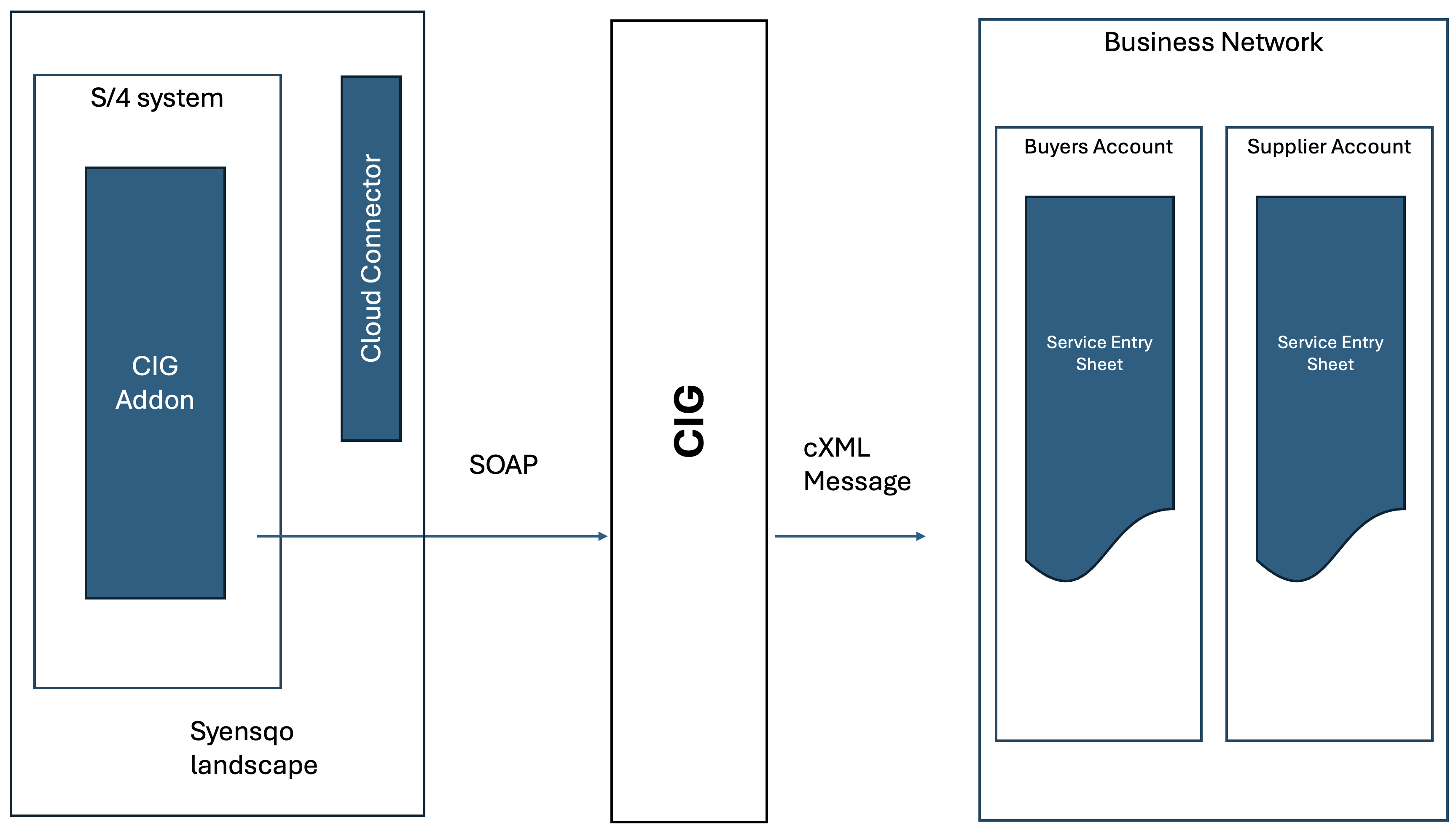
| Step | Description | Comment |
|---|---|---|
| 1. | Requester enters Service Entry sheet against a Service PO in Fiori | |
| 2. | Approved Service Entry sheet triggers create / change event over predefined Business Object | |
| 3. | CIG provided BAPI is executed | |
| 4. | Web Service Call is placed to the CIG | |
| 5. | CIG translates message into cXML format | |
| 6. | cXML is sent to the Business Network, received in the Buyers Account | |
| 7. | Service Entry Sheet is translated into Suppliers account and is matched against the Purchase Order |
Assumptions
- In SWEC transaction, document type ENTRYSHEET is assigned to the business object BUS2091 for On Create and On Change event
- Service Entry Sheet output must use BUS2091 only
Dependencies
- CIG Addon installed in S/4 Hana
- Cloud Connector installed in Syensqo landscape
- Initial setup of CIG Addon is done already as described in ERP-92, section Configuration Requirements.CIG Configuration.
- Connectivity from CIG Addon to CIG is established, as described in ERP-92
- ARBCIG_AN_VENDOR table is updated for every vendor and company code combination applicable for AN integration
Security, Integrity and Controls
The following are the Security and Authorization considerations for this interface:
- Message exchange between S/4 and CIG is encrypted over https.
- Access to interface parameters in CIG Addon is only available to the person with access to the SPRO authorization.
- Access to the CIG is restricted to the integration administrators within Ariba Guided Buying or Ariba Business Network
Configuration Requirements
CIG Configuration
Project setup is required in CIG to cover product type Ariba Network. One project is required per system ID of the backend S/4 system - Global, US and China. There are no additional setting for the Document Type ServiceEntrySheet
CIG Routing
Each Soap message sent from S/4 Hana contains System ID reference. No additional routing is needed in the CIG Addon - any subsequential message related to the Purchase Order sent from the S/4 Hana will use the System ID of the Purchase Order or the system id of the follow up document from S/4 Hana
CIG Addon Configuration
Configuration for CIG addon is consolidated in one place and should be completed in the logical order of the menu items. In the S/4 instance, navigate to SPRO → SAP Reference IMG →SAP Customizing Implementation Guide → Integration with Other SAP Components → Managed Gateway for Spend&Network for Buyer
Logical order of the menu is as following :
- Global Settings - majority of the common configuration is shared with Procurement solution and is already described in ERP-92, section Configuration. Only sections that are different are described in here.
- Create RFC Destination - new RFC destination to be added under HTTP Connections to External Server. Official documentation can be found here. This is a part of the generic Business Network setup, mandatory for this flow to work. However RFC destination definition is used by the incoming IDOC messages from the Business Network, not relevant for this integration. Values are as following:
Parameter Name Value - TEST
Value - PROD Technical Settings.Target System Settings.Host http://test-integration.eu.managedgateway.cloud.sap http://integration.eu.managedgateway.cloud.sap Technical Settings.Target System Settings.Path Prefix /cxf/receiveAddonIDOC /cxf/receiveAddonIDOC Login And Security User P007937 TBD - Not available at the moment Login And Security Password <confidential> <confidential>
- Create Logical System - new Logical System to be created for Business Network. Apart from the name definition, there's no additional setting needed. Official documentation can be found here
- Create RFC Destination - new RFC destination to be added under HTTP Connections to External Server. Official documentation can be found here. This is a part of the generic Business Network setup, mandatory for this flow to work. However RFC destination definition is used by the incoming IDOC messages from the Business Network, not relevant for this integration. Values are as following:
- SAP Business Network Integration
- General Settings.Setup Interface.Configure the Connections to Send Messages
- In the section for Interface Setup for Web Service select EU Data Center for Europe and same credentials as in the RFC Destination
- General Settings.Setup Interface.Configure the Connections to Send Messages
- In the section for Interface Setup for Web Service, under the Outbound messages sent to Managed Gateway for Spend&Network select ERP Initiated Service Entry Sheet
- execute the program Configure the Connections to Send Messages. This execution effectively creates the web service definition in the SOAMANAGER
- Application Specific Settings
- ERP-initiated Service Sheet.Maintain Parameters for ERP-initiated Service Sheet: Parameter ERP_SES_ENABLED set to X. Official documentation can be found here
- ERP-initiated Service Sheet.Maintain the Change Document Event for ERP-initiated Service Sheet - create CHANGED and CREATED event types for the document object ENTRYSHEET for object type BUS2091. Offcial documentation can be found here
- ERP-initiated Service Sheet.Maintain Event Type Linkages for ERP-initiated Service Sheet - for object type BUS2091, define Receiver Function Module ARBCIG_EXT_EVENT_ERP_SES for event Create. Official documentation can be found here
- General Settings.Setup Interface.Configure the Connections to Send Messages
Special Requirements
Not Applicable
Design Rationale
Not Applicable
API Use
Not Applicable
Data Structure
Standard mappings are a subject to change and are not linked in this documentation, latest excel sheet can be downloaded from CIG → Resources → Implementation Guides → Mapping Specs → Ariba Network
- ERPSES(proxy-cxml)
Mapping contains basic field mapping from the IDOC message into the cXML target structure with a basic logic explained in the pseudo code
Processing Logic
Processing within Source
Logic defined in the CIG specific ARBCIG_EXT_EVENT_ERP_SES is triggered by the workflow event defined in the SWEC table. Logic checks for the SES in the table ESSR and retrieve KZABN - acceptance indicator value - only accepted Service Entry Sheets are send to the Business Network
Code checks whether for the Vendor and Company Code from Purchase Order header there's entry in ARBCIG_AN_VENDOR. Only if there's entry in the table, e.g. supplier is defined as a Business Network Vendor, SES is send to the Business Network.
Predefined BAdl is available - ARBCIG_ERPSERVICE_ENTRY - that allows to change the data structure before the message is send out to the Business Network
Processing within Middleware
At this moment, standard transformation as referenced above is in place. In a case of any custom field is needed, custom field will be mapped in the CIG to the predefined custom field structure in the SAP
Processing within Target
Message Received by Business Network is routed to the Suppliers account.
Interface Alert & Monitoring
| System to be monitored | How to monitor | What can be monitored |
|---|---|---|
| S/4 Hana | SRT_MONI transaction | Outbound SOAP messages |
| CIG | Transaction Tracker ->ServiceEntrySheet | Transactions are stored for 30 days. Each transaction is referenced by the SES ID. Payloads can be downloaded, both - soap message and cXML one |
| Business Network | Fulfilment → Service Sheets | List of Service Entry sheets received by Ariba Network. |
Language Requirements
Not Applicable
User Interface Requirements
Not Applicable
Sequencing
Not Applicable
Volumetrics
20-40 Per Day
Performance Consideration
There are no specific performance requirements or considerations related to this interface.
Error Handling
In a case soap message fails to be sent to the CIG, it can be monitored and manually reprocessed in SRT_MONI. A background job can be scheduled to reprocess failed Web Services as documented in KBA 3280647 if required.
Testing
How to Test
Access to the Fiori app to enter the SES is required. Test Supplier account must be available and accessible. Supplier must be created in S/4 hana and Service PO has to be created for the supplier
Test Conditions and Expected Results
| ID | Condition | Expected Results |
|---|---|---|
| A User submits an SES against a Service PO in the Fiori ap | SES is created. If SES is within tolerance and quantity matches Service PO, it's sent for Approval | |
| SES Approver approves SES | Service PO Status Updated | |
| Approved SES triggers logic in the CIG Addon | SOAP message constructed and send over to the CIG | |
| CIG translates message to cXML format | cXML message is sent to the Buyers account of Business Network | |
| Buyer Network receives SES in the cXML format, routes it to the Suppliers account | Supplier received SES |
Test Considerations/Dependencies
Other Information
Development Details
Package
| Package Name | Parent Package |
|---|---|
Other Development Objects
| Object Type | Object Name | Purpose/High Level Logic | Design Rationale Reference |
|---|---|---|---|