


| Status | Approved |
|---|---|
| Owner | |
| Stakeholders |
Purpose
This document defines the conversion approach for migrating Sales (V1) and Billing (V3) output condition records from SAP ECC to SAP S/4HANA, based on a new BRF+-driven output management strategy.
This document introduces a new approach to migrating output management, shifting from the legacy ECC output condition record model to a simplified, rules-driven BRF+ framework. It describes the end-to-end migration process, covering data extraction and transformation (by Syniti), functional transformation (by the Functional Team), and loading into BRF+ decision tables (by the functional team)—ensuring alignment with overall project governance and design principles.
New Approach: BRF+ Output Simplification
Merge multiple legacy ECC output types (e.g., ZC10,ZC11,ZARM...) into a single BRF+-driven output type, e.g. ORDER_CONFIRMATION to simplify maintenance and governance.
- Global template layout per output type (as much as possible)
Minimize the creation of outputs that are rarely triggered, focusing on high-value and frequently triggered scenarios.
Avoid using business partners or email addresses as decision table input parameters. Instead, leverage business partner attributes to determine the appropriate outputs and channels. This approach requires that the relevant attributes be maintained during Business Partner migration, aligned with the existing output conditions.
Key Implications:
There will be no direct one-to-one mapping between ECC output condition records and BRF+ decision tables. Instead, this approach will use a rules-based model that covers the majority of business scenarios and reduces operational complexity.
The new model will establish and maintain output determination records—including email recipients, output channels, and Business Partner–related output conditions—within BRF+.
The transformation builds upon the configuration and master data currently maintained under the Classic Output Management (NAST framework) in ECC, adapting it to the BRF+ governance structure in S/4HANA.
The tables referenced in this document are intended to illustrate the rationale behind the BRF+ decision tables.
Similarly, the legacy tables extracted from ECC will not be migrated as-is. Instead, they will serve as a reference to support the migration and transformation of the relevant objects into the S/4HANA target design.
Conversion Scope
The conversion scope covers the extraction, transformation, and loading of output determination data from Classic Output Management (NAST-based framework) into BRF+ Output Parameter Determination (OPD) in S/4HANA, ensuring both initial migration and interim synchronization until full adoption of BRF+ is achieved.
The scope includes:
- Extraction of customer-related output condition records (e.g., for Sales Orders, Scheduling Agreements, Invoice and Credit and Debit memos) from Classic Output Management, including associated communication details such as email addresses, language, and output channels;
- Mapping of Classic condition record keys (application, condition type, key combination) to BRF+ OPD parameters (e.g., Document Type, Output Type, Sales Organization,);
- Transformation of medium and dispatch settings from Classic (e.g., NAST medium codes) to BRF+ equivalent channels (e.g., Email, Print, EDI), ensuring compatibility with S/4HANA Output Management settings;
- Initial Load of the transformed dataset into BRF+ Output Parameter Determination using the OPD framework and/or BRF+ application data load methods;
- Validation to ensure that migrated BRF+ records produce identical output results as their Classic counterparts for equivalent sales scenarios.
Out of Scope:
- Migration of output determination for applications outside of sales (e.g., MM Purchasing outputs);
- Migration of outputs no longer managed in S/4: Quotations and Contracts (Managed in Salesforce)
- Migration of output no longer in scope of Sales (V1): SDB outputs (managed in Delivery)
- Modifications to customer master data beyond the email and communication fields required for BRF+;
- Changes to output form templates (Smartforms/Adobe Forms) beyond what is required for enabling BRF+.
The data from legacy system includes:
- Active output condition records for Sales (Application V1 and V3) linked to customers (Partner Function SP, BP,PY, CONTACTS) with maintained communication details (email address, fax, etc.)
- Output types relevant for Sales Orders, Invoices and memos and Scheduling Agreements that are in active use in the business process
- Records with valid medium settings (e.g., Email, Print, EDI) compatible with S/4HANA BRF+ output channels
- Active records where the deletion indicator (LOEKZ) is initial.
- Language assignments that are valid in the target system
The data from legacy system excludes:
- Obsolete, expired, or logically deleted output condition records
- Output condition records for customers not in scope of the CNV-3003 Business Partners - Customer (Sales and Service) - FLCU01
- Output condition records for Sales areas not in scope.
- Output types not used in the current or target S/4HANA sales processes
- Records with incomplete or invalid communication data (e.g., missing email for email output medium)
- Condition records belonging to applications other than sales (e.g., LE, MM, FI outputs)
Data Profiling
The table below based on the entries in the table NAST outlines the legacy configuration values and numbers. Its purpose is to demonstrate how these values inform the design and logic of the BRF+ decision tables.
In addition, the table figures highlight the data that needs to be extracted from ECC systems, even though it will not be migrated into the target S/4HANA target .
| System | Application | Scope | Source Approx No. of NAST Records | Target System | Target Approx No. of Records |
|---|---|---|---|---|---|
| PF2 | V1 | 53997 records (raw count) | S4/Hana | ||
| PF2 | V3 | 134195 records (raw count) | |||
| WP2 | V1 | 36012 records (raw count) | |||
| WP2 | V3 | 42777 records (raw count) |
| System | Application | Table | Table Description | Output Types | Source Approx No. of Records | Target System | Target Approx No. of Records |
|---|---|---|---|---|---|---|---|
| WP2 V1 SALES OUTPUTS | |||||||
| WP2 | V1 | B001 | Sales Organization/Customer Number | BA00/SDB/ZMCE/ZRC3/ZRS2/ZRSP/ZRST/ZSY2/ZSYC | 534 | S4/OPD | |
| WP2 | V1 | B005 | Sales Organization/Order Type | SDB/ZAAR/ZAN1/ZARC/ZARD/ZARE/ZBA0/ZBA1/ZBA2/ZBA6/ZBA8/ZBA9/ZBAC/ ZBDC/ZBSC/ZCQ1/ZLRG/ZMRC/ZMRM/ZPL1/ZSTC/ZSTO/ZTP1/ | 2441 | ||
| WP2 | V1 | B013 | Sales Org. | ZAAR/ZAN0/ZAN1/ZARC/ZARD/ZARE/ZARM/ZBA1/ ZBA2/ZBA5/ZBA6/ZBA7/ZBA8/ZBA9/ZBAC/ZBAR/ZBSC/ | 125 | ||
| WP2 | V1 | B502 | Sales org./Sales off. | ZAAR/ZAN0/ZAN1/ZARC/ZARD/ZARE/ZARM/ZBA0/ZBA1/ZBA2/ZBA3/ZBA5/ ZBA6/ZBA7/ZBA8/ZBA9/ZBAR/ZBSC/ZCQ1/ZCQR/ZCSC/ZMRC/ZMRM/ZPL1/ | 477 | ||
| WP2 | V1 | B503 | Sales organization/Sales office/Commercial assistant | ZAAR/ZAN0/ZAN1/ZARC/ZARD/ZARE/ZARM/ZBA0/ZBA1/ZBA2/ZBA3/ZBA5/ZBA6/ ZBA7/ZBA8/ZBA9/ZBAR/ZBSC/ZCQ1/ZCQR/ZCSC/ZMRC/ZMRM/ZPL1/ | 278 | ||
| WP2 | V1 | B506 | Sales organization/Sales office/Sold-to party | ZARC/ZARM/ZBA0/ZBA1/ZBA2/ZBA5/ZBA9/ZBAC/ ZBSC/ZC10/ZC17/ZC19/ZCAR/ZCOE/ZMRC/ZMRM/ | 179 | ||
| WP2 | V1 | B532 | Sales Org/DC/Sales Office | ZARC/ZARM/ZBA1/ZBA2/ZBA9/ZBAC/ZBAR/ZBSC/ZMRM/ | 26 | ||
| WP2 | V1 | B559 | Sales org./Sold to Country/Currency | ZARC/ZARM/ZBAC/ | 16 | ||
| WP2 | V1 | B701 | Ship Point/SalesDocTy | ZDOC/ | 1 | ||
| WP2 | V1 | B933 | Sales org./PO type | ZARM/ZAWA/ | 91 | ||
| WP2 | V1 | B934 | Sales org./PO type/Sold-to pt | ZAWA/ | 763 | ||
| WP2 V3 INVOICE OUTPUTS | |||||||
| WP2 | V3 | B001 | Sales Organization/Customer Number | FUPI/RD00/RD02/RD04/ZFC1/ZINV/ZRD3/ZRD7 /ZRDA/ZRDB/ | 952 | ||
| WP2 | V3 | B008 | Billing Type | ZLO1/ZLOT/ZPI3/ZQBC/ZQCA/ZRAR/ZREJ/ | 39 | ||
| WP2 | V3 | B011 | Sales Organization/Billing Type | ZBA1/ZEID/ZEIG/ZEII/ZGST/ZPLD/ZRAC/ZRAR/ZRB0/ZRB1/ZRD0/ZRD1 /ZRD2/ZRD8/ZRDE/ZRDP/ZRDQ/ZRLA/ZRLR/ZRS1/ZRS2/ZRSC/ZRUP/ | 411 | ||
| WP2 | V3 | B013 | Sales Org. | RD04/ZFMX/ZRAR/ZRD3/ZRD5/ZRD7/ZRMX/ZRS5/ | 9 | ||
| WP2 | V3 | B504 | Sales organization/ Shipping point | ZRD4/ZRD5/ZRD6/ZRDD/ZRN5/ZRN6/ZRS5/ZRS6/ | 1 | ||
| WP2 | V3 | B505 | Sales organization/Shipping point/Bill-to party | ZRD6/ZRN6/ZRS6/ | 3 | ||
| WP2 | V3 | B507 | Sales organization/Sales office/Bill-to party | ZGST/ZLIF/ZLIP/ZRAR/ZRB0/ZRD0/ZRD1/ZRD2/ZRD8/ZRDE/ZRDP/ZREJ/ZRS1/ZRS2/ZRSC/ | 163 | ||
| WP2 | V3 | B511 | Sales organization/Sales office | ZLIF/ZLIP/ZRAR/ZRB0/ZRD0/ZRD1/ZRD2/ZRD8/ZRDE/ZRDP/ZRDQ/ZRS1/ZRS2/ZRSC/ | 53 | ||
| WP2 | V3 | B512 | Sales organization/Sales office/Commercial assistant | ZCOR/ZPLD/ZRB0/ZRB1/ZRD0/ZRD1/ZRD2/ZRD5/ZRDE/ ZRDP/ZRDQ/ZRS1/ZRS2/ZRS5/ZRSC/ | 47 | ||
| WP2 | V3 | B533 | Sales Org/Distribution Channel/Sales Office | ZRD6/ZRN6/ZRS6/ | 5 | ||
| WP2 | V3 | B539 | Sales org./Sales Off./Created/Bill. Type | ZPLD/ZRB0/ZRB1/ZRD0/ZRD1/ZRD2/ZRD8/ZRDE/ZRS1/ZRSC/ | 1 | ||
| WP2 | V3 | B551 | Sales org./Doc.cat./Sales Off./Bill to | ZINV/ZRDC/ZREI/ZRWF/ | 79 | ||
| WP2 | V3 | B552 | Sales org./Sales Off./Doc.cat./SalesDocTy/e-inv. flag | ZRDC/ZRWF/ | 788 | ||
| WP2 | V3 | B553 | Sales Off./Doc.cat./e-inv. flag | ZREI/ZRWF/ | 85 | ||
| WP2 | V3 | B554 | Sales org./Sales Off./Doc.cat./e-inv. flag | ZRDC/ZREI/ZRWF/ | 673 | ||
| WP2 | V3 | B558 | Sales Organization/Sales Office/Billing Type | ZRAC/ZRB0/ZRDE/ZRSC/ | 106 | ||
| WP2 | V3 | B560 | Sales Off./e-inv. flag | ZRDC/ZREI/ | 6 | ||
| WP2 | V3 | B569 | Sales org./Currency/Plant/Bill. Type | ZRAR/ZRB0/ZRD0/ZRD3/ZRDE/ZREJ/ZRLA/ZRN5/ZRS2/ZRSC/ | 11 | ||
| WP2 | V3 | B570 | Sales org./Currency/Bill. Type | ZGSU/ZPLD/ZRAR/ZRD5/ZRD8/ZRDE/ZREJ/ | 6 | ||
| WP2 | V3 | B572 | Sales org./Distr. Chl/Bill. Type/Sold-To Pt | ZGST/ZRB0/ZRDE/ZRSC/ | 21 | ||
| WP2 | V3 | B889 | Sales org./Sold-to pt | ZRDC/ZRWF/ | 27 | ||
| WP2 | V3 | B910 | Interco. billing: Org.comm./Bill-to | ZGST/ZRB0/ZRD0/ZRD1/ZRD5/ZRD8/ZRDE/ZRDQ/ZRLA/ZRLR/ZRN5/ZRS5/ZRSC/ | 37 | ||
| WP2 | V3 | B923 | Sales Organization/Distribution Channel/Bill-to party | ZGST/ZLIF/ZRB0/ZRD0/ZRD5/ZRDE/ZRS1/ZRS5/ZRSC/ | 51 | ||
| WP2 | V3 | B953 | Sales org./Bill.type/Payer | ZRDA/ZRGE/ | 84 | ||
| WP2 | V3 | B955 | Sales org./Ship.point/Bill.type/RecipCntry | ZRM6/ | 6541 | ||
| WP2 | V3 | B957 | Sales organization/Billing type/Bill-to party | ZINV/ZRD5/ZRDA/ZRDB/ZRS5/ | 7326 | ||
| WP2 | V3 | B960 | e-invoicing | ZRAR/ZREJ/ZRS2/ | 1 | ||
| WP2 | V3 | B962 | Sales Organization/Distribution Channel/Billing Type/Ship-to | ZLIF/ZRB0/ZRD0/ZRDE/ZRGE/ZRS1/ZRSC/ | 72 | ||
| WP2 | V3 | B995 | Sales Org/Sales Office/Billing Type/Dest country | ZRDE/ZRS2/ | 44 | ||
| PF2 V1 SALES OUTPUTS | |||||||
| PF2 | V1 | B001 | Sales Organization/Customer Number | BA00/SDB/ZC2B/ZC44/ZC46/ZC52/ZC55/ZMCE/ZRC3/ZRS2/ZRSP/ZRST/ZSY2/ZSYC | 18392 | ||
| PF2 | V1 | B005 | Sales Organization/Order Type | SDB/ZAAR/ZAN1/ZARC/ZARD/ZARE/ZBA0/ZBA1/ZBA2/ZBA6/ZBA8/ZBA9/ZBAC/ ZBDC/ZBSC/ZCQ1/ZLRG/ZMRC/ZMRM/ZPL1/ZSTC/ZSTO/ZTP1/ | 292 | ||
| PF2 | V1 | B006 | SOrg./Distrib.Ch/Division/Customer | ZC46/ZC50/ZCER/ | 11 | ||
| PF2 | V1 | B506 | Sales Off./Ship-To/SalesDocTy/Division | ZARC/ZARM/ZBA0/ZBA1/ZBA2/ZBA5/ZBA9/ZBAC/ ZBSC/ZC10/ZC17/ZC19/ZCAR/ZCOE/ZMRC/ZMRM/ | 75 | ||
| PF2 | V1 | B891 | Sales Office/Customer/Sales Document Type | ZC10/ZC11/ZC13/ZC14/ZC15/ZC16/ZC17/ZC19/ ZC35/ZC36/ZC40/ZCAR/ZCOE/ZCOF/ | 11248 | ||
| PF2 | V1 | B912 | Sales office/Sales document type | ZC10/ZC11/ZC13/ZC15/ZC16/ZCAR/ZCOE/ | 121 | ||
| PF2 | V1 | B913 | Sales office | ZC10/ZC11/ZC13/ZC15/ZCAR/ | 31 | ||
| PF2 | V1 | B917 | Sales Office/Sales DocType/PO type | ZC10/ZC17/ZCAR/ | 121 | ||
| PF2 | V1 | B918 | Sales office/Sold-to party | ZC10/ZC11/ZC13/ZC14/ZC17/ZC19/ZC35/ZC36/ZCAR/ZCOE/ | 3318 | ||
| PF2 | V1 | B922 | Sales office/Shipping conditions. | ZC30/ZC31/ZC40/ | 221 | ||
| PF2 | V1 | B938 | Sales organization/Purchase order type/Customer | ZC2B/ | 24 | ||
| PF2 | V1 | B950 | Sales office/Division/Sales document type | ZC10/ZC11/ZC13/ZC17/ZC19/ZCAR/ZCOE/ | 344 | ||
| PF2 | V1 | B956 | Sales office/Shipping conditions/Plant | ZC30/ZC32/ | 34 | ||
| PF2 | V1 | B959 | Sales office/Shipping conditions/Service agent | ZC30/ZC40/ | 108 | ||
| PF2 | V1 | B972 | Sales office/Shipping conditions/Contact Agent | ZC31/ | 1 | ||
| PF2 | V1 | B986 | Sales office/Country (Sold-to party) | ZC10/ZC11/ZC17/ZC19/ZCAR/ | 319 | ||
| PF2 | V1 | B989 | Sales Organization/Customer/Sales Document Type | ZC2B/ | 4 | ||
| PF2 V3 INVOICE OUTPUTS | |||||||
| PF2 | V3 | B001 | Sales Organization/Customer Number | FUPI/RD00/RD02/RD04/ZFC1/ZINV/ZRD3/ZRD7/ZRDA/ZRDB/ | 2966 | ||
| PF2 | V3 | B006 | SOrg./Distrib.Ch/Division/Customer | RD04 | 387 | ||
| PF2 | V3 | B008 | Billing Type | ZQBC | 2 | ||
| PF2 | V3 | B011 | Sales Organization/Billing Type | ZBA1/ZEID/ZEIG/ZEII/ZGST/ZPLD/ZRAC/ZRAR/ZRB0/ZRB1/ZRD0/ZRD1/ZRD2/ZRD8/ ZRDE/ZRDP/ZRDQ/ZRLA/ZRLR/ZRS1/ZRS2/ZRSC/ZRUP/ | 195 | ||
| PF2 | V3 | B013 | Sales Org. | RD04/ZFMX/ZRAR/ZRD3/ZRD5/ZRD7/ZRMX/ZRS5/ | 63 | ||
| PF2 | V3 | B840 | Sales office / Sold-to Doc type / Billing Type | ZF00/ | 35 | ||
| PF2 | V3 | B841 | Sales office / Sold-to Doc type | ZF00/ZF0R/ZF1R/ | 122 | ||
| PF2 | V3 | B913 | Sales office | ZF00/ZF01/ZF05/ZFCF/ | 110 | ||
| PF2 | V3 | B916 | Bill-to party | ZF01/ | 2 | ||
| PF2 | V3 | B919 | Sales office/Bill-to party/Billing type | ZF00/ZF01/ZF30/ | 1332 | ||
| PF2 | V3 | B920 | Bill.type/Sales org./RecipCntry | ZF00/ZF01/ | 14 | ||
| PF2 | V3 | B921 | Sales office/Bill-to party | ZF00/ZF01/ZF05/ZF10/ | 14365 | ||
| PF2 | V3 | B927 | Billing type/Bill-to party | RD06/ZF06/ZF17/ | 72 | ||
| PF2 | V3 | B932 | Payer | ZF00/ | 192 | ||
| PF2 | V3 | B935 | Sales organization/Shipping point/Billing type | ZF15/ZF16/ | 69 | ||
| PF2 | V3 | B937 | Payer/Billing type | ZF00/ZF01/ | 986 | ||
| PF2 | V3 | B939 | Sales office/Manual invoice maintenance | ZF00/ZF01/ZF05/ | 28 | ||
| PF2 | V3 | B940 | Sales office/Bill-to party/Manual invoice maintenance | ZF01/ | 46 | ||
| PF2 | V3 | B942 | Sales office/Country (Bill-to party) | ZF00/ZF01/ZF05/ZF10/ | 271 | ||
| PF2 | V3 | B953 | Sales office/Sales group | ZF00/ZF01/ | 72 | ||
| PF2 | V3 | B958 | Sales off./Sales org./Bill.type | ZF00/ | 71 | ||
| PF2 | V3 | B963 | Sales org./Contact agent/Bill.type | ZFCA/ | 1056 | ||
| PF2 | V3 | B966 | Sales org./Payer/Bill.type | ZF00/ZF01/ZF02/ZFCF/ZFMX/ | 32553 | ||
| PF2 | V3 | B967 | Sales Organization/PO type/Sold-to party | ZF2B/ | 1 | ||
| PF2 | V3 | B973 | Bill.type/Sales org./RecipCntry/Payer | ZF01/ZF99/ | 96 | ||
| PF2 | V3 | B974 | Sales organization/Billing type/Bill-to party | RD06/ZF15/ZF16/ZF17/ZFIL/ZFIM/ | 1882 | ||
| PF2 | V3 | B975 | Sales organization/Billing type/Delivering country | ZF15/ | 23 | ||
| PF2 | V3 | B985 | Sales organization/Sold-to party | 11 | |||
| PF2 | V3 | B993 | Sales Organization/Billing Type/Destination Country | ZF15/ | 16 | ||
| PF2 | V3 | B998 | Sales organization/Payer | ZFIL/ | 102 | ||
Additional Information
Multi-language Requirement
Output texts and messages will be migrated for all relevant languages (EN, FR, NL, PT, etc.).
Document Management
All deliverables, SQL extractions, and DT Templates will be version-controlled in Confluence and Jira.
Legal Requirement
N/A
Special Requirements
N/A
Target Design
In S/4HANA Output Management (via BRF+), decision tables replace the condition technique. Each BRF+ decision table acts like a flexible rule set:
Input Parameters → Decision Logic → Output Parameters (Result)
They determine:
- Output Type (e.g., ORDER_CONFIRMATION, BILLING_OUTPUT)
- Output Channel (Email, Print, EDI, IDoc)
- Form Template (Adobe Form)
- Receiver (Partner Function)
- Language
The decision tables below depict the typical structures of BRF+ tables and are based on the current design within the Toolkit. Please note that these tables will change once the final design has been confirmed.
SALES DECISION TABLES:
| Decision Table Name | Input Parameter 1 | Input Parameter 2 | Input Parameter 3 | Input Parameter 4 | Input Parameter 5 | Input Parameter 6 | Input Parameter 7 | Input Parameter 8 | Input Parameter 9 | Input Parameter 10 | Result | Result |
|---|---|---|---|---|---|---|---|---|---|---|---|---|
DT_OUTPUT_TYPE | Sales Document Cat. | Sales Doc. Type | Output Type | Dispatch Time | ||||||||
| DT_OUTPUT_CHANNEL | Output Type | Partner Role | Sales Org. | Distr. Channel | Division | Sales Office | Recipient | Channel | ||||
| DT_RECEIVER | Output Type | Partner Role | Exclusive Indicator | |||||||||
| DT_EMAIL_SETTING | Output Type | Partner Role | Sales Org. | Distr. Channel | Division | Sales Office | Sender Email | Email Template | ||||
| DT_EMAIL_RECEIVER | Output Type | Partner Role | Email Type Code | E-Mail Address | ||||||||
| DT_OUTPUT_RELEVANCE | Output Type | Purch Conf. Sts | Overall Header | Overall Cred Stat | Delivery Block | Billing Block | All Items | Relevance Indicator | ||||
| DT_FORM_TEMPLATE | Output Type | Sales Org | Distribution Channel | Division | Sales Office | Role | Channel | Sender Ctry/Reg | Receiver Ctry/Reg | Receiver Language | Form template | Form Language |
BILLING DECISION TABLES:
| Decision Table Name | Input Parameter 1 | Input Parameter 2 | Input Parameter 3 | Input Parameter 4 | Input Parameter 5 | Input Parameter 6 | Input Parameter 7 | Input Parameter 8 | Input Parameter 9 | Input Parameter 10 | Result | Result |
| DT_OUTPUT_TYPE | Document Cat. | Billing Type | Sales Org. | Distr. Channel | Division | Sales Office | Sales Group | Bill to party | Output Type | Dispatch Time | ||
| DT_RECEIVER | Output Type | Partner Role | Exclusive Indicator | |||||||||
| DT_CHANNEL | Output Type | Partner Role | Sales Org. | Distr. Channel | Division | Sales Office | Recipient | Customer Group 5 | Channel | |||
| DT_PRINTER | Output Type | Sales Org. | Distribution Channel | Division | Sales Office | Billing Type | Print Queue | Number of Copies | ||||
| DT_EMAIL_SETTING | Output Type | Partner Role | Sales Org. | Distr. Channel | Division | Sales Office | Billing Type | Sender Email | Email Template | |||
| DT_EMAIL_RECEIVER | Output Type | Partner Role | Email Type Code | E-Mail Address | ||||||||
| DT_FORM_TEMPLATE | Output Type | Sales Org. | Sender Ctry/Reg. | Recipient Ctry/Reg. | Recipient Language | Document Cat. | Billing Type | Form Template | Form Language | |||
| DT_OUTPUT_RELEVANCE | Output Type | Document Category | Posting Status | Billing Type | Sales Org. | Bill to Party | Receiver Ctry/Reg | Relevance Indicator |
Data Cleansing
N/A
| ID | Criticality | Error Message/Report Description | Rule | Output | Source System |
|---|---|---|---|---|---|
Conversion Process
The high-level process is represented by the diagram below:
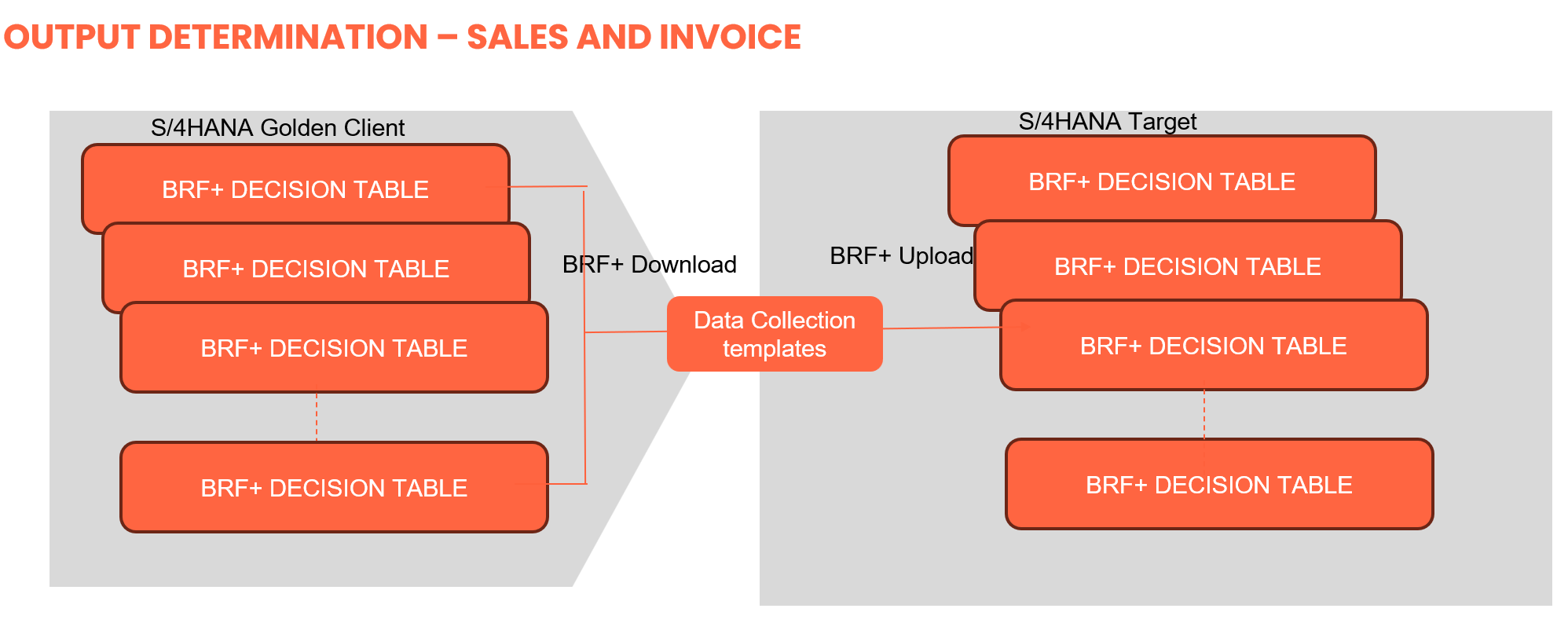
Data Privacy and Sensitivity
All data extracted must be anonymized and handled according to data protection policies.
Extraction
Data will be extracted from ECC using SQL-based queries executed directly on the source database.
The extraction process is required to join those B* condition tables—which contain a link to a business partner (KUNNR, KUNAG, KUNRE, KUNRG) or contain a large number of entries for a single output type—to the NACH table. This approach enables identification of the output medium and the output language and ensures that all relevant configuration records are captured.
The extracted data will not be migrated directly; instead, it will be used to:
- Update the business partner attributes that determine the appropriate outputs and channels.
- Populate the data collection files based on the BRF+ decision table setup.
Relevancy criteria will be applied to include only active, valid, and in scope records.
There will therefore be 2 different sets of Data collection templates (DCT)
- An initial set based on the legacy BXXX tables that will include all relevant information to facilitate the subsequent uploads. It will be referred to "RT_OUTPUT_CONDITIONS"
- The RT_OUTPUT_CONDITIONS can be used in CNV-3003 Business Partners - Customer (Sales and Service) - FLCU0 to set up default outputs channels. (TBC)
- A subsequent set of OPD DCT tables, referred to as DCT_OPD_DECISION_TABLES
Source Tables to be extracted:
Following Bxxx tables relate to output conditions linked to business partners as well as tables with multiple entries. The whole table needs to be extracted:
BXXX TABLES
| System | App | Table-Name | Description | Field 1 | Field 2 | Field 3 | Field 4 | Field 5 | Field 6 | Comment |
| PF2 | V1/V3 | B001 | Sales Organization/Customer Number | KAPPL | KSCHL | VKORG | KNDNR | |||
| PF2 | V1/V3 | B006 | SOrg./Distrib.Ch/Division/Customer | KAPPL | KSCHL | VKORG | VTWEG | SPART | KNDNR | |
| PF2 | V3 | B866 | Sales Organization/Division/Customer | KAPPL | KSCHL | VKORG | SPART | KNDNR | ||
| PF2 | V3 | B867 | Sales Organization/Division/Customer/Quality code | KAPPL | KSCHL | VKORG | SPART | KNDNR | MVGR3 | |
| PF2 | V1 | B891 | Sales Office/Customer/SalesDocType | KAPPL | KSCHL | VKBUR | KNDNR | AUART | No Sales org | |
| PF2 | V1 | B918 | Sales Office/Sold-to Party | KAPPL | KSCHL | VKBUR | KUNNR | No Sales org | ||
| PF2 | V3 | B919 | Sales Office/Bill-to Party/Billing Type | KAPPL | KSCHL | VKBUR | KUNRE | FKART | No Sales org | |
| PF2 | V3 | B921 | Sales Office/Bill-to Party | KAPPL | KSCHL | VKBUR | KUNRE | No Sales org | ||
| PF2 | V3 | B927 | Billing type/Bill-to party | KAPPL | KSCHL | FKART | KUNRE | No Sales org | ||
| PF2 | V3 | B932 | Payer | KAPPL | KSCHL | KUNRE | No Sales org | |||
| PF2 | V3 | B937 | Payer/Billing type | KAPPL | KSCHL | KUNRG | FKART | No Sales org | ||
| PF2 | V1 | B938 | Sales organization/Purchase order type/Customer | KAPPL | KSCHL | VKORG | BSARK | KNDNR | ||
| PF2 | V3 | B940 | Sales office/Bill-to party/Manual invoice maintenance | KAPPL | KSCHL | VKBUR | KUNRE | MRNKZ | No Sales org | |
| PF2 | V3 | B966 | Sales Org/Payer/Billing Type | KAPPL | KSCHL | VKORG | KUNRG | FKART | ||
| PF2 | V3 | B973 | Bill.type/Sales org./RecipCntry/Payer | KAPPL | KSCHL | FKART | VKORG | LAND1 | KUNRG | |
| PF2 | V3 | B974 | Sales Org/Billing Type/Bill-to Party | KAPPL | KSCHL | VKORG | FKART | KUNRE | ||
| PF2 | V1 | B989 | Sales Organization/Customer/Sales Document Type | KAPPL | KSCHL | VKORG | KNDNR | AUART | ||
| PF2 | V3 | B998 | Sales organization/Payer | KAPPL | KSCHL | VKORG | KUNRG | |||
| WP2 | V1/V3 | B001 | Sales Organization/Customer Number | KAPPL | KSCHL | VKORG | KNDNR | |||
| WP2 | V1 | B005 | Sales Organization/Order Type | KAPPL | KSCHL | VKORG | AUART | No customer, 2441 entries | ||
| WP2 | V3 | B505 | Sales organization/Shipping point/Bill-to party | KAPPL | KSCHL | VKORG | ZZVSTEL | KUNRE | ||
| WP2 | V3 | B507 | Sales organization/Sales office/Bill-to party | KAPPL | KSCHL | VKORG | ZZVKBUR | KUNRE | ||
| WP2 | V3 | B551 | Sales org./Doc.cat./Sales Off./Bill to | KAPPL | KSCHL | VKORG | VBTYP | ZZVKBUR | KUNRE | |
| WP2 | V3 | B572 | Sales org./Distr. Chl/Bill. Type/Sold-To Pt | KAPPL | KSCHL | VKORG | VTWEG | FKART | KUNAG | |
| WP2 | V3 | B889 | Sales org./Sold-to pt | KAPPL | KSCHL | VKORG | KUNAG | |||
| WP2 | V3 | B910 | Interco. billing: Org.comm./Bill-to | KAPPL | KSCHL | VKORG | KUNRE | |||
| WP2 | V3 | B923 | Sales Organization/Distribution Channel/Bill-to party | KAPPL | KSCHL | VKORG | VTWEG | KUNRE | ||
| WP2 | V3 | B924 | Sales org./Distr. Chl/Bill to/Del. type | KAPPL | KSCHL | VKORG | VTWEG | KUNRE | LFART | |
| WP2 | V1 | B934 | Sales org./PO type/Sold-to pt | KAPPL | KSCHL | VKORG | BSARK | KUNNR | ||
| WP2 | V3 | B953 | Sales org./Bill.type/Payer | KAPPL | KSCHL | VKORG | VTWEG | FKART | KUNWE | |
| WP2 | V3 | B955 | Sales org./Ship.point/Bill.type/RecipCntry | KAPPL | KSCHL | VKORG | ZZVSTEL | FKART | LAND1 | No customer, 6541 entries |
| WP2 | V3 | B957 | Sales organization/Billing type/Bill-to party | KAPPL | KSCHL | VKORG | FKART | KUNRE | ||
| WP2 | V3 | B962 | Sales Organization/Distribution Channel/Billing Type/Ship-to | KAPPL | KSCHL | VKORG | VTWEG | FKART | KUNWE | |
| WP2 | V3 | B964 | Sales org./Ship Point/Bill. Type/Ship-to | KAPPL | KSCHL | VKORG | ZZVSTEL | FKART | KUNWE | |
The agreed Relevancy criteria is applied to the extracted records to identify the records that are applicable for the Target loads (relevant sales Organisation
NACH TABLE
| Table | Field | Field | Data Type | Length | Short Description | Requirement | |
| 1 | NACH | MANDT | MANDT | CLNT | 3 | Client | Mandatory |
| 5 | NACH | KVEWE | KVEWE | CHAR | 1 | Usage of the condition table | Mandatory |
| 6 | NACH | KOTABNR | KOTABNR | CHAR | 3 | Condition table | Mandatory |
| 7 | NACH | KAPPL | KAPPL | CHAR | 2 | Application | Mandatory |
| 8 | NACH | KSCHL | KSCHL_OC | CHAR | 4 | Condition Type | Mandatory |
| 13 | NACH | PARVW | PARVW | CHAR | 2 | Partner Function | Mandatory |
| 14 | NACH | PARNR | NA_PARNR_OC | CHAR | 10 | Message partner | Mandatory |
| 15 | NACH | NACHA | NA_NACHA | CHAR | 1 | Message transmission medium | Mandatory |
| 17 | NACH | VSZTP | NA_VSZTP | CHAR | 1 | Dispatch time | Mandatory |
| 18 | NACH | SPRAS | SPRAS | LANG | 1 | Language Key | Optional |
Extraction Run Sheet
001 WP2 V1 /V3 NACH | NACH-KVEWE = 'B' (Usage Output) NACH-KAPPL = 'V1' (Application Sales Order) OR 'V3' (Application Billing) NACH-KOTABNR ( Tables: above ) NACH-KSCHL (Output types) NACH-NACHA (Transmission Medium) NACH-PARVW (Partner) NACH-SPRAS ((Language) | |
001 PF2 V1 /V3 NACH | NACH-KVEWE 'B' (Usage Output) NACH-KAPPL = 'V1' (Application Sales Order) OR 'V3' (Application Billing) NACH-KOTABNR ( Tables: above ) NACH-KSCHL (Output types) NACH-NACHA (Transmission Medium) NACH-PARVW (Partner) NACH-SPRAS (Language) | |
001 WP2 V1/V3 B TABLES |
| |
001 PF2 V1/V3 B TABLES |
|
Selection Screen
| Selection Ref Screen | Parameter Name | Selection Type | Requirement | Value to be entered/set |
|---|---|---|---|---|
| Not applicable |
RT_OUTPUT_CONDITIONS
The legacy output conditions from the B table will be combined with their corresponding medium / partner and language from table NACH in a report Table called RT_OUPUT_CONDITIONS. An additional column will be added to cater for following exceptions:
- a table / table entry without a Sales organisation
- a table / table entry without a customer
- A duplicate (or more) entry for a customer number
As we are dealing with multiple tables with different number of fields, the customer number can be in different positions, and have a different field name:
The customer in the BXXX table can be
- KUNNR
- KNDNR
- KUNAG
- KUNRE
- KUNRG
- KUNWE
The customer number field will be referred to at CUSTNO and depending on the B table will be mapped as follows: (eg. B_TABLE-CUSTNO = B_TABLE-KNDNR if table = B001, B006 etc..)
| PF2 | WP2 | |||||||||||||||
| KNDNR | B001 | B006 | B866 | B867 | B876 | B891 | B938 | B989 | B001 | |||||||
| KUNNR | B918 | B934 | ||||||||||||||
| KUNRE | B919 | B921 | B927 | B932 | B940 | B974 | B505 | B507 | B551 | B910 | B923 | B924 | B957 | |||
| KUNRG | B937 | B966 | B973 | B998 | ||||||||||||
| KUNAG | B572 | B889 | ||||||||||||||
| KUNWE | B953 | B962 | B964 | |||||||||||||
Data Transformation:
RT_OUTPUT_CONDITIONS
The target audience for the Output Conditions DCT is:
- the L2C functional team responsible for uploading the various OPD decision tables. These tables will be reviewed by the business.
- the L2C data team as the L2C functional team responsible for uploading the Business Partners sales view.
- Each BP's default Medium will be held in Customer Group 4 (sales) and 5 (billing) rather than being an entry in the Decision table (TBC)
The extraction will allow the following:
- a table entry that leads to multiple output Mediums in NACH for the same partner
- a table entry that leads to multiple output Mediums in NACH and partner depending on the condition type
- New rules need to be agreed by the business and added to manage multiple table entries
| Field Name | Field Description | Source | Rule | Target Table | Target Field | Transformation Logic | |
|---|---|---|---|---|---|---|---|
TRANSFORMATION LOGIC: There are 3 types of B tables
B* Tables and NACH table are linked via field KNUMH. The purpose of the transformation is to obtain the NACH table entry or entries that contains the customer number. The customer number information is contained in NACH-VAKEY and can be the last field (RIGHT,10) or the 2nd field (MID,4,10) for B919,B940,B940 , B924. The NACH table entry will also contain the output partner (NACH-PARVW) and medium (NACH-NACHA) It is possible to find multiple entries for a given customer, all the entries will be added to the RT_OUTPUT_CONDITIONS and a rule defined by the business will select the relevant one. As the material number is not available, the sales org transformation should assign all relevant target sales orgs and add them. B* tables where there is no Sales organisation: IF TABLE-NAME IN B891,B918,B919,B921,B927,B932,B937,B938 THEN
ELSE (exclude entries from not relevant Sales Organisation or Customer) SELECT from WP2-BXXX where VKORG is in scope and KUNNR is in scope SELECT from PF2-BXXX where VKORG is in scope and KUNNR is in scope IF TABLE-NAME IN B005 , B995
IF TABLE-NAME IN B891,B918,B919,B921,B927,B932,B937,B938 THEN READ NACH (using KNUMH number) where NACH-KVEWE = 'B' NACH-KAPPL = B_TABLE-KAPPL NACH-KNUMH = B_TABLE_KNUMH NACH-KOTABNR = B_TABLE-NAME RIGHT(NACH-VAKEY,10) = B_TABLE-CUSTNO IF TABLE-NAME <> B919 OR B940 OR B940 OR B924 ELSE (second field) MID (NACH-VAKEY,4,10) = B_TABLE-CUSTNO RT_OUTPUT-CUSTNO = B-TABLE-CUSTNO RT_OUTPUT-PARVW = NACH-PARVW RT_OUTPUT-CHANNEL = NACH-NACHA RT-OUTPUT-LANGUAGE = NACH-SPRAS ADD ENTRY TO TABLE | |||||||
| SYSTEM | System PF2/WP2 | B* | RT_OUTPUT_CONDITIONS | SYSTEM | Copy 1:1 | ||
| APP | V1 or V3 | B* | RT_OUTPUT_CONDITIONS | APP | Copy 1:1 | ||
| TABLE | B* | RT_OUTPUT_CONDITIONS | TABLE | Copy 1:1 | |||
| VKORG | Sales org | B* | If Mapping is 1:N Exception = "LEGACY" | RT_OUTPUT_CONDITIONS | SALES ORG | If mapping is 1:1
Else
| |
| VTWEG | Distr Channel | B* | If Mapping is 1:N Exception = "LEGACY" | RT_OUTPUT_CONDITIONS | DIST CHANNEL | If mapping is 1:1
Else
| |
| SPART | Division | B* | If Mapping is 1:N Exception = "LEGACY" | RT_OUTPUT_CONDITIONS | DIVISION | If mapping is 1:1
Else
| |
| AUART | Sales order Type | B* | RT_OUTPUT_CONDITIONS | ORDER TYPE | MAP-AUART | ||
| FKART | Billing Type | B* | RT_OUTPUT_CONDITIONS | BILLING TYPE | MAP-FKART | ||
| VKBUR | Sales office | B* | If Mapping is 1:N Exception = "LEGACY" | RT_OUTPUT_CONDITIONS | SALES OFICE | If mapping is 1:1
Else
| |
| LAND1 | Country | B* | RT_OUTPUT_CONDITIONS | COUNTRY | MAP-LAND | ||
| BSARK | Purchase order type | B* | RT_OUTPUT_CONDITIONS | PO TYPE | MAP-BSARK | ||
| VKGRP | Sales group | B* | RT_OUTPUT_CONDITIONS | SALES GROUP | MAP-VKGRP | ||
| CUSTNO | Customer number | B* | RT_OUTPUT_CONDITIONS | CUSTOMER NO | Customer-XREF | ||
| CUSTNAME | Customer name | ADRC | Read customer name from ADRV-NAME1 | RT_OUTPUT_CONDITIONS | CUSTOMER NAME | COPY 1:1 | |
| PARVW | Partner type | NACH | RT_OUTPUT_CONDITIONS | PARTNER TYPE | COPY 1:1 | ||
| NACHA | Output Medium | NACH | RT_OUTPUT_CONDITIONS | MEDIUM | COPY 1:1 | ||
| SPRACH | Language | NACH | RT_OUTPUT_CONDITIONS | LANGUAGE | COPY 1:1 | ||
| RT_OUTPUT_CONDITIONS | EXCEPTION CODE | ||||||
RT_OPD_DECISION_TABLES
The L2C functional team is responsible for uploading the information in the OPD decision tables. Some tables are mainly replacing the legacy condition configuration, and will be populated with predefined values first for business review and update
BRF+ provides a built-in feature to download and upload decision tables as Excel files.
Steps:
Go to BRF+ application in transaction BRF+
Open the Decision Table object.
From the Table Maintenance screen:
Click on “Download to Excel” → system exports the current content and structure.
Fill in or update the Excel file offline.
Use “Upload from Excel” to import back.
Note:
- Each table must be handled individually.
- The creation of Data collection template must be aligned with BRF+ configurations . For now, the following Templates are based on interim configurations (from S/4HANA sandbox). This will be replaced once the configuration is ready. The same applies to the contents of the DTs, they are here as examples of how the entries look like and will be replaced by real objects .
- DT_OUTPUT_TYPE
- DT_RECEIVER
- DT_OUTPUT_CHANNEL
- DT_EMAIL_SETTING
- DT_EMAIL_RECEIVER
- DT_OUTPUT_RELEVANCE
- DT_FORM_TEMPLATE
SALES DECISION TABLES
DT_OUTPUT_TYPE:
DT Rules:
| Name | Description(Text) | Result Column | Type | Binding | Length | Decimals | Only Positive | Only Uppercase | Timepoint Type | Dimension Key |
| SDDOCUMENTCATEGORY | Document Cat. | Element (Text ) | VBTYPL | 4 | 0 | |||||
| SALESDOCUMENTTYPE | Sales Doc. Type | Element (Text ) | AUART | 4 | 0 | X | ||||
| OUTPUT_TYPE | Output Type | X | Element (Text ) | APOC_OUTPUT_TYPE | 30 | 0 | X | |||
| DISPATCH_TIME | Dispatch Time | X | Element (Text ) | APOC_OR_DISPATCH_TIME | 1 | 0 | X |
DT Template:
| Document Cat. | Sales Doc. Type | Output Type | Dispatch Time |
| =C | =OR | Z_ORDER_ACKNOWLEDGEMENT_EMAIL | 2 |
| =C | <>BV ; exclude =SO01 ; =CCIS | ORDER_CONFIRMATION | 1 |
| =C | <>BV ; exclude =SO01 ; =CCIS | ORDER_CONFIRMATION_CHANGE | 1 |
| =C | =BV | CASH_SALE | 1 |
| =A | SALES_INQUIRY | 1 |
DT_RECEIVER: (Partner)
DT Rules:
| DT_RECEIVER | ||||||||||
| Description(Text) | Result Column | Type | Binding | Length | Decimals | Only Positive | Only Uppercase | Timepoint Type | Dimension Key | |
| OUTPUT_TYPE | Output Type | Element (Text ) | APOC_OUTPUT_TYPE | 30 | 0 | X | ||||
| ROLE Name | Role | X | Element (Text ) | APOC_ROLE_CODE | 2 | 0 | X | |||
| EXCLUSIVE_IND | Exclusive Indicator | X | Element (Text ) | APOC_EXCLUSIVE_INDICATOR | 1 | 0 | X | |||
DT Template:
| Output Type | Role | Exclusive Indicator |
| =Z_ORDER_ACKNOWLEDGEMENT_EMAIL | AP | - |
| =ORDER_CONFIRMATION | AP | - |
| =ORDER_CONFIRMATION | AG | - |
| =ORDER_CONFIRMATION_CHANGE | AG | - |
| =CASH_SALE | RE | - |
| =CASH_SALE_CHANGE | RE | - |
| =CUSTOMER_RETURN | AG | - |
| =CUSTOMER_RETURN_CHANGE | AG | - |
| =DEBIT_MEMO_REQUEST | ZM | - |
| =DEBIT_MEMO_REQUEST_CHANGE | ZM | - |
| =CREDIT_MEMO_REQUEST | ZM | - |
DT__CHANNEL: (Medium)
DT Rules:
| Name | Description(Text) | Result Column | Type | Binding | Length | Decimals | Only Positive | Only Uppercase | Timepoint Type | Dimension Key |
| OUTPUT_TYPE | Output Type | Element (Text ) | APOC_OUTPUT_TYPE | 30 | 0 | X | ||||
| ROLE | Role | Element (Text ) | APOC_ROLE_CODE | 2 | 0 | X | ||||
| SALESORGANIZATION | Sales Org. | Element (Text ) | VKORG | 4 | 0 | X | ||||
| DISTRIBUTIONCHANNEL | Distr. Channel | Element (Text ) | VTWEG | 2 | 0 | X | ||||
| ORGANIZATIONDIVISION | Division | Element (Text ) | SPART | 2 | 0 | X | ||||
| SALESOFFICE | Sales Office | Element (Text ) | VKBUR | 4 | 0 | X | ||||
| BUSINESS_PARTNER_ID | Recipient | Element (Text ) | APOC_RECEIVER_ID | 10 | 0 | X | ||||
| SALESDOCUMENTTYPE | Sales Doc. Type | Element (Text ) | AUART | 4 | 0 | X | ||||
| OVRLITMGENERALINCOMPLETIONSTS | All Items | Element (Text ) | UVALL_SU | 1 | 0 | X | ||||
| CHANNEL | Channel | X | Element (Text ) | APOC_CHANNEL | 5 | 0 | X | |||
| EXCLUSIVE_IND | Exclusive Indicator | X | Element (Text ) | APOC_EXCLUSIVE_INDICATOR | 1 | 0 | X |
DT Template:
| Output Type | Role | Sales Org. | Distr. Channel | Division | Sales Office | Recipient | Sales Doc. Type | All Items | Channel | Exclusive Indicator |
| =Z_ORDER_ACKNOWLEDGEMENT_EMAIL | - | |||||||||
| =ORDER_CONFIRMATION | =AP | - | ||||||||
| =ORDER_CONFIRMATION | =AG | - | ||||||||
| =ORDER_CONFIRMATION | =AG | =1001 | =OR | EDI | - | |||||
| =ORDER_CONFIRMATION | =AG | - | ||||||||
| =ORDER_CONFIRMATION_CHANGE | - | |||||||||
| =CASH_SALE | - |
DT__EMAIL_RECEIVER:
DT Rules:
| Name | Description(Text) | Result Column | Type | Binding | Length | Decimals | Only Positive | Only Uppercase | Timepoint Type | Dimension Key |
| OUTPUT_TYPE | Output Type | Element (Text ) | APOC_OUTPUT_TYPE | 30 | 0 | X | ||||
| ROLE | Role | Element (Text ) | APOC_ROLE_CODE | 2 | 0 | X | ||||
| EMAIL_ROLE | Email Type Code | X | Element (Text ) | APOC_EMAIL_ROLE_CODE | 5 | 0 | X | |||
| EMAIL_URI | E-Mail Address | X | Element (Text ) | AD_SMTPADR | 241 | 0 |
DT Template:
| Output Type | Role | Email Role | Email URI |
| =Z_ORDER_ACKNOWLEDGEMENT_EMAIL | =AP | TO | |
| =ORDER_CONFIRMATION | =AP | TO | |
| =ORDER_CONFIRMATION | =AG | TO |
DT__EMAIL_SETTING:
DT Rules:
| Name | Description(Text) | Result Column | Type | Binding | Length | Decimals | Only Positive | Only Uppercase | Timepoint Type | Dimension Key |
| OUTPUT_TYPE | Output Type | Element (Text ) | APOC_OUTPUT_TYPE | 30 | 0 | X | ||||
| ROLE | Role | Element (Text ) | APOC_ROLE_CODE | 2 | 0 | X | ||||
| SALESORGANIZATION | Sales Org. | Element (Text ) | VKORG | 4 | 0 | X | ||||
| DISTRIBUTIONCHANNEL | Distr. Channel | Element (Text ) | VTWEG | 2 | 0 | X | ||||
| ORGANIZATIONDIVISION | Division | Element (Text ) | SPART | 2 | 0 | X | ||||
| SALESOFFICE | Sales Office | Element (Text ) | VKBUR | 4 | 0 | X | ||||
| EMAIL_FROM | Sender Email | X | Element (Text ) | APOC_SENDER_EMAIL_ADDR | 241 | 0 | ||||
| EMAIL_TEMPLATE_ID | Email Template | X | Element (Text ) | APOC_EMAIL_TEMPLATE | 30 | 0 | X |
DT Template:
| Output Type | Role | Sales Org. | Distr. Channel | Division | Sales Office | Sender Email | Email Template |
| =ORDER_CONFIRMATION | =AG | =1001 | jatin.somaiya-ext@syensqo.com | SD_SLS_DEFAULT_EMAIL_TEMPLATE | |||
| =ORDER_CONFIRMATION | =1001 | jatin.somaiya-ext@syensqo.com | SD_SLS_DEFAULT_EMAIL_TEMPLATE | ||||
| =Z_ORDER_ACKNOWLEDGEMENT_EMAIL | =AP | jatin.somaiya-ext@syensqo.com | SD_SLS_DEFAULT_EMAIL_TEMPLATE |
DT__OUTPUT_RELEVANCE:
DT Rules:
| Name | Description(Text) | Result Column | Type | Binding | Length | Decimals | Only Positive | Only Uppercase | Timepoint Type | Dimension Key |
| OUTPUT_TYPE | Output Type | Element (Text ) | APOC_OUTPUT_TYPE | 30 | 0 | X | ||||
| OVERALLPURCHASECONFSTATUS | Purg Conf. Sts | Element (Text ) | COSTA_D | 1 | 0 | X | ||||
| HDRGENERALINCOMPLETIONSTATUS | Overall Header | Element (Text ) | UVALL_UK | 1 | 0 | X | ||||
| TOTALCREDITCHECKSTATUS | OverallCredStat | Element (Text ) | CMGST | 1 | 0 | X | ||||
| DELIVERYBLOCKREASON | Delivery Block | Element (Text ) | LIFSK | 2 | 0 | X | ||||
| HEADERBILLINGBLOCKREASON | Billing Block | Element (Text ) | FAKSK | 2 | 0 | X | ||||
| OVRLITMGENERALINCOMPLETIONSTS | All Items | Element (Text ) | UVALL_SU | 1 | 0 | X | ||||
| RELEVANCE_IND | Relevance Indicator | X | Element (Text ) | APOC_RELEVANCE_INDICATOR | 1 | 0 | X | |||
| OVRLITMGENERALINCOMPLETIONSTS | All Items | Element (Text ) | UVALL_SU | 1 | 0 | X | ||||
| CHANNEL | Channel | X | Element (Text ) | APOC_CHANNEL | 5 | 0 | X | |||
| EXCLUSIVE_IND | Exclusive Indicator | X | Element (Text ) | APOC_EXCLUSIVE_INDICATOR | 1 | 0 | X |
DT Template:
| Output Type | Purg Conf. Sts | Overall Header | OverallCredStat | Delivery Block | Billing Block | All Items | Relevance Indicator | All Items | Channel | Exclusive Indicator |
| =Z_ORDER_ACKNOWLEDGEMENT_EMAIL | =" " | " " | - | |||||||
| =ORDER_CONFIRMATION | =C ; =" " | =C | contains not any 'BC' | is initial | =C | X | - | |||
| =ORDER_CONFIRMATION_CHANGE | =C ; =" " | =C | contains not any 'BC' | is initial | =C | X | - | |||
| =CASH_SALE | =C | contains not any 'BC' | is initial | is initial | X | EDI | - | |||
| =CASH_SALE_CHANGE | =C | contains not any 'BC' | is initial | is initial | X | - | ||||
| =CUSTOMER_RETURN | =C | contains not any 'BC' | is initial | X | ||||||
| =CUSTOMER_RETURN_CHANGE | =C | contains not any 'BC' | is initial | X | ||||||
| =ORDER_WO_CHARGE | =C ; =" " | =C | contains not any 'BC' | is initial | X | |||||
| =ORDER_WO_CHARGE_CHANGE | =C ; =" " | =C | contains not any 'BC' | is initial | X | |||||
| =DEBIT_MEMO_REQUEST | =C | contains not any 'BC' | is initial | X | ||||||
| =CREDIT_MEMO_REQUEST | =C | contains not any 'BC' | is initial | X |
DT__FORM_TEMPLATE:
DCT_Rules
| Name | Description(Text) | Result Column | Type | Binding | Length | Decimals | Only Positive | Only Uppercase | Timepoint Type | Dimension Key |
| OUTPUT_TYPE | Output Type | Element (Text ) | APOC_OUTPUT_TYPE | 30 | 0 | X | ||||
| SALESORGANIZATION | Sales Org | Element (Text ) | 1 | 0 | X | |||||
| DISTRIBUTIONCHANNEL | Distribution Channel | Element (Text ) | 1 | 0 | X | |||||
| DIVISION | Division | Element (Text ) | 1 | 0 | X | |||||
| SALESOFFICE | Sales Office | Element (Text ) | 2 | 0 | X | |||||
| ROLE | Role | Element (Text ) | 2 | 0 | X | |||||
| CHANNEL | Channel | Element (Text ) | 1 | 0 | X | |||||
| SENDER_COUNTRY | Sender Ctry/Reg | Element (Text ) | 2 | 0 | X | |||||
| RECEIVER_COUNTRY | Receiver Ctry/Reg | Element (Text ) | 2 | 0 | X | |||||
| RECEIVER_LANGUAGE | Receiver Language | Element (Text ) | 2 | 0 | X | |||||
| FORM_TEMPLATE_NAME | Form template Name | X | Element (Text ) | 0 | X | |||||
| FORM_TEMPLATE_LANGUAGE | Form template Language | X | Element (Text ) |
DT Template:
| Output Type | Sales Org | Distribution Channel | Division | Sales Office | Role | Channel | Sender Ctry/Reg | Receiver Ctry/Reg | Receiver Language | Form template Name | Form Template Language |
| =Z_ORDER_ACKNOWLEDGEMENT_EMAIL | =" " | " " | X | X |
BILLING DECISION TABLES
DT_OUTPUT_TYPE:
DT Rules:
| Name | Description(Text) | Result Column | Type | Binding | Length | Decimals | Only Positive | Only Uppercase | Timepoint Type | Dimension Key |
| SDDOCUMENTCATEGORY | Document Cat. | Element (Text ) | VBTYPL | 4 | 0 | |||||
| BILLINGDOCUMENTTYPE | Billing Type | Element (Text ) | FKART | 4 | 0 | X | ||||
| SALESORGANIZATION | Sales Org. | Element (Text ) | VKORG | 4 | 0 | X | ||||
| DISTRIBUTIONCHANNEL | Distr. Channel | Element (Text ) | VTWEG | 2 | 0 | X | ||||
| DIVISION | Division | Element (Text ) | SPART | 2 | 0 | X | ||||
| SALESOFFICE | Sales Office | Element (Text ) | VKGRP | 2 | 0 | X | ||||
| SALESGROUP | Sales Group | Element (Text ) | VKBUR | 4 | 0 | X | ||||
| Bill to party | Bill to party | Element (Text ) | KUNNR | 10 | 0 | X | ||||
| OUTPUT_TYPE | Output Type | X | Element (Text ) | APOC_OUTPUT_TYPE | 30 | 0 | X | |||
| DISPATCH_TIME | Dispatch Time | X | Element (Text ) | APOC_OR_DISPATCH_TIME | 1 | 0 | X |
DT Template:
| Document category | Billing Doc Type | Sales Org | Distribution Channel | Division | Sales Office | Sales Group | Bill-to Partner | Output Type | Dispatch Time |
| X | X |
DT_RECEIVER: (Partner)
DT Rules:
| DT_RECEIVER | ||||||||||
| Description(Text) | Result Column | Type | Binding | Length | Decimals | Only Positive | Only Uppercase | Timepoint Type | Dimension Key | |
| OUTPUT_TYPE | Output Type | Element (Text ) | APOC_OUTPUT_TYPE | 30 | 0 | X | ||||
| ROLE | Role | X | Element (Text ) | APOC_ROLE_CODE | 2 | 0 | X | |||
| EXCLUSIVE_IND | Exclusive Indicator | X | Element (Text ) | APOC_EXCLUSIVE_INDICATOR | 1 | 0 | X | |||
DT Template:
| Output Type | Role | Exclusive Indicator |
DT_CHANNEL: (Medium)
DT Rules:
| Description(Text) | Result Column | Type | Binding | Length | Decimals | Only Positive | Only Uppercase | Timepoint Type | Dimension Key | |
| OUTPUT_TYPE | Output Type | Element (Text ) | APOC_OUTPUT_TYPE | 30 | 0 | X | ||||
| ROLE | Role | Element (Text ) | APOC_ROLE_CODE | 2 | 0 | X | ||||
| SALESORGANIZATION | Sales Org. | Element (Text ) | VKORG | 4 | 0 | X | ||||
| DISTRIBUTIONCHANNEL | Distr. Channel | Element (Text ) | VTWEG | 2 | 0 | X | ||||
| DIVISION | Division | Element (Text ) | SPART | 2 | 0 | X | ||||
| SALESOFFICE | Sales Office | Element (Text ) | 2 | 0 | X | |||||
| BUSINESS_PARTNER_ID | Recipient | Element (Text ) | APOC_RECEIVER_ID | 10 | 0 | X | ||||
| CUSTOMERGROUP5 | Customer Group 5 | Element (Text ) | KDGRP | 2 | 0 | X | ||||
| CHANNEL | Channel | X | Element (Text ) | APOC_CHANNEL | 5 | 0 | X | |||
| EXCLUSIVE_IND | Exclusive Indicator | X | Element (Text ) | APOC_EXCLUSIVE_INDICATOR | 1 | 0 | X |
DT_PRINTER
DT Rules:
| Description(Text) | Result Column | Type | Binding | Length | Decimals | Only Positive | Only Uppercase | Timepoint Type | Dimension Key | |
| OUTPUT_TYPE | Output Type | Element (Text ) | APOC_OUTPUT_TYPE | 30 | 0 | X | ||||
| SALESORGANIZATION | Sales Org. | Element (Text ) | VKORG | 4 | 0 | X | ||||
| DISTRIBUTIONCHANNEL | Distr. Channel | Element (Text ) | VTWEG | 2 | 0 | X | ||||
| DIVISION | Division | Element (Text ) | SPART | 2 | 0 | X | ||||
| SALESOFFICE | Sales Office | Element (Text ) | 2 | 0 | X | |||||
| BILLINGDOCUMENTTYPE | Billing Type | Element (Text ) | FKART | 4 | 0 | X | ||||
| PRINT_QUEUE_NAME | Print Queue | X | Element (Text ) | APOC_PRINT_QUEUE | 32 | 0 | X | |||
| NUMBER_OF_COPIES | Number of Copies | X | Element (Number ) | APOC_NUMBER_OF_COPIES | 5 | 0 | X |
DT_EMAIL_SETTING
DT Rules:
| Description(Text) | Result Column | Type | Binding | Length | Decimals | Only Positive | Only Uppercase | Timepoint Type | Dimension Key | |
| OUTPUT_TYPE | Output Type | Element (Text ) | APOC_OUTPUT_TYPE | 30 | 0 | X | ||||
| ROLE | Role | Element (Text ) | APOC_ROLE_CODE | 2 | 0 | X | ||||
| SALESORGANIZATION | Sales Org. | Element (Text ) | VKORG | 4 | 0 | X | ||||
| DISTRIBUTIONCHANNEL | Distr. Channel | Element (Text ) | VTWEG | 2 | 0 | X | ||||
| DIVISION | Division | Element (Text ) | SPART | 2 | 0 | X | ||||
| SALESOFFICE | Sales Office | Element (Text ) | 2 | 0 | X | |||||
| BILLINGDOCUMENTTYPE | Billing Type | Element (Text ) | FKART | 4 | 0 | X | ||||
| EMAIL_FROM | Sender Email | X | Element (Text ) | APOC_SENDER_EMAIL_ADDR | 241 | 0 | ||||
| EMAIL_TEMPLATE_ID | Email Template | X | Element (Text ) | APOC_EMAIL_TEMPLATE | 30 | 0 | X |
DT_EMAIL_RECEIVER
DT Rules:
| Description(Text) | Result Column | Type | Binding | Length | Decimals | Only Positive | Only Uppercase | Timepoint Type | Dimension Key | |
| OUTPUT_TYPE | Output Type | Element (Text ) | APOC_OUTPUT_TYPE | 30 | 0 | X | ||||
| ROLE | Role | Element (Text ) | APOC_ROLE_CODE | 2 | 0 | X | ||||
| EMAIL_ROLE | Email Type Code | X | Element (Text ) | APOC_EMAIL_ROLE_CODE | 5 | 0 | X | |||
| EMAIL_URI | E-Mail Address | X | Element (Text ) | AD_SMTPADR | 241 | 0 |
DT_FORM_TEMPLATE: ()
DT Rules:
| Description(Text) | Result Column | Type | Binding | Length | Decimals | Only Positive | Only Uppercase | Timepoint Type | Dimension Key | |
| OUTPUT_TYPE | Output Type | Element (Text ) | APOC_OUTPUT_TYPE | 30 | 0 | X | ||||
| SALESORGANIZATION | Sales Org. | Element (Text ) | VKORG | 4 | 0 | X | ||||
| SENDER_COUNTRY | Sender Ctry/Reg. | Element (Text ) | APOC_SENDER_COUNTRY | 3 | 0 | X | ||||
| RECEIVER_COUNTRY | Recipient Ctry/Reg. | Element (Text ) | APOC_RECEIVER_COUNTRY | 3 | 0 | X | ||||
| RECEIVER_LANGUAGE | Recipient Language | Element (Text ) | APOC_RECEIVER_LANGUAGE | 1 | 0 | |||||
| SDDOCUMENTCATEGORY | Document Cat. | Element (Text ) | VBTYPL | 4 | 0 | |||||
| BILLINGDOCUMENTTYPE | Billing Type | Element (Text ) | FKART | 4 | 0 | X | ||||
| FORM_TEMPLATE_NAME | Form Template | X | Element (Text ) | APOC_FORM_TEMPLATE_ID | 30 | 0 | X | |||
| FORM_TEMPLATE_LANGUAGE | Form Language | X | Element (Text ) | APOC_FORM_TEMPLATE_LANGUAGE | 1 | 0 |
DT Template:
| Output Type | Sales Org | Sender Country/Reg | Recipient Ctry/Reg. | Recipient Language | Document Cat. | Billing Type | Form template Name | Form Template Language |
| =" " | X | X |
DT_OUTPUT_RELEVANCE: ()
DT Rules:
| Description(Text) | Result Column | Type | Binding | Length | Decimals | Only Positive | Only Uppercase | Timepoint Type | Dimension Key | |
| OUTPUT_TYPE | Output Type | Element (Text ) | APOC_OUTPUT_TYPE | 30 | 0 | X | ||||
| SDDOCUMENTCATEGORY | Document Cat. | Element (Text ) | VBTYPL | 4 | 0 | |||||
| ACCOUNTINGTRANSFERSTATUS | Posting Status | Element (Text ) | RFBSK | 1 | 0 | X | ||||
| BILLINGDOCUMENTTYPE | Billing Type | Element (Text ) | FKART | 4 | 0 | X | ||||
| SALESORGANIZATION | Sales Org. | Element (Text ) | VKORG | 4 | 0 | X | ||||
| Bill to party | Bill to party | Element (Text ) | KUNNR | 10 | 0 | X | ||||
| RECEIVER_COUNTRY | Recipient Ctry/Reg. | Element (Text ) | APOC_RECEIVER_COUNTRY | 3 | 0 | X | ||||
| RELEVANCE_IND | Relevance Indicator | X | Element (Text ) | APOC_RELEVANCE_INDICATOR | 1 | 0 | X |
DT Template:
| Output Type | Document Cat. | Posting status | Billing Type | sales Org | Bill-to partner | Recipient Ctry/Reg. | Relevance Indicator | All Items | Channel | Exclusive Indicator |
| =" " | " " | - |
Extraction Dependencies
| Item # | Step Description | Team Responsible |
|---|---|---|
| 1 | Source System Availability
| Syensqo IT |
| 2 | Data Structure
| Syniti |
| 3 | Referential Integrity
| Syniti |
| 4 | Extraction Methodology
| Syniti |
| 5 | Performance and Scalability Considerations
| Syniti |
| 6 | Security and Compliance
| Syniti |
Transformation
There will be no transformation on the legacy data. The data will be used to help design / complete the new decision tables in S/4 Hana.
Transformation Run Sheet
| Item # | Step Description | Team Responsible |
|---|---|---|
| Finalized mapping document approved by Functional and Business teams. | ||
| Completion of source data extraction and cleansing. | ||
| Availability of default values for S/4 mandatory fields. | ||
Legacy condition tables setup:
Please note that there is no direct mapping between the output condition types and the BRF+ output types. Not all Communication medium will be used in OPD. The tables below are used as guidelines as how the outputs will be managed in S/4.
Legacy Communication Medium to OPD Channel:
| Application | MEDIUM | CHANNEL |
| V1/V3 | ALE | |
| V1/V3 | EDI | EDI |
| V1/V3 | EXTERNAL SEND | IDOC / PRINT / EMAIL |
| V1/V3 | ||
| V1/V3 | ||
| V1/V3 | SPECIAL FUNCTION | IDOC / PRINT / EMAIL |
The table below contains the list of legacy output conditions that were triggered between 1st and 15th Nov 2025. Please also note that conditions no longer associated to V1 have been excluded. .
| System | Application | Output Type | Condition type Name | BRF+ Output Type | Print output 1 | Fax 2 | External Send 5 | EDI 6 | Simple Mail 7 | Special function 8 | Distribution (ALE) A |
| PF2 | V1 | BA00 | BA00 Order Confirmation | ORDER_CONFIRMATION | |||||||
| PF2 | V1 | ZC10 | ZC10 Order Confirmation | ORDER_CONFIRMATION | 2401 | 685 | |||||
| PF2 | V1 | ZC11 | ZC11 Order Conf. (Copy C) | ORDER_CONFIRMATION | 24 | 17 | |||||
| PF2 | V1 | ZC13 | ZC13 Order Conf. (No Pr.) | ORDER_CONFIRMATION | 40 | 34 | |||||
| PF2 | V1 | ZC17 | ZC17 Order Conf. One Time | ORDER_CONFIRMATION | 2304 | 2116 | |||||
| PF2 | V1 | ZC19 | ZC19 Order Conf. Manual | ORDER_CONFIRMATION | 2130 | 1895 | |||||
| PF2 | V1 | ZC2B | ZC2B B2B Message | ORDER_CONFIRMATION | 2 | ||||||
| PQF2 | V1 | ZC35 | ZC35 Transmission Letter | ORDER_CONFIRMATION | 18 | ||||||
| PQF2 | V1 | ZC36 | ZC36 Trans. Letter (C) | ORDER_CONFIRMATION | 17 | ||||||
| PQF2 | V1 | ZTP1 | ZTP1 TP - Mail creat | ORDER_CONFIRMATION | |||||||
| PQF2 | V1 | ZCAR | ZCAR Acknowled. Receipt | Z_ORDER_ACKNOWLEDGEMENT | 1163 | ||||||
| PQF2 | V1 | ZCOE | ZCOE Order Acknowledgment | Z_ORDER_ACKNOWLEDGEMENT | 477 | ||||||
| WP2 | V1 | ZAAR | Archive Ord Con Aero | ORDER_CONFIRMATION | 3236 | ||||||
| WP2 | V1 | ZAN0 | Quotation | ORDER_CONFIRMATION | 148 | ||||||
| WP2 | V1 | ZAN1 | Quotation | ORDER_CONFIRMATION | 84 | ||||||
| WP2 | V1 | ZARC | PDF by mail | ORDER_CONFIRMATION | 3831 | ||||||
| WP2 | V1 | ZARD | PDF by mail | ORDER_CONFIRMATION | 3278 | ||||||
| WP2 | V1 | ZARE | Order Confirm Aero | ORDER_CONFIRMATION | 682 | ||||||
| WP2 | V1 | ZARM | Order creation Email | ORDER_CONFIRMATION | 1520 | ||||||
| WP2 | V1 | ZAWA | EMail to Assistant | ORDER_CONFIRMATION | 125 | ||||||
| WP2 | V1 | ZBA1 | Order Confirmation | ORDER_CONFIRMATION | 85 | ||||||
| WP2 | V1 | ZBA2 | Order Confirmation | ORDER_CONFIRMATION | 702 | ||||||
| WP2 | V1 | ZBA5 | Order Confirmation | ORDER_CONFIRMATION | 1 | ||||||
| WP2 | V1 | ZBA8 | Order Confirmation | ORDER_CONFIRMATION | 6 | ||||||
| WP2 | V1 | ZBA9 | Order acknoled Asia | Z_ORDER_ACKNOWLEGEMENT | 331 | ||||||
| WP2 | V1 | ZBAC | EP Contract - Asia | CONTRACT | 22 | ||||||
| WP2 | V1 | ZBAR | Archive Ord.Conf. | ORDER_CONFIRMATION | 1328 | ||||||
| WP2 | V1 | ZBSC | Ord.Confirmation GTC | ORDER_CONFIRMATION | 688 | ||||||
| WP2 | V1 | ZDOC | Document creation | ORDER_CONFIRMATION | 1 | ||||||
| WP2 | V1 | ZMRC | eOrd. Conf. to Cust. | ORDER_CONFIRMATION | 873 | ||||||
| WP2 | V1 | ZMRM | eOrd. Ackn. To Cust | ORDER_CONFIRMATION | 1 | 517 | |||||
| WP2 | V1 | ZPI1 | Monitoring 1er order | ORDER_CONFIRMATION | 26690 | ||||||
| WP2 | V1 | ZRSP | Ack.Ord.EDI (V2 SYC) | ORDER_CONFIRMATION | 565 | ||||||
| WP2 | V1 | ZRST | Tech.Ack.ord EDI(V2) | ORDER_CONFIRMATION | 2 | ||||||
| WP2 | V1 | ZSTC | AERO O.F reject STO | ORDER_CONFIRMATION | 1 | 6957 | |||||
| WP2 | V1 | ZTP1 | TP - Mail creat | ORDER_CONFIRMATION | 156 | ||||||
| PF2 | V3 | RD04 | RD04 InvoiceReceipt FI IV | 2997 | |||||||
| PF2 | V3 | RD06 | RD06 Inv. Bridge ERP/RCS | ||||||||
| PF2 | V3 | ZF00 | ZF00 Invoice | 1025 | 1053 | ||||||
| PF2 | V3 | ZF01 | ZF01 Invoice (C. Cust.) | 204 | 168 | ||||||
| PF2 | V3 | ZF02 | ZF02 Invoice (C. Acc.Dep) | 2100 | |||||||
| PF2 | V3 | ZF06 | ZF06 Invoice (C.Loc.cur.) | 5 | |||||||
| PF2 | V3 | ZF0R | ZF0R Invoice archive | 443 | |||||||
| PF2 | V3 | ZF15 | ZF15 Customs/Prof Invoice | 64579 | 232 | ||||||
| PF2 | V3 | ZF16 | ZF16 Export document | ||||||||
| PF2 | V3 | ZF17 | ZF17 Customs Invoice (C) | 296 | |||||||
| PF2 | V3 | ZF1R | ZF1R Inv. archive w/o T&C | ||||||||
| PF2 | V3 | ZF99 | ZF99 Invoice (Copy BG) | ||||||||
| PF2 | V3 | ZFCF | ZFCF Invoice (C. Frwd) | 27 | |||||||
| PF2 | V3 | ZFEI | ZFEI Excise Invoice IN | 29 | |||||||
| PF2 | V3 | ZFIL | ZFIL Invoice list | 66 | |||||||
| PF2 | V3 | ZFIM | ZFIM Invoice list(C.Cust) | 25 | |||||||
| PF2 | V3 | ZFMX | ZFMX Invoice (MX) | ||||||||
| PF2 | V3 | ZQBC | ZQBC Batch cert for India | ||||||||
| WP2 | V3 | RD04 | Invoice Receipt MM | 191 | |||||||
| WP2 | V3 | ZCOR | Cert of Origin(Asia) | 21 | |||||||
| WP2 | V3 | ZEID | IN Excise inv depot | 105 | |||||||
| WP2 | V3 | ZEIG | IN Form 403 gujarat | 225 | |||||||
| WP2 | V3 | ZEII | IN Excise invoice | 225 | |||||||
| WP2 | V3 | ZFMX | XML invoice (MX) | 108 | |||||||
| WP2 | V3 | ZGSC | IN GST Credit Memo | 1 | |||||||
| WP2 | V3 | ZGSE | IN GST Exportinvoice | 17 | |||||||
| WP2 | V3 | ZGST | IN GST invoice | 112 | 14 | ||||||
| WP2 | V3 | ZGSU | IN GST Subcontractin | 18 | |||||||
| WP2 | V3 | ZINV | EDI: Invoice | 86 | |||||||
| WP2 | V3 | ZLOT | Batch number recov. | 5 | |||||||
| WP2 | V3 | ZPI3 | Pilotage | 4492 | |||||||
| WP2 | V3 | ZPLD | Pack List (Dropship) | 84 | |||||||
| WP2 | V3 | ZQBC | Batch cert for India | 18 | |||||||
| WP2 | V3 | ZQCA | COA for deliveries | 153 | |||||||
| WP2 | V3 | ZRAC | Original Inv Aero | 1163 | |||||||
| WP2 | V3 | ZRAR | Invoice archive | 22166 | |||||||
| WP2 | V3 | ZRB0 | Original Asian Inv | 1447 | |||||||
| WP2 | V3 | ZRB1 | duplicata Asian Inv | 46 | |||||||
| WP2 | V3 | ZRBI | Asian Pro-forma INV | 4 | |||||||
| WP2 | V3 | ZRD0 | Original Invoice | 221 | |||||||
| WP2 | V3 | ZRD1 | Invoice | 215 | |||||||
| WP2 | V3 | ZRD2 | Invoice comm. assit | 1 | |||||||
| WP2 | V3 | ZRD3 | Invoice for accounti | 125 | |||||||
| WP2 | V3 | ZRD5 | Export Invoice | 172 | |||||||
| WP2 | V3 | ZRD6 | Plant Invoice | 277 | |||||||
| WP2 | V3 | ZRD7 | Inv for plant abroad | 1 | |||||||
| WP2 | V3 | ZRD8 | Orig Inv Letter | 40 | |||||||
| WP2 | V3 | ZRDA | Invoice Direct Ship. | 328 | |||||||
| WP2 | V3 | ZRDB | IntercoBridg RCS/ERP | 78 | |||||||
| WP2 | V3 | ZRDC | eInvoice PDF by mail | 1522 | |||||||
| WP2 | V3 | ZRDD | Invoice Customs Mono | 4 | |||||||
| WP2 | V3 | ZRDE | Inv by mail to ZI | 829 | |||||||
| WP2 | V3 | ZRDF | Proforma Inv.RE | 5 | |||||||
| WP2 | V3 | ZREI | Trad revers ex inv | 417 | |||||||
| WP2 | V3 | ZRLA | Letter of Auth. CN | 199 | |||||||
| WP2 | V3 | ZRLR | Invoice List | 29 | |||||||
| WP2 | V3 | ZRM6 | PDF Invoice by email | 141 | |||||||
| WP2 | V3 | ZRMX | Invoice mexico | 129 | |||||||
| WP2 | V3 | ZRN5 | Export Invoice Lett | 38 | |||||||
| WP2 | V3 | ZRN6 | Plant Invoice Letter | 195 | |||||||
| WP2 | ZRS1 | Invoice Cust. copy | 4 | ||||||||
| WP2 | ZRS2 | ORD RESP APRIS INDEN | 2001 | ||||||||
| WP2 | ZRS5 | Export Invoice | 165 | ||||||||
| WP2 | ZRS6 | Plant Invoice | 39 | ||||||||
| WP2 | ZRSC | Original Invoice GTC | 219 | ||||||||
| WP2 | ZRWF | Workflow | 48 |
List of Custom Target Reports for this object is maintained here: Conversion Specification - Custom Reports Register.
Transformation Mapping
| Mapping Table Name | Mapping Table Description |
|---|---|
| Not Applicable | |
Transformation Dependencies
List the steps that need to occur before transformation can commence| Item # | Step Description | Team Responsible |
|---|---|---|
| 1 | Decision Tables are complete | Functional Team (L2C) + Data Team (L2C) |
| 2 | OPD configuration is complete | Functional Team (L2C) + Data Team (L2C) |
| 3 | Org structure configuration is complete | Functional Team (L2C) + Data Team (L2C) |
| 4 | Dependent Master Data records for Customer and Material are loaded | Functional Team (L2C) + Data Team (L2C) |
PreLoad Validation
Project Team
Completeness
| Task | Action |
|---|---|
| Configuration | Ensure necessary configurations are in place in target system |
| Check Values | Validate the pre-load data confirming the values are aligned with BRF+ configuration |
| Validate template structure and required field population | Ensure mandatory fields as per the definition table are available |
Accuracy
| Task | Action |
|---|---|
| Perform format validation (if relevant) | Standardize format to match SAP accepted input (e.g., YYYYMMDD for dates) |
| Conduct dry runs using BRF+ Simulations | Analyze load results and correct format or conversion errors |
Business
Completeness
| Task | Action |
|---|---|
| Completeness | Review and confirm if the extraction contain all the relevant DT and DT entries |
Accuracy
| Task | Action |
|---|---|
| Completeness | Review and confirm if the extraction contain all the accurate DT and DT entries |
Load
The load process includes:
- The process will involve downloading the DCT Excel Decision Tables and then uploading the tables into the target system using the standard SAP BRF+ upload functionality .The generated excel files will be used as load files
- Once the data is loaded to the target system, it will be extracted and prepared for Post Load Data Validation
BRF+ provides a built-in feature to download and upload decision tables as Excel files.
Steps:
Go to BRF+ application in transaction BRF+
Open the Decision Table object.
From the Table Maintenance screen:
Click on “Download to Excel” → system exports the current content and structure.
Fill in or update the Excel file offline.
Use “Upload from Excel” to import back.
Load Run Sheet
Each Item represent a Decision table downloaded from Golden Client
There will be Decision tables for sales and Billing.
| Item # | Step Description | Team Responsible |
|---|---|---|
DT_OUTPUT_TYPE | ||
| DT_OUTPUT_CHANNEL | ||
| DT_RECEIVER | ||
| DT_EMAIL_SETTING | ||
| DT_EMAIL_RECEIVER | ||
| DT_OUTPUT_RELEVANCE |
Load Phase and Dependencies
Configuration
| Item # | Configuration Item |
|---|---|
| BRF+ configurations | Ensure configurations are complete for the target system and mapping tables are updated accordingly |
| Organization Data | Ensure configurations for all the organization units are imported into the target system |
Conversion Objects
| Object # | Preceding Object Conversion Approach |
|---|---|
| Material Master | Material Master Basic and Sales View |
| Business Partner | Business Partner Basic and Sales View |
Error Handling
| Error Type | Error Description | Action Taken |
|---|---|---|
| Authorization Errors | Lack of access to execute load in target client/system | Raised access request; obtained necessary authorizations |
| Obsolete Master Data | Customer or material master data no longer exists in target system | Replaced or removed based on business input |
| Technical Load Failure | File not processed due to syntax/format error or system issue | Reviewed logs; regenerated file; re-executed load after resolving issue |
| Missing Dependencies | Dependent records (Order types, business partners, Email Addresses) not available | Reviewed config dependencies; coordinated with config team for correction |
PostLoad Validation
Project Team
Completeness
| Task | Action |
|---|---|
| Download DT in target as described before | |
Accuracy
| Task | Action |
|---|---|
Business
Completeness
| Task | Action |
|---|---|
Accuracy
| Task | Action |
|---|---|
Key Assumptions
- Master Data Standard is up to date as on the date of documenting this conversion approach and data load.
- is in scope based on data design and any exception requested by business.