


Please see the SyWay Analytics Approach document, section 'Documentation' for more information about the context of this document.
| Status | Approved |
|---|---|
| Functional Specification Owner | PRAZERES-ext, ines |
| Stakeholders | Aurélien Vermeillet, Helena Macieira |
| Jira Request ID | ERP-1278 - Getting issue details... STATUS |
| Jira Development (Build) ID | ERP-2320 - Getting issue details... STATUS |
| Lean IX App Link | |
| Business Process Reference (L4) | 11.11.01.02. Create & Distribute Custom Reports |
High-Level Specification
| Parameter | Value |
|---|---|
| Application System (Delivery Tool) | SuccessFactors – Story Report Module: Goal Management / Performance Management/CDP |
Functional Overview
Report label:
Continuous Performance Engagement
Type of report:
Story report
Purpose / Business Need
Why the report is needed
Syensqo wants to understand how goal‑setting practices influence performance outcomes and identify employees without goals for compliance and development purposes. The report ensures goals are clearly set, aligned with business priorities, and consistently applied across the organization.
Business questions answered
- How many performance and development goals are set and completed?
- What is the goal‑setting status across the organization?
- How does goal‑setting correlate with end‑year performance ratings?
- Which employees do not have goals defined?
Business value
The report supports HR and Managers in monitoring goal‑setting practices, ensuring compliance, and identifying improvement opportunities related to performance and development.
Scope
In scope
- Employee performance vs goal setting
- Distribution of employees by:
- Number of goals set
- Number of goals completed
- Correlation with end‑year performance rating
- Goal‑setting status
- Number and percentage of employees without goals
Out of scope
- Non‑active employees
- Non‑cadre employees (restricted via pay grade)
Intended Users & Access
- System Administrators
- HR IT
- HR and Line Managers
Solution Overview
Content ownership: PRAZERES-ext, ines
Input from: Aurélien Vermeillet
Scope
The dashboards should include:
- Employee Performance vs Goal Setting
- Track employee distribution based on the number of set goals vs completed goals
- Correlation with performance outcome (end-year performance rating)
- Goal Setting Status
- Track goal setting status
- Number of completed goals
- Percentage of employees without goals
Deliverables
Multiple dashboards within one story, including:
- Summary charts for goal-setting completion and performance correlation
- Detailed tables showing goal status and performance ratings
Data Source Filters
Active employees only - including white collar employees
Non-cadre should not be included. (we can restrict the population using the pay grade)
Dashboards / Charts
1.Summary KPIs: Headcount, FTE, Nr of Performance Goals Set, Average nr of performance goals set per user, Nr of Development Goals Set, Average nr of development goals set per user, Average performance rating
- Type of chart (bar, line, pie, etc.): Numerical
- Fields to be used: Headcount, FTE, Nr of Performance Goals Set, Nr of Development Goals Set, Average performance rating
- Any calculations required (provide details):Headcount, FTE, Nr of Performance Goals Set, Nr of Development Goals Set, Average performance rating
2. Nr of Performance Goals vs goal status
- Type of chart (bar, line, pie, etc.): pie chart
- Fields to be used: Nr of Goals Set, goal status
- Any calculations required (provide details): Nr of Goals Set
3. Nr of Development Goals vs goal status
- Type of chart (bar, line, pie, etc.): pie chart
- Fields to be used: Nr of Goals Set, goal status
- Any calculations required (provide details): Nr of Goals Set
4. Nr of Performance Goals (and %) per status per Type of Goal
- Type of chart (bar, line, pie, etc.): Pie chart
- Fields to be used: Nr of Goals Set, Goal Type
- Any calculations required (provide details): Nr of Goals
5. Nr of Performance Goals per status per several dimensions
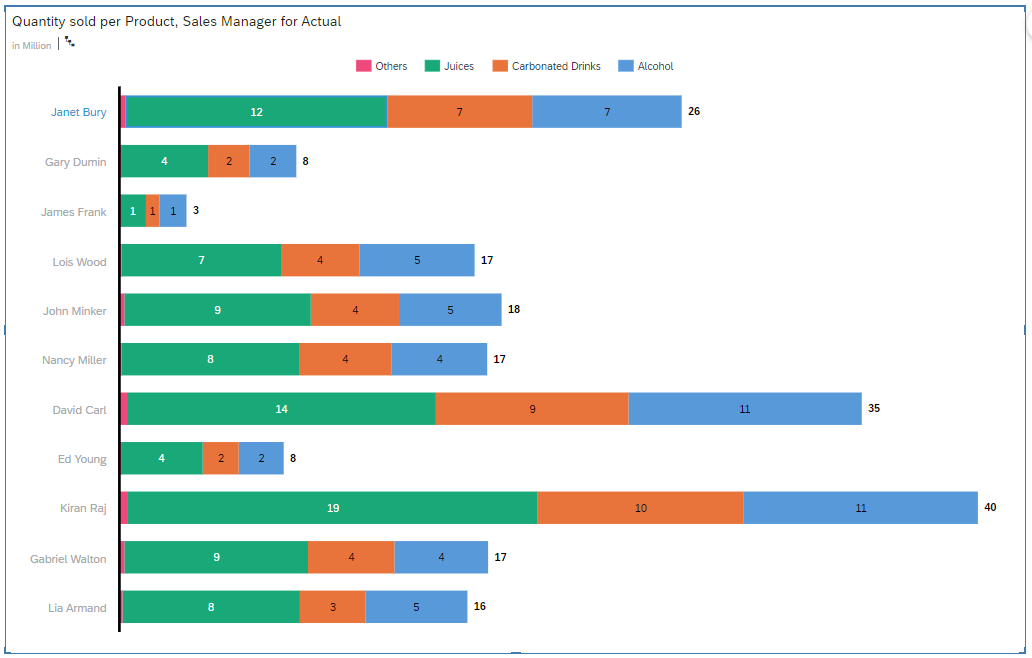
- Type of chart (bar, line, pie, etc.): bar chart. Add input control with several dimensions, allows users to select how they want to see the data, e.g., Nr of Goals per Division or Nr of Goals per Entity, etc..
- Fields to be used: Nr of Goals Set, location, gender, Talent flags, Entity LT N-1, grades, regions, job function, country, site, department, goal status
- Any calculations required (provide details): Nr of Goals
6. Nr of Development Goals per status per several dimensions
- Type of chart (bar, line, pie, etc.): bar chart. Add input control with several dimensions, allows users to select how they want to see the data, e.g., Nr of Goals per Division or Nr of Goals per Entity, etc..
- Fields to be used: Nr of Goals Set, location, gender, Talent flags, Entity LT N-1, grades, regions, job function, country, site, department, goal status
- Any calculations required (provide details): Nr of Goals
Example of how the chart could look like: but in our case would be f.ex Nr of goals set per Division with a breakdown of the status of the goals identified by colors and nr.
7. Average Rating vs. Several dimensions
- Type of chart (bar, line, pie, etc.): bar chart. Add input control with several dimensions, allows users to select how they want to see the data, e.g., Nr of Goals per Division or Nr of Goals per Entity, etc..
- Fields to be used: Average Rating, location, gender, Talent flags, grades, regions, job function, country, site, department, goal status
- Any calculations required (provide details): Average Rating
8. Number and % of employees without development actions
- Type of chart (bar, line, pie, etc.): pie chart
- Fields to be used: Total number of employees, Status ( Users with and Users without development goals)
- Any calculations required (provide details): Total number of employees, Status ( Users with and Users without development goals)
Tables / Lists
Employee User ID, Employee First and last name, Country, Legal entity, Division, Department, Team, Talent flag, gender, Nr of Development goals, Nr of Performance goals, Rating, performance goals set (goal name), development goals set (goal name), Performance goal details, Development goal details, goal status, goal plan year, goal creation date
Page Filters
location, gender, Talent flags, Entity LT N-1 (Allow to select the indirect reports → HR want to be able to see the direct reports and indirect reports of Managers), grades, regions, job function, country, site, department, goal status
Details on the way we can filter to have data on the direct and indirect Reports:
1.On the data source we need to have the Manager and Manager +1 selected. Manager+1 is the Manager of the Manager.
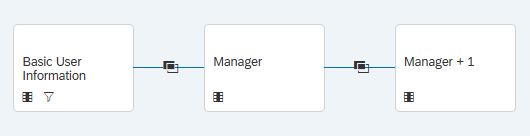
2.Then there are 2 options to have as filter:
a) Add Manager and Manager of the Manager as filters:
→ If we have these filters, they will act as an AND relationship, meaning we cannot apply both at the same time, otherwise we will get no data.
What we must do is to either apply the Manager filter (and see the direct reports of these manager), or apply the Manager of the Manager (and see the Indirect Reports of the Manager).
→ what we will not be able to see, is see simultaneously the direct and indirect reports of a Manager.
b) Add an Advanced filter with and OR condition as follows:

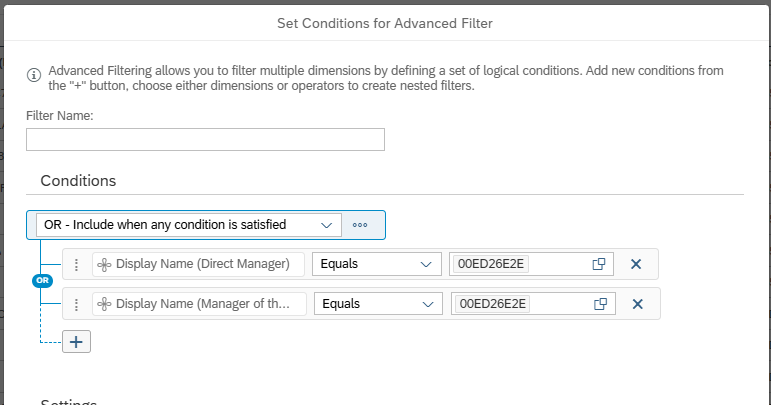
This will allow us to see the direct and indirect reports of a Manager simultaneously.
→ However, there is no possibility of selecting all users (i.e, not selecting any particular manager), which means that if we apply this filter the HRs will have to know to come to this filter and select a Manager otherwise they will not see any data displaying.
Layout & Distribution
Report Layout
Report should be in this format:
- Page filters pinned at the top of the page
- Syensqo Logo top left corner
- Summary KPIs
- Charts
- Table
Report Sharing & Access
- 50-IT HR Specialist (HRIT)/System Admin/IT Admin
- 20-Line Manager(CS - Manager)
- 30-Talent Manager/Talent Management Business Partner
Additional Notes / Attachments
→ In order to allow HRs to see all data and also to see the Direct Reports and Indirect Reports of Managers, we propose the following:
- Have 1 tab for HRs to see all employees, and here we can add the filter Manager and Manager of the Manager:
- Here HRs will be able to see all data (all employees), but also see direct and indirect reports of managers separately. AND, managers can also use the Manager and Manager of the Manager to see their own Direct reports and Indirect reports
- Have a another tab for HRs to see data of the direct and indirect reports of a Manager simultaneously
- To note that when the HR first opens the tab they will not see any data, and will only see data after they apply the filter. We can have this filter as a page filter and a note that highlights that the filter needs to be applied.
Screenshots
Example of reports:

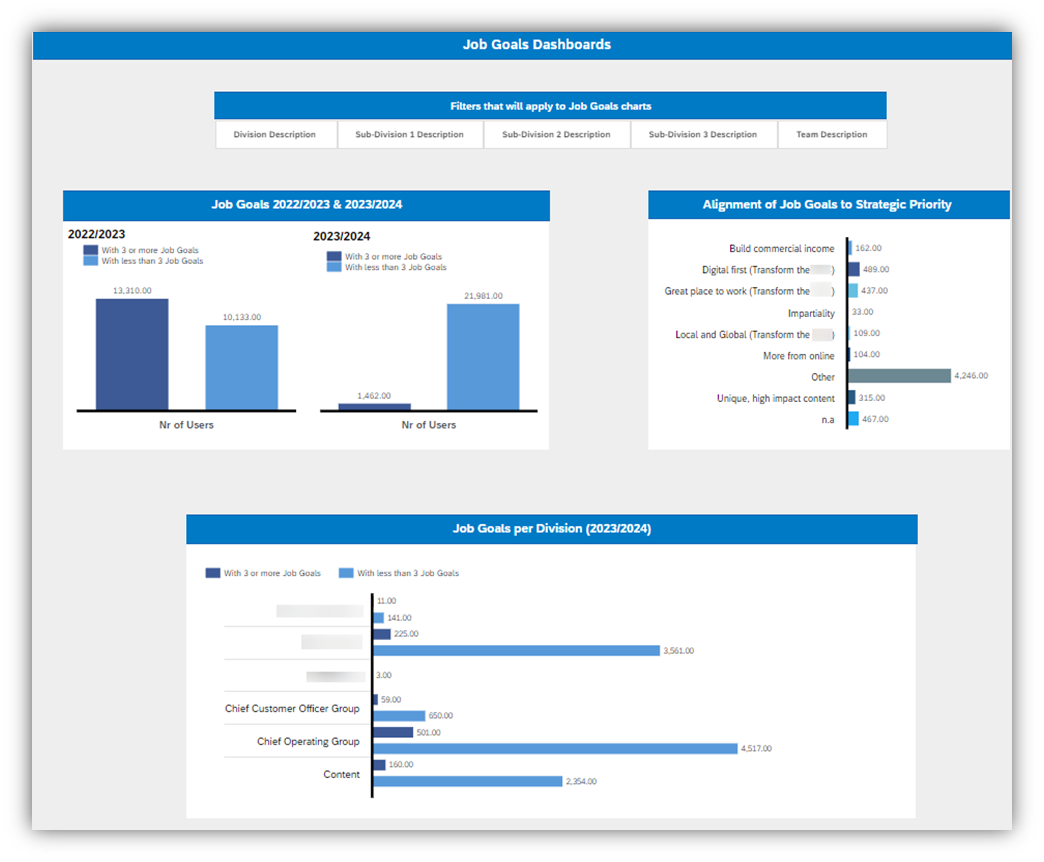

Story Page 1 – Goal Setting Tracking
Page Objective
Provide a consolidated view of goal‑setting practices and their correlation with performance outcomes, using summary KPIs, charts, and detailed employee‑level data.
Page Filters
| Report Field Name | Mandatory / Optional | Prompt Type | Default / Restrictions |
|---|---|---|---|
| Location | Optional | Multiple Single Values | All |
| Gender | Optional | Multiple Single Values | All |
| Talent Flag | Optional | Multiple Single Values | All |
| Entity LT N‑1 | Optional | Hierarchy | All |
| Grade | Optional | Multiple Single Values | All |
| Region | Optional | Multiple Single Values | All |
| Job Function | Optional | Multiple Single Values | All |
| Country | Optional | Multiple Single Values | All |
| Site | Optional | Multiple Single Values | All |
| Department | Optional | Multiple Single Values | All |
| Goal Status | Optional | Selection Option | All |
Page Level Input Controls
- Dimension selector allowing users to analyze charts by:
- Location
- Gender
- Talent Flag
- Entity LT N‑1
- Grade
- Region
- Job Function
- Country
- Site
- Department
Calculations
All calculations are performed within SuccessFactors reporting capabilities:
- Headcount
- FTE
- Number of Performance Goals
- Number of Development Goals
- Average number of goals per user
- Average performance rating
Layout
Page layout order:
- Page filters pinned at the top
- Syensqo logo (top‑left)
- Summary KPIs
- Charts
- Detailed tables
Dashboards / Charts
Summary KPIs (Numerical):
- Headcount
- FTE
- Number of Performance Goals Set
- Average Number of Performance Goals per User
- Number of Development Goals Set
- Average Number of Development Goals per User
- Average Performance Rating
Charts:
- Number of Performance Goals vs Goal Status (Pie)
- Number of Development Goals vs Goal Status (Pie)
- Performance Goals per Status and Goal Type (Pie)
- Performance Goals per Status across Multiple Dimensions (Bar with input control)
- Development Goals per Status across Multiple Dimensions (Bar with input control)
- Average Rating across Multiple Dimensions (Bar with input control)
- Number and Percentage of Employees without Development Goals (Pie)
Tables / Lists
Employee‑level table includes:
- Employee User ID
- Employee First and Last Name
- Country
- Legal Entity
- Division
- Department
- Team
- Talent Flag
- Gender
- Number of Development Goals
- Number of Performance Goals
- Performance Rating
- Performance Goal Name
- Development Goal Name
- Performance Goal Details
- Development Goal Details
- Goal Status
- Goal Plan Year
- Goal Creation Date
Story Filters (Global)
| Report Field Name | Mandatory / Optional | Prompt Type | Default / Restrictions |
|---|---|---|---|
| Employee Status | Mandatory | Selection Option | Active employees only |
| Employee Type | Mandatory | Selection Option | White‑collar only |
Business Roles
- HR
- Line Managers
- HR IT / System Administrators
Design Rationale
No existing report in the current catalog meets the business requirements. SAP standard templates were reviewed but are insufficient due to the complexity of required analyses and correlations. A custom SuccessFactors Story Report is therefore required.
Assumptions
- Data is sourced exclusively from SuccessFactors modules (Goal Management, Performance Management, CDP).
- Only active, white‑collar employees are included.
- Managerial hierarchy data is correctly maintained.
Dependencies
- Availability and consistency of goal and performance data in SuccessFactors.
- Correct population of manager and organizational attributes.
Special Requirements
- Ability to analyze data across multiple organizational dimensions using input controls.
- Clear identification of employees without goals for compliance monitoring.
Frequency of Analysis / Report Run
Daily and Quarterly (ad‑hoc usage).
Testing Considerations / Dependencies
- Validate layout, filters, and input controls.
- Validate correlation between goals and performance ratings.
- Validate exclusion rules (inactive and non‑cadre employees).
Test Conditions and Expected Results
| ID | Condition | Expected Result |
|---|---|---|
| TC01 | Open report without filters | Data displayed for all active white‑collar employees |
| TC02 | Apply goal status filter | Charts and tables update accordingly |
| TC03 | Change dimension via input control | Charts re‑aggregate correctly |
| TC04 | Review employees without goals | Correct count and percentage displayed |