| Status | |
|---|---|
| Owner | WENNINGER-ext, Sascha |
| Stakeholders | |
| Jira Request ID | |
| Jira Development ID |
High-Level Specification
| Parameter | Value |
|---|---|
| Application System (Source) | SAP Signavio |
| Application System (Target) | SAP Cloud ALM |
| Source System Interface | Standard, native API |
| Target System Interface | Standard, native API |
| Business Process Reference | N/A - not modelled in a business process as this is a background interface used only for SyWay-internal work |
Functional Overview
The functional design of the Integration Process defines both inbound and outbound interfaces. An integration defines a specific physical interaction that will need to occur between the system and an external application in response to some business event.
Scope and Objectives
This integration process implements a SAP-standard integration between Signavio and Cloud ALM that is used to publish business process models from Signavio into the Test Management function of Cloud ALM.
The integration is configured as per the SAP documentation and is performed as designed without any middleware components between the systems.
As CloudALM is used internally in the SyWay program, the integration is configured with the Cloud ALM instance for SyWay.
Process Flow Diagram

Step | Description | Comment |
|---|---|---|
1 | Signavio calls an API provided by Cloud ALM to publish the process model | The process must be initiated by a user in Signavio with the permissions to publish process models to Collaboration Hub. |
Assumptions
Automated publishing via Signavio Process Governance workflows is not required due to the limited scope of processes in scope for testing via Cloud ALM. Should Cloud ALM be used beyond Release 2 (pending SyWay Testing Approach), this decision may be revisited.
Dependencies
The integration requires the deployment of an API component via SAP for Me, called the connectivity add-on for SAP Signavio solutions, as described in the SAP documentation.
Security, Integrity and Controls
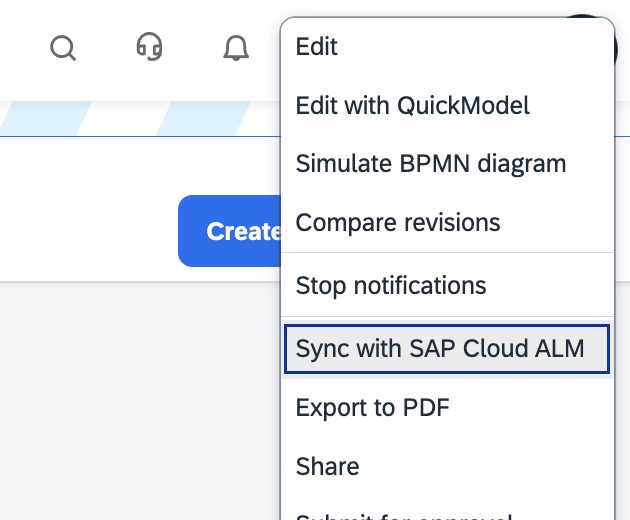
When manually syncing a business process model from Signavio to Cloud ALM, the user performing the synchronisation requires authorization to publish business process models in Signavio to the Collaboration Hub. Only for such users is the menu option 'Sync with Cloud ALM' available.
Once a business process model is synced, it is not possible to undo the synchronization. To break the synchronization, a model would need to be backed up in Signavio, then be deleted from both Signavio and Cloud ALM, before being restored from backup.
Synced diagrams cannot be edited in Cloud ALM. Any edit made through Signavio Process Manager creates a new revision of the model, which needs to be synced with Cloud ALM again.
Configuration Requirements
The integration is configured as per the SAP documentation. There are no configuration options for the establishment of the connection, beyond those described in the aforementioned document.
Automatic publishing of process models is supported via Signavio Process Governance, but as of the time of writing, this is not configured nor required because Cloud ALM is used only for testing Release 2 scope, whose scope is only 12 processes which can easily be managed manually.
Special Requirements
The synchronisation from Signavio only supports BPMN models (i.e. Level 3/4 models). Value Chain diagrams (used for Levels 1 & 2 as per the Business Process Modelling Standard), are not supported to be synchronised to Cloud ALM.
As of the time of writing, only L4 processes are required in Cloud ALM, and thus this limitation does not present any challenges.
Design Rationale
This integration is configured as per SAP's documentation for this standard integration.
Data Structure
Source Structure
The following fields will be used to provide the required information for this interface:
| Field | Description |
|---|---|
| N/A | SAP STANDARD |
Target Structure
The following fields will be used to provide the required information for this interface:
| Field | Description |
|---|---|
| N/A | SAP STANDARD |
Mapping and Calculation
N/A
Processing Logic
Processing within Source
N/A
Processing within Middleware
N/A
Processing within Target
Cloud ALM does not support all object types in BPMN models created in Signavio. Exceptions are documented in the SAP Help.
Interface Dependency
None
Interface Constraints
Cloud ALM does not support all object types in BPMN models created in Signavio. Exceptions are documented in the SAP Help.
Delivery Requirements
Please describe delivery requirements driven by business. i.e. real time, batch, scheduled, synchronous, triggering requirement, push or pull, etc.
Delta or Full Load Requirements
Synchronization happens one process model at a time, triggered manually by an administrator in Signavio.
Interface Alert & Monitoring
This is a synchronous interface initiated by a user. Any errors during the process are surfaced to the user triggering the integration from the Signavio UI.
Synchronization logs are available via the Signavio Reporting tab, as described here.
Interface Reporting
None
Language Requirements
N/A
User Interface Requirements
The synchronization is triggered from the Signavio Collaboration Hub using a menu option available via the [...] button on a BPMN model:
Volumetrics
Triggered ad-hoc. Volumes are limited by the total number of BPMNs available in Signavio, which is planned to be fewer than 20 for Release 2, or 750 for Release 4.
Performance Consideration
Since the interface is triggered by a user in the Signavio UI, wait times for the interface to succeed or fail should be lower, and in the order of 5-10 seconds in order to avoid inconveniencing the Signavio user.
Error Handling
This is a synchronous interface initiated by a user. Any errors during the process are surfaced to the user triggering the integration from the Signavio UI.
Synchronization logs are available via the Signavio Reporting tab, as described here.
Testing
How to Test
Since both Signavio and Cloud ALM have only productive instances, any testing has to be performed in Production.
This can be easily done by creating a new, temporary business process model using the BPMN standard, and then publishing it to Cloud ALM. The model can be deleted once publishing has been confirmed in Cloud ALM.
Test Conditions and Expected Results
| ID | Condition | Expected Results |
|---|---|---|
| 1 | Create a new business process model using the BPMN format. | |
| 2 | From the Collaboration Hub, click on the model's context button and trigger the synchronization to Cloud ALM, confirming at the dialog that appears. | The synchronisation is successful. |
Test Considerations/Dependencies
Since testing must be performed in production, any temporary models created and published in the course of testing must be deleted.
Other Information
Development Details
Package
| Package Name | Parent Package |
|---|---|
Other Development Objects
| Object Type | Object Name | Purpose/High Level Logic | Design Rationale Reference |
|---|---|---|---|
