

Table of contents
Create a fixed costs report
What are the main sources of errors?
What are the main sources of discrepancies between the BW fixed cost request and the P&L?
Allocation of a cost center to a plant in a BW Fixed costs report
- In BW, the determination of the cost center's plant is done with its Profit Center
The field "Department" of the profit center is a critical field that is used in BW to assign a cost center to a plant and then to a site.
ex:
- The cost center 7512-1022 is assigned to the profit center 7512-I0449
- The department of the profit center 7512-I0449 is 7512
=> The cost center is assigned to the plant 7512

Depending on the type of profit center the department code can be:
- a plant code = a code maintained in table T001W in WP1 or PF1 (1)

- a generic plant code (only in WP1) created by GBU (2). This code doesn't exist in the table T001W.

Rule by ERP + type of profit center
| ERP | Type of profit center | Department | Example | |||||||||||
|---|---|---|---|---|---|---|---|---|---|---|---|---|---|---|
| PF1 | Reporting profit center | = "blank" |
| |||||||||||
= plant code By default the department code = profit center code without the letter C However the rule is to have one department code by site even if for historical reasons there can be several profit centers in the same site. ex: in Tavaux, all profit centers are assigned to the department TAU:
There is one exception when there are several management units / GBU in the site (only in GBU Soda Ash). In the GBU Soda Ash, there should be one dedicated department for Soda Ash another one for Bicar. ex: in Torrelavega
|
| |||||||||||||
| WP1 | Profit center used in the master data of production cost centers (the codification of the cost center starts with the plant code  ) ) | = plant code = first digits of the profit center code ex: department of profit center 7512 -I0449 = 7512 |
| |||||||||||
Profit center used in the master data of SG&A / CBS / Financial cost centers (the codification of the cost center starts with the company code These profit centers are used in cost center that could be shared between several plants/sites. Ex: in Rhodia Operation, there can be people working in the same team located in Paris or Lyon. Then the cost center is allocated neither to the Paris site nor to the Lyon site but to a generic site. By default this rule applies to all cost centers that are not used on production plants. The only exception is the facilities cost centers in CBS. | = generic GBU code = BFC GBU code + 00 ex: Novecare = CS00 |
| ||||||||||||
| Exception: Facilities cost centers included in the group ZCBS-FFAC of the ZCBS hierarchy | = plant code = first digits of the profit center code ex: department of profit center 7925 -I0569 = 7925 |
|


For historical reasons, there may be exceptions to the codification
How can an error in the cost center's master data lead to an error in a BW fixed cost report?
The allocation of a cost center to the P&L is not handled in the same way in the P&L and the BW fixed cost report. Naturally, if the two methods are not consistent, this creates a discrepancy between the two reports.
As a reminder, the allocation of a cost center to the P&L is done through an assessment cycle. In contrast, in BW, the allocation is based solely on the cost center's master data.
Example:
In the fixed costs report, the cost center 4002-1100 is reported in the plant 4002 but in the P&L the same cost center is reported in a non allocated plant.

1. The profit center of the cost center 4002-1100 is 4002-I1210
How to display the cost center master data ?
2. The department of the profit center 4002-I1210 is 4002 so in the fixed costs report, the cost center is allocated to the plant 4002

3. The cost center 4002-1100 is included in the COPA cycle 4002PA
How to display the cost center master data ?

4. The cost center 4002-1100 is not allocated to a plant

What must be done to correct an inconsistency ?
The cost center 4002-1100 is allocated to the plant 4002 via its profit center but is not allocated to a plant via its assessment cycle, the following steps can help address this inconsistency:
Analyze the Business Rules:
- Determine which plant allocation is correct
Adjust Master Data or Cycle Configuration:
- If the profit center is incorrect, request the update of the cost center's master data: Request the creation / update of Master Data
- Alternatively, if the assessment cycle is not correct, request the update of the assessment cycle in Service One.
What is the impact of the correction on historical data ?
Once the change is made, the historical data will be impacted in the following ways:
- In BW fixed costs query: when you update the master data of a cost center, historical data are reallocated to the new plant.
- In the P&L, if you update the assessment cycle of a cost center, it will only impact the future but historical data is not impacted. If there is a need to correct historical data, a manual correction in COPA should be done. It has to be requested in Service One .
- Allocation of a cost center to a GBU in a BW Fixed costs report
- The fixed costs report is available by GBU.
- How can an error in the cost center's master data lead to an error in a BW fixed cost report?
- What must be done to correct an inconsistency ?
- What is the impact of the correction on historical data ?
Allocation of a cost center to a GBU in a BW Fixed costs report
The fixed costs report is available by GBU.
In the BW fixed costs query a cost center can only be allocated to one GBU.
- When it is a cost center in WP1, the determination of the GBU is done with its Profit Center
- When it is a cost center in PF1, the determination of the GBU is done with its Business Area

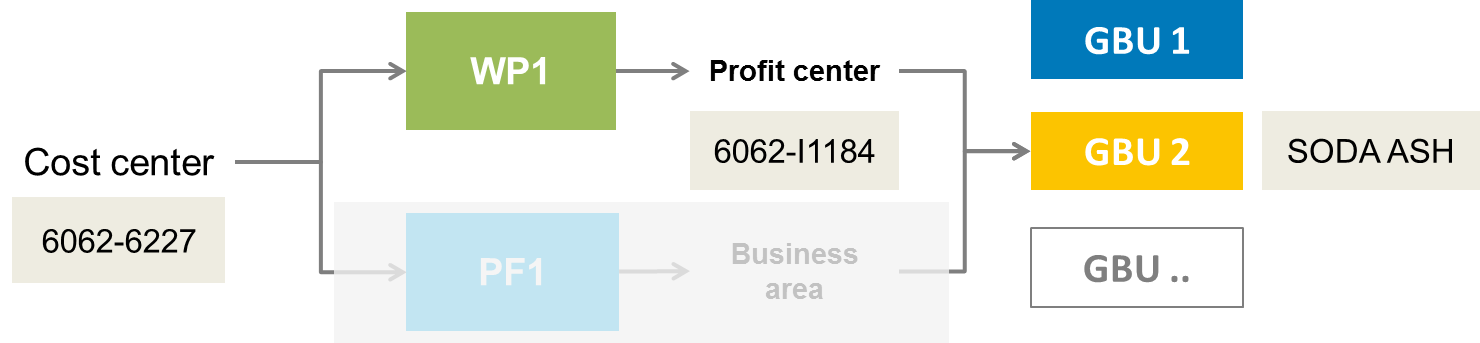
GBU determination in WP1
The determination of the GBU in WP1 is done with the Profit Center Standard hierarchy
Example
1. The profit center of the cost center 6062-6227 is 6062-I1184
How to display the cost center master data ?

2. The profit center belongs to the GBU Soda Ash
How to display the profit centers hierarchy ?

3. In the fixed costs report, the cost center 6062-6227 is allocated to the GBU Soda Ash
GBU determination in PF1
The determination of the GBU for PF1 cost centers is done with the Business Area
Example
1. The business area of the cost center SM16210000 is 8500
How to display the cost center master data ?

2. The business area belongs to Corporate Business Services
How to allocate a business area to a GBU?
3. In the fixed costs report, the cost center SM16210000 is allocated to Corporate Business Services
How can an error in the cost center's master data lead to an error in a BW fixed cost report?
The allocation of a cost center to the P&L is not handled in the same way in the P&L and the BW fixed cost report. Naturally, if the two methods are not consistent, this creates a discrepancy between the two reports.
As a reminder, the allocation of a cost center to the P&L is done through an assessment cycle, allowing it to be allocated to multiple GBUs. In contrast, in BW, the allocation is based solely on the cost center's master data (profit center or business area) and is assigned to a single GBU.
Example:
In the fixed costs report, the cost center TK19300000 is reported in the GBU Peroxides but in the P&L the same cost center is reported in the GBU Special Chem ?

1. The business area of the cost center TK19300000 is 7360
How to display the cost center master data ?
2. The business area 7360 belongs to the GBU Peroxide so in the fixed costs report, the cost center is allocated to the GBU Peroxide
How to allocate a business area to a GBU?

3. The cost center TK19300000 is included in the COPA cycle 0360P1
How to display the cost center master data ?

4. The cost center TK19300000 is allocated to the profit center D7630 which belongs to the GBU Special Chem
How to allocate a profit center to a GBU in PF1?

What must be done to correct an inconsistency ?
The cost center TK19300000 is allocated to Peroxide via its business area and to GBU Special Chem via its assessment cycle, the following steps can help address this inconsistency:
Analyze the Business Rules:
- Determine which GBU allocation via business area or via cycle is correct
Adjust Master Data or Cycle Configuration:
- If the business area is incorrect, request the update of the cost center's master data: Request the creation / update of Master Data
- Alternatively, if the assessment cycle, request the update of the assessment cycle in Service One.
What is the impact of the correction on historical data ?
Once the change is made, the historical data will be impacted in the following ways:
In BW fixed costs query: when you update the master data of a cost center, historical data are reallocated to the new GBU.
In the P&L, if you update the assessment cycle of a cost center, it will only impact the future but historical data is not impacted. If there is a need to correct historical data, a manual correction in COPA should be done. It has to be requested in Service One .
How-to group members
How can you create your own groups of ZCBS (cost centers) or ZSOLV (cost elements)
How to create a group of cost elements in a workbook
Example: you want to create your own group of cost elements:
- Labor
- Maintenance
- Others
The ZSOLV cost elements group is too detailed for your need, to you need to group some of the ZSOLV groups
- Select one or more cost elements you want to group

2. Right click and select "Group members"

3. Enter group name and click OK

4. The new group is created

5. Create other groups

Going further with Fixed costs reports
- FC - Create a fixed costs report — This page explains how you can create step-by-step a fixed costs report.
- FC - ONE SYENSQO - Cost center Analysis — This workbook gives the detail of all cost centers CBS & GBU.
- FC - Characteristics — List of Characteristics & Measures available in the BW Fixed costs application with the link to more detailed documentation when it exists.
- FC - Methodology to create a fixed costs report
- FC - What are the main sources of discrepancies? — What are the main sources of discrepancies between the BW fixed cost request and the P&L?
- FC - Cost centers master data — This page explains how you can display cost centers master data. It is a useful tool for preparing and validating master data to ensure the accuracy of fixed costs reports.
- FC - Fixed costs report - P&L impact — The P&L impact fixed costs query is used when a cost center is shared with several GBUs
- FC2 - Fixed costs (obsolete) (WBP) — This page explains how the application FC2 - Fixed costs was replaced by the application FC - GBU Fixed costs.
- FC - How-to group members — How can you create your own groups of ZCBS (cost centers) or ZSOLV (cost elements)
- FC - Internal Orders master data — This page explains how you can display CO orders master data. It is a useful tool for preparing and validating master data to ensure the accuracy of fixed costs reports.