


| Status | Approved |
| Owner | VAN OS-ext, Nico |
| Stakeholders | Najaite Nidboufker |
Issue
During the process of arranging transport with carriers there are several business functions that require integration with carriers. These business functions are:
- Tendering
- Order placement
- Slot Scheduling
- Track and Trace
- Charge Settlement
To cater for these functions, SAP provides an online platform: SAP Business Network for Logistics (BNL).
Currently Syensqo uses two TMS solutions that are catering for these business functions: Transwide (in EMEA countries) and BuJay (in North America). As BluJay is scoped to be replaced, there is a separate KDD focused on the decision of the way forward with BluJay: KDD048 - Way Forward with BluJay.
This KDD will focus on the standard solution for Syensqo globally. Here the decision is to be made which online platform Syensqo should use to integrate with carriers other than the scope of KDD048.
Recommendation
With the seamless integration with SAP TM and SAP BNL, it would be recommended to have SAP BNL as the standard global solution to integrate with carriers.
With SAP BNL users can do all their tasks in SAP TM, and can monitor and track all business functions of BNL from SAP TM. There are some other possible benefits of SAP BNL, like end-to-end tracking of Sales Orders and Purchase Orders. And resources can be tracked on their lifecycle. This can be useful for tracking of Syensqo managed trucks and containers.
As integration of SAP TM and SAP BNL is standard, it will be easier to setup and maintain than other third party TMS solutions.
The biggest downside of transitioning to SAP BNL is that carriers that Syensqo does business with also need to support SAP BNL. They can use the BNL online launchpad, or they can integrate their system with available API or EDI connection. For the second option that would require them to do an initial investment. With SAP being such a dominant market player, it is possible that Syensqo might be the first, but maybe not the only client with that request. And for having Syensqo as a customer, you would imagine that carriers are willing to accommodate.
Background & Context
Overview of SAP TM with BNL
To be be able to assess if SAP TM with integration to BNL is a fitting solution for Syensqo, an understanding of the SAP TM processes is essential. In this section a more detailed explanation is provided how the process works in this system configuration.
System Landscape
SAP Business Network for Logistics is SAP's new collaborative cloud network that empowers logistics businesses to work together. There are two submodules within BNL:
SAP Business Network Freight Collaboration improves supply chain efficiency by connecting business partners on a collaborative network that supports jointly managing transactions, exchanging documents, and sharing insights across the value chain. For instance, upon invitation from a shipper, a carrier can onboard onto the network and collaborate with shippers on freight tendering, subcontracting, freight settlement and dock appointment scheduling.
The aim of SAP Business Network Global Track and Trace is to capture, process and store tracking information about tracked business processes. Then, it allows business users to get real-time transparency of the execution of those processes. They can query any tracked process and display its retrieved data from end to end.
Following image provides a simplified view of the system landscape:

Process Flow
The functionality of this setup will be explained by the following process steps:

Transportation Planning
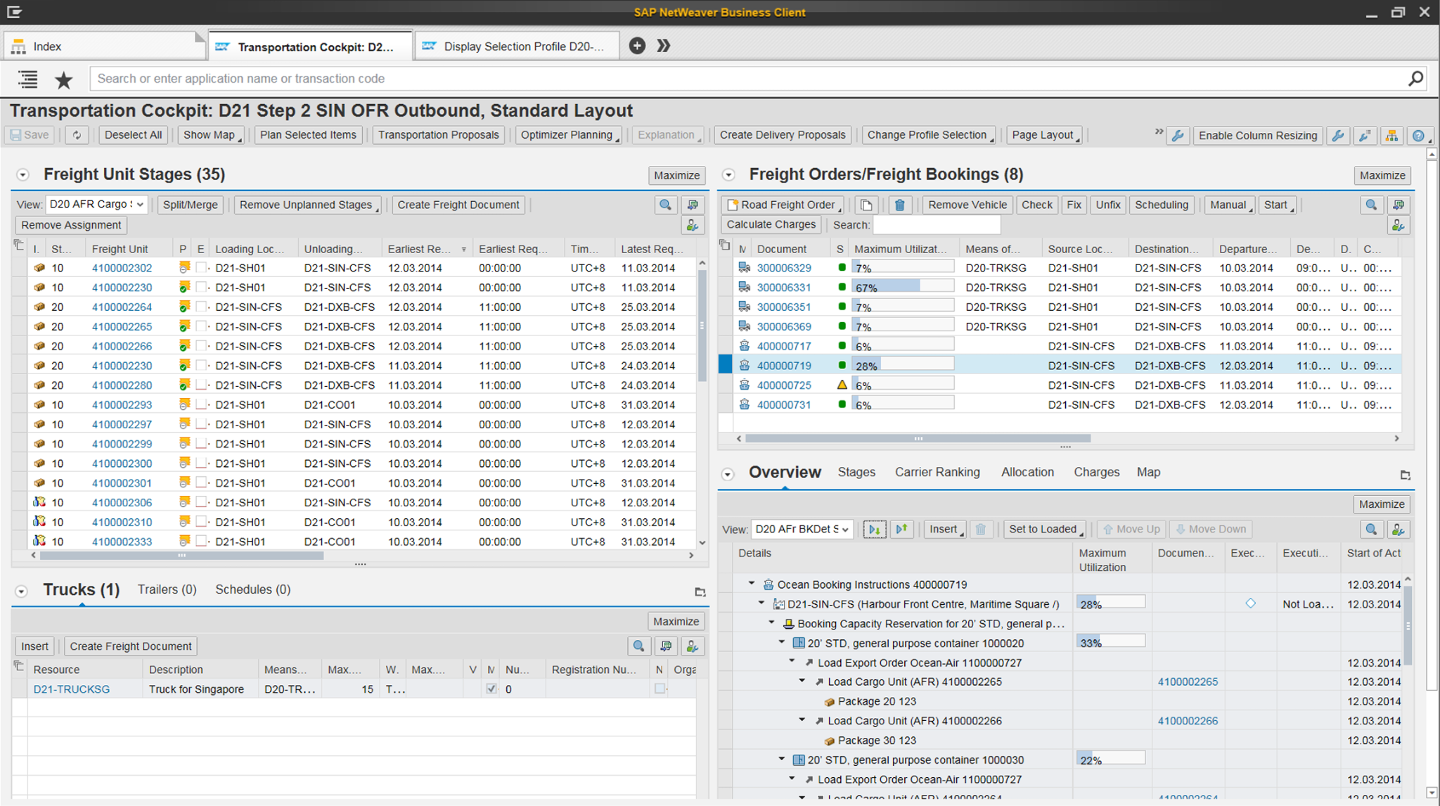
During Transportation Planning, Freight Orders (Road and Rail) or Freight Bookings (Air and Ocean) are created. These transportation orders are the starting point for integration to BNL and communication with carriers. There are multiple ways how these transportation orders are created:
- Manual Planning in the Transportation Cockpit.
- Manual creation from the Freight Unit or Container Unit.
- Short cut planning where a Freight Order is created directly from delivery.
- Automated planning.
Tendering
SAP TM supports peer-to-peer tendering, broadcast tendering or a combination of the two.
Peer-to-Peer Tendering initiates the tendering process with one or more carriers sequentially. This means that the system will wait for a (negative) response from the first carrier before contacting the second (or third and so on) carrier.
Broadcast Tendering is executed in which several carriers are contacted simultaneously. With a 'best offer' mechanism the carrier is selected that quoted the best price within a pre-defined timeframe. With a 'first acceptable offer' mechanism the carrier is selected that has the fastest response with a quote below a specific price limit (price limits can be communicated or can be hidden from carrier).
With a combination of the two tendering approaches, the most likely process is that first a peer-to-peer tendering step is completed. If these carriers are not accepting the orders, then a broadcast tender can be performed to a selected group of carriers.
The tendering approach is defined in a Tendering Profile. This tendering profile can be selected by the user in the Freight Order, or it can be automatically selected by the system.
Example of Tendering Profile:

Monitoring tendering status with response of carriers in Freight Order:

Example of Request for Quotation that is send to carrier for response:

Dock Appointment Scheduling
As a shipper, you can use dock appointment scheduling functionality in SAP Business Network Freight Collaboration to book dock appointments for a loading point on behalf of the carrier for loading or unloading services in the docking locations of your organization.
Key features:
- Enable collaboration on dock appointments and gate-in and gate-out processes
Starting from planning and scheduling of dock appointments to check-in and check-out at the gates as
well as loading and unloading. - Share responsibilities between shipper and (external) warehouse / yard operators
Share master data as well as operational data instantly across the involved parties. - Integrate into logistics backend systems for seamless processes
Open APIs available for integration into SAP Logistics suite and 3rd party systems. Standard integration
available for SAP Yard Logistics. - Manage dock appointments centrally
Configure master data and share with business partners e.g. on appointment creation, define docking
locations and loading points.
Leverage calendar view and color coding to keep track of dock appointment status. - Manage gate processing centrally
Maintain gate master data related to docking locations and docking points.
View dock appointments and access worklists to assign gates, perform check-in, add notes and
attachments.


Transportation Execution
Transportation execution comprises all activities involved with handling and documenting shipments in transit. It is more than just tracking a vehicle on the road, and includes recording any changes to the planned transport and handovers to other business partners or entities.
With the SAP Business Network Global Track and Trace solution, you can seize each moment by connecting the physical movement of orders and goods with the flow of information – providing situational awareness beyond milestone reporting
Key features:
- Track your order fulfillment progress and goods in-transit
Monitor shipments standalone (Freight Orders and Freight Bookings) or as part of the end-to-end order fulfillment (Sales Orders and Purchase Orders) for maximum insight with milestone monitoring and exception management - Understand the impact of deviations from the plan
Conduct impact analysis and view the document flow. Benefit from event correlation between orders, deliveries, shipments and external identifiers - Inform stakeholders of progress and exceptions
Set up exception and information notifications, such as an email with tracking link upon order confirmation, and notify stakeholders when an exception occurs - Enrich milestones monitoring by real-time visibility
Perform geolocation tracking with predictive expected time of arrival across multiple modes of transport, integrated out-of-the-box with visibility vendors for parcel, road, ocean and air - Ease transacting with your logistics service providers
Receive milestone updates via API or EDI (ANSI X12) - Flexible and extensible setup, supported by standard apps & templates
Supports customer-defined fields, event types and event-to-action scripts. Or build custom scenarios from scratch - Integrate with your ERP and logistics systems for seamless transparency
Standard / extractor-based integration via Idocs. Provide insights to end users in their preferred working environment


Dispute Management
A freight settlement dispute case is an individual business document that captures differences in logistics item quantities or charge amounts in a freight order or carrier invoice. As a requester of transportation services, such as a shipper, you own the information in the freight order. Your provider of transportation services, such as your carrier, checks the accuracy of the charge and logistics details in your freight order.
In the self-billing process, the service provider uses the SAP Business Network for Logistics to create a dispute case against a freight order.
In the invoice submission process, the process of settlement between you and your service provider is based on an invoice that your service provider submits to you for a freight order. Your service provider can use the SAP BNL portal to submit such an invoice. For example, your service provider can submit an invoice that contains changes to logistics details such as gross weight or gross volume, or changes to charge details such as rate or an additional charge line for an unplanned charge. In these situations, the system captures the changes in a dispute case and links the dispute case to the invoice your service provider submits.
If the dispute case fails the tolerance limits you specify in Customising, you must manually review the dispute case on the Freight Settlement Dispute Cases app.

Self-Billing / Carrier Invoicing
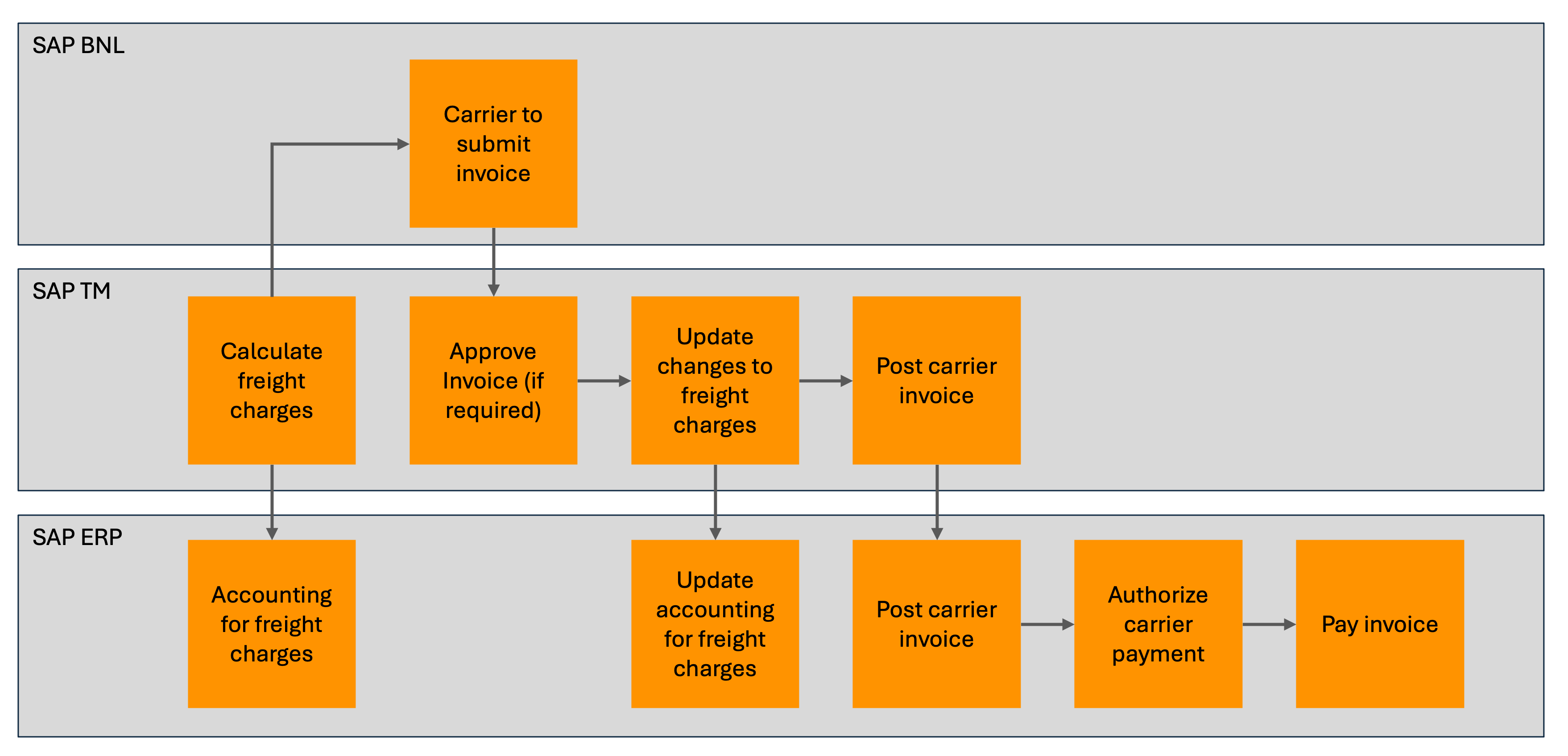
Depending on your system integration with SAP Business Network for Logistics, carriers can submit their invoices based on self-billing process or upload their freight-order based invoices to your system.
Self-Billing
Once the Freight Order is sent to the carrier, a new document is created within the "Invoice Freight Document" app, marked with the status "To Be Invoiced." Subsequently, the carrier user can generate an invoice for this document by utilizing the "Create Invoice" button within the app. This action triggers the creation of an invoice document in the "Manage Invoice" app, labelled with the status "Draft," concurrently adjusting the Freight Order status to "Invoicing in Progress." As the carrier submits the invoice, the document status transforms to "Submitted," while the Freight Order status evolves to "Awaiting Ordering Party Response."
At this juncture, the system initiates the transmission of the invoice to the Transportation Management (TM) system. Upon successful creation of the invoice in TM, the carrier invoicing status undergoes an update within the Freight Order, subsequently relayed to BNL. This transition culminates in setting the Freight Order status to "Completely Invoiced," marking the successful completion of the invoicing process.
Carrier Invoicing
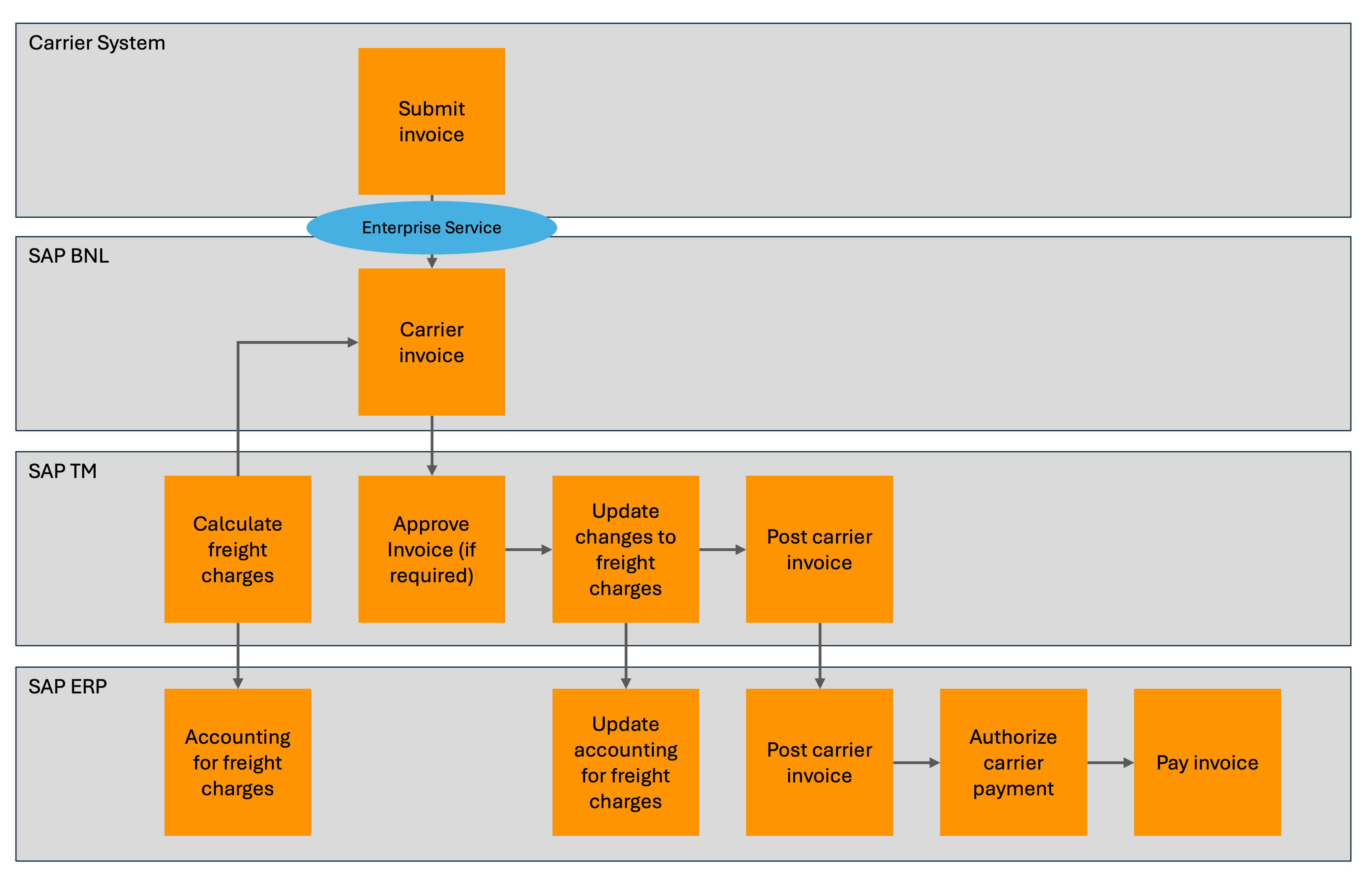
Carrier can create an invoice for freight orders using the Provider API for Invoicing. Additionally, users can view the freight order for invoicing in the Invoice Freight Documents app in SAP BNL. If there is any mismatch in the charges, the system creates a dispute either in the ordering party’s SAP Business Network for Logistics ordering party tenant or the external transportation system depending on the settings.
Carrier On-Boarding to SAP Business Network for Logistics
The Invite Business Partners app is designed for managing all the business partners that you want to be part of your network. You can use this app to select and invite business partners to join your business network and check their participation status.
Carriers can choose to use BNL from the launchpad (online), or they can set up integration using the following API's (EDI is also available):
- Provider and consumer API for Freight Tendering to accept or reject a freight request for quotation.
- Provider and consumer API for Freight Subcontracting to integrate freight order subcontracting.
- Provider and consumer API for Freight Booking to integrate freight booking subcontracting.
- Provider and consumer API for Order Events or Order Tracking to post events.
- Provider API to create an invoice

Project 44 Add-On
SAP provides SAP Business Network with project44 add-ons that provide real-time visibility content.
These add-on services leverage the project44 multi-mode carrier network with its established B2B connectivity to carrier and logistics provider systems, truck telematics, electronic logging devices, and so on.
With the add-ons for project44 visibility services, SAP Business Network users can benefit from the availability of actual shipment execution insights, such as real-time shipment location and event status for full truck loads, and real-time milestone status for less than truck load shipments. This allows for a holistic view of both planned and actual shipment status, as well as automatic business event detection.
Project 44 visibility content is available to SAP Business Network users through supplementary, add-on licenses from SAP.
Alternative 1: SAP TM integrated with Transwide
Transwide is the current TMS solution used in Europe and a few countries outside of Europe. The features used in from Transwide are:
- Tendering
- Carrier Determination
- Slot Scheduling
- Status Tracking
- Exception Management
- Additional Cost and Settlement
Transwide is currently only used for road transportation, but can be extended to other modes of transport.
Transwide is owned by Alpega and the solution has been renamed to Alpega TMS. Alpega TM is a combination of Inet and Transwide.
When integrating with Transwide, the integration objects will be Freight Order and Freight Booking. Once these documents are created, they are interfaced to Transwide for further processing.
For track and trace functions the design will follow similar design as with BNL, where Project 44 is integrated with Transwide and Syensqo internal systems also send updates to Transwide where required. From Transwide the updates are propagated to SAP system.

*Note: decision for North America for replacement of old BluJay is not taken into account in this KDD. Next to Transwide new BluJay could be part of system landscape.
Alternative 2: SAP TM integrated with BluJay deployed internationally
BluJay is the current TMS solution used in North America. BluJay is a complete, integrated software solution that manages the entire logistics operation from front to back, handling multiple languages, currencies, and time zones. It allows shippers to manage all multimodal transportation activities for one shipment. BluJay is used by most GBU's in North America region.
Features:
- Contracts & tariffs management
- Load optimisation
- Mode and carrier determination
- Electronic booking
- Freight cost calculation (planned & unplanned costs)
- Collaborative status tracking
- Transport reporting (carrier compliance, freight costs, KPIs…)
- Freight audit
- Freight payment
Part of this KDD is to consider new BluJay version to be deployed globally. In that case Transwide would be replaced and all Freight Orders and Freight Bookings are integrated with new BluJay version.
More detail on BluJay and BluJay replacement is provided in KDD048 - Way Forward with BluJay.

Assumptions
Execution systems can report events to portal
Execution systems owned by Syensqo, like Selfy, FDTMS or other mobile apps, can be integrated with the chosen portal solution. This can be SAP BNL, Transwide or BluJay. If this integration is not possible, then it will be considered to integrate these systems directly with SAP TM (this will be custom development). This decision will be taken during detail design.
Project 44
Project 44 will be included in project scope to receive shipment updates from ocean shipping liners.
Carriers can adopt SAP BNL
With the information provided by SAP, carriers are able to utilise the launchpad online, or they can use API's provided by SAP.
Constraints
Way Forward with BluJay
With the replacement of BluJay, would it be beneficial to have new BluJay, Transwide and SAP TMS all operational within Syensqo? As North America has to make a decision on what the future solution is going to be, there is a dependency between this KDD and KDD048 - Way Forward with BluJay.
Impacts
Carriers to adopt SAP BNL
Carriers that are currently not using SAP BNL will have to use the SAP BNL Launchpad, or invest in integration using the BNL API or EDI interfaces.
User experience
With the use of SAP TM in combination with SAP BNL, Syensqo users will work only in SAP TM and they can monitor progress of Tendering, Carrier Selection and Execution in the SAP TM system. When other systems are involved then users will need to switch between SAP and third party systems.
Resource Tracking
SAP BNL has the option do to resource tracking. For trucks and containers it is then possible to do full lifecycle tracking.
Business Rules
Freight charges to be updated in SAP TM
In either solution, freight charges have to be reported back to SAP TM transportation documents. This is to cater for accrual postings. The charges are distributed over the cargo and are posted as accruals in accounting.
Evaluation
Evaluating the functionalities between SAP BNL and Transwide, then there doesn't seem to be a lot of differences. The integration between SAP TM and SAP BNL is then a unique selling point. Transportation planners can work from SAP TM and don't have to switch systems. The integration between the two systems is existing, making the configuration and setup of the landscape easier from a project perspective.
The biggest downside for switching from Transwide to SAP BNL is for the carriers. Those that don't have SAP BNL integration will need to invest in making this integration work. However, this will be a one-time investment. A software provider as SAP has such a market dominance, that a new solution like SAP BNL will require more and more carriers to support the platform.
The replacement system of old BluJay might be another candidate to replace Transwide in Europe, however the seamless integration with SAP TM and SAP BNL make the SAP BNL solution a more capable, efficient and user friendly solution.
Option A: SAP TM with BNL | Option B: Integrate SAP TM with Transwide | Option C: Integrate SAP TM with BluJay | |
|---|---|---|---|
Functionality |
|
| |
User experience |
|
|
|
Costs |
|
|
|
Risks |
|
|
|
Network |
|
|
|

 All users will have to learn how to use SAP TM in combination with BNL.
Change log
Workflow history
| Title | Last Updated By | Updated | Status | |
|---|---|---|---|---|
| There are no pages at the moment. | ||||