


How to translate the HR tools to your language - ServiceOne
→The Chatbot, Digital Workplace and the HR Wiki
WANT TO USE THE HR TOOLS IN YOUR LANGUAGE?
All 3 sources of HR information - Chatbot, Digital Workplace and HR Wiki have automated translation capabilities to let you enjoy the content in the language of your preference.
Translate to your language - You can chose to use the platform and chat in your own language.
HOW TO CHANGE THE LANGUAGE IN THE CHATBOT
Simply type "Change language" →Select your language→Approve your selection.
Chatbot will reload in your language.
WATCH THE VIDEO TUTORIAL
HOW TO CHANGE THE LANGUAGE IN DIGITAL WORKPLACE.
Digital Workplace: Go to your profile→Preferences→Select your language→Sign into the tool again.
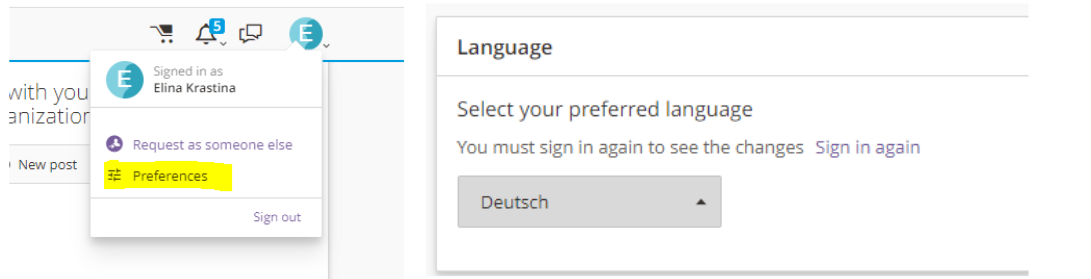
*Please note that this option will not translate the Service Catalogue and Knowledge articles.
To interact fully in local language you can use Chatbot or enable Google translate functionality. See the information below.
HOW TO ENABLE GOOGLE TRANSLATE IN DIGITAL WORKPLACE.
To translate some content in Digital workplace you can use Google translate functionality.
Right click on the screen→Select Translate to→Choose language→Read in your language.
WATCH THE VIDEO TUTORIAL
HOW TO TRANSLATE THE HR WIKI?
Click on Translate tab in the header→Select your language→Read content in your language
WATCH THE VIDEO TUTORIAL
* Please note that images/photos, presentations and other embedded documents that are in English will not be translated.
Date last updated:
