
How to check the rates
- Go to transaction SE16
- Select table TCURR
- Enter a Exchange rate type (ZRHO for WC)
- Enter a from currency / to currency
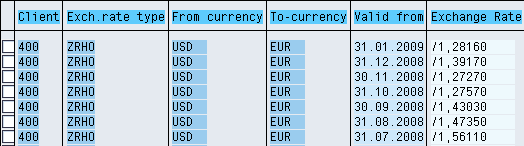
Note If there is no rate for a period BW will use the previous one! Using the example above: if I need to convert from USD to EUR with date = 10.02.2009 since there is no rate it will use the January rate
How to check the conversion types
- Go to transaction RSCUR
- Select a conversion type
- You can then check :
- The exchange rate used
- The time characteristic used to apply the rate
- The target currency (fixed, fixed variable, open)