

Tasks to be completed when documenting an operation (from creation to publication)
1. Enter the Title of the operation / page
2. Add the following Labels:
Scope of applicability: ww, country_accounting
Country or group of countries (if applicable): belux, china, france, italy, lam, nam,uk_ie, bulgaria, dach, netherlands, iberia, poland, latvia, australia, india, japan, south_korea, thailand, singapore, new_zealand, emea_transversal, apac_transversal
Unit and Domain according to the List of labels to be used in the Finance Service Line space
- E.g. 1: WW Operation in Financial Accounting under domain "Central Finance Processes & Compliance":
- Labels to be used: ww, financial_accounting, central_fin_proc_compliance
- Labels to be used: ww, financial_accounting, central_fin_proc_compliance
- E.g. 2: France Operation in Financial Accounting:
- Labels to be used: country_accounting, france, financial_accounting
(for country operations, the Domain is always country_accounting)
- Labels to be used: country_accounting, france, financial_accounting
- E.g. 1: WW Operation in Financial Accounting under domain "Central Finance Processes & Compliance":
3. Fill in all fields as described above
4. Name the title of each section using OPD methodology naming convention - Infinitive verb without the “to”, mainly action verb...something) -" I do something..."
5. Once the description of the operation is completed, ensure it is approved and published by launching the SBS-Finance approval workflow
Responsibility area:
Table of contents
Scope
ERP


Frequency

References
Forms
CUSTOMS DUTY POSTING 8090 - TEMPLATE
CUSTOMS DUTY POSTING 5835 - TEMPLATE
Attachments
<< IT - Customs duty procedure >>
1. Objective and Scope
1.1. Objective of this Operation
You are responsible for posting data retrieved from the 'Cassetto Doganale' portal to our financial accounts.
This procedure is born from a simplification of the process to take advantage of new tools put in service by the customs agency. The “CASSETTO DOGANALE” is an online portal provided by the Italian Customs Agency (Agenzia delle Dogane e dei Monopoli). It is designed to give companies and authorized users access to a wide range of customs-related information and services and based on this list we will prepare and post data from the 'Cassetto Doganale' portal into company accounts.
Posting customs data from the 'Cassetto Doganale' portal to accounts is essential for VAT compliance, accurate financial management, transparency, and operational efficiency.
1.2. Scope
This procedure is applied to Italian entities 5835 SYENSQO SPOL IT (PF2) and 8090 SYENSQO SOLUTIONS IT (WP2).
2. Definitions
See Finance Glossary:
- ...
3. Tasks description
3.1. I manage the download of customs documents from the 'Cassetto Doganale' portal
3.1.1. I access “CASSETTO DOGANALE”
1) In order to access into “CASSETTO DOGANALE” you must connect to Website:
https://cassettodoganale.sp1.it
2) After clicking on https://cassettodoganale.sp1.it this image will appear:
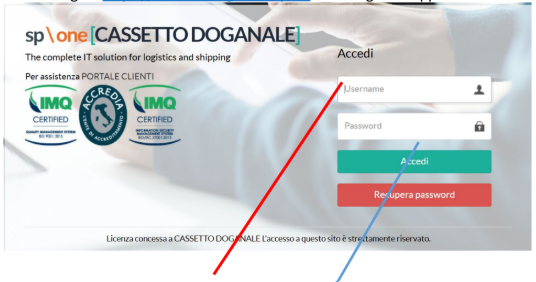
In the Username box you have to digit all capital letters: XXXXXXX
In the Password box you have to digit all capital letters: XXXXXX
For Syensqo Specialty Polymers Italy >> IT03521920961
User: SOLVAY.SPECIALTY
Password: SOLVAY25
For Syensqo Solutions Italy >> IT12290050157
User: SOLVAY.SOLUTIONS
Password SOLUTIONS25
3) Click on “ACCEDI”
3.1.2. I download the data from “CASSETTO DOGANALE”
After clicking on “Accedi” this image will appear:
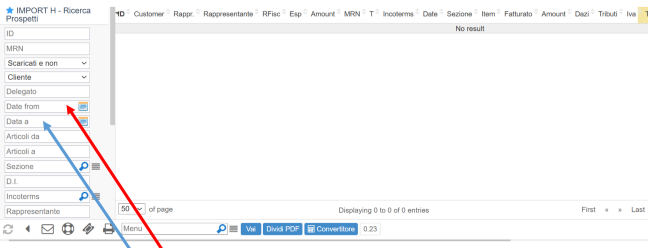
1. Search for box “DATE FROM”, select and it will appear a calendar. You have to select on the start day (i.e.: 01/01/2025)
2. Then do the same in the box “DATA A” to select the last day (e.i.: 31/01/2025).
After digiting both Calendar Dates, scrolling the sidebar down you have find the box “SEARCH”. Click on it to get the list of customs bills.
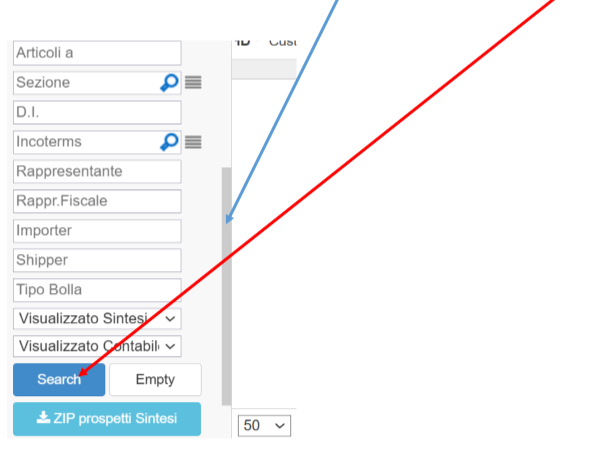
This image will appear:
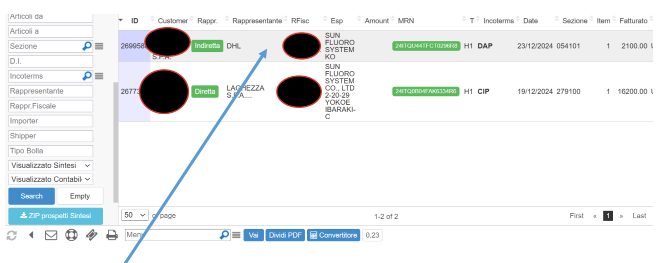
Clicking twice on the selected Customs Bills this image will appear:
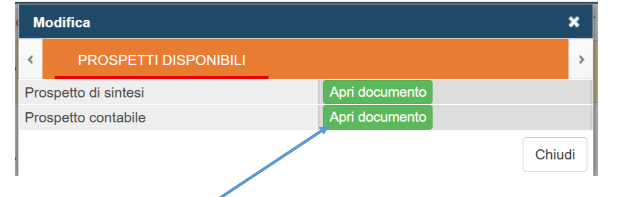
Clicking on the box “Apri documento” of the item “Prospetto contabile” will appear the Customs Bill, which you can download to justify or entries.

3.2. I prepare and post data from the 'Cassetto Doganale' portal
3.2.1. I prepare data from the 'Cassetto Doganale' portal
I handle the posting of customs data to accounting records using information from the 'Cassetto Doganale' portal with the support of an excel file (of easy maintenance in case of need).
For that, you just need to copy to sheet "STEP1 CUSTOMS DECLAR" the list downloaded from the “CASSETTO DOGANALE” website.
This will automatically update and create the accounting entry for all the submitted customs declarations.
Document type KR WP2 / R2 PF2
Debit Supplier “dogana” as table below is selected based on the "Sezione" code displayed in the statement retrieved.
Credit Waiting Account
Credit VAT (if applicable)
Credit Supplier “dogana” To clear the supplier account
Debit Waiting Account

- There are several Customs Offices that can be used, in case new codes appear we link the vendor code that belongs to that region/area. No need to create a new one.
https://www.adm.gov.it/portale/en/indirizzi-organigramma-periferico-area-dogane-uffici-dogane - ALL ENTRIES DONE SHOULD HAVE ATTACHED THE PDF DOWNLOADED FROM THE CUSTOMS.
- There are several Customs Offices that can be used, in case new codes appear we link the vendor code that belongs to that region/area. No need to create a new one.
3.2.2. I post data from the 'Cassetto Doganale' portal
Fictitious invoice is fully automated you just need to double check if entries are missing and update the path of the pdf file from the customs. You can add as many posting lines as you need (each entry has 4 lines), just copy paste the last 4 lines to add new posting entries.
Go to area where you saved the pdf's, select the document and with the right button select "copy as path" and paste it in the first line of each posting of the posting file (column V).

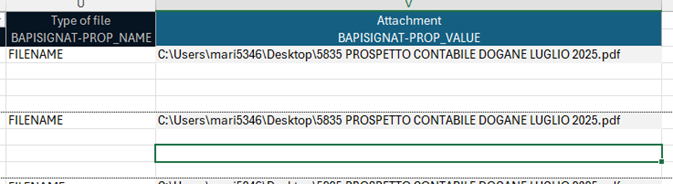
As soon as you are ready go to transaction ZZF_POSTING_FILE, select the file you want to post (without lines with zero amount) and process the transaction.
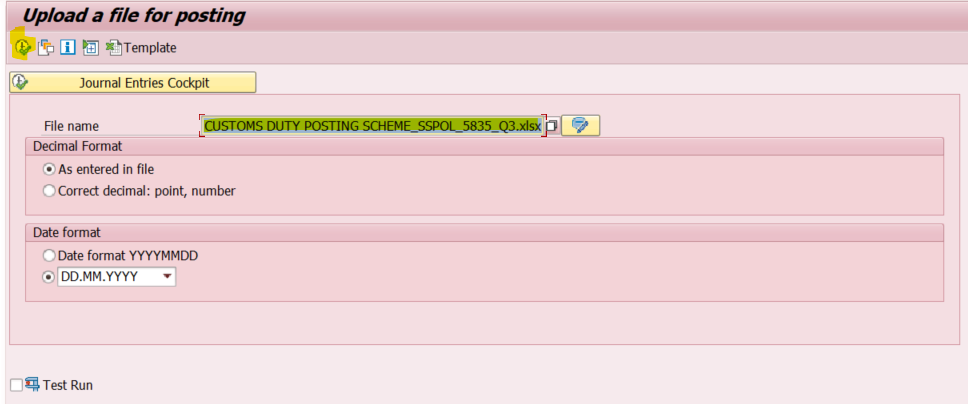
The outcome should be similar to this.

If something goes wrong with the attachment make sure to upload manually.
In PF2, using SM30 you can display the parameters of posting for the customs, the table Z1F_IT_LC_VENDOR has to be updated every year with code VW.

In WP2 this table does not exist.
3.2.3. I finish the process by clearing the waiting account and supplier accounts
STEP3 CLEARING VAT IMPACT sheet from the excel file, it is fully automated you just need to double check the amount posted in previous step (sometimes there are roundings) and update the path of the current excel file to justify all the entries.
If the entry has a VAT impact it will generate a small profit for the company, affecting the P&L.
Debit Waiting Account
Credit PL code 7470000000 with cost center B780008045 if you are working with SSPOL
Once this entry is done go to transaction F-03 and clear GL account (using a standard assignment we can clear it very fast - use the current year 2025) and save.
Also the supplier codes must be cleared of open items; use transaction F-44 and clear the accounts where postings were made. They should always get a zero balance, in case of difference, double check your entries.