

1. Objective and scope
This OP shows how to mass modify some data in SAP which can be performed in PF1_050, PF1_020 and WP1_400.
You are recommended to download existing data before you mass change something inside the system.
2. Mass modification

# | Main activities | Tips/Best practices | Key points |
1 | Double click on the system you want to update data | If you are new for mass update data, please be advised to try on quality system first QF1 = PF1_050, PF1_020 WQ1 = WP1 |
|

# | Main activities | Tips/Best practices | Key points |
2 | Insert T-code “XK99” and press “Enter” on keyboard |
|
|

# | Main activities | Tips/Best practices | Key points |
3 | Click | You can click more than 1 table |
|
4 | Click |
|
|


# | Main activities | Tips/Best practices | Key points |
5 | Click | You can click more than 1 field |
|
6 | Click |
|
|


# | Main activities | Tips/Best practices | Key points |
7 | Click | Vendor code is commonly used as the reference information If you are mass change in company or purchasing view, you might need to specify company code or purchasing organization |
|

# | Main activities | Tips/Best practices | Key points |
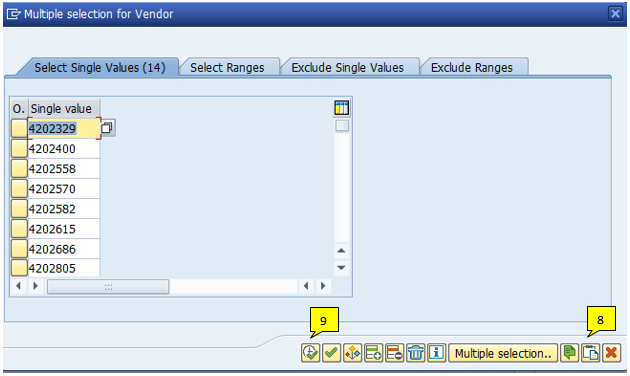
8 | Copy information for the template and click | You can check how many items you need to change from number in blankets |
|
9 | Click |
|
|


# | Main activities | Tips/Best practices | Key points |
10 | Click to execute |
|
|
# | Main activities | Tips/Best practices | Key points |
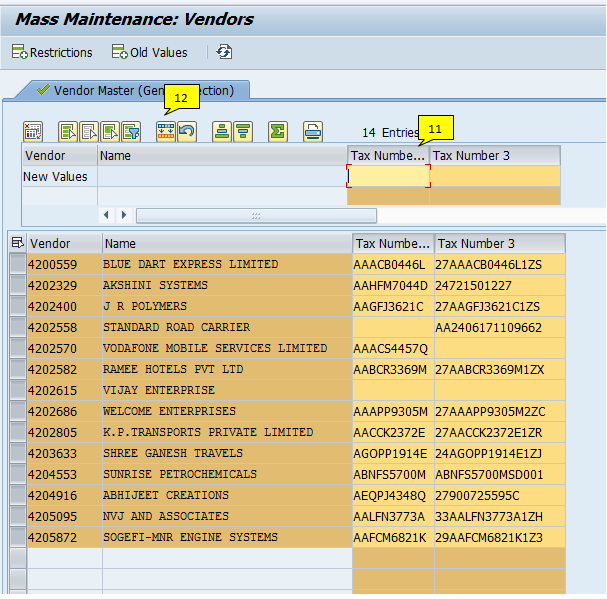
11 | Click on the field you want to clear the old data and make sure the entire column is highlighted | You can select more than 1 field | There are some cases the system already has the existing data inside the particular filed , you need to remove all data before upload new data |
12 | Click |
|
|


# | Main activities | Tips/Best practices | Key points |
13 | Copy data and paste them to the field you want to change | The list of reference will be listed in ascending order You can paste data only what you can see in the window, if you have a long list, please split into 10-20 items at a time |
|
14 | Click | If you are working on the large amount of data, it will take some time for the system to finish it |
|


# | Main activities | Tips/Best practices | Key points |
15 | Click | You may or may not have this message |
|

# | Main activities | Tips/Best practices | Key points |
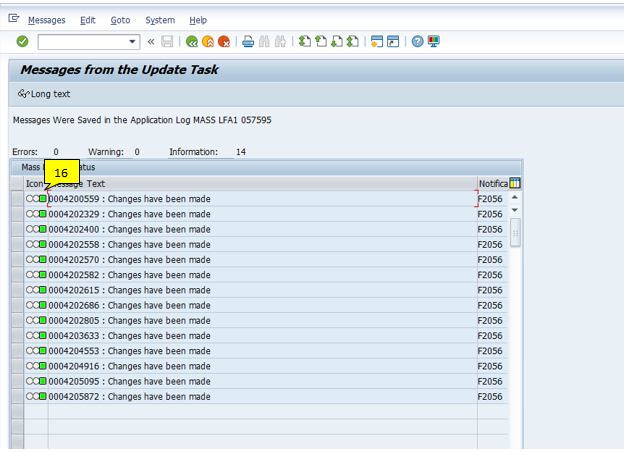
16 | The successful mass upload status is green | If it is red, it means that there are some errors, please see the reason in ‘Message Text’ |
|