Table of contents
1. Objective and Scope
2. Scope
3. Definitions
4. Routes creation in PF1
5. The route determination
6. Route Determination Mass Upload
7. Route Determination Mass Deletion 7
1. Objective and Scope
This document presents the general process for managing routes in PF1 system.
2. Scope
This process applies to all deliveries to be processed in the EMEA zone (except Gorzow in Poland), and exclusively with regard to sales transport.
3. Definitions
SD : Shipment Document. This file is a summary of all the elements necessary for carrying out a transport: route, carrier used, point of departure, point of arrival, mode of transport used ...
SCD : Shipment Cost Document. It is generated during the implementation (= ex works) of the transport mentioned in the SD where the accrual of the transport cost is created.
SHIPPING POINT : This is a code assigned to each site according to the nature of the product transported and the type of transport used (Ex: Collonges = 0151).
TARIFF ZONE : Division of a country to avoid having to enter the same tariff as many times as there are departments in the same geographical area (Ex: ZT Rhône-Alpes can include 01, 38, 69, 42)
EMEA : Europe, Middle East and Africa
TRANSPORT PLANNING POINT (TPO) : This is a code assigned to each administrative entity. It defines which site is responsible for organizing and paying for each transport.
RDT : Route Determination Table. This table allows that a route populate automatically in an order.
GOOGLE FORM : It is a way that allows sites to make emergency route requests.
4. Routes creation in PF1
The route defines the way used to deliver goods between 2 points, for a combination of criteria.
The route ID follows this rule :
- Country code of the departure zone + Shipping type + Forwarding agent + Loading port + Unloading port + Number of days for the transportation organization + Number of days of transit.
The route allows also to determine the transportation agent, and to schedule the sales order / PO dates, before checking the availability of the goods and the shipping conditions on the date agreed by the customer.
To enable an automatic determination of the route, a certain number of basic data is necessary :
- Departure country and zone : Come from the shipping point
- Arrival country and zone : Come from the Ship-to customer's address (arrival zone can be changed during sales order entry if needed)
- Transportation group : Come from the 'Plant' view of the material
- Shipping conditions : Come from the 'Sales' view of the customer (can be changed during order entry if needed)
- Routes propositions (created and updated by Logistics Data)
5. The route determination

6. Route Determination Mass Upload
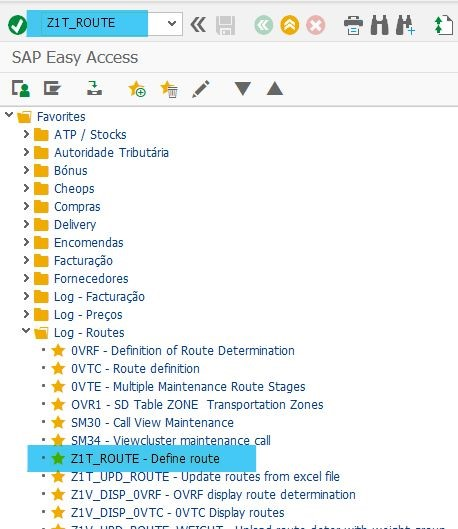
Route determination is performed with transaction Z1T_ROUTE
6.1 - Prepare your excel template with the mandatory fields:

6.2 - Save it as an Unicode file without the first line(the header):

6.3 - Go to Z1T_ROUTE transaction:
6.4 - Select Change button (the pencil):

6.5 - Then, select Determination button :

6.5.1 Press Upload Determination button:

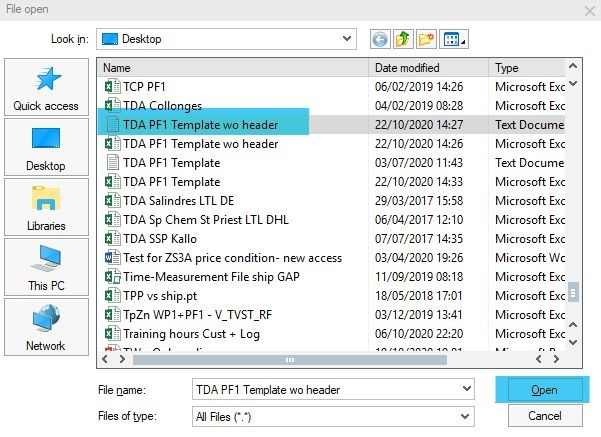
6.5.2 Select your txt file and press Open button:
6.5.3 You will obtain a report of your upload:

7. Route Determination Mass Deletion
Route determination is performed with transaction Z1T_ROUTE
7.1 - To delete a route determination, you must have to follow the previous steps (from 6.1 to 6.5) but in your template, you have to delete the route code:

7.2 - Press the Upload Determination Deletion button:

7.3 - Select your txt file and press Open button:

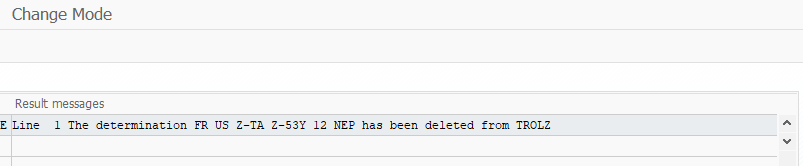
7.4 - You will obtain a report of your upload: