


High- Level Specification
| Implementing System | SAP ECC (PRS, PF2-050) |
|---|---|
| Invokes | ERP-111, ERP-289 |
| Business Process Reference | 03.02.07.01. Manage Sourcing MD (R2) (Solution Process) |
Functional Overview
The purpose of this interface is to extract latest Exchange Rate data from the SAP ECC (PRS / PF2-client 050 ) and send to SAP Cloud Integration (CPI).
SAP ECC receives a data feed of exchange rates from Reuters every Monday to Friday, and an existing program updates them to the currency table as "Standard" rate type M, and as Indirect rates from EUR to foreign Currency. For systems that do not have a direct source for Exchange Rates, this System Interface acts as the provider, with CPI providing the middleware capabilities to transform and deliver via technical capabilities in those systems.
This System Interface extracts the Standard Exchange rates ( M rates ) from ECC tables after they are updated on a defined schedule. The Interface first normalises the rates maintained internally by applying conversion factors, then calculates inverse and cross rates, before pushing the data to CPI. CPI then transforms the content to suite the receiver system specifications.
Scope and Objectives
This System Interface, a custom implementation in SAP ECC, sends:
- Selected list of Indirect, M type Exchange rates from TCURR table after applying any conversion factors - e.g. 1 EUR = 1.79230 AUD, 1 EUR = 1.17225 USD
- Direct rates calculated from the above - e.g. 1 AUD = 0.55794 EUR, 1 USD = 0.85306 EUR
- Cross rates for each of the Indirect rates - e.g. 1 AUD = 0.65404 USD, 1 USD = 1.52894 AUD
ECC carries out all rate calculations, so that there will be no discrepancies due to rounding. CPI is only responsible for routing and mapping to the target structures.
As of writing this specification, CPI will deliver the rates to Ariba and ICertis. The selection and calculation of the rates as shown above fulfils the requirements for these two systems.
Process Flow Diagram
Step | Description | Comment |
|---|---|---|
1 | The Custom Program implemented in SAP ECC PF2 Client 050 (PRS) reads the Exchange Rates from TCURR | TCURR table contains Exchange Rates of type M created by processing the Reuters file. |
2 | The Program harmonises the rates by applying any conversion factors and calculates inverses and cross rates, the maps the data to a defined simple structure | SAP ECC and CPI will share a simple schema for enable data mapping as required |
3 | The Program invokes a service (via a Proxy or a Service Client) and sends the data to a CPI end-point | CPI provides a service to receive the data. |
4 | CPI receives the data and initiates IFlow(s) to process them | |
5 | The IFlows transforms the data as required by the Processing Systems | |
6 | SAP CPI invokes the outbound services to send the data for processing in Receiver Systems | See ERP-111 for details on processing in Ariba to upload the data See ERP-290 for details on processing in ICertis to upload data |
Assumptions
- The System Interface relies completely on the data available in TCURR. It is assumed that Reuters upload program manages any exceptions and errors
- The System Interface reads values applicable on the run date for each currency. It is assumed that the receiver system validates, if required, dates and currency codes that may differ from what's defined in respective systems
- The System Interface calculations will be rounded to a defined number of decimal points for consistency. It is assumed that Inverse and Cross rate calculations that may lead to minor differences in rounding are acceptable
- The System Interface will only extract the list of Currencies listed below
Dependencies
- This System Interface depends on the Exchange rates loaded via the existing BAU process. If the rates upload is missing, for example due to a public holiday, or an exception, this integration will continue to process the most recent rates.
Security, Integrity and Controls
- Required authorisations to execute the Program as a Background Job in ECC need to be defined.
- Existing secure connectivity for communication between SAP ECC and SAP CPI will be applied.
- User role based authorisation will be applied to the Service hosted in CPI.
- Integration will use the integrity and control provided by Proxy framework in ECC.
Configuration Requirements
- The Custom Program implementing this service will be scheduled as a batch job
- SOAMANAGER configuration is required for Proxy Configuration
Special Requirements
- Ariba Exchange Rates have 10 decimal points and therefore the ECC output shall also adhere to this maximum to reduce rounding errors.
Design Rationale
The rationale of this System Interface is to provide a simple but reliable asynchronous flow of Exchange Rate data from SAP ECC to SAP CPI. The interface is implemented as a custom ABAP report that constructs and posts an XML payload directly to a CPI.
The program retrieves exchange rate data from standard SAP tables TCURR, but also uses data in other support tables like TCURF, and TCURV. The program selects only M rates, which are saved as indirect rates. For each rate, the system applies conversion factors and calculates the direct (inverse) rate, rounded to 10 decimal points. The output XML is structured in a flat format, reducing the need for further mapping or transformation in CPI.
The process is scheduled to run once daily, after the Reuters exchange rate upload job completes, ensuring that downstream systems such as SAP Ariba and ICertis receive consistent and current financial rates aligned with ECC’s valuation dates.
API Use
There are no API use in this System Interface. The Interface uses SOAP messaging protocol over HTTP/S transport to push the data to CPI.
Data Structure
The output consists of a flat XML structure:
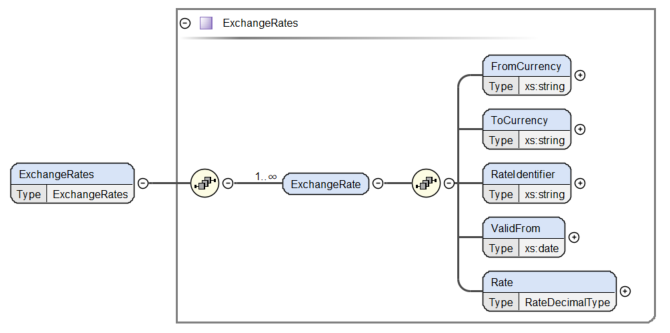
Schema File: ExchangeRateSchemaECC.xsd
Sample structure example in XML:
The following fields will be used to provide the required data structure of the interface:
| Node | Element | Description | Mandatory (Y/N) | Data Type |
|---|---|---|---|---|
| ExchangeRate | FromCurrency | From Currency Code. This is the from Currency Code. For Indirect rates, this is always EUR | Yes | 3 character String |
| ExchangeRate | ToCurrency | To Currency Code. | Yes | 3 character String |
| ExchangeRate | RateIdentifier | A unique Identifier for the Currency Rate | Yes | String |
| ExchangeRate | ValidFrom | The Date from TCURR table | Yes | XML Date type ('YYYY-MM-DD') |
| ExchangeRate | Rate | Exchange Rate | Yes | With 10 decimal points |
Calculation and Validation
Indirect Rate Mapping
Only "M" type rates are mapped
| Node | Element | Rule Type | Rule Instruction | Example Value |
|---|---|---|---|---|
| ExchangeRate | FromCurrency | Copy | Get value from TCURR-TCURR | Always EUR |
| ExchangeRate | ToCurrency | Copy | Get value from TCURR-FCURR | USD |
| ExchangeRate | RateIdentifier | Combine Strings | Concatenate values from TCURR-TCURR and TCURR-FCURR, separated by a colon. | EUR:USD |
| ExchangeRate | ValidFrom | Format | Transform value TCURR-GDATU to XML date format | 2025-09-30 |
| ExchangeRate | Rate | Calculate and format | Remove Indirect indicator, multiply by the Factors as below: Rate = (TCURR-UKURS indirect indicator removed) x TCURR-FFACT / TCURR-TFACT | 1.1743500000 |
Direct (Inverse) Rate Mapping
Direct rates are calculated by taking the inverse of the Indirect rates calculated in the previous table.
| Node | Element | Rule Type | Rule Instruction | Example Value |
|---|---|---|---|---|
| ExchangeRate | FromCurrency | Copy | Value from TCURR-FCURR | USD |
| ExchangeRate | ToCurrency | Copy | Value from TCURR-TCURR | Always EUR |
| ExchangeRate | RateIdentifier | Concatenate | Concatenate values from TCURR-FCURR and TCURR-TCURR, separated by a colon. | USD:EUR |
| ExchangeRate | ValidFrom | Format | Transform value TCURR-GDATU to XML date format | 2025-09-30 |
| ExchangeRate | Rate | Calculate | Calculate the Inverse of the corresponding Indirect rate | 0.8515348916 |
Cross Rate Mapping
This is required for all Indirect rates. Each of the Currency require a Cross with the other Currencies, as well as the inverse.
| Node | Element | Rule Type | Rule Instruction | Example |
|---|---|---|---|---|
| ExchangeRate | FromCurrency | Copy | Use ToCurrency from the calculated Indirect Rates | USD |
| ExchangeRate | ToCurrency | Copy | Use ToCurrency from the calculated Indirect Rates. There will be an entry for each of the ToCurrency values except for Currency Code in the above row | AUD |
| ExchangeRate | RateIdentifier | Concatenate | Concatenate values of the two Currency Codes (Both are from TCURR-FCURR column), separated by a colon. | USD:AUD |
| ExchangeRate | ValidFrom | Format | Transform value TCURR-GDATU to XML date format | 2025-09-30 |
| ExchangeRate | Rate | Calculate | Calculate the cross rate by dividing Indirect rate of the ToCurrency in this row by the Indirect Rate of the From Currency in this row. For Example, if calculating USD (FromCurrency) to AUD (ToCurrency), USD:AUD = EUR:AUD / EUR:USD | 1.5129864600 |
Processing Logic
Reuters Feed to SAP ECC
SAP ECC receives Exchange Rate feeds Monday to Friday and gets uploaded SAP ECC at 16:30 CET (with a contingency run at 17:20 CET). The feed from Reuters contains the list of Currencies and their rates with a given valid date. The rates are created in table with the given valid date, and does not validate whether all expected rates are available in the file. Hence the extraction of rates to send to downstream systems are will extract the dates that are valid as of run date - i.e. the most recent exchange rates.
The list of Currencies to be extracted are found here: Currency_List_ERP_110.txt. This file contains EUR to Foreign Currency rates - i.e. Indirect rates - received from Reuters and uploaded ECC.
- Extract the valid currencies, based on the list of currencies, with type M from TCURR that are valid for the run date - i.e. the most recent rate available in the system
- Sanitize the Rate value to remove the Indirect indicator, and apply the Conversion factors to get the normalised decimal value for the Indirect rate
- Calculate the Inverse to get the Direct rate
- For each Indirect Rate, calculate the Cross rate for each of the other Indirect Rates
- Generate the payload in XML
- Invoke the CPI service and pass the values for downstream processing
The batch job would be executed upon successful run of the existing currency upload job in PF2/050 and will be used as a start condition of this job.
Delta or Full Load Requirements
The integration will upload all M rates valid for the date.
Interface Alert & Monitoring
The batch job will be monitored using the BAU process through Automatic Check Job tool as per current practice. As part of the monitoring tool, an email will be sent to the respective parties through set distribution list. In addition, an incident ticket will be raised in SyRA through the Helix mailbox. The IT support group assigned in the batch job monitoring configuration would investigate the issue.
Details are documented in the file below.
Automatic_Check_Job_Monitoring.docx
Language Requirements
No Language Requirements
User Interface Requirements
Selection Screen
| Field Name | Description | Select: | Data Type/Length | Default Value/ Validation rule/ Value Help | Selection Logic |
|---|---|---|---|---|---|
| S_FCURR | From currency field | Select Option | WAERS | Input help implemented in TCURC | Select only the currencies in this select option |
| S_DATE | Validity date of the Currency to be picked | Select Option with no extensions | DATUM_INV | Standard date value help | Select the valid currencies in TCURR based on the date as of which the rates are effective (GDATU) |
| P_TEST | Testing of extract without sending to CPI | Check box | XFELD | N/A | If set as true, do not send the data to CPI |
Volumetrics
Each Integration contain entries for all Indirect rates, their inverses, and cross rates with the other Indirect rates. At the moment there are 70 Exchange Rates in the Reuters file, therefore this Integration produces an output containing 4,970 rates.
Performance Consideration
The output message from the Interface is less than 2MB, with one message per day. There is no performance specific consideration in SAP ECC as there are only around 5000 rates to be sent to the service on a given run.
Error Handling
- As mentioned in the monitoring section, the batch job would be monitored via the existing Automatic Check Job tool.
- In case the service in CPI is not reachable during the batch job run, the batch job would end in cancelled status and the respective IT support team would be notified of the cancellation.
- The said team would confirm if there's an outage in CPI and if confirmed that the outage is already resolved or the issue blocking the service is already resolved,
- first, attempt to Restart the failed message via SXMB_MONI
- if the above does not succeed, then the batch job would be rescheduled and re-executed.
- For any other possible errors in the system, the batch job can be rescheduled as soon as the issue has been resolved.
- There are no dependencies in re-executing the failed batch job nor any clean-up activities required before rescheduling the batch job.
Testing
How to Test
- Schedule or run the Custom Program implemented by this Interface
- Check in CPI that the Integration file has been received
Test Conditions and Expected Results
| ID | Condition | Expected Results |
|---|---|---|
| ERP-110-UT-001 | Defined set of Exchange Rates are available in the output to CPI | For the given set of Exchange rates, Indirect Rates, their Inverses and cross rates are available in the output |
| ERP-110-UT-002 | A new Currency has been configured | The output includes the new Currency, its inverse and cross rate with other exchange rates |
| ERP-110-UT-003 | A currency is removed from the batch job variant | The output does not contain the currency |
Test Considerations/Dependencies
Not Applicable
Other Information
Not Applicable
Development Details
Package
| Package Name | Parent Package |
|---|---|
| ZWPU_5_08 | N/A |
Other Development Objects
| Object Type | Object Name | Purpose/High Level Logic | Design Rationale Reference |
|---|---|---|---|
| CLAS | ZMM_CO_CL_EXCHANGE_RATES_PORT | Currency Exchange Proxy Class | |
| DTEL | ZMM_RATE_DECIMAL_TYPE | Data element for Rate Decimal Format | |
| TABL | ZMM_EXCHANGE_RATES | Structure for Currency Exchange | |
| TABL | ZMM_SEND_EXCHANGE_RATES_REQ | Structure for the Currency Exchange Request | |
| TABL | ZMM_EXCHANGE_RATES_EXCHANGE_TB | Structure for the Exchange | |
| TTYP | ZMM_EXCHANGE_RATES_EXCHANGE_RT | Table type for the Exchange structure | |
| REPS | ZMM_CURRENCY_CONV_INTERFACE | Program triggering the Currency Exchange | |
| REPS | ZMM_CURR_CONV_INTF_CL01 | Include Program under the Main Program | |
| REPT | ZMM_CURRENCY_CONV_INTERFACE | Report Text for the main program | |
| MSAG | ZMM_EXRATE | Message Class for Exchange Rates |