

Overview
Each space have its own space menu accessible from this left button:
The Space menu is just a selection of existing pages (mostly, "Editorials"), organized in a flat or hierarchical way, at your choice.

Advanced level
This operation need to use the "Tridion Content Manager" instead of the better known "Site Edit".
Table of contents
Step-by-step
Step 1: Open the space menu component | |
|---|---|
1. Reach the following Tridion Content Manager path (click the link): |  |
2. According to your entity, reach your space sub-folder. Example: \SW W1 ONE Master\Building Blocks\Component\1 ONE\Function\Finance\ |  |
| 3. Double click the banner component in this folder | 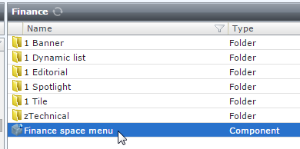 |
| 4. Keep the default "Edit the parent item", then press "OK" |  |
Step 2: Understand the space menu component structure | |
 | |
Related articles
| Related docs | ||||
|---|---|---|---|---|
 The best way to get IT support is to use the new
Service One Platform.
The best way to get IT support is to use the new
Service One Platform.