
Exchange Rates
In WBP
List
| Type Code | BW description | Currencies | Frequency | Periods |
|---|---|---|---|---|
| CAR1 | Magnitude Exchange Rate | To EUR only | Monthly | Up to 2020 |
| CAR3 | Exchange Rate base on CAR1 ref. crcy EUR | All | Monthly | Up to 2020 |
| M | Standard translation at average rate | All | Daily | Up to last day |
| ZRH2 | Exchange Rate base on ZHRO ref. crcy EUR | All | Monthly | Up to last month |
| ZRH3 | Exchange Rate base on ZHRO ZBUD ref. EUR | All | Monthly | |
| ZRHO | Monthly valuation consolidation rate | All | Monthly | Up to year + |
| C | Cumulated average monthly (reporting) | To EUR only | Monthly | Up to last month |
| ZBUD | ZBUD Monthly reval. for budget (spring) | To EUR only | Monthly | Up to current month |
CAR1 - Magnitude Exchange Rate
Description
CAR1 is the joining of the "un-cumulated" version of the Cumulated Monthly Mean (CMM - Also refered as "YTD Monthly Avg Rate") AND the PREV (Budget) rates from BFC.
For past months, CAR1 is the un-cumulated CMM and for the future months, it is the PREV rate.
When to use it
Must be used for Profit & Loss accounts (cumulated) and most of balance sheet movement flows.
Source
Business Objects receives the Cumulated Monthly Mean rate (CMM) and the PREV (Budget) rates from BFC and calculates via a program the "un-cumulated" monthly rates and then sends it to BW via flat file.
For details of the calculations in BO :
Technical Details
- Process chain Z_TAUX_CARAT
- File is //exploit/BW/TAUX_DEV/Taux_dev_carat.lst
- Program Z_CREATE_EXCHANGE_RATES_CARAT
CAR3 - Exchange Rate base on CAR1 ref. crcy EUR
CAR3 is the same rate as CAR1 but can be used to convert from any currency to any currency.
As CAR1 can only be used to convert to EUR, CAR3 is set so that EUR is used as a "Pivot" currency.
M - Standard translation at average rate
Source
The M rate comes directly from SAP WP1.
ZRHO - Monthly valuation consolidation rate
Description
It's the End of month rate (FDM) from BFC. Rate is posted by the European Central Bank (ECB - TARGET system) or related National Central Bank, on last quotation day.
Source
BFC
When to use it
Must be used for Balance Sheet accounts, end of period flow.
Some examples
| Application | Query | Rate | Time Reference |
|---|---|---|---|
| GSV | CVA 01_00_00: Invoiced purchasing turnover (FI) GSV_QRY_CUB_FIAP1_CVA_010000 | CAR3 | 0CALMONTH - Invoice Posting Date |
| TR | BW - Shipment costs analysis new (Core Query) BW_QRY_MPR_TR002_0001 | CAR1 | 0CALMONTH - Shipment Creation Date |
| PS | BW - Projects PEC & Cash (Core Query) BW_QRY_MPR_PS004_0001 | CAR3 | 0CALMONTH :
|
| FC2 | FC2-A01 - Cost Analyst - NVC destination (Core) BW_QRY_MPR_FC001_0010C | CAR3 | 0FISCPER - Posting Date |
| CBS | CBS - Functions - end of month (Core query) BW_QRY_MPR_FC001_0001 | CAR3 | 0FISCPER - Posting Date |
| IM | BW - Stock evolution with conversion (Core Query) BW_QRY_MPR_IC001_0062 | ZRHO | 0CALMONTH - Stock Month |
| FIAR | BW - Credit Management Overdue (Core Query) BW_QRY_MVFIAR01_0002 | ZRH2 | Selected Date (Variable) |
| FIWC | BW - Working Capital for GBU (Core Query) BW_QRY_MPR_WC02_0002 | ZRH2 | Selected Date (Variable) |
In PQ1
Currency Conversion How To
How to check the rates
- Go to transaction SE16
- Select table TCURR
- Enter a Exchange rate type (ZRHO for WC)
- Enter a from currency / to currency
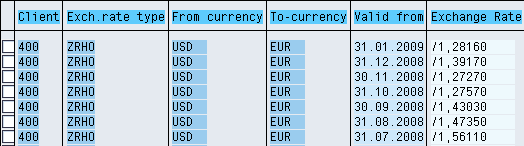
Note If there is no rate for a period BW will use the previous one! Using the example above: if I need to convert from USD to EUR with date = 10.02.2009 since there is no rate it will use the January rate
How to check the conversion types
- Go to transaction RSCUR
- Select a conversion type
- You can then check :
- The exchange rate used
- The time characteristic used to apply the rate
- The target currency (fixed, fixed variable, open)
How to create and transport currency factor in BW System
How to create a new rate type in BW
Management of the currencies on the WBP System