


| Status | Revision under Review |
|---|---|
| Owner | |
| Stakeholders |
Purpose
The purpose of this document is to define the conversion approach to create the WBS - CAPEX, OPEX, Statistical in S/4 HANA.
In SAP, a WBS element (Work Breakdown Structure element) is a key component in project structure. WBS elements are organized hierarchically and facilitates planning, execution, and control.
Conversion Scope
The scope of this document covers the approach for converting applicable active WBS - CAPEX, OPEX, Statistical from Legacy Source Systems into S/4HANA following the WBS - CAPEX, OPEX, Statistical Master Data Design Standard.
The DCT will contain transformed data from source system for Capital and Budget Managed Operating PS Project Definitions in scope for migration, enrichment will be necessary to produce properly formatted data load sheets for S/4 HANA.
Relevancy Criteria
The data from legacy system to be included in the initial extract includes:
The data from legacy system includes:
- Capital projects (e.g. Industrial, Facility, IT and R&I) open as at migration date postings in the agreed migration time or has AUC balance.
- Budgeted Operating projects (e.g. Budgeted Maintenance, Marketing, Demolition projects) open as at migration date with postings in the agreed migration time
- Closed Capital Projects with postings within the agreed timeframe.
- Closed Budgeted Operational projects with postings within the agreed time frame.
- Specifically also included are IT and R&I Projects (open as at migration date and (closed projects with postings the agreed timeframe) with postings postings in the agreed migration time
The data from legacy system excludes
- Project Definition in out of scope Company Codes
- Project Definitions in out of scope Plants.
- Project which has deletion indicator set.
- Project marked as closed and not included in 3, 4 and 5 above
- Non Budgeted Maintenance Projects.
Additionally WBS elements without any initial extract will be created in the DCT only, this includes -
- WBS elements with no reference to PPM items
- For the Provisions (One WBS per Company code/Plant)
- Intercompany recharge (One Level 1 WBS per Company Code, Level 2 WBS per Trading Company Code)
List of source systems and approximate number of records
| Source | Scope | Source Approx No. of Records | Target System | Target Approx No. of Records |
|---|---|---|---|---|
| PF2 | Relevant WBS elements | S/4 Hana | TBD | |
| WP2 | Relevant WBS elements | S/4 Hana | TBD | |
| DCT | S/4 Hana | TBD |
Inter-company recharge WBS elements are replicated to other S/4 Hana instances by batch job as per business process.
Identification Logic
In principal any WBS element belonging
Capital project is a project that has any WBS elements with a Investment Profile. PRPS-IZWEK
Budgeted Opex is any other project that has any WBS elements with budget. WBS has entry in BPGE for value type 41
IT Project is a project that has a WBS element one of the following criteria
- in WP2 user field 1 starting with IT PRPS-USR00
- in PF2 user field 2 starts with IT PRPS-USR01
- has a WBS element Family is SBS IS
R&I Project is a project meeting one of the following criteria,
- in PF2 Project ID starts with R- PROJ-PSPID
- in WP2 Project ID starts with RR- PROJ-PSPID
- has a WBS element with WEGO ID field filled PRPS-ZZ_WEGO_ID
- has a WBS element family indicated as R&I or R&I Others
Industrial projects
- Capital project is a project that has any WBS elements with a Investment Profile. PRPS-IZWEK
- Budgeted Opex is any other project that has any WBS elements with budget. WBS has entry in BPGE for value type 41
- has a WBS element family indicated as GEC, Regular,RegAffairs or Others
Facilities Projects
- Capital project is a project that has any WBS elements with a Investment Profile. PRPS-IZWEK
- Budgeted Opex is any other project that has any WBS elements with budget. WBS has entry in BPGE for value type 41
- has a WBS element family indicated as Facilities
Additional Information
Multi-language Requirement
The WBS element name is maintained in a single language only, no translation required.
Document Management
Not required.
Legal Requirement
Not applicable
Special Requirements
Not applicable
Target Design
The technical design of the target for this conversion approach.
| Table | Field | Data Element | Field Description | Data Type | Length | Requirement |
|---|---|---|---|---|---|---|
| PRPS | POSID | PS_POSID | WBS element | CHAR | 24 | Mandatory |
| PRPS | POST1 | PS_POST1 | Description | CHAR | 40 | Mandatory |
| PRPS | VERNR | PS_VERNR | No. of Person Resp. | NUMC | 8 | Mandatory |
| PRPS | ASTNR | PS_ASTNR | Applicant no. | NUMC | 8 | Mandatory |
| PRPS | PBUKR | PS_PBUKR | Company code | CHAR | 4 | Mandatory |
| PRPS | PKOKR | PS_PKOKR | Controlling area | CHAR | 4 | System Generated |
| PRPS | PRCTR | PRCTR | Profit Center | CHAR | 10 | Mandatory |
| PRPS | PRART | PS_PRART | Project Type | CHAR | 2 | Mandatory |
| PRPS | PLAKZ | PS_PLAKZ | Planning Element | CHAR | 1 | System Generated |
| PRPS | BELKZ | PS_BELKZ | Acct asst elem. | CHAR | 1 | Conditional |
| PRPS | FAKKZ | PS_FAKKZ | Billing Element | CHAR | 1 | Conditional |
| PRPS | FKSTL | PS_FKSTL | Responsible CC | CHAR | 10 | Mandatory |
| PRPS | FKOKR | PS_FKOKR | CA resp. cost center | CHAR | 4 | Mandatory |
| PRPS | FABKL | FABKL | Factory Calendar | CHAR | 2 | System Generated |
| PRPS | PWPOS | PS_PWPOS | Currency | CUKY | 5 | System Generated |
| PRPS | WERKS | WERKS_D | Plant | CHAR | 4 | Mandatory |
| PRPS | SLWID | Field key | CHAR | System Generated | ||
| PRPS | USR08 | USR08 | Exp Capital'ion | DAT | 8 | Conditional |
| PRPS | USR10 | USR10 | Cross System | CHAR | 1 | Conditional |
| PRPS | SCOPE | SCOPE_CV | Object class | CHAR | 2 | System Generated |
| PRPS | XSTAT | PS_XSTAT | Statistical | CHAR | 1 | Conditional |
| PRPS | KOSTL | PS_KOSTL | CCtr posted actual | CHAR | 10 | Conditional |
| PRPS | IMPRF | IM_PROFIL | Investment Profile | CHAR | 6 | Conditional |
| PRPS | FUNC_AREA | FKBER | Functional Area | CHAR | 16 | Mandatory |
| PRPS | PSPHI | PS_PSPID | Project Definition | CHAR | 24 | Mandatory |
| PRPS | STUFE | PS_STUFE | Level | CHAR | 3 | Mandatory |
| PRHI | UP | PS_PHIUP | WBS_UP | NUMC | 8 | System Generated |
| PRHI | LEFT | PS_PHILE | WBS_LEFT | NUMC | 8 | System Generated |
| PRPS | ZX01 | CAPEX/ OPEX | CHAR | 10 | Conditional | |
| PRPS | ZX02 | Maintenance event | CHAR | 40 | Conditional | |
| PRPS | ZX03 | Trading company code | CHAR | 4 | Conditional |
Data Cleansing
Data cleansing tasks are set out in CNV-1024 which deals with projects and also by definition includes the closing of WBS elements in those projects.
| ID | Criticality | Error Message/Report Description | Rule | Output | Source System |
|---|---|---|---|---|---|
1 | Projects with no actuals / Commitment in agreed timeframe | If the projects do not have any actual or commitments in the past year, and is not used as account assignment on open maintenance orders then set the projects should have status CLSD (CJ20N) | Old project which can be closed | WP2/PF2 | |
| 2 | Open WBS elements, not relevant for migration, with assigned maintenance orders. | An open WBS element which does not fall within the scope of migration (not a Capex Projects, IT Projects, R&I Projects and Budgeted OPEX project) and has assigned open maintenance orders. | Maintenance orders to be closed or after migration will have assignment and settlement rules to cost centers | WP2/PF2 |
Open WBS elements, not relevant for migration, with assigned maintenance orders
Selection
This is done for Open Projects Only which fall within the company codes relevant for migration
Identify projects not going to PPM.
Project does not have any WBS elements with a Investment Profile. PRPS-IZWEK
And
Project does not have any WBS with
- in WP2 user field 1 starting with IT PRPS-USR00
- in PF2 user field 2 starts with IT PRPS-USR01
And
Project does not meet any of the following
- in PF2 Project ID starts with R- PROJ-PSPID
- in WP2 Project ID starts with RR- PROJ-PSPID
- has a WBS element with WEGO ID field filled PRPS-ZZ_WEGO_ID
And
Project does not have any WBS elements with budget. WBS has budget if it has an entry in BPGE for value type 41
For projects not going to PPM we determine open WBS elements not PPM relevant..
Select Orders from AUFK
Order Category = 30
Deletion Flag is Blank
Closed is Blank
PSPEL = Not PPM Relevant WBS elements
Output
Project Number (PROJ)
WBS Number (PRPS)
Order Number (AUFK)
Company Code (AUFK)
Plant (AUFK)
Technical completion date (AUFK)
Conversion Process
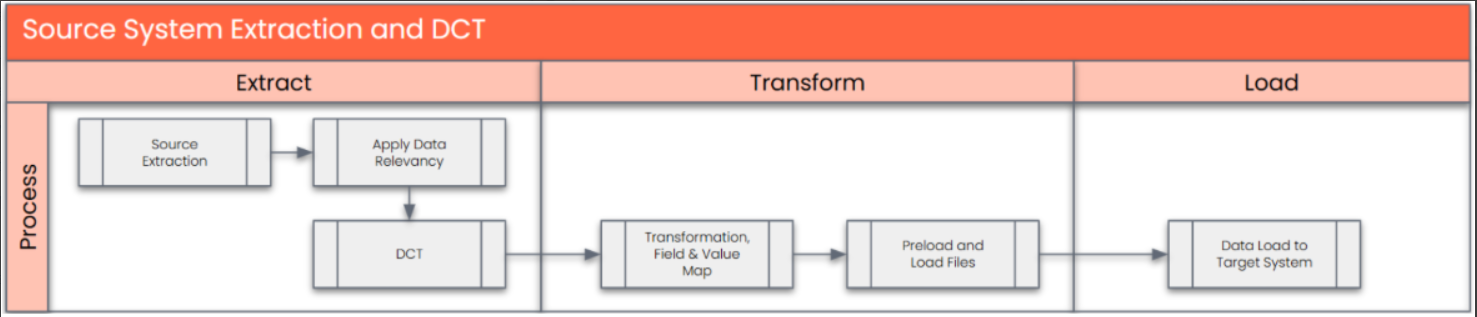
The high-level process is represented by the diagram below:
Data Privacy and Sensitivity
Not applicableExtraction
Extract data from a source into Syniti Migrate
. There are 2 possibilities:
- The data exists. Syniti Migrate connects to the source and loads the data into Syniti Migrate. There are 3 methods:
- Perform full data extraction from relevant tables in the source system(s).
- Perform extraction through the application layer.
- Only if Syniti Migrate; cannot connect to the source, data is loaded to the repository from the provided source system extract/report.
- The data does not exist (or cannot be converted from its current state). The data is manually collected by the business directly in Syniti Migrate. This is to be conducted using DCT (Data Collection Template) in Syniti Migrate
The agreed Relevancy criteria is applied to the extracted records to identify the records that are applicable for the Target loads
Extraction Run Sheet
| Req # | Requirement Description | Team Responsible |
|---|---|---|
1 | Confirm scope and extraction approach for each ECC source systems WP2, PF2 (direct DB or manual extract) | Data Team (I2M), Data Team (Syniti) |
2 | Establish and validate Syniti connectivity to both ECC source systems | Technical / Basis Team, Data Team (Syniti) |
3 | Perform full data extraction from relevant SAP WBS elements from both source systems WP2, PF2 | Data Team (Syniti) |
4 | Extract WBS via the application layer for additional validations for Manual Data Collection using DCTs | Data Team (I2M) |
5 | Apply agreed Relevancy Criteria to filter only applicable WBS records for S/4HANA | Data Team (I2M), Data Team (Syniti) |
6 | In case of restricted access or connectivity issues, receive pre-extracted reports/files from source system team and upload to Syniti Migrate manually | Data Team (I2M), Data Team (Syniti) |
8 | Perform data quality checks on extracted records (e.g., missing fields, invalid dates, incorrect formats) | Data Team (I2M), Data Team (Syniti) |
9 | Review and approve extracted data sample sets from each source system before transformation begins | Business / Functional Team |
Selection Screen
Not applicable| Selection Ref Screen | Parameter Name | Selection Type | Requirement | Value to be entered/set |
|---|---|---|---|---|
Data Collection Template (DCT)
Target Ready Data Collection Template will be created for data with exception of some fields which require transformation as mentioned in the transformation rule.WBS - CAPEX, OPEX, Statistical DCT Rules:
| Field Name | Field Description | Rule |
|---|---|---|
| PSPHI | Project Definition | Project ID assigned to the WBS elements. Refer table PROJ-PSPHI for allowed values. Dropdown values from PROJ-PSPHI It is a Required Field: Preload Check to be done to confirm that this is field in the Data Collection Template |
| POSID | WBS element | Unique Identifier for the WBS Element as per project coding mask. It is a Required Field: Preload Check to be done to confirm that this is field in the Data Collection Template. |
| POST1 | Description | 40 character description of the WBSE. It is a Required Field: Preload Check to be done to confirm that this is field in the Data Collection Template |
| VERNR | No. of Person Resp. | This field represents the position of the Person Responsible for a WBS Element. It will be derived from the Project Definition and can be overwritten. Dropdown values from TCJ04-PS_VERNR It is a Required Field: Preload Check to be done to confirm that this is field in the Data Collection Template. |
| ASTNR | Applicant no. | This field represent the position of the Project Financial Controller. It will be derived from the Project Definition and can be overwritten. Dropdown values from TCJ05-ASTNR. It is a Required Field: Preload Check to be done to confirm that this is field in the Data Collection Template. |
| PRCTR | Profit Center | In Syway, Profit Center represent a plant or a site or generic for GBU. It will be derived from the Project Definition and can be overwritten. Dropdown values from CEPC-PRCTR It is a Required Field: Preload Check to be done to confirm that this is field in the Data Collection Template. |
| PRART | Project Type | It is an attribute that serve as classification field that help to define the nature, purpose, and governance of a WBS element. They are useful for reporting, controlling, and compliance alignment. It is a Required Field: Preload Check to be done to confirm that this is field in the Data Collection Template. |
| BELKZ | Acct asst elem. | This indicator enables financial posting on the WBS element. It will be checked in below conditions- It is a Required Field: Preload Check to be done to confirm that this is field in the Data Collection Template where required and blank when not. |
| FAKKZ | Billing Element | Only relevant for project profile of project maintained in PSPHI is a Recharge Project |
| FKSTL | Responsible CC | Cost Center responsible for delivery of work. Refer master data table field CSKS-KOSTL for allowed values. It is a Required Field: Required for all account assigned WBS elements. Preload Check to be done to confirm that this is field in the Data Collection Template when required. |
| WERKS | Plant | Plant represent a site of the WBS element. Mandatory for all WBS elements. It is a Required Field: Preload Check to be done to confirm that this is field in the Data Collection Template |
| USR08 | Exp Capital'ion | Expected Capitalization date marks the anticipated execution of the AUC final settlement, restricted to WBS elements with Investment Profile. Date Field. |
| USR10 | Cross System | This checkbox field, will be selected when inter-company services are needed for a WBS element. |
| KOSTL | CCtr posted actual | This field represents the receiver Cost Center of actual cost for any actual financial posting on the statistical WBS element. This field will be mandatory for all statistical WBS element - WBS elements of project with Project Profile "ZPS0001" where Project Type is Capital Lease Dropdown values from KOSTL Preload validation required to ensure field is filled when required. |
| IMPRF | Investment Profile | Investment Profile on WBS element is used to enable auto generation of AuC w.r.t. predefined asset class. Applicable for CAPEX projects (with Project Profile ZPS0001) Dropdown values from TAPRF-IVPRO for allowed values. Preload validation required to ensure field is filled when required. |
| FUNC_AREA | Functional Area | Functional Area is an organisational unit used to classify expenses based on their purpose or function. Dropdown values from TFKB-FKBER. |
| STUFE | Level | In a project, WBS elements are structured across multiple levels to form a tree-like hierarchy for better project controlling and monitoring. |
| UP | WBS_UP | This field represents the immediate superior WBS element (parent node) required for establishing parent-child relationships in the WBS hierarchy. Can only be a WBS element within the same PSPHI. It is a Required Field for level 2 and lower: Preload Check to be done to confirm that this is field in the Data Collection Template when required. |
| LEFT | WBS_LEFT | This field represents the left-adjacent WBS element in the same hierarchy level required for navigating sibling relationships within a WBS hierarchy. Can only be a WBS element within the same PSPHI. Preload Check to be done to confirm that this is field in the Data Collection Template when required. |
| ZX01 | CAPEX / OPEX | This field identifies expense is CAPEX or OPEX.
Preload Check to be done to confirm that this is field in the Data Collection Template when required. |
| ZX02 | Maintenance event | This field is used to determine the settlement rule receiver for the relevant maintenance Work Order. This field is used to determine the settlement rule receiver for the relevant maintenance Work Order. This field will be applicable for projects with Project Profile ZPS0001 & ZPS0002 at level 3 & 4 WBS element. |
| ZX03 | Trading company code | This field will be applicable when Project Type = Intercompany Recharge. Mandatory at Level 2 WBS to determine the trading company for intercompany recharges |
| Instance | Instance where the WBS is to be loaded. (Field required in DCT) |
In conjunction with DCT business user will be provided with Person Responsible / Applicant list for reference.
Extraction Dependencies
| Item # | Step Description | Team Responsible |
|---|
Transformation
The Target fields are mapped to the applicable Legacy field that will be its source, this is a 3-way activity involving the Business, Functional team and Data team. This identifies the transformation activity required to allow Syniti Migrate to make the data Target ready:
- Perform value mapping and data transformation rules.
- Legacy values are mapped to the to-be values (this could include a default value)
- Values are transformed according to the rules defined in Syniti Migrate
- Prepare target-ready data in the structure and format that is required for loading via prescribed Load Tool. This step also produces the load data ready for business to perform Pre-load Data Validation
Transformation Run Sheet
| Item # | Step Description | Team Responsible |
|---|---|---|
1 | Obtain DCT Sign-off from Business | Data Team |
2 | Execute and Load and perform Transformation | Data Team |
3 | Monitor the transformation progress and ensure performance and completion is within allowed timeframe | Data team |
4 | Review and Validate Error and Preload Reports | Data Team |
5 | Generate data load count. | Data team |
6 | Generate Load Files | Data Team |
7 | Log errors as defects, if any and address resolutions. Close defects. | Data team |
8 | Re-transform and re-validate the Pre-load reports if necessary. | Data team |
9 | Validate the transformed file as part of pre-load validation, raise data defects or provide the pre-load sign-off. | Business |
10 | Analyze and resolve any pre-load defects logged by business. | Data team |
11 | Repeat steps 7 to 10 if necessary | Data team |
12 | Proceed to pre-load validations | Data team |
Transformation Rules.
| Rule # | Source system | Source Table | Source Field | Source Description | Target System | Target Table | Target Field | Target Description | Transformation Logic |
|---|---|---|---|---|---|---|---|---|---|
| 1 | PF2/WP2 | PRPS | POSID | WBS element | S/4 Hana | PRPS | POSID | WBS element | WBS element numbering is based on the rules set out in section Parent/Number/Level Determination below. |
| 2 | DCT | PRPS | POSID | WBS element | S/4 Hana | PRPS | POSID | WBS element | Manually copy from Non ECC source |
| 3 | PF2/WP2 | PRPS | POST1 | Description | S/4 Hana | PRPS | POST1 | Description | Copy from source to target system |
| 4 | DCT | PRPS | POST1 | Description | S/4 Hana | PRPS | POST1 | Description | Manually copy from Non ECC source |
| 5 | PF2/WP2 | PRPS | VERNR | No. of Person Resp. | S/4 Hana | PRPS | VERNR | No. of Person Resp. | Value Mapping: Responsible Person to new Person Responsible Position ID |
| 6 | DCT | PRPS | VERNR | No. of Person Resp. | S/4 Hana | PRPS | VERNR | No. of Person Resp. | Manually copy from Non ECC source |
| 7 | PF2/WP2 | PRPS | ASTNR | Applicant no. | S/4 Hana | PRPS | ASTNR | Applicant no. | Value Mapping: Applicant to new Applicant Position ID |
| 8 | DCT | PRPS | ASTNR | Applicant no. | S/4 Hana | PRPS | ASTNR | Applicant no. | Manually copy from Non ECC source |
| 9 | PF2/WP2 | PRPS | PBUKR | Company code | S/4 Hana | PRPS | PBUKR | Company code | Value Mapping: Old to New Company Code |
| 10 | DCT | S/4 Hana | PRPS | PBUKR | Company code | If Source of WBS is construct then Copy from Project Definition using target PSPHI | |||
| 11 | All | S/4 Hana | PRPS | PKOKR | Controlling area | Default from project profile | |||
| 12 | PF2/WP2 | PRPS | PRCTR | Profit Center | S/4 Hana | PRPS | PRCTR | Profit Center | Value Mapping: Old to New Profit Centre |
| 13 | DCT | PRPS | PRCTR | Profit Center | S/4 Hana | PRPS | PRCTR | Profit Center | Manually copy from Non ECC source |
| 14 | DCT | PRPS | PRART | Project Type | S/4 Hana | PRPS | PRART | Project Type | Manually copy from Non ECC source |
| 15 | PF2/WP2 | PRPS | BELKZ | Acct asst elem. | S/4 Hana | PRPS | BELKZ | Acct asst elem. | Copy from source to target system |
| 16 | DCT | PRPS | BELKZ | Acct asst elem. | S/4 Hana | PRPS | BELKZ | Acct asst elem. | Manually copy from Non ECC source |
| 17 | All | PRPS | FAKKZ | Billing Element | S/4 Hana | PRPS | FAKKZ | Billing Element | Default from project profile |
| 18 | PF2/WP2 | PRPS | FKSTL | Responsible CC | S/4 Hana | PRPS | FKSTL | Responsible CC | Value Mapping: Old to New Cost Centre |
| 19 | DCT | PRPS | FKSTL | Responsible CC | S/4 Hana | PRPS | FKSTL | Responsible CC | Manually copy from Non ECC source |
| 20 | All | S/4 Hana | PRPS | FKOKR | CA resp. cost center | Default from project profile | |||
| 21 | All | S/4 Hana | PRPS | FABKL | Factory Calendar | Copy Factory Calendar from Plant using Field WERKS | |||
| 22 | PF2/WP2 | PRPS | PWPOS | Currency | S/4 Hana | PRPS | PWPOS | Currency | Copy from Project Definition |
| 23 | DCT | S/4 Hana | PRPS | PWPOS | Currency | Copy from Project Definition | |||
| 24 | PF2/WP2 | PRPS | WERKS | Plant | S/4 Hana | PRPS | WERKS | Plant | Value Mapping: Old to New Plant |
| 25 | DCT | PRPS | WERKS | Plant | S/4 Hana | PRPS | WERKS | Plant | Manually copy from Non ECC source |
| 26 | DCT | PRPS | USR08 | Exp Capital'ion | S/4 Hana | PRPS | USR08 | Exp Capital'ion | Manually copy from Non ECC source |
| 27 | DCT | PRPS | USR10 | Cross System | S/4 Hana | PRPS | USR10 | Cross System | Manually copy from Non ECC source |
| 28 | All | S/4 Hana | PRPS | SCOPE | Object class | Copy from Project Definition | |||
| 29 | All | S/4 Hana | PRPS | XSTAT | Statistical | Set to X for WBS Elements of Project Profile ZPS0003 Set to X for WBS elements with Project Type 16 | |||
| 30 | DCT | PRPS | KOSTL | CCtr posted actual | S/4 Hana | PRPS | KOSTL | CCtr posted actual | Manually copy from Non ECC source |
| 31 | PF2/WP2 | PRPS | IMPRF | Investment Profile | S/4 Hana | PRPS | IMPRF | Investment Profile | Value Mapping: Old to new Investment Profile |
| 32 | DCT | PRPS | IMPRF | Investment Profile | S/4 Hana | PRPS | IMPRF | Investment Profile | Manually copy from Non ECC source |
| 33 | PF2/WP2 | S/4 Hana | PRPS | FUNC_AREA | Functional Area | Copy from Project Definition PROJ-FUNC_AREA | |||
| 34 | DCT | PRPS | FUNC_AREA | Functional Area | S/4 Hana | PRPS | FUNC_AREA | Functional Area | Manually copy from Non ECC source |
| 35 | PF2/WP2 | PRPS | PSPHI | Project Definition | S/4 Hana | PRPS | PSPHI | Project Definition | New Project definition is determined by selecting PSPID from PROJ - USR00 for source PSPHI |
| 36 | DCT | PRPS | PSPHI | Project Definition | S/4 Hana | PRPS | PSPHI | Project Definition | Manually copy from Non ECC source |
| 37 | PF2/WP2 | PRPS | STUFE | Level | S/4 Hana | PRPS | STUFE | Level | WBS element numbering is based on the rules set out in section Parent/Number/Level below. |
| 38 | DCT | PRPS | STUFE | Level | S/4 Hana | PRPS | STUFE | Level | Manually copy from Non ECC source |
| 39 | PF2/WP2 | S/4 Hana | PRPS | PRHI-UP | WBS_UP | Parent Object determination is based on the rules set out in section Parent/Number/Level below. | |||
| 40 | DCT | PRPS | UP | WBS_UP | S/4 Hana | PRPS | PRHI-UP | WBS_UP | Manually copy from Non ECC source |
| 41 | DCT | PRPS | LEFT | WBS_LEFT | S/4 Hana | PRPS | PRHI-LEFT | WBS_LEFT | Manually copy from Non ECC source |
| 42 | DCT | PRPS | ZX01 | Capex / OPEX | S/4 Hana | PRPS | ZX01 | CAPEX/ OPEX | Manually copy from Non ECC source |
| 43 | DCT | PRPS | ZX02 | Maintenance event | S/4 Hana | PRPS | ZX02 | Maintenance event | Manually copy from Non ECC source |
| 44 | DCT | PRPS | ZX03 | Trading company code | S/4 Hana | PRPS | ZX03 | Trading company code | Manually copy from Non ECC source |
List of Custom Target Reports for this object is maintained here: Conversion Specification - Custom Reports Register.
The following does not apply to WBS elements created directly in the DCT.
- The transformation of WBS element structure from the legacy systems is changed from a multi-level structure to a formal phase based approach with adherence to pre-approved project structures across all project types.
- To facilitate this only WBS elements flagged account assignment from PF2/WP2 will be created and assigned to the project structures in S/4 which has already created during PPM item creation (CNV-1022), (relevancy criteria for migration is the same), while a mapping of all WBS elements, including non-account assignment objects will be provided.
The following is executed for WBS elements across a single project at a time.
Parent/Number/Level Determination
1. Target Structure - The project structure created in S/4 is used for this, select PSPNR from PRPS where PSPHI = Target PSPHI and STUFE = MAX of STUFE 2. All projects which fall within the relevancy criteria has phase level structure.
1.1 If count selection = 1. (New project structure has only a single phase, for capex all FXA relevant WBS elements must be linked at this level)
1.1.1 Source AUC - From source system select all WBS elements for the project Investment Profiles
Loop by Source AUC WBS element assigning if count is >0
TARGET - PRHI-UP = PARENT from 1 above.
Target - PSPNR = Parent PSPNR + .01 (incrementing by .01 for each subsequent WBS element (such that first would be A.0000001.01 second A.0000001.02 and so forth)
Target - STUFE = PARENT STUFE +1.
Target - CAPEX / OPEX = CAPEX
Lower Levels - For each SOURCE AUC see if any lower level WBS elements with account assignment active and Settlement receiver object is a WBS element in subsequent levels taking note that the relationship may be more than level lower. This is done using PSHI where SOURCE AUC WBS element is maintained in up.
Loop by Source CHILD WBS element assigning
TARGET - PRPH-UP = TARGET from 1.1 above.
TARGET - PSPNR = PRPNR from 1.1.2 above + .01 (incrementing by .01 for each subsequent WBS element (such that first would be A.0000001.01.01 second A.0000001.01.02 and so forth)
TARGET - STUFE= PARENT STUFE +1.
1.1.2 Source Opex - Any WBS elements which have not been assigned to the structure is now assigned to PARENT WBS from 1.1 This takes care of situations where there is no Capital settlements in the parent child relationships but where postings exist.
Loop at SOURCE OPEX WBS element - assigning
TARGET - PRHI-UP = PARENT from 1 above.
Target - PSPNR = Parent PSPNR + .01 (increments continue )
TARGET - STUFE= PARENT STUFE +1.
Target - CAPEX / OPEX = OPEX
1.2 If count selection > 1. New project structure has multiple phases, by default all Investment Profile relevant WBS elements to be linked to the Execution phase WBS element`.
1.2.1 Source AUC - From source system select all WBS elements for the project Investment Profiles
Loop by Source AUC WBS element assigning f count is >0
TARGET - PRHI-UP = TARGET from 1.2 above.
Target - PSPNR = Parent PSPNR + .01 (incrementing by .01 for each subsequent WBS element (such that first would be A.0000001.01 second A.0000001.02 and so forth)
Target - STUFE = PARENT STUFE +1.
Target - CAPEX / OPEX = CAPEX
Lower Levels - For each SOURCE AUC see if any lower level WBS elements with account assignment active and Settlement receiver object is a WBS element in subsequent levels taking note that the relationship may be more than level lower. This is done using PSHI where SOURCE AUC WBS element is maintained in up. This should specifically exclude any WBS elements selected in 2 above directly.
Loop by Source CHILD WBS element assigning
TARGET - PRPH-UP = TARGET from 1.2 above.
TARGET - PSPNR = PRPNR from 2 above + .01 (incrementing by .01 for each subsequent WBS element (such that first would be A.0000001.01.01 second A.0000001.01.02 and so forth)
TARGET - STUFE= PARENT STUFE +1.
1.2.2 Source Opex - Any WBS elements with account assignment active which have not been assigned to the structure is now assigned to the execution PARENT WBS from 1.2 This takes care of situations where there is no Capital settlements in the parent child relationships but where postings exist.
Loop at SOURCE OPEX wbs element - assigning
TARGET - PRHI-UP = PARENT from 1.2 above.
Target - PSPNR = Parent PSPNR + .01 (increments continue )
TARGET - STUFE= PARENT STUFE +1.
Target - CAPEX / OPEX = OPEX
Transformation Mapping
| Mapping Table Name | Mapping Table Description |
|---|---|
| T001 | Value Mapping: Currency From Company Code |
| Company Code | Value Mapping: BUKRS: Old Company Code to New Company Code |
| Controlling Area | Value Mapping: Old to New Controlling Area |
| Cost Centre | Value Mapping: Old to New Cost Centre |
| Plant | Value Mapping: Old Plant to New Plant |
| Profit Center | Value Mapping: Old to New Profit Centre |
| Applicant | Value Mapping: Applicant to new Applicant Position ID |
| Person Responsible | Value Mapping Responsible Person to new Person Responsible Position ID |
| Investment Profile | Value Mapping: Investment Profile Old to New |
Transformation Dependencies
List the steps that need to occur before transformation can commence| Item # | Step Description | Team Responsible |
|---|---|---|
| 1 | Ensure all the fields that require value mapping, as stipulated. Mapping tables, have the correct values mapped and imported into tool. | Syway Data Team |
| 2 | Person Responsible and Applicant Position ID interface has been executed | Syway Data Team |
Pre-Load Validation
Project Team
Completeness
| Task | Action |
|---|---|
Verify Record Count | SyWay I2M Data Team to verify that the total number of relevant records from the DCT is equal to the total number of records in the Preload and Load Sheets. |
Accuracy
| Task | Action |
|---|---|
Conversion Accuracy | SyWay I2M Data Team to verify that all fields below meet pass the checks:
|
Review Error Reports | Review and correct the errors. Achieve a zero-error record count as much as possible. Raise defects for data remediated and requiring a correction in the source (DCT) data. |
Business
Completeness
| Task | Action |
|---|---|
Verify Record Count | Business Data Owner/s to verify that the total number of relevant records from the DCT is equal to the total number of records in the Preload and Load Sheets |
Accuracy
| Task | Action |
|---|---|
Conversion Accuracy | Business Data Owner/s to verify that all the data in the load table/file is accurate as per endorsed transformation/mapping rules (and signed-off DCT data). |
Load
The load process includes:
- Execute the automated data load into target system using load tool or product the load file if the load must be done manually
- Once the data is loaded to the target system, it will be extracted and prepared for Post Load Data Validation
Load Run Sheet
| Item # | Step Description | Team Responsible |
|---|---|---|
1 | Load using transaction CNMASSCREATE or Migration cockpit | Data Team |
2 | Load 3 records for < > to validate if data is loaded successfully without errors | Data Team |
3 | Load 3 records for < > to validate if data is loaded successfully without errors | Data Team |
4 | Proceed with full load if steps 2 and 3 are validated | Data Team |
5 | Validate few records loaded by accessing CN41N report | Data Team |
6 | Generate post load report if step 5 is validated | Data Team |
Load Phase and Dependencies
Configuration
| Item # | Configuration Item |
|---|---|
| 1 | Project Coding Mask |
| 2 | Company Code |
| 3 | Controlling Area |
| 4 | Project Type |
| 5 | Factory Calendar |
| 6 | Currency Code |
| 7 | Plant |
| 8 | Investment Profile |
| 9 | Functional Area |
| 10 | Define Tolerance Limits |
| 11 | WBS Status Profile |
| 12 | Settlement Profile |
| 13 | Budget Profile |
| 14 | Project Profile |
| 15 | Validations and Substitutions |
Conversion Objects
| Object # | Preceding Object Conversion Approach |
|---|---|
| 1022 | Portfolio Item |
| 1024 | Project Definition |
| 1074 | Cost Center |
Error Handling
| Error Type | Error Description | Action Taken |
|---|---|---|
| Invalid Data | Project Definition does not exist | Correct upload data, review load of CNV-1024 |
| Invalid Data | WBS Element already exist | Correct upload data. |
| Invalid Data | Person Responsible does not exist | Correct upload data |
| Invalid Data | Applicant does not exist | Correct upload data |
| Duplicate Records | More than one WBS element per Provision type per company code/plant based on project type | Remove Duplicate values from DCT |
| Duplicate Records | Trading partner is filled and appears more than once per Recharge Project | Remove Duplicate values from DCT |
| System Validation | All standard WBS element validations to be adhered to | Correct upload data |
Post-Load Validation
Project Team
Completeness
| Task | Action |
|---|---|
Verify Count | SyWay I2M Data Team to verify the record count created in target S/4 HANA by accessing post load reports or standard reports from S/4 HANA. |
Verify Logs | Check if there is data that failed to load and perform the necessary actions (e.g. register as post load issue or attempt to load the record again, etc.). |
Accuracy
| Task | Action |
|---|---|
Conversion Accuracy | Verify that the Project Definition in target S/4 HANA were loaded correctly via Project Builder display and table PROJ |
Business
Completeness
| Task | Action |
|---|---|
| Verify template Project data - Project Definition | Extract data from PS report CN41N in S/4 Hana |
Accuracy
| Task | Action |
|---|---|
| Verify template Project data - Project Definition | Extract data from PS report CN41N in S/4 Hana |
Key Assumptions
- Master Data Standard is up to date as on the date of documenting this conversion approach and data load.
- WBS - CAPEX, OPEX, Statistical is in scope based on data design and any exception requested by business.
- The DCT should validate the project WBS coding mask numbering as per the SAP instance config.
- Validation / substitution might required to switched off at the time of load.