


| Status | Approved |
| Owner | |
| Stakeholders |
Issue
Syensqo is embarking on a full greenfield Salesforce implementation, which means that no legacy Salesforce org, configuration, or data model will be reused. This fresh start offers important advantages—such as the freedom to design a clean architecture, adopt best practices from the beginning, and avoid technical debt—but it also introduces a fundamental question: which Salesforce Cloud(s) should be selected as the foundation of the solution?
Choosing the right Salesforce Cloud is a critical architectural decision because each cloud comes with its own functional coverage, licensing implications, data model assumptions, and extensibility boundaries. The selection must be driven first and foremost by the business capabilities required by the client: process automation, customer engagement, case management, lead-to-cash workflows, partner interactions, service operations, and more. However, this capability matching cannot be done in isolation. It must be balanced with strategic principles such as prioritizing standard features over heavy customization, maximizing long-term maintainability, and controlling both licensing cost and implementation cost.
The challenge lies in navigating the trade-offs between clouds that provide strong native support for certain business processes and alternative clouds that would require extensive customization to deliver similar outcomes. An inappropriate cloud selection could lead to unnecessary complexity, higher total cost of ownership, duplicated capabilities, or a solution that drifts too far from Salesforce best practices. Therefore, a structured evaluation is needed to align the client’s required capabilities with the intrinsic strengths of each Salesforce Cloud, ensuring that the chosen foundation supports a scalable, cost-efficient, and future-proof architecture.
Recommendation
In response to the current limitations of Syensqo’s fragmented CRM architecture, there exists a powerful opportunity to transform business operations by adopting a unified Salesforce platform strategy. This approach involves transitioning away from bespoke, legacy, and siloed solutions toward a centrally managed suite of Salesforce standard modules, each natively supported and strategically aligned with the Salesforce product roadmap. Below is the recommendation:
AS IS | TO BE |
Sales Cloud | Manufacturing Cloud for Sales |
Custom CPQ | Revenue Cloud |
Sales Cloud (used for Service) | Service Cloud |
CloudCraze + 5 Portals | B2B Commerce + 1 Unified Portal |
Pardot | Marketing Cloud Next |
Standard SF Reporting | Standard SF Reporting + Tableau Next |
The intent is to build upon Salesforce’s native capabilities by leveraging recent core platform solutions that are fully integrated, scalable, and strategically aligned with Salesforce’s product roadmap.
By prioritizing standard Salesforce modules over custom or legacy alternatives, this approach aims to:
- Maximize platform consistency by ensuring all capabilities operate within the same Salesforce data model and security framework.
- Enhance robustness and maintainability by relying on modules natively supported and continuously improved by Salesforce.
- Accelerate innovation readiness by adopting solutions that are part of Salesforce’s strategic investments — particularly those leveraging AI, automation, and data unification through Agentforce and Data Cloud.
- Optimize total cost of ownership (TCO) through reduced customization needs, streamlined upgrades, and simplified governance.
Background & Context
Following the strategic separation from Solvay and the establishment of Syensqo as an independent entity, the organization inherited a complex CRM environment shaped by years of growth, acquisitions, and adaptation to diverse business needs. This landscape, while functional, reflects a history of siloed decision-making, varied business models across Global Business Units (GBUs), and a reliance on custom and legacy processes that were often designed to meet immediate tactical demands rather than enabling long-term strategic goals.
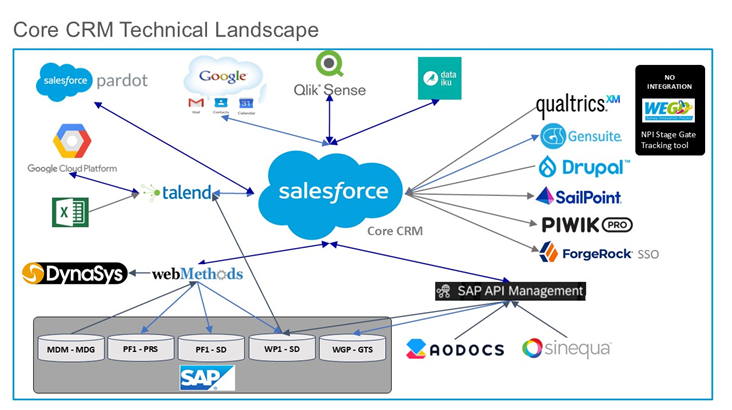
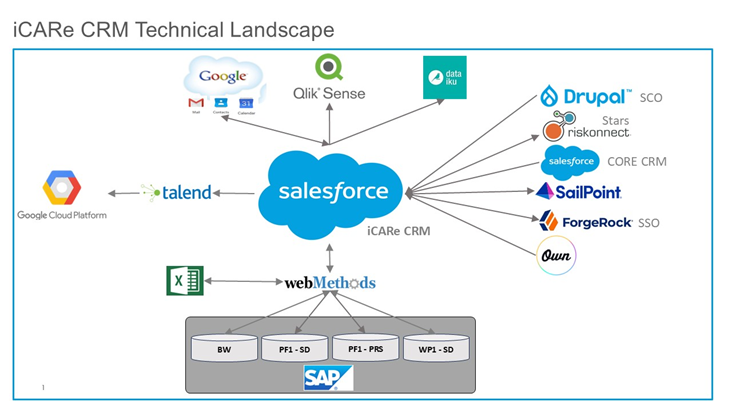
See below two links for existing integration landscape:
Core CRM interface provider.pdf
Core CRM interfaces consumer.pdf
Today, Syensqo’s CRM systems are characterized by:
- Multiple legacy solutions and custom-built components resulting from historical mergers and region- or unit-specific requirements.
- Fragmented data models and process inconsistencies across Sales, Service, Commerce, Marketing, and Revenue Management functions.
- Siloed GBUs, each often operating with separate workflows, limited data sharing, and differing standards for customer engagement, reporting, and compliance.
- High maintenance overhead due to aging integrations, duplicated effort, and manual workarounds.
- Reactive rather than proactive innovation, where complex change management and technical debt inhibit adoption of new features or industry best practices.
This patchwork approach has, over time, created increasing challenges around growth, efficiency, and the ability to deliver a seamless customer and employee experience.
The decision to go to a Greenfield approach building a new CRM solution cross GBUs has been taken in the following KDD: KDD040 - CRM Platform Approach
Assumptions
- Business Requirements : The assessment has been done based on the collected input from the different CRM workshops. If critical business or technical information changes, recommendations and analysis may need to be revisited.
- Salesforce Capabilities: Evaluation has been done based on the current salesforce available capabilities.
- Standardization: There is a shared organizational preference for maximizing standard (out-of-the-box) solution usage, with customizations being justified case by case.
- CLM capabilities of Revenue Cloud is not considered as part of this KDD due to ongoing discussion (Revenue Cloud vs Icertis)
- Salesforce Feedback Management: We assume that the same licenses as the one currently used in the AS IS are needed and it is not subject to discussion in this KDD.
- Agentforce Licenses : We assume that Agentforce (AI) licenses will be needed based on the requirement collected and is not subject to discussion in this KDD.
- Salesforce License: Syensqo is responsible for managing the License provisioning and negotiations terms with Vendor Salesforce.
Constraints
In making the cloud platform decision, Syensqo should be mindful of the following constraints:
- Adopt Standard Salesforce Processes: Going for an Out of the box approach allows to speedup the time to market and reduce the TCO, however it will come with some constraints in term of capabilities and an appropriate governance will be needed in order to balance the need of customization versus the adoption of the ways of working in Salesforce
- License and Contract Terms: Each Salesforce Cloud module usually comes with a license cost to be considered in order to take the final decision
Impacts
Selecting the most appropriate cloud platform (e.g., Salesforce Sales Cloud, Service Cloud, Marketing Cloud, or alternatives) will have important, strategic consequences for Syensqo’s business transformation:
- Speed to Value: Standard modules and accelerators available in each cloud may determine how quickly new capabilities can be rolled out to business users and with limited customization efforts.
- Change Management: Given the green field nature of the new CRM and the selection of Clouds not already used by the business, change management will be key to get the adoption.
- License Costs: Leveraging specialized cloud will come with extra cost but should decrease the implementation TCO and enable a future proof architecture.
Business Rules
At this stage, specific business rules are not defined within this document. Platform and cloud selection will be based on high-level business requirements and anticipated rules complexity. Detailed business logic, validations, and approval processes will be captured and validated during subsequent Detailed Design Phase.
Salesforce Cloud Options
Manufacturing Cloud for Sales
Objective: To leverage Salesforce Manufacturing Cloud for managing long-term sales commitments, optimizing sales performance, and streamlining commercial operations within manufacturing organizations, rather than building custom solutions on Sales Cloud.
Option A: Manufacturing Cloud for Sales
Manufacturing Cloud offers a specialized, out-of-the-box solution tailored specifically for the complex sales and account management needs for companies such as Syensqo, providing industry-specific features like Sales Agreements and forecasting.
Key Advantages:
- Sales Agreement Management: Consolidates long-term sales commitments, enabling tracking of planned vs. actual revenue and quantity metrics, automatic performance updates, and a single source of truth for renewals and operational planning.
- Performance Management: Allows account managers and sales representatives to monitor actual order volumes against planned quantities for accurate sales process oversight.
- Price Change Notification: Facilitates sending price change documents to customers within the Sales Agreement when updates occur after the initial order.
- Extension of Salesforce Core: Specifically designed for manufacturing organizations, Manufacturing Cloud extends Sales Cloud functionality to better align sales, planning, and operations with advanced features, reducing implementation effort and technical debt.
- Future-Ready: Leveraging standard features ensures access to future product updates and innovations without the need for custom development.
Key Challenges:
- Transitioning from custom-built solutions in Sales Cloud to standard features in Manufacturing Cloud may require process adjustments and change management.
- Integrating rebate management with external systems such as SAP S/4 HANA or forecasting with Kinaxis Maestro could present technical and operational complexities.
- Adapting existing workflows to new features like Sales Agreements may require additional training for account managers and field representatives.
- Aligning commercial operations across sales, planning, and operations teams to fully leverage Manufacturing Cloud’s advanced capabilities.
See below the key capabilities from Manufacturing Cloud identified for Syensqo:
| Manufacturing Cloud for Sales Features* | Description (TBD) | High Level Fit | Explanation of the Fit | Next Steps |
|---|---|---|---|---|
| Visit Management | Visit Management is designed to help the sales team plan, execute, and analyze field-based or in-person interactions with customers, partners, distributors, or store locations. | Low |
| |
| Sales Agreement | Sales agreements is a way to create structured arrangement for commercial organizations that provide visibility into planned and actual sales volumes, revenues, and product commitments next to legal contract document. The key benefit is to monitor the performance and help commercial organizations manage predictable, ongoing business relationships rather than one-off transactions. | High |
| |
Advanced Account Forecasting | Create a unified, highly accurate and granular sales forecasts by blending customer-level data from multiple sources. | Medium |
|
|
Account Manager Targets | Convert your organization’s growth plans into measurable targets that you can assign to your team members and distribute them per customers or products. | Low |
| |
Program-based business | Program based business allows you to define your products and your customer’s products and create relationships between them. Therefore, it can automatically translate the customer product build rates into precise material requirements, ensuring the production plans align instantly with volatile customer schedules to minimize inventory waste. | Medium |
|
|
Rebates | Automate, manage, track, and calculate complex volume-based incentives and channel program payouts offered to customers or partners. | Low |
| |
Non functional requirements |
| High |
| |
Other Relevant capabilities |
| Medium |
|
Option B: Leverage Sales Cloud and Build Custom on Top
This approach uses the highly flexible core Sales Cloud platform and requires additional custom development to build and maintain the specific manufacturing-related features needed to meet unique business requirements
Key Advantages:
- Maximum Flexibility & Control: Offers the freedom to design and build a solution that precisely matches every unique and specific manufacturing business requirement and existing process.
Key Challenges:
- Higher TCO: Requires ongoing investment in development resources for building, maintaining, testing, and updating the custom code with every Salesforce platform release.
Evaluation
| Criteria | Option A: Manufacturing Cloud for Sales | Option B: Leverage Sales Cloud and Build Custom on Top |
|---|---|---|
| Alignment with "Simplification and Standardization principles" |  Manufacturing Cloud offers out of the box features such as Sales Agreements and Advanced Account forecasting using standard objects and processes. Adopting a standard feature comes with less variations and simplified system setup and use. Manufacturing Cloud offers out of the box features such as Sales Agreements and Advanced Account forecasting using standard objects and processes. Adopting a standard feature comes with less variations and simplified system setup and use. |  All the processes not standard in Sales Cloud will have to be customized with the risk of increased complexity and variations, exceptions across stakeholder groups All the processes not standard in Sales Cloud will have to be customized with the risk of increased complexity and variations, exceptions across stakeholder groups |
| User Adoption and Experience | Features such as Sales Agreement offer capabilities and views that provide a better User Experience (e.g. table/matrix like structures with less clicks to get to an overview or make bulk updates | Building custom experiences opens up the possibility to provide flexibility in building something tailored exactly for Syensqo but this will have a significative cost impact in implementation and maintenance |
| Scalability & Future-Proofing | Salesforce handles continuous maintenance, security updates, and regular feature innovation, ensuring the platform automatically evolves with technology and industry standards without incurring constant internal development costs | Building customization on the top of the platform is not allowing to benefit of future upgrade/ extract capabilities that would be provided by the platform in the future. |
| Feature Fit & Implementation Cost | Full leverage on Manufacturing Cloud out of the box capabilities (including the features highlighted in the table above with a high or medium fit) reducing the implementation cost. | Higher cost of implementation in order to custom build the capabilities needed to cover the business requirements which have a fit with the Manufacturing Cloud features. |
| Licenses/Subscription Cost | Manufacturing Cloud for Sales cost to be foreseen | Cheaper License Cost |

Revenue Cloud
Objective: To unify and optimize product management and pricing processes by leveraging Salesforce Revenue Cloud, enabling structured, automated, and scalable configuration, pricing, and quoting, and replacing manual, fragmented approaches with a future-ready, integrated solution.
Option A: Revenue Cloud
Leverage Revenue Cloud CPQ solution in order to standardized and simplify the CPQ implementation.
Key Advantages:
- Quote management: Different use cases require different workflows. Quote management is tailored to the relevant business industry and way of working. Room for harmonization and localization where needed.
- Centralized Product Catalog Management: Dynamic, integrated product data from MDM (yet to be decided for Release 3). Streamlined Catalog management for product administrators. Qualification rules and constraint models to drive harmonized product visibility.
- Structured Price Execution: Attribute-driven pricing for scalability and consistency. Flexible price execution to support both cost/margin and price driven execution. Option for reduced complexity and more granular definition of attribute driven pricing to improve accuracy and reduce redundancy.
- Price Deviation Tracking: Price waterfall analysis for transparency. Automated flagging of unusual discounts or markups based on pre defined triggers and corresponding thresholds. Proactive monitoring of margin leaks and price fluctuations.
- Streamlined Approvals: Proactive monitoring of margin leaks and price fluctuations. Dedicated approval triggers, thresholds and approval flows configurable per business unit. Improved transparency on approval needs. Improved cycle time through SMART Approvals
- Document Harmonization: Reduced admin work through harmonized dynamic document generation. Dynamic sections allow for localization where needed. Improved document quality and consistency through enhanced document configuration.
- Native Salesforce Integration: Seamless interoperability with Sales, Manufacturing, and Service Clouds. Unified data and simplified upgrades. Enhanced scalability and maintainability.
- Automated Processes: Automated approvals, price execution and quote-to-cash workflows. Reduced manual intervention and improved compliance.
- Future-Readiness: Ongoing access to new features and automation capabilities. Simplified upgrades and scalable adoption.
Key Challenges:
- Learning Curve & Complexity: The implementation and maintenance of complex product rules and pricing constraints requires specialized knowledge and may have functional limits.
- User Adoption: Without proper training and stakeholder buy-in, adoption rates remain low.
- Customization vs. Standardization: Balancing standard features with necessary customizations is a common challenge
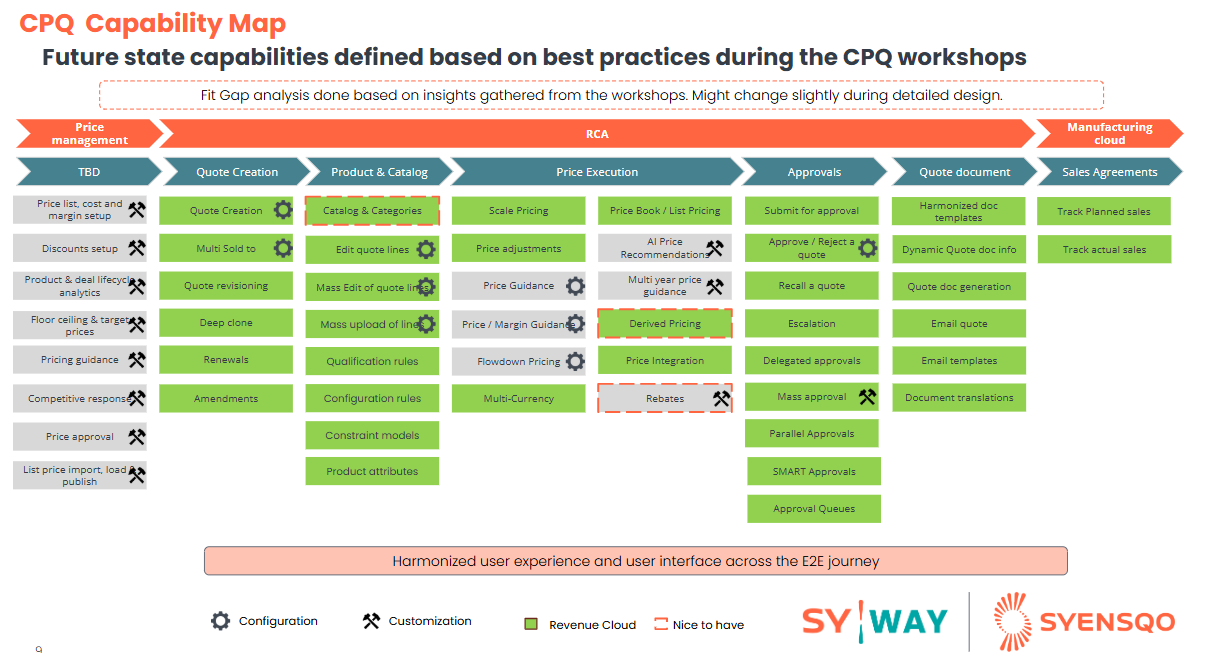
Capability Map:
The below table is the CPQ Capability map for Syensqo requirements highlighting the out of the box capabilities of Revenue Cloud:
Business sub-process | Key Optimizations | Business Benefits & Impacts |
Quote creation |
|
|
Product catalog |
|
|
Price Execution |
|
|
Price deviation tracking |
|
|
Streamlined Approvals |
|
|
Harmonized Document Generation |
|
|
Revenue Cloud License Type:
Revenue Cloud full license vs Revenue Cloud Growth license
Revenue Cloud Growth: For Syensqo context, discussions are still ongoing with business (sessions to happen in Jan 2026 with legal team) and if the Group legal decides to perform Contract authoring, negotiation and signature part outside Salesforce, then the recommendation is to avoid going for Growth license as business would like to then use contract lifecycle management.

Revenue Cloud Advanced (full license): In addition to leveraging the Contract lifecycle management capabilities (on top of Catalog management, CPQ, Order management and asset management), other value add would be to use built in Agentforce actions/ templates.

Option B: Custom Build CPQ
Build the new CPQ fully custom not leveraging any Salesforce Cloud
Key Advantages:
- Perfect Functional Fit: Allows for the exact replication of existing, highly complex, or proprietary quoting and pricing logic without any out-of-the-box constraints.
Key Challenges:
- Technical Debt & Maintenance: Syensqo is fully responsible for all bug fixes, security updates, and ensuring the custom code remains compatible after every Salesforce platform release.
Evaluation
| Criteria | Option A: Revenue Cloud | Option B: Custom Build CPQ |
|---|---|---|
| Alignment with "Simplification and Standardization principles" | Revenue Cloud is the CPQ solution recommended by Salesforce having a clear focus and investment in the future Salesforce roadmap. The solution is covering most Syensqo processes (Except for price setup) | Huge customization which will make the solution complex to maintain. |
| User Adoption and Experience | Standardization of the user experience which might introduce limitation or extra customization in case a business expectations deviating from this standard experience. | Building custom opens up the possibility to provide flexibility in building something custom but this will have a significative cost impact. |
| Scalability & Future-Proofing | Salesforce handles continuous maintenance, security updates, and regular feature innovation, ensuring the platform automatically evolves with technology and industry standards without incurring constant internal development costs | Building customization on the top of the platform is not allowing to benefit of future upgrade/ extract capabilities that would be provided by the platform in the future. |
| Implementation Cost | Full leverage on Revenue Cloud out of the box capabilities reducing the implementation cost | Very High cost of implementation in order to build the capabilities needed to covered. CPQ solution are usually product and cannot be easily rebuild from scratch keep a certain level of flexibiliy. |
| Licenses/Subscription Cost | Revenue Cloud for Sales cost to be foreseen | No additional License Cost |
Service Cloud
Objective: To transition existing service functionalities currently managed through Salesforce Sales Cloud to Salesforce Service Cloud, enabling access to advanced service capabilities, improved efficiency, and scalable support for complex service operations.
Option A: Service Cloud
Fully leverage the service cloud capabilities of Salesforce in order to bring value to Syensqo.
Key Capability Value (Applicable Regardless of License Tier)
Salesforce natively supports Case Management as part of the Sales Cloud license, meaning that the organization can already track and process complaints and requests within Salesforce without requiring Service Cloud licenses. This includes:
- Basic case creation from Accounts and Contacts
- Routing to queues and teams
- Status tracking and ownership for accountability
- Linking cases to Opportunities, Orders, or Products for traceability
When Service Cloud Adds Clear Value
Service Cloud licensing becomes beneficial if the service operating model requires more structured service processes, higher throughput, or multi-channel interaction. This includes scenarios such as:
- Advanced Omni-Channel routing across email, web, phone, and portals to balance workload and ensure SLA coverage.
- Guided workflows, automated SLAs, entitlement rules, and escalations to support regulated complaint handling or high-volume service environments.
- Knowledge Base, Macros, and Screen Flows for agent efficiency and consistency of response.
- Additional Licensing Costs: Transitioning to Service Cloud requires purchasing Service Cloud licenses, increasing overall costs.
- Potential Overhead for Simple Needs: If service requirements remain basic, Service Cloud may introduce unnecessary complexity and features beyond current needs.
Capability Map:

Option B: Sales Cloud leveraging service capabilities
Key Advantages:
- No extra license costs: Avoid paying any extra license cost for service agents.
Key Challenges:
- Legal/Commercial: While technically Sales Cloud licenses provides access to some Service cloud capabilities, there is a risk of not being commercial compliant. This should be discussed with Salesforce during license negotiations.
- Future Locks: This will prevent to easily onboard extra Service Cloud capabilities (not needed today) and license will have to be renegotiated with Salesforce.
Evaluation
| Criteria | Option A: Service Cloud | Option B: Sales Cloud leveraging service capabilities |
|---|---|---|
| Capabilities | Service Cloud provides a set of extra capabilities such a SLA management which have been identified as Syensqo business need. Those extra capabilities as currently not used (AS IS) but it might bring extra value to implement those capabilities | Extra capabilities offered by Service Cloud are not available and business will not be able to leverage those extra feature staying in the AS IS situation from a Service perspective. |
| Legal/Commercial | Fully compliant with Salesforce positioning. | While technically Sales Cloud licenses provides access to some Service cloud capabilities, there is a risk of not being commercially compliant. This should be discussed with Salesforce during license negotiations. |
| License Cost | Extra License Cost | Reduce the license cost |
B2B Commerce Cloud (LWR) for one single customer portal
Objective: To improve customer experience, streamline operations, and align with Salesforce’s strategic roadmap, we recommend Syensqo consolidate its multiple portals into a single, unified portal built on Salesforce B2B Commerce Cloud. This transition will provide a scalable, future-proof, and fully supported e-commerce platform.
Key Advantages:
Unified Platform and Branding: Replaced four legacy solutions with a single, unified platform for a simplified customer journey and easier maintenance (one login, catalog, order, and document experience).
Enhanced Customer Autonomy & Efficiency:
Embedded a capable AI agent (e.g., populating carts from POs, guiding search, retrieving documents).
Extended self-service capabilities (e.g., samples, documents, order tracking), freeing up frontline time.
Drove Growth and Broader Sales: Enabled customers to seamlessly buy a wider range of products through guided search, fast quote requests, and effortless ordering.
Centralized and Consistent Data Management: Unified and standardized data across systems, creating a single source of truth for customers, products, pricing, and orders.
Modern, Scalable, and Future-Proof Architecture: Built on a cloud-native platform (Salesforce) that supports future innovations (like predictive ordering) and ensures simplified maintenance and ongoing upgrades.
Key Challenges:
- Some components can be leveraged OOTB, other will be extended. Some features will have to be custom. Tracked in column R Requirements & estimations.xlsx
Business Endorsements
- The Portal user will benefit from a Cross-GBU Portal experience (“One Syensqo” UX/UI)
- Target audience: Key Accounts, Critical Accounts, Standard Accounts, Key Distributors, Standard Distributors and SCP.
- The portal will consume the Account hierarchy stored in Salesforce: The contact/user will be linked to a child account (sold to). Some contacts (e.g. SCP) will be linked to more than 1 child account to order across GBU (Ship to).
- Commerce will leverage the product hierarchy from MDM (replicated in the Product Catalog of CPQ) to create entitlement policies. However, the SAP Category hierarchy will not be displayed in the catalogue for the customers/distributors.
- Commerce will use the SAP Market Segmentation (GBU, Market, Region, Country) to drive the product visibility per Account -> general rules. Exception rules will be handled via specific entitlement policies (& related buyer group).
- Only commercialized version of a product will be available in the portal for the user to request an order, a quote or a sample.
- The user will never be blocked from requesting an order. Besides, all orders placed by the child account (sold-to) should be accessible in MyOrder (i.e. not only the ones placed in the Portal). if the Financial or GTS checks fail, the user will be sent a notification, and a failed order would appear in My Order section
- Sample & Quote are requests (cases) sent to SF backend with assignment rules & managed by the CSR/Account Managers.
Evaluation
- The decision to exclusively pursue Salesforce B2B Commerce Cloud (on Lightning) is a necessity because the prior solution, CloudCraze, is considered a legacy platform with a limited future. Salesforce has redirected all innovation and support efforts to the new, native B2B Commerce on the Lightning platform. Continuing with the CloudCraze architecture would mean operating on an unsupported system that receives no new features, limited security updates, and is not natively integrated with modern Salesforce capabilities like AI, Experience Cloud, or the latest UX/UI. This shift guarantees long-term sustainability, better performance, and seamless integration with the rest of the Salesforce Customer 360 platform.
- Salesforce has been named a Leader in Gartner® Magic Quadrant™ for Digital Commerce for the 10th Consecutive Year (November, 2025) https://www.salesforce.com/news/stories/gartner-magic-quadrant-digital-commerce-2025/
The rebranding of Salesforce B2B Commerce Cloud to Agentforce Commerce directly supports the Syensqo Portal's strategic need for enhanced self-service capabilities beyond simple transactions. Salesforce Announces New Agentforce Commerce Capabilities - Salesforce
This shift focuses on leveraging embedded AI Agents to transform the portal experience from a manual, commercial storefront into an autonomous, guided experience:
Self-Service Automation: The "Agentforce" name signifies the introduction of "digital labor"—AI agents that automate and execute complex customer workflows, aligning perfectly with the goal of increased self-service for Syensoq users.
Agentic Guidance: Instead of forcing users to navigate through menus, Agentforce Commerce utilizes AI for Guided Shopping. This means buyers can use conversational tools to define their needs (e.g., "I need a specific widget") and the AI agent will autonomously find and recommend the correct products, moving far beyond basic search.
Autonomous Workflow Execution: The Agentic Enterprise platform allows AI agents to assist in or even execute core customer workflows autonomously, such as managing complex Order Routing or handling Merchandising Actions. This reduces the administrative burden on Syensoq's internal teams while providing instant, automated service to the customer.
Magic Quadrant

Marketing Cloud Next/Data Cloud
Objective: To align with Salesforce’s platform-first strategy and ensure long-term scalability, it is recommended to transition from Pardot (Account Engagement) to Marketing Cloud Next (On Core).
Option A: Marketing Cloud Next
Key Advantages:
- Natively built on the core Salesforce platform, enabling direct connection to CRM data and eliminating the need for data syncing.
- Supports real-time customer engagement across multiple channels (Syesnqo’s requirement is to enable SMS and WhatsApp channels, too).
- Simplifies system setup and enables users to leverage the same platform (e.g. to notify Sales team when a lead becomes MQL or has a bounced email address).
- Has advanced engagement, fit and marketing scoring model available by default.
- Unlocks powerful Flow automation and leverages Data Cloud for Unified Customer Profiling leveraging Matching and Reconciliation rules. This is useful to identify the same individual from AI prospects, Leads, and website visitors data sources.
- Provides AI-driven personalization and event-triggered journeys based on any Salesforce object, allowing for tailored experiences throughout the customer lifecycle.
- Ensures consistent messaging, easier governance, and stronger collaboration between Marketing, Sales, and Service teams through native integration and multichannel capabilities.
- Keeps the organization future-ready and aligned with Salesforce’s ongoing investments in AI, automation, and data unification.
- Avoids the limitations of Pardot, which would require additional integration efforts, limit the number of communication channels and restrict access to new innovations.
Key Challenges:
- This is the newest Marketing Automation solution from Salesforce, and some third-party software vendors do not have an integration layer yet.
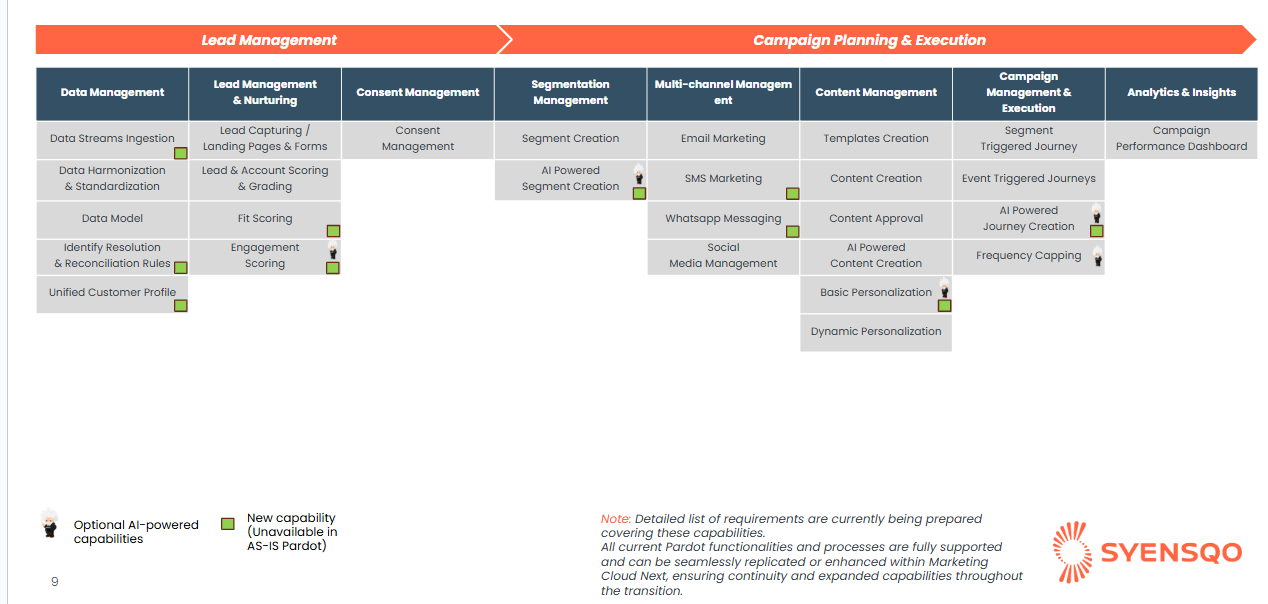
Marketing Cloud Capability Map:
Option B: Pardot
Key Advantages:
- Platform has capabilities to grade, score and provide insight through Pardot Einstein on when and how to best nurture leads to highlight most engaged prospects.
- Strong content management capabilities and ability to create local and global reusable component for scalability & sharing across business units & Salesforce CRM using “Files”.
- Enterprise native, managed and extensible bi-directional near-time and real-time connector. Same ecosystem. However, not all Custom Objects are accessible from Pardot.
- Strong capability for inbuilt forms & landing pages development, including template, dynamic content across web & email & real-time actions on submissions.
- Wide range of native standard connectors for Facebook Ads, LinkedIn & Google Ads.
- System lacks capability to export detailed engagement data to external platforms e.g. datalakes.
Key Challenges:
- Limited to email as only native communication channel. Third party apps can be integrated to deliver SMS and other channels.
- Receives less updates and new releases than Marketing Cloud Next.
- Does not leverage Salesforce’s newest Agentforce (AI) features.
Evaluation
Marketing Cloud Next represents Salesforce’s next-generation marketing solution, natively built on the core Salesforce platform. Unlike Pardot, which only supports email as a channel and operates as a separate data environment, Marketing Cloud Next connects straight to your CRM data leveraging the power of Data Cloud. This means no more integration setup needed, a simpler system setup, and the ability to engage customers in real time across multiple channels — not just email.
With Marketing Cloud Next, your marketing teams can unlock powerful Flow automation and leverage Data Cloud to generate a 360 view on your customers using Unified Profiles. Plus, it offers AI-driven personalization and AI Agents that support MC users in campaign building and content generation, event-triggered campaign flows based on any Salesforce CRM or Data Cloud object. Marketing Cloud Next uses these features to deliver truly tailored experiences at every stage of the customer lifecycle.
Thanks to its native integration and Omni-Channel capabilities, Marketing Cloud Next ensures consistent messaging, easier governance, and stronger collaboration between Marketing, Sales, and Service teams.
By adopting Marketing Cloud Next, the organization ensures it remains future-ready and aligned with Salesforce’s ongoing investments in AI, marketing automation, and data unification. Continuing with Pardot would noticeably limit access to these innovations and require additional integration effort to maintain parity with Salesforce’s strategic direction.
The decision to recommend Marketing Cloud Next (often referred to as Marketing Cloud On Core) over Pardot (now Marketing Cloud Account Engagement) is driven by the need for a truly omnichannel, high-volume, and future-ready engagement platform. While Pardot remains Salesforce's B2B marketing automation solution, its architecture is inherently focused on lead nurturing and email, relying on a connector for CRM data integration.
Marketing Cloud Next, however, is built for complex, multi-channel customer journeys across email, SMS, WhatsApp, social media, offering a modular, enterprise-grade framework that better leverages advanced features like Campaign Flows, Agentforce capabilities (AI-driven campaign management and content creation), large-scale data segmentation and Unified Profile creation. Opting for the more advanced Marketing Cloud Next future-proofs the investment by aligning with the long-term vision of a unified, data-driven customer experience platform, which is essential for scaling complex, personalized communications beyond just the lead-to-opportunity pipeline.
| Criteria | Option A: Marketing Cloud Next | Option B: Pardot |
|---|---|---|
| Capabilities |
|
|
| Scalability & Future Proofing |
|
|
| Deployment Lifecyle | Test Environments (Sandboxes) are supported and can be deployed automatically using data kits. |
|
| Integration | Marketing Cloud Next is built on Core, and has access to all CRM objects via Data Cloud without a need for integration. Besides non CRM data can be easily made available leveraging standard Data Cloud connectors. |
|
| User Experience & Usability | Ease of use – Marketing Cloud Next has the same user interface as Salesforce CRM and gives a unified user experience cross-clouds. |
|
| Compliance & Security | Data Cloud has a concept of data spaces (data segregation) and content workspaces (content segregation). |
|
Tableau Next/Data Cloud
Objective: Tableau Next moves beyond the static, object-based reporting of standard Salesforce by using Agentic AI and a unified data layer (Data Cloud) to deliver personalized, contextual, and actionable insights to users across the business, directly in their workflow.
Option A: CRM Reporting Done with a combination of Standard Reporting and Tableau Next
Key Advantages:
- Rich, AI-powered analytics and unified data: Tableau Next adds a semantic layer + agent-based AI (“Agentic Analytics”) that can automate data prep, detect trends/exceptions, answer natural-language queries, and surface actionable insights — making analytics more powerful, contextual and accessible across the business.
- Flexible and future proof: supports Salesforce data with external systems or other internal data sources, enabling cross-system analytics (e.g. combining CRM, supply chain, inventory, market data). That can also be allowed with Zero copy functionality limiting the duplication of storage between data lakes and avoid reworking data models within the different environment.
- 3 out of the box agent to support the activity of the business and the data analyst users :
- Concierge : Enable trusted Q&A with your own data.
- Inspector : offers proactive data monitoring and insights by continuously tracking your data for key changes, analyzing trends, and predicting improvements.
- Data Pro : is your intelligent data preparation assistant. Instead of manually cleaning and transforming your data, Data Pro provides smart suggestions and automatically handles some of the complicated changes for you.
- You also get access to Tableau Pulse: AI-powered insights embedded into CRM with personalized metrics and intelligent, conversational insights directly in Salesforce. Which enable each user to follow KPIs that matter to their activities and are able to get automatic notification summarizing what your tracking to bring your attention to what matters
- Accelerated development of new KPIs and reports with the support the Agentforce within the development cycle
- Tableau Next has an interoperability concept which mean that whatever was build in Tableau, CRM Analytics or Salesforce report/dashboard can be leveraged into the tool natively. That allows company not to integrate directly with the legacy of reports already built and to avoid rebuild effort.
- Also integrates within your Microsoft teams to have it available outside of Salesforce
Key Challenges:
- Additional complexity and cost: implementing Tableau Next means building/maintaining a data layer, semantic models, governance, integrations.
- “Growing pains”: some advanced dashboarding or deep analytics capabilities are not yet as mature as traditional BI tools, and for very complex dashboards the tool may still feel “light”.
- License cost that is on a token based consumption
- Limited to No prebuild asset to limit the development effort (feature on the roadmap of Salesforce team)
- Additional effort in training to educate the users
Option B: CRM Reporting Done with Standard Reporting only
Key Advantages:
- Seamless and secure: Because it’s built into Salesforce, everything respects existing security/permission settings and works directly on live CRM data with no extra infrastructure needed.
- Quick and simple for basic needs: Ideal for standard lead-to-cash metrics without substantial setup efforts (dashboards and scheduled reports are ready with minimal configuration)
- Large amount of OOTB reports that need limited configuration to be implemented. Limiting the cost of development
- Limited cost
- Already known solution by most of the users
Key Challenges:
- Limited flexibility and depth: Cross-object joins, complex aggregations or combining Salesforce data with external data sources is hard or messy; visualizations and analytics stay basic.
- Scalability constraints and UI quirks: For large datasets or many reports/dashboards, performance or maintenance issues may arise; dashboard component, filter and sharing limits may become restrictive.
- User experience is outdated with no dynamic filtering that modern visualization tools offers
Evaluation
| Criteria | Option A: Standard Reporting & Tableau Next | Option B: Standard Reporting only |
|---|---|---|
| Capabilities |
|
|
| User Experience |
|
|
| Cost | ||
| Development effort | ||
| Asset |