
Exchange Rates
In WBP
List
| Type Code | BW description | Currencies | Frequency | Periods |
|---|---|---|---|---|
| CAR1 | Magnitude Exchange Rate | To EUR only | Monthly | Up to 2020 |
| CAR3 | Exchange Rate base on CAR1 ref. crcy EUR | All | Monthly | Up to 2020 |
| M | Standard translation at average rate | All | Daily | Up to last day |
| ZRH2 | Exchange Rate base on ZHRO ref. crcy EUR | All | Monthly | Up to last month |
| ZRH3 | Exchange Rate base on ZHRO ZBUD ref. EUR | All | Monthly | |
| ZRHO | Monthly valuation consolidation rate | All | Monthly | Up to year + |
| C | Cumulated average monthly (reporting) | To EUR only | Monthly | Up to last month |
| ZBUD | ZBUD Monthly reval. for budget (spring) | To EUR only | Monthly | Up to current month |
CAR1 - Magnitude Exchange Rate
Description
Source
The CAR1 rate comes from Business Objects PPE application. In BO, this rate is calculated by
Technical Details :
- Process chain Z_TAUX_CARAT
- File in //exploit/BW/TAUX_DEV/Taux_dev_carat.lst
- Program Z_CREATE_EXCHANGE_RATES_CARAT
In PQ1
Currency Conversion How To
How to check the rates
- Go to transaction SE16
- Select table TCURR
- Enter a Exchange rate type (ZRHO for WC)
- Enter a from currency / to currency
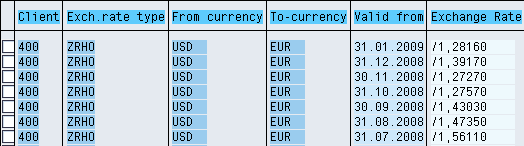
Note If there is no rate for a period BW will use the previous one! Using the example above: if I need to convert from USD to EUR with date = 10.02.2009 since there is no rate it will use the January rate
How to check the conversion types
- Go to transaction RSCUR
- Select a conversion type
- You can then check :
- The exchange rate used
- The time characteristic used to apply the rate
- The target currency (fixed, fixed variable, open)
How to create and transport currency factor in BW System
How to create a new rate type in BW
Management of the currencies on the WBP System