

Restructuring cost centers must be included in 2 cycles :
- CCCC RT for the allocation of the cost center to the restructuring order
- CCCC R2 for the allocation to COPA

Cycle CCCCRT
When you create a cycle to settle the restructuring cash out to an internal order in WP1, you must follow the following rules
STEP 1
Create an assessment cycle with KSU1 - Create Actual Assessment Cycle
1. Cycle = CCCCRT
2. Start Date = 01.01.20YY to 31.12.20YY
3. Text = Restructuring Cash out

STEP 2
Enter
1. Segment name = cost center code
2. Segment description = Alloc to Cash Out Restr. Order
3. Assessment CEle = 99425000 Cash out Restruct.CC
4. Receiver rule = Fixed percentages

5. Sender cost center = CCCC-8xxx
6. Sender cost elements group = ZSOLV-FC
7. Receiver cost centers group = restructuring order

When you create a cycle to settle the restructuring cash out to an internal order in PF1, you must follow the following rules
STEP 1
Create an assessment cycle with KSU1 - Create Actual Assessment Cycle
1. Cycle = CCCCRT
2. Start Date = 01.01.20YY to 31.12.20YY
3. Text = Restructuring Cash out

STEP 2
Enter
1. Segment name = cost center code
2. Segment description = Alloc to Cash Out Restr. Order
3. Assessment CEle = 9612000001 FRAIS PERSONNEL NI
4. Receiver rule = Fixed percentages

5. Sender cost center
6. Sender cost elements group = REST_USE
7. Receiver cost centers group = restructuring order

Cycle CCCCR2
When you create a cycle to assess the a restructuring cost center to COPA in WP1, you must follow the following rule:
STEP 1
Create a COPA cycle with KEU1 - Create Actual Assessment to CO-PA
1. Cycle = CCCCR2
2. Start Date = 01.01.20YY to 31.12.20YY
3. Text = Restructuring COPA
4. Sender Select. Type = 1
5. CO Area = Controlling area & Type of CO-PA = 1

STEP 2
Enter
1. Segment name = CA + "last four digits or the IECRA"
2. Segment description = Segment name // cost center or group of cost centers
3. Assessment CEle = 99429940 Restruct. COPA
4. PA transfer struct. = CA
5. Rule = Fixed percentages

6. Sender cost center = Restructuring cost center or group of cost centers (=CCCC-RS-xx)
REMARK
There are 2 types of Restructuring cost centers:
- The ones linked with a BFC Restructuring Plan and a specific internal order for the restructuring provision process » CCCC-RS-x1
- The ones linked to some restructuring BFC Headings but related to impairment (fixed assets, current and non current assets) » CCCC-RS-x2
7.Company code
8. IECRA

9. Portion/percent = 100

When you create a cycle to assess the a restructuring cost center to COPA in PF1, you must follow the following rule:
STEP 1
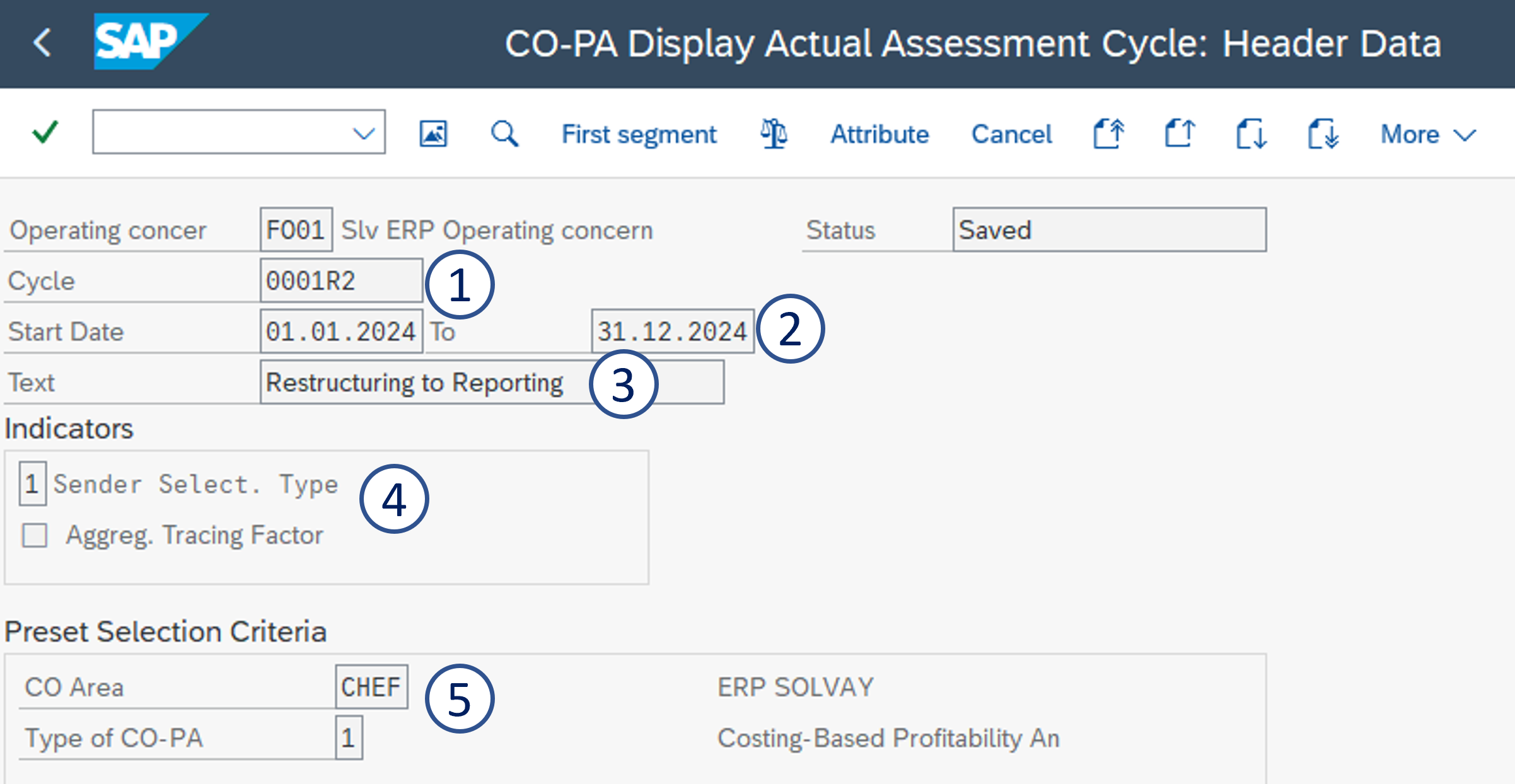
Create a COPA cycle with KEU1 - Create Actual Assessment to CO-PA
1. Cycle = CCCCR2
2. Start Date = 01.01.20YY to 31.12.20YY
3. Text = Restructuring to Reporting
4. Sender Select. Type = 1
5. CO Area = CHEF & Type of CO-PA = 1
STEP 2
Then for each cost center, you need to create 3 segments
A - Allocation to the value field VVK10
B - Allocation to the value field VVK05
C - Allocation to the value field VVK15

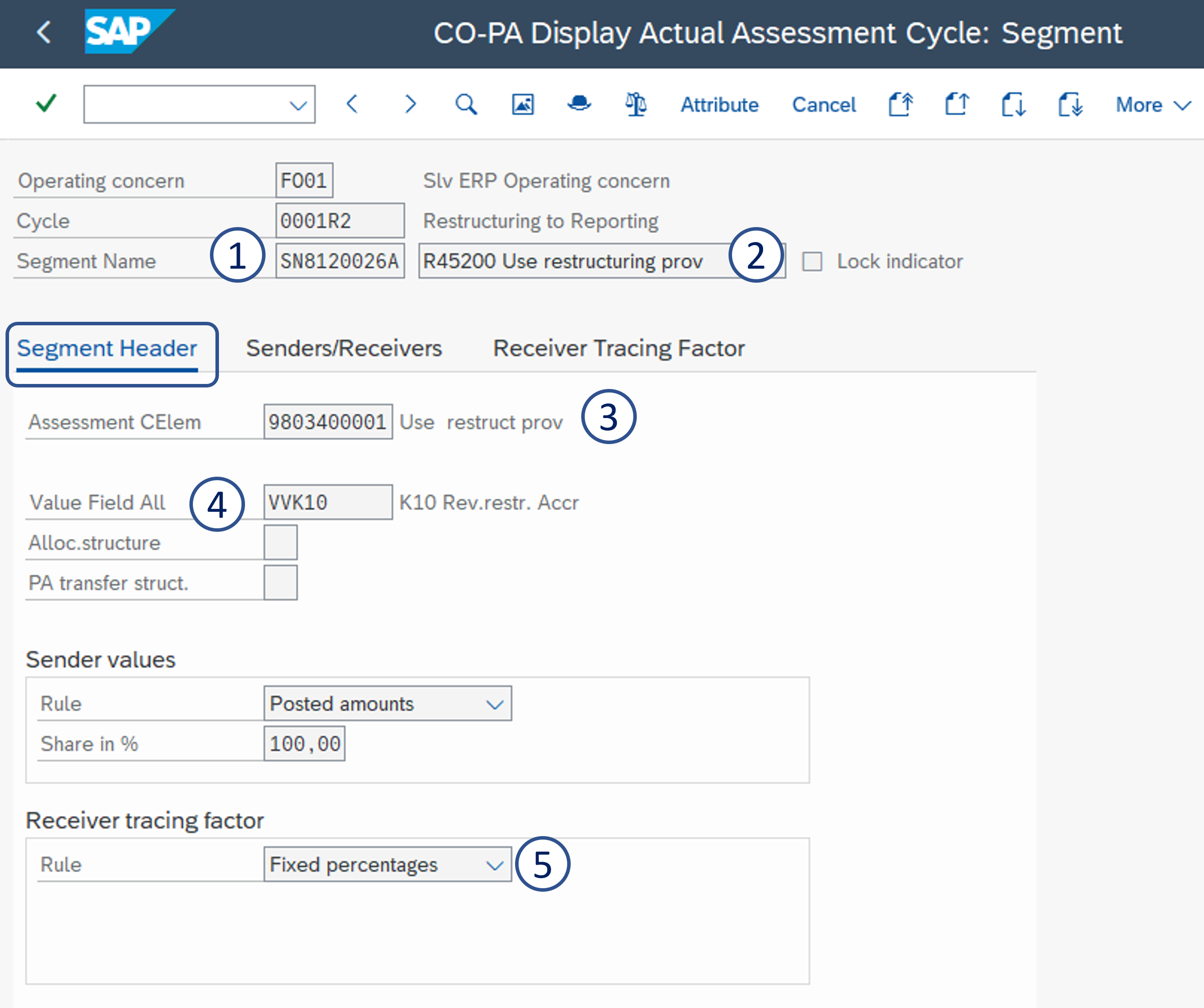
Segment A - Allocation to value field VVK10 - K10 Rev.restr.Accr
Enter:
1. Segment name = Cost center + A
2. Segment description = R45200 Use restructuring prov
3. Assessment CEle = 9803400001 Use restruct prov
4. Value Field All = VVK10
5. Rule = Fixed percentages
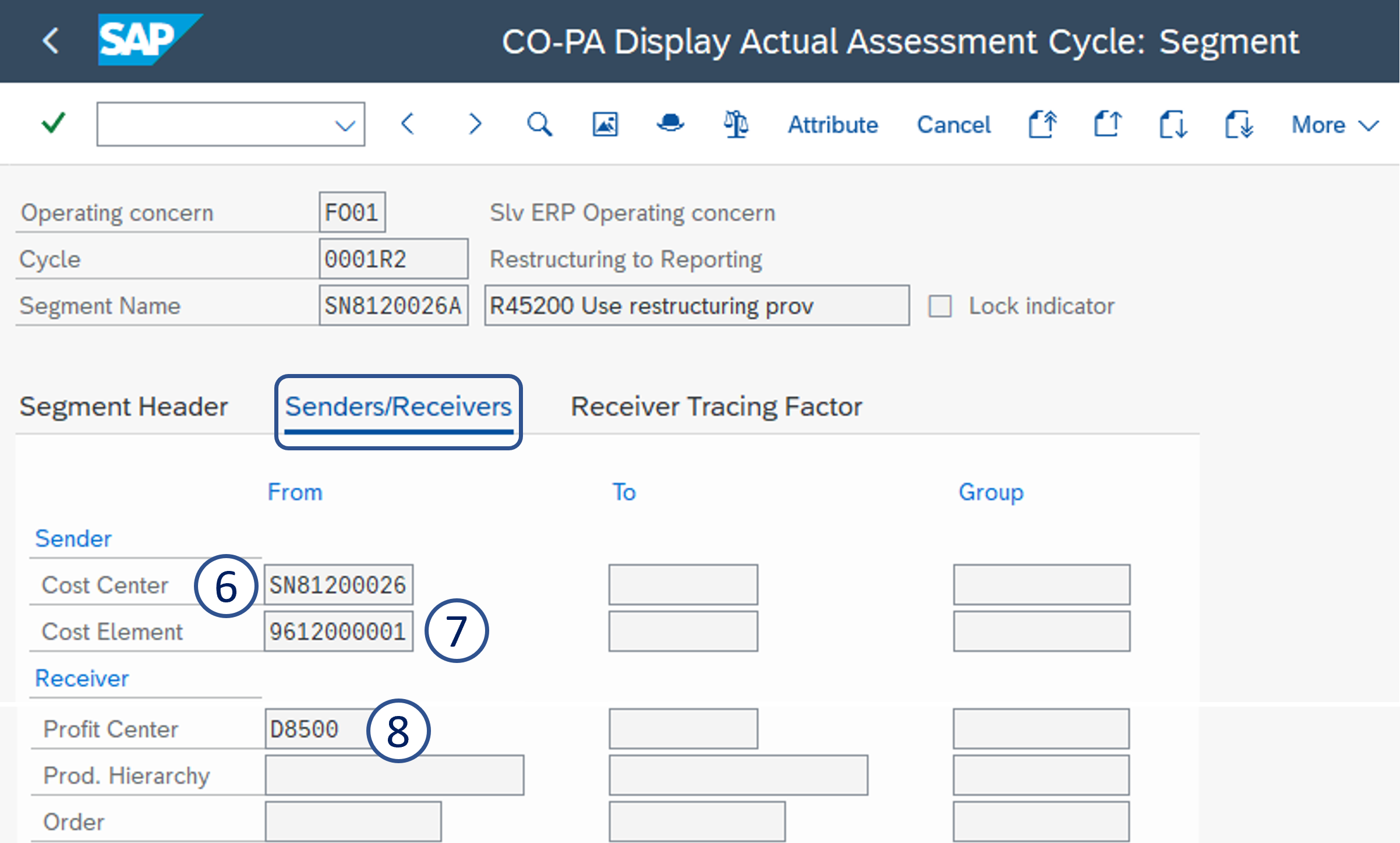
6. Sender cost center = Restructuring cost center
7. Cost Element = 9612000001
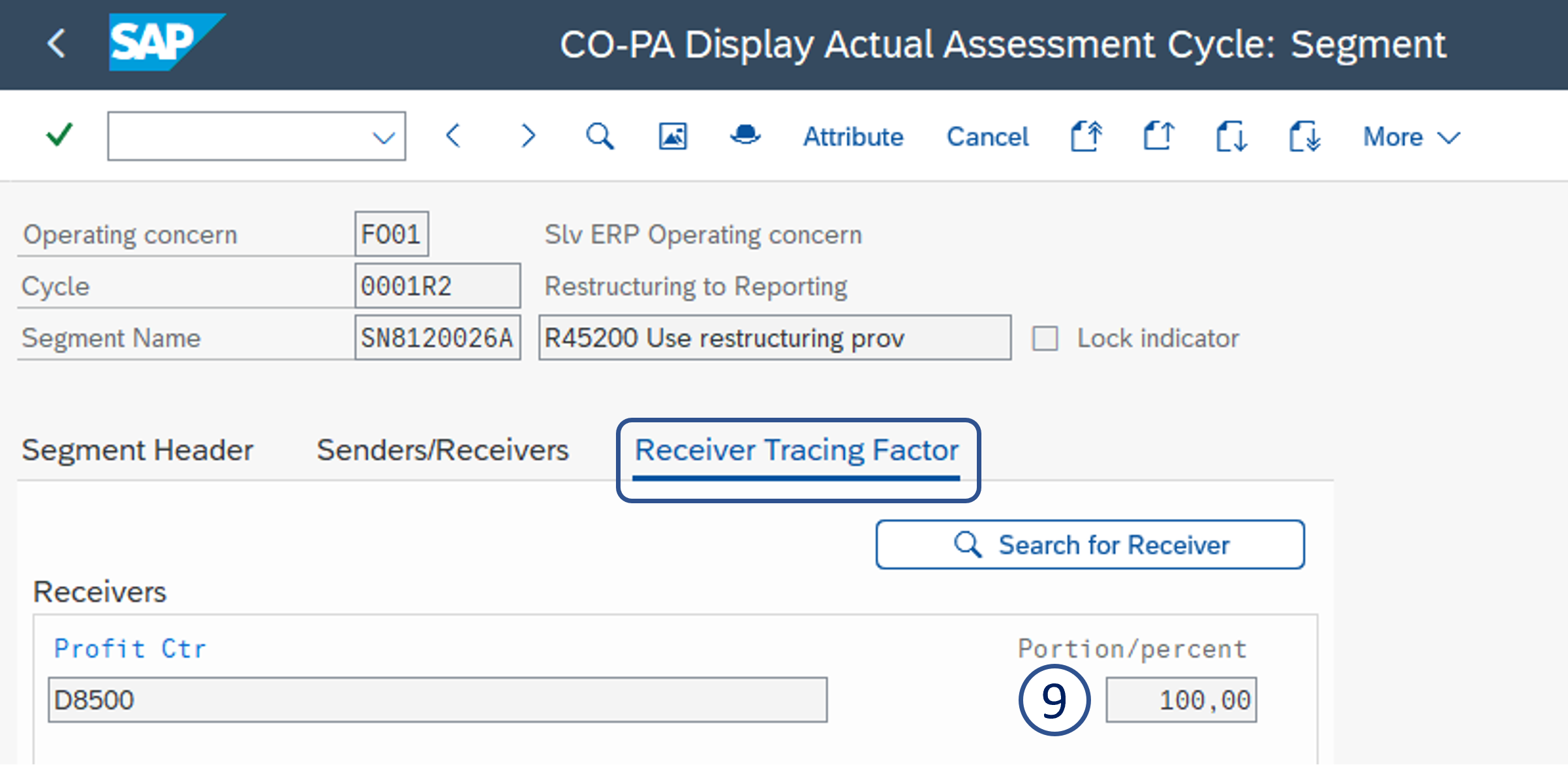
8. Profit Center
9. Portion/percent = 100
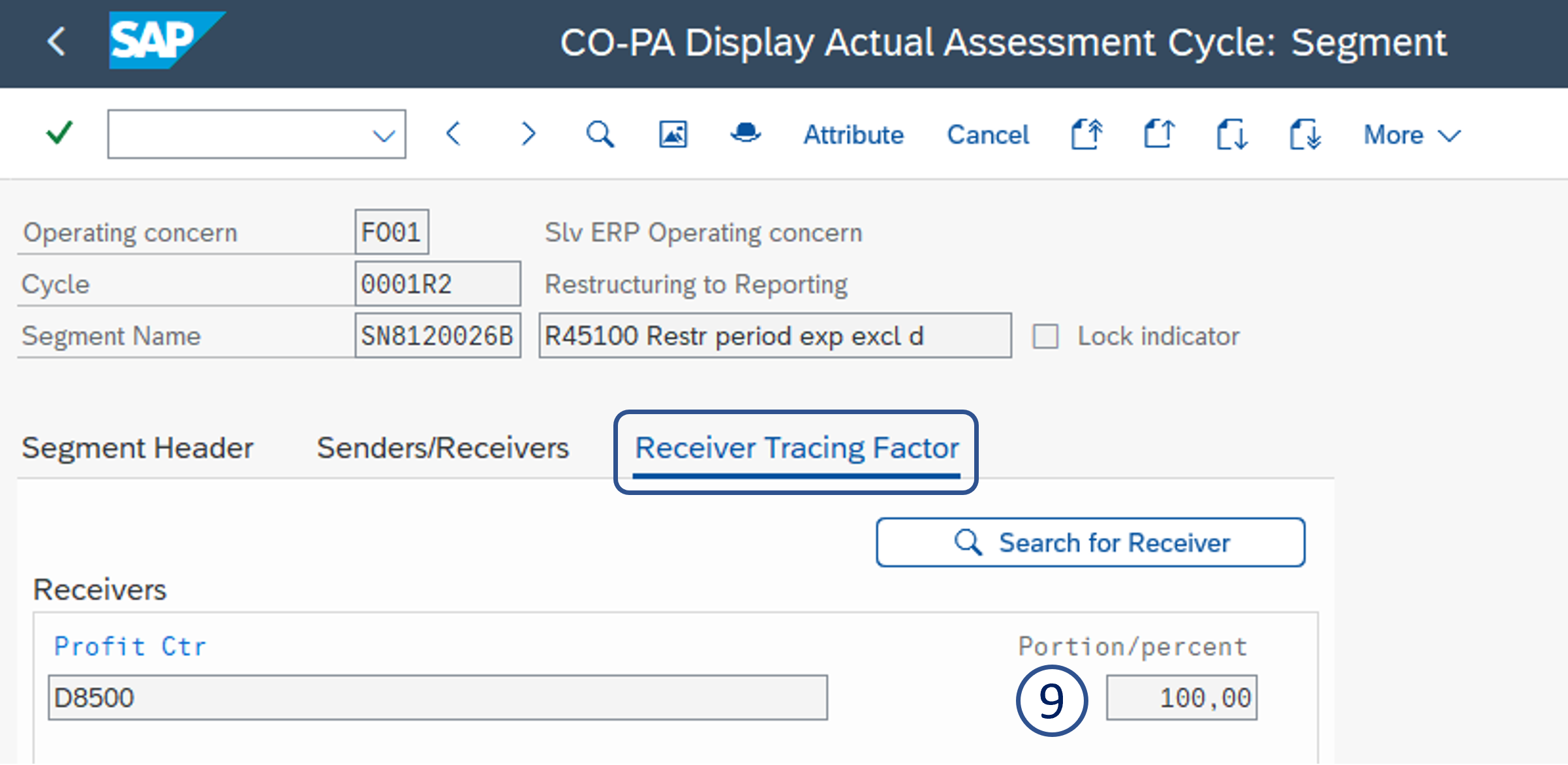
Segment B - Allocation to value field VVK05 - K05 Cur.Yr.restr.exp
Enter:
1. Segment name = Cost center + B
2. Segment description = R45100 Restr period exp excl d
3. Assessment CEle = 9816600001 R45100 Restruct exp
4. Value Field All = VVK05 - K05 Cur.Yr.restr.exp
5. Rule = Fixed percentages
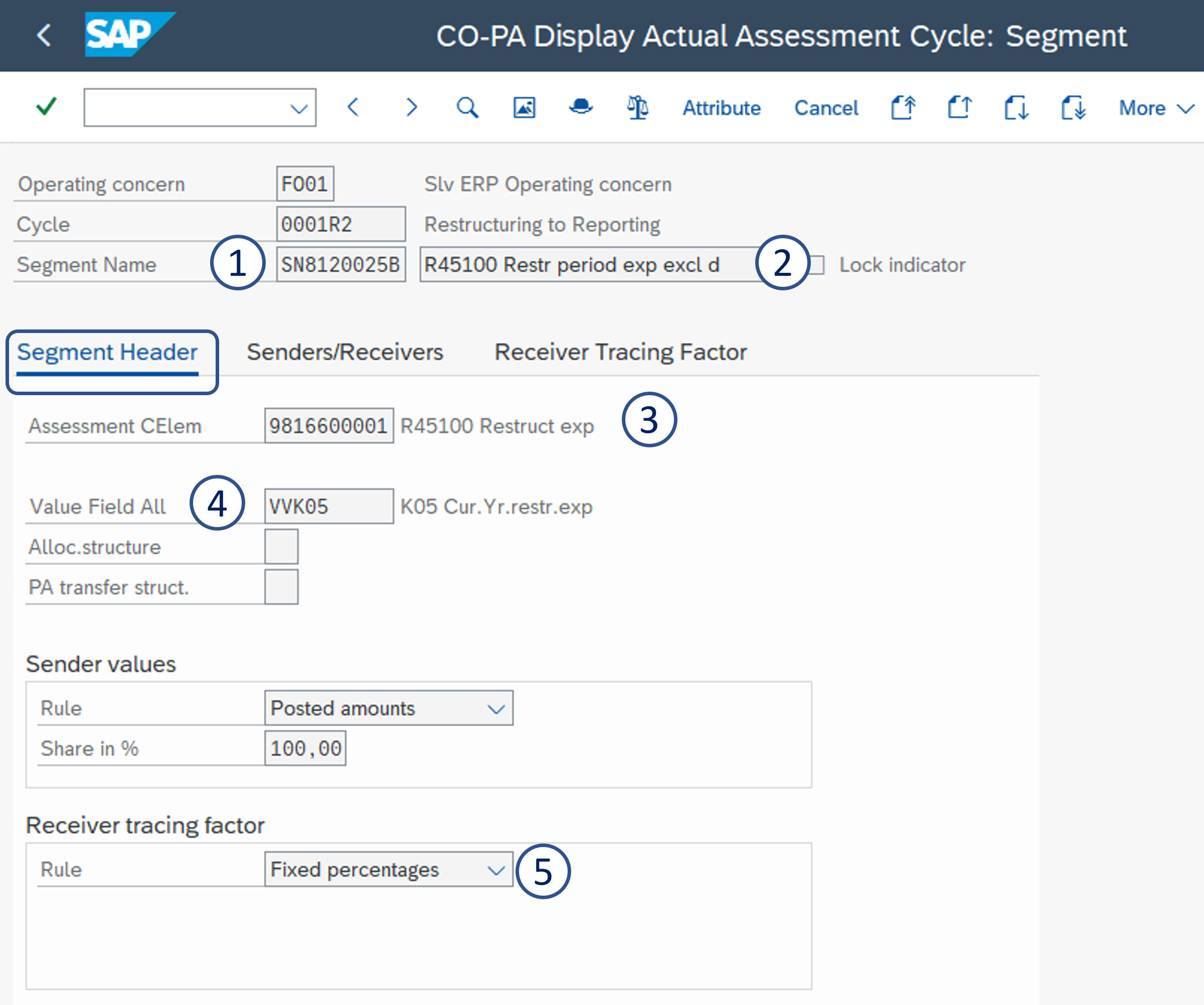
6. Sender cost center = Restructuring cost center
7. Cost Element group = REST_USE
8. Profit Center
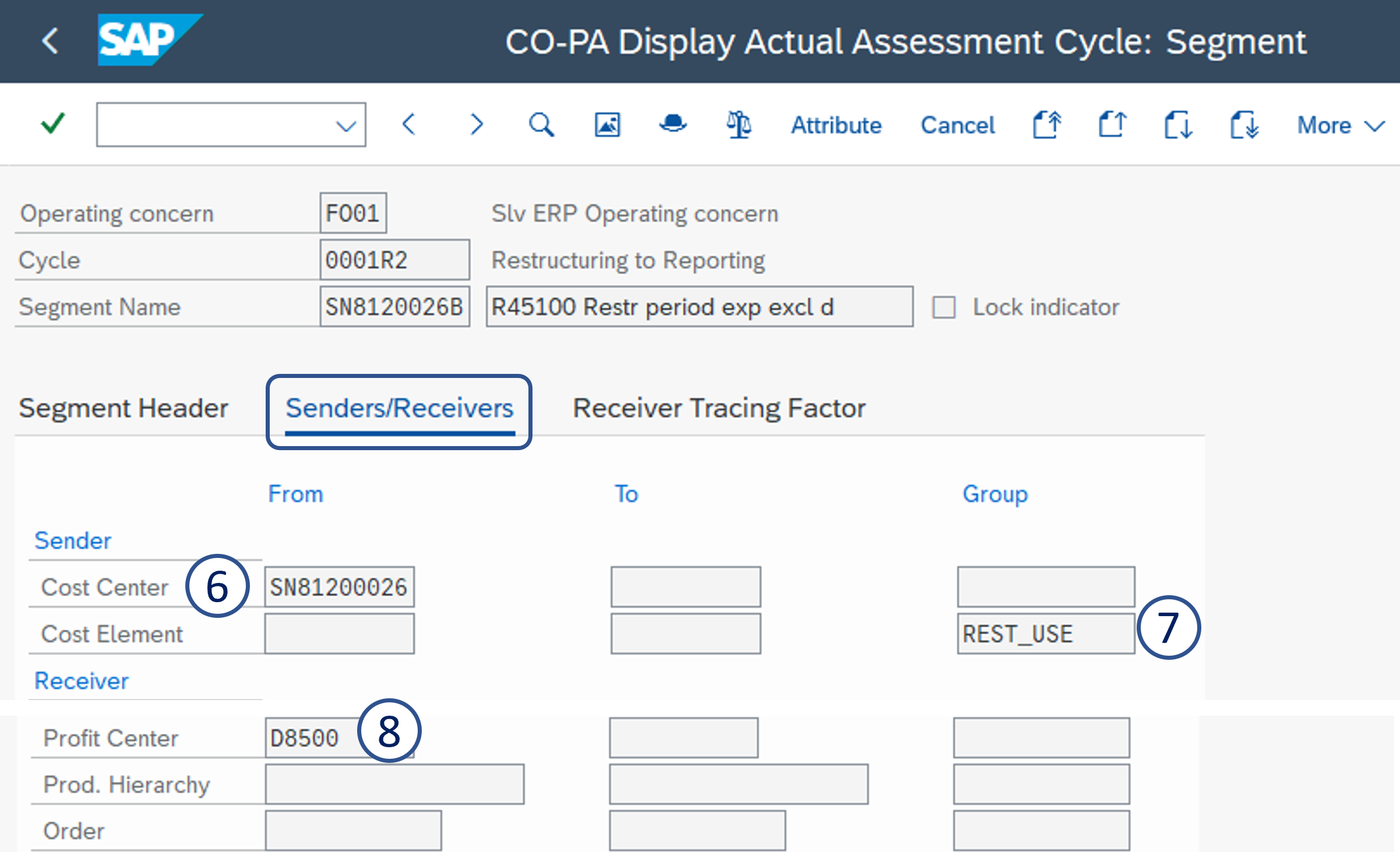
9. Portion/percent = 100
Segment C - Allocation to value field VVK15 - K15 New Restruct.
Enter:
1. Segment name = Cost center + C
2. Segment description = R45300 Increase/Decrease
3. Value Field All = VVK15 - K15 New Restruct.
4. Assessment CEle = PA - Rep CCtr -> Rep CCtr (assess.)
5. Rule = Fixed percentages
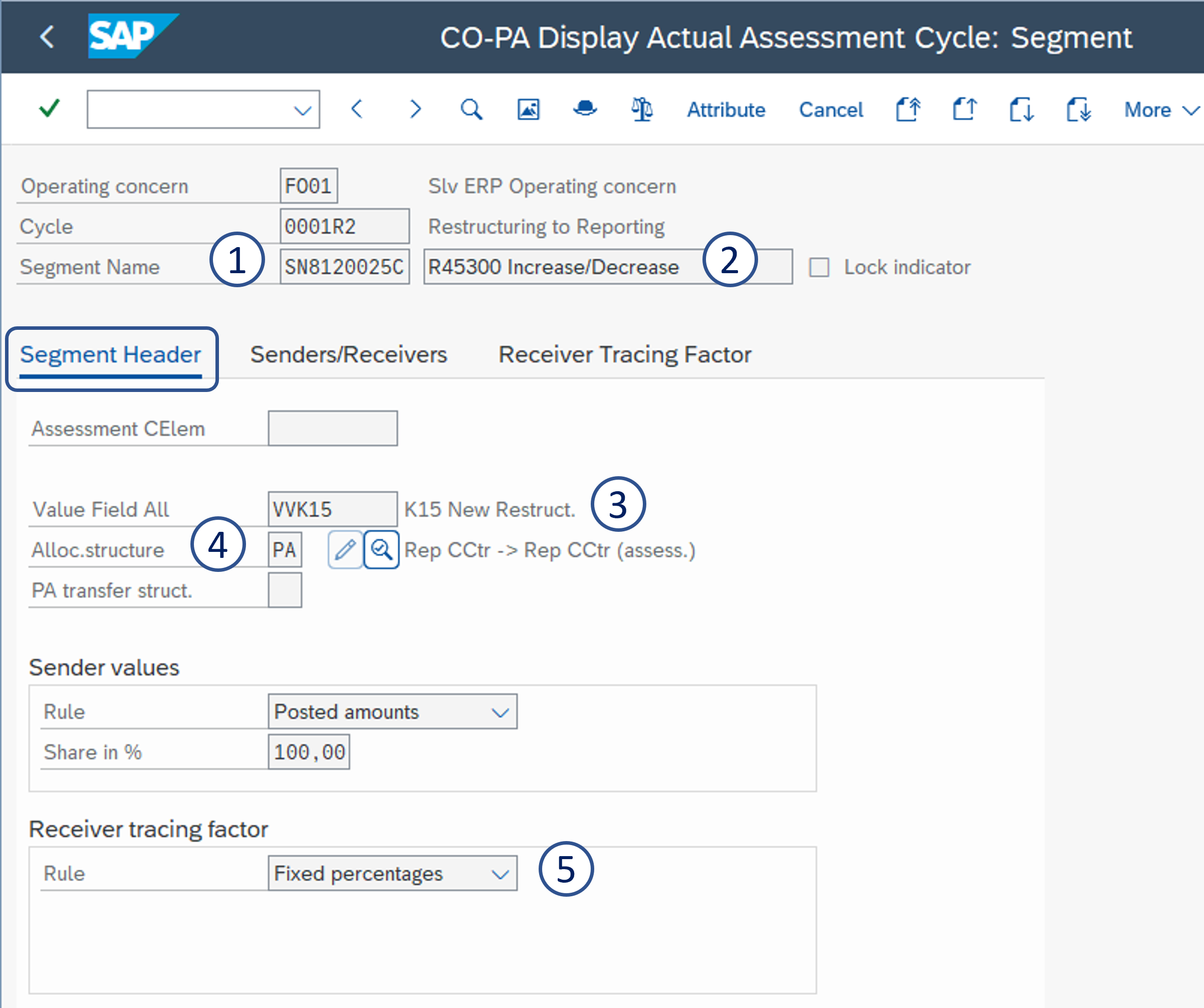
6. Sender cost center = Restructuring cost center
7. Cost Element group = RESTR45300
8. Profit Center
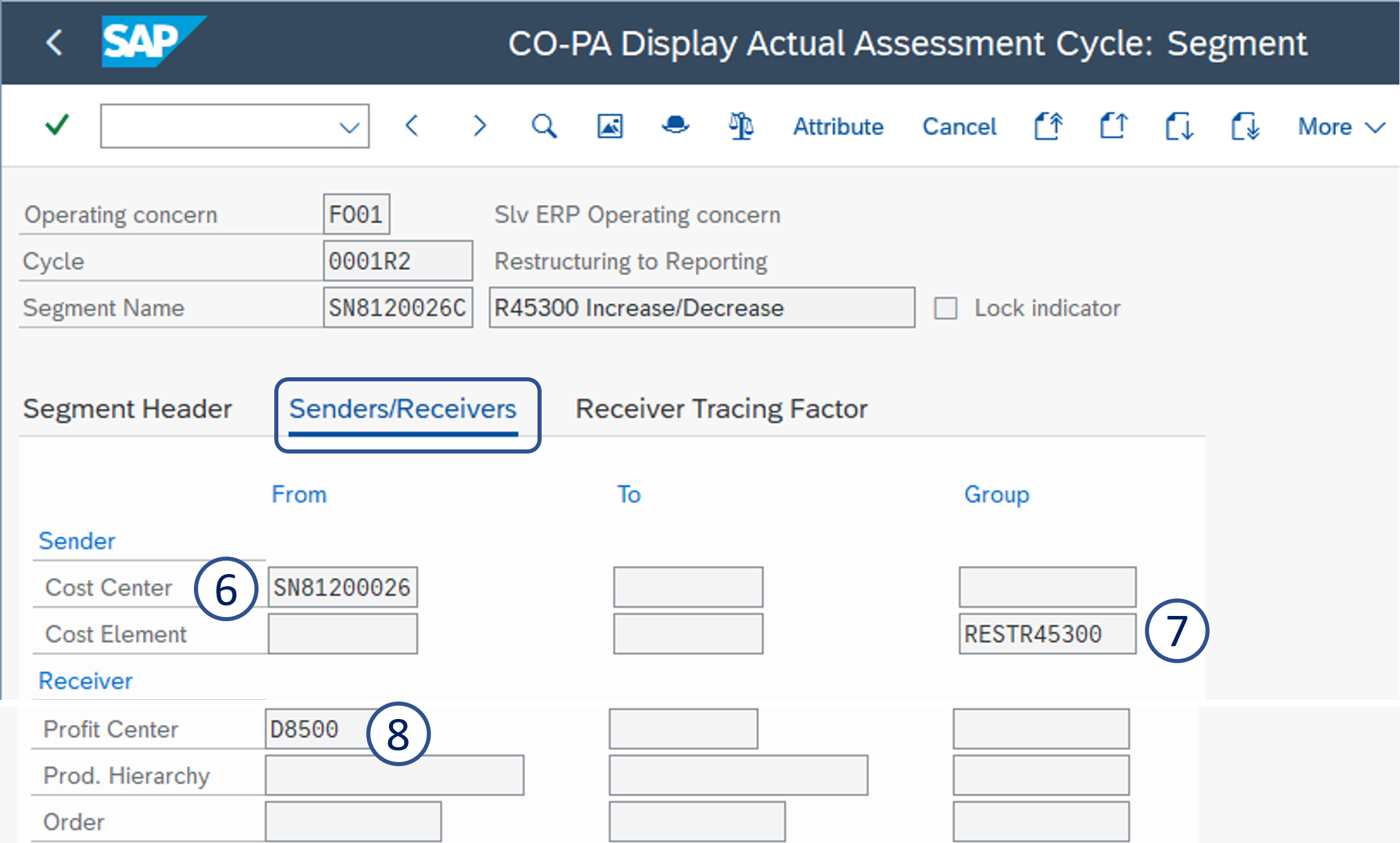
9. Portion/percent = 100
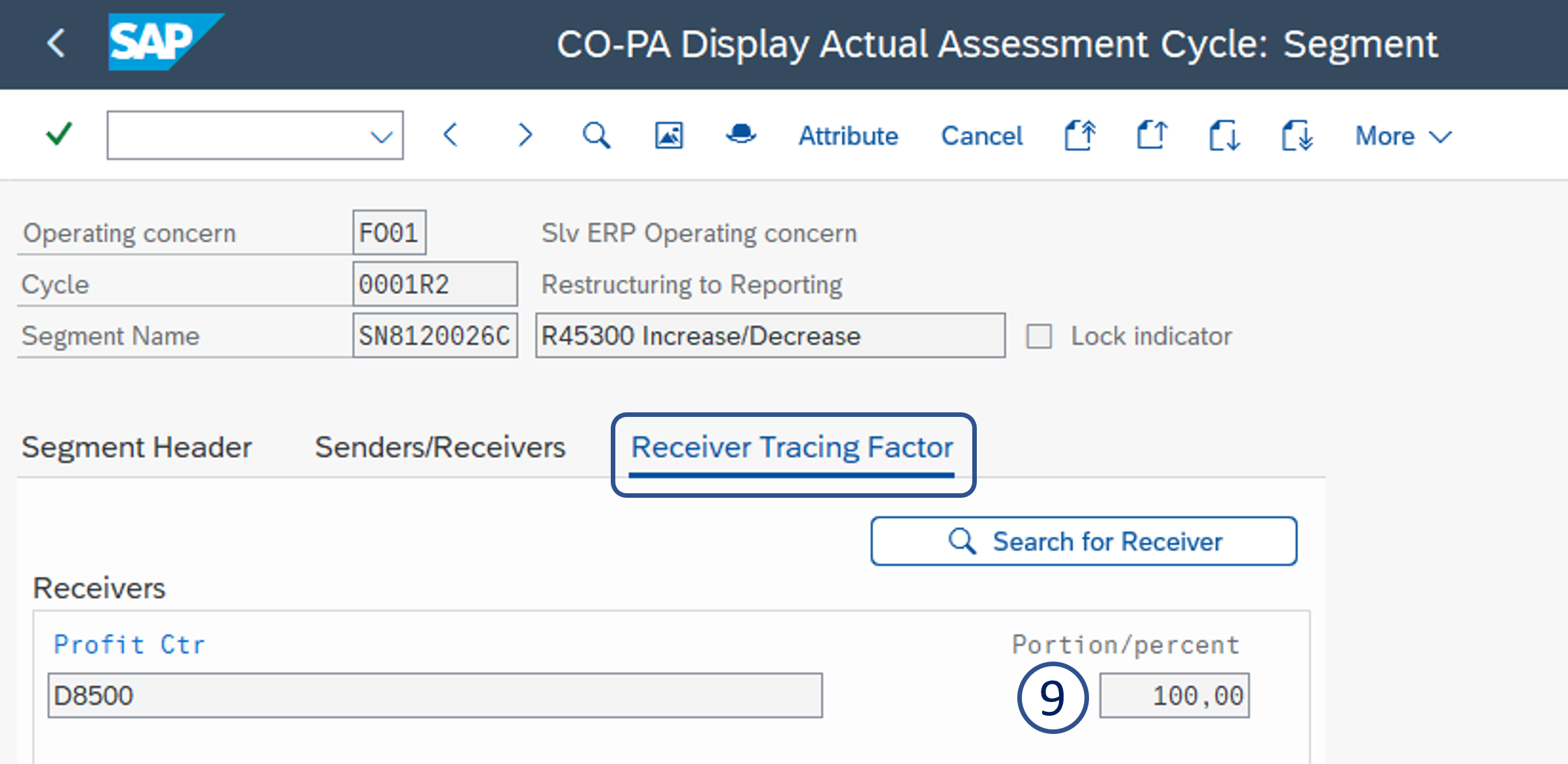
9 Comments
Jean-Pierre Godbillon
Sevilla, Rosario, / Hamburger, Joao it is ok for you ?
ROLLIER, Charlotte, how can we track validation from PE of every pages ?
Hamburger, Joao
Yes it is ok.
Jean-Pierre Godbillon
Hamburger, Joao
Why do we refer in the sender to a specific cost center and not to a group ?
Hamburger, Joao
It is a single restructuring cc per GBU, no? So it is more likely to be cc sender and not group. Even if we have more than one restructuring, you have different destination IECRAs in CCCR2 (and in the CCCCRt, it is not clear to me if it is a single restructuring order per company code or per company / GBU).
ROLLIER, Charlotte
Do you refer to the cycle CCCCRT or CCCC-C & CCCCR2 ?
For CCCCRT we have one internal order for one cost center. so we need to allocate each cost center to the corresponding order.
For CCCC-C & CCCCR2
Jean-Pierre Godbillon
Clear : can someone remind me we are due to use one segment by sender CC in PF1 ?
ROLLIER, Charlotte
As it is a Sympa rule, I think Antonio Sanchez & Hamburger, Joao can answer better than me
Hamburger, Joao
No allocation structure for restructuring has been created in PF1 to date. This was not treated in the projects.
Antonio Sanchez
Because is simple, and this was one of the objectives. and because in PF1 the standard heriarchy do not drive the allocation as in the case of RCS WP1