

The editor allows you to enter or change the title of your page; insert content including text, images, and links; and format your content using the toolbar.

Editor toolbar
The editor toolbar is where you format your page layout and text, and add links, tables, attachments and macros. You can also perform a find and replace, or get help using the editor by choosing the help icon 
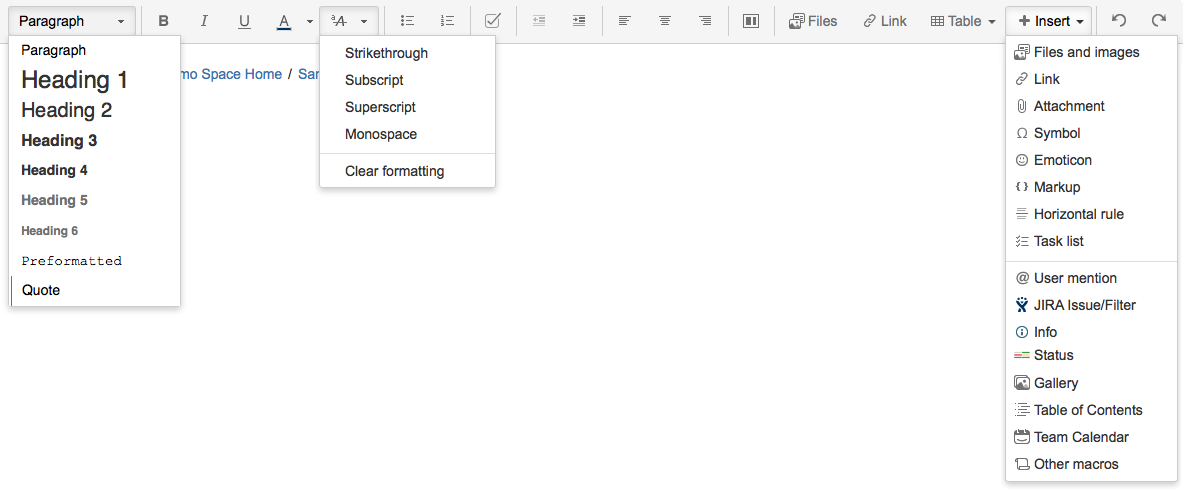
The Insert menu
Use the Insert menu to include any of the following content types on your page:
- An image
- A link to another Confluence page or external URL, or a link to an attachment or image
- An emoticon or symbol, or a horizontal line
- A macro (choose a specific macro, or Other Macros, from the Insert menu)

Restrictions, labels
When editing a page, you may want to set restrictions  on who can view or edit the page, or add labels
  to the page to make it easily searchable.

 The best way to get IT support is to use the new
Service One Platform.
The best way to get IT support is to use the new
Service One Platform.