

SYMPA ACADEMY
Structure of the training
1- The first part explains the construction of the BFC P/L. Several concepts need to be presented such as Master Data, closing process and Product Costing. Master Data are the static concepts used to carry out properly the closing process. Closing subsection demonstrate the dynamic use of the master data. Product costing is a sub-product but it is an important section because a big amount of the Cost of Goods Sold (COGS) is built during product costing process.
2- The second part presents all the reports to be used to carry out performance analysis and how you can use those reports.

Read me first
BFC P/L before the implementation of SYMPA model.

- R25460-FC period = 0
- R25470-Non proportional Cost Absorbed = 0
Those two lines are every month equal to 0 in the BFC P/L before the implementation of SYMPA model.
FC + Dep. Period = 40 + 10 = 50
We have sold 60% => 50*60% = 30
R25490 COGS FC = 30 – Dep. = 30 – 10 = 20
R25860 Dep. Period is a FI information available in the balance sheet. In this example, Dep. Period = 10
Let’s imagine that next month there are no sales => COGS has to be equal to 0 but Dep. Will be still equal to 10. => COGS = 0 – Dep. = 0 – 10 = -10 It is not relevant.
BFC P/L : Theory

- R25460-FC period = 40 => In PF1 model all the costs of the period are sent to inventories.
- R25470-Non proportional Cost Absorbed = -40 => this amount reflects the counterpart in the P/L of the balance sheet posting (inventory account). Full absorption is the model applied in PF1, so Non proportional cost absorbed corresponds to the full amount of FC period.
- R25490-FC COGS = variable cost * sales = 40 * 60% = 24
- R25860 Dep. Period is a FI information available in the balance sheet. In this example, Dep. Period = 10
- R25870 Dep. Absorbed = -10 => Full absorption is the model applied in PF1, so Dep. absorbed is the absorption of the full amount of Dep. period.
- R25890-Dep. COGS = dep. period * sales = 10 * 60% = 6
BFC P/L : From theory P/L to PF1 P/L after implementation of the SYMPA model
The theoretical P/L has been not selected and implemented because the use of R25870-Dep Absorbed and R25890-Dep. COGS would have driven erroneous REBITDA calculation.

- R25460-FC period = 40 => In PF1 model all the costs of the period are sent to inventories.
- R25470-Non proportional Cost Absorbed = Full absorption of FC period + full absorption of Dep. = -40 + -10 = -50.
- R25490-FC COGS = variable cost * sales + Dep Period * sales = 40 * 60% + 10 * 60% = 24 + 6 = 30
- R25860 Dep. Period is a FI information available in the balance sheet. In this example, Dep. Period = 10
- R25870 Dep. Absorbed = 0
- R25890-Dep. COGS = 0
In SAP, it is not possible to obtain a report that explains the origin of the costs. The split between fixed costs, variable costs and depreciation are available in BFC P/L thanks to a specific program that combines PCA + ML + FI.
Here, you have a representation of what is used in each P/L line.
TO BE UPDATED WITH AFTER SPS PROJECT
Business Financial Consolidation (BFC)
P&L statements and BFC interfaces are produced through
- CO-PA for sales data (by country, partner, etc.)
- CO-PCA for other P/L reporting items
- Material ledger for COGS (split VC / NVC / DEP)

SECTION 1 Construction of the P/L
| Code | Description | |
|---|---|---|
| Operating concern | FO01 | Slv ERP Operating concer |
| Controlling area | CHEF | ERP SOLVAY |
| Company code | List | |
| Plant | ||

Definitions
>> Syensqo is organized in Global Business units, Groups of activities and Activity 1. This structure is used to provide the proper reports for business follow-up.
The Business Structure is maintained in Syensqo consolidation tool – SAP BFC (Business Object Financial and Consolidation)
Codification
- GBU : 2 Letters
- Groups of Activities : 5 Letters
- Activity 1 : 4 Letters or 2 digits
The business structure is maintained by Group & Accounting Reporting team and the updated list can be found in AODocs:


Going further
| WP2 |
|
|---|---|
| PF2 |
|
It is a family of products
- It is a Code assigned to the materials.
- It aggregates the materials with similar characteristics.
- Material link to PIF is done via the Product hierarchy.

The Product Hierarchy is stored in the view "Basic data 1" or the material master data.
It is consistent with the codification of the reporting profit center that is stored in the view "Costing 1" and contain the corresponding PIF code
For instance the product hierarchy of the material 31859 is ABBHE and its profit center is F47ABBXXI2 where ABB is the PIF.


Structure Axes
In PF2, a material sold is assigned to an Activity 1 through its profit center.

SAP t-code
A primary cost elements is for CO the equivalent as accounts in FI with the same codification that is detailed in the page GL Accounts codification tables.
In PF2
The codification of a primary cost element is:
- 6 when it is a cost & 7 a revenue
- 9 digits : it can depend on the use of the cost element

In WP2
The codification of a primary cost element is:
- 98 : primary cost element
- 6 digits that can depend on the use of the cost element

There are 2 types of secondary cost elements:
- Cost elements to transfer costs between cost centers, orders & WBS
- Cost elements to transfer costs from the cost centers to COPA (in PF2 we speak about "Reporting cost elements")
In PF2
The codification of a cost element to transfer costs between cost objects is:
- 9 : secondary cost element
- 4 digits : cost section
- 3 digits : local need
- 1 digit
- 0 - ad cost
- 1 - unit price
- 2 - fixed price
- 1 digit
- 0 - settlement
- 1 - assessment
- 2 - activities

Example
Codification of a non reporting secondary cost element used to settle Maintenance with assessment cycles
9 : secondary cost element
4 digits : cost section : 105 Maintenance
3 digits : by default 000
1 digit : 0 - ad cost
1 digit : 1 - assessment

The codification of a Reporting cost element (to transfer costs from a cost center to COPA):
- 98 : reporting cost element
- 3 digits : cost section
- 3 digits : local need
- 1 digit
- 0 - ad cost
- 1 - unit price
- 2 - fixed price
- 1 digit
- 0 - settlement
- 1 - assessment
- 2 - activities

In WP2
The codification of a secondary cost element is:
- 99 : secondary cost element
- 6 digits : the first digits depend on the use of the cost element

SAP t-code
The group ZRCS-FC is created in PF1 & WP1 and is used
- in BW & Qlikview for the fixed costs reports
- in assessment cycles
SAP t-code
Warning
From the group ZRCS-FC is replaced by the Cost element Group ZSOLV

- In PF2, the group XCS-ALL is the base for allocation structures of Utilities and for new Splitting Structures
- In WP2, the group XCS-ALL is used in the PA transfer structures for settling WBS elements, process orders and internal orders to CO/PA
SAP t-code


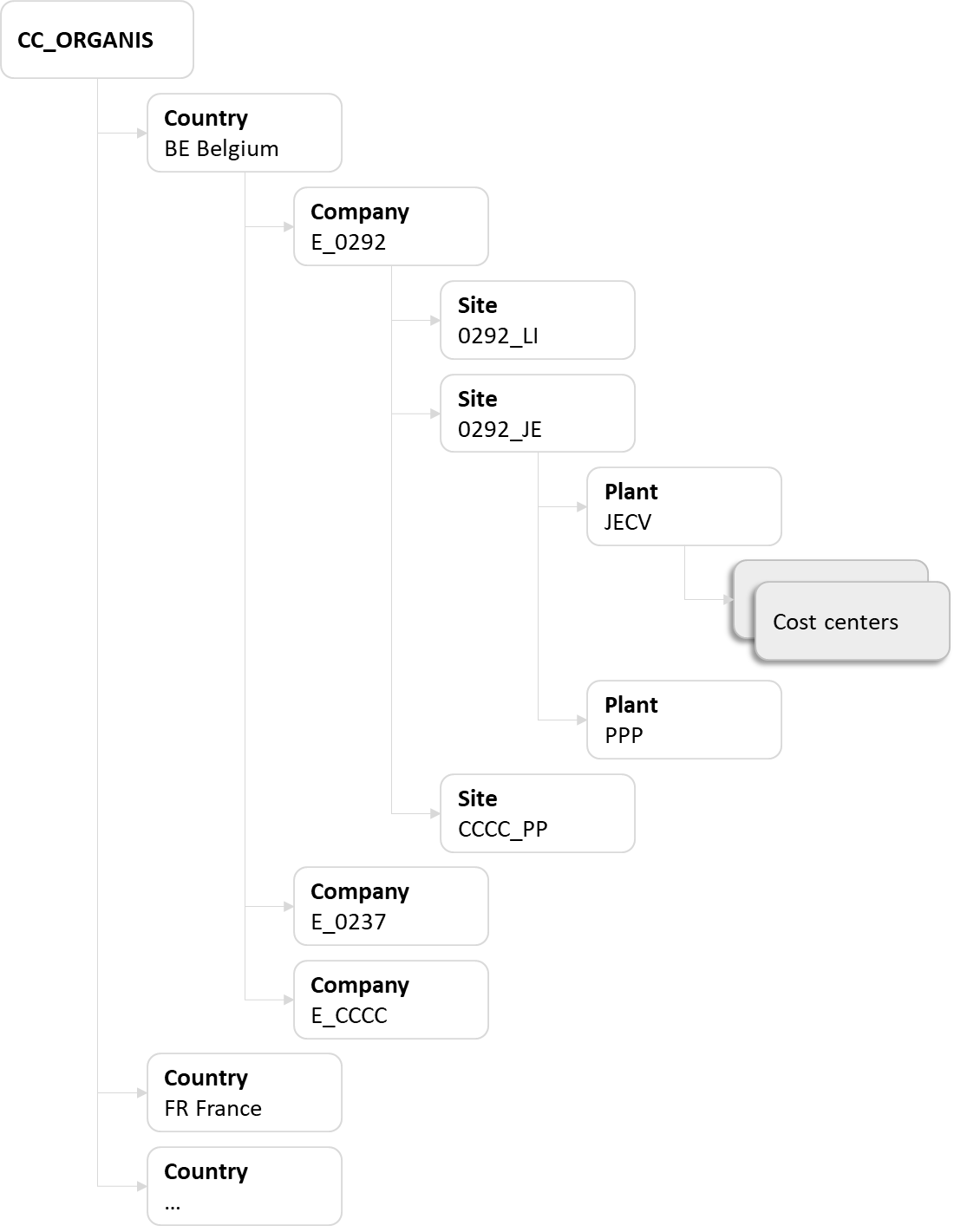
The code of the standard hierarchy in PF2 is KCHEF_HIER and it is structured in 2 main sub-groups:
- CC_ORGANIS
CC_CHEOPS
The group CC_CHEOPS was used for reporting cost centers. These cost centers are not used anymore.
In other words the group CC_CHEOPS should not be used anymore and all active cost centers should now be included in the group CC_ORGANIS.

- XX - Country
- E_CCCC - Company
- CCCC_PP - Site
- PPP - Plant
- Cost center 1
- Cost center 2
- PPP - Plant
- CCCC_PP - Site
- E_CCCC - Company
XX = Country code
CCCC = Company code
PPP = plant code
PP = First 2 digits of the plant code
Reporting cost centers are not used anymore. They were all blocked in May 2021 and should not be created anymore.
- Company – with split by partner (level 1)
- Division – with split by origin or by partner (level 2)
- PIF / origin / packaging (level 3)
Standard codification
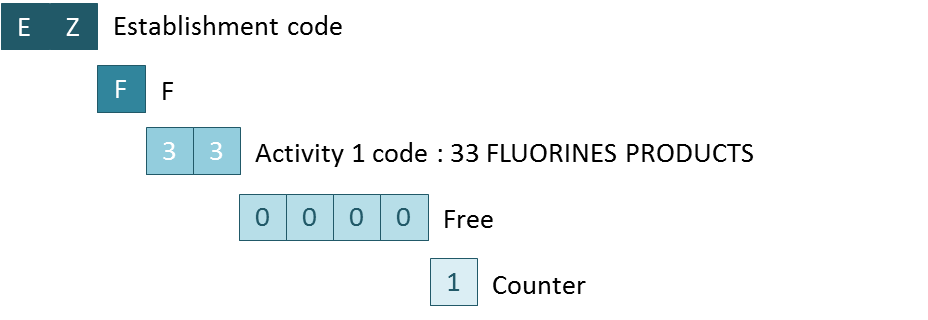
The codification of a reporting cost center used at PIF level
- Establishment code
- Letter F
- Activity 1 code

Example
Codification of a reporting cost center for the PIF NGAAA Nocolok Wet in the plant SEF Seoul
Standard codification
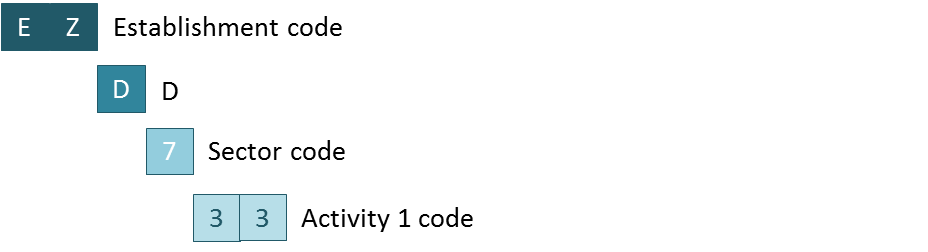
The codification of a reporting cost center used at Activity 1 level
- Establishment code
- Letter D
- Sector code
- Activity 1 code

Example
Codification of a reporting cost center for the Activity 1 = 33 in the plant SEF Seoul
Standard codification
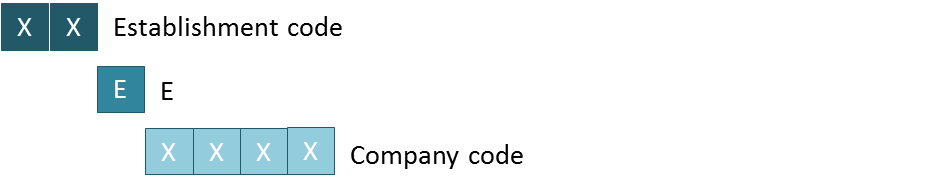
The codification of a reporting cost center used at Company code level:
- Establishment code
- Letter E
- Company code
Standard codification
The codification of an organizational cost center used for production is the combination of :
- Establishment code
- Cost section
- Code Prix de Revient (=CPR) that can be found with PF2 - Table ZZRT179V - Product hierarchies
Note: Finance workflow is checking if the "Cost section" code is valid, reading table "ZZK_SECTION" in PF1_050; it should be maintained when required.

Example
Codification of a cost center used for the workshop F2 in the plant OSF Onsan

Standard codification
The codification of an organizational cost center not used for production is the combination of :
- Establishment code
- Cost section
- Free (for utilities it depends on the utility type listed here)

Example
Codification of a cost center used for Finance & Corporate Development in the plant OSF Onsan

ZCBS is the code of the alternative cost centers hierarchy that is mainly used for reporting purposes (ex: Co$ta - Reports , Fixed costs ).
You can display the ZCBS hierarchy:
- in SAP using the transaction KSH3 - Display cost center hierarchy
You can also use the report FC - Cost centers master data to display all cost centers with their assignment in the hierarchy ZCBS.
All active must be assigned to the lowest level in the hierarchy so that the full ZCBS levels are properly shown for the related cost center.
A cost center in included in ZCBS according to the following principles:
1. There is a direct link between the first level of the ZCBS hierarchy and the Activity 1
CBS cost centers
- All cost centers included in the groups SCBS-CORPO Corporate Function & SCBS-FUNCT FUNCTION SERVICES are assigned to the Activity 1 CBSS in WP2 (=IECRA00569) and PF2 (=DIV 50 or =BA 8500).
- Cost centers included in the group SCBS-ICO INTERCOMPANIES are assigned to the Activity 1 CBSS in WP2 (=IECRA01148) and PF2.

Non allocated cost centers
- All cost centers included in the group SCBS-OTH CBS NON FUNCTION COSTS are assigned to the Activity 1 CBNR in WP2 (=IECRA00450) and PF2 (=DIV 59 or =BA 8590).

GBU cost centers
- All cost centers included in the group ENTRP ENTERPRISE are assigned to a GBU.
There can not be cost centers allocated to CBS included in the group ENTRP.

Other groups
- The group RHXXX TECHNICAL COST CENTERS is used for technical cost centers (not reported in fixed costs report)
- The group DISC DISCONTINUED is used for cost centers that are blocked
- The group ZNS-FUNCT NON SOLVAY - FUNCTION SERVICES can be used for entities sold when they want to keep working with a fixed costs report with their own groups
Group ZNS-FUNCT
Currently, the group ZNS-FUNCT does not exist in WP2 or PF2 because it doesn't need to be maintained.

2. There is a direct link between the first (or second) level of the ZCBS hierarchy and the P&L
CBS cost centers
- All cost centers included in the group SCBS-CORPO Corporate Function & SCBS-FUNCT FUNCTION SERVICES are allocated to R33400 Shared service function expenses (origin)
- All cost centers included in the group SCBS-ICO INTERCOMPANIES are allocated to R33200 Shared services function costs invoiced

Non allocated cost centers
- Cost centers included in the group SCBS-OTH CBS NON FUNCTION COSTS : they will be allocated to corresponding BFC headings depending on its destination (ie: Administrative or Commercial expenses, Other recurring operating income/expenses, etc)

GBU cost centers
- The allocation of cost centers included in the group ENTRP ENTERPRISE depends on the type of costs:
| ZCBS group | Definition |
|---|---|
| EPRD | All production cost centers should be included in the group EPRD:
=> Definition of Period non-proportional costs of production (R25460) |
| EADM | This group is used for cost centers allocated to the BFC account Administrative expenses (R33310)
|
| EMSV | This group is used for cost centers allocated to the BFC account Commercial expenses (R33320)
|
| RDD | This group is used for cost centers allocated to the BFC account Research and Development (R360)
|
For other groups you can look at the file by ERP in Assessment cycles Rules

Technical cost centers are not allocated to BFC
3. There is a direct link between the lowest level of the ZCBS hierarchy and a BSA
The Result (Reporting) Profit Centers are the basis for Group reporting
- Material (plant level, Costing view)
- Cost centers
- CO orders
- PM orders
- PP orders
- Cost collectors
- WBS
Standard codification
The codification of an organizational profit center
- Letter C
- Plant code

PIF level
Standard codification
The codification of a reporting profit center used at PIF level:
- Letter F
- Activity 1 code - 2 characters of the Reporting Division from SM30 table V_134G, Division code (check in Material Master Data (MM03), tab Basic Data 1, the field Division) + Plant code, to get the correct Business Area.
- PIF code - Use the first 5 characters of the PIF code (complete with “X” to reach 5 characters). To identify the correct code, go to T-code MM03 → Basic Data 1 tab, check the Prod. Hierarchy field. In SM30 table ZZRT179V, confirm that the Prod. Hierarchy code is marked with an “X” in the Flag PIF column.
- Country of origin - 1 character for the country code of the industrial origin, i.e. where the goods are manufactured - see appendix for the codes.
- Code packaging - 1 character (normally a digit) to differentiate - normally odd for packed and even for bulk.
These profit centers are used for postings at the lower level of detail : PIF + industrial origin.

Activity 1 level
Standard codification
The codification of a reporting profit center used at Activity 1 level
- D + Business Area
- Letter D
Business Area - Sector code
- Activity 1 code
- Free
- Letter D
- D + Business Area
These profit centers are used for posting at “company code” + “BFC Activity 1” level. Should wait until the Business Area has been created by APDM and is available in PF2_020 before creating the D* profit center.

Profit centers at company & company/object levels should not be used anymore
Before the project SPS (COPA in PF2) there were 2 other types of reporting profit centers:
At company level
They were used for posting at “company code” level for which there was no subdivision between GBU or BFC Activities.
The codification of a reporting profit center used at Company code level was:
- Letter E
- Company code
At company & object level
These profit centers represent the shares of the company hold by other Solvay companies. Can be created for any Solvay companies, operating in the ERP Solvay or not.
The codification of a reporting profit center used at Company code and object level was:
- Letters SCHEF
- Company code
Reporting profit centers at company & company/object levels should not be used anymore
It's not possible to change the business area field during a fiscal year once there are already postings or planned postings in that fiscal year.
The Business area is used in PF2 only and is used to identify the business involved in each transaction.
The codification of the Business area is:
- 1st digit : Rules - PF2 - Sector code
- the 2 middle characters : Rules - PF2 - Activity 1
- last digit is always "0", except for German companies

An assessment cycle is used in SAP to assign all primary cost elements and secondary cost elements from a sending cost center to the receiver cost center.When you want to transfer costs from one cost center to another through an assessment cycle, sap use a secondary cost element and accumulates all the primary cost and secondary cost and send it to the receiving cost center.
Definition
An assessment cycle is used in SAP to assign all primary cost elements and secondary cost elements from a sending cost center to the receiver cost center. When you want to transfer costs from one cost center to another through an assessment cycle, sap use a secondary cost element and accumulates all the primary cost and secondary cost and send it to the receiving cost center.
PF1
WP1
In PF1, assessment cycles are used to:
- Allocate common production & utilities cost centers to Workshops cost centers (EE32xxxxxx or EE193xxxxx)
The codification of the secondary cost element to be used is: 91xxxxxxxxxx
In WP1 , assessment cycles are used to:
- Allocate common production cost centers (PPPP-2xxx) to Workshops cost centers (PPPP-1xxx)
The codification of the secondary cost element to be used is: 99xxxxxxxx


Maintenance of cycles in SAP
Example
List of cycles
PF1
WP1
A distribution cycle is used in SAP to transfer primary costs from a sender cost center to receiving controlling objects. The original cost element remains the same.
In PF1, distribution cycles are used for IAS 19

When you create a cycle to distribute corporate IAS19 costs in PF1, you must follow the following steps:
STEP 1
Create a distribution cycle with KSV1 - Create Actual Distribution Cycle
1. Cycle = CCCCDV
2. Start Date = 01.01.20YY to 31.12.20YY
3. Text = Distribution (IAS19)

STEP 2
Only one segment needs to be created
1. Segment name = EE800IAS19
2. Segment description = IAS 19 BFC Dotation
3. Sender values =
- Sender rule: Posted amounts
- Share in %: 100
- Act. vals
4. Receiver tracing factor
- Receiver rule: Variable portions
- Var.portion type: Actual costs
- Scale Neg. Tracing Factors: No scaling
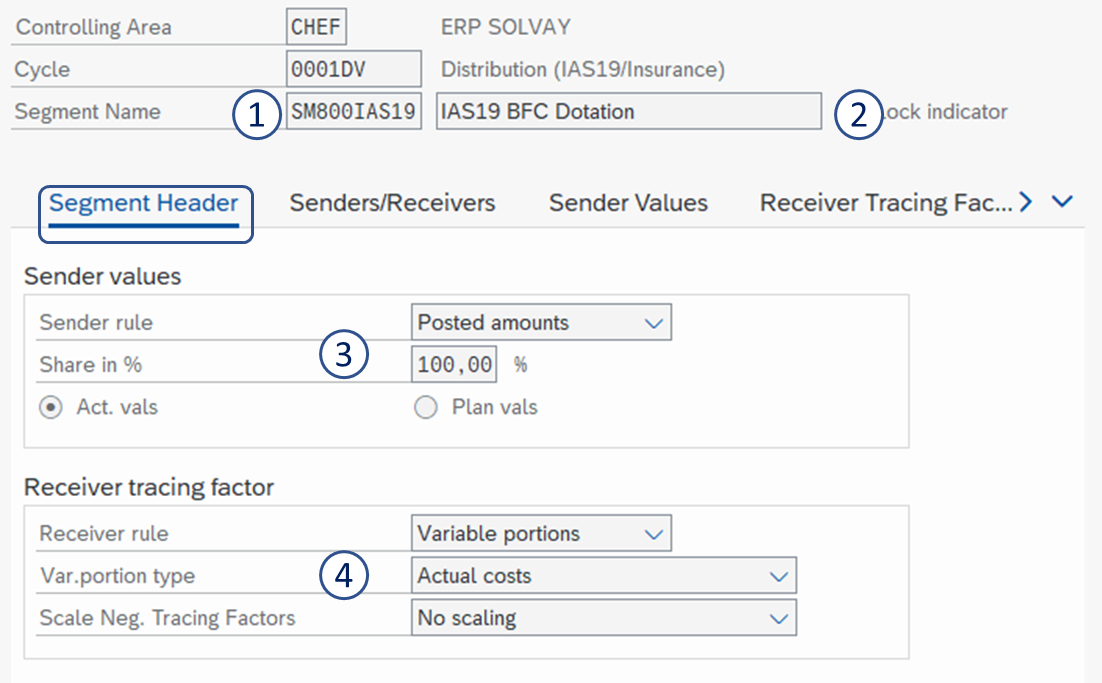
5. Sender cost center = EE 800IAS19
6. Sender cost elements group = ZSO-P20010
7. Receiver cost centers group = E_CCCC (= all cost centers of the company)
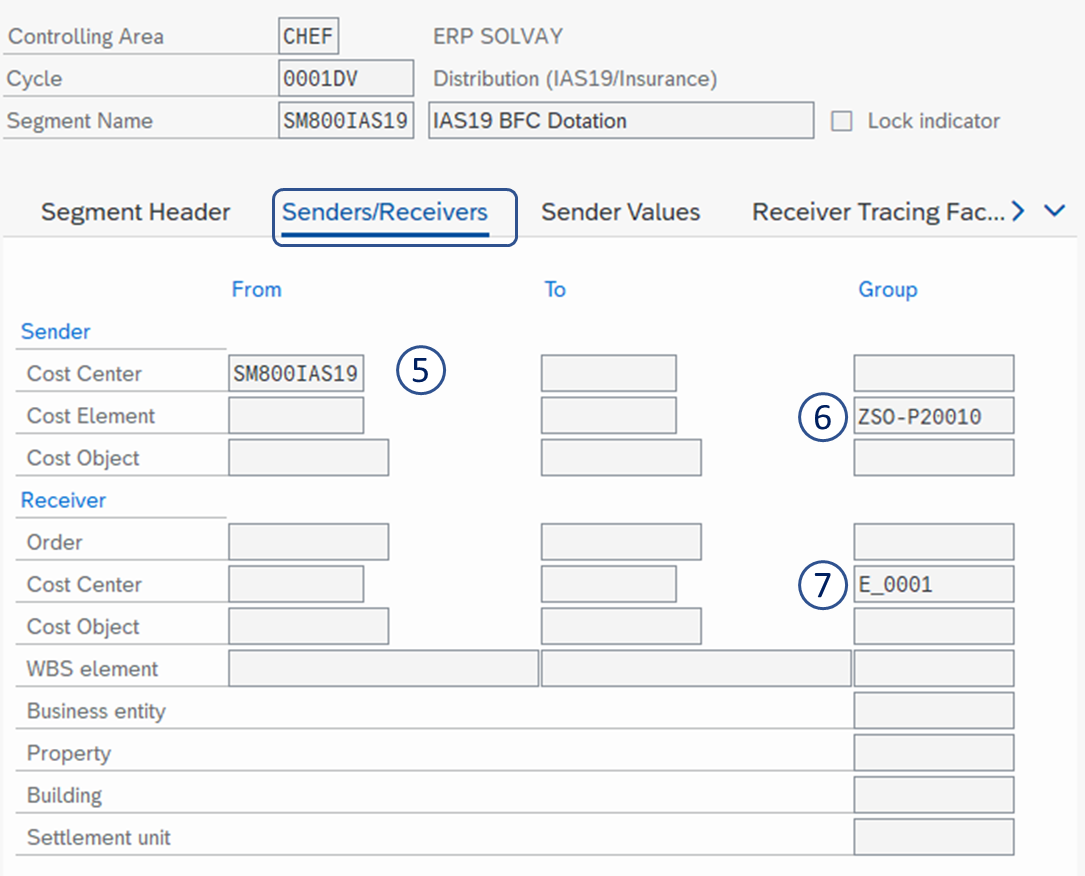
8. Cost Element Group = IASSERV
SAVE 

Rule 1
It is not allowed to create a cost center for less than two employees

Rule 2
An employee is assigned to one cost center only

Recommendation: minimize the number of CC allocation
- For Production costs: allocation between organizational CC and another organizational CC
- For non Production costs: allocation from organizational CC to reporting CC
Exception
- Utilities
- Insurance (IAS 19)
- R&I: allocation from CC to WBS
- Intercos: from organizational CC to organizational CC other company

General rule:
- All type of expenses - different than Manufacturing Costs (Indirect/Direct) and R&I - go directly to BFC (at different reporting cost center) and to only 1 BFC heading.

General rule:
- “No pricing” rule: allocations between organizational cost center, within the same legal entity (same GBU normally, but could be also between 2 GBUs) should be done at cost.

General rule:
- Payroll expenses shouldn’t be posted to technical cost center if HR/Payroll system is integrated.
- An employee is assigned to only one cost center

General rule: A minimum level of detail is required for assessment to reporting cost center:
- For gross margin => Cost center reporting at “PIF” Level (see codification below)
- Below gross margin => Cost center reporting at “Division” level (see codification below)
- Below EBIT => Cost center reporting at “Company” level (see codification below)

General rules:
1. For GBU cross charge
- Change the cycle usage: evolution from actual amounts to planned amount
- Objective: anticipate the launch of cycles (from D2 to D-1) and reduce problems in D4
- Create and standard cost center for Cross charge (in order to align to method of CBS)
2. For CBS
- Create a specific Cost Section (160) for SBS invoicing
Technical Cost Center can be used for the following cases:
- Use case 1: to centralize primary costs for corporate needs (e.g.: Insurance, IAS 19…)
- Use case 2: to post costs not directly linked to the organizational structure (e.g.: other non recurring expenses)
- Use case 3: to collect the result of income miscellaneous (e.g.: sales of scrap…)
- Use case 4: if the organization cost is not defined in the Cost Section narrative
Reminder: in all cases, the request has to be approved by the Central Costing Expert after approved the request by GBU.

Statistical key figures usage
Definition: “Statistical key figures” provide information on non-monetary data such as the number of employees, number of machines, capacity usage, market information…and can be used for internal cost allocations.
Recommendation: minimize the usage of SKF or avoid it (if possible)
2 conditions are identified to use the “Statistical key figures”
- Volumes of target CC
- High frequency (e.g.: every month) of update
Working File 3
Overview of Working file 3
All the companies harmonized in Sympa Model after a period of 2-3 months where some adjustment are done;
Controllers should have access to their WF3. If you do not have; please request it
- Each year by the end of October you will be requested to review your allocation keys by RCOM. And this will be part of an Internal Control.

- Request Cycles changes with Costing forms
- Review of the roles and transactions access by the users has been done in January-16.
Expand to see the last version of the cycle model in Gdrive:
Definition
Cost object in Product Cost by Period that collects the periodic actual costs incurred in the production of a material. When a cost collector is used, the product is the main cost object.
Use
Product cost collectors are independent of the production type. This means that costs can be collected on product cost collectors in the following production environments:
- In order-related production (using production orders) to analyze the costs by period rather than by lot;
- In process manufacturing (using process orders) to analyze the costs by period rather than by lot;
- Repetitive manufacturing: product cost collectors are used as cost objects.
Cost collectors are independent of the production type. This means that costs can be collected
CO-Product Costing Object - Structure
KKPHIE - Insert a new Cost Object
KKF8 - Display Product Cost Collector
CS03 - Display Material BOM
CA23 - Display Rate Routing

CO-Product Costing Object - Basic Schema


CO-Product Costing Object – Example – 2/3

CO-Product Costing Object – Example – 3/3

- Splitting structure is used in cost center planning to define which cost elements are considered for calculating which prices of activity types, when a cost center has more than one activity associated to it, and the price is not manually determined (most of the cases in production cost center). Splitting structure links Cost elements (and its amounts) with activities types of a given production cost center.
- During the costing process, actual price calculation of the activity types is run. In other word, activity types are reevaluated with actual prices of the month. The splitting structures provide the reference (actual price) for the reevaluation of activity types. This reference has to be defined for each cost center to do so a splitting structure has to be associated to each cost center.
For example, costs posted in the cost center D232410900 are considered as Variable or fixed and then allocated to the corresponding activity with the splitting structure that is based on the hierarchy XCS-ALL


- It is done at CC level.
- The level of complexity is determined by the different types of activity types used in production CC.
- The right design of the splitting Structure/Activity Types is a preliminary step to have the Cost Component structure as detailed or as simple as we want.
The most common splitting structures are Z1 and Z2. They are based on the Rules - Cost element Group XCS-ALL
The splitting structure can be displayed with OKES - Display splitting structure


- When a production CC is not included in a splitting structure… then the amount is split by the number of Activity types and it is allocated to each of them. Eg: 1000 with 3 act types >> 1000/3
You can check if the cost center is included in a splitting structure with KS03 - Display cost center
In the example the cost center D232410900 is included in the splitting structure Z1

- If there is a posting in a CC in a given cost element linked to a activity type; but there is no posting of that activity type: the system will generate an error in the Product Costing step (activity type revaluation) and the balance of the cost element will remain in the cost center
- If there is posting of an activity type without any posting in the cost elements associated to it: actual price revaluation will bring its price to zero.
- Cost Component structure are used to classify within the cost collector which cost elements are fixed, variable or Depreciation. But not only this. The level of granularity depends on the GBU election (election of Cost Component), but it has to be coherent with activity types. It links them to material ledger classification.
- It is customized at Company level.
- The level of detail provided and its complexity is determined by the different types of activity types used in production CC.
- The right design of the Splitting structure / Activity Types is a preliminary step to have the Cost Component structure as detailed or simple as we want.
There are currently 12 different Cost Component Structures. The most popular one is Z1 that is a very basic one; its main purpose is to be able to split cost in VC-FC-Depr as requested by BFC
- It can be displayed with OKTZ - Display cost component structure
Each Cost component Structure can have different Cost Components elements:

Cost component Element is categorized as Fix or Variable / this is the base for interface to BFC

Each Cost Component element is compounded by the amount posted in the Cost collector in a given set of Cost elements

There are other cost components structure
ZF used by Special Chem (Not always)

ZC used by Soda Ash US

ZY used by Specialty Polymer (not always)

The cost components structure must be consistent with the splitting structure
- The Cost Components Structure can be very detailed, but if it is not consistent with the activity type and the Splitting structure, the result won't be as detailed as expected.
- In this example, Fixed Costs in the production CC are only used in one activity type: ZZPROD. So we can not get more detail.


SECTION 2 Usage of different reports to explain the P/L

PF1 Data have been merged in BW – production - WBP to facilitate the analysis of GBUs using WP1 & PF1. For more details, you can visit RtR PE Reporting
Access WBP and Open data source or workbook or go to BW - Analysis Workbook Guide for more details regarding BW
To have the P&L in BW you can use the report ZZKPL_M01_BASIC_02
STEP 1
In WPB, Select the report ZZKPL_M01_BASIC_02

STEP 2
You can enter:
- The period (compulsory)
- GBU
- Company code
- Partner Business Unit

STEP 3
Create your report with your selection with criteria available


For further information on the characteristics and its attributes better contact to DMR Reporting team
The P&L is displayed

STEP 4
You can detail a BFC heading.
For instance, have the Non proportional costs of production:
- by material

- by business area

Other reports that can be used
| Report | Description of the report |
|---|---|
ZZKPL_M01_CONSO_01 | P&L - Consolidation Report. Not used at legal entity level but used by GBU controllers. It is set-up with the consolidation methodology used in BFC |
ZZKPL_M01_CONSO_03 | P&L - Consolidation Report Integrated Margin. It considers the Margin taking in account the production cost at Origin. Only available for SpP and Soda Ash (active also for Peroxide but not validated yet with GBU controller). |
Warning
Since January 2018, this procedure is not applicable anymore in PF2
After project SPS, the P&L in PF1 can be displayed using KE30 - Profitability report
STEP 1
To display the P&L in PF1, use a report with transaction GR55 :
- Z4C1 - BFC Monthly evolution (EUR)
- Z4S1 - BFC Monthly evolution (Loc Curr)

STEP 2
Enter
- Fiscal year
- Controlling Area : CHEF
- Group of Company Codes or single value or leave it blank
- Group of Profit Center
 or single value or leave it blank
BDxx where xx is the GBU code

STEP 3
The P&L is displayed

Main Material Ledger - Reports
| CKM3 | Z1K_CONS_ESTO | Z1K_ML_display(*) | Upper Level in CKM3 | Description |
|---|---|---|---|---|
| Beginning Inventory | BEGINNING INVENTORY | AAA: BEGINNING INVENTORY | - | Beginning Inventory |
| Receipts | RECEIPTS | IN: RECEIPTS | - | Total inventory received : produced & purchased (mvt 1xx) |
| Stock transfer | TRANSFER (RECEIPT) | N: STOCK TRANSFER | RECEIPTS | Transfer from another plant (= mvt 311) |
| Production | PRODUCTION | N: PRODUCTION N: Purchase Order | RECEIPTS RECEIPTS | Production of the month Purchase of the month |
| Consumption | OUT: TOTAL CONSUMPTIONS | - | Sales + consumption in production + transfer to another plant | |
| Not allocated | NOT ALLOCATED | OUT: NOT ALLOCATED | Consumption | ML Revaluation |
Consumption | CONSUMP | OUT:CONS/SALES | Consumption | Sales (=mvt 6xx) |
| Production | CONSUMP PRODUCTION | OUT:CONS TO PRODUCTION | Consumption | Internal consumption (=mvt 26x) |
| Stock transfer | TRANSFER (ISSUE) | OUT:STOCK TRANSFER | Consumption | Transfer to another plant (= mvt 311) |
| Ending inventory | FINAL INVENTORY | ZZZ:ENDING INVENTORY | - | Ending inventory |
Use CKM3 - Material Price Analysis with the view "Cost components".


Use PF2 - Z1K_CONS_ESTO - Report consumption and final stock for a mass report
- R15400 Proportional costs of sales
- View
- CONSUMP
- NOT ALLOCATED
- TRANSFER
- Cst Comp
- Raw materials
- Packaging Materials

- R25460 - Absorption variance: Period non-proportional costs of production (excl depr)
- View
- PRODUCTION
- Cst Comp
- Manufact. Activities
- Packaging Activities

- R25490 - Non-proportional costs of sales (excl depr)
- View
- CONSUMP
- NOT ALLOCATED
- TRANSFER
- Cst Comp
- Manufact. Activities
- Packaging Activities
- Depreciation

- R25860 - Absorption variance: Period non-proportional depreciation of production
- View
- PRODUCTION
- Cst Comp
- Manufact. Activities
- Packaging Activities
- Depreciation

With S_ALR_87013615 - Breakdown by Partner,
To have a report of R25460 - Absorption variance: Period non-proportional costs of production (excl depr) & R25860 - Absorption variance: Period non-proportional depreciation of production
Select:
- Cost centers group : CCCCXXCC; where CCCC is company code XX the 2 digits of the division (or activity 1)
- Cost elements group. Use the group Rules - Cost element Group XCS-ALL or its subgroups
- XCS-FCPE in case you want to report Period Fixed costs
- XCS-DEPPE in case you want to report Period Depreciation

Select:
- Cost centers group : all cost centers in Working File 3 using the allocation structure S2 (for R33310), S1 (for R33320) or S3 (for R33400)
- Cost elements group. Use the group Rules - Cost element Group ZRCS-FC

The report will not tie with the P&L when:
- there are direct posting in Reporting cost centers,
there are costs centers not using the appropriate allocation structure
Use the report PF2- Z1K_MATCOST_SYMPA - Prix de revient
There are PRG templates that:
- Are provided to controllers for their scope: Entity - plant
- There are adapted to local request.
- Filters can be changed by controllers: eg unfilter depreciation services. Or they can add other dimension.

This task must be performed on D2 with the template Template Fixed Costs Reconciliation CCCC_September 2015.xlsx
- PRG costs to be filled by the controller
Updated from BFC
Difference between PRG & BFC => To be explained by the controller
Updated from BFC. Non-proportional cost absorbed should be equal to FC Period + Depr Period
Updated from BFC.
Stock Effect
If after point F, there are still a discrepancy (Threshold >20), Costing process expert team should be contacted

Analysis of the stock effect is done with PF2 - Z1K_CONS_ESTO - Report consumption and final stock with the template Template for Z1k_CONS_ESTO.xlsx
1. Export the report Z1K_CONS_ESTO in excel and copy data in the tab CCCC ESTO

2. Refresh the pivot table in the tab Stocking Pivot to get the stock effect.

Analysis of the stock effect
Stock Effect Fixed costs
= (2) Final inventory (Manufact. Activities + Packaging Activities) – (1) Beginning Inventory (Manufact. Activities + Packaging Activities)

Stock Effect Depreciation
= (2) Final inventory (Depreciation) – (1) Beginning Inventory (Depreciation)
