

Master data management
The responsibility area is assigned to
Data Management & Reporting
Responsibility Area & Process

The codification of cost centers is different in WP2 & PF2. Depending on the type of request, you must follow the corresponding rules.
An useful reference to the codification of the cost centers is the Assessment cycle rules file for WP2 or for PF2. This file is particularly helpful in identifying the codification for technical cost centers.
Standard codification
The codification of an organizational cost center used for production is the combination of :
- Establishment code
- Cost section
- Code Prix de Revient (=CPR) that can be found with PF2 - Table ZZRT179V - Product hierarchies
Note: Finance workflow is checking if the "Cost section" code is valid, reading table "ZZK_SECTION" in PF1_050; it should be maintained when required.

Example
Codification of a cost center used for the workshop F2 in the plant OSF Onsan

Standard codification
The codification of an organizational cost center not used for production is the combination of :
- Establishment code
- Cost section
- Free (for utilities it depends on the utility type listed here)

Example
Codification of a cost center used for Finance & Corporate Development in the plant OSF Onsan

Standard codification
The codification of a cost center used for production is the combination of :
- The plant code (4 digit)
- "-"
- 4 digits, the first digit depends on the use of the cost center

Example
Codification of a cost center used for the workshop "Compounding" in the plant 7822 Belle-Etoile

Standard codification
The codification of a cost center not used for production is the combination of :
- Company code
- "-"
- 4 digits, the first digit (or the first 2 digits) depend on the use of the cost center
Cost centers starting with 8* are technical cost centers. If the codification range for 83* is completed, 85* codification should follow. An helpful resource is the file Assessment cycles rules for WP2.

Example
Codification of a cost center used for Strategic Marketing in the company ZFR3 Rhodia Operations

The person responsible of a cost center is accountable for the elements allocated in the cost center
The companies using SRM7 for purchasing should have a SRM7 user ID (=BIP user ID) entered in this field, starting with 5, such as 50000000
When creating a new cost center, you need to select the correct code using the following matrix  .
.
- List of codes to be used in SYENSQO
=> You can filter by GBU/Function, name or position to find the code to be used.
Find out more about SRM7
Cost center hierarchy in PF2
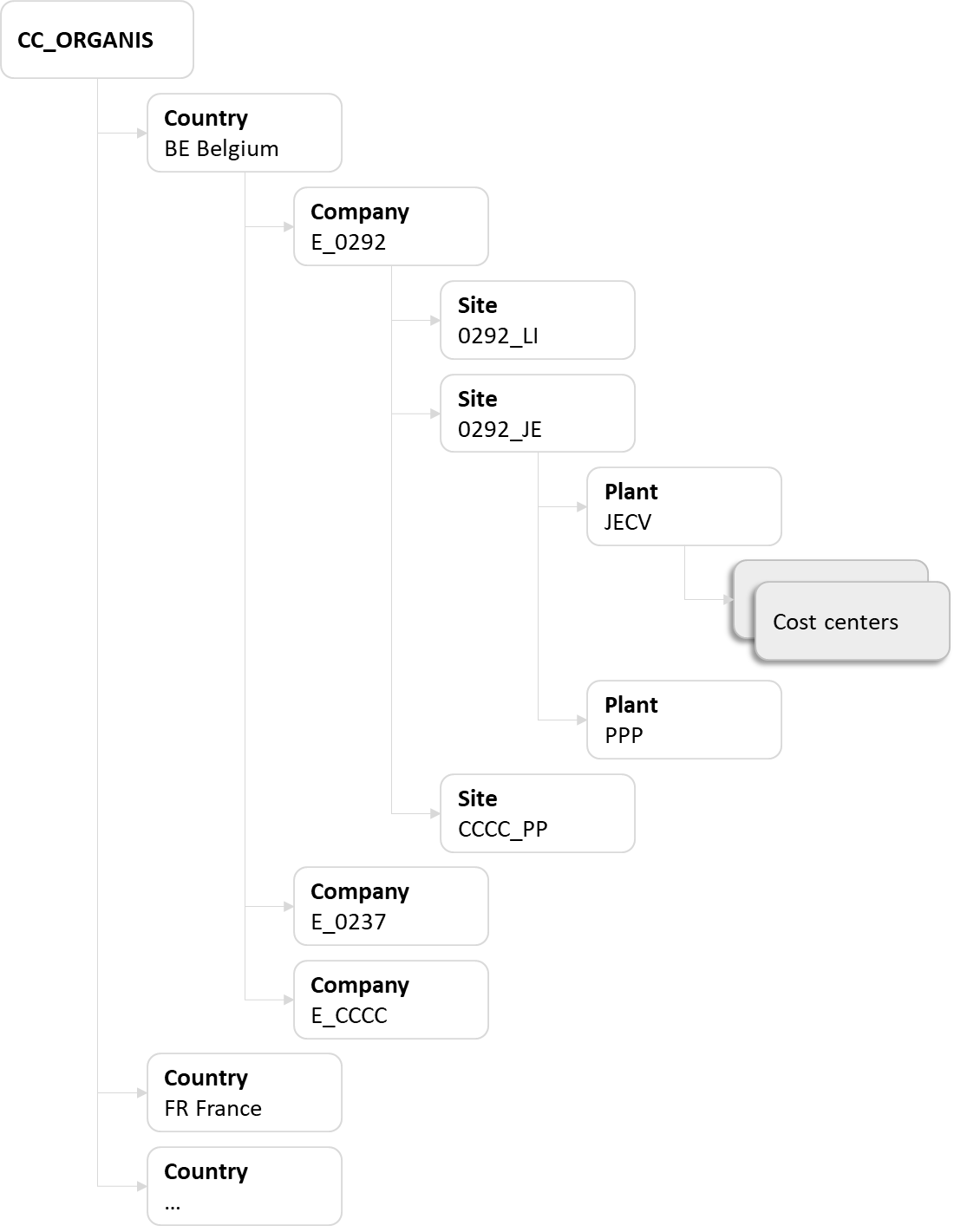
The code of the standard hierarchy in PF2 is KCHEF_HIER and it is structured in 2 main sub-groups:
- CC_ORGANIS
CC_CHEOPS
The group CC_CHEOPS was used for reporting cost centers. These cost centers are not used anymore.
In other words the group CC_CHEOPS should not be used anymore and all active cost centers should now be included in the group CC_ORGANIS.

- XX - Country
- E_CCCC - Company
- CCCC_PP - Site
- PPP - Plant
- Cost center 1
- Cost center 2
- PPP - Plant
- CCCC_PP - Site
- E_CCCC - Company
XX = Country code
CCCC = Company code
PPP = plant code
PP = First 2 digits of the plant code
Cost center hierarchy in WP2
In WP2, there is one standard hierarchy per Controlling Area
The structure must follow the standard rule:
Zxxx = Controlling Area
PPPP = Plant code
CCCC = Company code
GB = GBU code
- CB - Corporate Business Services
- CM - Composite Materials
- CS - Novecare
- OG - Oil & Gas
- PA - Aroma Performance
- SP - Specialty Polymers
- TS - Technology Solutions
The group PPPP-FUNCT is only used by the GBU Novecare

It's not possible to change the business area field during a fiscal year once there are already postings or planned postings in that fiscal year.
The Business area is used in PF2 only and is used to identify the business involved in each transaction.
The codification of the Business area is:
- 1st digit : Rules - PF2 - Sector code
- the 2 middle characters : Rules - PF2 - Activity 1
- last digit is always "0", except for German companies

Profit center to be used in PF2
The profit center to be used in the master data of a cost center is the organizational profit center of the plant.
Standard codification
The codification of an organizational profit center
- Letter C
- Plant code

Profit center to be used in WP2
The profit center to be used in the master data of a cost center in WP2 must be chosen carefully as it is used for several purposes :
- Fixed costs dashboard
- Industrial dashboard
- Working Capital
Two controls must be performed when assigning a profit center to a cost center :
1. The GBU & the value stream
The profit center that is assigned to a cost center is used to identify to which GBU & value stream the cost center belongs. The profit center used must be included in the right value stream & GBU.

The profit center hierarchy can be displayed in SAP with:
Value stream
The value stream (VS) is the lower level of the profit center hierarch in WP1 system, where the profit centers are assigned through the "Profit Ctr Group".
Historically, the value stream nodes in the profit center hierarchy were used for some Industrial reporting on specific production lines but currently this reporting level is no longer used, unless there's a justified request for it. Nevertheless, we need to maintain the value stream node at a standard level.
Most of the value stream codes are already defined for a certain GBU and geographical zone and just need to be extended to a particular company code. It has to be always checked before creating a new code.
VALUE STREAM CODIFICATION in the profit center hierarchy:
| X | X | X | X | - | V | Z | Y | M | N |
|---|
XXXX - Stands for the company code
V - Standard for all the VS codes
ZY - Is used to define a specific GBU code as follows (the currently active GBU's are the ones highlighted):
•ZA for a VS under GBU ACETOW |
•ZB for a VS under GBU PEROXIDES |
•ZC for a VS under GBU COATIS |
•ZD for a VS under GBU SODA ASH |
•ZE for a VS under GBU ECO SERVICES |
•ZF for a VS under GBU FIBRAS |
•ZG for a VS under GBU ENG PLASTICS |
•ZH for a VS under GBU SPECIAL CHEM |
•ZI for a VS under GBU EMERGING BIOCHEMICALS |
•ZJ for a VS under GBU TECHNOLOGY SOLUTIONS |
•ZK for a VS under GBU COMPOSITES MATERIALS |
•ZL for a VS under GBU SOLD ACTIVITIES (2003-2010) |
•ZM for a VS under GBU SPECIALTY POLYMERS |
•ZN for a VS under GBU NOVECARE |
•ZO for a VS under GBU AROMA PERFORMANCE |
•ZP for a VS under GBU POLYAMIDE & INTERMEDIATES |
•ZQ for a VS under GBU Oil & Gas |
•ZR for a VS under GBU CBS (former NON REPARTI RHODIA) |
•ZS for a VS under GBU SILICA |
•ZT for a VS under GBU RARE EARTH SYSTEMS |
•ZY for a VS under GBU ENERGY |
M - stands for the geographical zones, as follows:
| EU: 0, 1, 2 |
| NA: 3, 4 |
| LA: 5, 6 |
| AP: 7, 8 |
| WW: 9 |
N - it's a serial number
Note: The value stream codes have to be included in table ZWFAT187 to be able to define the related descriptions in several standard languages.
For this, the codification has to be converted to an 8 digit code as follows (some of the digits are already defined when establishing the VS node in the profit center hierarchy):
| C | G | U | Z | Y | 0 | M | N |
CGU - Standard for all the standard VS codes
ZY - Is used to define a specific GBU code, as per list above
0 - Always zero
M - stands for the geographical zones, as per list above
N - it's a serial number
Link to the old WP2 Codification Value Streams Master (OBSOLETE).
Usually a specific value stream is used for production cost centers (PPPP-1xxx & PPPP-2xxx) and a non allocated value stream is used for other cost centers.
2. The department of the profit center
- A profit center with a department = plant code is assigned to production cost centers (PPPP-1xxx & PPPP-2xxx)
- A profit center with a department = GBU plant is assigned to other cost centers especially for SG&A, R&I...
The field "Department" of the profit center is a critical field that is used in BW to assign a cost center to a plant and then to a site.
ex:
- The cost center 7512-1022 is assigned to the profit center 7512-I0449
- The department of the profit center 7512-I0449 is 7512
=> The cost center is assigned to the plant 7512

Depending on the type of profit center the department code can be:
- a plant code = a code maintained in table T001W in WP1 or PF1 (1)

- a generic plant code (only in WP1) created by GBU (2). This code doesn't exist in the table T001W.

Rule by ERP + type of profit center
| ERP | Type of profit center | Department | Example | |||||||||||
|---|---|---|---|---|---|---|---|---|---|---|---|---|---|---|
| PF1 | Reporting profit center | = "blank" |
| |||||||||||
= plant code By default the department code = profit center code without the letter C However the rule is to have one department code by site even if for historical reasons there can be several profit centers in the same site. ex: in Tavaux, all profit centers are assigned to the department TAU:
There is one exception when there are several management units / GBU in the site (only in GBU Soda Ash). In the GBU Soda Ash, there should be one dedicated department for Soda Ash another one for Bicar. ex: in Torrelavega
|
| |||||||||||||
| WP1 | Profit center used in the master data of production cost centers (the codification of the cost center starts with the plant code ) | = plant code = first digits of the profit center code ex: department of profit center 7512 -I0449 = 7512 |
| |||||||||||
Profit center used in the master data of SG&A / CBS / Financial cost centers (the codification of the cost center starts with the company code These profit centers are used in cost center that could be shared between several plants/sites. Ex: in Rhodia Operation, there can be people working in the same team located in Paris or Lyon. Then the cost center is allocated neither to the Paris site nor to the Lyon site but to a generic site. By default this rule applies to all cost centers that are not used on production plants. The only exception is the facilities cost centers in CBS. | = generic GBU code = BFC GBU code + 00 ex: Novecare = CS00 |
| ||||||||||||
| Exception: Facilities cost centers included in the group ZCBS-FFAC of the ZCBS hierarchy | = plant code = first digits of the profit center code ex: department of profit center 7925 -I0569 = 7925 |
|


For historical reasons, there may be exceptions to the codification
ZCBS is the code of the alternative cost centers hierarchy that is mainly used for reporting purposes (ex: Co$ta - Reports , Fixed costs ).
You can display the ZCBS hierarchy:
- in SAP using the transaction KSH3 - Display cost center hierarchy
You can also use the report FC - Cost centers master data to display all cost centers with their assignment in the hierarchy ZCBS.
All active must be assigned to the lowest level in the hierarchy so that the full ZCBS levels are properly shown for the related cost center.
A cost center in included in ZCBS according to the following principles:
1. There is a direct link between the first level of the ZCBS hierarchy and the Activity 1
CBS cost centers
- All cost centers included in the groups SCBS-CORPO Corporate Function & SCBS-FUNCT FUNCTION SERVICES are assigned to the Activity 1 CBSS in WP2 (=IECRA00569) and PF2 (=DIV 50 or =BA 8500).
- Cost centers included in the group SCBS-ICO INTERCOMPANIES are assigned to the Activity 1 CBSS in WP2 (=IECRA01148) and PF2.

Non allocated cost centers
- All cost centers included in the group SCBS-OTH CBS NON FUNCTION COSTS are assigned to the Activity 1 CBNR in WP2 (=IECRA00450) and PF2 (=DIV 59 or =BA 8590).

GBU cost centers
- All cost centers included in the group ENTRP ENTERPRISE are assigned to a GBU.
There can not be cost centers allocated to CBS included in the group ENTRP.

Other groups
- The group RHXXX TECHNICAL COST CENTERS is used for technical cost centers (not reported in fixed costs report)
- The group DISC DISCONTINUED is used for cost centers that are blocked
- The group ZNS-FUNCT NON SOLVAY - FUNCTION SERVICES can be used for entities sold when they want to keep working with a fixed costs report with their own groups
Group ZNS-FUNCT
Currently, the group ZNS-FUNCT does not exist in WP2 or PF2 because it doesn't need to be maintained.

2. There is a direct link between the first (or second) level of the ZCBS hierarchy and the P&L
CBS cost centers
- All cost centers included in the group SCBS-CORPO Corporate Function & SCBS-FUNCT FUNCTION SERVICES are allocated to R33400 Shared service function expenses (origin)
- All cost centers included in the group SCBS-ICO INTERCOMPANIES are allocated to R33200 Shared services function costs invoiced

Non allocated cost centers
- Cost centers included in the group SCBS-OTH CBS NON FUNCTION COSTS : they will be allocated to corresponding BFC headings depending on its destination (ie: Administrative or Commercial expenses, Other recurring operating income/expenses, etc)

GBU cost centers
- The allocation of cost centers included in the group ENTRP ENTERPRISE depends on the type of costs:
| ZCBS group | Definition |
|---|---|
| EPRD | All production cost centers should be included in the group EPRD:
=> Definition of Period non-proportional costs of production (R25460) |
| EADM | This group is used for cost centers allocated to the BFC account Administrative expenses (R33310)
|
| EMSV | This group is used for cost centers allocated to the BFC account Commercial expenses (R33320)
|
| RDD | This group is used for cost centers allocated to the BFC account Research and Development (R360)
|
For other groups you can look at the file by ERP in Assessment cycles Rules

Technical cost centers are not allocated to BFC
3. There is a direct link between the lowest level of the ZCBS hierarchy and a BSA
a) All the production cost centers (cost center category F) must have the "Record Quantity" field flagged:

b) Cost centers Cost of goods sold - Statistics (codification CCCC-9200 in WP1) must have the "Actual revenues" and "Plan revenues" fields not flagged and
the "Record Quantity" field flagged:

There are 2 types of cost elements:
- Primary Cost Elements for cost flows from Financial Accounting to Controlling. They are the replica of GL Accounts
- Secondary Cost Elements for cost flows within Controlling. They are created within the CO module.
Master Data to be maintained in PF2 & WP2
Display cost elements master data with KA03 - Display Cost Element

1. Codification
The codification of a cost element depends on the ERP & the usage of the cost element:
A primary cost elements is for CO the equivalent as accounts in FI with the same codification that is detailed in the page GL Accounts codification tables.
In PF2
The codification of a primary cost element is:
- 6 when it is a cost & 7 a revenue
- 9 digits : it can depend on the use of the cost element

In WP2
The codification of a primary cost element is:
- 98 : primary cost element
- 6 digits that can depend on the use of the cost element

There are 2 types of secondary cost elements:
- Cost elements to transfer costs between cost centers, orders & WBS
- Cost elements to transfer costs from the cost centers to COPA (in PF2 we speak about "Reporting cost elements")
In PF2
The codification of a cost element to transfer costs between cost objects is:
- 9 : secondary cost element
- 4 digits : cost section
- 3 digits : local need
- 1 digit
- 0 - ad cost
- 1 - unit price
- 2 - fixed price
- 1 digit
- 0 - settlement
- 1 - assessment
- 2 - activities

Example
Codification of a non reporting secondary cost element used to settle Maintenance with assessment cycles
9 : secondary cost element
4 digits : cost section : 105 Maintenance
3 digits : by default 000
1 digit : 0 - ad cost
1 digit : 1 - assessment

The codification of a Reporting cost element (to transfer costs from a cost center to COPA):
- 98 : reporting cost element
- 3 digits : cost section
- 3 digits : local need
- 1 digit
- 0 - ad cost
- 1 - unit price
- 2 - fixed price
- 1 digit
- 0 - settlement
- 1 - assessment
- 2 - activities

In WP2
The codification of a secondary cost element is:
- 99 : secondary cost element
- 6 digits : the first digits depend on the use of the cost element

2. Categories
Depending on the type & usage of the cost element, the category differs:
Primary cost element
Category 01 : the account can use a cost element or a profitability segment
- The sign used in the account in FI is the same used in CO-PA
Category 11 : the account must use a profitability segment
- The sign used in the account in FI is inversed in CO-PA (KE24)
- The report re-inverse the sign in the line (KE30)
- We cannot mix the 2 categories in the same CO-PA value field
- Be careful in the assessment cycles from cc to CO-PA (rules need to be followed)
Category 22 : external settlement > used in the primary cost elements defined as a counter part of a cost object settlement to a balance account (ex: wbs UAC in Europe )
Secondary cost element
- Category 21 : internal settlement > used in the cost elements of PM orders settlement
- Category 42 : assessment > used in the assessment cycles of cost centers
- Category 43 : internal activity allocation > assigned to the activity types. Every one could represents a fix cost or a variable cost , never mixed cost.
A cost element is included in 2 core groups :
- In PF2, the group XCS-ALL is the base for allocation structures of Utilities and for new Splitting Structures
- In WP2, the group XCS-ALL is used in the PA transfer structures for settling WBS elements, process orders and internal orders to CO/PA
SAP t-code

The group ZSOLV is created in PF2 & WP2.
It replaces the cost element group ZRCS-FC from
It is used:
- in BW & Qlik for CO$TA - Cost Transparency (WBP) & fixed costs reports: CBS - Function costs & FC - GBU Fixed Costs
- in assessment cycles (PA transfer structures & Allocation structures)
- for the determination of the subpackage in CO$TA - Cost Transparency (WBP) when the package derivation source is COSTELMNT (see Co$ta - Package assignment)
How to display the group ZSOLV ?
- It is maintained in SAP and can be displayed with KAH3 - Display cost element group
- A report is available in BW with the list of all cost elements and their group ZSOLV => Co$Ta - BW Cost Element Master Data

Profit center master data are displayed with KE53 - Display Profit Center
PF2

WP2

PIF level
Standard codification
The codification of a reporting profit center used at PIF level:
- Letter F
- Activity 1 code - 2 characters of the Reporting Division from SM30 table V_134G, Division code (check in Material Master Data (MM03), tab Basic Data 1, the field Division) + Plant code, to get the correct Business Area.
- PIF code - Use the first 5 characters of the PIF code (complete with “X” to reach 5 characters). To identify the correct code, go to T-code MM03 → Basic Data 1 tab, check the Prod. Hierarchy field. In SM30 table ZZRT179V, confirm that the Prod. Hierarchy code is marked with an “X” in the Flag PIF column.
- Country of origin - 1 character for the country code of the industrial origin, i.e. where the goods are manufactured - see appendix for the codes.
- Code packaging - 1 character (normally a digit) to differentiate - normally odd for packed and even for bulk.
These profit centers are used for postings at the lower level of detail : PIF + industrial origin.

Activity 1 level
Standard codification
The codification of a reporting profit center used at Activity 1 level
- D + Business Area
- Letter D
Business Area - Sector code
- Activity 1 code
- Free
- Letter D
- D + Business Area
These profit centers are used for posting at “company code” + “BFC Activity 1” level. Should wait until the Business Area has been created by APDM and is available in PF2_020 before creating the D* profit center.

Profit centers at company & company/object levels should not be used anymore
Before the project SPS (COPA in PF2) there were 2 other types of reporting profit centers:
At company level
They were used for posting at “company code” level for which there was no subdivision between GBU or BFC Activities.
The codification of a reporting profit center used at Company code level was:
- Letter E
- Company code
At company & object level
These profit centers represent the shares of the company hold by other Solvay companies. Can be created for any Solvay companies, operating in the ERP Solvay or not.
The codification of a reporting profit center used at Company code and object level was:
- Letters SCHEF
- Company code
Reporting profit centers at company & company/object levels should not be used anymore
Standard codification
The codification of an organizational profit center
- Letter C
- Plant code
Codification - Standard codification
The codification of a profit center is
- Company code or plant code
- Letter
- Last 4 digits of the IECRA

The recommended practice is to put a Profit Center with "plant" codification in the Master Data of a "plant" Cost Center
Example
Codification of a profit center for Novecare in the plant 8091 Zhuhai

In PF2, the name of a profit center is critical for the reporting, the rules must be strictly followed.
PIF level
The name of a reporting profit center used at PIF level (F)
position 1-3 = first 3 characters of the Business Area (Sector code + Activity 1 code)
- positions 4-5 = Spaces
- positions 6-10 = PIF code (always in Caps Lock ) + spaces to make it 5 chars
- positions 11-14 = industrial origin code - see transaction ZPRI - in case of tolling in an external plant, use the one of the Syensqo plant responsible for the tolling
- 9997 for product bought outside the group from third parties
- 9991 - 9994 for Rhodia GBU for which we do not know the specific industrial origin
position 15 = E (packed) or V (bulk) if a differentiation is made at that level.
positions 16-20 = free (not relevant for BFC)

Example
The name of the profit center F49JLAXXU1 is 349 JLA 3272E
Sector code = 3 PLASTICS
- Reporting Activity 1 code = 49 FLUOR MATERIALS
- “empty”
- PIF code = JLA Tecnoflon
Industrial origin code = 3272 SOLVAY SPOL US
Packaging code = E Packed
“empty”

The long text of a reporting profit center used at PIF level (F)
- Description of the PIF from table view ZZRT179V
- Space - hyphen - space
- City name of the establishment (EMEA… for 9991 - 9994 - and “3RD PARTIES” for industrial origin 9997)
- Space - hyphen - space
- “PACK” or “PACKED” // “BULK"
Note: If over the SAP 40-chars limit, abbreviate the names according to SLV traditions.

Activity 1 level
Example
The name of the profit center D3490 is 349
Sector code = 3 PLASTICS
- Reporting Activity 1 code = 49 FLUOR MATERIALS
- “empty”
- not applicable
- “empty”

The name of a reporting profit center used at PIF level (D)
- position 1-3 = first 3 characters of the Business Area (Sector code + Activity 1 code) - essential as used by COPA / BW for automatic determination
- positions 4-10 = Spaces
- positions 11-14 = Industrial origin code (only for specifics cheops value item like “ARRET”)
- position 15 = Spaces
- positions 16-20 = Free (not relevant for BFC)

The long text of a reporting profit center used at PIF level (D)
- Description from table ZZR_REPO_DIV taking the middle 2 characters from the Business Area (ex. profit center D9TN0 - search for “TN”).

Company level
Example
The name of the profit center E6288 is 6288 SFLX-DE
Reporting company code = 6288
- “empty”
- Enterprise abbreviation = SFLX
- "Hyphen"
- County = DE
The long text of a reporting profit center used at company level (E)
positions 1-4 = Reporting company code
- positions 5 = Space
positions 6-20 = Company “Enterprise medium name” from transaction ZPRI

Company and object level
Example
The name of the profit center SCHEF6329 is 6579 FIOP-BR
Object company code = 6579
- “empty”
- Enterprise abbreviation = FIOP
- "Hyphen"
- County = BR
The long text of a reporting profit center used at Company and object level (S)
positions 1-13 = PARTICIPATION
position 14 = Space
- position 15 -18 = Object company code
- positions 19 = Space
last positions = Company “Enterprise medium name” from transaction ZPRI

Unlike reporting profit centers, the description of organizational profit center doesn't matter.
- Short name - company code + space + plant “establishment abbreviation” from PF2 - ZPRI Display table ETAB (using the first 3 chars of the plant)
- Long text - plant NAME1 from view V_T001W (if needed using standard SLV abbreviation for the site) + abbreviated NAME2 from V_T001W if making it clearer.

In WP2, the name of a profit center does not matter as it is not used in reporting.
Plant level
The name of profit center created at plant level:
- PPPP = plant code
- name of the profit center
- VVVVV = value stream code
Example: 7666 divers Diphénols MEL - VZS05

Company code level
The name of profit center created at company level:
- PPPP = Generic plant code (=BFC GBU code + 00)
- name of the profit center (by default the GBU name)
- VVVVV = value stream code
Example: SI00 Silica - VSL01

PIF level
The Person responsible of a reporting profit center used at PIF level (F) is
position 1-4 = "X "
- positions 5-20 = free (not relevant for BFC)
Example
The person responsible of the profit center F49JLAXXU1 is X
position 1-4 = X
- positions 5-20 = “empty”

=> In case of inter-company sales, the person responsible is
position 1-4 = partner company code
- positions 5 = partner sector
- positions 6-7 = division partner
- positions 8-20 = free (not relevant for BFC)
Example
The person responsible of the profit center F27UYXXXFB is 3490727
žpartner company code = 3490 SOLVAY SPECIALIT FR
- partner sector = 7 CHEMICALS
- activity 1 partner = 27 PCC
- “empty”

Activity 1 level
The Person responsible of a reporting profit center used at Activity 1 level (D) is
position 1-4 = "X "
- positions 5-20 = free (not relevant for BFC)
Example
The person responsible of the profit center D3490 is X
žposition 1-4 = X
- positions 5-20 = “empty”

Company level
The Person responsible of a reporting profit center used at company level (E) is
position 1-4 = Company code
- positions 5-20 = free (not relevant for BFC)
Example
The person responsible of the profit center E0001 is 0001
žposition 1-4 = 0001
- positions 5-20 = “empty”

Company and object level
The person responsible of a reporting profit center used at Company and object level (S)
- positions 1-4 = "X "
- positions 5-20 = free (not relevant for BFC)
Example
The person responsible of the profit center SCHEF0001 is X
position 1-4 = X
- positions 5-20 = “empty”

The only reporting profit centers impacted by the change of the Person Responsible field are the ones started by D* and F*
The field "Department" of the profit center is a critical field that is used in BW to assign a cost center to a plant and then to a site.
ex:
- The cost center 7512-1022 is assigned to the profit center 7512-I0449
- The department of the profit center 7512-I0449 is 7512
=> The cost center is assigned to the plant 7512
Depending on the type of profit center the department code can be:
- a plant code = a code maintained in table T001W in WP1 or PF1 (1)
- a generic plant code (only in WP1) created by GBU (2). This code doesn't exist in the table T001W.
Rule by ERP + type of profit center
| ERP | Type of profit center | Department | Example | |||||||||||
|---|---|---|---|---|---|---|---|---|---|---|---|---|---|---|
| PF1 | Reporting profit center | = "blank" |
| |||||||||||
= plant code By default the department code = profit center code without the letter C However the rule is to have one department code by site even if for historical reasons there can be several profit centers in the same site. ex: in Tavaux, all profit centers are assigned to the department TAU:
There is one exception when there are several management units / GBU in the site (only in GBU Soda Ash). In the GBU Soda Ash, there should be one dedicated department for Soda Ash another one for Bicar. ex: in Torrelavega
|
| |||||||||||||
| WP1 | Profit center used in the master data of production cost centers (the codification of the cost center starts with the plant code ) | = plant code = first digits of the profit center code ex: department of profit center 7512 -I0449 = 7512 |
| |||||||||||
Profit center used in the master data of SG&A / CBS / Financial cost centers (the codification of the cost center starts with the company code These profit centers are used in cost center that could be shared between several plants/sites. Ex: in Rhodia Operation, there can be people working in the same team located in Paris or Lyon. Then the cost center is allocated neither to the Paris site nor to the Lyon site but to a generic site. By default this rule applies to all cost centers that are not used on production plants. The only exception is the facilities cost centers in CBS. | = generic GBU code = BFC GBU code + 00 ex: Novecare = CS00 |
| ||||||||||||
| Exception: Facilities cost centers included in the group ZCBS-FFAC of the ZCBS hierarchy | = plant code = first digits of the profit center code ex: department of profit center 7925 -I0569 = 7925 |
|
For historical reasons, there may be exceptions to the codification
The code of the standard hierarchy in PF2 is KCHEF_HIER and it is structured in 2 main sub-groups:
- CHEFCHEOPS for reporting profit centers
- CHEF_CNTRL for non reporting Profit Center

The profit center hierarchy can be displayed in SAP with:
Value stream
The value stream (VS) is the lower level of the profit center hierarch in WP1 system, where the profit centers are assigned through the "Profit Ctr Group".
Historically, the value stream nodes in the profit center hierarchy were used for some Industrial reporting on specific production lines but currently this reporting level is no longer used, unless there's a justified request for it. Nevertheless, we need to maintain the value stream node at a standard level.
Most of the value stream codes are already defined for a certain GBU and geographical zone and just need to be extended to a particular company code. It has to be always checked before creating a new code.
VALUE STREAM CODIFICATION in the profit center hierarchy:
| X | X | X | X | - | V | Z | Y | M | N |
|---|
XXXX - Stands for the company code
V - Standard for all the VS codes
ZY - Is used to define a specific GBU code as follows (the currently active GBU's are the ones highlighted):
•ZA for a VS under GBU ACETOW |
•ZB for a VS under GBU PEROXIDES |
•ZC for a VS under GBU COATIS |
•ZD for a VS under GBU SODA ASH |
•ZE for a VS under GBU ECO SERVICES |
•ZF for a VS under GBU FIBRAS |
•ZG for a VS under GBU ENG PLASTICS |
•ZH for a VS under GBU SPECIAL CHEM |
•ZI for a VS under GBU EMERGING BIOCHEMICALS |
•ZJ for a VS under GBU TECHNOLOGY SOLUTIONS |
•ZK for a VS under GBU COMPOSITES MATERIALS |
•ZL for a VS under GBU SOLD ACTIVITIES (2003-2010) |
•ZM for a VS under GBU SPECIALTY POLYMERS |
•ZN for a VS under GBU NOVECARE |
•ZO for a VS under GBU AROMA PERFORMANCE |
•ZP for a VS under GBU POLYAMIDE & INTERMEDIATES |
•ZQ for a VS under GBU Oil & Gas |
•ZR for a VS under GBU CBS (former NON REPARTI RHODIA) |
•ZS for a VS under GBU SILICA |
•ZT for a VS under GBU RARE EARTH SYSTEMS |
•ZY for a VS under GBU ENERGY |
M - stands for the geographical zones, as follows:
| EU: 0, 1, 2 |
| NA: 3, 4 |
| LA: 5, 6 |
| AP: 7, 8 |
| WW: 9 |
N - it's a serial number
Note: The value stream codes have to be included in table ZWFAT187 to be able to define the related descriptions in several standard languages.
For this, the codification has to be converted to an 8 digit code as follows (some of the digits are already defined when establishing the VS node in the profit center hierarchy):
| C | G | U | Z | Y | 0 | M | N |
CGU - Standard for all the standard VS codes
ZY - Is used to define a specific GBU code, as per list above
0 - Always zero
M - stands for the geographical zones, as per list above
N - it's a serial number
Link to the old WP2 Codification Value Streams Master (OBSOLETE).
Consistency checks to be made before validating a “PIF level” profit center : if one of these conditions is not met, we need to challenge / reject the request
STEP 1
Check the consistency between the data present in the code, in the short name and in the long description

STEP 2
Check that the Reporting Division is within the validity dates in table ZZR_REPO_DIV

STEP 3
In the table view ZZRT179V control that:
- The “ Flag PIF ” is ticked,
- The PIF is not deleted - The description of Product hierarchy can't contain *D*,
- The validity period - We cannot have profit centers at higher / lower levels of the hierarchy than the PIF

STEP 4
Check the Business area assignment in the production plant is consistent with the Reporting division present in the profit center, in table view V_134G :
- Plant = plant code where the material is going to be extended. If it's a production plant you can check its validity via transaction ZPRI,
Product division = the one corresponding to the PIF, in table view ZZRT179V,
- The Business area indicated in view V_134G must be consistent with the Reporting division of the profit center.

Internal order master are displayed with KO03 - Display Internal Order
List of fields to be filled when creating an internal order:
- Description
- Business area (only in PF1)
- Profit center
- Responsible CCtr
- External order no.
- Settlement Rule

Process of cost centers maintenance

Operating procedures
Local procedures